Legria HF R57 - Caméscope CANON - Notice d'utilisation et mode d'emploi gratuit
Retrouvez gratuitement la notice de l'appareil Legria HF R57 CANON au format PDF.


Questions des utilisateurs sur Legria HF R57 CANON
0 question sur cet appareil. Repondez a celles que vous connaissez ou posez la votre.
Poser une nouvelle question sur cet appareil
Téléchargez la notice de votre Caméscope au format PDF gratuitement ! Retrouvez votre notice Legria HF R57 - CANON et reprennez votre appareil électronique en main. Sur cette page sont publiés tous les documents nécessaires à l'utilisation de votre appareil Legria HF R57 de la marque CANON.
MODE D'EMPLOI Legria HF R57 CANON
Canon
FUB DE-0451-070 (178A)
DIED0451000
HD Camcorder
Getting Started
LEGRIA HFR56 LEGRIA HFR57 LEGRIA HFR506

Package Contents
□ HD Camcorder
LEGRIA HF R56 / LEGRIA HF R57 / LEGRIA HF R506
□ BP-718 Battery Pack [0]
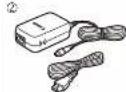
□ CA-110E Compact Power Adapter (including power cord) [2]
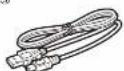
□ IFC 300PCU/S USB Cable [②]
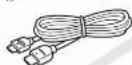
□ HTC-100/S High Speed HDMI Cable [④]
□ Transfer Utility LE Startup Guide

Installing the Camcorder's Instruction Manual (PDF File)
This guide only introduces the most basic functions of the camcorder to get you started. To earn more about your camcorder, to read important handling precautions and to consult the troubleshooting section if an error message is displayed, be sure to read the full-version Instruction Manual (PDF file). Access the following Web site. Click on your country/region and follow the onscreen instructions to download the PDF file.
* Adobe® Reader® 6 or later is required to view the PDF file. http://www.canon.com/vicpd/
①

③
④

Charging the Battery Pack
Charge the supplied battery pack in advance. Fully charging the supplied battery pack will take about 6 hours 35 minutes.
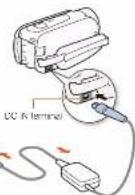
- Plug the compact power adapter into a power outlet and connect it to the camcorder's DC IN terminal.
- Connect the power cord to the compact power adapter before plugging the power cord into the power cullet.
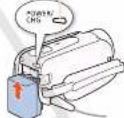
- Attach the battery pack to the camcorder.
- Press the battery pack softly into the battery attachment unit and slice it up until it clicks in place.
- Charging will start when the camcorder is turned off. • The POWER/CHG indicator will turn on in red (battery pack charging). When the red POWER/CHG indicator goes out, the battery pack is fully charged.
- When the battery pack is fully charged, disconnect the compact power adapter from the camcorder and then from the power outlet.
POWER: 16 (energy indicator)

Inserting a Memory Card
You can use commercially available SD, SDXC and SDXC cards with this camcorder. We recommend using memory cards rated SD Speed Class 4, 6 or 10. Initialize a memory card before using it with the camcorder for the first time (PDF) Initializing the Memory).
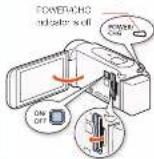
- Open the LCD panel.
- The camcorder will turn on and the first screen of the initial setup will appear.
- Press ON/OFF to turn off the camcorder.
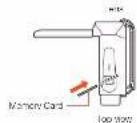
• Make sure the POWER/CHG indicator is off. - Open the memory card slot cover and insert the memory card.
- Insert the memory card at a sight angle, with the label facing toward the lens.
- Close the memory card slot cover.

Basic Setup
The first time you turn on the camcorder, you will be guided by the camcorder's basic setup screens to select the camcorder's initial settings, such as the language date and time. movie format, etc.
- Turn on the camcorder.
- Open the LCD panel or press ON/OFF.
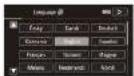
- Touch the desired language for onscreen displays and then touch [D].
- Touch the desired date/time format and then touch [>].
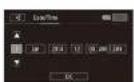
- Set the date and time.
- Touch a field you want to change and touch [▲] or [▼] to
change. Repeat as necessary. - Touch [24H] to use 24-hour clock or leave untouched to use AM/PM.
5 Touch [OK] and then touch [D].
6 Touch [VAC] or [MPA] to select the movie format and then touch [I>]. - IIF056157 After you select the movie format, you need to select the memory to be used for recording movies (step 7) and photos (step 8).
• IIF1506 No further settings are necessary. Skip to step 8
7 Touch [∅] (built-in memory) or [∅] (memory card) and then touch [D].
8 Touch [☐] (built-in memory) or [☐] (memory card) and then touch [▶]. - Touch [OK] to complete the basic setup and close the setup screen.

Shooting Video and Taking Photos Playing
- Turn on the camcorder and open the lens cover.
- Open the LCD panel or press ON/OFF and then side down the lens cover switch.
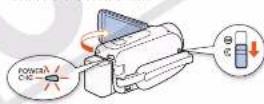
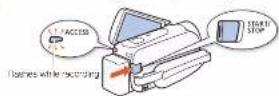
- Video: Press START/STOP to start recording video. Press again to stop recording.
Photos: Touch [PHOTO] to record a photo.
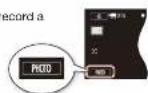
- When you finish recording, close the lens cover and turn off the camcorder.

eo and Viewing Photos
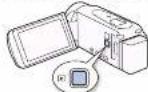
- Press the ▶ button.
The [■] index screen will open. To play back different content, change the index screen.
[曲] ➤ [▶ Photo Playback] for the [▶ (photo) index screen.
[鱼] [O Baby Album] for the [O] index screen (only scene recorded in Baby mode).
[曲] ▶ [■ Video Snapshot] for the [■] index screen (only AVCHD video snapshot scenes).
Inves screen button
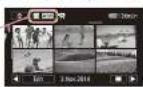
- Touch the thumbnail of the scene or photo you want to play back.
- During playback, touch the screen to display the playback controls.
To change the memory* or video format From the index screen;
- Touch the index screen button (next to the Ⓜ (Home) button).
- Select the memory* (☐ or ☐) and/or movie format (TAH0 or MP3) of the recordings you wish to play back and then touch [OK].
HERSORST only
To delete recordings
From the index acre
- Touch [Edit] ➤ [Delete].
- Select whether to delete all the scenes/photos in the same folder, selected scenes/photos, or all scenes/photos. • To select individual recordings: touch all the scenes/photos you wish to delete to mark them with a √, then touch [OK].
- Touch [Yes] ▶ [OK].
HFR56/R57 Wi-Fi Functions
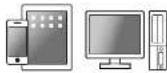
The camcorder features a number of convenient W-F functions that will allow you to use it in
combination with Wi-Fi enabled smartphones and tablets. For example, you can use a
smartphone or tablet to control the same order
remotely while recording, or to upload recordings to the Web.

-
If necessary, install the required app on the smartphone or tablet.
-
Select the desired Wi-Fi function on the camcorder.
-
Wirelessly connect the device to the camcorder.
Note: The necessary procedure may differ according to the Wi-Fi function you wish to use. For details, be sure to refer to the PDF Instruction Manual (PDF) Wi-Fi Functions).
Optional Accessories
Canon offers a wide range of optional accessories for your car record. For details, be sure to refer to the PDF Instruction Manual (PDF) Optional Accessories.
Use of genuine Canon accessories is recommended.
This product is designed to achieve excellent performance when used with genuine Canon accessories. Canon shall not be liable for any damage to this product and/or accidents such as this, etc., caused by the malfunction of non-genuine Canon accessories (e.g., leakage and/or expiration or a battery pack). Please note that this warranty does not apply to repairs arising out of the malfunction of non-genuine Canon accessories, although you may request such repairs on a scopeable basis.
This mark resembles genuine Canon video accessories. When you use Canon video equipment, we recommend Canon-brand accessories or products bearing the same mark.

Important Usage Instructions
COPYRIGHT WARNING:
Unauthorized recording of copyrighted materials may infringe on the rights of copyright owners and be contrary to copyright laws.
Only for European Union and EEA (Norway, Iceland and Liechtenstein)
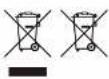
These symbols indicate that this product is not to be deposited or with your household waste, according to the WEEE Directive (2012/19/EJ), the Battery Directive (2006/06/50) and/or national legislation implementing those directives.
It a chemical symbol is omitted beneath the symbol shown above, in accordance with the Battery Directive, this indicates that a heavy metal (Hg – Mercury, Co – Cadmium, Pb – Lead) is present in this battery or accumulator at a concentration above an applicable threshold specified in the Battery Directive.
This product should be handled over to a designated collection point, e.g., on an authorized one-for-one basis when you buy a new similar product or to an authorized collection site for recycling waste electrical and electronic equipment (I-PP) and batteries and accumulators. Improper handling of this type of waste could have a possible impact on its environment, and human health due to potentially hazardous substances that are generally associated with the EEE. Your cooperation in the correct disposal of the product will contribute to the effective usage of natural resources.
I or more information about the recycling of this product, please contact your local city office, waste authority, approved scheme or your household waste disposal service visit.
www.ogren.europa.com/nowe, at www.ogren.europa.com/nowe.
Complies with IDA Standards DB007671
This product is related with the WLAN Module which is certified to standards or by DA Singapore.
Precautions About the Battery Pack
DANGER!
Treat the battery pack with care.
- Keep it away from fire for it right expode.
- Do not expose the battery pack to temperature higher than 60 °C. Do not have it near a better or better air in hot weather.
• Do not try to distinguish or modify it.
• Do not drop it, or subject it to choose
• Do rol get. I. wel.
Important Note About the Memory Card
- Observe the following precautions while the ACCS-SS Indicator is or or fishing. Failing to co so may result in permanent data loss or damage to the memory card.
- Do not open the memory card slot cover.
- Do not disconnect the carconder's power source or turn on the carconder.
- Do not change the cam border's operating mode.
IMPORTANT SAFETY INSTRUCTIONS
To reduce the use of electric shock, do not expose this product to charging or splicing.
The Mains plug is used as the disconnect device. The Mains plug shall remain readily operable to disconnect the plug in case of an accident.
While using the compact power adapter, do not wrap it or cover it with a piece of dots, and do not place it in confined narrow spaces.
CA-110E identification plate is located on the bottom.
REGIONS OF USE
The H-GHA HF-FSG and HF-Fb/ are in compliance (as of November 2013) with the basic signal regulations of the regions listed below. For details on other regions where it can be used, make inquiries with the contacts listed inside the blue frame at the bottom of this page.
REGIONS
Australia, Austria, Belgium, Bulgaria, Cyprus, Czech Republic, Denmark, Estonia, Finland, France, Germany, Greece, Hong Kong S.A.P., Hungary, Ireland, Iceland, Latvia, Lithuania, Luxembourg, Luxembourg, Malta, Netherlands, New Zealand, Norway, Poland, Portugal, Romania, Russia, Singapore, Slovakia, Slovenia, Spain, Sweden, Switzerland, United Kingdom
c€
Statement on EC directive
Hereby, Canon no., declares that this WW217 is in compliance with the essential requirements and other relevant provisions of Directive 190067-FC.
Please contact the following address for the original Declaration of Conformity:
CANON EUHOPAN.V.
Hovenkenberg 69, 1195 XB Anteleen, The Netherlands
CANON INC
35-2, Smonanulo 3-chore Onita-ku, Tokyo: M6-8501, Japan
Model
IDOC201F0BIA HF R56 /LEGB4HF R57
Trademark Acknowledgements
• SIO, SIOHC and SIOXC logos are trademarks of SIO (IC), H.O.
• HTML the HTML logo and HAI Definition Multimedia
Interlans are tracemarks or registered tracemarks or
HOM Licensing LLC in the United States and other
countries
• Manufactures under license from Doloy Laboratories
"Dolby" and the double D symbol are trademarks of Dolby
Laboratories.
• WI-FI is a registered trademark of the WI-FI Alliance.
• W-FI Certified, WPA, WPA2, and the W-FI Certified logo are trademarks
the W+Alliance.
- Other names and products not mentioned above may be trademarks or
registered trademarks of their respective companies.
• This device incorporates eFAT technology licensed from Microsoft.
• "FUL HD 1085" refers to Canon campondors compliant
with high definition video composed of 1,030 vertical
pixe recurring lines
- This product is licensed under AT&T patents for the
MPEG-1 standard and may be used for encoding MPEG-1 consistent video and/or according MPEG-1 compliant video that was enclosed only (1) for a personal and non-commercial purpose or (2) by a video provider licensed under the AT&T patents to provide MPEG-1 compliant video. No license is granted or mailed for any other use for MPEG-1 standard.
HDMI
DOLBY
DIGITAL
STRENDIGATE
(1) 2017年1月1日
(1) 本说明仅供参考。
re trademarks
(1)本次股东大会的决议
market marks of
表决方式:
Mcmson.
FILIA
FULL RD
1080
(1) 2017年1月1日
complaint
encoded only
video producer
plant video No
standard.
Canon
Canon Inc. 50-2, Shimomarujo 3-chome, Ohta-ku, Tokyo 146-8501, Japan
Canon Europa N.V.
Havenverkurswig SD, 118b XB Amsterdam, The Netherlands.
www.euroge.com
Canon UK Ltd
CCI Service Centre, Unit 130
Centennial Park, Grenamwood, Ferlordshire, WLB 3SE, United Kingdom
Telephone 08/1-369-0100
Canon Australia Pty Ltd
10: 13:43 (with Australia only)
181) 02-9205-2655
www.oxcon.com.su
Canon New Zealand Ltd
e: 0200-222-286 (whir New Zealand only)
(64) 39-488-0300
www.csc00.co.nz
Canon Singapore Pte. Ltd
- Harbour Front Avenue, 102-01 Keppel Bay Tower, Singapore 089832
e: 651 6/30 0000
Fax: 051 0799 8882
Canon Hongkong Company Ltd
19/F, The Metropolis Tower, 10 Metropolis Drive,
Hungren, Kowloon, Hong Kong
Tel: +852 3191 2335. Fax: +852 2428 5005
Canon Latin America, Inc.
Sales & Enquiries
Cre Canon Park, Motile, NY 11747 USA
The information in this juice is verified as of November 2013. Specifications and other appearance are subject to change without previous notice. © CANON NO. 2013