SC2900 - Equipement DJ DENON - Notice d'utilisation et mode d'emploi gratuit
Retrouvez gratuitement la notice de l'appareil SC2900 DENON au format PDF.


Questions des utilisateurs sur SC2900 DENON
0 question sur cet appareil. Repondez a celles que vous connaissez ou posez la votre.
Poser une nouvelle question sur cet appareil
Téléchargez la notice de votre Equipement DJ au format PDF gratuitement ! Retrouvez votre notice SC2900 - DENON et reprennez votre appareil électronique en main. Sur cette page sont publiés tous les documents nécessaires à l'utilisation de votre appareil SC2900 de la marque DENON.
MODE D'EMPLOI SC2900 DENON
Digital Controller and Media Player
DN-SC2900 Quick Setup Guide
About Quick Setup Guide
This Quick Setup Guide presents cyclic connection and usage examples as well as explaining steps to connect this unit to a computer and perform a setup to enable "engine" operations. For details, stout connectors and operations, see the Owner's Manual and the "engine" 's instruction manual.
Symbols
3
This symbol indicates a reference page on which related information is described.
@Owner's Manual
This mark indicates an item described in the unit's Owner's Manual that is included in the supplier Resource disc.
√200196
This mark indicates an item described in the music management software "engine" s instruction manual that is included in the
(1)
Supervised Resource Dis
√
This symbol indicates a supplementary information and tips for operations.
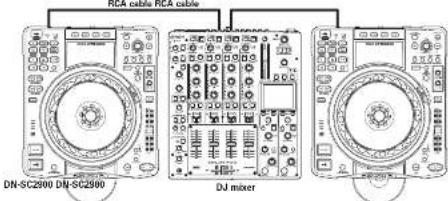
Using as a CD player
Connect 2 units to a mixer with RCA cables to use as a CD players.
For connection, see "Basic connections" 📋 Owner's Manual page 171.
RCA cable RCA cable
text_image
DN-SC2000 DN-SC2500 DJ mixerUsing USB devices (Using the Player Link function to share music files on a USB memory device or HDD)
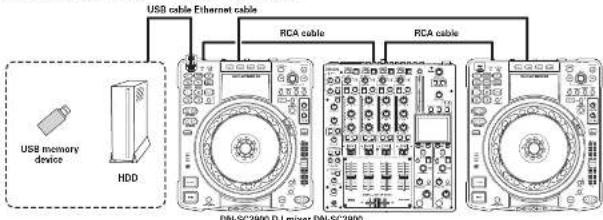
Use as a media player to play back music. Yes stored on a USB memory device or HDD.
For connection, see "Basic connections" 100 Owner's Manual page 171.
- Connect 2 units with an Ethernet cable and use the Player Link function to enable music files stored on a memory device or FDD connected to one unit [for DN-SC2900] to be played with the other unit [2nd DN-SC2900] as well.
text_image
USB cable Ethernet cable RCA cable RCA cable USB memory device HDD DN-SC2900 DJ mixer DN-SC2900-1-2-
② Initializing "engine"
In millions of dollars
Make sure to perform initialization.
③ Preparing for DJ play
You can make the following settings and preparation as necessary before DU play.
- Registering music files to "engine"
- Music files stored on your computer can be registered in the "engine" library to enable the music search function that uses tag information and to enable file classification by crate and play list. Us to 100,000 files can be managed per USB memory device or HDD (8 engine page 15).
- You can feed music files and play lists from iTunes into the "engine" library. Furthermore, you can play back music files on iTunes with the unit; even if you have not registered them in the "engine" library

does not have a function to import music files from CO.
- Preparing playback support information
- "argina" automatically generates audio waveform information, beat point information, and BPM information. (Engine page 14) - You can preset CUE points and LOOP points for music files registered in the library (Engine page 20)
- Preparing a USB memory device or HDD for playback
Prepare for a USB memory service or HDD to be connected and used with the unit [USB] ④ Owner's Manual page 22.
④ Connecting "engine" to the unit over a network
You can easily connect up to 4 units to a computer over a network with the following steps. Make sure to complete these steps before making the network connection.
-
Set a Network ID to share music among units (Player Link) (Owner's Manual page 33).
-
Connect "engine" to units over a network (PC Link) (Owner's Manual page 33).
System configuration with "engine"
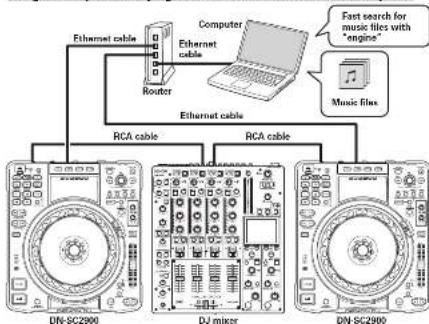
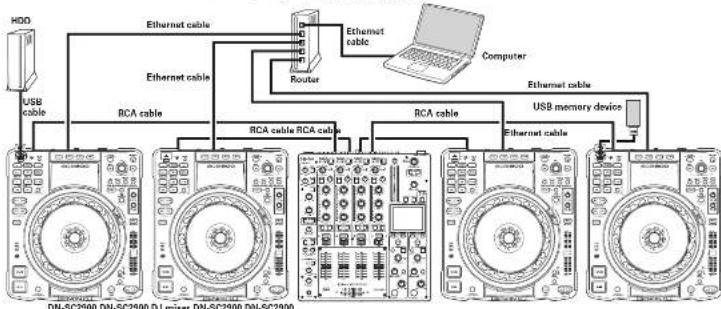
Usage example ① Playing back music files stored on a computer
flowchart
graph TD
    A["Router"] -->|Ethernet cable| B["Computer"]
    B -->|Ethernet cable| C["DJ mixer"]
    C -->|RCA cable| D["DN-SC2900"]
    C -->|RCA cable| E["DN-SC2900"]
    F["Music files"] -->|Fast search for music files with "engine"| G["Computer"]
- "engine" enters PC Link mode if you connect units (with other not tabs) to a computer where "engine" is installed. P27@Owner's Manual page 18).
- You can use "engine" to perform a fast search for music files regardless in the "engine" library and then load them to the units for playback (IT) engine page 101.
Using "engine"
You can use the advanced search function provided by "angins" engine page 18.
flowchart
graph TD
    HDD["HD0"] -->|USB cable| MON1["MON"]
    MON1 -->|Ethernet cable| Router["Router"]
    Router -->|Ethernet cable| Computer["Computer"]
    MON1 -->|RCA cable| MON2["MON"]
    MON2 -->|RCA cable| MON3["MON"]
    MON3 -->|RCA cable| MON4["MON"]
    MON4 -->|RCA cable| MON5["MON"]
    MON5 -->|Ethernet cable| MON6["MON"]
    MON6 -->|USB memory device| CPU["CPU"]
    CPU -->|Ethernet cable| MON7["MON"]
    MON7 -->|Ethernet cable| MON8["MON"]
    MON8 -->|Ethernet cable| MON9["MON"]
DN-SC2900 DN-SC2900 DJ mixer DN-SC2900 DN-SC2900
NOTE
- After the router is started, connect the router to DN SC2902 and your computer and power them on.
- Do not connect the router to the internet or WAN. Doing so may cause playback sound to cut out, or devices may not be able to connect correctly. - This unit can be connected directly to a computer without using a router. In the case, set the computer's network address settings to a fixed IP address, and use the following settings.
IP adarass: 169 254.2.1 Sunset Maw: 264.255.0.3
- When connecting 4 units to a computer, use a router or LAN hub that has 5 or more LAN ports. - When connecting using a router, this unit and the computer should be connected to LAN ports.
Main "engine" features
Multi-player/multi-storage playback
Using an ethernet cable to connect the unit to a computer where "engine" is installed, you can play back music files stored on the computer. USB memory devices, or HDD while switching among them with the "engine" s advanced search functions.
□ Management of up to 100,000 music files and fast search "engine"
You can manage us to 100,000 music files per USB memory device or IDD. Furthermore, fast and multifunctions file search is available with the newly developed search system.
□ Operation environment with less latency
You can enjoy comfortable D. play with less latency as the unit itself processes audio without using computer resources. Furthermore, you can connect a USB memory device or HDD to continue playback without interruption even if the computer freezes.
Before using "engine"
① Installing "engine"
Insert the supplied UN-SC29CD Resource slot into your computer (Windows\Mac) to install "engine" file engine page 4
1
• For Mac OS X 10.7 IL on or later, make sure to create a folder named "DENONDJ2" in all cases under the root of the startup disc before using "engine". Otherwise, music files can not be registered (②) engine page 4).
- For Windows, you need to install Apple QuickTime on your computer. Download and install the latest QuickTime from the Apple web site. Using the latest QuickTime version is recommended.
NOTE
• Software Upgradeable by USB
Please be sure to update with the latest firmware. From time to time, we will make improvements to current features or add new features.
We will try to include ideas from customers' feedback where possible. The updates are made available via our www.demand.com website.
• A Windows security warning window appears when you start "engine" for the first time after installing it on your Windows computer. Select "Unlock" (Windows XP or Vistar) or "Allow access" (Windows 7). Otherwise, you can not use the "engine" PC-LINK function. If you set a wrong option, see "Notes regarding first launch after installation" (① engine page 5).
- On a computer with security software installed, a warning window may appear depending on the setting. In that case, set up the software to allow "engine". If you set a wrong option, contact your security software support.
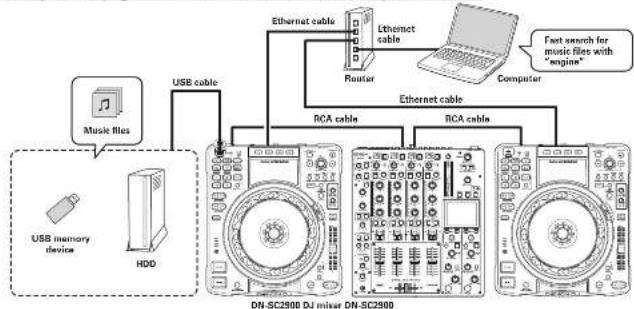
Usage example ② Playing back music files stored on a USB memory device or HDD
flowchart
graph TD
    A["Music files"] -->|USB cable| B["DRAM"]
    C["USB memory device"] -->|HDD| B
    B --> D["DRAM"]
    E["Router"] --> F["Computer"]
    G["Ethernet cable"] --> H["DRAM"]
    I["Ethernet cable"] --> J["DRAM"]
    K["RTCA cable"] --> L["DRAM"]
    M["RTCA cable"] --> N["DRAM"]
    O["Fast search for music files with "engine""] --> P["Computer"]
- You can use a USB memory device or HDD prepared with "engine" for LINK connection to share music files on a USB memory device or HDD among multiple units [T engine page 23]
- You can use database and playback support information created with "engine" for the search engine page 261.
- Linux a USB megrotv device or I/O request with "engine" is used, it is accessible to drive without a computer.
- You can play back music files stored on a USB memory device or HDD with the folder search function provided by the ON SC290D even without a database crashed by "angna".
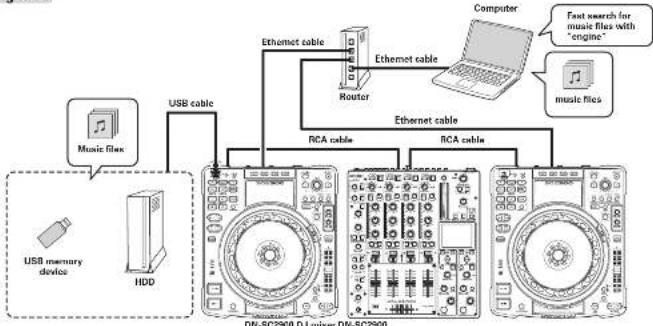
Usage example ③ Playing back music files stored on a computer, USB memory device, or HDD while switching among them
flowchart
graph TD
    A["Music file"] -->|USB cable| B["DRAM"]
    C["USB memory device"] -->|USB cable| B
    D["HDD"] -->|USB cable| B
    E["Router"] -->|Ethernet cable| F["Computer"]
    G["RTC cable"] -->|Ethernet cable| H["DRAM"]
    I["RTC cable"] -->|Ethernet cable| J["DRAM"]
    K["Computer"] -->|Fast search for music files with "engine"]
- By simultaneously using the functions of usage examples ① and ②, you can use a USB memory device, or HDD as a backup for the computer. This enables you to play back music files stored on the USB memory device or HDD connected to the UN SC290D even if the computer retrieves, so you can continue DU play without stopping the music.
- Do changes and requests are supported
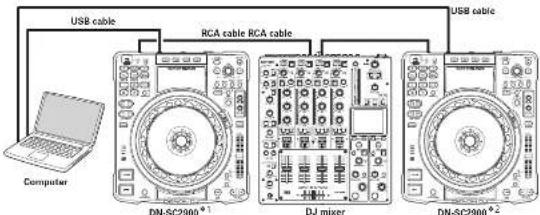
Setup example 1
A setup using the unit as a MUI controller and sound card.
This setup enables MIDI control of sample decks via TRACTOR 2, but it is not possible to output audio from the unit. When using sample decks, prepare a separate audio interface with an internal sound card.
text_image
USB cable RCA cable RCA cable Computer DN-SC2900° DJ mixer DN-SC2900°2(4) Unit No. 1/MICH-1 (4) Unit No. 2/MICH-2 Settings @ Owners Manual page 44, 45
Setup example 2
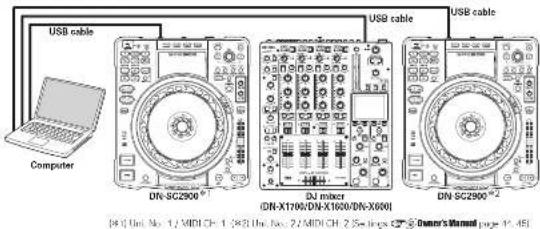
A setup using an audio interface (UN-X1700/UN-X1600/UN-X600)
You can also use an audio interface with an internal sound card other than DN X1600. For details on the setup method, see the owner's manual for the audio interface.
text_image
USB cable Computer DN-SC2900® USB cable DN-X1706/DN-X1600/DN-X000 DN-SC2900® [4] Unit No. 1/ MIDI CH: 1, 363 Unit No. 2/ MIDI CH: 2 See Image C# Owner's Manual page 14.451Procedure for installing TRAKTOR LE 2
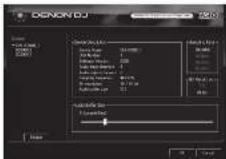
1 Only perform this step when using Windows. Insert the supplied "DN-SC2900 Resource disc" computer, and install the ASIO driver.
Owner's Manual page 12
2 Insert the DJ software installation disc into the computer, and install TRAKTOR LE 2.
- After installation. Activate the software. For details on how to Activate the software, see the Service Center Manual which is inside the Documentation folder in the Service Center folder that a created after installation. - The social number is printed on the park of the disease.
Owner's Manual page 15
3 Only perform this step when using Windows. Check that DN-SC2900 is displayed on the ASIO driver control panel screen.
- If there is to check mark on the left of the DN-SC2900, click the Enable button to display a check mark and display the device name in bold type. - If the ASIC Control Panel is open, close it before starting TRAKTOR LE 2
4 Only perform this step when using Mac. Set up the AUDIO and MIDI devices in Mac OS. - Launch Audio MIDI Setup in Mac OS. - After opening the audio device window, right-click on DN-5C2900 and set up the sound input device and sound output device.
- When using 2 x Oh-SC2800's with TRAKTOR LE 2 - it is necessary to aggregate the sound cards for correct audio routing. - Resource disc Oh-SC2800_nec_configuration_manual
Setting of TRAKTOR LE 2
[Mac] [PC]
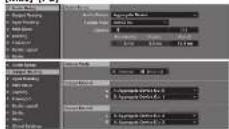
Audio Setup Audio Device: Aggregate Device Output Routing Mixing Mode: External Output Deck A: L = 1; Aggregate Device Cut 0 R = 2; Aggregate Device Cut 1 Output Deck B: L = 3; Aggregate Devices Cut 2 R = 4; Aggregate Devices Cut 3
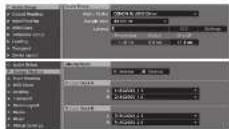
Audio Setup Audio Devices: DENON AS O Driver Output Routing Mixing Mode: External Output Deck A: L = 1, SC2905_1 R = 2, SC2930_1 2 Output Deck B: L = 5, SC2905_2 1 R = 4, SC2930_2 2
-
Launch TRAKTOR LE 2.
-
DJ software installation disc factor Z setting started
6 From the TRAKTOR LE 2 Help menu, select Wizard" and perform the following operations. ① In the startup screen, click "NEXT"
Select "LES" for "Are you using air exilema controller 7" and "CLY="NEXT.
② Select "Donor" for "Choose your manufacture" and select "EN
SU2800 LL* for "Choose your filter," and enter "NEX"
* When using TEAKTOR PRO 2, perform the following operations: ① Select "D4-SC2300" and click "NEXT". ② Select "YES" for "Are you using external mixer 2" and click "NEXT".
③. Sensor "2" Tack Docks + 2 Sample Docks", and click "NEXT" 7 Use the mouse to set the TRAKTOR I.F. 2 main output to "0dB" (Fig. 1).
- It is recommended that you always use the newest version of TRAKTOR LE 2. - Launch Service Center Program that was created after installation and update TRAKTOR LE 2.
- For details on TRAKTOR LE 2 operations, see "Tractor 2 Getting Started" and "Tractor 2 Application Reference" or the supplied DJ software installation dies.

【Fig. 1】TRAKTOR LE 2 Main Output Settings
-5--6-
Setting of TRAKTOR PRO 2
This is a setup example when a 4ch mixer is connected.
(Mac)
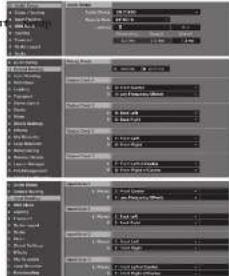
text_image
Screenshot of a software interface showing multiple panels with text labels and color settings, likely from an older design or editing tool.Audio Setup
Auto Device: DN-X1600
Output Roating Ming Hone:
Output Deck A: L = 3: Front Center
B = 4 Low Frequency Effects
E = E Bac Biot
Output Deck C: 1 = 1: Front Left
H = 2 Fract High
B = B. [for: Right of Center]
Input Routing
Input Deck A: L Moncl = 3; Front Center B = 4; Low Frequency Effects
Input Dock 8: L (Mon) = 5 Bank Left
P = 6: Back Right
Input Deck C. LIMOR=1, Front Left B = 2 Front Left
Input Deck 0: Lvlprol = 7; Front Left of Center
E = B Front Right of Center
[PC]
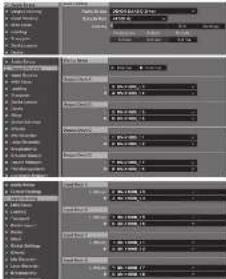
text_image
Screenshot of a software interface showing multiple panels with text, images, and settings panels in Chinese.Audio Setup
Audio Device: DENON ASIO Driver
Output Routing Vimp Bias:
Output Deck A: L = 3; DN X1600_1_3
F-4 DN X1600_14
Output Deck B: L = 3; DN-X1600_1_5 E = E:\DN-X1670_1_8
Output Deck C: 1 = 1 ON X1602 1.1
P-2:DN×1600 12
Output Deck D: L = 7 EN-X1620_1?
Input Routing
input lock
F = 4 DN × 1620.14
Input Deck B: L (Vano) = 5: DN X1620 15
R = 6.1 / 4 × 10^2 × 10^-3
F=2.174X163D 12
Input Deck D : L Monel = 7: DN-X1600 + 7
E = B · 15N × 10^10 × 1.5
NOTE
- When using multiple DENON DJ devices such as DN-SC2300, change "Unit No." © Owner's Manual page 4M/ "MIDI CH" © Owner's Manual page 4E in the Utility settings so that there are no nuclear numbers.
- When using DN-SC2000 with a DENON DJ mixer (DN-X1700/DN-X1800/DN-X600), set the sampling frequency (FSI on the DENON DJ mixer IDN-X1700/DN-X1800/DN-X600) to 44.5 kHz. For how to set this, see the owner's manual of the DENON DJ mixer (DN-X1700/DN-X1800/DN-X600).
- It has been verified that this unit works properly with the THAKTOR LE ZIFRO 2 software.
• Use the latest version of the TRAKTOP mapping file (tail file). The latest version can be downloaded at www.dandrond.com.
DN-SC2900 Mapping Guide
for TRAKTOR LE 2 / PRO 2
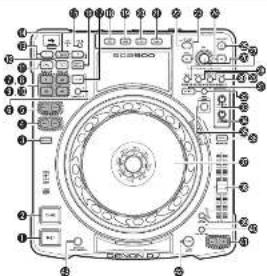
text_image
Technical diagram of a CD-ROM drive with labeled components and numbered parts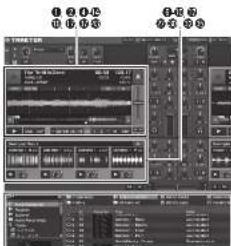
text_image
Screenshot of a digital audio workstation interface with multiple track controls and instrument panels[Unreadable]
| 1. For or not | 4- | 5- |
| 2. Use | 6- | 7- |
| 3. Use | 8- | 9- |
| 4. Use | 10- | 11- |
| 5. Use, complete book | 12- | 13- |
| 6. Use, complete 4 & 5 sample, use 4 | 14- | 15- |
| 7. Use, use 1 / Sample use 1 | 16- | 17- |
| 8. Use, use 2 / Sample use 2 | 18- | 19- |
| 9. Use, use 3 / Sample use 3 | 20- | 21- |
| 10. Use, use 4 / Sample use 4 | 22- | 23- |
| 11. Use, use 5 / Sample use 5 | 24- | 25- |
| 12. Use, use 6 / Sample use 6 | 26- | 27- |
| 13. Use, use 7 / Sample use 7 | 28- | 29- |
| 14. Use, use 8 / Sample use 8 | 30- | 31- |
| 15. Use, use 9 / Sample use 9 | 32- | 33- |
| 16. Use, use 10 / Sample use 10 | 34- | 35- |
| 17. Use, use 11 / Sample use 11 | 36- | 37- |
| 18. Use, use 12 / Sample use 12 | 38- | 39- |
| 19. Use, use 13 / Sample use 13 | 40- | 41- |
| 20. Use, use 14 / Sample use 14 | 42- | 43- |
| 21. Use, use 15 / Sample use 15 | 44- | 45- |
| 22. Use, use 16 / Sample use 16 | 46- | 47- |
| 23. Use, use 17 / Sample use 17 | 48- | 49- |
| 24. Use, use 18 / Sample use 18 | 50- | 51- |
| 25. Use, use 19 / Sample use 19 | 52- | 53- |
| 26. Use, use 20 / Sample use 20 | 54- | 55- |
| 27. Use, use 21 / Sample use 21 | 56- | 57- |
| 28. Use, use 22 / Sample use 22 | 58- | 59- |
| 29. Use, use 23 / Sample use 23 | 60- | 61- |
| 30. Use, use 24 / Sample use 24 | 62- | 63- |
| 31. Use, use 25 / Sample use 25 | 64- | 65- |
| 32. Use, use 26 / Sample use 26 | 66- | 67- |
| 33. Use, use 27 / Sample use 27 | 68- | 69- |
| 34. Use, use 28 / Sample use 28 | 70- | 71- |
| 35. Use, use 29 / Sample use 29 | 72- | 73- |
| 36. Use, use 30 / Sample use 30 | 74- | 75- |
| 37. Use, use 31 / Sample use 31 | 76- | 77- |
| 38. Use, use 32 / Sample use 32 | 78- | 79- |
| 39. Use, use 33 / Sample use 33 | 80- | 81- |
| 40. Use, use 34 / Sample use 34 | 82- | 83- |
| 41. Use, use 35 / Sample use 35 | 84- | 85- |
| 42. Use, use 36 / Sample use 36 | 86- | 87- |
| 43. Use, use 37 / Sample use 37 | 88- | 89- |
| 44. Use, use 38 / Sample use 38 | 90- | 91- |
| 45. Use, use 39 / Sample use 39 | 92- | 93- |
| 46. Use, use 40 / Sample use 40 | 94- | 95- |
| 47. Use, use 41 / Sample use 41 | 96- | 97- |
| 48. Use, use 42 / Sample use 42 | 98- | 99- |
| 49. Use, use 43 / Sample use 43 | 100- | 101- |
| 50. Use, use 44 / Sample use 44 | 102- | 103- |
| 51. Use, use 45 / Sample use 45 | 104- | 105- |
| 52. Use, use 46 / Sample use 46 | 106- | 107- |
| 53. Use, use 47 / Sample use 47 | 108- | 109- |
| 54. Use, use 48 / Sample use 48 | 110- | 111- |
| 55. Use, use 49 / Sample use 49 | 112- | 113- |
| 56. Use, use 50 / Sample use 50 | 114- | 115- |
| 57. Use, use 51 / Sample use 51 | 116- | 117- |
| 58. Use, use 52 / Sample use 52 | 118- | 119- |
| 59. Use, use 53 / Sample use 53 | 120- | 121- |
| 60. Use, use 54 / Sample use 54 | 122- | 123- |
| 61. Use, use 55 / Sample use 55 | 124- | 125- |
| 62. Use, use 56 / Sample use 56 | 126- | 127- |
| 63. Use, use 57 / Sample use 57 | 128- | 129- |
| 64. Use, use 58 / Sample use 58 | 130- | 131- |
| 65. Use, use 59 / Sample use 59 | 132- | 133- |
| 66. Use, use 60 / Sample use 60 | 134- | 135- |
| 67. Use, use 61 / Sample use 61 | 136- | 137- |
| 68. Use, use 62 / Sample use 62 | 138- | 139- |
| 69. Use, use 63 / Sample use 63 | 140- | 141- |
| 70. Use, use 64 / Sample use 64 | 142- | 143- |
| 71. Use, use 65 / Sample use 65 | 144- | 145- |
| 72. Use, use 66 / Sample use 66 | 146- | 147- |
| 73. Use, use 67 / Sample use 67 | 148- | 149- |
| 74. Use, use 68 / Sample use 68 | 150- | 151- |
| 75. Use, use 69 / Sample use 69 | 152- | 153- |
| 76. Use, use 70 / Sample use 70 | 154- | 155- |
| 77. Use, use 71 / Sample use 71 | 156- | 157- |
| 78. Use, use 72 / Sample use 72 | 158- | 159- |
| 79. Use, use 73 / Sample use 73 | 160- | 161- |
| 80. Use, use 74 / Sample use 80 | 162- | 163- |
| 81. Use, use 75 / Sample use 85 | 164- | 165- |
| 82. Use, use 76 / Sample use 86 | 166- | 167- |
| 83. Use, use 77 / Sample use 87 | 168- | 169- |
| 84. Use, use 78 / Sample use 88 | 170- | 171- |
| 85. Use, use 79 / Sample use 89 | 172- | 173- |
| 86. Use, use 80 / Sample use 90 | 174- | 175- |
| 87. Use, use 81 / Sample use 91 | 176- | 177- |
| 88. Use, use 82 / Sample use 92 | 178- | 179- |
| 89. Use, use 83 / Sample use 93 | 180- | 181- |
| 90. Use, use 84 / Sample use 94 | 182- | 183- |
| 91. Use, use 85 / Sample use 95 | 184- | 185- |
| 92. Use, use 86 / Sample use 96 | 186- | 187- |
| 93. Use, use 87 / Sample use 97 | 188- | 189- |
| 94. Use, use 88 / Sample use 98 | 190- | 191- |
| 95. Use, use 89 / Sample use 99 | 192- | 193- |
| 96. Use, use 90 / Sample use 100 | 194- | 195- |

text_image
TRAKTOR LE2 FIGURE 1: A device is a key and the following components are: TRAKTOR LE2 is a key and the following components are: TRAKTOR LE2 is a key and the following components are: TRAKTOR LE2 is a key and the following components are: TRAKTOR LE2 is a key and the following components are: TRAKTOR LE2 is a key and the following components are: TRAKTOR LE2 is a key and the following components are: TRAKTOR LE2 is a key and the following components are: TRAKTOR LE2 is the main component. The device is designed to be a single component with a single or multiple pin configuration. The device is designed to be a single or multiple pin configuration. The device is designed to be a single or multiple pin configuration. The device is designed to be a single or multiple pin configuration. The device is designed to be a single or multiple pin configuration. The device is designed to be a single or multiple pin configuration. The device is designed to be a single or multiple pin configuration. The device is designed to be a single or multiple pin configuration. The device is designed to be a single or multiple pin configuration. The system is designed to be a single component with a single or multiple pin configuration. The system is designed to be a single or multiple pin configuration. The system is designed to be a single or multiple pin configuration. The system is designed to be a single or multiple pin configuration. The system is designed to be a single or multiple pin configuration. The system is designed to be a single or multiple pin configuration. The system is designed to be a single or multiple pin configuration. The system is designed to be a single or multiple pin configuration. The system is designed to be a single or multiple pin configuration. The systems are designed to be a single or multiple pin configuration. The system is designed to be a single or multiple pin configuration. The system is designed to be a single or multiple pin configuration. The system is designed to be a single or multiple pin configuration. The system is designed to be a single or multiple pin configuration. The system is designed to be a single or multiple pin configuration. The system is designed to be a single or multiple pin configuration. The system is designed to be a single or multiple pin configurations in the main component of the device, including one of the four main components (including one of the four outer components). The device has been designed as an electronic component, but it does not have any other electronic components or other external components. The device has been designed as an electronic component, but it does not have any other electronic components or other external components. The device has been designed as an electronic component, but it does not have any other electronic components or other external components. The device has been designed as an electronic component, but it does not have any other electronic components or other external components. The device has been designed as an electronic component, but it does not have any other electronic components or other external components. The device has not been designed as an electronic component, but it does not have any other electronic components or other external components. The device has been designed as an electronic component, but it does not have any other electronic components or other external components. The device has been designed as an electronic component, but it does not have any other electronic components or other external components. The device has been designed as an electronic component, but it does not have any other electronic components or other external components. The device has been designed as a single or multiple pin configuration, which consists of three pins (one at one end, two at two ends) and one pair (two at three ends). The device has been designed as a single or multiple pin configuration, which consists of three pins (one at two ends, two at three ends) and one pair (three ends). The device has been designed as a single or multiple pin configuration, which consists of three pins (one at three ends, two at four ends) and one pair (three ends). The device has been designed as a single or multiple pin configuration, which consists of three pins (one at four ends, two at five ends) and one pair (three ends). The device has been designed as a single or multiple pin configuration, which consists of three pins (one at five ends, two at six ends) and one pair (three ends). The device has been designed as a single or multiple pin configuration, which consists of three pins (one at six ends, two at seven ends) and one pair (three ends). The device has been designed as a single or multiple pin configuration, which consists of three pins (one at seven ends, two at eight ends) and one pair (three ends). The device has been designed as a single or multiple pin configuration, which consists of three pins (one at eight ends, two at nine ends) and one pair (three ends). The device has been designed as a single or multiple pin configuration, which consists of three pins (one at nine ends, two at ten ends) and one pair (three ends). The device has been designed as a single or multiple pin configuration, which consists of three pins (one at ten ends, two at ten ends) and one pair (three ends). The device has been designed as a single or multiple pin configuration, which consists of three pins (one at ten ends, two at ten ends) and one pair (three ends). The device has been designed as a single or multiple pin configuration, which consists of three pins (one at ten ends, two at ten ends) and one pair (three ends). The device has been designed as a single or multiple pin configuration, each of which consists of three pins (one at ten ends, two at ten ends) and one pair (three ends), respectively. The device has been designed as a single or multiple pin configuration, which consists of three pins (one at ten ends, two at ten ends) and one pair (three ends), respectively. The device has been designed as a single or multiple pin configuration, which consists of three pins (one at ten ends, two at ten ends) and one pair (three ends), respectively. The device has been designed as a single or multiple pin configuration, which consists of three pins (one at ten ends, two at ten ends) and one pair (three ends), whereas the device has been designed as a single or multiple pin configuration, which consists of three pins (one at ten ends, two at ten ends) and one pair (three ends), respectively. The device has been designed as a single or multiple pin configuration, which consists of three pins (one at ten ends, two at ten ends) and one pair (three ends), respectively. The device has been designed as a single or multiple pin configuration, which consists of three pins (one at ten ends, Two at ten ends) and one pair (three ends), respectively. The device has been designed as a single or multiple pin configuration, which consists of three pins (one at ten ends, Two at ten ends) and one pair (three ends), respectively. The device has been designed as a single or multiple pin configuration, which consists of three pins (one at ten ends, Two at ten ends) and one pair (three ends), respectively. The device has been designed as a single or multiple Pin configuration, which consists of three pins (one at ten ends, Two at ten ends) and one pair (three ends), respectively. The device has been designed as a single or multiple Pin configuration, which consists of three pins (one at ten ends, Two at ten ends) and one pair (three ends), respectively. The device has been designed as a single or multiple Pin configuration, which consists of three pins (one at ten ends, Two at ten ends) and one pair (three end), respectively. The device has been designed as a Single or Multiple Pin configuration, which consists of three pins (one at ten ends, Two at ten ends) and one pair (three end), respectively. The device has been designed as a Single or Multiple Pin configuration, which consists of three pins (one at ten ends, Two at ten ends) and one pair (three end), respectively. The device has been designed as a Single or Multiple Pin configuration, which consists of three pins (one at ten ends, Two at ten ends) and one pair (two end), respectively. The device has been designed as a Single or Multiple Pin configuration, which consists of three pins (one at ten ends, Two at ten ends) and one pair (three end), respectively. The device has been designed as a Single or Multiple Pin configuration, which consists of three pins (one at ten ends, Two at ten ends) and one pair (three end), respectively. The device has been designed as a Single or Multiple Pin configuration, which consists of three pins (One at ten ends, Two at ten ends) and one pair (three end), respectively. The device has been designed as a Single or Multiple Pin configuration, which consists of three pins (One at ten ends, Two at ten ends) and one pair (three end), respectively. The device has been designed as a Single or Multiple Pin configuration, which consists of three pins (One at ten ends, Two at ten ends) and one pair (three end), respectively. The device has been designed for a single or multiple Pin configuration, which consists of three pins (One at ten ends, Two at ten ends) and one pair (three end), respectively. The device has been designed for a single or multiple Pin configuration, which consists of three pins (One at ten ends, Two at ten ends) and one pair (three end), respectively. The device has been designed for a single or multiple Pin configuration, which consists of three pins (One at ten ends, Two at ten ends) and one pair (two end), respectively. The device has been designed for a Single or Multiple Pin configuration, which consists of three pins (One at ten ends, Two at ten ends) and one pair (three end), respectively. The device has been designed for a Single or Multiple Pin configuration, which consists of three pins (One at ten ends, Two at ten ends) and one pair (three end), respectively. The device has been designed for a Single or Multiple Pin configuration, which consists of three pins (One at ten ends, Two at ten ends) and one pair (two end), respectively. The device has been designed for a Single or Multiple Pin configuration, which consists of three pins (One at ten ends, Two at ten ends) and one pair (three end), respectively. The device has been designed for a Single or Multiple Pin configuration, which consists of three pins (One at ten ends, Two at ten ends) and one pair (two end), respectively. The device has been designed for a Single or Multiple Pin configuration, which consists of three pins (Two at ten ends, Two at ten ends) and one pair (two end), respectively. The device has been designed for a Single or Multiple Pin configuration, which consists of three pins (One at ten ends, Two at ten ends) and one pair (two end), respectively. The device has been designed for a Single or Multiple Pin configuration, which consists of three pins (One at ten ends, Two at ten ends) and one pair (two end), respectively. The device has been designed for a Single or Multiple Pin configuration, which consists of three pins (One at ten ends, Two at ten ends) and one pair (two end), respectively. The device has been designed to be a Single or Multiple Pin configuration, which consists of three pins (One at ten ends, Two at ten ends) and one pair (two end), respectively. <|caption_end|> <|content_start|>| Component | Value | | --------- | ----- | | Tractor 1 | 0 | | Tractor 2 | 0 | | Tractor 3 | 0 | | Tractor 4 | 0 | | Tractor 5 | 0 | | Tractor 6 | 0 | | Tractor 7 | 0 | | Tractor 8 | 0 | | Tractor 9 | 0 | | Tractor 10 | 0 | | Tractor 11 | 0 | | Tractor 12 | 0 | | Tractor 13 | 0 | | Tractor 14 | 0 | | Tractor 15 | 0 | | Tractor 16 | 0 | | Tractor 17 | 0 | | Tractor 18 | 0 | | Tractor 19 | 0 | | Tractor 20 | 0 | | Tractor 21 | 0 | | Tractor 22 | 0 | | Tractor 23 | 0 | | Tractor 24 | 0 | | Tractor 25 | 0 | | Tractor 26 | 0 | | Tractor 27 | 0 | | Tractor 28 | 0 | | Tractor 29 | 0 | | Tractor 30 | 0 | | Tractor 31 | 0 | | Tractor 32 | 0 | | Tractor 33 | 0 | | Tractor 34 | 0 | | Tractor 35 | 0 | | Tractor 36 | 0 | | Tractor 37 | 0 | | Tractor 38 | 0 | | Tractor 39 | 0 | | Tractor 40 | 0 | | Tractor 41 | 0 | | Tractor 42 | 0 | | Tractor 43 | 0 | | Tractor 44 | 0 | | Tractor 45 | 0 | | Tractor 46 | 0 | | Tractor 47 | 0 | | Tractor 48 | 0 | | Tractor 49 | 0 | | Tractor 50 | 0 | | Tractor 51 | 0 | | Tractor 52 | 0 | | Tractor 53 | 0 | | Tractor 54 | 0 | | Tractor 55 | 0 | | Tractor 56 | 0 | | Tractor 57 | 0 | | Tractor 58 | 0 | | Tractor 59 | 0 | | Tractor 60 | 0 | | Tractor 61 | 0 | | Tractor 62 | 0 | | Tractor 63 | 0 | | Tractor 64 | 0 | | Tractor 65 | 0 | | Tractor 66 | 0 | | Tractor 67 | 0 | | Tractor 68 | 0 | | Tractor 69 | 0 | | Tractor 70 | 0 | | Tractor 71 | 0 | | Tractor 72 | 0 | | Tractor 73 | 0 | | Tractor 74 | 0 | | Tractor 75 | 0 | | Tractor 76 | 0 | | Tractor 77 | 0 | | Tractor 78 | 0 | | Tractor 79 | 0 | | Tractor 80 | 0 | | Tractor 81 | 0 | | Tractor 82 | 0 | | Tractor 83 | 0 | | Tractor 84 | 0 | | Tractor 85 | 0 | | Tractor 86 | 0 | | Tractor 87 | 0 | | Tractor 88 | 0 | | Tractor 89 | 0 | | Tractor 90 | 0 | | Tractor 91 | 0 | | Tractor 92 | 0 | | Tractor 93 | 0 | | Tractor 94 | 0 | | Tractor 95 | 0 | | Tractor 96 | 0 | | Tractor 97 | 0 | | Tractor 98 | 0 | | Tractor 99 | 0 | | Tractor A1 | - | | Tractor A2 | - | | Tractor A3 | - | | Tractor A4 | - | | Tractor A5 | - | | Tractor A6 | - | | Tractor A7 | - | | Tractor A8 | - | | Tractor A9 | - | | Tractor A10 | - | | Tractor A11 | - | | Tractor A12 | - | | Tractor A13 | - | | Tractor A14 | - | | Tractor A15 | - | | Tractor A16 | - | | Tractor A17 | - | | Tractor A18 | - | | Tractor A19 | - | | Tractor A20 | - | | Tractor A21 | - | | Tractor A22 | - | | Tractor A23 | - | | Tractor A24 | - | | Tractor A25 | - | | Tractor A26 | - | | Tractor A27 | - | | Tractor A28 | - | | Tractor A29 | - | | Tractor A30 | - | | Tractor A31 | - | | Tractor A32 | - | | Tractor A33 | - | | Tractor A34 | - | | Tractor A35 | - | | Tractor A36 | - | | Tractor A37 | - | | Tractor A38 | - | | Tractor A39 | - | | Tractor A40 | - | | Tractor A41 | - | | Tractor A42 | - | | Tractor A43 | - | | Tractor A44 | - | | Tractor A45 | - | | Tractor A46 | - | | Tractor A47 | - | | Tractor A48 | - | | Tractor A49 | - | | Tractor A50 | - | | Tractor A51 | - | | Tractor A52 | - | | Tractor A53 | - | | Tractor A54 | - | | Tractor A55 | - | | Tractor A56 | - | | Tractor A57 | - | | Tractor A58 | - | | Tractor A59 | - | | Tractor A60+Function table
Available for TRAKTOR LE 2 / PRO 2 control with DN-SC2900
| Buttons | MIDI BANK1 MIDI BANK2 | |||||||||||||
| Normal | SHIFT + | CLR + | TIME + | DISPLAY + | SINGLE/CONT + | MEMO + | EXIT/RELOOP | RVS + | Normal | SHIFT + | CLR + | SHIFT + & CLR + | RVS + | |
| 1 PlayPune | Play on size | - | - | - | - | - | - | - | Place play or pop for sample clock.20 | Play on size | - | - | - | Place play or pop for sample clock.20 |
| 2 CUE | Pass: Set concurrent one point of play and back to sample clock.3 | Close the house of the house. | - | - | - | - | - | - | Start after closing for sample clock.20 | Pass: Set concurrent one point of play and back to sample clock.3 | Back to the house of the house. | - | - | Staff: Anteager for sample clock.20 |
| 3 REVERSE | Show matching for sample clock.4 | Sets one shot or locked for sample clock.5 | Sets one shot or locked for sample clock.6 | Sets one shot or locked for sample clock.7 | Sets one shot or locked for sample clock.8 | Show matching for sample clock.9 | - | - | - | |||||
| 4 FAST SEARCH | Find search | Find search. | ||||||||||||
| 5 TRACK SEARCH | Hands with corresponding tasks. | - | - | - | - | - | - | - | - | Hands with corresponding tasks. | - | - | - | - |
| 6 MIDI BANK 2 | Show matching for sample clock.4 | Shows matching for sample clock.40 | Show matching for sample clock.40 | Shows matching for sample clock.40 | Shows matching for sample clock.40 | Shows matching for sample clock.40 | Shows matching for sample clock.40 | |||||||
| 7 HOT CUE 1 | Show matching for sample clock.4 | Sets touch key at 10% | Cable set point. | - | - | - | - | - | Shows there were more than samples shot.50 | Shows there were more than samples shot.50 | Shows there were more than samples shot.50 | Shows there were more than samples shot.50 | Shows there were more than samples shot.50 | Shows there were more than samples shot.50 |
| 8 HOT CUE 2 | Show matching for sample clock.4 | Sets touch key at 10% | Cable set point. | - | - | - | - | - | Shows there were more than samples shot.50 | Shows there were more than samples shot.50 | Shows there were more than samples shot.50 | Shows there were more than samples shot.50 | Shows there were more than samples shot.50 | Shows there were more than samples shot.50. |
| 9 HOT CUE 3 | Show matching for sample clock.4 | Sets touch key at 10% | Cable set point. | - | - | - | - | - | Shows there were more than samples shot.50 | Shows there were more than samples shot.50 | Shows there were more than samples shot.50 | Shows there were more than samples shot.50 | Shows there were more than samples shot.50 | Shows there were more than samples shot.50 . |
| 10 HOT CUE 4 | Show matching for sample clock.4 | Sets touch key at 10% | Cable set point. | - | - | - | - | - | Shows there were more than samples shot.50 | Shows there were more than samples shot.50 | Shows there were more than samples shot.50 | Shows there were more than samples shot.50 | Shows there were more than samples shot.50 | Shows there were more than samples shot.50 - |
| 11 A | Sets step in spot or collection loop. | - | - | - | - | - | - | - | - | Sets step in spot or collection loop. | - | - | - | |
| 12 B | Sets step out point or collection loop. | - | - | - | - | - | - | - | - | Sets step out point or collection loop. | - | - | - | |
| 13 -/+ | Fold selection | Read deck software open session. | - | - | - | - | - | - | - | Fold selection | Read deck software open session. | - | - | |
| 14 AUTO LOOP | Auto loop or and off. | - | - | - | - | - | - | - | - | Auto loop or and off. | - | - | - | |
| 15 OUTRELOOP | Shift matching for loading back deck in sample clock.6 | - | - | - | - | - | - | - | - | Shift matching for loading back deck in sample clock.6 | - | - | - | |
| 16 CLR | - | - | - | - | - | - | - | - | - | - | - | - | - | |
| 17 CRI | ||||||||||||||
| 18 USB | ||||||||||||||
| 19 LINE | ||||||||||||||
| 20 MIDI | ||||||||||||||
| 21 HOT LIST ADD | Includes an stroke the receiver's window. | Appendix track to conversation. | includes a stroke the receiver's window. | Repeats the line in conversation. | ||||||||||
| 22 - | Using counter button use to sample clock. | - | - | - | - | - | - | - | - | Jump up or use to the counter button. | - | - | - | |
| 23 -+ | Using counter button use to sample clock.6 | - | - | - | - | - | - | - | - | Jump up or use to the counter clock.6 | - | - | - | |
| 24 DISC ELECT | Take Suits through posted library in two weeks.6, Play model. | Take Suits through posted library.7, Push Open and Close following from 2000 to 2000. | - | - | - | - | - | - | - | Take Suits through posted library in two weeks.6, Play model. | Take Suits through posted library in two weeks.6 | - | - | |
| 25 SLL | ||||||||||||||
| 26 TIME | Shift matching for sample clock.6 | - | - | - | - | - | - | - | - | Shift matching for sample clock.6 | - | - | - | |
| 27 DISPLAY | Shift matching for sample clock.6 | - | - | - | - | - | - | - | - | Shift matching for sample clock.6 | - | - | - | |
| 28 SINGLE/CONT | Shift matching for sample clock.6 | - | - | - | - | - | - | - | - | Shift matching for sample clock.6 | - | - | - | |
| 29 ANNU/OUIL | Shift matching for sample clock.6 | - | - | - | - | - | - | - | - | Shift matching for sample clock.6 | - | - | - | |
| 30 SHIFT | ||||||||||||||
| 31 LOCK | - | - | - | - | - | - | - | - | - | - | - | - | - | |
| 32 START TIME | Controls hit back cut off. | - | - | - | Controls hit back out for sample clock.6 | Controls hit back out for sample clock.6 | Controls hit back out for sample clock.6 | Controls hit back out for sample clock.6 | Controls hit back out for sample clock.6 | Controls hit back out for sample clock.6 | Controls hit back out for sample clock.6 | - | - | |
| 33 STOP HILL | Controls hit push. | - | - | - | Controls hit push out for sample clock.6 | Controls hit push out for sample clock.6 | Controls hit push out for sample clock.6 | Controls hit push out for sample clock.6 | Controls hit push out for sample clock.6 | Controls hit push out for sample clock.6 | Controls hit push out for sample clock.6 | - | - | |
| 34 SLIP | - | - | - | - | Controls hit push out for sample clock.6 | Controls hit push out for sample clock.6 | Controls hit push out for sample clock.6 | Controls hit push out for sample clock.6 | Controls hit push out for sample clock.6 | Controls hit push out for sample clock.6 | Controls hit push out for sample clock.6 | - | - | |
| 35 VINYL | ||||||||||||||
| 36 Joy Wheel | Controls sent, or not of seconds. | Set stones hit files in the list. | - | - | - | - | - | - | - | Controls sent, or not of seconds. | Set stones hit files in the list. | - | - | |
| 37 Pitch Fender | Pick face. | Pick face. | ||||||||||||
| 38 PITCH RANGE | Pick range. | Pick range. | ||||||||||||
| 39 KEY ADJUST | Key back. | - | - | - | - | - | - | - | - | Key back. | - | - | - | |
| 40 PITCH BEND | Pick head. | - | - | - | - | - | - | - | - | Pick head. | - | - | - | |
| 41 TDP | Pick head. | - | - | - | - | - | - | - | - | Pick head. | - | - | - | |
| 42 BPM SYNC | Tracks with fixed numbers. | Sets much like the main number to page frame. | - | - | - | - | - | - | - | Tracks with fixed numbers. | Sets much like the main number to page frame. | - | - | |
* Hurrian Selbrie n 80K106 PH17
May OS and IBox are recommended to trade marks of Apr. 18, implemented in the U.S. and other revenues. Wind Turks and Wind Turks as one segment construction of Midland Corporation in the United States or for other countries. IBox and Pemans are recommended to trade marks of Iron Castes on or in the United States, and other sources. All other product and company tenies are not necessarily for registered trade marks of their respective companies. Use of their does not imply any additional with or underpinement by them. All specifications are subject to charge without notice. ©2012. WATC INSTRUCATES GRUAL LLC (as follows described by WATC INSTRUCATES) in Canada: Made in Canada.