RT233 - Compteur Vetta - Notice d'utilisation et mode d'emploi gratuit
Retrouvez gratuitement la notice de l'appareil RT233 Vetta au format PDF.


Questions des utilisateurs sur RT233 Vetta
0 question sur cet appareil. Repondez a celles que vous connaissez ou posez la votre.
Poser une nouvelle question sur cet appareil
Téléchargez la notice de votre Compteur au format PDF gratuitement ! Retrouvez votre notice RT233 - Vetta et reprennez votre appareil électronique en main. Sur cette page sont publiés tous les documents nécessaires à l'utilisation de votre appareil RT233 de la marque Vetta.
MODE D'EMPLOI RT233 Vetta

text_image
VETTA Acumen Inc. www.vetta.com ©2006 All Rights Reserved RT233 REV 1.0 ENGLISHWARNINGS & CAUTIONS
Vetta's RT233 is an upgraded version of RT33 cycle computer. It is recommended that this product to be installed by a qualified bicycle retailer. Failure to read the instructions and/or improper installation of this device may void the warranty. If you have any doubts about the installation or the operations, contact your local bicycle retailer for clarification.
FUNCTIONS / FEATURES
| Standard Harness | Auto Awake & Start-up |
| Replaceable Front Cover | Current Speed |
| 2 Screen Display Windows | Cumulative Odometer |
| EZ Tire Set | Trip Distance |
| Service Timer | 12/24 Hour Clock |
ILLUSTRATIONS
HEAD UNIT
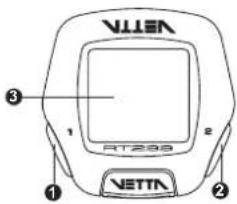
text_image
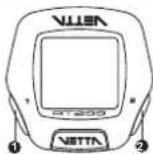
VETTA 1 2 3 RT298-
Button ①
-
Button ②
-
Main Display
-
Contact Pins
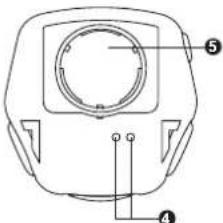
text_image
Technical diagram of a mechanical component with numbered parts labeled 4 and 5-
Battery Compartment
-
Battery Cap
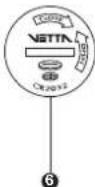
COMPONENTS
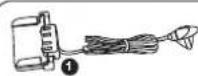

5

6

7
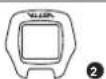
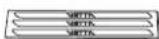
8
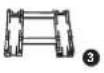

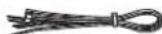
9
- Wired Speed Sensor with Mounting Bracket
- Extra Clear Front Cover
- Bracket Rubber Pad
- Bracket Rubber Pad (Riser Handlebar)
- Bladed Scoke Magnel
- Spacer
- Head Unit Battery (CR2032, 3-Volt)
- Wire Securing Tape
- Zip-Ties
BUTTON FUNCTIONS
Press momentarily
Button 2: Lower Screen Modes
Press & hold for 2 seconds
Button ① & ② when the lowest screen is in the CLK Mode: NOM Setup
Button ①& ② when the lowest screen is in the DST Mode: Reset Ride Data
BATTERY INSTALLATION
HEAD UNIT
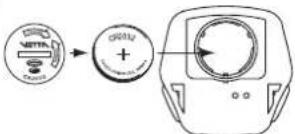
The Head Unit uses a CR2032 3-Volt Lithium button cell battery.
Battery Run Time (1 hour training / day): Approx. 12 months
Important: Most cycle computer problems are caused by weak or dead batteries. See the Trouble Shooting section near the end of the manual for details.
text_image
0912 +- Remove the battery cap from the bottom of the Head Unit using a coin.
- Install a new battery as shown with the positive (+) side facing out. Do not touch or bend
any of the battery contacts during installation. - Screw the battery cap firmly into place making sure the O-ring seal does not get pinched or distorted.
Caution: To avoid damage to the battery cap, do not over tighten.
INSTALLATION
Important: Do not use Zip-Ties, use the tapes provided with the package to hold wires to the frame. fork, bars or stem to avoid damaging or cutting the wires accidentally. Make sure excess wire is taped down or wrapped around brake cable housing to secure it.
WIRED SPEED SENSOR & MAGNET
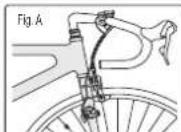
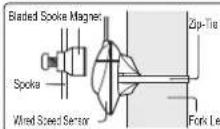
Attach the Wired Speed Sensor with the Zip-Ties supplied and tighten the Bladed Spoke Magnet to the bicycle. Mounting the sensor as high up as on the fork leg (see Fig. A). Adjust the sensor and magnet spacing with the Spacer. Remove the Spacer after snugging the Zip-Tie down to hold the sensor in its final position.
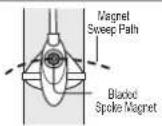
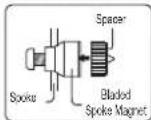
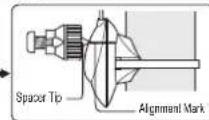
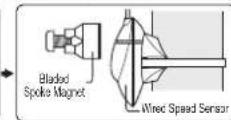
MOUNTING BRACKET & HEAD UNIT
Attach Mounting Bracket & Bracket Rubber Pad to the handlebar on the "Sensor side" using the Zip-Ties provide. Adjust its position to your liking and tighten the Zip-Ties. Note: Be sure to leave enough slack in the wire to accommodate the movement of fork and handlebars. (See Fig. A)
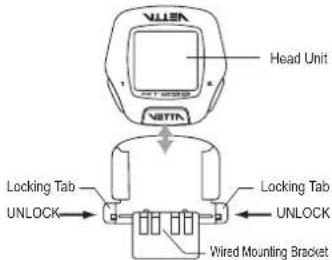
Slide the Head Unit into the Wired Mounting Bracket as shown until it clicks into position. Remove by pressing in the two locking tabs as shown.
Secure wire with tape supplied and by winding it around cables.
text_image
Head Unit Locking Tab UNLOCK Locking Tab UNLOCK Wired Mounting BracketINSTALLATION TESTS
Once installation is complete, the computer should be tested to make sure it is working properly.
Pick up the front of the bicycle and spin the front wheel. The LCD should display a speed- reading within 2-3 seconds.
If there is no speed-reading, check the alignment and spacing between the magnet and sensor. Make sure that the Head Unit is completely locked into position. If these checks do not solve the problem, talk to an Authorized Vetta's Retailer or connect to www.vetta.com.
Important: Make sure the magnet locking screw and all Zip-Ties are properly tightened.
SETUP & PROGRAMMING
In Setup, Button ① is used to select or set a value and to advance to the next digit or Mode. Button ② is used to switch between settings and to increase values.
Initial Setup
RT233 is programmed to enter the Initial Setup Mode after new battery replacement.
In the Initial Setup, riders can program the Basic Settings for the computer, the content of settings are same as NOM Setup for Basic Setting.
NOM Setup
After completed the Initial Setup, riders can change any values or correct any errors by re-entering the NOM Setup. To enter the NOM Setup Mode press & hold (1) & (2) simultaneously when the lowest screen is in the CLK Mode.
Important: Computer CANNOT exit during the Setup Mode until all the Basic Settings are finished.
12/24 CLOCK
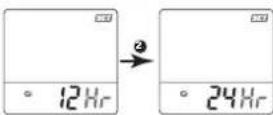
Press ② to toggle between flashing 12 and 24 hour formats. Press ① to select your desired format (without PM icon implies AM in 12 hour format) and advance to Time setting.
TIME
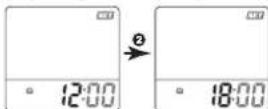
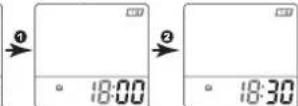
Press ② to advance hour digits to correct hour (hold button for rapid advance). Press ① to select and advance to minute setting. Press ② to advance minute digits to correct minute. Press ① to select and advance to the next Setup Mode.
SPEED/ DISTANCE UNIT
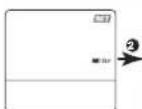
Press ② to toggle between flashing M/hr and KM/hr. Press ① to select and advance to the next Setup Mode.
Note: Speed/Distance Unit cannot be changed if there have been ride data on screens. If you want to change the Unit, please make sure you had cleared all ride data before entering the NOM Setup Mode. This restriction does not apply to the Initial Setup after that time battery installation, new battery replacement or All Clear Total Reset.
SERVICE TIMER
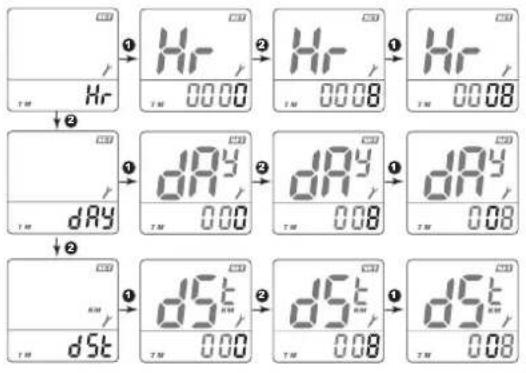
Service Timer could be programmed with a selected number of ride time (hours or days) or distance as the interval for servicing the bicycle or any component on it, such as a front or rear shock.
The default settings '0000' means the Service Timer is turned off.
Press ② to scroll flashing hr (hour), day or dst (distance) as the Service Timer unit. Press ① to select the desired Service Timer unit.
When the desired Service Timer unit has been chosen, press ② to scroll the flashing digit to the desired number. Press ① to select this number and advance to next digit. Repeat this procedure until all digits are selected. Press ① to advance the next Setup Mode. ( Maximum settings: hour / day / distance = 1999 / 999 / 9999 )
text_image
Hr Tm Hr ① Tm 00.00 ② Tm 00.08 ③ Tm 00.08 Hr Tm dRy ① Tm 00.00 ② Tm 00.08 ③ Tm 00.08 dRy Tm dSt ① Tm 00.00 ② Tm 00.08 ③ Tm 00.08 dRy Tm dSt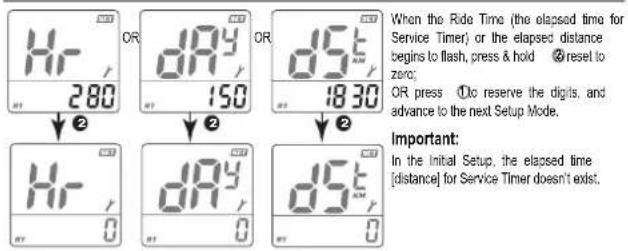
text_image
Hr 280 OR d9y 150 OR d5t 1830 When the Ride Time (the elapsed time for Service Timer) or the elapsed distance begins to flash, press & hold Ⓠ reset to zero; OR press Ⓐ do reserve the digits, and advance to the next Setup Mode. Important: In the initial Setup, the elapsed time [distance] for Service Timer doesn't exist.WHEEL/TIRE SIZE
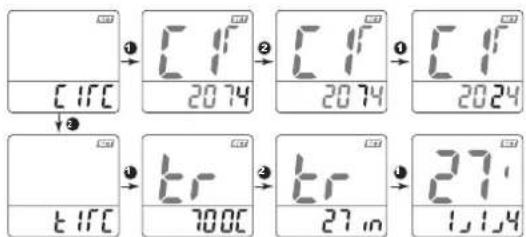
Press ② to toggle between flashing circ (circumference) and tire (tire type). Press ① to select the desired and advance the settings.
If pre-set to circ (see Table of Tire Size Vs Circ), press ② to scroll the flashing digit to the desired number. Press ① to select this number and advance to next digit. Repeat this procedure until all four digits are selected.
If pre-set to tire, press ② to scroll the flashing 700c, 650c, 27in, 26in, 24in, 20in or 16in. Press ① to select and advance to next setting to complete the Tire Size. Again, press ② to scroll and press ① to finalize the Tire Size and advance to the next Setup Mode.
text_image
CIFC ① CIF 2074 ② CIF 2074 ③ CIF 2024 ④ EIFC 67 7000 ⑤ EIF 27 in ⑥ 27- 1,1,4| TIRE SIZE CIRC | TIRE SIZE CIRC | TIRE SIZE CIRC | TIRE SIZE CIRC | ||||
| 700c x 38mm | 2180 | 700c x 20mm | 2074 | 26" x 2.25" | 2115 | 26" x 1.0" | 1913 |
| 700c x 35mm | 2168 | 700c Tubular | 2130 | 26" x 2.1" | 2095 | 24" x 1.91" | 1916 |
| 700c x 32mm | 2155 | 650c x 23mm | 1990 | 26" x 2.0" | 2074 | 20" x 1.25" | 1618 |
| 700c x 30mm | 2145 | 650c x 20mm | 1945 | 26" x 1.91" | 1955 | 16" x 2.0" | 1253 |
| 700c x 28mm | 2136 | 27" x 1.25" | 2161 | 26" x 1.75" | 2035 | 16" x 1.95" | 1257 |
| 700c x 25mm | 2124 | 27" x 1.125" | 2155 | 26" x 1.5" | 1985 | 16" x 1.5" | 1206 |
| 700c x 23mm | 2105 | 26" x 2.3" | 2135 | 26" x 1.25" | 1953 | ||
ODOMETER
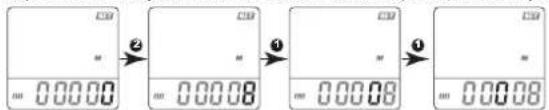
Press② to scroll the flashing digit to the desired number. Press① to select this number and advance to next digit. Repeat this procedure until all five digits are selected. Press① to advance the next Setup Mode. (Maximum setting: 99999)
text_image
CB # 0.00.00 ② CB # 0.00.08 ③ CB # 0.00.08 ④ CB # 0.00.08FUNCTIONS
Press ② to scroll the lower screen Modes.
To enter the NOM Setup Mode, press & hold① &② simultaneously for 2 seconds when the lowest screen is in the CLK Mode. To reset Ride Data to zero, press & hold① and② simultaneously for 2 seconds when the lowest screen is in the DST Mode.
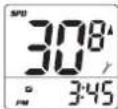
SPD
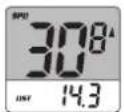
Speed is shown at all times on upper display. It is accurate to 0.1 M/hr or KM/hr and the maximum reading is 139.9 M/hr or 199.9 KM/hr.
DST
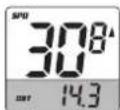
DST displays trip distance of current ride to a maximum of 999.9 miles or kilometers. It is accurate to 0.1 Mile or KM.
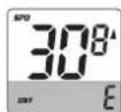
Note: When the Trip Distance exceeds 999.9 miles [kilometers], symbol "E" appears indicating that further measurement is impossible.
ODO
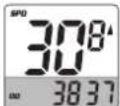
The odometer displays distance to 99999 Miles or Kilometers. It is accurate to 1.0 Mile or KM.
CLK
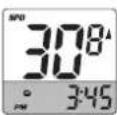
Time is displayed in user-selected 12 or 24 hour formats.
OTHER FEATURES
SLEEP MODE
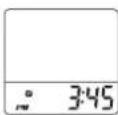
Computer enters Sleep Mode after 5 minutes without input from any buttons or wheel, and displays the clock only. Computer exits Sleep Mode and returns to the screen last displayed when any button is pressed or the wheel turns.
SERVICE TIMER(/)
Blinking * alerts rider the Service Time is reached.
TROUBLE SHOOTING
- Current speed-reading is erratic or does not appear.
Check the alignment of the bladed spoke magnet and sensor, and the distance between the two components. Realign the magnet and sensor with the spacer.
OR Inspect the wiring for any breaks or kinks. Replace Mounting Bracket and sensor as needed.
- Incorrect data appears on screen during operation.
Accuracy of the Setup data may be a problem (wheel size setting, etc.).
- Data display is extremely slow.
Computer LCD screen operates the best under the following temperature range:
Operating range is: 0 °C to 50 °C or 32 °F to 122 °F
- Screen is dark and display erratic characters.
Do not leave the computer in direct sunlight for extended periods of time. Move the computer into the shade until the screen recovers.
Noted: Data will not be affected.
- Screen reading is weak or fading.
Symptom of a weak battery. Replace the battery.
- Screen readings are erratic and read too high or too low.
Symptom of a weak battery. Replace the battery.
Screen "frozen", no response to buttons.
Symptom of a weak battery. Replace the battery.
No display whatsoever.
Battery is completely dead, or not installed. Replace or install the battery.
WARRANTY POLICY
ACUMEN INC. WARRANTS ALL VETTA (The Company) PRODUCTS AGAINST MANUFACTURER DEFECTS FOR A PERIOD OF 3 YEARS. Subject to the following limitations, terms and conditions, components will be free of manufacturing defects in materials and workmanship. The 3 year limited warranty is conditioned upon the components being used and operated in normal riding conditions. This warranty does not cover normal wear and tear (i.e. battery replacement, broken wire), rider abuse, acts of God, improper installation or product alteration.
This warranty is void if the components were not purchased (new) from or through an authorized VETTA retailer or dealer. Examples of unauthorized dealers are online auction sites or online retailers.
ACUMEN INC. at its sole discretion will repair or replace items at its own cost. Users are responsible for all freight and shipping charges, when returning items for warranty service.
ACUMEN INC. will pay the freight when returning serviced items, via USPS or UPS to consumers or dealers, once the item(s) has been repaired or replaced.
REQUIREMENTS FOR WARRANTY SERVICING
-
Prior to shipping an item back, you must first obtain a Return Authorization Number (s) (RA#). Each item being returned must have an individual RA#.
-
To obtain an RA #, you must either contact the retailer where the product was originally purchased from, or contact VETTA directly at customer service @ vetta.com.
-
For trouble shooting purposes, we request that the complete unit with packaging be returned to ACUMEN INC. unless otherwise stated by VETTA representative.
ITEMS TO BE INCLUDED IN RETURNS
-
The defective product(s)
-
A letter clearly stating the problem(s) with the returned item(s).
-
Copy of the original sales receipt showing proof of purchase date.
-
The Company is not responsible for loss or additional damages while in transit to ACUMEN INC.
-
Clearly mark the RA# on the outside of the return packaging. All items without an RA# will be refused and returned to the return address on the package.
The Company shall not be held responsible for replacing items with new items for greater than the amount of the original item purchase price. This limited warranty does provide the original owner with certain legal rights and recourse. The original owner may possess other rights or recourse, depending on the state or country. Please check the web to help answer any question and service manual.
ACUMEN INC CUSTOMER SERVICE CENTERS
Acumen Inc.
101A Executive Dr., Suite 100, Sterling, VA 20166, USA.
Acumen Europe BV
Splijtbakweg 117, 1333 HJ. Almere, The Netherlands.
Email: customerservice@vetta.com
Website: www.velta.com