FT94 - Tapis de course Fuel Fitness - Notice d'utilisation et mode d'emploi gratuit
Retrouvez gratuitement la notice de l'appareil FT94 Fuel Fitness au format PDF.


Questions des utilisateurs sur FT94 Fuel Fitness
0 question sur cet appareil. Repondez a celles que vous connaissez ou posez la votre.
Poser une nouvelle question sur cet appareil
Téléchargez la notice de votre Tapis de course au format PDF gratuitement ! Retrouvez votre notice FT94 - Fuel Fitness et reprennez votre appareil électronique en main. Sur cette page sont publiés tous les documents nécessaires à l'utilisation de votre appareil FT94 de la marque Fuel Fitness.
MODE D'EMPLOI FT94 Fuel Fitness
fuel
FITNESS
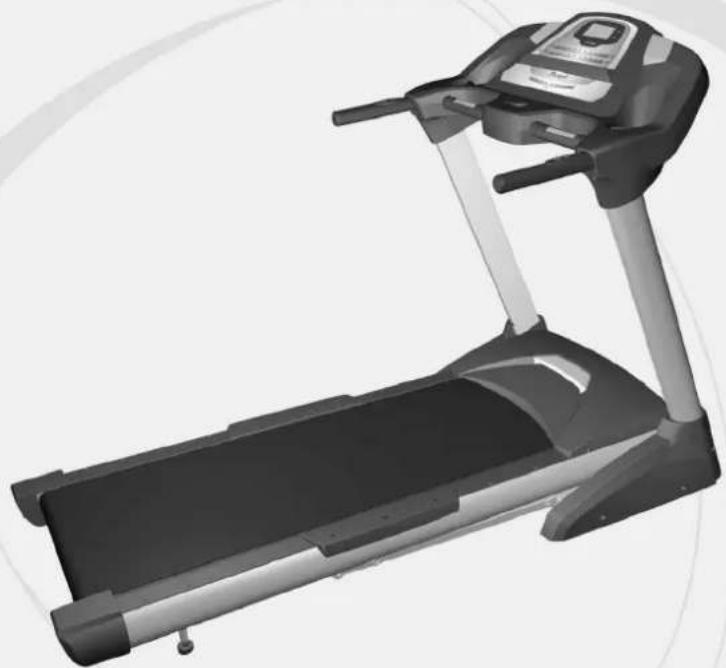
natural_image
Black and white photo of a treadmill with adjustable arms and control panel (no visible text or symbols)FT94
Motorized Treadmill
OWNER'S MANUAL
PLEASE CAREFULLY READ THIS ENTIRE MANUAL BEFORE
OPERATING YOUR NEW TREADMILL!
Table of Contents
Product Registration....2
Important Safety Instructions....3
Important Electrical Information....4
Important Operation Instructions....5
Assembly instructions....6
Folding Instructions....1
Operation of Your New Treadmill....12
Programmable Features....1
General Maintenance....1
Service Checklist - Diagnosis Guide 2
Manufacturer's Limited Warranty 2
fuel
FITNESS
CONGRATULATIONS ON YOUR NEW TREADMILL AND WELCOME TO THE SOLE FAMILY!
Thank you for your purchase of this quality treadmill from FUEL. Your new treadmill has been manufactured by one of the leading fitness manufacturers in the world and is backed by one of the most comprehensive warranties available. FUEL will do all we can to make your ownership experience as pleasant as possible for many years to come.
If you have a problem that requires service, call FUEL at: 866-545-3835, or send an email to: service@fuelfitnessusa.com
Please take a moment at this time to record below the name of the dealer, their telephone number, and the date of purchase for easy contact in the future. We appreciate your confidence in FUEL and we will always remember that you are the reason that we are in business. Please complete and mail your registration card today and enjoy your new treadmill.
Yours in Health, FUEL Fitness
Name of Dealer ____ Telephone Number of Dealer ____ Purchase Date ____
Product Registration
RECORD YOUR SERIAL NUMBER
Please record the Serial Number of this fitness product in the space provided below.
Serial Number
REGISTER YOUR PURCHASE
The self-addressed product registration card must be completed in full and returned to FUEL, or to register online go to: www.fuelfitnessusa.com
FT94 / 2008 ver.B
Important Safety Instructions
WARNING - Read all instructions before using this appliance.
DANGER - To reduce the risk of electric shock disconnect your FUEL treadmill from the electrical outlet prior to cleaning and/or service work.
WARNING - To reduce the risk of burns, fire, electric shock, or injury to persons, install the treadmill on a flat level surface with access to a 120-volt, 15-amp grounded outlet with only the treadmill plugged into the circuit..
DO NOT USE AN EXTENSION CORD UNLESS IT IS 14AWG OR BETTER, WITH ONLY ONE OUTLET ON THE END. The treadmill should be the only appliance in the electrical circuit. DO NOT ATTEMPT TO DISABLE THE GROUNDED PLUG BY USING IMPROPER ADAPTERS, OR IN ANY WAY MODIFY THE CORD SET. A serious shock or fire hazard may result along with computer malfunctions.
Do not operate treadmill on deeply padded, plush or shag carpet. Damage to both carpet and treadmill may result.
Do not block the rear of the treadmill. Provide a minimum of 3 1/2 feet clearance between the rear of the treadmill and any fixed object.
- Keep children away from the treadmill. There are obvious pinch points and other caution areas that can cause harm.
- Keep hands away from all moving parts.
■ Never operate the treadmill if it has a damaged cord or plug. If the treadmill is not working properly, call your dealer.
- Keep the cord away from heated surfaces.
■ Do not operate where aerosol spray products are being used or where oxygen is being administered. So that from the water is a high-temperature product
Important Electrical Information
WARNING!
NEVER use a ground fault circuit interrupt (GFCI) wall outlet with this treadmill. Large switching currents of the drive motor will trip GFCI type outlets, as with any appliance with a large motor. Route the power cord away from any moving part of the treadmill including the elevation mechanism and transport wheels.
NEVER remove any cover without first disconnecting AC power.
If voltage varies by ten percent (10%) or more, the performance of your treadmill may be affected. Such conditions are not covered under your warranty. If you suspect the voltage is low, contact your local power company or a licensed electrician for proper testing.
NEVER expose this treadmill to rain or moisture. This product is NOT designed for use outdoors, near a pool or spa, or in any other high humidity environment. The operating environmental specification is 40 to 120 degrees Fahrenheit, and humidity limit is 95%, non-condensing (no water drops forming on surfaces).
Grounding Instructions
This product must be grounded. If the treadmill should malfunction or breakdown, grounding provides a path of least resistance for electric current, reducing the risk of electric shock. This product is equipped with a cord having an equipment-grounding plug. The plug must be plugged into an appropriate outlet that is properly installed and grounded in accordance with all local codes and ordinances.
DANGER - Improper connection of the equipment-grounding conductor can result in a risk of electric shock. Check with a qualified electrician or serviceman if you are in doubt as to whether the product is properly grounded. Do not modify the plug provided with the product if it will not fit the outlet; have a proper outlet installed by a qualified electrician.
This product is for use on a nominal 120-volt circuit, and has a grounding plug that looks like the plug illustrated below. A temporary adapter that looks like the adapter illustrated below may be used to connect this plug to a 2-pole receptacle as shown below if a properly grounded outlet is not available. The temporary adapter should be used only until a properly grounded outlet, (shown below) can be installed by a qualified electrician. The green colored rigid ear-lug, or the like, extending from the adapter, must be connected to a permanent ground such as a properly grounded outlet box cover. Whenever the adapter is used, it must be held in place by a metal screw.
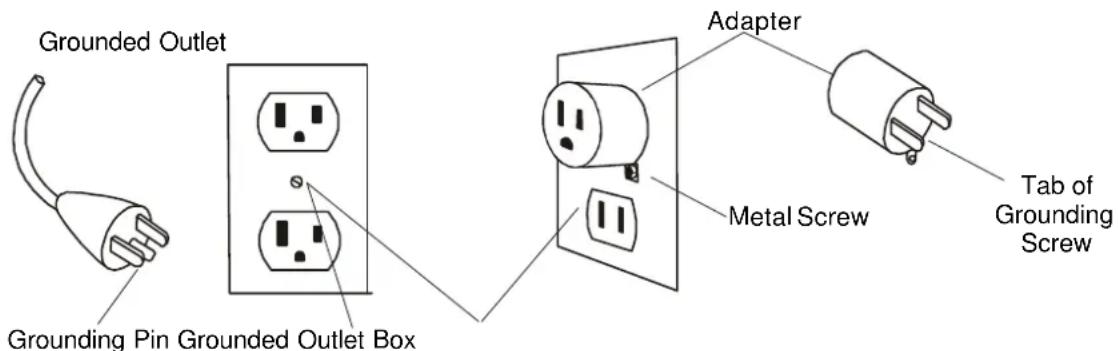
text_image
Grounded Outlet Grounding Pin Grounded Outlet Box Adapter Metal Screw Tab of Grounding ScrewImportant Operation Instructions
- NEVER operate this treadmill without reading and completely understanding the results of any operational change you request from the computer.
- Understand that changes in speed and incline do not occur immediately. Set your desired speed on the computer console and release the adjustment key. The computer will obey the command gradually.
- NEVER use your treadmill during an electrical storm. Surges may occur in your household power supply that could damage treadmill components.
- Use caution while participating in other activities while walking on your treadmill; such as watching television, reading, etc. These distractions may cause you to lose balance or stray from walking in the center of the belt; which may result in serious injury.
- NEVER mount or dismount the treadmill while the belt is moving. FUEL treadmills start at a very low speed and it is unnecessary to straddle the belt during start up. Simply standing on the belt during slow acceleration is proper after you have learned to operate the unit.
Always hold on to a handrail or hand bar while making control changes (incline, speed, etc.). Do not use excessive pressure on console control keys. They are precision set to function properly with little finger pressure. Pushing harder is not going to make the unit go faster or slower. If you feel the buttons are not functioning properly with normal pressure contact your FUEL dealer.
Safety Tether Cord
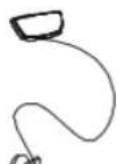
A safety tether cord is provided with this unit. It is a simple magnetic design that should be used at all times. It is for your safety should you fall or move too far back on the tread-belt. Pulling this safety tether cord will stop tread-belt movement.
To Use:
- Place the magnet into position on the console control head. Your treadmill will not start and
Assembly Instructions (FT94)
!!ATTENTION: IMPORTANT UNPACKING INSTRUCTIONS. PLEASE READ BEFORE UNPACKING YOUR FOLDING TREADMILL!!
Serious injury could occur if this folding treadmill is not unpacked properly.
There is a Velcro strap installed around the treadmill base that prevents the treadmill from unfolding accidentally during shipping. If this strap is not removed properly the treadmill could spring open unexpectedly and cause injury if someone is standing near the treadmill when the strap is removed. To ensure your personal safety during removal of the shipping strap please make sure the treadmill is positioned flat on the ground, in the orientation it would be in if you were using the treadmill. Do not turn the treadmill up on its side while removing the shipping strap. This could cause the treadmill's folding mechanism to spring open. If the end of the Velcro strap (that you need to grab to remove it) happens to be under the treadmill deck, reach under the deck to grab it, but do not tilt the treadmill up to gain access to the strap end.
ASSEMBLY PACK CHECK LIST

96. M5 x 10 m/m
Phillips Head Screw (6pcs)

95.ψ/16"x19x1.5T
Curved Washer (8pcs)

94. 5/16" x15m/m Button Head Socket Bolt (14pcs)

90. 3.5x12 m/m
Self Tapping Screw (4pcs)
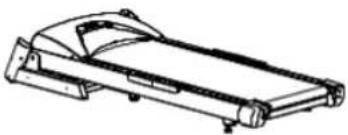
■ Step 1.
Remove the treadmill from the carton and lay it aside on a smooth level surface.
natural_image
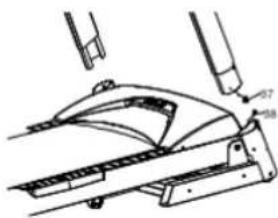
Line drawing of a mechanical device with no visible text or symbols■ Step 2.
Connect the Lower Computer Cable (38) with the Middle Computer Cable (37).
text_image
Technical diagram showing mechanical assembly with labeled parts 47 and 38, likely from an engineering or manufacturing context.■ Step 3.
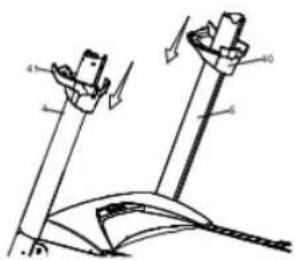
Insert the Upright tubes (4,5) into the Frame Base with the eight 5/16"x15mm Button Head Socket Bolts (94) and four 5/16" x 19 x 1.5T Curved Washers (95) - on the bolts for the side of
■ Step 4.
Install the Left Handrail Cover (41) onto the Left Upright tube (4), Right Handrail Cover (40) onto the Right Upright tube (5). Make sure they are facing the correct direction and allow them to slide down and sit at the bottom of the tubes.
natural_image
Technical line drawing of a mechanical device with labeled parts (no text or symbols)■ Step 5.
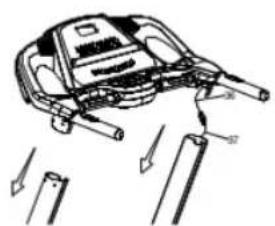
Connect the middle Computer Cable (37) with the upper Computer Cable (36).
natural_image
Diagram of a mechanical device with arrows indicating motion or force direction (no text or symbols)■ Step 7.
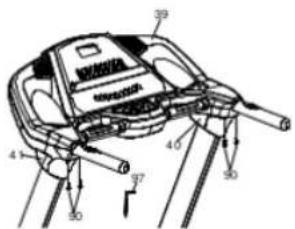
Install the Left and Right Handrail Covers (41, 40) onto the Console Assembly (39) with the four 3.5x12mm Self Tapping Screws (90).
text_image
Technical diagram of a mechanical device with numbered components and directional arrows indicating motion or assembly.■ Step 8
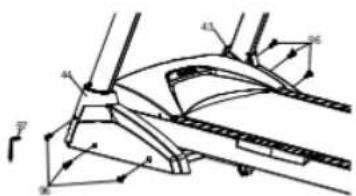
Install the Frame Base Caps (44,43) onto the Frame Base with six M5x10mm Phillips Head Screws (96).
text_image
Technical diagram of a mechanical assembly with numbered components and directional arrows indicating motion or force vectors.Folding Instructions
Do not attempt to move the unit unless it is in the folded and locked position. Be sure the power cord is secured to avoid possible damage. Use both handrails to maneuver the unit to the desired position.
UNFOLDING
Hold the treadmill running board with your left hand. Pull the locking knob with your right hand and slowly lower the treadmill running board.
FOLDING
Ensure the incline angle of the treadmill is at its lowest position. Lift the treadmill running board up until locking knob pops into the hole in the telescoping tube.
Operation of Your Treadmill
Getting familiar with the control panel
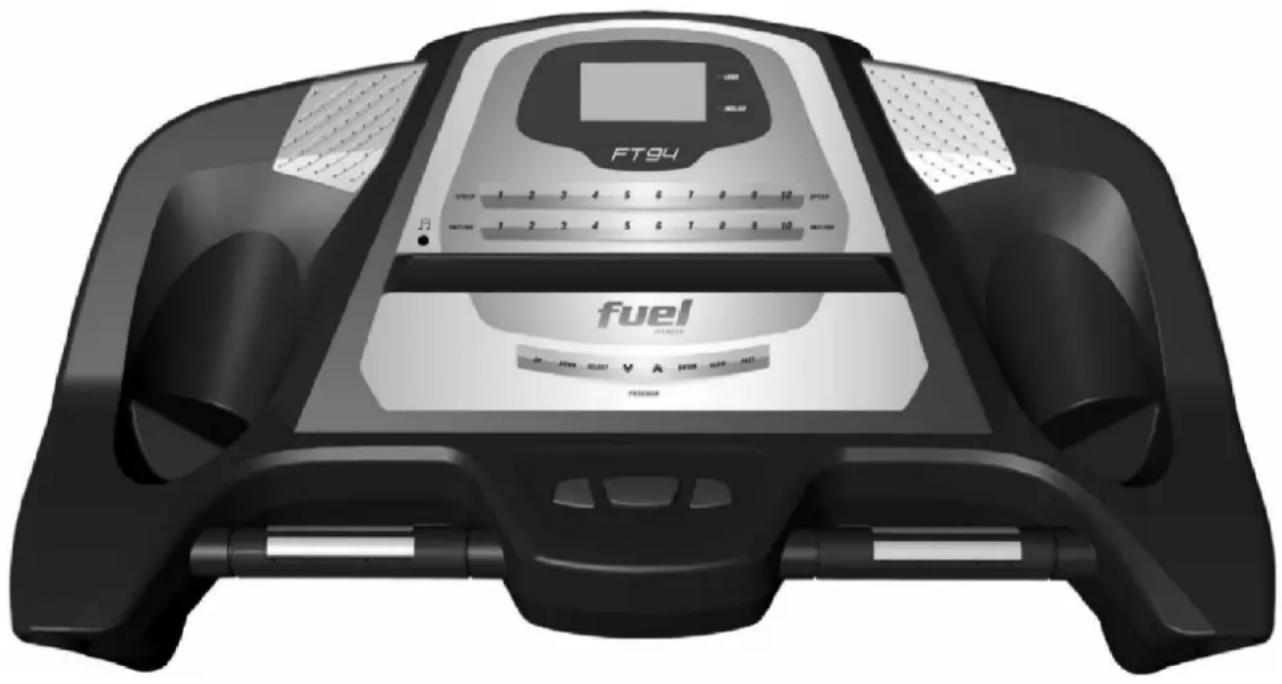
FT94 Console
natural_image
Black and white photo of a fuel balance device (no visible text or symbols on the device body)Initial Display:
When the power is turned on, the main display will light up showing all characters. The console will be performing an internal test to make sure the console is operational. The display will then scroll through three numbers, the first showing the current software version, second is how many hours the treadmill has been in use and third is how many virtual miles the treadmill has gone. The treadmill will then enter idle mode and show P0 on the display, which is the starting point for operation.
WINDOW DISPLAY DATA:
SCAN: When lit, will scan through all the display information; each one for 5 seconds.
SPEED: Displays the current belt speed from starting at 1.0Mph to 10.0Mph.
TIME: Accumulates total workout time from 00:00 to 99:59.
DISTANCE: Accumulates total workout distance from 0.00 to 99.99 miles.
CALORIES: Accumulates the user's calorie consumption during exercise. Max. Value is 9999 calories.
PULSE: Displays your current heart rate in beats per minute from 40 to 240.
♥ Icon: The heart icon blinks when a pulse is detected.
INCLINE LED: When lit, the display will be showing the elevation position from 0 to 10.
LUBE LED: Reminds the user to apply silicon lubricant between the belt and deck. To turn off the light press and hold the SELECT button for 5 seconds.
FUNCTION BUTTON:
START: Press "START" button to start training.
STOP: Press "STOP" button to stop training and press for 3 seconds to reset.
FAST: Press "FAST" button to increase your speed.
SLOW: Press "SLOW" button to decrease your speed.
UP: Press "UP" button to increase elevation position.
DOWN: Press "DOWN" button to decrease elevation position.
ENTER: Press "ENTER" button to select different setting parameters in STOP mode.
SELECT: Does "SELECT" button to recall through the display/undread information
set the time to count down, see STEP 7.
STEP 3: Press the SELECT button to scroll through your workout data. The initial screen will be showing the SPEED. Pressing the SELECT button will show the TIME then DISTANCE, CALORIES, PULSE, INCLINE and SCAN. In scan mode each data will be displayed for 5 seconds.
STEP 4: To get a pulse reading, simply grasp both stainless steel pick-ups. Make sure the display is set to show Pulse, or Scan. When the ♥ Icon is flashing that means the console is receiving a pulse. It may take a few seconds for the display to reach the actual number.
STEP 5: While training, you can press STOP button to stop your workout or pull safety key away from its position to shut down the computer. If you want to resume your workout, you can press START button and all previous data will resume counting.
STEP 6: At the end of a program you can press FAST/SLOW to display the accumulated data for speed, time, distance and calories that are memorized during training.
STEP 7: To set a TARGET: Before training, press the ENTER button to be able to program the time clock to count down. Use the up and down keys to set the time then press Start or Enter to program the Distance or Calories. If you set multiple parameters, the first one to reach zero ends the program.
To Select a Program:
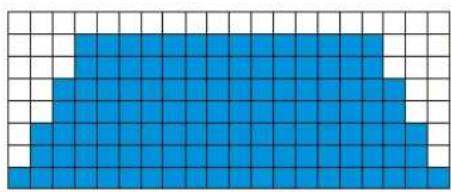
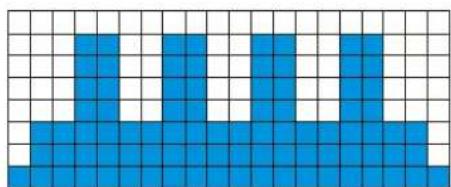
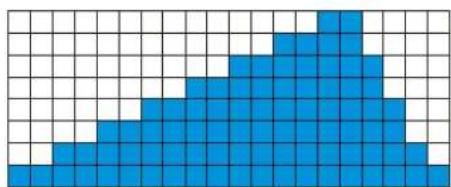
Step 1: Press the ^ or v button to choose P1 \~ P5, each program has a preset speed value.
Step 2: Press the ENTER button to set the count down time from 10:00 to 99:00; the preset value is 20:00. You can adjust the value by pressing FAST/SLOW or press START button to start training immediately.
Step 3: Press STOP button to stop your workout or pull safety key away from its position to shut down the computer.
Pulse Feature:
The Pulse (Heart Rate) window will display your current heart rate in beats per minute during the workout. You must use both stainless steel sensors on the front cross bar to display your pulse. Pulse value displays anytime the upper display is receiving a Pulse signal.
There is an Audio Input Jack on the front of the console and built-in speakers. You may plug any low-level audio source signal into this port. Audio sources include MP3, Ipod, portable radio, CD player or even a TV or computer audio signal.
ERROR MESSAGE:
- LS: Treadmill doesn't receive the speed signal for 8 seconds.
- E1: Memory of console malfunction or CPU accessing problem
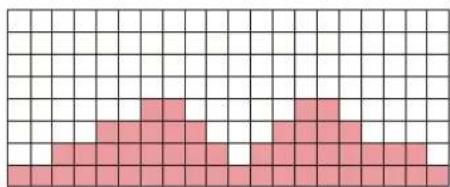
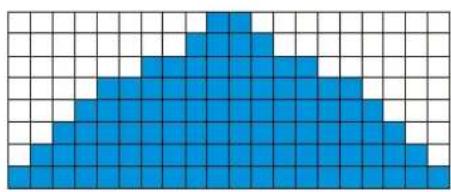
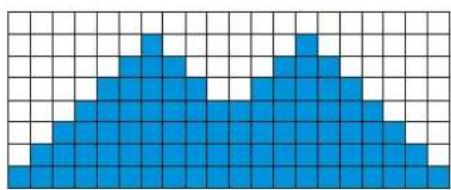
Programmable Features
Speed
P1
natural_image
Blue pixelated grid pattern on white background (no text or symbols)Incline
natural_image
Grid pattern with pink pixelated shapes on white background (no text or symbols)P2
natural_image
Blue pixelated triangular shape on a white grid background (no text or symbols)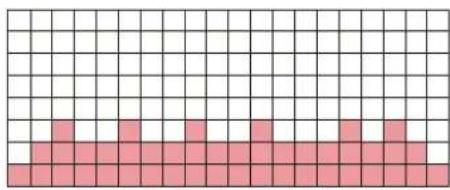
natural_image
Grid pattern with alternating black and pink squares (no text or symbols)P3
natural_image
Pixelated blue geometric shape on a white grid background (no text or symbols)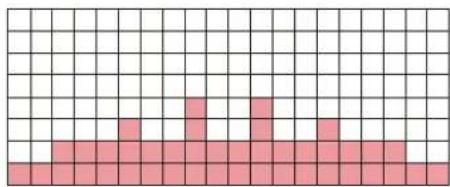
natural_image
Grid pattern with pink squares on white background, no text or symbols presentP4
natural_image
Abstract grid pattern with blue and white blocks (no text or symbols)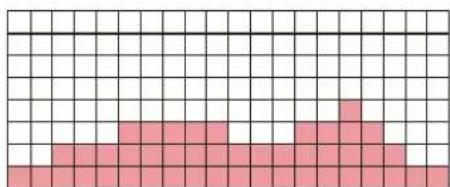
natural_image
Grid pattern with pink squares on white background, no text or symbols presentP5
natural_image
Blue pixelated geometric shape on a white grid background (no text or symbols)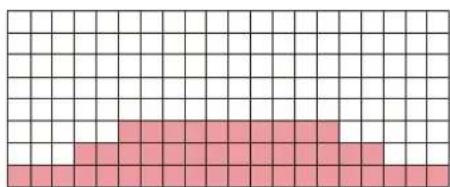
natural_image
Grid pattern with pink squares on white background, no text or symbols presentGeneral Maintenance
Belt and Bed - Your treadmill uses a very high-efficient low-friction bed. Performance is maximized when the bed is kept as clean as possible. Use a soft, damp cloth or paper towel to wipe the edge of the belt and the area between the belt edge and frame. Also reach as far as practical directly under the belt edge. This should be done once a month to extend belt and bed life. Use water only - no cleaners or abrasives. A mild soap and water solution along with a nylon scrub brush will clean the top of the textured belt. Allow to dry before using.
Belt Dust - This occurs during normal break-in or until the belt stabilizes. Wiping excess off with a damp cloth will minimize buildup.
General Cleaning - Dirt, dust, and pet hair can block air inlets and accumulate on the running belt. On a monthly basis, vacuum undemeath your treadmill to prevent buildup. Once a year, you should remove the black motor hood and vacuum out dirt that may accumulate. UNPLUG POWER CORD BEFORE THIS TASK.
BELT ADJUSTMENTS:
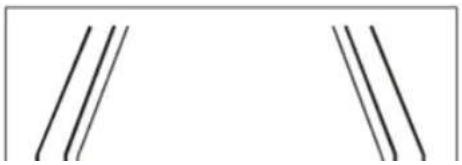
Treadbelt Tension Adjustment - Belt tension is not critical for most users. It is very important for joggers and runners in order to provide a smooth, steady running surface. Adjustment must be made from the right side of the rear roller in order to adjust tension with the 6 mm Allen wrench provided in the parts package. The adjustment bolt is located at the end of the right side rail as noted in diagram below.
natural_image
Pure geometric lines forming two symmetrical shapes without any text, numbers, or symbolsTREADBELT TRACKING ADJUSTMENT:
The performance of your treadmill is dependent on the frame running on a reasonably level surface. If the frame is not level, the front and back roller cannot run parallel, and constant belt adjustment may be necessary.
The treadmill is designed to keep the treadbelt reasonably centered while in use. It is normal for some belts to drift near one side while the belt is running with no one on it. After a few minutes of use, the treadbelt should have a tendency to center itself. If, during use, the belt continues to move toward one side, adjustments are necessary.
TO SET TREADBELT TRACKING:
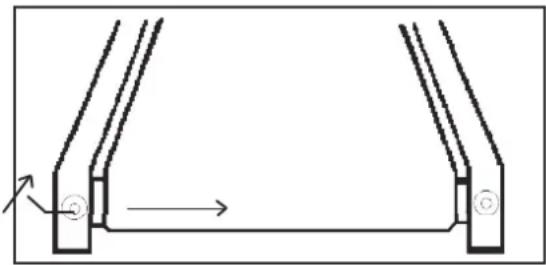
A 6 mm Allen wrench is provided to adjust the rear roller. Make tracking adjustments from the
left side only. Set belt speed at
approximately 2 to 3 mph. A small adjustment can make a dramatic difference. Turn the bolt only a 1/4 turn and wait a few minutes for the belt to adjust itself. Continue to make 1/4 turns until the belt stabilizes in the center of the running deck. The belt may require
periodic tracking adjustment depending on use and walking/running characteristics. Some users
natural_image
Pure mechanical diagram showing two U-shaped components with a directional arrow, no text or symbols presentwill affect tracking differently. Expect to make adjustments as required to center the treadbelt.
Adjustments will become less of a maintenance concern as the belt is used. Proper belt tracking is an owner responsibility common with all treadmills.
ATTENTION:
DAMAGE TO THE RUNNING BELT RESULTING FROM IMPROPER TRACKING / TENSION ADJUSTMENTS IS NOT COVERED UNDER THE FUEL WARRANTY.
Belt/deck lubrication procedure:
Do not lubricate with other than FUEL approved lubricant. Your treadmill comes with one tube of lubricant and extra tubes can be ordered directly from FUEL. There are commercially available lube kits, but the only one currently approved by FUEL is Lube-N-Walk. These kits come with an application wand that makes applying the lubrication easier. The kits can be purchased directly from Lube-N-Walk here: http://www.jadfitness.com/.
Keeping the deck lubricated at the recommended intervals ensures the longest life possible for your treadmill. If the lubricant dries out, the friction between the belt and deck rises and places undue stress on the drive motor, drive belt and electronic motor control board, which could result in catastrophic failure of these expensive components. Failure to lubricate the deck at regular intervals may void the warranty.
The deck comes pre-lubricated and subsequent lubrication should be performed every 180 hours of use. The console has a built in lubrication reminder indicator that lights every 180 hours of use. To lubricate the deck with the tube of lubricant supplied it will be necessary to loosen the walking belt. Using the 6 mm Allen wrench supplied, loosen the two rear roller adjustment bolts – located in the rear end caps – enough to get your hand under the belt (5–10 turns). Make sure to loosen both bolts the same amount of turns and also remember how many turns, because when finished you will need to tighten the bolts back to the point they were before.
Once the belt is loose, wipe the deck with a clean lint free cloth to remove any dirt. Apply the whole tube of lubricant onto the deck surface about 18 inches from the motor cover. Squeeze out the contents of the tube across the deck (parallel to the motor cover) in about a one-foot line, like toothpaste on a toothbrush. The one-foot line should be in the middle of the deck at approximately equal distance from both side edges of the belt. You want the lubricant to be applied about the spot that your feet would hit the belt as you are walking. This should be about 18 inches from the motor cover, but you may want to walk on the treadmill before loosening the belt to note where your feet land on the belt. If you mostly run on the treadmill the spot where your feet land may be different from walking.
Service Checklist - Diagnosis Guide
Before contacting your dealer for aid, please review the following information. It may save you both time and expense. This list includes common problems that may not be covered under the treadmill's warranty.
PROBLEM
SOLUTION/CAUSE
| Display does not light | Tether cord not in position.Circuit breaker on front grill tripped. Push circuit breaker in until it locks.Plug is disconnected. Make sure plug is firmly pushed into AC household wall outlet.Household circuit breaker may be tripped.Treadmill defect. Contact your FUEL dealer. |
| Treadbelt does not stay centeredTreadmill belt hesitates when walked/run on | A user may be walking while favoring or putting more weight on either the left or right foot. If this walking pattern is natural, track the belt slightly off-center to the side opposite from the belt movement. See General Maintenance section on Treadbelt Tension. Adjust as necessary. |
| Motor is not responsive / Display is lit | Make certain clock is running. |
| Treadmill will only achieve approximately 7 mph but shows higher speed on display | This indicates motor should be receiving power to operate. Low AC voltage to treadmill. Do not use an extension cord. If an extension cord is required it should be as short as possible and heavy |
Manufacturer's Limited Warranty
Effective January 1, 2007 TREADMILL WARRANTY
FUEL warrants parts for the FT94 treadmill for a period of time listed below from the date of retail sale, as determined by sale receipt or in the absence of a receipt eighteen (18) months from the original factory shipping date. RUEL's responsibilities include providing new or remanufactured parts, at RUEL's option, and technical support to our independent dealers and servicing organizations. In the absence of a dealer or service organization, these warranties will be administered by RUEL directly to a consumer. The warranty period applies to the following components:
| Drive Motor & frame Parts |
| Labor |
| Lifetime |
| 1 Year |
| 1 Year |
NORMAL RESPONSIBILITIES OF THE CONSUMER
This warranty applies only to products in ordinary household use, and the consumer is responsible for the items listed below:
1. The warranty registration card must be completed and returned to the address listed on the card within 10 days of the original purchase to validate the manufacturer's limited warranty.
2. Proper use of the treadmill in accordance with the instructions provided in this manual, including belt tracking.
4. Proper connection to a grounded power supply of sufficient voltage, replacement of blown fuses, repair of loose connections or defects in house wiring.
5. Expenses for making the treadmill accessible for servicing, including any item that was not part of the treadmill at the time it was shipped from the factory.
6. Damages to the treadmill finish during shipping, installation or following installation.
EXCLUSIONS
This warranty does not cover the following:
1. CONSEQUENTIAL, COLLATERAL, OR INCIDENTAL DAMAGES SUCH AS PROPERTY DAMAGE AND INCIDENTAL EXPENSES RESULTING FROM ANY BREACH OF THIS WRITTEN OR ANY IMPLIED WARRANTY.
Note: Some states do not allow the exclusion or limitation of incidental or consequential damages, so this limitation or exclusion may not apply to you.
2. Service call reimbursement to the consumer. Service call reimbursement to the dealer that does not involve malfunction or defects in workmanship or material, for units that are beyond the warranty period, for units that are beyond the service call reimbursement period, for treadmills not requiring component replacement, or treadmills not in ordinary household use.
3. Damages caused by services performed by persons other than authorized FUEL services; use of parts other than original FUEL parts; or external causes such as alterations, modifications, abuse, misuse, accident, improper maintenance, inadequate power supply, or acts of God.
4. Products with original serial numbers that have been removed or altered.
5. Products that have been sold, transferred, bartered, or given to a third party.
6. Products that do not have a warranty registration card on file at FUEL. FUEL reserves the right to request proof of purchase if