
Cat.6a Keystone Jack shielded LSA+ - Câble pour ordinateur et périphérique Equip - Notice d'utilisation et mode d'emploi gratuit
Retrouvez gratuitement la notice de l'appareil Cat.6a Keystone Jack shielded LSA+ Equip au format PDF.


| Type de produit | Keystone Jack |
| Marque | Equip |
| Modèle | Cat.6a Keystone Jack shielded LSA+ |
| Catégorie | Câble pour ordinateur et périphérique |
| Connecteur | RJ45 femelle (Keystone) |
| Standard réseau | Catégorie 6a (Classe EA) |
| Blindage | Oui (Shielded) |
| Type de terminaison | LSA+ (IDC) |
| Schéma de câblage | T568A / T568B |
| Matériau du boîtier | Plastique avec blindage métallique |
| Couleur | Blanc |
| Dimensions (approx) | 21 x 16 x 28 mm |
| Poids (approx) | 10 g |
| Température de fonctionnement | -20°C à +60°C |
| Humidité de fonctionnement | 10% à 90% HR |
| Compatibilité câble | UTP/STP Cat.6a |
| Utilisation | Réseaux Ethernet 10/100/1000/10G |
| Installation | À l'aide d'un outil de perforation (110 ou Krone) |
| Pièces détachées | Non applicable (connecteur intégré) |
| Entretien | Nettoyage à sec, éviter les liquides |
| Sécurité | Utiliser des câbles appropriés, déconnecter avant installation |
| Réparabilité | Non réparable, remplacer si défectueux |
FOIRE AUX QUESTIONS - Cat.6a Keystone Jack shielded LSA+ Equip
Questions des utilisateurs sur Cat.6a Keystone Jack shielded LSA+ Equip
0 question sur cet appareil. Repondez a celles que vous connaissez ou posez la votre.
Poser une nouvelle question sur cet appareil
Téléchargez la notice de votre Câble pour ordinateur et périphérique au format PDF gratuitement ! Retrouvez votre notice Cat.6a Keystone Jack shielded LSA+ - Equip et reprennez votre appareil électronique en main. Sur cette page sont publiés tous les documents nécessaires à l'utilisation de votre appareil Cat.6a Keystone Jack shielded LSA+ de la marque Equip.
MODE D'EMPLOI Cat.6a Keystone Jack shielded LSA+ Equip
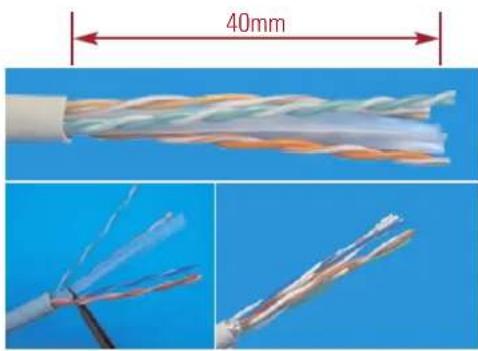
- Strip approximately 40mm of the cable jacket.
natural_image
Cross-sectional view of a twisted cable with visible internal structure and 40mm thickness dimension (no text or symbols)- Follow the color-coding to position T568A or T568B wiring.
T568A T568B
Pin 1 White/Green Pin 1 White/Orange
Pin 2 Green Pin 2 Orange
Pin 3 White/Orange Pin 3 White/Green
Pin 4 Blue Pin 4 Blue
Pin 5 White/Blue Pin 5 White/Blue
Pin 6 Orange Pin 6 Green
Pin 7 White/Brown Pin 7 White/Brown
Pin 8 Brown Pin 8 Brown
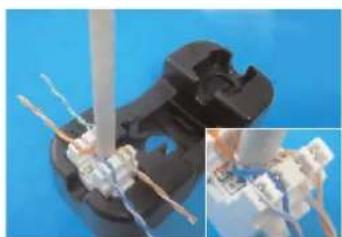
- Follow the wiring sticker to place the wires into IDC slot. Make sure to keep the pairs twisted as long as possible.
- Punch the wires with a 110 or Krone impact tool and cut off the surplus wires.
Unshielded Type:
natural_image
Close-up of a mechanical component with wires and connectors, shown in two views (no text or symbols visible)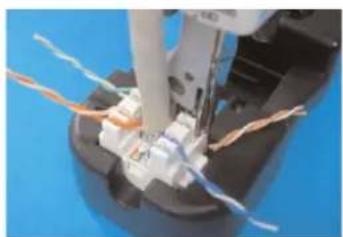
natural_image
Close-up of a sewing machine needle stitching wires on a mechanical component (no visible text or symbols)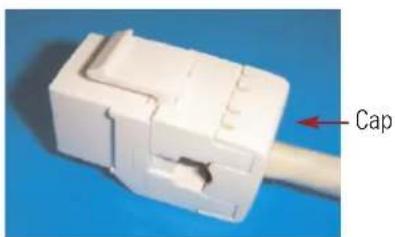
- Snap in the IDC cap to fix the wires, and finish the installation.
Shielded Type:

natural_image
Close-up of a white electrical connector with wires against a clear blue sky, showing a vertical pole and wiring (no text or symbols visible)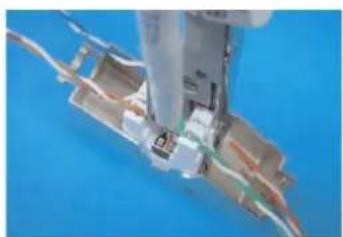
natural_image
Close-up of a mechanical component with wires and a tool inserted, against a blue background (no visible text or symbols)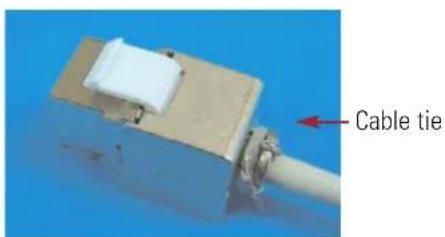
- Tie up the cable by cable tie, and finish the installation.


Marque : Equip
Modèle : Cat.6a Keystone Jack shielded LSA+
Catégorie : Câble pour ordinateur et périphérique