SRF-56 - Radio SONY - Notice d'utilisation et mode d'emploi gratuit
Retrouvez gratuitement la notice de l'appareil SRF-56 SONY au format PDF.


Questions des utilisateurs sur SRF-56 SONY
0 question sur cet appareil. Repondez a celles que vous connaissez ou posez la votre.
Poser une nouvelle question sur cet appareil
Téléchargez la notice de votre Radio au format PDF gratuitement ! Retrouvez votre notice SRF-56 - SONY et reprennez votre appareil électronique en main. Sur cette page sont publiés tous les documents nécessaires à l'utilisation de votre appareil SRF-56 de la marque SONY.
MODE D'EMPLOI SRF-56 SONY
FM Stereo Radio
Operating Instructions

WALKSTAN
FM WALKMAN
SRF-56
Sony Corporation ©2001 Printed in China
11
http://www.world.sony.com/
WARNING
You are cautioned that any changes or modifications not expressly approved in this manual could void your authority to operate this equipment.
Before You Begin
Thank you for choosing the Sony radio! It will give you many hours of reliable service and listening pleasure. Before operating the radio, please read these instructions thoroughly and retain them for future reference.
Precautions
- Operate the unit only on 1.5V DC with one size AA (R6) battery.
- Avoid exposure to temperature extremes, direct sunlight, moisture, sand, dust or mechanical shock. Never leave in a car parked in the sun.
- Should any solid object or liquid fall into the unit, remove the battery and have the unit checked by a qualified personnel before operating it any further.
- In vehicles or buildings, radio reception may be difficult or noisy. Try listening near a window.
- To clean the casing, use a soft cloth dampened with a mild detergent solution.
- This product is not designed to be water-resistant, so you should take care to use the unit when raining, snowing or in a water-splash place.
Notes on Headphones
Road safety
Do not use headphones while driving, cycling, or operating any motorized vehicle. It may create a traffic hazard and is illegal in many areas. It can also be potentially dangerous to play your headphones at high volume while walking, especially at pedestrian crossings. You should exercise extreme caution or discontinue use in potentially hazardous situations.
Preventing hearing damage
Avoid using headphones at high volume. Hearing experts advise against continuous, loud and extended play. If you experience a ringing in your ears, reduce volume or discontinue use.
Caring for others
Keep the volume at a moderate level. This will allow you to hear outside sounds and to be considerate to people around you.
Warning
If there is lightning when you are using the unit, take off the headphones immediately.
If you have any questions or problems concerning your unit, please consult your nearest Sony dealer.
Specifications
Frequency range
87.5 - 108 MHz
Output
(headphones) jack ( 3.5 mm stereo minijack)
Power output
3.6 mW + 3.6 mW (at 10% harmonic distortion) with headphones having impedance of 32 Ω
Power requirements
1.5 V DC, one size AA (R6) battery
Dimensions
Main unit:
Approx. 65 · 92.9 · 26.5 mm (w/h/d)
(Aprox. 2^5/8 · 3^3/4 · 1^1/_16 inches) incl. projecting parts and controls
When attaching the belt clip to the main unit:
Approx. 65 · 92.9 · 30.5 mm (w/h/d)
(Aprox. 2^5/8 · 3^3/4 · 1^1/_4 inches) incl. projecting parts and controls
Mass
Approx. 72.2 g (2.5 oz) incl. a battery and the belt clip
Accessories supplied
Stereo headphones (1)
Belt clip (1)
Design and specifications are subject to change without notice.
LIMITED WARRANTY (Portable Audio) FOB 30\$ 以下

text_image
Dial scale VOL TUNE POWER ON/OFF SENS DX LOCALA
text_image
Rear→
text_image
Size AA (R6) · 1Insert the ⊖ side of the battery first.
B

text_image
Diagram illustrating a mechanical or electrical process transformation, showing a device with rotating components before and after change.C
natural_image
Diagram showing a device connected to a human torso with a belt buckle (no text or symbols)a

natural_image
Illustration of hands holding a device with a knob and arrow indicator (no text or symbols)b

natural_image
Illustration of hands holding a camera module with an arrow indicating rotation (no text or symbols)Installing the Battery
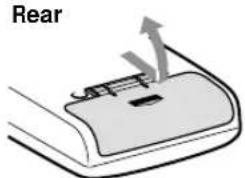
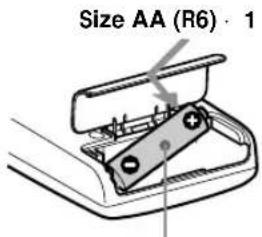
(See Fig. A)
1 Open the battery compartment lid at the rear of the radio.
2 Insert one size AA (R6) battery (not supplied) with the ⊕ and ⊖ marks aligned correctly.
3 Close the battery compartment lid.
Battery life (approx. hours) (JEITA*)
Using Sony alkaline size AA (LR6) battery 100
Using Sony size AA (R6) battery 35
* Measured by JEITA (Japan Electronics and Information Technology Industries Association) standards. The actual battery life may vary depending on the circumstance of the unit.
When to replace the battery
Replace the battery when the sound becomes weak or distorted. Remove the old battery and insert a new one.
Notes on battery
- Do not charge the dry battery.
- Do not carry the dry battery with coins or other metallic objects. It can generate heat if the positive and negative terminals of the battery are accidentally contacted by a metallic object.
- When you are not going to use the unit for a long time, remove the battery to avoid damage from battery leakage and corrosion.
To attach the battery compartment lid if it is accidentally detached (see Fig. B)
1 Put in one side of the lid as illustrated.
2 Push the other side to attach.
Playing the Radio
1 Connect the supplied stereo headphones to Ⓞ (headphones) jack.
2 Set POWER to ON to turn on the radio.
3 Turn TUNE to tune in a station
4 Adjust VOL (volume).
• To turn off the radio, set POWER to OFF.
• To improve reception
Extend the stereo headphones cord which functions as the FM antenna.
- Set SENS to LOCAL if interference is prevalent when radio wave intensity is dramatically stronger.
To listen to stereo programs, set to DX.
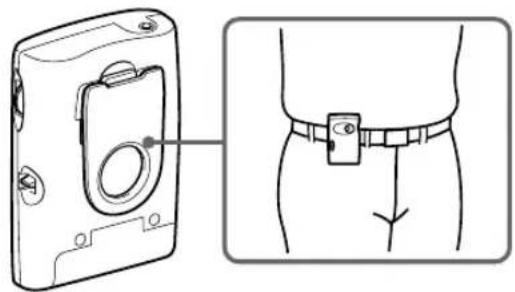
Using the Belt Clip (See Fig. C)
Use the belt clip when attaching the unit to your belt.
To detach the belt clip, see fig. C- a.
To attach the belt clip, see fig. C- b.