DI 866 - Flash NISSIN - Notice d'utilisation et mode d'emploi gratuit
Retrouvez gratuitement la notice de l'appareil DI 866 NISSIN au format PDF.


Questions des utilisateurs sur DI 866 NISSIN
0 question sur cet appareil. Repondez a celles que vous connaissez ou posez la votre.
Poser une nouvelle question sur cet appareil
Téléchargez la notice de votre Flash au format PDF gratuitement ! Retrouvez votre notice DI 866 - NISSIN et reprennez votre appareil électronique en main. Sur cette page sont publiés tous les documents nécessaires à l'utilisation de votre appareil DI 866 de la marque NISSIN.
MODE D'EMPLOI DI 866 NISSIN
Di866
PROFESSIONAL
DIGITAL TTL POWER ZOOM FLASH
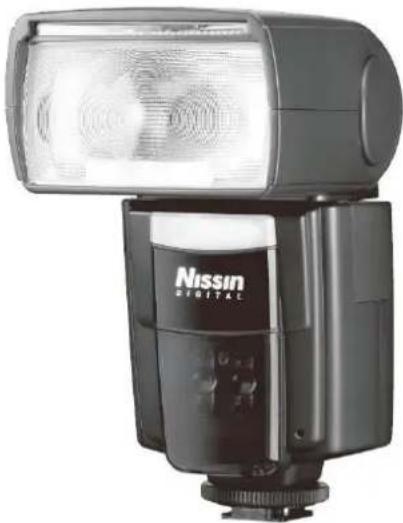
natural_image
Exterior view of a Nissin digital flash unit (no visible text or symbols on body)INSTRUCTION MANUAL
Nissin
Nissin Japan Ltd., Tokyo
http://www.nissin-japan.com
Nissin Marketing Ltd., Hong Kong
http://www.nissindigital.com
N0709Rev.1.0
Thank you for purchasing a Nissin product
Before using this flash unit, please read this instruction manual and refer your camera owner's manual carefully to get a better understanding of proper operation to enjoy flash photography.
Nissin Di866 type Nikon is designed for Nikon digital SLR and hotshoe type cameras, listed below, with the latest TTL flash control system, and features Nissin's original rotating color display easily guiding its operations.
It works automatically with Nikon's i-TTL auto-flash system. Please note that Di866 type N is not usable with other branded cameras for TTL operation.
UNIQUE FUNCTION
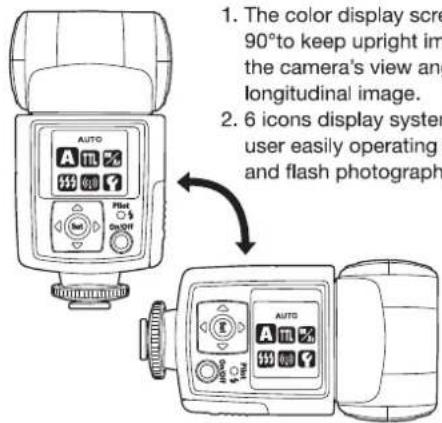
text_image
1. The color display scre 90° to keep upright im the camera's view any longitudinal image. 2. 6 icons display syser user easily operating and flash photographSIMPLE OPERATION
When attaching Di866 on the camera, the basic flash exposure operation is fully controlled by the camera. It is the same idea as you use the built-in camera flash, but it's placed on the hotshoe of the camera, instead of built-in.
ADVANCED FUNCTIONS
Di866 provides many advanced flash functions, too. Wireless TTL off camera flash technology, high speed shutter synchronization, frequent repeat-flash system, External Av priority setting and etc. are supported.
Compatible cameras
Nikon Digital SLR cameras
D40, D40x, D60, D70, D70s, D80, D90, D5000
D200. D300, D700, D3, D3x
Fujifilm Digital SLR cameras
Finepix S5Pro
As for the cameras launched after May 2009, please refer Nissin's compatibility chart shown in its home page, http://www.nissin-japan.com or http://www.nissindigital.com
SAFTY INSTRUCTIONS
This safety instructions refer important information to use the product safely and properly. Please read the following instructions before using the product.

WARNING
This sign refers the danger or serious damage.
● The flash unit contains high voltage electric parts. Do not try to open or repair the flash unit. Return it back to the repair service station or the store you bought it.
- Do not touch the inside parts from the opening when the unit was dropped and broken.
- Do not shoot the flash direct to the eye at short distance. It may damage the eye. When taking flash picture especially toward a baby, it is recommended to keep the flash unit at least 1 meter (3.3 feet) away from the subject.
Or use diffuser or bounce the light to the ceiling or to the wall to soften its intensity.
- Do not use the flash unit in the flammable gas, chemicals or such liquids. It may cause fire or electric shock.
- Do not touch the flash unit with wet hands or use in the water. The flash unit carries high voltage inside and it may cause an electric shock.
- Do not shoot the flash unit directly to the driver of automobiles or such vehicles.
- Do not set the flash window close to the human body and shoot, which may get burned.
- Place the batteries correctly in position. Placing the batteries in wrong polarity may cause leakage, exothermic heat or explosion.

CAUTIONS
This sign refers the damage or defect.
- Do not leave or store the flash unit in the temperature over 40°C, such like in the automobile.
● The flash unit is not water resistance. Keep the unit away from rain, snow and humidity. - Do not use benzene, thinner or other alcoholic agents to clean the unit.
- Do not use this flash unit with the cameras which is not recommended in this instruction manual, otherwise it may damage the camera's circuitry.
- Remove the batteries when not in use for a longer period of time.
- Do not have a heavy impact to the flash unit, nor throw it onto a hard surface floor.
- When using the external power pack, read the safety instruction carefully and follow the operation manual.
3
Nomenclature
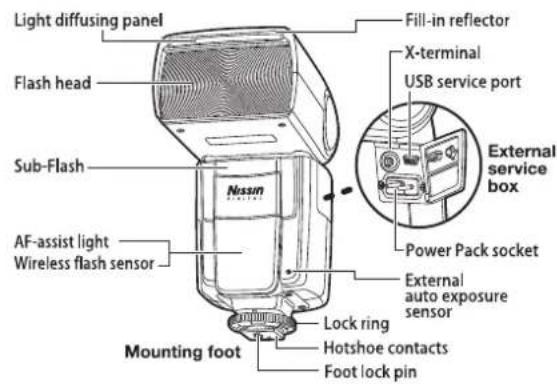
text_image
Light diffusing panel Flash head Sub-Flash AF-assist light Wireless flash sensor Mounting foot Fill-in reflector X-terminal USB service port External service box Power Pack socket External auto exposure sensor Lock ring Hotshoe contacts Foot lock pin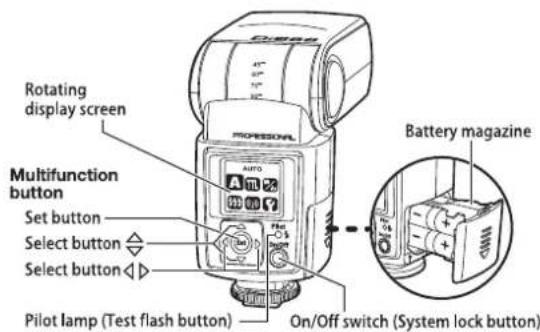
text_image
Rotating display screen Multifunction button Set button Select button Select button Pilot lamp (Test flash button) Battery magazine On/Off switch (System lock button)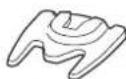
Flash stand
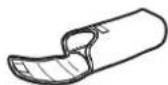
Soft case
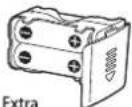
battery magazine (option)
4
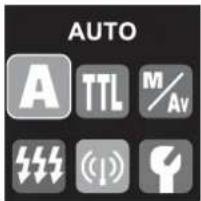
MENU SCREEN FOR MAIN MODES
Di866 Flash Mode and Functions - to be set on the flash unit.
text_image
AUTO A TTL M/Av (1)A ... Full Automatic Mode
TTL ... TTL Program Mode
M/Av ... Manual Setting Mode
… Repeat flash Mode
(1) ... Wireless TTL Flash Mode
... Custom Setting Mode

Full Automatic Mode page 10
Flash light is fully controlled by the camera for the most proper exposure.

TTL Program Mode ____ page 12
Flash light is automatically controlled by the camera but the flash exposure value can be compensated.

Manual Setting Mode ____ page 16
Manual Mode - Selecting the desired manual power on the flash unit, Av priority Mode - Selecting the desired f-stop on the flash unit.

Repeat flash Mode page 22
Multiple lighting exposes the playback photos in one frame of picture.

Wireless TTL Flash Mode —— page 24
Placing multiple numbers of flashes (remote flash) off camera and controlling the creative TTL lighting.

Custom Setting Mode page 29
Variety of custom settings is available for own default value.
5
ADVANCED FUNCTIONS
Advanced functions is provided in some operation modes - to be set on the flash unit
| Advanced Functions | Operation Modes | |
| Sub-Flash | TTL Program Mode | Manual Setting Mode |
| Manual Zoom | TTL Program Mode | Manual Setting Mode |
| Slave Mode | Manual Setting Mode | |
| F.Stop Setting | Manual Setting Mode*1 | |
| ISO setting | Manual Setting Mode*2 | |
*1 Effective on Manual Mode and on Slave Mode, and when using Di866 with film type camera or with non dedicated camera.
*2 Effective on Slave Mode, and when using Di866 with film type camera or with non dedicated camera.
Functions by Camera setting – The flash is automatically controlled by the camera

High speed shutter synchronization —— page 31
Flash synchronizes to the faster shutter speed than regular synchronization speed.

Rear curtain synchronization — page 31
The flash fires just before the rear curtain close. A moving subject will appear with such moving marks behind.

Auto Flash Bracketing page 31
Flash exposure level is automatically compensated on the sequence of frames pre-set in the camera.

Red-eye reduction page 32
Blinks of flash released before actual effective flash eliminate the red-eye problem.

Fv. Lock page 32
Flash exposure can be locked at the main subject while moving the framing.

Slow Shutter Synchronization —— page 32
The flash is controlled at slow shutter speed considering the dim condition of the back ground.
6
BASIC OPERATION
Inserting batteries
Usable batteries - Alkaline batteries, Lithium batteries, NiMH batteries.
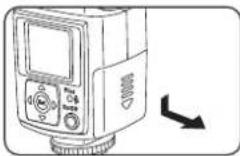
- Remove the battery magazine and insert 4 x size AA batteries as shown in the picture.
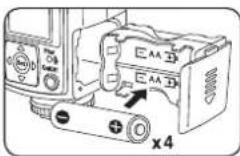
- The battery compartment is designed so that every cell is placed in the same direction to avoid the confusion in poor light condition.

-
+/- symbol is clearly marked at the battery compartment.
-
Place the battery magazine back into the body.
When the recycle time becomes longer than 20 sec., replace the batteries with the fresh ones or recharge the batteries (rechargeable batteries).
NOTE
It is recommended to use all 4 batteries in same brand and type, and replace them all at the same time.
Wrong insertion of each cell does not make electric contact.
7
Mounting Di866 on the Camera
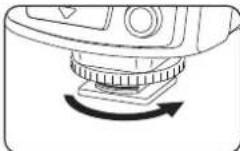
-
Turn off the power switch of both Di866 and the camera
-
Turn the lock ring of Di866 to loosen it all the way as shown in the picture.
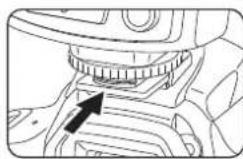
- Slide the mounting foot of Di866 into the hotshoe of the camera.
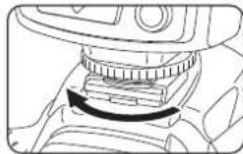
-
Turn the lock ring to opposite direction and tighten it.
-
Lock pin comes out to hook the foot at the hotshoe for sure contact.
Removing Di866 from the Camera
- Loosen the lock ring and slide the mounting foot of Di866 off the hotshoe of the camera. Make sure to turn the lock ring all the way to completely clear the lock pin off the hooking slot on the hotshoe.
Turn on the flash unit
- Press the on/off switch. Screen A appears, and the mode A is set.
- The pilot lamp blinks red showing the unit is charging.
- In a few seconds, the pilot lamp turns green.
- The display screen automatically turns off in about 30sec. after the setting job is terminated.
- For a test flash, press the pilot lamp.
- To turn off the flash unit manually, press the on/off switch for 2 seconds.
8
Di866 has energy saving double power off function.
-
The power is automatically turned off (to stand-by mode), in about 30 sec. of idle use on the camera or after the last setting job. To save the battery energy, you can select the display-off setting from the custom function. In this case, the display screen turns off in about 8 sec. of idle use.
While Di866 is in the stand-by mode a display screen turns off and the pilot lamp blinks every 2 seconds showing the flash unit is in stand-by mode.
To turn on Di866 again, press the camera's shutter button halfway or press any button of the flash unit. -
In case Di866 is not in use over 30 minutes, the unit is completely turned off and shut out the current leakage from the batteries.
To turn on Di866 again, take the first step of turning the flash unit on.
In case of using Di866 in off-camera-use mode (Wireless TTL flash- Remote-, or Slave flash mode), it is recommended to set the auto-off timer off or to 60 minutes. Turn off timer can be changed at the Custom setting....ref. page 30.
The mode and the value set on the flash unit before turning off is memorized and returns in the same condition when switch it on again.
9
SETTING THE MODE AND THE FUNCTION

Full Automatic Flash Control
The modes to be set on the camera:
[Auto] (Full Auto), [P] (Program), [S] (Shutter priority),
[ A ] (Aperture priority), [ M ] (Manual);
as well as Night, Macro, Sport, Kids, Scene,
Portrait, depending on the camera model.
In all those camera's modes listed above, Di866 will automatically and fully work in iTTL automatic flash control system.
- Set Di866 to the camera's hotshoe and press the on/off switch to power on.
- Display screen automatically shows A, the Full Automatic Mode.
- Di866 is now set for the camera's automatic flash control system.
- Press the on/off switch once again to lock this condition on your flash. (Press it again to release the lock)
● The all the job required for this mode is completed. - When the pilot lamp turns green, press the shutter button of your camera halfway to focus the subject.
- Shutter speed, aperture and flash mark (⚡) are shown in camera's view finder and the display panel of the camera.
- Press the shutter, and Di866 is fired. The result is immediately shown on the camera's LCD monitor.
- Flash power is automatically controlled by the camera and the most proper exposure is obtained on your picture.
- When you change the focal length of your camera lens, Di866 responds without delay and set its light source for the proper illumination angle.
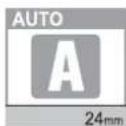
10
- The lens focal length you set is shown in the display screen of the flash unit.
The flash illumination coverage of Di866 responds to the lens focal length of 24mm to 105mm (full size format/film camera standard).
Set the camera's mode, select the focal length and take pictures with Di866 on your camera.
Di866 is a supplement to help your taking a creative and live picture. While you take pictures in Full Automatic mode, almost all jobs are automatically done by the camera and you just manually control the camera only.
| Mode | Shutter Speed | Aperture Setting | Control on the camera |
| [Auto] | Automatic | Automatic | Automatic |
| [P] | Automatic | Automatic | Automatic |
| [S] | Manual | Automatic | Any available shutter speed can be set. |
| [A] | Automatic | Manual | Any available f-stop can be set. |
| [M] | Manual | Manual | Any shutter speed / f-stop combination can be set. |
11

TTL Flash Exposure Value Compensation
With the latest TTL flash control system, the flash power level is always automatically controlled by the camera for the most appropriate exposure. You wish if you can soften or weaken the flash light, or give more light to the subject without changing the environmental or background exposure effect Di866 can make it possible quickly for each shot at respective occasion of flash picture.
The modes to be set on camera:
[Auto] (Full Auto), [P] (Program), [S] (Shutter priority),
[ A ] (Aperture priority), [ M ] (Manual);
as well as Night, Macro, Sport, Kids, Scene,
Portrait, depending on the camera model.
In all those camera's modes listed above, Di866 will automatically and fully work in iTTL automatic flash control system.
- Set Di866 to the camera's hotshoe and press the on/off switch to power on.
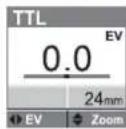
- Display screen shows A. Press set Set and the display turns to the screen of 6 icons.
- Select TTL by select button ◀ and set Set Or the display returns back to the A mode screen in about 8 seconds.
- The TTL flash exposure compensation value 0.0Ev is shown as a default setting.
- TTL flash exposure compensation is provided in 19 steps by 0.3Ev increment from -3.0⋯0⋯to +3.0Ev.
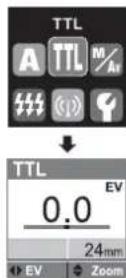
12
- Select ◀ the compensation value you desire and set Set.
- To keep this value on your flash, press on/off switch to lock. (Press it again to release the lock)
● Take a picture and the aimed subject is shown with required lighting effect by keeping the exposure level of back ground as originally expected.
- On some cameras, the TTL flash exposure compensation can be set on the camera.
- When the flash exposure compensation is set on the flash unit, this value is to be counted in addition to the compensation value you set on the camera.
- The display screen of the flash unit however shows the exposure compensation value set on the flash unit only.
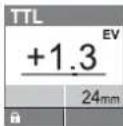
Set the camera's mode, select the flash exposure compensation value and take pictures. The almost all jobs are automatically done by the camera with such compensation of the flash exposure value and you just manually control the camera only.
13
ADVANCE CUSTOM SETTING
An ADVANCE CUSTOM SETTING enables you to enjoy creative flash photography.
For advance flash photography, following two functions can be set on your flash.
Sub Flash Function
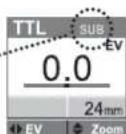
Di866 provides an extra small flash below the main flash. This small flash gives a fill-in light while bouncing the main flash. Bouncing the light may shadow the underside of face, and this fill-inn flash brightens up the shadow.
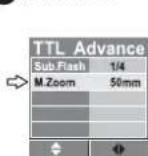
- On the TTL function screen, press the set button Set for 2 sec.
• TTL Advance page appears. - Select Subflash and continuously select ◀ the power and set Set or wait for 8 seconds to returns to the TTL function screen.
- The following 4 powers are prepared in accordance with the photographic situation.
| Subflash power | Guide No. at ISO100 |
| 1/1 (Full power) | 12 |
| 1/2 | 8.5 |
| 1/4 | 6 |
| 1/8 | 4 |
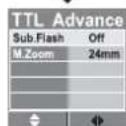
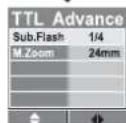
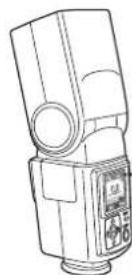
- This subflash function is available only at bounce photography, and the mark SUB appears when tilting the flash head. When the flash head is set at the normal position, this mark disappears.
14
Manual Zoom Setting
The reflector position of Di866 can manually be set.
When using Di866 with non-dedicated camera or traditional film type camera, the reflector position of Di866 does not respond to the camera lens movement. In this case, use this Manual Zoom Setting. To get an illumination area different from the picture frame, manual zoom setting makes a sense.
- On the TTL function screen, press the set button Set for 2 sec.
- TTL Advance page appears.
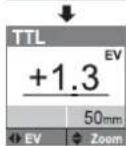
- Select M.Zoom and continuously select △ on and set Set or wait for 8 seconds to returns to the TTL function screen.
- Select any zooming position from 24mm to 105mm as desired.
15

Manual Power Operation
CAMERA MODE : [M] or [A]
Flash Power can manually be adjusted at option. The photographer can set his desired exposure manually by the most appropriate power in combination with the aperture value. 22 different power, from full power to 1/128 power, by every 1/3 stops are available.
- Set the camera mode, to [M] or [A] on your camera.
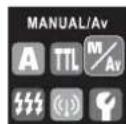
- Set the mode of Di866. From the 6 icons screen, select ◀▶M/Av and set Set.
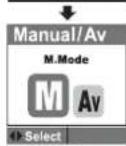
- Select ◀ ▷ M and set Set
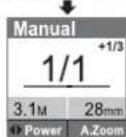
- Select ◀ your desired power and set Set.
- The camera-subject distance for the most proper exposure is determined by the film speed (ISO) and the F stop set on the camera.
- This distance is shown in the Manual function screen.
● The film speed information (ISO) is automatically transferred from the camera. - The F. stop you set on the camera is to be set on the flash unit, too.
- To get the camera-subject distance on the display screen, F. Stop setting is required.
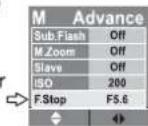
- Press set Set for 2 seconds, the screen goes to the Advance Function page.
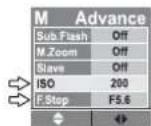
- Move cursor to F.Stop line and continuously select the same F.Stop number you set on your camera.
- Press on/off switch to lock the value. (Press it again to release the lock)
- The distance is automatically follows by changing the focal length and ISO sensitivity level on the camera, or selecting the other power level.
16
- As for the non-dedicated or traditional type film cameras, the film speed (ISO) information is not transferred from the camera.
- In this case, the film speed (ISO) is to be set on the flash unit to indicate the camera-subject distance.
- Move cursor to ISO line at Advance function page and continuously select the ISO value which you set on your camera.
17
ADVANCE CUSTOM SETTING
Advance custom setting is prepared in this mode.
Following advance functions are available, beside F. Stop and ISO setting.
Sub Flash Function —— page 14
Manual Zoom Setting ____ page 15
Slave Function
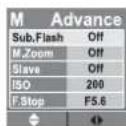
Di866 has a universal wireless remote flash system as a slave unit. You can enjoy creative flash photography with multiple lightings from the various directions. 2 slave modes are provided in accordance with the flash system of the master flash.
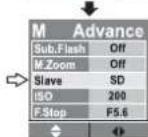
Slave Digital (SD) for digital pre-flash system and Slave Film (SF) for an analogue flash system are available.
SD : In this mode, Di866 synchronizes to the pre-flash system. The master flash is to be set at iTTL mode.
SF : In this mode, Di866 synchronizes to the traditional single flash system. The master flash is to be set at manual mode. Studio strobe lighting system synchronizes to this mode. This mode is also available for open flash, and for a traditional film type flash in the market.
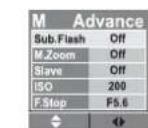
- To set Di866 to the salve function mode, move cursor to Slave line at Advanced function page and continuously select SD or SF in accordance with the system of the master flash you set.
18
- Setting of Mater and Slave flash:
Setting Master flash:
The master flash to be set is one unit only.
Place the master flash on the camera and switch it on.
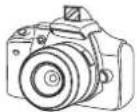
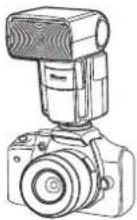
Or set the camera's built-in flash on. Make sure which mode you chose, digital
pre-flash flash system or analogue flash system.
Setting Slave flash Di866:
Multiple numbers of flashes can be set. Switch Di866 on and select the appropriate slave system either SD or SF.
When flash is set to the slave function, the red LED starts blinking every 2 seconds showing the slave
function is in order. Make sure the mode you set, SD or SF which should couple with the master flash system.
- Set slave flash at any place and direct the flash head as you desire. Slave sensor in the slave flash is to face the camera or to the master flash.
- Use the flash stand included. Place Di866 on to the flash stand which can be placed either on the flat place or on the tripod by the screw.
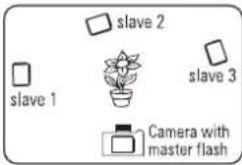
text_image
slave 2 slave 1 slave 3 Camera with master flashNOTE
Metal type accessory shoe is not recommended since it may give electric damage on the electrical contact of the flash hotshoe.
When setting Di866 to the slave function, the zoom setting system is automatically set for the Manual Zoom at 24mm position. The zooming position can be selected manually to any other position available. In this mode, the auto-off timer is recommended to set at 60min. or be cancelled.
19

Av. Mode Operation
CAMERA MODE: [M] or [A]
The flash light is automatically controlled by the photo sensor built-in the flash unit instead of TTL metering. Select your desired F. Stop on Di866 and set this F. Stop on your camera. The intensity of flash light is automatically controlled for the most proper exposure within the certain area of distance.
- Set the camera mode, to M or A on your camera.
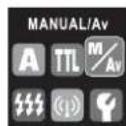
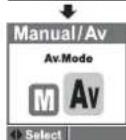
- Set the mode on Di866. From the 6 icons screen, select ◀ ▷ M/Av and set Set.
- Select ◀ ▷ Av and set Set.
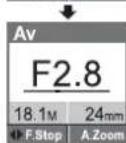
- F. Stop is displayed in the screen in accordance with the ISO setting on the camera.
- Select ◀ your desired F. Stop and set Set on the flash unit.
- Press on/off switch to lock the value. (Press it again to release the lock)
- Set the same F. Stop on your camera.
- The display screen shows the F. Stop selected, the camera-subject maximum distance for the proper exposure and the focal length set on the camera.
- The flash light is automatically controlled within the distance area. The shortest distance for the proper exposure is approximately 1.0m(3ft.) from the camera to the subject.
- The distance varies by changing the focal length and F. Stop set on Di866.
This Av. mode of Di866 is not coupled with camera's aperture setting. The aperture setting on the flash unit is not controlled by the camera.
- When changing the ISO setting on the camera, the F. Stop of the flash unit is automatically reset for such corresponding ISO value.
20
- In this case, reset this F. Stop on you camera.
- As for the traditional type film cameras, no ISO information or F. Stop information is transferred by the camera. In this case, set ISO value at the Advance function page of Di866.
ADVANCE CUSTOM SETTING
Advance custom setting is prepared in this mode.
Following advance functions are available, beside F. Stop and ISO setting.
Sub Flash Function page 14
Manual Zoom Setting page 15
Slave Function page 18
21

Multiple Flash Mode (Repeat flash/Stroboscopic flash):
CAMERA MODE : [M]
Repeating the flash illumination on the subject freezes the sequence of motion in one frame of picture.
In this mode, the power level, frequency and the number of flashes are to be set on the flash unit in advance.
Power Ratio:
Uncontrolled manual power is provided in 5 steps, from 1/8 to 1/128 power.
Frequency :
1 Hz to 90 Hz frequency can be set.
Flash Times :
1 time to 90 times can be set.
- Set the camera mode to M on your camera.
- Set the shutter speed on your camera in accordance with the guide table below.
-
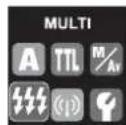
Set the mode on Di866. From the 6 icons screen, select ◀ and set Set.
-
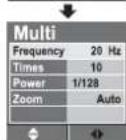
Value setting screen is appeared with the default values preset as shown.
- In this mode, the reflector zooming function is automatically set for option. Either Auto zoom or Manual zoom setting is selectable.
- Select the function and chose the value desired one by one.
- Press on/off switch to lock this condition.
- Or press set Set, the screen shows the 6 icons screen and returns back to Multi function screen in about 8 sec. The function and the value remain recorded as set.
22
● The use of tripod is recommended for this flash mode.
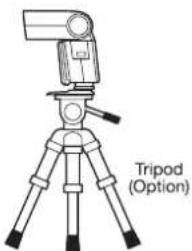
text_image
Tripod (Option)NOTE
The shutter speed to be set on the camera is calculated in the following formula.
Number of flashed ÷ Frequency = Shutter Speed
Example: To get 20 flashes at 10Hz → 20÷10=2
The shutter speed to be set on the camera is 2 sec. or longer. Shutter for bulb setting is also available.
Guide Table for the number of flashes
| Hz | 1 | 2 | 3 | 4 | 5 | 6-7 | 8-9 | 10 | 11 | 12-14 | 15-19 | 20-50 | 51-90 |
| 1/8 | 14 | 14 | 12 | 10 | 8 | 6 | 5 | 4 | 4 | 4 | 4 | 4 | 4 |
| 1/16 | 30 | 30 | 30 | 20 | 20 | 20 | 10 | 8 | 8 | 8 | 8 | 8 | 8 |
| 1/32 | 60 | 60 | 50 | 40 | 30 | 25 | 20 | 12 | 12 | 12 | 12 | 12 | 12 |
| 1/64 | 90 | 90 | 80 | 70 | 50 | 35 | 25 | 20 | 20 | 20 | 20 | 20 | 20 |
| 1/128 | 90 | 90 | 80 | 70 | 50 | 35 | 25 | 20 | 20 | 20 | 20 | 20 | 20 |
Caution
Do not repeat multiple flash more than 10 continuous frames. Take an interval of 10 to 15 minutes to the next shot. Flash source may be heated up and may cause serious damage on the flash unit. Please note that the basic operation is controlled by the main batteries(battery magazine) in the flash unit and when the main batteries are exhausted, flash control system does not work. Replace the batteries when recycle time becomes longer than 20 seconds by main batteries only.
23

Wireless TTL Flash Mode
Di866 provides two possibilities of off camera wireless remote flash system.
This page explains Wireless TTL flash system.
(The other system, slave flash system, is prepared at M and Av. mode. - Ref. page 18)
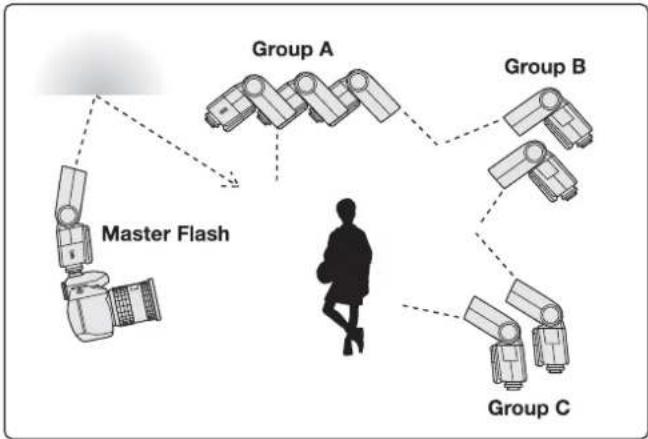
The flash unit placed on the camera, connected by TTL off-camera flash cord, camera's built in flash or the speed light commander are called "Master flash". The master flash to be set is one unit only.
The flash unit placed off the camera is called "Remote flash". Multiple number of flashes can be set and controlled in 3 different groups (A, B and C group).
4 channels are prepared for signal transmission between the Master flash and the Remote flash.
Available combination of flash models and cameras
Wireless TTL Flash Pairing Chart
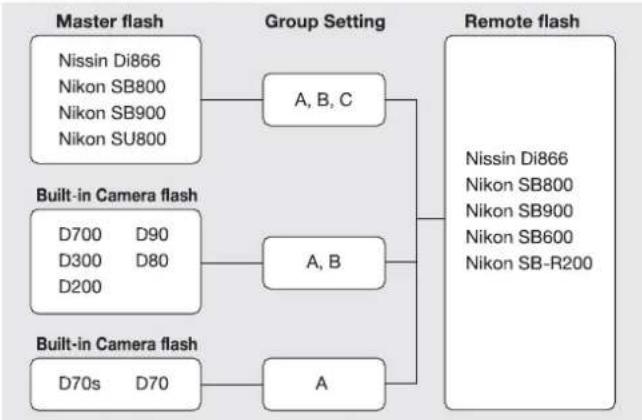
flowchart
graph TD
    A["Master flash"] --> B["Nissin Di866"]
    A --> C["Nikon SB800"]
    A --> D["Nikon SB900"]
    A --> E["Nikon SU800"]
    F["Built-in Camera flash"] --> G["D700 D90"]
    F --> H["D300 D80"]
    F --> I["D200"]
    J["Built-in Camera flash"] --> K["D70s D70"]
    J --> L["A"]
    M["Group Setting"] --> N["A, B, C"]
    N --> O["Remote flash"]
    O --> P["Nissin Di866"]
    O --> Q["Nikon SB800"]
    O --> R["Nikon SB900"]
    O --> S["Nikon SB600"]
    O --> T["Nikon SB-R200"]
24
Remote flash
There is no limit of the numbers of remote flash to set in one time. It is however recommended to set maximum 3pcs in one group, as it may cause interference between flashes depending on the photographic conditions.
Use flash stand to set the Remote flash. The stand provides the flash shoe and can stay either on the flat surface, or be placed on the tripod or light stand by the screw provided at the bottom.
When setting the flash to Remote, some flash automatically cancels its auto-off setting. Di866 is not automatically set to timer-off. It is recommended to cancel the auto-off setting or set it to 60 minutes at the Custom Settings - Ref. page 30.
Refer your flash instruction manual for this function, which may differ according to the flash model.
At Remote flash mode, Di866 is set automatically for manual zoom setting and sets its reflector position for 24mm to cover the wider range of illumination. It is possible to set the desired flash coverage angle manually by select button ◀ ▷.
Place the Remote flash in consideration of;
- The remote flash does not shoot its light directly into the camera lens.
- The wireless flash sensor of the Remote flash is not blocked.
- The remote flash is usually not place behind the master flash.
- In the daylight synchronization, the sensor of remote flash may be saturated by sunlight and its responsibility will extremely be reduced. In this case, the wireless TTL function may not result with success. Making a shade to cover the sensor of remote flash is one of the ideas to help the situation.
Setting the Remote flash
Channel, Group and the flash reflector zooming position are to be set on the Remote flash.
TTL and Manual mode is available on Remote Flash, which can however only be set by the Master flash.
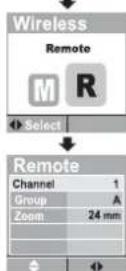
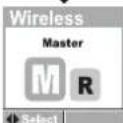
- From the 6 icons screen, select ◀ ▷ (↓) and set Set Select ◀ ▷ R and set Set. AF assist light starts blinking every 2 seconds showing Di866 stands by in Remote Flash mode.
- Select the line channel and set the channel. 4 channels are available from 1 to 4.
- Select the line Group and set the group. 3 groups are available from A to C.
- Select ≈ the line Zoom and set ◀ zooming position. When setting Di866 to the Remote mode, the zoom setting system is automatically set at 24mm position. The zooming position can be selected manually to any other position available.
- Press on/off switch to lock this condition. (Press it again to release the lock).
- Or press set set, the screen shows the 6 icons screen and returns back to Multi function screen in about 8 sec. The function and the value remain recorded as set.
● Auto-off timer is automatically cancelled and set to timer off. - When placing more flashes, repeat the same operation procedures instructed above.
- The group can be chosen free from A, B or C, but the channel of this bundle of wireless flash system is to be set in one common channel.
- The flash mode and the value can not be set on the Remote flash, but they are set by the Master flash only.
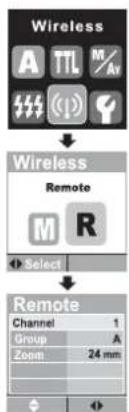
flowchart
graph TD
    A["Wireless"] --> B["Select"]
    B --> C["Remote"]
    C --> D["Channel 1: Group A, Zoom 24 mm"]
25
26
Setting the Master flash
The mode available on the Master flash is TTL or M mode.
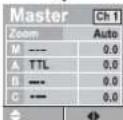
The master flash sets, the signal transmission channel, flash reflector zooming position, flash mode of the master flash itself, flash mode of the Remote flash at group A, B and C respectively.
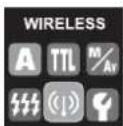
- From the 6 icons screen, select ◀ ▷ ⇌ (↓) and set Set
- Select ◀ ▷ M and set Set
- Set the master flash, first.
- On the display screen, the item channel is framed.
- Select the channel by select ◀ button. 4 channels are available from 1 to 4. The channel to select is to be same one as selecting on the Remote flash.
- Select ⇌ the next item Zoom, and set ◀ ▷ the zooming position from Auto or, 24mm through 105mm respective position as you desire.
- Select the next item M to set the operation mode and its value on the master flash.
- Move ◀ ▷ the cursor to the mode selection box and select the mode either TTL(TTL), Manual(M) or Flash-off(---).
- Move ◀ ▷ the cursor to value setting box and select ≡ the value.
- Set the Remote flash by the master flash.
- Select ⇌ A (Group A).
- Move ◀ ▷ the cursor to the mode selection box and select ⇌ the mode either TTL or Manual.
- Move ◀ ▷ the cursor to value setting box and select ⇌ the value.
- The remote flash set at Group A is now set accordingly by the master flash. In case of multiple flashes are set for group A, all flashes belong to group A are set to this condition altogether.
- For more groups, if set, select the next group and repeat the same operation procedure as instructed above.
- Di866 can set up maximum 3 groups, of A, B and C.
- The flash mode and the value set on the Master flash is automatically transferred to every Remote flash and controlled respectively when the Master flash is triggered.
27
- Place the Master flash on to the camera and release the shutter, the all flash units in the system work all together in one time.
WIRELESS TTL FLASH SETTING EXAMPLE
flowchart
graph TD
    A["Master Flash"] --> B["Group A"]
    B --> C["Group B"]
    C --> D["Group C"]
    D --> E["Group A"]
    style A fill:#f9f,stroke:#333
    style B fill:#ccf,stroke:#333
    style C fill:#cfc,stroke:#333
    style D fill:#fcc,stroke:#333
28

Custom settings
A variety of custom settings enable you to customize your Di866.
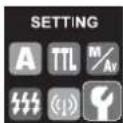
- From 6 icons, select ◀ ▷ ≡ Custom setting mode and set Set .
- Select ⇌ the item to be customized and set ◀ ▷ the value to customize.
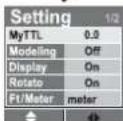
- 7 custom settings are prepared.
My TTL TTL Exposure level custom setting
TTL exposure level is accurately calibrated for standard balance in accordance with Nissin's standard. If any adjustment is however required, or if you like to set your own preferable level, it can be adjusted for about ±3ev. by every 1/3 steps.
Modeling Illuminating the subject to find its lighting efficiency.
A short pulse of flash light released by the test button illuminates the subject monitoring the lighting efficiency on the subject.
Display Display can be set off if it's not necessary.
To save a battery energy, or imply to avoid the display illumination, the display screen can be switched off when not in operation job. Set it off, and the display goes off in 8 seconds after the last job of operation. The display will not wake up by the camera's shutter release. The display can only be woken up by the operation button of Di866.
Rotate Cancel the rotating action and keep the image fixed. The screen won't rotate.
ft/meter For the user who prefers distance indication by feet. Select ft instead of meter.
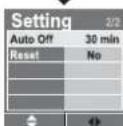
Auto Off Auto off timing can be selected from 10min. 15min. 45min. 60min. or off (cancel).
Reset
All those customs setting is reset to the default value and conditions which are provided and set at the factory.
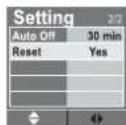
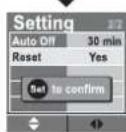
- Those customized value and conditions are effective on all modes(*) and memorized even the flash unit is switched off.
- To reset the customized value or conditions, select Reset, chose "Yes" and set Set. All the memorized data is cancelled and Di866 is reset to the default value and condition.
30
Functions by Camera setting
You do not need to set the flash unit for these functions.

High speed shutter synchronization
This function is available at A mode and TTL mode.
Di866 produces FP flash beam and synchronizes to the highest shutter speed set on the camera. To capture subject with softening off the back ground in daylight synchronization photography, the shutter speed is to set at higher than the regular synchronization speed. When the camera shutter is set at the faster shutter speed, a mark FP is shown in the display screen on Di866 and the flash system is automatically set for FP flash beam.

Rear curtain synchronization
All modes except Multiple flash mode are available for this sync. system. In rear-curtain sync., the flash fires just before the rear curtain close. By using this function at slow shutter speeds, a moving subject will appear with such moving marks behind. Refer the operation manual of the camera for details.

Auto Flash Bracketing
Di866 supports this function at A mode and TTL mode. By setting this function on the camera, you will get continuous flash pictures in the different exposure effect on each frame. Exposure compensation ratio, number of picture frame is to be set on the camera. Refer the operation manual of the camera for details.
31

Red-eye reduction
To prevent the subject's eyes from appearing red, Di866 fires three controlled flash just before the picture is taken. Red-eye reduction can be combined with slow sync. Red-eye reduction flash is produced at all modes of Di866. Refer the operation manual of the camera for details.

Fv. Lock
Di866 offers this function at A and TTL mode.
Focus the main subject and press
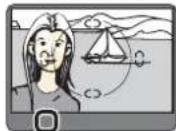
Aim the viewfinder center over the main subject and release the shutter.

Slow Shutter Synchronization
All modes in Di866 supports the slow shutter synchronization.
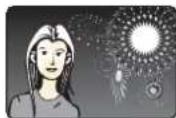
The flash is controlled at a slow shutter speed to trace the correct exposure on both the main subject and back ground in low light conditions or at night.
The slow shutter speed produces a blurring effect of the subject and a sharp flash beam freeze the moment. A combination of slow shutter and flash light creates a motion image in the still picture.
32
OTHER FEATURES
AF assist light emitter
Under the low light condition, in the dark place, AF assist light will automatically emitt the red colored beam and illuminate the subject, so that the camera can easily focus the subject in darkness.
Fill-in reflector and Light diffusing panel built-in
For short distance or portrait flash photography, we wish if the light is not too sharp or too strong to the subject. Use fill-in reflector flash or diffuse the light.
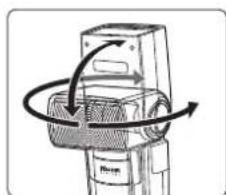
- If the subject is close(within 2 meter), turn the flash head 90^ upward and pull out the fill-in reflector as shown in the picture.
● Take a picture as usual. A blink of fill-in flash freshens up the subject in natural image. - This small blink of flash is also useful when taking a picture of baby without scaring him.
- Pull out the light diffusing panel and place it over the flash window as shown in the picture. The diffusing panel makes the flash light soften and creates a lively color effect on the subject.
- Since the light diffusing panel expands the lighting area, it covers the range of 18mm of focal length lens.
natural_image
Diagram of a mechanical device with rotational arrows indicating motion (no text or symbols)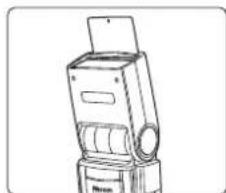
natural_image
Line drawing of a mechanical device with a cylindrical component and a top-mounted screen (no text or symbols)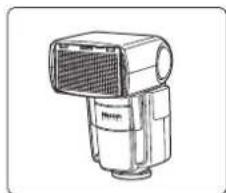
natural_image
Line drawing of a mechanical device with a central grille and base mount (no text or symbols)Bounce Lighting
When taking a picture of a baby or small children, do not shoot the flash straight on to them. Bounce the light off the ceiling or wall so that it won't scare them.
When pointing the flash to a subject in front of the wall, it creates an unexpected sharp shadow on the wall results the picture disappointed. Bounce the light off the ceiling or wall to soften the light over on the subject, and the shadow fade out.
Turn the flash head upwards or sideway. The wall or ceiling in this case should be flat surface and white color is preferable. Colored ceiling or wall may reflect its color on the subject.
External Power Pack Socket

When using an external power source, the number of flashes is increased and the recycling time is shortened. Following external power pack is available in option.
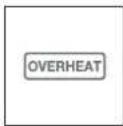
Di866 is automatically turned off when repeating flash continuously
| Battery = NiMH battery | Operation Modes | Recycle time |
| Nissin Power Pack PRO-300 | 500 flashes | 0.7 sec. |
| Nikon SD-8A | 200 flashes | 1.5 sec. |
over 20 to 30 times to protect the flash circuitry. It will be automatically reset after 15 minutes of rest. Please note that the basic operation is controlled by the main batteries(battery magazine) in the flash unit and when the main batteries are exhausted, flash control system does not work. Replace the batteries when recycle time becomes longer than 20 seconds by batteries only.
USB Service Port
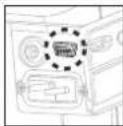
For firmware update service, Di866 provides a USB service port. Di866 is developed to work with the cameras presently available in the market and it may need to install updated firmware to work with the new camera coming future, or the camera with updated firmware. In this case, a software to work with such new version will be available at Nissin's home page to download. The same USB connector cord included in the camera's package can commonly be used.

X terminal
Di866 can be used with non-hotshoe cameras. Some cameras provide a flash synchronization contact at x-terminal instead of hotshoe. For this type of cameras, Di866 has a x-terminal socket for flash synchronization. A standard sync-cable in the market is usable.

35
Guide Number and Flash duration table
Guide No. at manual exposure mode (ISO 100 in meters/feet)
Flash Power Level
| Zoom position | Full | 1/2 | 1/4 | 1/8 | 1/16 | 1/32 | 1/64 | 1/128 |
| 24mm | 31 | 22 | 16 | 11 | 8 | 5.5 | 4 | 2.5 |
| 28mm | 36 | 25 | 18 | 12.5 | 9 | 6.5 | 4.5 | 3 |
| 35mm | 40 | 28 | 20 | 14 | 10 | 7 | 5 | 3.5 |
| 50mm | 46 | 32 | 23 | 16 | 11.5 | 8 | 5.5 | 4 |
| 70mm | 52 | 36 | 26 | 18 | 13 | 9 | 6.5 | 4.5 |
| 85mm | 54 | 38 | 27 | 19 | 13.5 | 9.5 | 7 | 5 |
| 105mm | 60 | 42 | 30 | 21 | 15 | 10.5 | 7.5 | 5.5 |
| Flash Duration (sec.) | 1/600 | 1/900 | 1/1500 | 1/3200 | 1/5000 | 1/9000 | 1/15000 | 1/22000 |
TROUBLE SHOOTING
The flash unit does not start charging.
● Batteries are not correctly installed
Install batteries to correct direction.
● Batteries are exhausted
Replace the batteries if the recycle time beyond 20 sec.
The flash unit does not flash.
● The flash unit is not firmly clipped on the camera
Mount the flash unit firmly on the camera's hot shoe.
● The flash unit is automatically powered off
Turn on the switch again
The flash picture is overexposed or underexposed.
● A reflective object or strong lighting near the subject >>> Use Fv lock.
● The unit is set for manual exposure mode at wrong distance >>> Set to TTL mode or select other power level.
SPECIFICATIONS
| Usable cameras | Nikon iTTL flash system SLR and hotshoe type compact digital cameras-ref. page 2 for camera models. |
| Guide No. | 60/198 at 105mm focal length (ISO 100 m/ft) |
| 40/132 at 35mm focal length (ISO 100 m/ft) | |
| Wattage | 83 Ws. at full power |
| Illumination coverage | 24-105mm (18mm with diffuser panel built-in) |
| Power source | 4 x LR6 batteries (Size AA Ni-MH or lithium batteries usable) |
| Battery life | 150-1500 flashes according to the mode (with alkaline batteries) |
| Energy Saving | Come to Stand-by mode in 30 sec., and Power off time can be set |
| Recycle time | 5.5 sec. with fresh alkaline batteries for full power |
| Flash Exposure | iTTL for Nikon digital SLR cameras |
| Automatic exposure metering by external photo sensor | |
| Manual exposure (Power ratio available)-Ref G.No. table below | |
| AF assist light | Effective range of approx. 0.7 to 10m / 2.3 to 33 ft. |
| Color Temperature | 5600 K°at full power flash |
| Flash Duration | 1/300 sec. (full power flash) |
| 1/300-1/30,000 sec. (controlled flash) | |
| FP flash for high speed synchronization | |
| Wireless flash | Wireless TTL off camera flash system |
| Wireless Master mode | |
| Wireless Remote mode | |
| Slave flash function at external auto-exposure | |
| Slave to digital pre-flash system | |
| Slave to traditional single flash sytem | |
| External Power Pack | Service socket for the external power pack(optional accessory) |
| Nissin Power Power Pack Pro-300 | |
| Nikon Power Assist Pack SD-9/SD-8A | |
| USB service port | For firmware update service from home page |
| USB cord is not included | |
| Sync. Contact | Camera's hot shoe-iTTL for Nikon system |
| Traditional sync. System | |
| X-terminal socket | |
| Dimensions | 74 x 134 x 110mm (29.2 x 53 x 43.5 inch) |
| Weight | 380g |
36
WARANTEE
In case of the following reason of the defect, it may void the warrantee. Please refer the respective warrantee condition for details which depend on the country by country.
- The product is not used in accordance with the instruction of the owner's manual.
- The product is repaired or modified by the one who is not an authorized repair service.
- When the products is used with the cameras not applicable, lens, adaptors or such accessories produced by the third party.
- Fault or defect caused by fire, earthquake, flood, public pollution and such natural accident.
- In case that the product is stored in dust, moisture, extremely high temperature or such poor condition.
- Scratch, blemish, crush or worn out by a violently use or treatment.
- Guarantee card without name of place purchased or date of purchase stamped, or no guarantee card.