
MAP 790 - GPS et systèmes de navigation CLARION - Notice d'utilisation et mode d'emploi gratuit
Retrouvez gratuitement la notice de l'appareil MAP 790 CLARION au format PDF.


| Type de produit | GPS portable et système de navigation |
| Marque | CLARION |
| Modèle | MAP 790 |
| Dimensions (L x H x P) | 127,2 x 82,2 x 20 mm |
| Poids | Environ 200 g |
| Écran | Écran LCD 4,3 pouces haute définition non réfléchissant |
| Alimentation | Batterie lithium-ion rechargeable intégrée, adaptateur secteur et chargeur voiture inclus |
| Autonomie | Environ 3 à 5 heures selon utilisation |
| Processeur | 400 MHz |
| Mémoire interne | 2 Go flash |
| Stockage externe | Slot carte SD/SDHC jusqu'à 8 Go |
| Récepteur GPS | Sirf III, 20 canaux, compatible antenne externe |
| Bluetooth | Intégré, kit mains-libres, streaming audio A2DP, AVRCP |
| Trafic | Récepteur RDS-TMC intégré, information trafic gratuite (selon pays) |
| Cartes préinstallées | 44 pays d'Europe |
| Fonctions de navigation | Affichage 3D (bâtiments, relief), indicateur de voie, panneaux de signalisation, noms de rues énoncés, recherche par code postal, POI, ordinateur de bord |
| Multimédia | Lecteur MP3/WMA, vidéo, visionneuse de photos |
| Langues disponibles | 32 langues pour la navigation, 38 pour les instructions vocales, 11 pour la synthèse vocale (TTS) |
| Contenu de la boîte | Adaptateur secteur, chargeur voiture, câble USB, kit de montage antivibrations, antenne TMC, stylet, DVD de sauvegarde, guide de démarrage rapide |
| Entretien et nettoyage | Nettoyer l'écran avec un chiffon doux et sec. Ne pas utiliser de produits abrasifs. |
| Sécurité | Utiliser uniquement le support de fixation fourni. Ne pas manipuler en conduisant. Respecter les lois locales sur les radars. |
| Pièces détachées et accessoires | Supports, socles, antennes, chargeurs : références CMK002, PBK431, etc. (voir notice complète) |
| Réparabilité | Pour toute réparation, contacter un centre agréé CLARION ou le revendeur. |
FOIRE AUX QUESTIONS - MAP 790 CLARION
Questions des utilisateurs sur MAP 790 CLARION
0 question sur cet appareil. Repondez a celles que vous connaissez ou posez la votre.
Poser une nouvelle question sur cet appareil
Téléchargez la notice de votre GPS et systèmes de navigation au format PDF gratuitement ! Retrouvez votre notice MAP 790 - CLARION et reprennez votre appareil électronique en main. Sur cette page sont publiés tous les documents nécessaires à l'utilisation de votre appareil MAP 790 de la marque CLARION.
MODE D'EMPLOI MAP 790 CLARION
More than a navigator: a leader
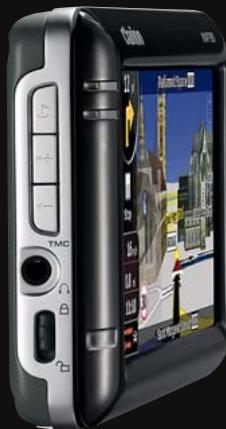
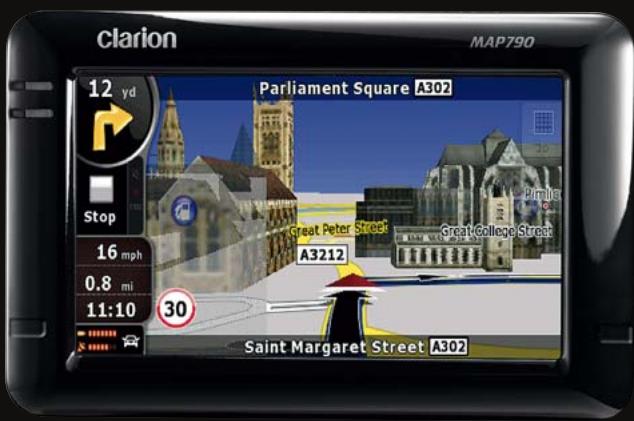
MAP790/MAP690
PORTABLE NAVIGATION


Bluetooth
COMPACT SIZE (mm): 127.2 (W) × 82.2 (H) × 20 (D)
- GENERAL: • High Definition 4.3" non-reflective LCD display for crystal clear viewing • Built-in RDS-TMC tuner for traffic information • Built-in Bluetooth® interface for Hands-free and Audio Streaming (A2DP) • Sirf III GPS module with 20-channel receiver • External GPS antenna capable • 400 MHz CPU • 2 GB flash memory • SD card slot with up to 8 GB capacity • Lithium ion rechargeable battery • Equipped with postcode search (handles 5-digit & 8-digit codes for UK)
- PACKAGE CONTENT: AC adapter, Car charger, USB cable, Vibration-free mounting kit, TMC antenna, Stylus, Backup DVD, Quick start guide
- NAVIGATION: • 360° 3D display mode for: 3D city maps, 3D landmarks, 3D terrain • Simple mode or Advanced mode operation • Free TMC traffic information • Signpost information • Lane indicator • Spoken street and city names • Rich POI database • Trip computer • Speed limit information • Speed camera compatible • Navigation programme languages: 32 • Voice guidance languages: 38 • TTS voice languages: 11
*Speed camera warning may be prohibited in some countries. *3D information is not available everywhere. *Only 18 languages available for Setting and Bluetooth menu. *Toll-Free Traffic Information is not available in all countries.

NAVIGATION

ENTERTAINMENT
Navigation menu
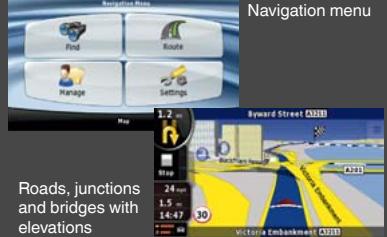
*Illustration of bridge with shadow underneath
- Trip Computer
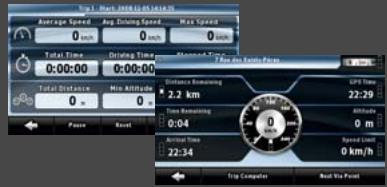
● Text to Speech
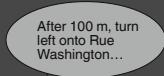
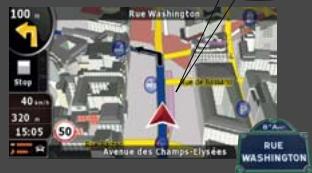
While streets are displayed on the screen, the voice guidance tells you their actual name. Also, the system is able to tell you the direction to take, so when driving in Paris you would hear “... After 100m, turn left onto Rue Washington...”
● Movie Player
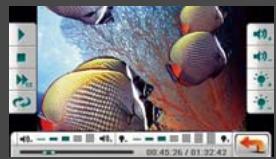
Enjoy portable cinema function anywhere with popular movie formats saved on MMC or SD cards up to 8 GB.
Music Player
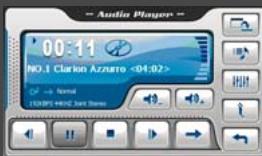
Transform your MAP navigation system instantly into a handy touch screen MP3/WMA compatible music player.
● Photo browser
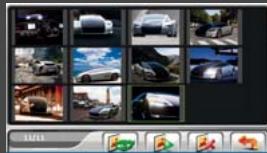
Create your own personal photo album and share it with friends wherever you go.

natural_image
Man wearing sunglasses and a dark shirt holding a smartphone outdoors, seated at a table with a glass of water and trees in the background (no visible text or symbols)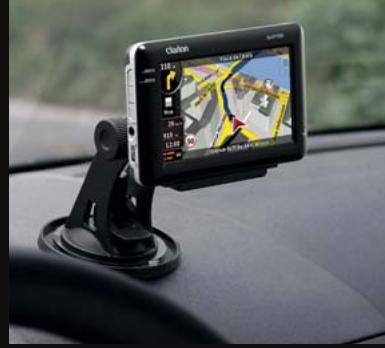
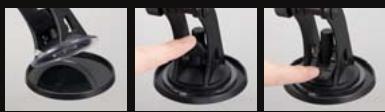
The stand installs in seconds, with a large suction cup that affixes firmly on the dash. Accomodates virtually any make of car (dashboard disc is optional).
Enjoy music, pictures and videos thanks to an SD/SDHC Memory Card slot and a mini USB port


COMMUNICATION
Bluetooth®
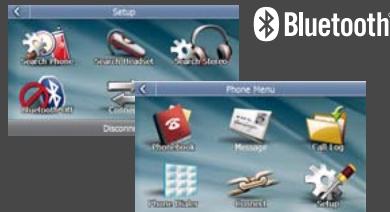
Built-in enhanced Bluetooth functionality lets you fully enjoy the MAP790 / MAP690. Safe driving does not demand that you compromise on powerful communication. Phone book management • POP message for incoming SMS • Audio Streaming (A2DP) • Audio Video Remote Control Profile (AVRCP)
RDS-TMC
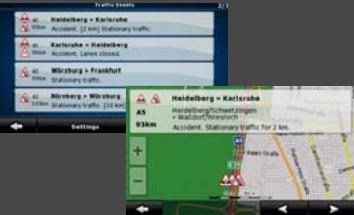
Receive instant traffic information through the built-in TMC receiver. The MAP790 / MAP690 can receive toll-free traffic information (TMC). You are always informed whenever new information is broadcast. *Toll-Free Traffic Information is not available in all countries.
360° 3D Realistic View
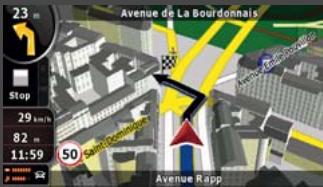
3D Buildings
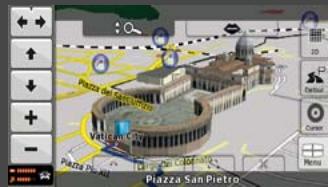
3D Landmarks
Comfort and clear instructions promote safe driving. This is the reason why Clarion considers it is so important to provide high quality graphics in its navigation systems, offering route guidance with detailed and realistic map views. Many cities are represented with 3D buildings, landmarks and monuments, shown in their actual shapes in great detail.
Elevation
Modelling Terrain
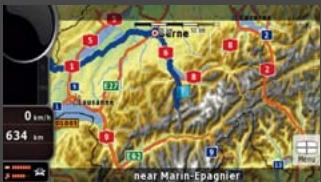
Topographical view
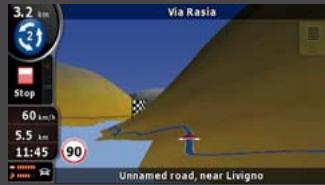
Modelling Terrain in 3D
While driving, hills and mountains are rendered in 3D to better represent your real-world driving environment. 3D landmark data is integrated seamlessly into the graphical rendering in 3D mode and does not block the view of POIs and other useful information
Lane Indicator and Motorway Signposts
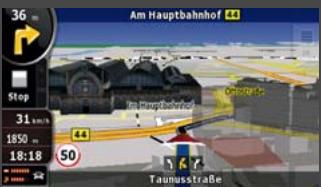
Lane Indicator
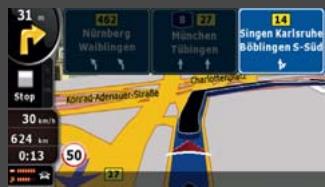
Signposts
The system shows which lanes allow you to exit and which ones continue ahead. All lanes on the same road segment are rendered, with the lane you need to take highlighted. On the motorway, this information in enhanced by an extremely clear representation of actual signposts on the road.
Bluetooth®
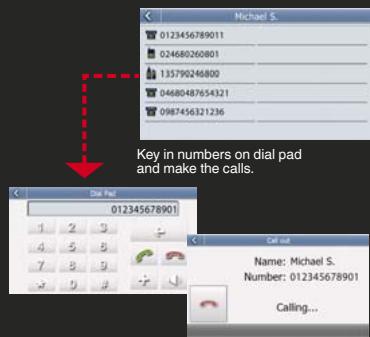
Make a call from the touch screen
Just touch the name on the phonebook screen to initiate and place a call. If your entry has multiple stored phone numbers, you can select which one to call. Of course, you can also manually key in the phone number.
SMS (Short Message Service)
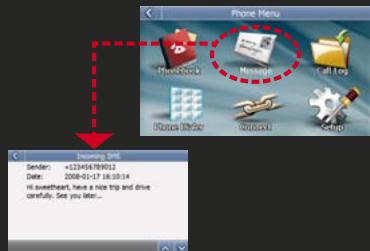
Popup appears for incoming SMS messages, and you can save downloaded docs in a designated file. Messages can be imported automatically right after connection, or manually.
MAP COVERAGE
MAP790 with preinstalled map data for 44 countries. The complete solution for all of Europe.

Albania, Andorra, Austria, Belarus, Belgium, Bosnia-Herzegovina, Bulgaria, Croatia, Czech Republic, Denmark, Estonia, Finland, France, Malta, Monaco, Macedonia, Germany, Greece, Hungary, Ireland, Italy, Latvia, Lithuania, Luxembourg, Moldova, the Netherlands, Norway, Poland, Portugal, Romania, San Marino, Serbia, Montenegro, Slovakia, Slovenia, Spain, Gibraltar, Sweden, Switzerland, Liechtenstein, Turkey, Ukraine, United Kingdom, the Vatican
MAP690 and SD card with map data. Your flexible way to navigate
| MAP690EEU | MAP690RUS | MAP690TRK |
| Eastern Europe package contains MAP690 + SD690EEU | Russia package contains MAP690 + SD690RUS | Truck package contains MAP690 + SD690TRK |
| • TeleAtlas maps and local map data provider for more detailed coverage• Rich POI database• 3D landmarks and petrol stations• 3D city maps (Hungary only)• Cross border routing in Eastern Europe• Major road network for Western Europe | • Up-to-date TeleAtlas coverage for Russia• 3D landmarks• 3D petrol stations• Lane indicator | • Software supports vehicle specification (height, weight, length, hazardous goods)• Route calculation respects physical and legal restriction for trucks• Truck-specific Points of Interest |
- PORTABLE NAVIGATION ACCESSORIES
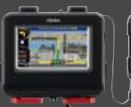
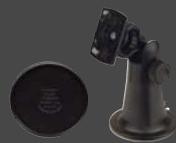
CMK002
Vibration-free mounting bracket including self-adhesive disc connector MAP790, 690, 780, 680, 770, 670, 370, 560, 360
PBK431
PND socket for CMK002 For MAP790, 6
PBK430
PND socket for CMK002 For MAP780, 6770, 670
PBK350
PND socke For MAP50
-
t for
PND socket for
CMK002 For MAP780, 6 770, 670
PBK35
PND socke For MAP50
-
t for 60, 3
•
CMK 70,3
The Ground Truth image displays a single, solid horizontal line. According to Rule 2 (UNDERSCORE & LINE RULES), this is a stylistic or background line, not a placeholder underscore. Therefore, the OCR result must ignore it and output nothing or only meaningful text. The provided OCR content is "____", which consists of four underscores. This is an incorrect interpretation of the line as a placeholder, violating the rule that stylistic lines must be ignored. The OCR has hallucinated underscores where none should exist based on the GT's visual context. Hence, the OCR result is inconsistent with the Ground Truth.
002 60
-
-
( x - 2x) t - xy^2 = ( x - 2x) f^ t
|
PNC432
Prot For
432
ectic MAP7
;
n ca 90,6
-
se 90
-
m = 311
-
m = 311
2 : x^ ( x) = y^ ( x) = 1 . x^2 + y = - 1
( x - 2x) t - xy^2 = ( x - 2x) f^ t
PC
Ca For
COO
r cha MAR
1
arge 790
-
r 690
-
780
-
680
-
m = 311
G
E Fo
PAO
xterl er MA
01
nal O P79
-
GPS 0,690
-
ante 0,78
-
nna 0,68
-
).
B
V
502
rpro AP78
-
of pr 0,68
m = 311
oted 0
-
tion
-
cas
m = 311
e
The results of the present study are presented in Table 1. The mean values of the three parameters were 2.0% (range, 1.5 - 3.0% ) and 2.4% (range, 1.5 - 3.0% ). The mean values of the other parameters were 1.8% (range, 1.5 - 2.5% ) and 1.9% (range, 1.5 - 2.5% ). The mean values of the other parameters were 1.7% (range, 1.5 - 2.5% ) and 1.6% (range, 1.5 - 2.5% ).
The results of the present study are presented in Table 1. The mean values of the three parameters were 2.0% (range, 1.5 - 3.0% ) and 2.4% (range, 1.5 - 3.0% ). The mean values of the other parameters were 1.8% (range, 1.5 - 2.5% ) and 1.9% (range, 1.5 - 2.5% ). The mean values of the other parameters were 1.7% (range, 1.5 - 2.5% ) and 1.6% (range, 1.5 - 2.5% ).
The results of the present study are presented in Table 1. The mean values of the three parameters were 2.0% (range, 1.5 - 3.0% ) and 2.4% (range, 1.5 - 3.0% ). The mean values of the other parameters were 1.8% (range, 1.5 - 2.5% ) and 1.9% (range, 1.5 - 2.5% ). The mean values of the other parameters were 1.7% (range, 1.5 - 2.5% ) and 1.6% (range, 1.5 - 2.5% ).
The results of the present study are presented in Table 1. The mean values of the three parameters were 2.0% (range, 1.5 - 3.0% ) and 2.4% (range, 1.5 - 3.0% ). The mean values of the other parameters were 1.8% (range, 1.5 - 2.5% ) and 1.9% (range, 1.5 - 2.5% ). The mean values of the other parameters were 1.7% (range, 1.5 - 2.5% ) and 1.6% (range, 1.5 - 2.5% ).
The results of the present study are presented in Table 1. The mean values of the three parameters were 2.0% (range, 1.5 - 3.0% ) and 2.4% (range, 1.5 - 3.0% ). The mean values of the other parameters were 1.8% (range, 1.5 - 2.5% ) and 1.9% (range, 1.5 - 2.5% ). The mean values of the other parameters were 1.7% (range, 1.5 - 2.5% ) and 1.6% (range, 1.5 - 2.5% ).
The results of the present study are presented in Table 1. The mean values of the three parameters were 2.0% (range, 1.5 - 3.0% ) and 2.4% (range, 1.5 - 3.0% ). The mean values of the other parameters were 1.8% (range, 1.5 - 2.5% ) and 1.9% (range, 1.5 - 2.5% ). The mean values of the other parameters were 1.7% (range, 1.5 - 2.5% ) and 1.6% (range, 1.5 - 2.5% ).
The Ground Truth image displays a single, solid horizontal line. According to Rule 2 (UNDERSCORE & LINE RULES), if the GT contains lines used for stylistic emphasis or as background (like ruled paper), the OCR result must ignore them. The line in the GT is clearly a stylistic/background line, not a placeholder for text. Therefore, the OCR should not have output any underscores. Outputting `____` constitutes an error under Rule 2, as it hallucinates placeholder symbols where none are semantically intended. Hence, the OCR result is inconsistent with the Ground Truth.
CMK00270,360
m = 311
on case
80, 68
m = 311
m = 311
m = 311
m = 311
m = 311
7
on case
60,37
FM9
Exte
For M
9
ernal
MAP5
-
TMC
60, 3
m = 311
recei
70, 36
m = 311
ver
0
m = 311
The image is too blurry to recognize any text content.
The image is too blurry to recognize any text content.
10
0,
-
NAVIGATION MAP UPDATE
Please see our website for the latest available map updates
Marque : CLARION
Modèle : MAP 790
Catégorie : GPS et systèmes de navigation