EPSON EB-455WI - Projecteur interactif

EB-455WI - Projecteur interactif EPSON - Notice d'utilisation et mode d'emploi gratuit

Retrouvez gratuitement la notice de l'appareil EB-455WI EPSON au format PDF.
📄 16 pages Français FR Télécharger 💬 Question IA 10 questions ⚙️ Specs
Notice EPSON EB-455WI - page 1
Choisissez votre langue et indiquez votre email : nous vous enverrons une version traduite specifiquement.
Intitulé Description
Type de produit Projecteur interactif à courte focale
Résolution native WXGA (1280 x 800)
Luminosité 3 300 lumens (mode normal)
Contraste 16 000:1
Technologie d'affichage 3LCD
Connectivité HDMI, VGA, USB, RJ-45, RS-232C
Dimensions approximatives 380 x 290 x 100 mm
Poids 3,6 kg
Alimentation électrique 100-240 V, 50/60 Hz
Durée de vie de la lampe Environ 10 000 heures (mode éco)
Fonctions principales Projection interactive, partage d'écran sans fil, correction de la distorsion
Entretien et nettoyage Nettoyage régulier du filtre à air, remplacement de la lampe selon l'utilisation
Pièces détachées et réparabilité Lampe, filtre à air, télécommande disponibles en pièces détachées
Sécurité Protection contre la surchauffe, verrouillage par code PIN
Compatibilités Compatible avec Windows, Mac, Chromebook, et appareils mobiles

FOIRE AUX QUESTIONS - EB-455WI EPSON

Comment connecter mon EPSON EB-455WI à un ordinateur ?
Pour connecter votre EPSON EB-455WI à un ordinateur, utilisez un câble HDMI ou VGA. Assurez-vous que le projecteur est allumé, puis sélectionnez la source appropriée en appuyant sur le bouton 'Source' de la télécommande.
Que faire si l'image projetée est floue ?
Si l'image est floue, ajustez la mise au point en tournant la molette de mise au point sur le projecteur. Assurez-vous également que le projecteur est à la bonne distance de l'écran.
Comment régler le volume du son sur le projecteur ?
Utilisez les boutons de volume sur la télécommande du projecteur pour augmenter ou diminuer le son. Vous pouvez également régler le volume à partir de l'ordinateur connecté.
Que faire si le projecteur ne s'allume pas ?
Vérifiez que le projecteur est correctement branché à une source d'alimentation. Si le témoin d'alimentation est éteint, essayez de changer de prise. Si le témoin clignote, laissez le projecteur refroidir avant de le rallumer.
Comment mettre à jour le firmware de l'EPSON EB-455WI ?
Pour mettre à jour le firmware, téléchargez la dernière version depuis le site officiel d'Epson. Ensuite, suivez les instructions fournies dans le guide de mise à jour.
Comment nettoyer le filtre à air du projecteur ?
Pour nettoyer le filtre à air, éteignez le projecteur et débranchez-le. Retirez le filtre et nettoyez-le délicatement avec un aspirateur ou un chiffon doux. Remettez le filtre en place une fois qu'il est propre.
Que faire si le projecteur ne reconnaît pas le signal HDMI ?
Vérifiez que le câble HDMI est bien connecté à la fois au projecteur et à l'ordinateur. Essayez d'utiliser un autre câble HDMI ou un autre port HDMI sur le projecteur.
Comment régler la projection pour un affichage en format paysage ou portrait ?
Pour changer l'orientation de l'affichage, accédez au menu de configuration du projecteur et sélectionnez l'option d'orientation de l'image. Choisissez entre 'Paysage' ou 'Portrait' selon vos besoins.
Comment réinitialiser les paramètres d'usine de l'EPSON EB-455WI ?
Pour réinitialiser aux paramètres d'usine, allez dans le menu 'Configuration', puis sélectionnez 'Réinitialiser' et confirmez l'action. Cela rétablira tous les paramètres par défaut.
Comment utiliser la fonction de tableau blanc interactif ?
Pour utiliser la fonction de tableau blanc interactif, assurez-vous que le logiciel approprié est installé sur votre ordinateur. Suivez les instructions à l'écran pour calibrer et interagir avec le tableau.

Questions des utilisateurs sur EB-455WI EPSON

0 question sur cet appareil. Repondez a celles que vous connaissez ou posez la votre.

Poser une nouvelle question sur cet appareil

L'email reste privé : il sert seulement à vous prévenir si quelqu'un répond à votre question.

Aucune question pour l'instant. Soyez le premier à en poser une.

Téléchargez la notice de votre Projecteur interactif au format PDF gratuitement ! Retrouvez votre notice EB-455WI - EPSON et reprennez votre appareil électronique en main. Sur cette page sont publiés tous les documents nécessaires à l'utilisation de votre appareil EB-455WI de la marque EPSON.

MODE D'EMPLOI EB-455WI EPSON

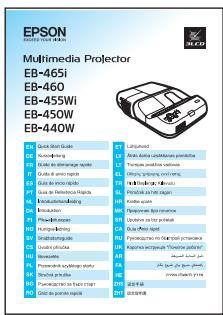
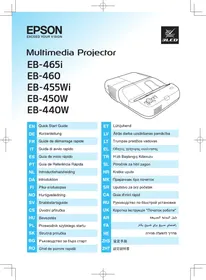
Multimedia Projector

EB-465i

EB-460

EB-455Wi

EB-450W

EB-440W
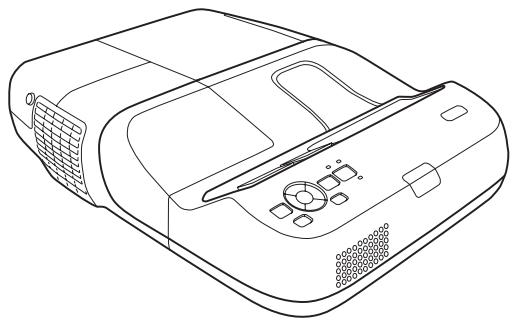
EPSON EB-455WI - EB-440W - 1

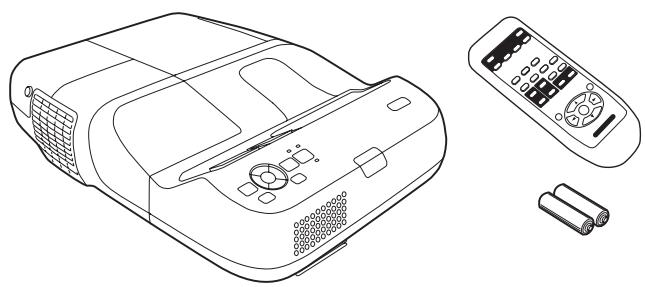
natural_image Line drawing of a projector device with control panel and ventilation slots (no text or symbols)
ENQuick Start Guide
DEKurzanleitung
FRGuide de démarrage rapide
ITGuida di avvio rapido
ESGuía de inicio rápido
PTGuia de Referência Rápida
NLIntroductiehandleiding
DAIntroduktion
FIPika-aloitusopas
NOHurtigveiledning
SVSnabbstartsguide
CSÚvodní příručka
HUBevezetés
PLPrzewodnik szybkiego startu
SKStručná príručka
BGРъководство за бърз старт
ROGhid de pornire rapidă
ETLühijuhend
LVĀtrās darba uzsākšanas pamācība
LTTrumpas pradžios vadovas
ELΟδηγός γρήγορης εκκίνησης
TRHızlı Başlangıç Kılavuzu
SLPriročnik za hitri zagon
HRKratke upute
MKПрирачник брз почеток
SRUputstvo za brz početak
CAGuia d'inici ràpid
RUРуководство по быстрой установке
UKКоротка інструкція "Початок роботи"
ARدیل البداية الس��عة
FAراهنمای سریع برای شروع بکار
HEהכלהה כרִים לַעָה
ZHS设定手册
ZHT設定説明書
ENFor detailed information, refer to the Safety Instructions and the User's Guide on the Document CD-ROM.
DEWeitere Informationen finden Sie in den Sicherheitsanweisungen und in der Bedienungsanleitung auf der CD-ROM mit der Dokumentation.
FRPour des informations détaillées, consultez les Consignes de sécurité et le Guide de l'utilisateur figurant sur le CD-ROM de documentation.
ITPer informazioni dettagliate, consultare la sezione relativa alle Istruzioni sulla sicurezza e il Manuale dell'utente disponibili nel CD-ROM della documentazione.
ESPara obtener información detallada, consulte las Instrucciones de seguridad y el Manual de usuario en el CD-ROM de la documentación.
PTPara mais informações, consulte as Instruções de Segurança e o Manual do Utilizador no CD-ROM com documentação.
NLRaadpleeg voor meer informatie de Veiligheidsvoorschriften en de Gebruikershandleiding op de cd-rom met documentatie.
DAYderligere oplysninger finder du i Sikkerhedsinstruktionerne samt i Brugerhåndbogen på cd-rom'en med dokumenter.
FILisätietoja on Turvaohjeissa ja dokumentaatio-CD-levyllä olevassa Käyttäjän oppaassa.
NODu finner mer detaljert informasjon i Brukerhåndboken og i Sikkerhetsinstruksjonene på dokument-CD-ROMen.
SVSe Bruksanvisningen och Säkerhetsinstruktionerna på cd-rom-skivan med dokument för ytterligare information.
CSPodrobné informacje naleznete v Bezpečnostnich pokynech a Uživatelské přiručce na disku Documentace CD-ROM.
HURészletesebb információk a CD-ROM-on lévő Biztonsági előirásokban és a Használati útmutatóban találhatók.
PLSzczegółowe informacje zawierają Instrukcje dotyczące bezpieczeństwa oraz Przewodnik użytkownika na dysku CD-ROM z dokumentacją.
SKPodrobné informácie nájdete v Bezpečnostných pokynoch a Príručke používateľa na disku Documentacion CD-ROM.
BGПодробна информация можете да намерите в Инструкциите за безопасност и Ръководството за потребителя в компактдиска с документация.
ROPentru informații detaliate, consultați Instrucțiunile pentru lucrui in siguranța și Ghidul utilizatorului de pe CD-ul cu documentație.
ETLähemat teavet vaata ohutusjuhistest ja kasutusjuhendist dokumentatsiooni CD-ROM-ilt.
LVSīkāka informācija atrodama drošības instrukcijā un lietotāja rokasgrāmatā uz kompaktdiska.
LTDetalios informacijos ieškokite saugumo instrukcijoje ir vartotojo žinyne, esančiame dokumentacijos kompaktiniame diske.
ELΓια λεπτομερείς πληροφορίες, ανατρέξτε στις Οδηγίες για την ασφάλεια και στο Εγχειρίδιο χρήσης στο αρχείο στο CD-ROM.
TRAyrıntılı bilgi için Documents (Dokümanlar) CD’sindeki Güvenlik Talimatlarına ve Kullanım Kilavuzuna başvurun.
SLPodrobne informacije najdete v Varnostnih navodilih in Uporabniškim priročnike na zgoščenki.
HRDetaljnije informacije potražite u Sigurnosnim uputama i Korisničkom uputama na CD-ROM-u s dokumentima.
MKЗа детална информација погледнете во напатствието за безопасност и прирачникот за употреба на ЦД-РОМ - от со документи.
SRDetaljnije informacije naći ćete u Sigurnosnim uputstvima u Korisničkom uputstvu na CD-ROM-u sa dokumentacijom.
CAPer obtenir informació detallada, consulteu les Instruccions de seguretat i la Guia de l’usuari al CD-ROM de la documentació.
RUДля получения дополнительной информации см. Правила техники безопасности и Руководство по эксплуатации на компакт-диске с документацией.
UKБільш докладна інформація наведена в Інструкції з техніки безпеки та Інструкції з експлуатації на CD-ROM з документацією.
ARللمعلومات تفصيلية. ارجع إلى “تعليمات الأُمان” “دَلَيل المستخدم” のᵏ Wood Ugandaة بالمرجع الfoundودة بالقرص الم spectroط.
FAبراي اطلاعات مشروح. به “دستورالعملهاي إِيمنى” “راهنماي كاربر” بر روی ديسک فشرده استناد مراجعه شود.
HE.שְׁתָה בַרִים בַרִים בַרִים בַרִים בַרִים בַרִים בַרִים בַרִים בַרִים בַרִים בַרִים בַרִים בַרִים בַרִים בַרִים ב'בּוֹן בַרִים בַרִים בַרִים ב'בּוֹן בַרִים ב'בּוֹן ב'בּוֹן ב'בּוֹן ב'בּוֹן ב'בּוֹן ב'ב'בּוֹן ב'ב'בּוֹן ב'ב'בּוֹן ב'ב'בּוֹן ב'ב'ב'בּו'
ZHS有关详细信息,请参阅 Document CD-ROM 中的安全使用须知和使用说明书。
ZHT有關詳細資訊,請參閱 Document CD-ROM 中的安全使用須知和使用說明書。
ENContent of the box
DEPackungsinhalt
FRContenu de la boîte
ITContenuto della confezione
ESContenido del paquete
PTConteúdo da embalagem
NLInhoud van de doos
DAÆskens indhold
FILaatikon sisältö
NOInnholdet i esken
SVInnehåll i lådan
CSObsah balení
HUA doboz tartalma
PLZawartość opakowania
SKObsah balenia
BGСЪдржание на кутията
ROConținutul cutiei
ETKasti sisu
LVKomplektācija
LTDéžès turinys
ELПеріехóμενα της συσκε?ασίας
TRKutunun içeriği
SLVsebina paketa
HRSadržaj paketa
MKСодержина на кутијата
SRSadržaj kutije
CAContingut de la caixa
RUСодержимое упаковки
UKВміст упаковки
ARمحتوى الصندوق
FAمحتويات جعبه
HEהכלה
ZHS包装箱内容
ZHT包装箱内容

EPSON EB-455WI - EB-440W - 2

natural_image Line drawing of a projector with control panel, remote control unit, and battery pack (no text or symbols)

EB-465i/455Wi
EPSON EB-455WI - EB-440W - 3

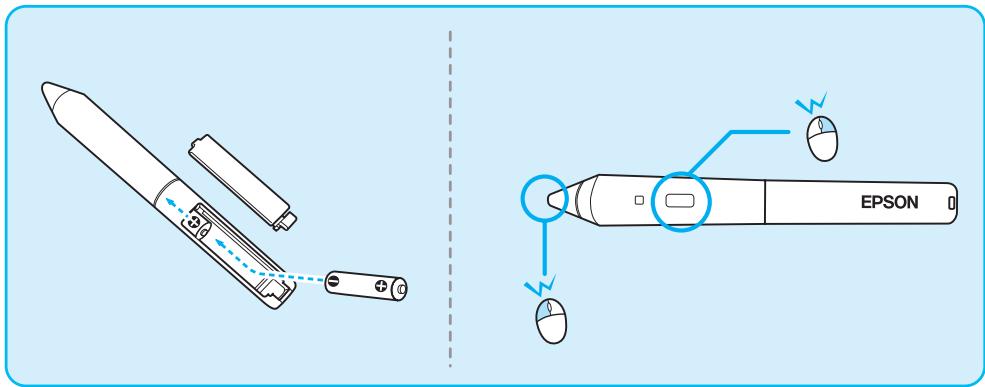
natural_image Line drawing of a pen-like device with EPSON logo and two cylindrical batteries (no text or symbols on main body)

EPSON EB-455WI - EB-440W - 4

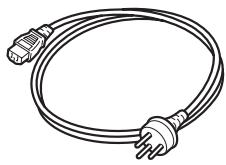
natural_image Line drawing of a straight electrical outlet with two terminal connectors (no text or symbols)

EB-465i/455Wi
EPSON EB-455WI - EB-440W - 5

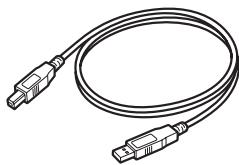
natural_image Illustration of a USB cable with two connectors (no text or symbols)

EPSON EB-455WI - EB-440W - 6

EPSON EB-455WI - EB-440W - 7

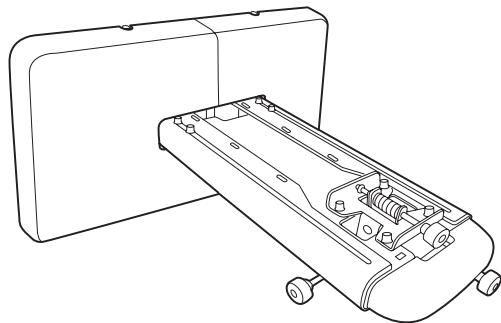
natural_image Line drawing of a device chassis with wheels and internal components (no text or symbols)

EPSON EB-455WI - EB-440W - 8

text_image EPSON Multi-media projector EB-465i EB-460 EB-455Wi EB-450W EB-440W Multi Media Projector EB-465i EB-460 EB-455Wi EB-450W EB-440W 1.000 GB 2.000 GB 3.000 GB 4.000 GB 5.000 GB 6.000 GB 7.000 GB 8.000 GB 9.000 GB 10.000 GB 11.000 GB 12.000 GB 13.000 GB 14.000 GB 15.000 GB 16.000 GB 17.000 GB 18.000 GB 19.000 GB 20.000 GB 21.000 GB 22.000 GB 23.000 GB 24.000 GB 25.000 GB 26.000 GB 27.000 GB 28.000 GB 29.000 GB 30.000 GB 31.000 GB 32.000 GB 33.000 GB 34.000 GB 35.000 GB 36.000 GB 37.000 GB 38.000 GB 39.000 GB 40.000 GB 41.000 GB 42.000 GB 43.000 GB 44.000 GB 45.000 GB 46.000 GB 47.000 GB 48.000 GB 49.000 GB 50.000 GB 51.000 GB 52.000 GB 53.000 GB 54.000 GB 55.000 GB 56.000 GB 57.000 GB 58.000 GB 59.000 GB 60.000 GB 61.000 GB 62.000 GB 63.000 GB 64.000 GB 65.000 GB 66.000 GB 67.000 GB 68.000 GB 69.000 GB 70.000 GB 71.000 GB 72.000 GB 73.000 GB 74.000 GB 75.000 GB 76.000 GB 77.000 GB 78.000 GB 79.000 GB 80. 25 MB 81 MB

EPSON EB-455WI - EB-440W - 9

text_image EPSON Document CD-ROM EB-465I EB-465T EB-460 EB-455WI EB-455WT EB-450W EB-440W The Windows® Copyright © 2017.03.28 (E-mail: Epson) Copyright © 2017.03.29 (E-mail: Epson) Copyright © 2017.03.30 (E-mail: Epson) Copyright © 2017.03.31 (E-mail: Epson) Copyright © 2017.03.32 (E-mail: Epson) Copyright © 2017.03.33 (E-mail: Epson) Copyright © 2017.03.34 (E-mail: Epson) Copyright © 2017.03.35 (E-mail: Epson) Copyright © 2017.03.36 (E-mail: Epson) Copyright © 2017.03.37 (E-mail: Epson) Copyright © 2017.03.38 (E-mail: Epson) Copyright © 2017.03.39 (E-mail: Epson) Copyright © 2017.03.40 (E-mail: Epson) Copyright © 2017.03.41 (E-mail: Epson) Copyright © 2017.03.42 (E-mail: Epson) Copyright © 2017.03.43 (E-mail: Epson) Copyright © 2017.03.44 (E-mail: Epson) Copyright © 2017.03.45 (E-mail: Epson) Copyright © 2017.03.46 (E-mail: Epson) Copyright © 2017.03.47 (E-mail: Epson) Copyright © 2017.03.48 (E-mail: Epson) Copyright © 2017.03.49 (E-mail: Epson) Copyright © 2017.03.50 (E-mail: Epson) Copyright © 2017.03.51 (E-mail: Epson) Copyright © 2017.03.52 (E-mail: Epson) Copyright © 2017.03.53 (E-mail: Epson) Copyright © 2017.03.54 (E-mail: Epson) Copyright © 2017.03.55 (E-mail: Epson) Copyright © 2017.03.56 (E-mail: Epson) Copyright © 2017.03.57 (E-mail: Epson) Copyright © 2017.03.58 (E-mail: Epson) Copyright © 2017.03.59 (E-mail: Epson) Copyright © 2017.03.60 (E-mail: Epson) Copyright © 2017.03.61 (E-mail: Epson) Copyright © 2017.03.62 (E-mail: Epson) Copyright © 2017.03.63 (E-mail: Epson) Copyright © 2017.03.64 (E-mail: Epson) Copyright © 2017.03.65 (E-mail: Epson) Copyright © 2017.03.66 (E-mail: Epson) Copyright © 2017.03.67 (E-mail: Epson) Copyright © 2017.03.68 (E-mail: Epson) Copyright © 2017.03.69 (E-mail: Epson) Copyright © 2017.03.70 (E-mail: Epson) Copyright © 2017.03.71 (E-mail: Epson) Copyright © 2017.03.72 (E-mail: Epson) Copyright © 2017.03.73 (E-mail: Epson) Copyright © 2017.03.74 (E-mail: Epson) Copyright © 2017.03.75 (E-mail: Epson) Copyright © 2017.03.76 (E-mail: Epson) Copyright © 2017.03.77 (E-mail: Epson) Copyright © 2017.03.78 (E-mail: Epson) Copyright © 2017.03.79 (E-mail: Epson) Copyright © 2017.03.80 (E-mail: Epson) Copyright © 2017.03.81 (E-mail: Epson) Copyright © 2017.03.82 (E-mail: Epson) Copyright © 2017.03.83 (E-mail: Epson) Copyright © 2017.03.84 (E-mail: Epson) Copyright © 2017.03.85 (E-mail: Epson) Copyright © 2017.03.86 (E-mail: Epson) Copyright © 2017.03.87 (E-mail: Epson) Copyright © 2017.03.88 (E-mail: Epson) Copyright © 2017.03.89 (E-mail: Epson) Copyright © 2017.03.90 (E-mail: Epson) Copyright © 2017.03.91 (E-mail: Epson) Copyright © 2017.03.92 (E-mail: Epson) Copyright © 2017.03.93 (E-mail: Epson) Copyright © 2017.03.94 (E-mail: Epson) Copyright © 2017.03.95 (E-mail: Epson) Copyright © 2017.03.96 (E-mail: Epson) Copyright © 2017.03.97 (E-mail: Epson) Copyright © 2017.03.98 (E-mail: Epson) Copyright © 2017.03.99 (E-mail: Epson) Copyright © 2017.04.00 (E-mail: Epson)

Document CD-ROM

EPSON EB-455WI - EB-440W - 10

text_image EPSON Projector Software Vol. 3.02 Epic® Network Projector Software

Projector Software

EB-465i/455Wi
EPSON EB-455WI - EB-440W - 11

text_image EPSON Projector Software for Easy Interactive Function W.C.O.B 自定义 Easy Interactive China Inc.C.D.

Projector Software for Easy Interactive Function

EPSON EB-455WI - EB-440W - 12

EPSON EB-455WI - EB-440W - 13

natural_image Illustration of a crossed hammer and screwdriver crossed out, symbolizing anti-smoking or anti-smoking (no text present)

EPSON EB-455WI - EB-440W - 14

natural_image Illustration of a computer monitor with a prohibition symbol (no text or symbols present)

EPSON EB-455WI - EB-440W - 15

natural_image Prohibition sign showing a broken glass over a bottle, no text present

EPSON EB-455WI - EB-440W - 16

natural_image Illustration of a water droplet falling from a camera inside a blue circular frame (no text or symbols)

EPSON EB-455WI - EB-440W - 17

natural_image Illustration of a projector with smoke and spray, enclosed in a circular frame (no text or symbols)

EPSON EB-455WI - EB-440W - 18

natural_image Illustration of a projector emitting sound waves from a server rack, with no text or symbols present.

EPSON EB-455WI - EB-440W - 19

text_image Prohibition sign with Chinese text and a circular arrow, indicating no traffic or noise.

EPSON EB-455WI - EB-440W - 20

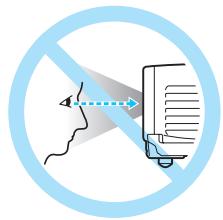
natural_image Simple line drawing of a person observing through a suspended platform with a camera mounted on top, no text or symbols present.

EPSON EB-455WI - EB-440W - 21

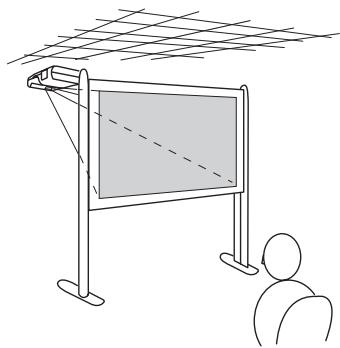
natural_image Simple line drawing of a person viewing a blank board under a grid-patterned roof (no text or symbols)

EPSON EB-455WI - EB-440W - 22

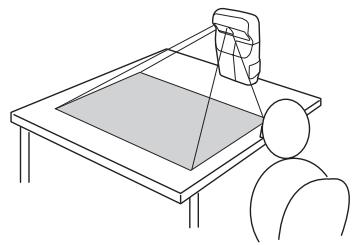
natural_image Line drawing of a person sitting at a desk with a lamp and screen, no text or symbols present

EPSON EB-455WI - EB-440W - 23

natural_image Diagram of a mobile phone casing with a blue internal panel and a blue arrow indicating rotation (no text or symbols)

EPSON EB-455WI - EB-440W - 24

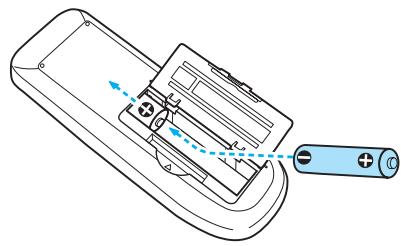
EPSON EB-455WI - EB-440W - 25

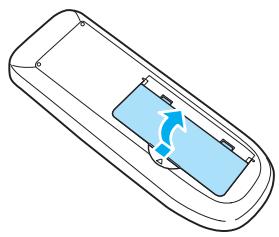
natural_image Line drawing of a remote control device with blue arrows indicating movement or force, and a battery attached to the right (no text or symbols)

EPSON EB-455WI - EB-440W - 26

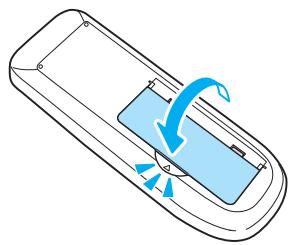
EPSON EB-455WI - EB-440W - 27

natural_image Diagram of a remote control panel with blue arrows indicating rotation or movement (no text or symbols)

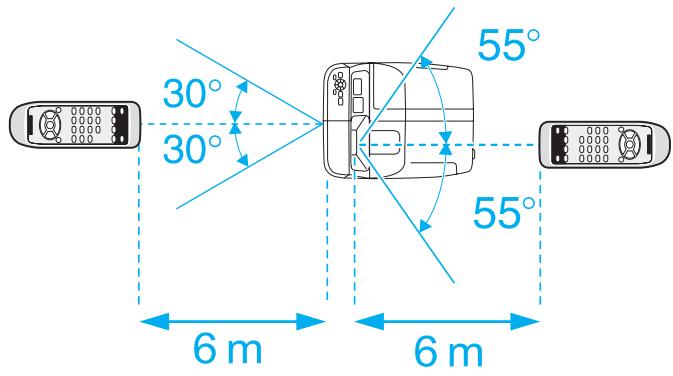
EPSON EB-455WI - EB-440W - 28

text_image 30° 30° 55° 55° 6 m 6 m

EPSON EB-455WI - EB-440W - 29

text_image 60° 6 m 60° 15° 6 m

1

1

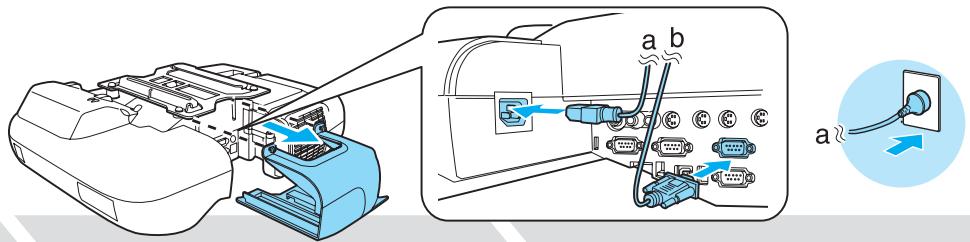
EPSON EB-455WI - ② - 1

text_image Diagram showing printer internal connection to a device with labeled ports and cable connections

3

EPSON EB-455WI - 3 - 1

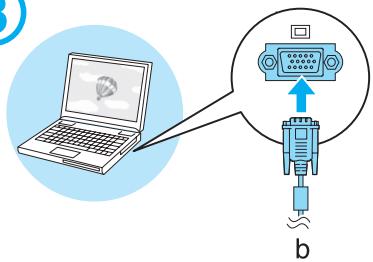
text_image Diagram showing a laptop connected to an audio device with a speaker, labeled 'b' at the bottom.

4

EPSON EB-455WI - 4 - 1

flowchart
graph TD
    A["Input"] --> B["Temp"]
    B --> C["Source Search"]
    C --> D["Wide"]
    D --> E["ON"]
    E --> F["Output"]
    style A fill:#f9f,stroke:#333
    style F fill:#bbf,stroke:#333

5

EPSON EB-455WI - 5 - 1

natural_image Illustration of a laptop with a speech bubble containing the word 'ON' (no additional text or symbols)

EPSON EB-455WI - ⑥ - 1

natural_image Illustration of hands typing on a laptop with a hot air balloon icon (no text or symbols)
EpsonFn + F8ToshibaFn + F5
NECFn + F3lenovo/IBMFn + F7
PanasonicSony
SotecDELLFn + F8
HPFn + F4FujitsuFn + F10

7
EPSON EB-455WI - ⑥ - 2

flowchart
graph TD
    A["Printer"] --> B["Computer"]
    B --> C["User Interface"]
    C --> D["User Interface"]
    D --> E["User Interface"]
    style A fill:#f9f,stroke:#333
    style B fill:#ccf,stroke:#333
    style C fill:#cfc,stroke:#333
    style D fill:#fcc,stroke:#333
    style E fill:#ffc,stroke:#333

EPSON EB-455WI - ⑥ - 3

EPSON EB-455WI - ⑥ - 4

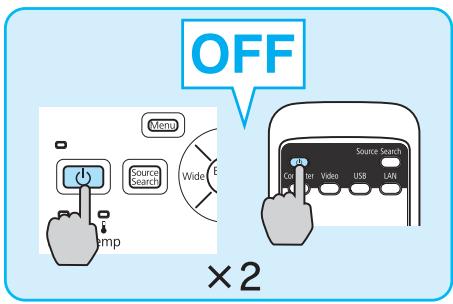
text_image OFF Menu Source Search Wide Temp Source Search Co rter Video USB LAN ×2

2

Easy Interactive Function(EB-465i/455Wi)

1

EPSON EB-455WI - 1 - 1

natural_image Diagram showing a device's internal components with blue arrows pointing to connectors (no text or symbols present)

EPSON EB-455WI - 1 - 2

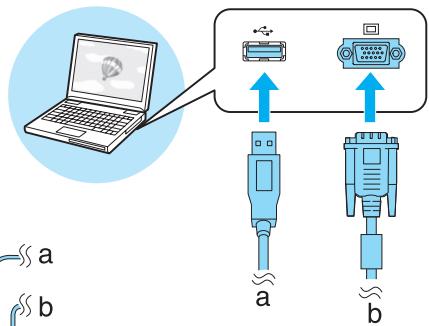
text_image Diagram showing wireless connection between a laptop and two connected devices labeled a and b, with bidirectional arrows indicating data flow.

EPSON EB-455WI - 1 - 3

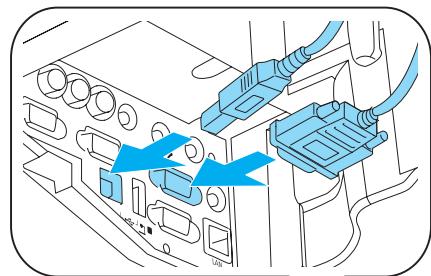
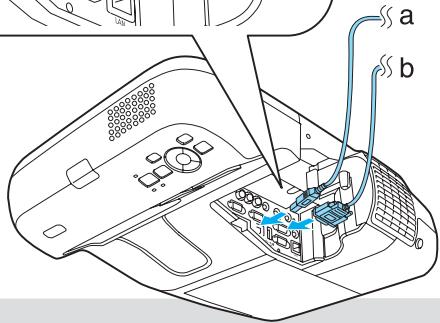
text_image Diagram of a device interior with labeled components and cable connections, showing ports and wiring connections.

EPSON EB-455WI - ② - 1

natural_image Illustration of a laptop with a speech bubble containing the word 'ON' (no text or symbols on the laptop itself)

EPSON EB-455WI - ② - 2

EPSON EB-455WI - ② - 3
Projector Software for Easy Interactive Function

EPSON EB-455WI - ③ - 1

flowchart
graph TD
    A["Power Switch"] --> B["Radio"]
    B --> C["Source Search"]
    C --> D["Wide"]
    D --> E["Sensor Interface"]
    E --> F["Monitor"]
    E --> G["Video"]
    E --> H["USB"]
    E --> I["LAN"]

EPSON EB-455WI - ③ - 2

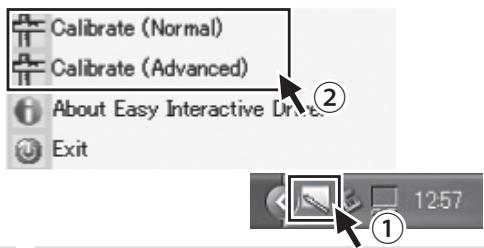
Windows
EPSON EB-455WI - ③ - 3

text_image Calibrate (Normal) Calibrate (Advanced) About Easy Interactive Drive Exit

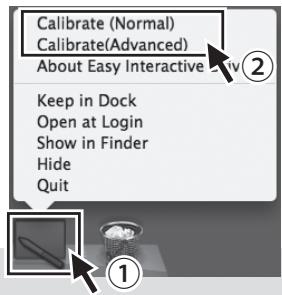
Mac OS
EPSON EB-455WI - ③ - 4

text_image Calibrate (Normal) Calibrate(Advanced) About Easy Interactive Keep in Dock Open at Login Show in Finder Hide Quit

EPSON EB-455WI - ③ - 5

EPSON EB-455WI - ③ - 6

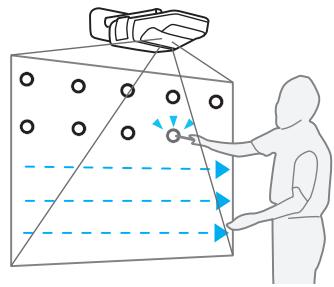
natural_image Diagram of a person interacting with a device in a grid-like environment, showing directional arrows and circular elements (no text or symbols)

EPSON EB-455WI - ③ - 7

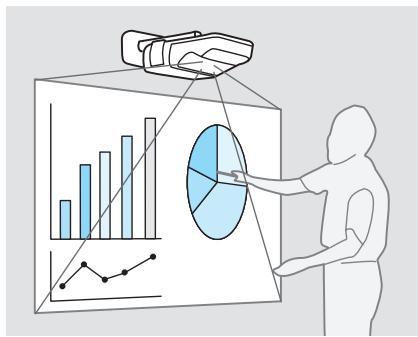
text_image Illustration showing a person interacting with a 3D bar chart and pie chart, likely illustrating a business or data analysis concept.

EPSON EB-455WI - ③ - 8

text_image Diagram showing a battery device connected to an EPSON sensor with labeled components and wiring connections

3 USB Display

EPSON EB-455WI - USB Display - 1

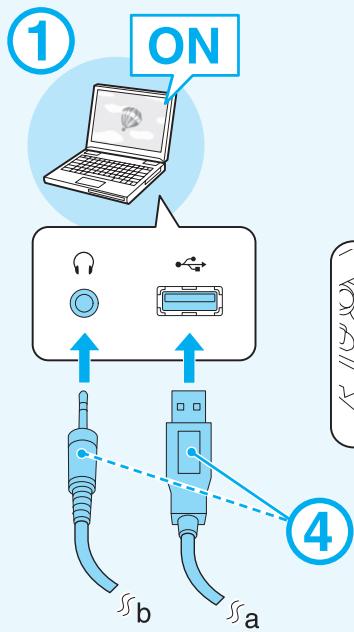
text_image ① ON ④ b a

EPSON EB-455WI - USB Display - 2

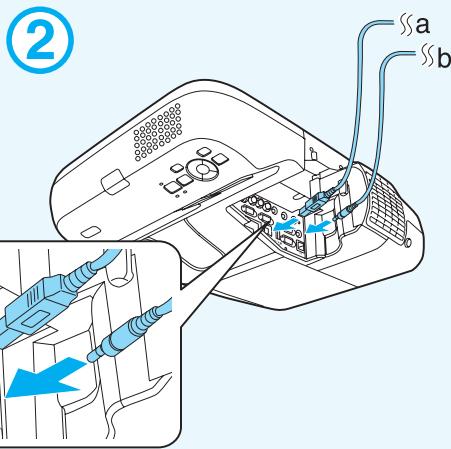
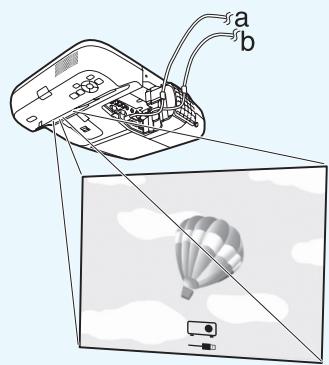
text_image ② a b

EPSON EB-455WI - USB Display - 3

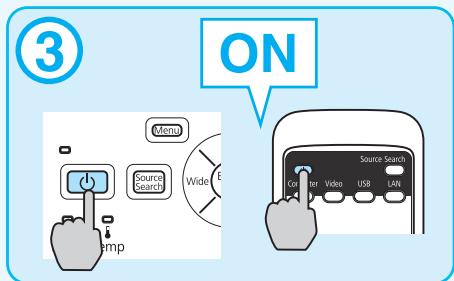
text_image ③ ON Menu Wide Source Search Temp Source Search Gr gr gr Video USB LAN

EPSON EB-455WI - USB Display - 4

EPSON EB-455WI - USB Display - 5

text_image Diagram showing a projector mounted on a screen with labeled parts 'a' and 'b', illustrating the principle of an optical or thermal imaging setup.

EPSON EB-455WI - USB Display - 6

EPSON EB-455WI - USB Display - 7

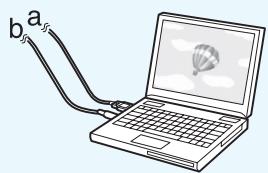
text_image b a

4

EPSON EB-455WI - 4 - 1

flowchart
graph TD
    subgraph Device_Units
        A["Device 1"] --> B["S-Video"]
        A --> C["Video"]
        A --> D["L-Audio-R"]
        A --> E["Y"]
        A --> F["Audio"]
    end

    subgraph Audio_Units
        G["Audio"] --> H["Computer1"]
        G --> I["Computer2"]
        G --> J["Audio1"]
        G --> K["Audio2"]
    end

    subgraph Devices_Units
        L["Device 2"] --> M["RS-232C"]
        L --> N["Monitor Out"]
        L --> O["TypeB"]
    end

    subgraph Audio_Units
        P["Audio"] --> Q["Computer1"]
        P --> R["Computer2"]
        P --> S["LAN"]
    end

    A --> B --> C --> D --> E --> F --> H --> I --> J --> K
    G --> H --> I --> J --> K
    style A fill:#f9f,stroke:#333
    style B fill:#ccf,stroke:#333
    style C fill:#cfc,stroke:#333
    style D fill:#fcc,stroke:#333
    style E fill:#cff,stroke:#333
    style F fill:#ffc,stroke:#333
    style G fill:#fcc,stroke:#333
    style H fill:#ffc,stroke:#333
    style I fill:#fcc,stroke:#333
    style J fill:#ffc,stroke:#333
    style K fill:#fcc,stroke:#333

EPSON EB-455WI - 4 - 2

flowchart
graph TD
    A["Input Image"] --> B["Image Panel"]
    B --> C["Display Panel"]
    C --> D["Control Panel"]
    D --> E["EPSON Remote Controller"]
    E --> F["Source Search"]
    F --> G["Computer Video USB LAN"]
    G --> H["Data Inputs"]
    H --> I["Output Display"]
    I --> J["Data Output"]
    J --> K["Control Panel"]
    K --> L["Display Panel"]
    L --> M["Control Panel"]
    M --> N["Output Display"]
    N --> O["Control Panel"]

Memo

EPSON

EXCEED YOUR VISION

Assistant notice
Powered by Anthropic
En attente de votre message
Informations produit

Marque : EPSON

Modèle : EB-455WI

Catégorie : Projecteur interactif