VIMMB-85P - Ukategorisert CRUX - Gratis bruksanvisning og manual
Finn enhetens veiledning gratis VIMMB-85P CRUX i PDF-format.


Brukerspørsmål om VIMMB-85P CRUX
0 spørsmål om dette apparatet. Svar på dem du kjenner, eller still ditt eget.
Still et nytt spørsmål om dette apparatet
Last ned instruksjonene for din Ukategorisert i PDF-format gratis! Finn veiledningen din VIMMB-85P - CRUX og ta den elektroniske enheten tilbake i hendene. På denne siden er alle dokumenter som er nødvendige for bruken av enheten din publisert. VIMMB-85P av merket CRUX.
BRUKSANVISNING VIMMB-85P CRUX
Vehicle Applications
MERCEDES BENZ
2017 E Class (W213)
Features
- Plug and Play activation via the OBD II port.
- No dealer programming required.
- Easy and time-saving 30 second coding procedure.
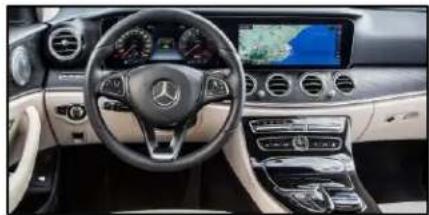
natural_image
Interior view of a Mercedes-Benz car dashboard and steering wheel (no visible text or symbols)Note
- Compatible with Comand NTG5.5 systems.
Parts Included
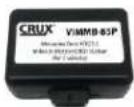
VIMMB-85P MODULE
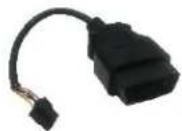
OBD II PLUG
Installation Instructions
- Locate OBD-port and remove cover.
- Turn on ignition.
- Wait until the head-unit has completely booted.
- Plug the VIMMB-85P into OBD-port which is usually located under the steering column.
- Leave coder for about 30 seconds in OBD-port until the Green LED has a steady light.
- Remove coder from the OBD-port.
To reverse the coding repeat steps 1-6.
After the first use on a vehicle, the VIMMB-85P is personalized to this vehicle and can be used unlimited times to code or reverse coding on this vehicle only.
LED Information:
| LED | Status | Description |
| Green | Solid | Coding procedure successfully completed |
| Flashing | Coding process in progress | |
| Red | Solid | Remove coding procedure successfully completed |
| Flashing | Coding process failed / license violation | |
| Green + Red | Solid | CAN Communication Error! - Abort of the diagnostic session |
Rev.112316
Crux Interfacing Solutions
www.crxinterfacing.com
tel. #: (818) 609-9299
fax #: (818) 996-8188