CPS480TG2UB - Batteri CyberPower - Gratis bruksanvisning og manual
Finn enhetens veiledning gratis CPS480TG2UB CyberPower i PDF-format.


Brukerspørsmål om CPS480TG2UB CyberPower
0 spørsmål om dette apparatet. Svar på dem du kjenner, eller still ditt eget.
Still et nytt spørsmål om dette apparatet
Last ned instruksjonene for din Batteri i PDF-format gratis! Finn veiledningen din CPS480TG2UB - CyberPower og ta den elektroniske enheten tilbake i hendene. På denne siden er alle dokumenter som er nødvendige for bruken av enheten din publisert. CPS480TG2UB av merket CyberPower.
BRUKSANVISNING CPS480TG2UB CyberPower
CyberPower®
POWERTRIP®480 User Guide AC Mobile Power Inverter CPS480TG2U/B
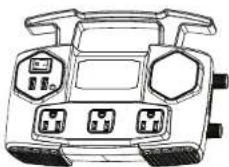
This guide contains important information regarding the safety, operation, maintenance, and storage of this product. Failure to read this guide and follow the directions could result in injury and/or property damage.
Before installing and using the CyberPower power inverter, please read the manual. Misusing or incorrectly connecting the Inverter may damage the equipment or create hazardous conditions for users. Read the following safety instructions and pay special attention to all CAUTION and WARNING statements in the manual.
- Do not operate the inverter near flammable materials, fumes, or gases.
- Always use the inverter where there is adequate ventilation. Do not obstruct the ventilation slots.
- Never immerse the unit in water or other liquids.
- Proper cooling is essential when operating the inverter. Refrain from placing the inverter near the vehicle's heat vent or in direct sunlight.
- Always turn the inverter off when not in use by removing it from the DC accessory port.
Check the warning labels on battery chargers or adapters before connecting them to the inverter. Do not connect battery chargers or adapters that have warnings about using with inverters.
Introduction
Thank you for choosing the CyberPower power Inverter. To enjoy all the features and benefits of Inverter, please read and follow all instructions.
The power inverter is a portable source of 120 volt AC power. The AC power converts DC battery power from your vehicle into standard 120 volt AC power, allowing you to power most notebook computers, cell phone chargers, camcorders, and other electronic products drawing AC power.
Package Contents
This product package includes:
• AC Power Inverter
• Cigar Plug Cable
- Battery Clamp Cable
- User Guide
Product Overview
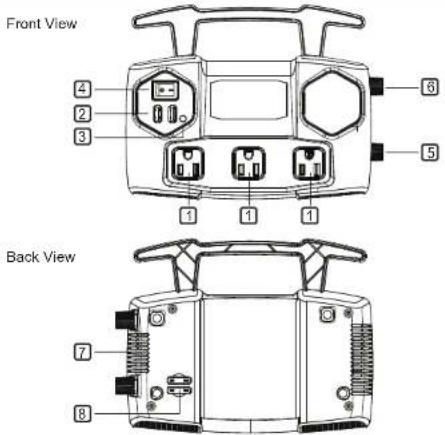
Product Features
-
120 volt AC outlet
-
USB charging ports (2.4 AMPS)
- LED indicator light [Power LED(Green), Input / Output Fault (Red)]
- ON/OFF SWITCH
- DC Input positive terminal
- DC Input negative terminal
- Cooling Fan
Operation: Connecting the power cord for loads under 150 watts
Follow these steps to connect the PowerTrip 480 to the vehicle cigarette lighter socket (for loads under 150 watts).
- Place the inverter on a flat surface on your vehicle floor.
- Make sure the power switch on the panel is off.
- Take the power cord equipped with the cigar plug and place the ring
terminals over the two cabling terminals on the back of the inverte - Place the inverter cigar plug in the vehicle cigarette lighter socket.
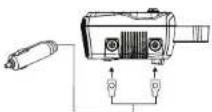
CAUTION:
- Connect the RED cable to the
POSITIVE terminal of the inverter. -
Connect the BLACK cable to the
NEGATIVE terminal of the inverter. -
Turn on the power switch. The green light indicates that the inverter is operating normally and that AC power is available at the outlet.
- Verify that the connected device(s) draws less than 150 watts and plug into the AC outlet.
- Always turn the inverter off when not in use.

Make sure you connect cable red to red and black to black, and make sure you screw the nuts on tightly.
Use the cigar plug cable only when the vehicle's engine is running. Use the cigar plug cable with the engine off will cause excessive battery drain.
Operation: Connecting the power cord for loads over 150 watts
Follow these steps to connect the power inverter directly to the vehicle's battery (for loads over 150 walls).
- Place the inverter on a flat surface.
- Make sure the power switch on the panel is off
- Take the power cord equipped with battery clamps on one end and place the ring terminals over the two cabling terminals on the back of the inverter.
- Fasten the positive (red) clamp to the positive battery post, and then fasten the negative (black) clamp to the negative battery post.
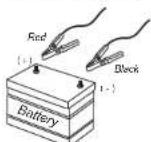
CAUTION :
- Connect the RED cable to the
POSITIVE terminal of the battery. -
Connect the BLACK cable to the NEGATIVE terminal of the battery
-
Turn on the power switch. The green light indicates that the inverter is operating normally and that AC power is available at the outlet.
- Take device power cord plug into the inverter AC outlet.
- Always turn the inverter off when not in use.

A reverse polarity connection (positive to negative) will blow a fuse in the inverter and may permanently damage the unit. Damage caused by a reverse polarity connection is not covered by your warranty.

Batteries contain corrosive materials and present an electrical shock hazard. To prevent irritation and burns, wear protective eyewear and clothing when you install the inverter or work with the batteries. Take special care to ensure that metal tools and personal metal objects like rings and bracelets do not contact the battery terminals.
Operating and Storage Tips
The inverter should only be operated under the following conditions:
- Dry - Do not allow water or other liquids to come into contact with the inverter.
- Moderate Temperature - Ambient air temperature should be between 32 °F - 104 °F (0 °C - 40 °C). Keep the inverter out of direct sunlight.
- Free Air Flow - Keep the inverter's ventilation slots unobstructed to ensure air flow to the unit. Do not place any items on or over the inverter during operation. The unit will shut down if it overheats.
• Proper storage temperature range is 32 °F - 122 °F (0 °C - 50 °C).
- Store and use the inverter in a cool and dry environment.
- Avoid exposing the inverter to heating elements, direct sunlight, or high humidity.
DC Fuse Replacement
The CPS480TG2U/B inverter contains protection fuses. Two on the inverter body and the other on the cigar plug cable (see Figure 1) to protect the unit against overloading. If the inverter draws more than 150 watts via the cigar plug connection, or more than 480 watts via the battery clamp connection, the internal fuse may open to protect the inverter, vehicle battery, and the connected equipment. To replace the fuse, please follow the instructions below:
- Turn off the inverter and disconnect any devices from the inverter.
- Disconnect the inverter from power source and remove the leads.
- Pull the fuse straight out of the holder.
- Replace with a new 25-amp fuse in the inverter body or a 20-amp fuse located inline on the cigar plug cable.
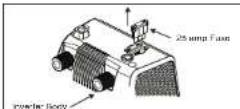
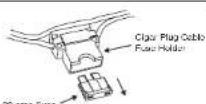
Figure 1. Fuse Replacement
Specifications
| Model | CPS480TG2U/B |
| Input Voltage | 11 to 15 volts |
| Output Peak Power | 480 Watts |
| Output Continuous Power | 400 Watts |
| Output Voltage | 120 Volts |
| Output USB Voltage | 5 Volts |
| Output Frequency | 60 Hz |
| Output Waveform | Simulated Sine Wave |
| Input Fuse (Internal) | 25Amp x2 |
| Input Fuse (Cigar plug) | 20Amp |
| Protection Features | Overload, Overvoltage, Overheating, Short-circuit |
Troubleshooting
| Problem | Possible Cause | Suggested Solutions |
| No AC output - Red LED lit. | 1. DC input is below 11 Vdc / Over 15Vdc.2. Short circuit.3. Overload.4. Inverter hot. | 1. Check your battery volts and recharge or replace the battery.2. Disconnect the load.3. Reduce the load.4. Disconnect the load and operate the inverter for a few minutes. |
| No AC output - Green LED not lit. | 1. Bad connection or wiring.2. Fuse is blown. | 1. Tighten all DC connections.2. Check fuse and replace or Call Service. |
| Motorized power tool will not operate | Excessive startup load.If the start up load exceeds the inverters peak load capability it will not work. | Disconnect the load until the inverter operates normally and connect the load again. |
2 Year Limited Warranty
CyberPower warrants this CPS480TG2U/B (the "Inverter") to be free from material and manufacturing defects for two years. If a defect results in product failure during its normal use, CyberPower's sole responsibility is to repair or replace (at its sole option) the Inverter.
The foregoing Limited Warranty is the consumer's sole and exclusive remedy and excludes any incidental or consequential damages. Some States do not allow the exclusion of limitation of incidental and consequential damages. It is possible that the above limitations or exclusions may not apply to you (the Consumer). This limited warranty gives the Consumer specific legal rights and the Consumer may have other rights, which vary from State to State.
To make a Limited Warranty claim:
1. Pack and ship the Inverter to CyberPower at 4241 12th Avenue East, Suite 400.
Shakopee, MN 55379
2. Clearly indicate on the outside of the packaging that this is a "WARRANTY RETURN".
3. Clearly include your name and address (a) on the outside packaging and (b) on a
sheet of paper enclosed in the box with the Inverter that is being returned.
4. You MUST prepay all shipping costs and you are responsible for packaging
and shipment.
CAUTION: Any changes or modifications not expressly approved by the guarantee of this device could void the user's authority to operate the equipment.
Product Registration
Thank you for purchasing a CyberPower product. Prompt product registration entitles coverage under the Limited Warranty and also allows the opportunity to be notified of product enhancements, upgrades, and other announcements.
Registration is quick and easy. Go to Product Registration page at www.cyberpowersystems.com.
Technical Support
Feel free to contact our Tech Support department with installation, troubleshooting, or general product questions.
CyberPower Technical Support
Phone: 1-877-297-6937
Email: tech@cpsww.com
Web: www.cyberpowersystems.com
Address: 4241 12th Ave. E., STE 400, Shakopee, MN 55379
Hours of Operation: Monday – Friday, 7:00am – 6:00pm (CST)
Legal notices (FCC Part 15)
This equipment has been tested and found to comply with the limits for a Class B Digital Device, pursuant to Part 15 of the FCC Rules. These limits are designed to provide reasonable protection against harmful interference in residential installation. This equipment generates, uses and can radiate radio frequency energy and, if not installed and used in accordance with the instructions, may cause harmful interference to radio communications. However, there is no guarantee that interference will not occur in a particular installation. If this equipment does cause harmful interference to radio or television reception, which can be determined by turning the equipment off and on, the user is encouraged to try to correct the interference by one or more of the following measures: (1) Reorient or relocate the receiving antenna; (2) Increase the separation between the equipment and receiver; (3) Connect the equipment into an outlet on a circuit different from that to which the receiver is connected; (4) Consult the dealer or an experienced radio/TV technician for help. Any special accessories needed for compliance must be specified in the instruction.
CAUTION: A shielded-type power cord is required in order to meet FCC emission limits and also to prevent interference to the nearby radio and television reception. It is essential that only the supplied power cord be used. Use only shielded cables to connect I/O devices to this equipment.
Cyber Power Systems (USA), Inc.
4241 12th Avenue East. Suite 400, Shakopee, MN 55379
TEL: (952) 403-9500 Toll-Free: (877) 297-6937
FAX: (952) 403-0009 E-mail: sales@cpsww.com
www.cyberpowersystems.com
© 2018 Cyber Power Systems (USA), Inc
All rights reserved. Reproduction in whole or in part without permission is prohibited.
Note Page