SLM205 - Accessoires pour projecteur Chief - Gratis bruksanvisning og manual
Finn enhetens veiledning gratis SLM205 Chief i PDF-format.


Brukerspørsmål om SLM205 Chief
0 spørsmål om dette apparatet. Svar på dem du kjenner, eller still ditt eget.
Still et nytt spørsmål om dette apparatet
Last ned instruksjonene for din Accessoires pour projecteur i PDF-format gratis! Finn veiledningen din SLM205 - Chief og ta den elektroniske enheten tilbake i hendene. På denne siden er alle dokumenter som er nødvendige for bruken av enheten din publisert. SLM205 av merket Chief.
BRUKSANVISNING SLM205 Chief
INSTALLATION INSTRUCTIONS SLB-205 HANGER BRACKET
for Plus U2-X2000,
Prior to assembly, unpack carton and verify contents.
For security installation, use security hardware package inside the ALL-POINTS™ Security Kit. Follow the instructions below for attaching the bracket to the projector using either standard hardware or security hardware.
If you are missing any of the following components, please contact Customer Service at 1-800-582-6480
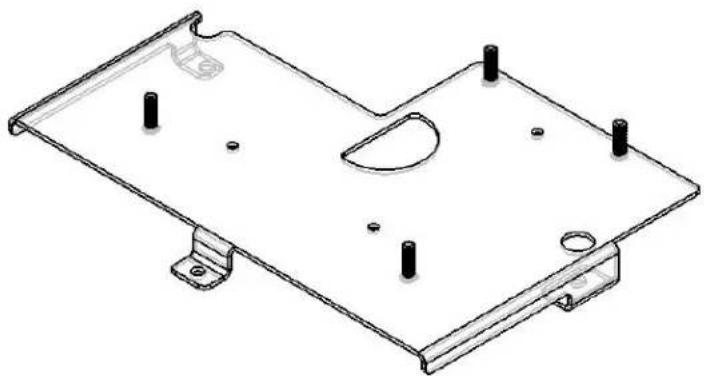
(1) SLB-205 Bracket (3) M4 - 8mm Screws
(4) 10 - 24 Thumb Nuts (3) M4 Flatwashers
natural_image
Technical line drawing of a metal bracket with mounting holes and mounting feet (no text or symbols)INSTALLATION INSTRUCTIONS
-
Turn projector upside down.
-
Place the SLB-205 bracket on to the bottom of the projector lining up the three mounting holes in the SLB-205 bracket with the three threaded inserts in the bottom of the projector.
-
Using the three M4-8mm mounting screws and M4 flatwashers place them through the holes in the bracket and secure into the treaded inserts of the projector. CAUTION: When attaching the mount be careful not to overtighten screws.
-
See RPA and/or Smart-Lift™ Instructions.