SSM1045 - Accessoires pour projecteur Chief - Gratis bruksanvisning og manual
Finn enhetens veiledning gratis SSM1045 Chief i PDF-format.


Brukerspørsmål om SSM1045 Chief
0 spørsmål om dette apparatet. Svar på dem du kjenner, eller still ditt eget.
Still et nytt spørsmål om dette apparatet
Last ned instruksjonene for din Accessoires pour projecteur i PDF-format gratis! Finn veiledningen din SSM1045 - Chief og ta den elektroniske enheten tilbake i hendene. På denne siden er alle dokumenter som er nødvendige for bruken av enheten din publisert. SSM1045 av merket Chief.
BRUKSANVISNING SSM1045 Chief
INSTALLATION INSTRUCTIONS
SSB-1045, SSM-1045, SLB-1045 and SLM-1045 Interface Brackets
SSB-1045, SSM-1045, SLB-1045 and SLM-1045 Interface Brackets are designed for use with Chief® Series Projector Mounts. See the specific installation instructions provided with the mount for additional installation information.
Unpack carton and verify kit contents. If any listed parts are missing, immediately contact a Chief Customer Service representative.

WARNING: IMPROPER INSTALLATION CAN LEAD TO EQUIPMENT FALLING CAUSING SERIOUS PERSONAL INJURY AND DAMAGE TO EQUIPMENT! DO NOT substitute hardware. Use only hardware supplied by manufacturer!
(1) Interface Bracket (4) Washer, Flat, M4
(4) 10-24 Thumb Nuts ** (4) Screw, Flat head, M4 x 8mm
(1) All-Points Security Kit
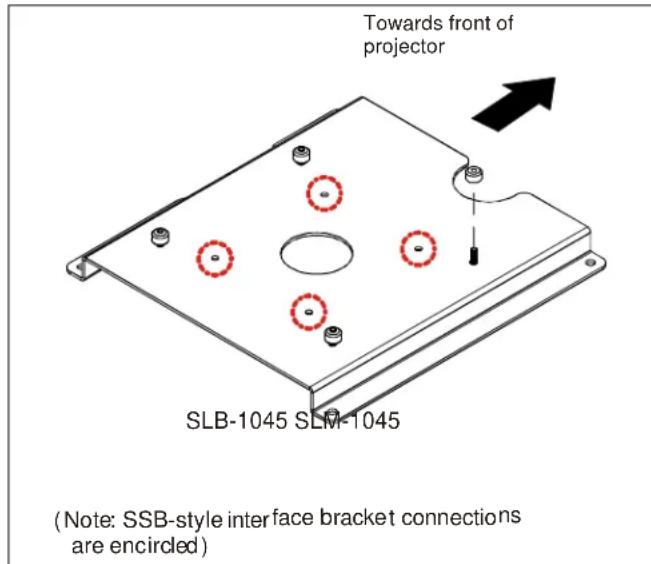
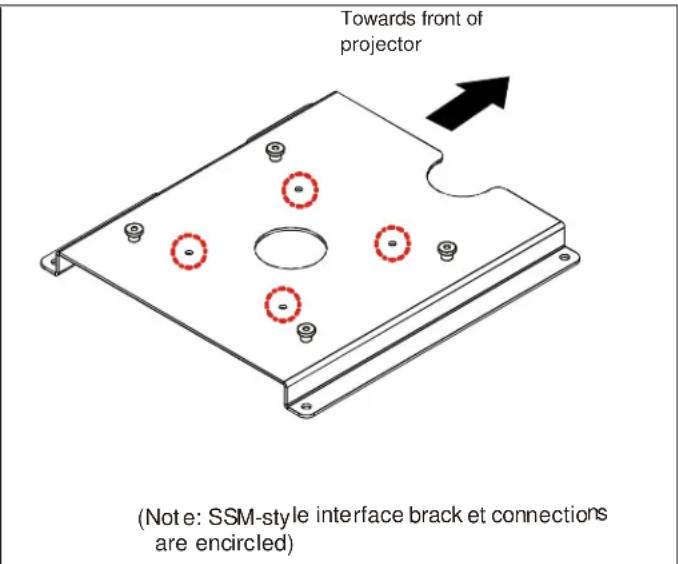
**Only used when installing SLB/SSB interface brackets.
NOTE: Specific to SSB-style and SSM-style interface bracket installation, all appropriate screws come pre-installed as reflected in the encircled locations above. DO NOT attempt to substitute and USE ONLY this pre-installed hardware for SSB-style and SSM-style interface bracket installation.
Installation Instructions

WARNING: OVER TIGHTENING OF SCREWS CAN DAMAGE PARTS AND CAN LEAD TO SERIOUS PERSONAL INJURY AND DAMAGE TO EQUIPMENT! DO NOT over tighten screws when installing interface brackets.
NOTE: Step 1 is only required when installing an SLB/SSB interface bracket. If an SLM/SSM bracket is being installed, proceed to step 2.
- Screw thumb screws onto the 10-24 x 5/8" Phillips pan head screws. DO NOT fully tighten thumb screws at this time.
- Turn projector upside down on a flat surface.
- Place interface bracket onto bottom of projector with the round cut out facing the front of the projector. Align the mounting holes in the interface bracket with the threaded inserts in the bottom of the projector and secure using mounting screws and washers. Tighten all fasteners at this time, securing the bracket to the projector.
NOTE: Security screws can be substituted when mounting interface bracket to projector by using the parts and installation instructions in the All-Points Security Kit.
Chief® is a registered trademark of Milestone AV Technologies. All rights reserved.

Milestone AV Technologies, and its affiliated corporations and subsidiaries (collectively, "Milestone"), intend to make this manual accurate and complete. However, Milestone makes no claim that the information contained herein covers all details, conditions or variations, nor does it provide for every possible contingency in connection with the installation or use of this product. The information contained in this document is subject to change without notice or obligation of any kind. Milestone makes no representation of warranty, expressed or implied, regarding the information contained herein. Milestone assumes no responsibility for accuracy, completeness or sufficiency of the information contained in this document.

CHIEF®
Our Mounts. Your Vision.
Chief Manufacturing, a products division of Milestone AV Technologies
8401 Eagle Creek Parkway, Savage, MN 55378
• P: 800.582.6480 / 952.894.6280 • F:877.894.6918 / 952.894.6918
8850-000096 Rev01
©2009 Milestone AV Technologies,
a Duchossois Group Company
05/09