
VT-3618 - Lamp V-TAC - Gratis gebruiksaanwijzing en handleiding
Vind de handleiding van het apparaat gratis VT-3618 V-TAC in PDF-formaat.


| Producttype | Lamp |
| Merk | V-TAC |
| Model | VT-3618 |
| Ingangsspanning | DC 18V |
| Vermogen | 16W |
| Lumen | 500 lm |
| Straalhoek | 30° |
| Kleurweergave (CRI) | >70 |
| Behuizing | Aluminium |
| Type | Slimme magnetische lineaire SPC-lamp |
| Besturing | Via V-TAC Smart Light app (iOS/Android) |
| Spraakbesturing | Compatibel met Amazon Alexa |
| Functies | Aan/uit-schakelaar, timer, activering via app |
| Installatie | Montage in geleiderail, uitschakelen stroom voor installatie |
| Onderhoud | Reinig met een zachte, droge doek |
| Veiligheid | Installatie door gecertificeerde elektricien; niet blootstellen aan water |
| Garantie | 5 jaar vanaf aankoopdatum |
| Geschikt voor | Binnenverlichting |
| Duurzaamheid | 10-12 uur dagelijks gebruik |
Veelgestelde vragen - VT-3618 V-TAC
Gebruikersvragen over VT-3618 V-TAC
0 vraag over dit apparaat. Beantwoord die u kent of stel uw eigen vraag.
Stel een nieuwe vraag over dit apparaat
Download de handleiding voor uw Lamp in PDF-formaat gratis! Vind uw handleiding VT-3618 - V-TAC en neem uw elektronisch apparaat weer in handen. Op deze pagina staan alle documenten die nodig zijn voor het gebruik van uw apparaat. VT-3618 van het merk V-TAC.
GEBRUIKSAANWIJZING VT-3618 V-TAC
V-TAC
Meaningful Innovation.
WEEE Number: 80133970
INSTRUCTION MANUAL
SMART MAGNETIC LINEAR SPO LIGHT - ADJUSTABLE ANGLE
TECHNICAL DATA
| Model | VT-3618 |
| SKU | 6887 |
| Input voltage | DC:48V |
| Lumens | 1500LM |
| Power | 18W |
| Beam Angle: | 30°D |
| CRI | >90 |
| Body Type | Aluminum |

INTRODUCTION & WARRANTY
Thank you for selecting and buying MAGNETIC SMART TRACKLIGHT V-TAC will serve you the best. Please read these instructions carefully before starting the installation and keep this manual handy for future reference. If you have any other query, please contact our dealer or local vendor from whom you have purchased the product. They are trained and ready to serve you at the best. The warranty is valid for 3 years from the date of purchase. The warranty does not apply to damage caused by incorrect installation or abnormal wear and tear. The company gives no warranty against damage to any surface due to incorrect removal and installation of the product. The products are suitable for 10-12 Hours Daily operation. Usage of product for 24 Hours a day would void the warranty. This product is warranted for manufacturing defects only.

MULTI-LANGUAGE MANUAL QR CODE Please scan the QR code to access the manual in multiple languages.
1/12 2/12 3/12 4/12
Step 9: Once you have successfully completed step 8, you will be redirected to below page, where the App searches, registers and initializes the device(lamp) (ref image below)
Step 10: Once your device is successfully added, rename the device to your preference.


Step 11: After successfully pairing the Wi-Fi receiver with the app, you can start controlling multiple features of the lamp through your mobile—on/off switch, timing & schedules, and more.


WARNING
- Please make sure to turn off the power before starting the installation.
-
Installation must be performed by a certified person.
-
Proper grounding should be ensured throughout the installation.
-
For Indoor use only


Caution, risk of electric shock.
This marking indicates that this product should not be disposed of with other household wastes.
RoHS
CE UK CA
INSTALLATION INSTRUCTION


-
Switch off the power.
-
Install the luminaire into the guide rail groove
-
Check that everything is in order.
-
Switch on the power if above etc.
-
Switch on the power if above steps done propeny without any mistakes.
APP INSTALLATION
Step 2: Scan the given QR code, or download "V-TAC Smart Light" from the App Store (iOS) or the Google Play Store (Android).


ALEXA SETTINGS
Step1: Install the Amazon Alexa app via the App Store(iOS) or the Play Store (Android) and register. If you already have an existing account with Amazon Alexa, please proceed to login in


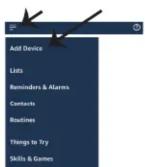
Step3: Tap on = settings and tap on "skills and games" as shown below.


Step4: Search for 'V-TAC Smart Light' on the "Skills & Games" page as shown below.

Search
Keyword or skill name V-TAC Smart Light
Step 3: Open the V-TAC Smart Light app and tap on register for creating a new account.
V-TAC Smart Light
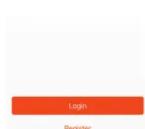
Step 5: Enter the verification code which will be sent to your mobile number/email id, then assign a new password to your account and tap on "Confirm".
Step 4: A) Mobile Number: Select the country, then enter your mobile number. Once done, tap "Next". B) E-Mail: Enter your email id and tap on "Next".

Step 6: Tap on 'Add Device' or the + sign. Make sure the lamp is switched on.


Step5: Enable the Skill.
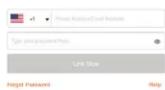
Step6: Enter your V-TAC Smart Light login ID and password and tap on "Link Now"

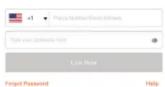
Step7: Once you tap on Link Now, you will be redirected to a new page requesting for authorization(Ref Image below). Tap on "Authorize"
Step8: You will receive confirmation of the account being linked successfully (Ref Image below)


Alexa by Amazon will be able to: Receive your public profile Control your devices over internet


V-TAC has been successfully linked.
What to do next: → Close this window to discover smart home devices you can control with Alexa.
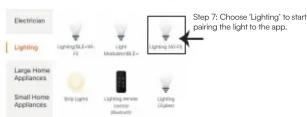
Step 8: To pair the device with LED Smart Strip Light make sure the light is blinks rapidly. Once the light blinks rapidly, the light is in pairing mode. If the light is not blinking rapidly,
you can do one of the following steps: A. Switch the light on & off repeatedly for 3 times, with short intervals of less than 2 seconds.
B. Tap the 'How to make light blink rapidly' link (as shown on the image to the right) C. You can also enable pairing mode from the Wi-Fi controller. Press and hold the ON/OFF button for 5-7 seconds and wait till you observe the light flashing. Please refer to the instruction section "Wi-Fi CONTROLLER FUNCTIONS".
Network Modes:
1) Smart Mode: Light flashes rapidly. 2) AP mode: Slow flash, once every 2 seconds. Confirm if the light blinks rapidly, select the Wi-Fi network, and enter the password.

Step9: Discover your smart device on Alexa. Once you have enabled the skill
A) You can use voice command "Alexa discover devices" to the Alexa device which you have.
B) To add device manually on home page tap on which you are adding and tap on discover device. and tap on Add device, select the device

Note: Discovering the device must be done every time the device's name is changed on the app.
ALEXA Commands
Now, you can control your smart device using voice commands on Alexa. Below are a
few commands you can use:
➢! Alexa, turn on/off bedroom light.
- ! Alexa, set bedroom light to 50 percent.
THINGS TO REMEMBER BEFORE STARTING INSTALLATION:
-
V-TAC Smart Light App & Amazon Alexa App
-
Make sure you have Amazon Alexa Device(including Echo, Echo Tap, or Echo Dot)
-
Smart Device - Lamp
-
Stable Wifi network
5/12 6/12 7/12 8/12

9/12
Step3: Make sure the Smart Bulb is paired with V-TAC Smart Light app before starting step 3. Tap on the arrow section as highlighted in the following form
Step4: Type "V-TAC Smart Light" on the search has seen top on the issue of "V-TAC Smart Light".

× V-TAC Smart Light|
New devices
Set up new devices Google Home, smart displays and devices labeled 'Made for Google' such as C by OE smart bulbs

Step5: Sign In with your V-TAC Smart Light Login credentials to Link the Smart Light device
Step6: Tap on Authorize in order to proceed to linking the device.

10/12
Step7
a. Account will now be linked, please stay on the page you will be redirected in few seconds to select the device to add to your home.
b. Select the device and tap on Next as show in image b.

Step8: Select the Home where you would like to Step9: You have successfully added Smart Light add the Smart Light under. (Or) you can create a device to your Google home App. New home in order to add the Smart Light to it.

11/12
Step10
a. You can turn the Lamp On/OFF by taping on On/Off options as shown below. (OR) You can tap on the Smart Lamp
b. You will be redirected to page(as shown in image b) where you can control the lights "Power and Dimmingfunctionality".

Google Commands:
Now, you can control your smart device using voice commands on Google Home. Below are a few
commands you can use:
▶! OK Google turn on/off hedgohm light
➢ ! OK Google, set bedroom light to 50 percent.
THINGS TO REMEMBER BEFORE STARTING INSTALLATION:
- V-TAC Smart Light App & Google Home App
- Make sure you have Google Home Device
- Smart Device - Lamp
- Stable Wifi network
IN CASE OF ANY QUERY/ISSUE WITH THE PRODUCT, PLEASE REACH OUT TO US AT: SUPPORT@V-TAC.EU FOR USE PRODUCED INVEST. YOU WITH YOUR PROPERTY OF YOUR DISTRIBUTION OR YOUR PROPERTY
MORE PRODUCTS RANGE, INQUITY PLEASE CONTACT OUR DISTRIBUTOR ON NEAR DEALERS. V-TAC EUROPE LTD. BULGARIA, PLOVDIV 4000, BULL.KARAVELOW 98
12/12


Merk : V-TAC
Model : VT-3618
Categorie : Lamp