
MSC012 - Elektronisch accessoire BELKIN - Gratis gebruiksaanwijzing en handleiding
Vind de handleiding van het apparaat gratis MSC012 BELKIN in PDF-formaat.


| Type product | Draadloze muis |
| Model | MSC012 |
| Merk | Belkin |
| Connectiviteit | 2,4 GHz draadloos |
| Bereik | Tot 10 meter |
| Sensor | Optisch, 1000 dpi |
| Knoppen | 3 (links, rechts, scrollwiel) |
| Stroomvoorziening | 1x AA-batterij (niet inbegrepen) |
| Accuduur | Tot 12 maanden normaal gebruik |
| Afmetingen | 10 x 6 x 3 cm |
| Gewicht | 100 gram (inclusief batterij) |
| Materiaal | Kunststof |
| Kleur | Zwart |
| Ondersteunde besturingssystemen | Windows, macOS, Linux |
| Inhoud doos | Muis, USB-ontvanger, handleiding |
| Garantie | 2 jaar |
| Reiniging | Met een droge, zachte doek |
| Veiligheid | CE, FCC-gecertificeerd |
| Repareerbaarheid | Batterij vervangbaar, overige onderdelen niet beschikbaar |
| Energie-efficiëntie | Automatische slaapstand na 10 minuten |
Veelgestelde vragen - MSC012 BELKIN
Gebruikersvragen over MSC012 BELKIN
0 vraag over dit apparaat. Beantwoord die u kent of stel uw eigen vraag.
Stel een nieuwe vraag over dit apparaat
Download de handleiding voor uw Elektronisch accessoire in PDF-formaat gratis! Vind uw handleiding MSC012 - BELKIN en neem uw elektronisch apparaat weer in handen. Op deze pagina staan alle documenten die nodig zijn voor het gebruik van uw apparaat. MSC012 van het merk BELKIN.
GEBRUIKSAANWIJZING MSC012 BELKIN
MSC012 Quick Setup Guide (QSG)
The Belkin Secure Holder with Clip for AirTag, MSC012 is designed to securely hold your Apple® AirTag™ while the raised edges help protect it against scratches. This article will guide you on how to place the AirTag inside the Belkin MSC012 or remove it from the secure holder.
Placing the AirTag
Removing the AirTag
Placing the AirTag
Step 1:
Place a flat object such as a coin or key into the indentation between the clip ring and top ring and then gently rotate clockwise to remove the top ring. Put your AirTag inside.

Step 2
Using your fingers, gently press the two pieces together until you hear a snap. This will indicate that the AirTag is locked into the Belkin MSC012.
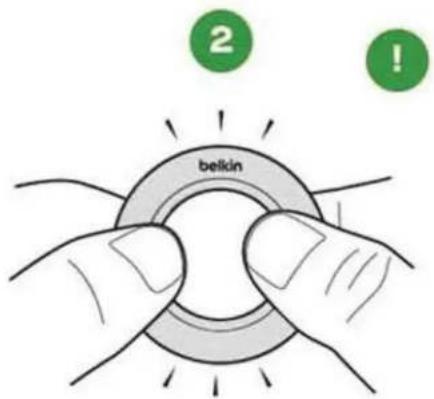
Removing the AirTag
Step 1
Insert a flat object such as a coin or key into the indentation located at the bottom of the Belkin MSC012.

Step 2
Twist the coin or key while holding the Belkin MSC012 firmly with your other hand. This will unlock the locking ring.

Step 3:
Pull out the AirTag from the Belkin MSC012.


Merk : BELKIN
Model : MSC012
Categorie : Elektronisch accessoire