
RAP-SB-187-GA41 - Bevestigingsaccessoire RAM Mount - Gratis gebruiksaanwijzing en handleiding
Vind de handleiding van het apparaat gratis RAP-SB-187-GA41 RAM Mount in PDF-formaat.


| Type product | Montagebeugel (RAM® EZ-Strap™) |
| Merk | RAM Mount |
| Model | RAP-SB-187-GA41 |
| Standaard | AMPS-gatpatroon (compatibel met RAM® ball mounts) |
| Materiaal | Polycarbonaat (basis) en rubber (riem) |
| Breedte riem | Ongeveer 2,5 cm |
| Lengte riem | Instelbaar: kort, middel, lang (max. ca. 40 cm) |
| Gewicht | Ongeveer 50 g (inclusief lijmkussens) |
| Kleur | Zwart |
| Bevestiging | Zelfklevend rubberkussen + riem door basis |
| Montageoppervlak | Vlak, niet-poreus (bijv. dashboard, glas) |
| Functie | Stevige bevestiging van elektronica (bijv. GPS, smartphone) op dashboard |
| Inhoud doos | 1 basis (A), 1 riem (B), 1 rubber kussen (C), 1 pin (D), 1 lijmkussen (E) |
| Onderhoud | Afvegen met zachte, droge doek; geen oplosmiddelen gebruiken |
| Reiniging lijmkussen | Voor hergebruik: reinig met water en milde zeep, laat drogen |
| Veiligheid | Niet gebruiken op airbagafdekking; alleen op vaste ondergrond |
| Geschikt voor temperatuur | Van -20°C tot 70°C |
| Garantie | 1 jaar op materiaal- en productiefouten |
| Reparatie | Vervang onderdelen (riem, kussens) via RAM® service |
Veelgestelde vragen - RAP-SB-187-GA41 RAM Mount
Gebruikersvragen over RAP-SB-187-GA41 RAM Mount
0 vraag over dit apparaat. Beantwoord die u kent of stel uw eigen vraag.
Stel een nieuwe vraag over dit apparaat
Download de handleiding voor uw Bevestigingsaccessoire in PDF-formaat gratis! Vind uw handleiding RAP-SB-187-GA41 - RAM Mount en neem uw elektronisch apparaat weer in handen. Op deze pagina staan alle documenten die nodig zijn voor het gebruik van uw apparaat. RAP-SB-187-GA41 van het merk RAM Mount.
GEBRUIKSAANWIJZING RAP-SB-187-GA41 RAM Mount
Parts Index
* not to scale

1 Attach (C) adhesive rubber pad to (B) strap.

natural_image
Technical line drawing of a mechanical tool or bracket with labeled parts C and B (no text or symbols beyond labels)2 Cut out measuring strip shown on the right. Wrap the strip around area where RAM® EZ-Strap™ is to be attached until the "ALIGN EDGE WITH ZONE" end aligns with one of the "Short, Medium, or Long" segments to determine appropriate strap length. Once correct segment is determined, use scissors to cut only along one of the shown reference lines "……" just pass the corresponding groove.

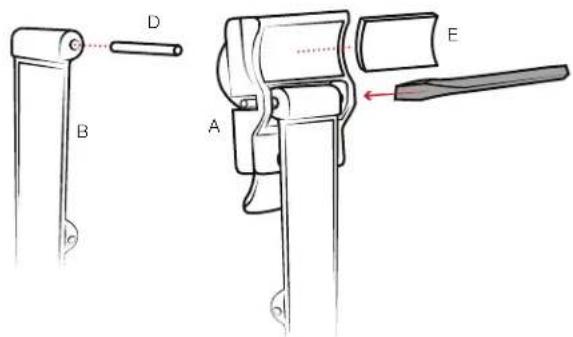
3 With (C) adhesive pad facing up, insert (D) pin half way inside hinge of (B) strap. Insert (B) strap with protruding (D) pin into the backside right slot of (A) base. While pressing (B) strap firm against (A) base, press pin through the left slot using a flat head screwdriver. Adhere (E) adhesive pad.
4 Place RAM® EZ-Strap™ on surface and feed the strap through (A) base until strap clicks into base. Hold the RAM® EZ-Strap™ in place as you pull the strap to tighten.

natural_image
Mechanical component diagram showing rotational motion with red arrows indicating direction (no text or symbols)
Merk : RAM Mount
Model : RAP-SB-187-GA41
Categorie : Bevestigingsaccessoire