DARKMOON - Smartphone WIKO - Gratis gebruiksaanwijzing en handleiding
Vind de handleiding van het apparaat gratis DARKMOON WIKO in PDF-formaat.


| Producttype | Smartphone |
| Merk | WIKO |
| Model | DARKMOON |
| Touchscreen | Ja |
| Batterij | Oplaadbaar, niet verwijderbaar |
| Soorten simkaarten | Micro-SIM en standaard (dual SIM) |
| Geheugenkaart | MicroSD tot 32 GB |
| Mobiele connectiviteit | GPRS, EDGE, 3G, HSPA, HSPA+ |
| Draadloze connectiviteit | Wi-Fi, Bluetooth, GPS |
| Fysieke knoppen | Aan/Uit, Home, Menu, Terug, Volume +/– |
| Inhoud van de doos | Mobiel, netadapter, micro-USB-kabel, batterij, headset, snelle startgids |
| SAR (hoofd) | 0,376 W/kg |
| Veiligheidsinstructies | Inbegrepen, met aanbevelingen voor kinderen, gehoor, rijden, vliegtuig, ziekenhuizen, enz. |
| Onderhoud | Droge doek, geen oplosmiddel |
| Repareerbaarheid | Reparatie alleen door erkende technicus |
| Garantie | Dekt geen normale slijtage (batterij, scherm, enz.) |
| Recycling | Onderworpen aan Europese richtlijn 2002/96/EG, verplichte gescheiden inzameling |
Veelgestelde vragen - DARKMOON WIKO
Gebruikersvragen over DARKMOON WIKO
0 vraag over dit apparaat. Beantwoord die u kent of stel uw eigen vraag.
Stel een nieuwe vraag over dit apparaat
Download de handleiding voor uw Smartphone in PDF-formaat gratis! Vind uw handleiding DARKMOON - WIKO en neem uw elektronisch apparaat weer in handen. Op deze pagina staan alle documenten die nodig zijn voor het gebruik van uw apparaat. DARKMOON van het merk WIKO.
GEBRUIKSAANWIJZING DARKMOON WIKO
Le descriptif de ce guide peut contenir certaines différences avec celui de votre téléphone en fonction de la version du logiciel ou de votre opérateur.
Félicitations!
Vous venez d'acquérir votre mobile WIKO DARKMOON. Vous trouverez dans ce guide toutes les informations relatives à l'utilisation de ce téléphone portable afin, nous le souhaitons, de vous familiariser rapidement avec l'univers WIKO.
Le transfert, la reproduction et la distribution de l'information contenue dans ce manuel ne peuvent en aucun cas être transmis ou produits sous quelque forme que ce soit, ou sans l'autorisation écrite de WIKO.
Marques commerciales
WIKO est une marque déposée de WIKO.
Avis
WIKO se réserve le droit de modifier à tout moment les
informations continues dans ce guide.
Ce guide a été réalisé avec la plus grande attention, mais toutes les informations et recommandations qui y sont inscrites ne représentent pas une garantie quelconque.
Limite de responsabilité
L’intégrabilité des services et contenus accessibles par cet appareil est la propriété exclusive de tiers et donc protégée par des droits [Droit d’auteur, brevet, licence, et autres droits sur la propriété intellectuelle]. Ces services sont réservés à leur usage personnel et non pour une utilisation commerciale. Il est impossible d’utiliser ces contenus ou services sans demande écrite au contrôle du contenu. Vous ne pouvez en aucune manière copier, publier, transférer, vendre ou exploiter sur quelque support que ce soit des contenus ou des services édités par le biais de cet appareil ou d’œuvres des formes dérivées.
LES SERVICES ET CONTENUS DES TIERS SONT DE
LIVRÉS «EN L'ÊTAT», WIKO NE GARANTIT PAS LES CONTENUS OU SERVICES AINSI DELIVRÉS, QUE CE SOIT DE MANIERE EXPRESSÉ OU IMPLICITE, À QUELQUE FIN QUE CE SOIT AINSI QUE LES GARAN-TIES QUALITAIRE MARCHANDE ET D'ADECUATION A UN USAGE PARTICULIER. WIKO N'ASSURE PAS LA GAR-ANTIE DE L'EXACTITUDE, LA VALIDÉ, LA LEGALITE OU L'EXHAUSTIVITE DES CONTENUS OU SERVICES FOURSIN PAR CET APPAREIL. WIKO N SE SERA PAS RESPONSABLE EN CASE DE NÉSIGENCE, QUE CE SOIT AU Niveau DE LA RESPONSABILTE CONTRACTUELLÉ OU DÉLICTUELLÉ, DES DOMMAGES DIR-CTS OU INDIRECTES, ACCESSOIRÉS SPECIAUXS, DES HONORAIRES D'AVOCAT, DES FRAIS OU DE TOUT AUTRE DOMMAGE RÉSULTANT DE L'UTILISATION DES CONTENUS OU SERVICES PAR VOUS-MÉME OU PAR UN TIERS MÉME SI WIKO A été INFORMÉ DE LA POSSIBILITE DE TELES DÉSAGRÊMENTS. CERTAINS PAYS N'AUTORISIENT PAS L'EXCLUSION DES GAR-ANTIES IMPLICITES OU LA LIMITATION DES DROITS
LEGAUX DU CONSOMMATEUR, IL SE POT QUE CES EXCLUSIONS ET LIMITATIONS NE VOUS SOIENT PAS APPLICABLES.
Les services de tiers peuvent être interrompus ou résiliés à tout moment. Dans le temps, WIKO n'assure aucune représentation ou garantie concernant la disponibilité de tout content ou service. WIKO n'a transmis seldom par des tiers via des réseaux ou des dispositifs de transmission.
WIKO décline expressément toute responsabilité lors d'interruption ou de suspension d'un contenu ou d'un service proposé par ce périmètre, sans restriction des générations de cette limite de responsabilité.
WIKO ne peut être en aucune manière responsable du service client associé aux contenus et services. Toute question ou requête concernant les contenus ou services doit être transmise directement au fournisseur des contenus ou des services concernés.
Contenu du coffret:
- Mobile WIKO DARKMOON
- Adaptateur secteur
- Cable micro-USB
- Batterie
- Kit pieton
- Guide rapide
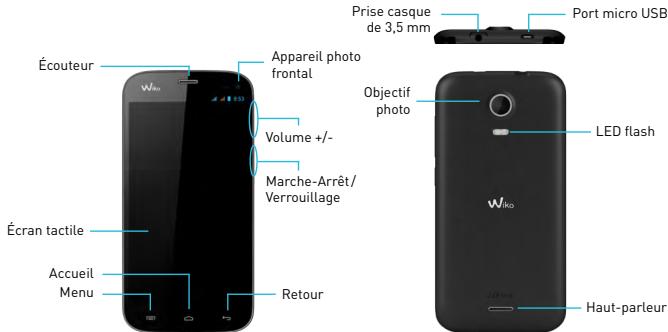
Les boutons du téléphone
| Boutons | Fonction |
| Marché/Arrêt | Maintenir le bouton enforcé: Allumer / arrêté le téléphone. Appuyer légrement: verrouiller l'écran tactile |
| Accueil | Revenir à l'écran d'accueil, ouvoir la liste des applications récentes (maintenir le bouton enforcé). |
| Menu | Afficher des menus d'options disponibles sur l'application active. |
| Retour | Revenir à l'écran précédent. Fermer le clavier à l'écran. |
| VOLUME +/- | Augmenter ou réduire le volume de l'appel, sonnerie, musique,iaux et d'autres fonctions audio.Lorsque le téléphone sonne,isser la sonnerie en mode silencieux. Activer le mode réunion en appuyant longuement sur Volume- |
Insertion des cartes SIM et de la carte mémoire
L'utilisation de votre téléphone nécessite l'insertion préalable de votre/vos carte(s) SIM.
L'emplacement situé du côté gauche du téléphone est destiné à une carte micro-SIM. Le bouton d'éjection est un petit orifice situé au-dessus de la porte du tiroir. Insérez l'outil d'éjection fourni avec le téléphone (ou une petite épingle) dans l'orifice d'éjection et appuyez fermement mais sans force jusqu'à l'ouverture de l'emplacement. Retirez l'emplacement et placez-y la carte micro-SIM. Insérez correctement la carte dans son logement. Replacez-le dans la fente et insérez-le délicatement dans le téléphone.
L'emplacement situé en haut du téléphone est destiné à une carte SIM standard. Poussez la partie supérieure de la coque vers le haut pour l'ouvrir. Insérez
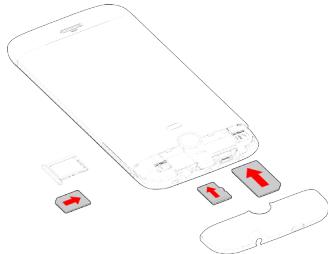
correctement la carte SIM standard dans le logement situé à gauche.
Dans ce même emplacement, l’emplacement à droite est prévu pour installer une carte mémoire MicroSD jusqu’à 32 Go : insérez-y la carte SD délicatement selon le schéma.
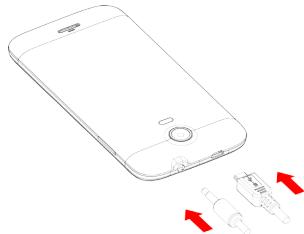
Chargement de la batterie
Votre téléphone est alimenté par une batterie rechargeable.
Le rouge clignante et indique que la batterie est très faible, veuillez recharger la batterie, un trop faible niveau de charge risque de réduire sa durée de vie.
Branchez le chargeur à une prise de courant et l'embout micro USB au port USB du téléphone.
Le voyant d'état du téléphone passe au rouge, indiquant qu'il est en charge.
Une fois que le changement est terminé, le voyant
d'état passe au vert, débranchez-le du chargeur.
ATTENTION: La batterie du téléphone n'est pas amovible, ne tentez pas d'ouvrir le téléphone.
Pour plus d'informations, reportez-vous à la section « Consignes de sécurité »
Démarrage et arrêt
Pour allumer le téléphone, appuyez sur le bouton MARCHE/ARRÉT de manière prolongée jusqu'à ce que le téléphone vibre.
Si votre carte SIM est verrouillée, vous devrez saisir le code PIN correct pour déverrouiller la carte SIM lors de la mise sous tension du téléphone.
Au bout de trois mauvaises saisies du code PIN, le portable se bloque et il faut le débloquer à l'aide de votre code PUK (fourni avec la carte SIM, si ce n'est pas le cas, contactez votre opérateur téléphonique)
Pour permettre le téléphone hors tension, appuyez de manière prolongée sur le bouton MARCHE-ARRET jusqu'à l'ouverture du menu, appuyez sur Eteindre. Appuyez ensuite sur OK pour confirmer.
Le téléphone vibre légèrement quand il est complètement éteint.
Gestion SIM
Lorsque vous allumez votre téléphone pour la première fois, diverses informations sur la/les cartes SIM s'affichent, vous êtes invité à modifier ou non les paramètres liés à l'appel, message et connexion internet. La carte SIM1 est configurée comme carte SIM par défaut pour la connexion des données.
Si les paramètres par défaut vous conviennent, appuyez sur Fermer.
Simone, appuyez sur « Modifier », le menu Gestion SIM s'affiche, vous pouvez:
- Personnaliser les informations sur les cartes SIM dans INFOSIM. La couleur d'arrière-plan sert à différencier les deux SIM dans les menus utilisant les SIM.
- Régler la SIM par défaut pour Appel vocal, Ap
Pel video, SMS/MMS, et Connexion de données pour internet.
Vous pouvez choisir la SIM lors d'une action, par exemple, avant d'émettre un appel ou d'envoyer un SMS/MMS, glissez le panneau de configuration vers le bas de l'écran, appuyez sur la SIM désirée.
~ Connexion réseau
Au premier démarrage du téléphone, ou lorsque vous changez de carte[s] SIM et rallumez le téléphone, le menu Paramètres des points d'accès s'affiche, appuyez sur Sélectionner. Appuyez sur le nom de la carte SIM afin d'afficher la liste de points d'accès. Choisissez celui qui correspond à votre opérateur en appuyant sur le bouton à droite, appuyez ensuite sur RETOUR → pour revenir au menu précédent.
APN non disponible
Si votre opérateur ne figure pas sur la liste ou que la liste est vide, renseignez-vous auprès de votre opérateur pour configurer les APN manuellement. Pour ce faire, appuyez sur le bouton menu, ensuite Nouvel APN, saisissez les informations fournies par cet opérateur. Appuyez de nouveau sur le bouton MENU et choisissez Enregistrer. Vous revenez sur le menu précédent, choisissez donc l'APN que vous venez d'enregistrer.
Activer la connexion de données
Pour vérifier cette configuration de connexion de données:
- Accédez au Paramètres → SANS-FIL & RESEAUX → Plus... → Réseaux mobiles → Noms des points d'accès, activez le point d'accès suivant cet opérateur/fortait.
- Revenez au menu précédent Paramètres du réseau mobile, appuyez ensuite sur Connexion des données,
appuyez sur le nom de votre carte SIM pour l'activer. Vous pouvez également faire glisser le panneau de notification vers le bas afin d'activer une connexion de données.
Service 3G
Si vous ave deux cartes SIM insérées, seulement une carte SIM peut être activée le service 3G, il est conseilé d'activer la SIM1 pour une performance optimale. Si vous voulez changer de SIM, accédez au Paramétres SANS-FIL & RESEAXU Plus... Réseaux mobiles Service 3G Activer 3G.
Itinérance des données
Notez que pour les cartes SIM en itinérance, vous devez activer son itinérance de données dans le menu Paramètres → Gestion SIM → REGLAGE DE BASE → Itinérance. Autrement la connexion internet sera désactivée par défaut.
Icônes de notification sur la barre d'état

Puissance du signal
Réseau GPRS connecté
Réseau EDGE connecté
Réseau 3G connecté
HSPA (3G+) connecté
HSPA+ [3G++] connecté

Aucun signal
En itinérance

Wi-Fi dispensables

Wi-Fi connecté

Bluetooth activé

GPS en service

Appel vocal en cours

Appel en attente

Appel manqué

Synchronisation

Nouvel e-mail

Alarme activée

Mode silencieux activé

Nouveau message vocal
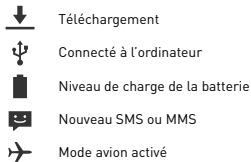
Selon les applications, les notifications peuvent être accomplies d'un signal sonore, d'une vibration ou du clignotement de voyants.
Le panneau de notifications
Pour connaître le détail de toutes nos notifications, faites glisser la barre d'état vers le bas. Les informations concernant l'arrivée de nouveaux messages, d'événements d'agenda à partir, l'état des téléchargements... seront alors stylisées. Le nom de l'opérateur
s'affiche en bas du panneau.
Appuyez sur pour effacer toutes les notifications ponctuelles, les applications en cours sont conservées dans la liste. Glissez une notification vers la gauche ou la droite pour l'effacer. Pour fermer le panneau, faites glisser vers le haut ou appuyez sur RETOUR . Pour accéder au panneau des réglages, appuyez sur

Pour y arriver plus rapidement, tirez la barre de notification avec deux doigts vers le bas.
Afficher les applications récentes
Appuyez de manière prolongée sur le bouton ACCUEIL, une liste des dernières applications utilisées s'ouvre. Appuyez sur une miniature pour ouvrir l'application. Faites défiler la miniature vers la gauche ou la droite pour arrêter ce processus.
~Utilisation des menus
Les menus de votre téléphone sont présentés sous forme de Menu contextuel ou Menu d'options.
Menucontextuel
Pour faire apparaître un menu contextuel, appuyez de manière prolongée sur un élément de l'écran, le menu contextuel propose des actions associées à cet élément.
Par exemple, appuyez de manière prolongée sur un SMS, les options liées à ce message apparaisent.
Attention: Tous les éléments ne disposent pas de menu contextuel. Lorsque vous effectuez un appui prolongé sur un élément lié à chaque menu, il ne se passe rien.
Menu d'options
Pour faire apparaître un menu d'options, appuyez sur le bouton MENU. Le menu d'options propose des actions ou réglages liés à l'application ou l'écran actuel, mais pas à un élément précis comme le menu contextual.
Attention : certains écrans ne disposent pas de menus d'options.
Consignes de sécurité
Afin d'utiliser ce téléphone en toute sécurité. Veuillez lire attentivement les consignes de sécurité:
- Enfants: Soyez très vigilant avec les enfants.
Un téléphone portable contient de nombreuses pièces détachées, il s'agit donc d'être très vigilant quand un enfant est en contact avec un téléphone portable. Le produit contient des petites pièces qui peuvent être ingérées ou entraîner la suffocation en cas d'ingestion. Dans le cas où votre appareil est équipé d'un appareil photo ou d'un dispositif d'éclairage, ne l'utilisez pas trop près des yeux des enfants ou des animaux.
- Audition: A pleine puissance, l'écoute prolongée au moyen d'un casque léger, ou d'écouteurs peut endommager sa audition. Veillez s périodes.
- Au volant: Prudence lorsque vous conduisez. La conduite demande une attention extrême et régulière pour réduire au maximum le risque d'accident. Utiliser un téléphone portable peut distraire son utilisateur et conduire à un accident. Il s'agit de respecter scrupuleusement la législation et les ré t de téléphoner en conduisant et l'utilisation d'un kit main-libre ne peut pas être considérée comme une solution.
Éteignez votre téléphone dans l'avion.
Pensez à éteindre vos téléphones lorsqu vous êtes dans un avion (GSM + Bluetooth). Celui-ci peut provoquer des interférences.
- Milieu hospitalier: Éteignez votre telephone à proximité de tout appareil médical.
Il est très dangereux de laisser allumer un téléphone
à proximité d'un appareil Médical. Celui-ci peut créer des interférences avec des appareils Médicaux. Il faut donc respecter toutes les consignes et avertissements dans les hôpitaux ou centres de soin.
Pensez à éteindre votre téléphone dans les stations-service. N'utilisez pas votre appareil dans une station-essence, à proximité de carburants.
Il est dangereux d'utiliser votre téléphone à l'intérieur d'un garage professionnel.
- Implants électroniques et stimulateurs cardiaques: Les personnes équipées d'un implant électronique ou d'un stimulateu tre appareil provoque des interférences avec un stimulateur cardiaque, éteignez immédiatement le téléphone et contactez le fabricant du stimulateur cardiaque pour être informé de la conduite à tenir.
- Risques d'incendie: Ne laissez pas cet appareil à proximité de sources de chaleur comme un radiateur
théateur ou une cuisinière. Ne mettez pas votre téléphone en charge à proximité de matières inflammables (les risques d'incendie sont réels).
- Contact avec des liquéfiés: Ne me tenez pas le téléphone en contact avec des liquéfiés, ni avec les mains mouillées, tous les dégâts provoqués par l'eau peuvent être irrémédiables.
- N'utilise que les accessoires homologués par WIKO.
L'utilisation d'accessoires non homologues peut déterminer une téléphone ou provoquer des risques.
- Ne détruisez pas les batteries et les chargeurs.
N'utilisez jamais une batterie ou un chargeur endommagé.
Ne pas mettre en contact des batteries avec des objets magnétiques, risque de court-circuit entre les bornes plus et moins de vos batteries et de détruire la batterie ou le téléphone de manière définitive.
D'une manière générale, il ne faut pas exposer les batteries à des pressions très basses ou très élevées.
[inférieures à 0°C ou supérieures à 45°C]. Ces déficiences de températures peuvent réduire l'autonomie et la durée de vie des batteries.
- Choc ou impacts: Utilisez et manipulez votre téléphone avec le plus grand soin. Protégez votre téléphone, des chocs ou impacts vous pourriez l'endommager. Certaines parties de votre téléphone sont en verre, et pourraient donc se briser en cas de chute ou de gros impacts. Évitez de laisser tomber tout appareil. Ne touchez pas l'écran avec un objet pointu.
- Décharge électrique: Ne cherchez pas à démonter votre téléphone, les risques de décharge électriques sont réels.
- Entretien: Si vous voulez nettoyer votre combiné, utilisez un chiffon sec [pas de solvant, tel que du benzène, ou de l'alcool].
- Rechargez votre téléphone dans une zone bien aérée. Ne pas recharger votre appareil si il est posé sur du tissu.
- Altération des bandes magnétiques : Ne placez pas votre téléphone à côté de cartes de crédit, cela peut endommager les données des bandes magnétiques.
Consignes d'utilisation importantes
Batteries - SIM - Appel d'urgence - DAS - Réparation
- Afin d'augmenter la durée de vie de votre batterie, utilisez uniquement les chargeurs et batteries WIKO. Le remplacement de la batterie par un modèle non-conforme peut entraîner une explosion de cette dernière.
- Ne jetez jamais les batteries au feu et veillez à respecter les consignes en vigueur en matière de recyclage des batteries et des téléphones usagés.
- Veillez à ne pas endommager et écraser la batterie. Cela risquera de provoquer un court-circuit interne et une surchauffe.
- Ne démontez pas la batterie.
- La batterie peut être rechargée des centaines de fois avant de nevoir la remplaquer. Lorsque la batterie présente des signes de faiblesse, vous pouvez proceder à son remplacement.
- Si vous n'utilisez pas votre téléphone portable pendant une durée prolongée, pensez à recharger la batterie afin d'optimiser sa durée d'utilisation.
- Ne vous débarrassiez pas des batteries avec les déchets ménagers, pensez au recyclage et suivez les consignes du fabricant. Si la batterie est endommagée, veillez la rapporter au service après-vente ou au revendeur WIKO agréé le plus proche.
- Afin de réduire votre consommation d'énergie, débranchez le chargeur de la prise murale lorsque le chargement de la batterie est terminé.
- Ne pas laissé la batterie se charger pendant plus d'une semaine, cela pourrait créer une surcharge et réduire la durée de vie du produit.
- Manipulez les cartes SIM avec précaution, essuyez les cartes avec un chiffon doux si elles semblent sales.
- Appel d'urgence: Il peut arriver que les numéros d'urgence uprès de votre opérateur.
12. Exposition aux radiofréquences :
Votre téléphone portable a été réalisé et construit de façon à respecter les directives internationales (ICNIRP) en matière d'exposition aux fréquences radiélectriques. Ces directives ont été mises en place par des organismes scientifiques indépendants à partir d'études et de recherches visant à garantir la sécurité de toutes les personnes ayant recours à l'utilisation d'un téléphone portable.
Les consignes de sécurité relatives à l'exposition aux ondes radiélectriques utilisent une unité de mesure appelée DAS [débit d'absorption spécifique]. Les directives internationales ont fixé cette limite à 2W/kg^*. Au cours des tests permettant d'identifier le DAS, on utilise le téléphone dans des positions de fonctionnement.
standard.
1 Commission Internationale de Protection contre les Rayonnements Non Ionisants
Même si le taux d'absorption spécifique est déterminé sous le niveau de puissance le plus élevé, le taux d'absorption spécifique réel du téléphone en fonctionnement peut être largement inférieur à la valeur maximale.
Un téléphone est conçu pour marcher à différents niveaux de puissance de façon à utiliser uniquement la puissance dont il a besoin pour être relié au réseau. De plus, n'importe quel modèle de téléphone, avant sa commercialisation, doit subir des tests visant à garantir sa conformité à la directive européenne R&TTE. Cette directive édite des règles strictes dans le but de garantir la sécurité des utilisateurs et prévenir tout risque sanitaire.
La valeur maximale du DAS testée sur cet appareil est de : 0.376W/Kg. Il est conforme aux règles en matière d'exposition aux fréquences radioélectriques, lorsqu'il est utilisé dans sa position normale au niveau de l'oreille, ou à une distance minimale de 1,5 cm du corps. Pour transmettre des fichiers, des données, ou des messages, cet appareil utilise une connexion de qualité au réseau. Parfait, la transmission de fichiers ou de messages peut être retardée jusqu'à ce que la connexion soit possible. Dans ce cas, veillez à bien respecter les instructions concernant la distance de séparation pour l'établissement de la transmission. Si vous utilisez un étui, un clip de ceinture, ou un support utilisé à des fins de transport, il ne doit pas contenir de parties métalliques, et doit être à une distance minimale de 1,5 cm entre le produit et le corps.
La limite DAS concernant les équipements mobiles est de 2 watts/kilogramme [W/kg] en moyenne sur dix grammes de tissu cellulaire. Les valeurs DAS peuvent évoluer selon les normes de présentation des informations
informations en vigueur dans différents pays.
Conseils pour réduire le niveau d'exposition
Afin de diminuer la quantité de rayonnement reçu, nous vous recommandons d'utiliser votre téléphone dans de bonnes conditions de réception. Il est conseillé d'en limiter l'utilisation notamment dans : les parkings souterrains, lors de déplacements en voiture ou en train, etc.
Les conditions de réception sont indiquées par l'intermédiaire de barrettes apparaissant sur votre téléphone. Plus il y a de barrettes de réception indiquées sur votre téléphone, plus la qualité de réception est bonne.
Afin de limiter l'exposition aux rayonnements, nous vous recommandons l'usage du kit mains libre.
Afin de limiter les mauvaises conséquences de l'exposition à un rayonnement prolongé, nous conseillons aux adolescents de tenir le téléphone éloigné de leur bas-ventre, et aux femmes enceintes de tenir le télé
phone éloigné du ventre.
- La réparation de votre appareil doit être effectuée par un technicien agrée. Si vous confiez la réparation de votre appareil à des personnes non habilitées, WIKO n'assure pas la garantie du téléphone.
Attention
WIKO ne garantit pas l'usage normal du produit (batteries, écrans, claviers, objectifs d'appareil photo, etc.).
Accord sur l'utilisation de données
L'enregistrement de votre téléphone WIKO est un service gratuit qui permet aux techniciens de WIKO d'être connectés aux données matérielles de votre téléphone, afin de connaître en temps réel vos spécifications matérielles, votre réseau et, en retour, de vous tenir informé des mises à jour disponibles pour
votre système, de vous alerter en cas de défaillance technique reconnue sur un modèle ou une série. Par ailleurs, ce service permet de nous alerter instantanément en cas d'anomalie afin d'y apporter une solution technique dans les meilleurs délais.
Par l'enregistrement de votre téléphone, vous reconnaîtrez à WIKO ainsi qu'à ses techniciens la possibilité de recueillir, conserver, analyser et utiliser des informations de diagnostic, techniques, d'utilisation et afférentes, incluant, sans limites, des informations concernant votre appareil WIKO, vos logiciels système et vos applications ; nous recueillerons régulièrement ces informations pour faciliter la mise à disposition de mises à jour de logiciels, d'assistance sur les produits et de services divers proposés au client (le cas échéant) relatifs aux logiciels de votre appareil.
WIKO peut utiliser ces informations, sans dévoiler l'identité du client, afin de lui proposer et d'améliorer ses produits ou ses services à l'utilisateur.
Ce service ne nous donne pas accès à vos contenus et fichiers personnels.
L'enregistrement de votre téléphone WIKO nécessite une connexion au réseau internet mobile. Cela pourrait vous entraîner des frais de communication, selon l'abonnement souscrit auprès de l'opérateur de téléphonie mobile. Nous vous recommandons d'utiliser une connexion Wi-Fi. Avec le Wi-Fi, vous n'avez pas de limitation de data [si cet abonnement téléphonique limite l'échange de Data] et la connexion est plus rapide.
Les informations recueillies font l'objet d'un traitement informatique destiné à accéder aux données matérielles de chaque téléphone. Le destinataire des données est WIKO SAS.
Conformément à la loi «Informatique et libertés» du 6 janvier 1978 modifiée en 2004, vous bénéficiaz d'un droit d'accès et de rectification aux informations personnelles transmises lors de l'enregistrement qui vous concerne, que vous pouvez exercer en vous
adressant à WIKO SAS, 1, rue Capitaine Dessemond, 13007 MARSEILLLE.
Vous pouvez également, pour des motifs légitimes, vous opposer au traitement des données vous concernant.
Recyclage

Sur ce manuel, le symbole de la poubelle barrée d'une croix, indique que le produit est soumis à une directive européenne 2002/96/EC: les produits électriques, électroniques, les batteries, et les accus
mulateurs, accessoires doivent impérativement faire l'objet d'un tri sélectif.
Veillez à déposer le téléphone hors d'usage dans une poubelle appropriée, ou le restituer dans un magasin de téléphone portable. Cette conduite aidera à réduire
les dangers pour l'environnement et la santé.
Les marchés, les revendeurs, et les associations nationales de constructeurs vous donneront les précisions essentielles concernant l'élimination de votre ancien appareil.
Notice
WIKO reserves the right to modify the information contained in this guide at any time. This guide has been produced with the utmost care. However, the information and advice herein do not represent a guarantee of any kind. The entire content and services accessible through this device are the exclusive property of third parties and are therefore protected in law (copyright, patents, licences and other intellectual property laws). These services are reserved for your personal use and not for commercial use. This content or these services may not be exploited without submitting a written request to the content owner. You may in no way copy, publish, transfer, sell or operate on any medium the content or services published by means of this device or generate derivative forms thereof. THIRD PARTY SERVICES AND CONTENT ARE DELIVERED AS IS>. WIKO DOES NOT GUARantee THE CONTENT AND SERVICES SO DELIVERED, EITHER EXPRESSLY OR IMPLICITLY, FOR ANY PURPOSE WHATSOEVER AS WELL AS WARRANTYES OF MERCHANTABILITY AND FITNESS FOR A PARTICULAR PURPOSE. WIKO DOES NOT GUARantee THE ACCURACY, VALIDITY, LEGALITY OR EXHAUSTIVENESS OF THE CONTENT OR SERVICES PROVIDED BY THIS DEVICE. WIKO SHALL NOT BE LIABLE FOR NEGLIgence, WHETHER IN CONTRACT OR IN TORT, FOR ANY DIRECT, INDIRECT, INCIDENTAL OR SPECIAL DAMAGES, LEGAL FEES, EXPENSES OR ANY OTHER DAMAGE ASRiSING FROM USE OF THE CONTENT OR SERVICES BY YOURSELF OR BY A THIRD PARTY EVEN IF WIKO HAS BEEN ADVISED OF THE POSSIBILITY OF SUCH INCONVENIENCES. AS SOME COUNTRIES DO NOT ALLOW THE EXCLUSION OF IMPLIED WARRANTY OR LIMITATIONS ON THE LEGAL RIGHTS OF CONSUMERS, IT IS POSSIBLE THAT THESE EXCLUSIONS AND LIMITATIONS MAY NOT APPLY TO YOU. Third party services may be interrupted or terminated at any time. WIKO makes no representations or warranties over time regarding the availability of any content or service. WIKO has no control over the content and services transmitted by third parties via networks or transmission devices. WIKO expressly disclaims all liability for any interruption or suspension of a service or content provided by this device without restricting the general scope of this limitation of liability. WIKO may in no circumstances be liable for the customer service associated with the content and services. Any questions or inquiries concerning the content or services should be sent directly to the supplier of the relevant content or services. 1. WIKO DARKMOON mobile phone 2. AC adaptor 3. Micro USB cable 4. Battery 6. Hands-free kit 6. Quick guide | Button | Function |
| On/Off | Press and hold the button to turn the phone on or off. Press the button lightly to lock the touch screen. |
| Home | Returns to the home screen and opens the list of recent applica- tions (press and hold the button). |
| Menu | Displays the options menus available on the active application. |
| Return | Returns to the previous screen.Closes the onscreen keyboard. |
| VOLUME+/- | Increases or decreases the call volume, the ringtone, music, games and other audio functions. Switch the ringtone to silent mode when the phone rings. Press and hold on Volume- to enable the meeting profile. |
Protection
Although the SAR is determined using the highest power level, the phone's real rate of specific absorption whilst in operation may be well below the maximum value. A phone is designed to operate at different power levels so that it only uses the power it needs to be connected to the network. In addition, all models of phone must undergo tests before being marketed to ensure compliance with the European R&TTE directive. This directive publishes strict rules for guaranteeing the safety of users and for preventing any risks to health. The maximum SAR value tested on this device is 0.376W / Kg . It complies with the rules on exposure to radio frequencies when used in its normal position at the ear or at a minimum distance of 1.5cm from the body. The device uses a high-quality network connection for transmitting files, data and messages. On occasion, the transmission of files or messages may be delayed until the connection is available. When this is the case, be sure to follow the instructions regarding the separation distance for establishing the transmission. If you use a case, belt-clip or holder for carrying the phone, it must not contain any metal and should be kept at a minimum distance of 1.5cm from your body. \*The SAR limit for mobile devices is 2.0 watts / kilogram [W / kg] averaged over ten grams of body tissue. SAR values may vary according to the standards for reporting information that are in force in different countries. We recommend that you use your phone in good reception conditions in order to reduce the amount of radiation received. It is advisable to limit the amount of time you use the phone in underground car parks and when travelling by car or train, etc. Reception conditions are indicated by the bars that are displayed on your phone : the more bars there are, the better the reception quality. We recommend that you use the hands-free kit to reduce exposure to radiation. To reduce the adverse effects of prolonged radiation exposure, we advise teenagers to hold the phone away from their lower abdomen, and that pregnant women hold the phone at a distance from their stomach. 13. Only qualified service personnel should repair your device. If you give your device to non-qualified personnel for repair, the phone will not be covered by WIKO's warranty. WIKO's warranty does not cover normal wear and tear (batteries, screens, keyboards, camera lenses, etc.). Registering your WIKO phone is a free service offered by WIKO that allows our engineers to connect to your phone's physical data so that they can tell what your model and hardware specifications are in real time. In return, the engineers can keep you informed of updates that are available for your system and warn you in case of a recognised technical failure on a model or series. In addition, this service allows us to alert you instantly if there is a malfunction so that we can provide a technical solution as soon as possible. By registering your phone, you acknowledge that WIKO and its engineers are able to collect, store, analyse and use diagnostic, technical and usage data and related data including, without limitation, data regarding your WIKO device, your software system and your applications. We will collect this information on a regular ba sis to facilitate the provision of software updates and product support and miscellaneous services offered to customers (where applicable) relating to the software on your device. WIKO may use this information without revealing the identity of the customer in order to offer and improve its products or services for the user. This service will not give us access to your content and personal files. You need to be connected to the mobile internet network for a short time to register your WIKO phone. This may result in connections costs, at your expense, depending on the nature of your contract with your mobile operator. We recommend that you use a Wi-Fi connection, as with this type of connection there is no data limit (if your phone service limits the exchange of data) and the connection is quicker. The information obtained is processed electronically in order to access the physical data on your phone. The data recipient is WIKO SAS. In accordance with the French Data Protection Act (the Lloi Informatique et Libertés of January 6, 1978, amended in 2004), you have the right to access and correct personal information submitted during registration. You may exercise this right by writing to WIKO SAS at 1, rue Capitaine Dessemond, 13007 Marseille, FRANCE. You may also, for legitimate reasons, oppose the processing of your personal data.  The symbol of a crossed-out wheeled-bin, as found in this manual., indicates that the item is subject to European Directive 2002/96/EC, which states that electrical and electronic equipment, batteries, ac cumulators and accessories must undergo selective waste management. Make sure that, when your phone is no longer usable, you put it in a suitable waste bin or return it to a mobile phone retailer. In this way you will help to reduce environmental and health hazards. Local councils, retailers and national manufacturing associations will give you the necessary information on how to dispose of your old device. «The details and conditions of our manufacturer warranty are available on www.wikomobile.com» We, WIKO SAS - 1, rue Capitaine Dessemond - 13007 - Marseilles - FRANCE, here by declare that the DARKMOON mobile phone complies with the standards and provisions of the Directives. The procedure for the Statement of Compliance, set out in Article 10.5 of Directive 1999/5/EC, was conducted under the supervision of the following organisation: PHOENIX TESTLAB GmbH, Königswinkel 10 D-32825 Blomberg, Germany www.phoenix-testlab.de Phone +49[0]5235 - 9500 - 0 / Fax +49[0]5235 - 9500 - 10 C€ 0700 The full text of the device's Statement of Compliance is available on written request to the following address: WIKO SAS - 1, rue Capitaine Dessemond - 13007 - Marseille - FRANCE 31/10/2013  Laurent DAHAN / CEO [Date] {Name and signature of the authorised official} SHARE YOUR IDENTITY 1, rue Capitaine Dessemond 13007 Marseille FRANCE www.wikomobile.com  Prolonged listening to the music player at full power may damage the user's hearing.  SHARE YOUR IDENTITY HELL  Guidrapida Il contento del presente attività pottrebbe differire dal prodotto o dal software formato dal gestore Telefonico. Hai appena acquistato un dispositivo mobile WIKO DARKMOON. Nella presente guida sono elencate le informazioni relative all'uso del tu曹操手機 allo scopo di aiutarti a familiarizzare con l'Universo WIKO. Copyright © 2013 WIKO www.wikomobile.com Non è consentito trasfere, riproduire e diffondere in nessun caso le informazioni cont∉ne nel presente manuale in qualisasi forma oicine averapreventivamente ottutto il consenso scritto di WIKO. Marchi commerciali WIKO é un marchio deposito di WIKO. Nota WIKO si riserva il diritto di modificare in qualsiasi mo mente le informazioni contene nella presente guida. Il presente manuale è realizzato con la massima attenzione, tuttavia tutte le informazioni e le raccomandazioni che vi sono descritte non rappresentano nessuna garanzia. Tutti i servizi e i contenuti accessibili tram QE tesso appeaccchio sono di propietà esclusiva di terze e pertanto protetti delle leggi in vigore in materia [diritto d'autore, brevotto, licenza e altre leggi sulla propietà intellettuiale]. Questi servizi sono riservati per uso personale e non per un uso commerciale. Non è possible utilizzare quosti contentu o serviti senza farne richiesta scritta al propietario del contento. Non è possibile copiare, pubblicare,trasferire, vendere o sfruttare con qualsiasi supporto i contentu o sui servizi modificati tramite il presente dispositivo o di createe opere derivate. I SERVIZI I CONTUNU DI TERZI SONO FORNITI « TALI QUALI » WIKO NON GARANTISCE I CONTENTUTI O I SERVIZI COSI FORNITI, ESPLICITAMENTE O IMPLICITAMENTE, PER NESSUNI SCOPO. WIKO RIFIUTA ALTRESI LE GARANZION DE COMMERCIABILITA O IDONETIÀ PER UNO SCOPO SPECIFICIO. WIKO NON GARANTISCE L'ACCURATEZZA, LA VALIDITA, LA LEGALITA O LA COMPLETEZZA DEI CONTENUTI O SERVIZI FORNITI DAL PRESENTE DISPOSITIVO. WIKO NON SARÀ RESPONSABLE IN CASE DI NEIGGENZA, IN CONTRATTO O TORTO, PER DANNI DIRETTI, INDIRETTI O FORTUITI, PER GLI ONORARI LEGALI, LE SPSE O QUALSIASI ALTRO DANNO RISULTANTE DALL'UTILIZZO DE CONTENUTI O SERVIZI DA PARTE DEL'TUENTE O DI TERZI ANCHE SE LA SOCIET A WIKO É STATA INFORMATA DELLA POSSIBILITIES DE EVENTUALI PROBLEMI. POICHE ALCINI PAESI NON AUTORIZZANO L'ESCLUSIONE DELLE GARANZIE IMPLICITE O LA LIMITAZIONE DEI DIRITTI LEGALI DEL CONSUMATORE, É POSSIBLE CHE QUESTE ESCLU SIONI E LIMITAZIONI NON SIANO APPLICABILI. I servizi forniti da terzi sono essere annulati o interrotti in qualiasi段时间. WIKO non garantisce una rappresentazione o garanzia relative alla disponibilità di qualiasi contenso utservizio nel tempo. WIKO non ha nessun controllo sul contenuti e servizi che sono trasmensi da terzi tramite reti o impianti di trasmissione. WIKO declina espressamente qualsiasi responsabilità in caso di interrup tion o suspensione di contentu o servizi disponibili tramite i presente dispositivo sansa restrizione delle characteristiche generali della nella presente limitazione di responsabilità. WIKO non è responsable e non ha alcun obbligo per il servizio di assistenza clienti relativa ai contenuti e ai servizi. Ogni fornando o richiesta sui contenuti o servizi che essere envia direttazione ai rispettoffornitori dei contenuti o servizi in oggetto. 1. Dispositivo mobile WIKO DARKMOON 2. Adattatore 3. Cavo micro USB 4. Auricolare 5. Batteria 6. Guida rapida | Tasti | Funzione |
| Accensione/spegnimento | Tenere premuto il tasto : per accendere/spagnere il Telefono.Premere leggermente : per bloccare il touch screen. |
| Home | Consente di ritornare alla schermata iniziale, aprire l'elenco delle applicazioni recenti (tenere premuto il tasto). |
| Menu | Consente di visualizzare i menu delle opzioni disponibili sull'applicazione attiva. |
| Tastodi indietro | Consente di ritornare alla schermata precedente.Consente di chiudere la tastiera della schermata. |
| VOLUME +/- | Consente di regolare il volume di chiamata della suoneria, della musica, dei giorni e delle altre funzioni audio. Quando il Telefono suona, consente di mettere il dispositivo in modalità silenziosa. Per attivare la modalità «riunione» premere a lungo il tasto Volume- |
APN non disponible
Se l'operaore di servizi internet desiderato non è presente nell'élenco oppure se l'élenco è vuoto, chiedere informazioni al proprio operatore per configurare manually gli APN. Per esquire esta opérationa, premire il tasti Menu ≡, quando Nuovo APN, insertre le informazioni ottenute dall'opercatore di rete. Premiere di nuovo sul tasti Menu e selezione Registrazione. Ritornare al menu precedente e selezioneari quindi l'APN salvato. Per vericare la configurazione della connessione dati: 1. Accederé a Piaramétr > WIFI E RETI > Avanti > Retir mobili > Punto di accesso, attivare il punto di accia cesso in base al proprio operatore/contratto. 2. Ritoriare al menu precedente Parametri della rete mobile, premere successivement su Connessione dati, clicare su nome della SIM selezionata per attivarla. ^E possible anche trascineri l pannello di notificza verso l basso per attivare una connessione dati. Se sono inserite due SIM, soltanto una più essere attivata per il servizio 3G. É consigiliable attivare la SIM1 par avoir prestazioni ottimali. Per cancellare la SIM, accederé al menu Parametri → WIFI E RETI → Avanti → RET mobili → Servizio 3G → Attivare 3G. Notare che per le SIM in roaming è necessario attivare il roaming nel menu Parametri → Gestione SIM → IMPOSTAZIONI DI BASE → Roaming. In caso contratto la connessione internet sare disattivata.  Potenza del segnale G Rete GPRS connessa E Rete EDGE connessa 3G Rete 3G connessa H HSPA (3G+) connessa H+ HSPA (3G + + ) connessa  Nessun segnale R In roaming  Reti Wi-Fi disponibili  Wi-Fi connesso  Bluetooth attivato  GPS in servizio  Chiamata vocale in corso  Chiamata in attesa  Chiamata persa  Sincronizzazione  Nuova e-mail  Allarme attenuato  Modalità silenziosa attivata  Nuovo messaggio vocale  Download  Connesso al computerr  Livello di carica della batteria  Nuovo SMS o MMS  Modalità aeroaattivata In base alle applicazioni, le notifiche possono essere occupagnate da un segnale acustico, da una vibrazione oppre da un lampeggiamiento delle spi. Por conoscere il dettaglio di tutte le notifiche, trascinate la barra di stato verso il basso. Saranno perci visualizzate che notifiche relative all arrivato di nuovi dati, eventi futuri in agenda, lo stato dei download. Il nome dell'operaore è visualizzato nel pannello in basso. Premiere 5 per cancellare tutte les notificationes, le也不例外i en corso vengono mantenant nelly elenco. Trascinare una notifica versus sinistra o destra per eliminarla. Per chiudere il pannello, trascinarto versus l'alt oppe presque premere il tasto Indietro Per acceder e pannello delle impostazioni, preme Per acceder e al menu più velocemente, con due dita trascinarare la barra delle notifiche verso il basso. Premiere per alcuni secondi il tasto Home per visualizzazione l'elenco delle ultime applicazioni. Tocare l'icona per aprire l'applicazione corrispondente. Spostare l'icona versusinastra o destra per chiudere la procedura. 1 menu del dispositivo sono presentati sotto forma di Menu contestuali e Menu di opzioni. Per visualizzato un menu contestuale, premere per alcuni初次 su uno elemento dello schermo, il menu contestuale propone delle operazioni associate a quello elemento. Per esempio, premere per alcuni secondi su un SMS e saranno visualizzate le opzioni collegate a questo messaggio. Attenzione: non tutti gli elementi hanno un menu contestuale, perché non succederà niente se si preme per alcuni secondi su un dato non collegato a un dato. Per visualizzare un menu delle opzioni, premere il tasto Menu Il menu delle opzioni propone operazioni o impostazioni collegate all'applicazione o alla schermata aperta, ma non a un dato specifico come il menu contestuale. Attenzione: alcune schermate non dispongono di menu delle opzioni. Leggere attentamente las informazioni sulla sicurezza prima di utilizzare il presente dispositivo: 1. Bambini: Prestare molta attenzione con i bambini. Un dispositivo mobile contiene numeroi pezzi assemblati, e quindi significabile fare molta attenzione se un bambino entra incontriatto con un dispositivo mobile. Il prodotto è composto da piccole parti che se ingerite, sono possaCAFIO. Nel caso in cui il disposativo sia dotato di fotocamera o di un flash, non utilizzato vicinoagli ecchi dei bambini o degli animali. 2. Udito: L'ecessiva espesizione a un livello di volume troppo elevato, in particolare quando si utilizzato le cuffe o 'auricolare, cui causare danni al'udito. Si raccomanda di abbassare il volume al minimo necessario quando si ascolta la musica o durante una conversazione. Evitare l'esposizione a un livello di volume troppo elevato per lunghi periodi di tempo. 3. Alla guida: Essere prudenti quando si è alla guida. L'uso di un dispositivo mobile durante la guida può causestridente con il rischio di provocare incidenti. Rispettare scrupolosamente le dispositionsi di legge in vigore in materia di restrizioni di utilizzo di dispositivi mobili quando si è alla guida di autoveicoli. É perciò viietato Telefonare durante la guida e l'utilizzo di un dispositivo «hands free» (viva você) PODESSERE una valida soluzione. In aeroe: Si raccomanda di spegnere il disposito durante la permanenza in un aeroe (GSM e Bluetooth), poichè potrebree causare interferenze. 4. Ambiente ospedaliero: Spegnere il dispossessioni in presenza di qualiasi sistrumentazione medica, poichè potrebbe interferire con quest'ultima. Bisogna perché rispetto tutte la precauzioni e le avervazioni presente negli ospedali o nei centri di cura. Spegnere il dispositivo quando si è fermi in una stazione di servizio. Non utilizzare il dispositivo in un distributore di benzina, in vicinanza di carburanti. É pericoloso'utilizzo il dispositivo all'interno di un'officina meracala. 5. Impianti elettronici e pace-maker: I portatori di impianti elettronici o pace-maker devono, in via precazone, positonare il dispositivi sul dato opposto a quello dell'impianto durante una conversazione Telefonica. Nel caso in cui il dispositivo provoco interferenze con il pace-maker, spegnere immediamente il dispositivo e contattare il produit del pace-maker per averare informazioni sulle precazioni da osservare. 6. Rischio di incidento: Non lasciare il disposativo vicino a fonti di calorie, per esempio un radiatore o una stufa. Non mettere il tefono in ricerica vicino a materiali inflammabili (risci di incidento sono real). 7. Contattato con i liquidi: Non lasciare il disposito aicontatto con i liquidi e non utilizzato con le mani bagnate: qualiasi danno provocato dall'acqua è ir- reversible. 8. Utilizzare unicamente accessori omologati da WIKO. L'utilizzo di accessori non omologati potere deteriorare il disposito o provocare dei rischi. 9. Non distruggere le batterie e il caricabatterie. Non utilizzare mai una batteria o un caricabatteria danneggiato. Non mettere in contatto le batterie con oggetti magneti per etivare i rischio di corto circuitto fra i poli positivo e negativo delle batterie e di distruggere definitivement la batteria o il dispositivo. In linea generale, evitare di esporre le batterie a temperature molto basse o molto elevate [inferiori a 0^ o superiori a 45^ ]. Queste differenze di temperature sono ridurre l'autonomia e la durata della vita delle batterie. 10. Urti o impatti: Utilizzare e maneggiare i disposito con grande attenzione e cura. Proteggere il dispositivo da urti o impatti che potreb bero dannegiarlo. Alcune parti del dispositivo sono di vetro e potrebbero quindi rompersi in casa di caduta o di impatti violenti. Non lasciare cadere il dispositivo. Non toccare lo scherno con oggetti appuntiti. 11. Scariche elettriche: Non tentare di smontare il dispositivo, i rischi di scariche elettriche sono reali. 12. Manutenzione: Per pulire il dispositorio, utilizzare un panno asciutto (senza solventi quali benzene o alcool). 13. Ricaricare il disposativo in un ambiente ben aerato. Non ricaricare il disposativo se è appoggiato su tessuto. 14. Alterazione delle bande magnetiche: Non posizioneare il dispositivo vicino a carte di credito per evitare di danneggiare i dati delle bande magnetiche. Batterie - SIM - Chiamata d'emergenza - DAS - Riparazione 1. Per augmentare la durata di vita della batteria, utilizzare unicamente i carcabatteria e le batterie WIKO. Sostituire la batteria con un modello non conforme cui provocare un esplonio di queste ultima. 2. Non gettare mai le batterie nel fuoco e rispettore les disposizioni in vigore in materia di smaltimento delle batterie e dei dispositivi obsoleti. 3. Non danneggiare o distruggere la batteria. Ciò rischierebbe di provocare un certo-circuito interno e surriscaldaire la batteria. 4. Non smontare la batteria. 5. La batteria più essée ricaricata multissime volte prima di essere{sostuile. Procedure alla sostuzione della batteria quando"Thisa segni di cedimento. 6. Se il disposativo non è utilizzato per un lungo pezzo, si consigilia di ricarcicare la batteria al fine di ottimizzarne la durata di utilizzo. 7. Non gettare le batterie nei rifiuti domestici, ma seguire lesindicazioni del produttore in materia di smaltimento.Nel caso in cui la batterie fosse dannegnita, reportlar alla assistenza post vendita oppure ar rivenditore autorizzato WIKO più vicino. 8. Per ridurre il consumo di energia, scollegare il caricatore alla presa di alimentazione dopo aver caricato completeness la batteria. 9. Non lasciare la batteria sotto carica per altre una settimana esta operatione potrebbe provocare un sovraccarico e ridurre la durata della vita del prodotto. 10. Maneggiare la SIM con attenzione; pulire le schede con un panno morbido se dovvesso sporiscari. 11. Chiamate d'émergence: é possible che i nombre di emergenza non siano accessibili su tutte le reti di telecomia mobile, nelle aree isolate o scoperte dal servizio; si consiglia di verificare la copertura presso il proprio operatore. 12. Esposizione alle radiofrequenze : Il presente dispositivo portale è realizzato e costruito nel rispetto delle dirette internazionali [ICINI RIP] in materia di esposizione alle onde radio ed elettriche. Le direttive menzionate sono state adottate da enti scientifici independenti a partire da studi e ricerca che hanno lo scopo di garantire la sicurezza di tutte le personne che utilizeano un dispositivo mobile. Le precauzioni di sicurezza relative all'esposizione an onda radio utilizzano un'unità di risura chiamata SAR (tasso di assorbimento specifico).Le direttive internazionali hanno fissato lo dato limite a 2W / kg^* .Nel corso di teste che consentono di identificare il SAR, il dispositivo eutilizzato in modalità di funzionamento standard. Commissione internazionale di protezione contro le radiazioni non ionizzanti. Anche se il tasso di assorbimento specifico determinato è inferiori al livello di potenza più elevato, il tasso di assorbimento specifico reale del disposivo in funzione più essere di molto inferiori rispetto al valore massimo. Un dispositivo è concepito per funzioni a diversi livelli di potenza in modo da utilizzare unicamente la potenza necessaria per essere collegata alla rete. Inoltre, qualsiasi modello di disposizione mobile, prima di essere commerciazato, deve essere sottoposto a test per garantirne la conformità alla diretiva europea R&TTE. La direttiva citata prescire norme rigide nell'ottica di garantire la sicurezza degli utenti e prevenir qualiasi rischio per la salute. Il valore massimo del SAR testato sul presente apperecchio è di: 0,761W/Kg. É conforme alle dispositionsi in materia di esposizione alla volte radio ed elettriche quando è utilizzato in modalità normale all'altezza dell'reccchio oppoe a una distance di 1,5 cm dal coro. Per trasmettre se file, dati o messaggi il presente dispositivo utilizes una connessione di qualità alla rete. La trasmissione dei file o dei messaggi talvotta pu essere retardata fin quando la connessione è possible. In quello caso, rispetto le struzioni relative alla distanza di separazione per la realizzazione della trasmissione. Ogni eventuale custodia, porta teftono da cintura o qualsi si supporto per il transporte del dispositivo non deve contener parte metalliche e devese essere a una distanza minima di 1,5 cm dal corso. *It limite SAR per i dispositivi mobili è in media di 2,0 watt/chilogramma [W/kg] su dieci grammi di tessuto cellulare. I valori di SAR sono vario sevarne seconde le norme di presentazione delle informazioni in vigore nei diversi paesi. Al fine di diminuire la quantità di irraggiamento ricevuto, si consiglia di utilizzare il disposativo in buone condizioni di risenza. Si consiglia di limitarne l'uso in particolare: nei parcheggii sotterranei, durante gli spostamenti in automobile o in treco, ecc. Le condizioni di ricezione sono indicate dalre barre vi sualizzate sul dispositivo. Più il numero di barre della ricezione è elevato e più la qualità del ricevimento è buona. Al fine di limitare l'esposizionea radio frequenza, si consiglia di utilizzare un kit viva voce. Per limitare le consequence negative dell'esposizione prolongata alle onde radio, gli adolescenti e lei donne in gravidanza dovrebbero tenere il dispositivo lontano alla pancia. 13. L'eventuale riparazione del dispositivo deve essere eseguita da un technician autorizzato. Nel caso in cui il dispositivo fosse riparato da tecnici non autorizzati, WIKO non riconoscerebbe la garanzia del dispositivo. WIKO non non es responsabile dell'usura del prodotti (batterie, schermo, tastiera, obiettivo fotografico, ecc.) La registrazione del tuo disposporto WIKO è un servizio gratuite che consente ai nostri tecni di connettersi ai dati hardware del tuo smartphone. E' un modo per gestire in tempo realette delle informazioni riguardanti ilmodeldo da te acquistato, le specifiche, gli aggiornamenti disponibili. Sarai informato in caso di anomalie individuate in un modello o una seriese per diffrìtta una soluzione tecnica efficace nel minor tempo POSSIBILE. Per la registrazione del tuo disposativo, è necessario autorizzato Wiko e i loro tecnici a raccogliere, conservare, analizzare e utilizzare informazioni diagnostica, tecniche, d'uso e afferent, compensoenza limitazione, informazioni riguardanti il tuo disposivo WIKO, i software di systeme e le applicazioni; raccogliereremo regolarmente le informazioni sopra indicate per rendere più facilement disponibili gli aggiornata amenti di software, l'assistenza sui prodotti e i diversi lavori proposti alla clientela relativi ai software del vostro dispositivo. WIKO più utilisé cette informazioni,SEA rivelezl'identitat del cliente,perpropore e migliorare i sui prodotti o sui servizi per l'utente. Questo servizio non ci consente di averere accesso ai cui contentu e file personali. Per registrar il suo disposativo WIKO avrai bisogno di connetterti alla rete Internet mobile. Per questa operazione pottrebbere essere addebatati deiosti di connessione in funzione dell'abbonamento che hai sottoscritto con il loro gestore di Telefonia mobile. Ticonigliamo di utilizzare una connessione Wi-Fi per non averve limitazioni di dati scarcati [se il vosto abbonamento Telefonico limite lo scambio di dati] e usfuriere da una connessione più veloco. Le informazioni raccolte saranno elaborate da unsystema informatico utilizzato per accederà ai data. hardware del tuo dispositorio. Il destinatorio dei dati è WIKO SAS. Ai sensi delle disposizioni della legge franse se informatica e libertà del 6 genazio 1978 modificata nel 2004, a虑e il dirito di acceder e modificare le voistre informazioni personali trasmesse durante la registrazione. Puoi esercitare tal diritti rivolgentedi a WIKO SAS, 1, rue Capitaine Dessemond, 13007 MARSIGILIA. Puo inottre, per motivi legittimi, opposti al trattamento dei dati che ti riguardano.  Nella presente guidia, il significo del cassetoneatto barrato con una cruce indica che i prodotto è soggetto alla diretiva europea 2002/96/EC: : prodotti elettrici, elettronico, la batterie e gli accumulatorati e gli accessori devono essere accuratamente separati. I dispositivi che non sono più utilizzabili devono essere depositati nel cassetonetto appropriato oppure restituito in un negozio di Telefonia. Questo accoraggio contribuira a ridurre i rischi per l'ambiente e per la salute. I comuni, i rivenditori e le associazioni nazionali di costrutturi sono fornire leindicazioni necessarie per un correttto smallamento del vecchio disposivo.| Teclas | Función |
| On / Off / Bloqueo | Almantener presionada esta tecla se enciende o apaga el teléfo-no. Al pulsarla ligeramente se bloquea la pantalla táctil. |
| Inicio | Al pulsar está tecla ligeramente seMEA la pantalla de iniciosy se abide el lista de aplicaciones recientes. |
| Menú | Al pulsar está tecla se muestran los menús de options disponibles en la aplicación activa. |
| Volver ← | Pulsa esta tecla para volver a la pantalla anterior o para que desaparezca el teclado. |
| VOLUMEN +/- | Pulsa para augmentar o disminuir el volumen de la lllamada, eltono, la música, juegos, y deorasrubaciones de audio. Al sonarel teléfono, permite pagar lo modo suspencio. Paraactivar el mode"reúnión",mantén pulsada la tecla Volumen- |
Avisos d'utilisation importantes
1. Con objeto deacular la vida de configuracionento de tu bateria, utilize una不曾ete cargadores y baterias WIKO. Sustainir la bateria original por una bateria no conforme pueda provocar que esta explote. 2. Nunca arroyas las baterias al fuego. Respita las consignas en vigor en materia de reciclaje de baterias y detelefonos usados. 3. Presta atencion o no daar ni aplastar la bateria. Ello provocacion el riego de cortocircuito interno y de sobrecalentamento. 4. No desmontes la bateria. 5. La bateria admièse ser cargada centenas de vezes antes de proceder a su sustitución. Cuando el rendimiento de la bateria disminuya, contacta con el serviceístico para su sustitución. 6. Si no vas a utiliser tu téléphone móvil durante un长大o periodo, no olvides recargar la bateria y asi optimizar sua vida de funciona;. 7. No te deshagos de las baterias indiscriminadasmente junto con desechos domesticos. Considera su reciclaje y sugie las pautas del fabricante. Si la bateria está dañana, lévala al serviceo postventa o al distribuidir WIKO más proximo. 8. Al objs de reducir el consumo de energia, encontrarclergadorde la toma de corriente una vezyhasta terminado la recarga de la bateria. 9. No dejes enarga la bateria durante días que podra generate una sobrecarga y reducir la vida de funciona del producto. 10. Maneja con precaucía las tarjetas SIM, si necesitas limpiarías pássables un paño secuo suavamente 11. Llamadas de emergencia: Puede occurrer que los nombres de emergencia no estén accesibles en todas las redes de Telefonia móvil, como en zonas asiladas o sin cobertura, consultado previamente a tu operador de Telefonia. 12. Exposión a radiofrecuencias: Tu Telefono movable ha sido设计理念 y construido de forma que respeta las directivas internaciones [ICINIRP] en materia de exposión a Frequencias radioeléctricas, directivas queienen sido implementadas por organismoscientificos independentes a partir destudios e investigaciones destinados a garantizar laseguidadde todaslespersonasque recurrenta alutilização detelefonosmobiles. Las consignas de seguidar relativas a la exposacion oandas de radio utilizean una unidad de media denominada SAR [coefficiente de absorcion espesifical]. Las directivas internaciones han fijado este limite a 2W / kg^* .En la realizacion de los tests que permiten identifcar el coefficiente SAR se usa un Telefono en positionses deccionamento estandar. Comisión Internacional de Protección contra las Radiaciones no lonizentes Incluso si el coeficiente de absorccion españica se determina con el nive del potencia mas elevado, el coeficiente real del téléphone en funciona bajo. ser ampliamente inferior al valor maximalo. Lostelefonosestánconcebidosparafuncirarafaddentes nivelesde potencia yayasimilarizuncamente la potencia queprecianpocectarasea red. Además, todo发展模式 de téléphone antes de su commercialización es sometido a tests destinados a garantizar su conformidad con la directiva europea R&TTE, la在哪 establishe reglas estrictas al的对象 de garantizar la的最后一jaridad de los usuario y de prevenir todo risco para la salute. El valor máximo SAR registrarado en este aparato es de: 0.376W/Kg, valor conforme a las normas en materia de exposión a Frequencias radioelectricas, cuando se usa en su posición normal a la alta de la oreja, o a una distancia minima de 1,5 cm respecto al cuero. Para transmitir:ficheros, datos o mensajes, este aparato utilize una conexión de calidad a la red. En occasions la transmisión de:ficheros o de mensajes pueda retrasarse hasta que es possible la conexión. En este caso, no olvides respetar las instruetiones sobrequel ha de ser la distancia de separacion para el establecimiento de la transmisión. Si realizas unaunda, una pinza para la cintura, o un soporte destinado atransportar el Telefono, no ha de CONTENER piezas metalicas,yeldispositivohadestaralmena1,5 cm del cuerojo. *Elimite SAR para dispositivos moviles es de 2,0 ratios/kilogramo [W/kg] como valor medio para diez gramos de tejido cellular. Los values SAR peuvent diferir según las normas de presentación de informational en vigor endietablespaises. Para disminuir la calidad de radiación recibida, te recomendamos que utiliseu tv Telefono en buena conditiones de recepcion. Se aconseja limitar su'utilisation principalmente en: parks subterraneos, o al displazarse en coche, tren, etc. Las conditiones de Reception se visualizan en el telefon mediante un Conjunto de barras verticals, Cuantas mas barras se muestran, mejor es la calidad de la-Reception. Para limitar la exposacion a la radiacion, te recomendamos lautilizacion de un kit de manoslibres. 13. La reparación de tu téléphone ha de efectuarla un的专业 autorizo. Si se confía la reparación del téléphone a una persona no realizada, WIKO no asumirá la garantía del téléphone. El desgaste por uso normal del producto [baterias, pantallas, teclados, objetivos de camera deotos] no está cubierto por la garantia WIKO. WIKO registrar tu Telefono de forma gratuite. Este service le permette a los��ecnicos de WIKO estar connectados con los datos del to telofono para poder en tiempo real tus specifications, tu modelo y, alsame tiempo, mantenenere informado sobre lasactualizaciones disponibles para tu sistemas yavisarte en caso de fallo技术服务 reconocido en tu modelos o en su series. Además, este service nos advierte al instante en caso de anomía para poder así, aportarle una solución的专业o antes possible. Al mesmo tiempo que registras tufaxelono, reconconce que WIKO, asi como sus先进技术,可以更好 recoger,guardar,analizar yutilizar la informacion de diagnóstico,informationistica,deutilizacion y relacionadas; incluyendo,son limites,informacion sobre tu aparato WIKO, el software de sistemas y tus aplicaciones. Recogemos con fecuencia estas informaciones para que sea más fácil poder a tu disposicion lasactualizaciones de software, la asistencia de los productos ydietentes servicios propuestos al cliente (si esta fueera necessario) relacionados con el software de tu aparato. WIKO peut usar esta informacion, sin revelar la identidad del cliente, para proponer mejoras de sus produits o de sus servicios para el usuario. Estevionosnosdaaccessauscontentoideryarchivospersonales. Para registrar tu téléphone WIKO se就需要 una联系电话 a la red de datos móvil. Estado你能 acarrear gastos de communicator que queden a su cargo según la.), le操控ación que tengas con tu operador de téléphone móvil. Te recomendamos usar una联系电话 Wi-Fi para estereasono. Con Wi-Fi, no tiemes limitation de datos (si tu suscripción Telefonica limita el intercambio de datos) y conexión es másLimite de responsabilité
A integralidade dos serviços e dos conteudos acessiveis atraves de este aparecido constitui apropriada exclusiva de terreiros, que está, assim, protegia pela legislatão [Direito de autor, patente, licença e outras leis relativas àpropriadainteletual].Estes serviços estao reservados para a suautilização pessoal e não para umautilizaçãocomercial. E imposívelutilizarestes conteudos ou serviços sem um pedido por escriço ao proprietario do conteudo. Não pode de modo algoq copiar,publicar,transferir,vender ouutilizar em qualquer suporte conteudos ou serviços editados atraves deeste aparecidoou produirformas derivadas. OS SERVCIOS E OS CONTEUDOS DE TERCEIROs SÃO FORNECIDOS « NO SEU ESTADO INITIAL » A WIKO NÃO GARANTE OS CONTEUDOS OU SERVICOs FORNECIDOS DESESTO MODO, DE MANEIRA EXPRESSA OU IMPlicITA, PARA QUALQUER FINALADADE BEM COMO AS GARANTIAS DE QUALidade COMERCIAL E DE ADEQUACÇÃO A UMA UTILIZATION EM ESPECIAL. A WIKO NÃO ASSEGURA A GARANTIA DA EXACTIDIA, DA VALIDADE, DA LEGALIDADE OU DA EXASTUVIDADE DOS CONTEUDOS OU SERVICOs FORNECIDOS POR ES Este APARELHO. A WIKO NÃO SERA RESPONSAZIBILIZADA EM CASO DE NEGLIGÊNCIA, QUER A NIVEL DA RESPONSAZIBILDADE CONTRATUAL OU DELTUIAL, DOS DANOS DIRECTOS OU INDIRECTROS, DOS ACCESIONOs ESPECIAIIS, DOS HONORÁRIOs DE ADVOGADO, DAS DESPESAS OU DE QUALQUER OUTRO DANO PROVOCADO PELA UTILIZATION DOS CONTEUDOS OU SERVICOs POR SI OU PRUM TERCEIRO MESMO, SE A WIKO TIVER SIDO INFORMADA DA POSSIBILIDADE DESTÉ IPO DE PROBLEMAS. ALGUNS PAISES NAO AUTORIZAM A EXCLUSAO DAS GARANTIAS IMPLICITAS OU A LIMITAÇAO DOS DIREitos LEGAIS DO CONSUMIDOR. PODE DAR-SE O CASO DE ESTAS EXCLUSÉS NÃO SE APLICAREM A SI. Os serviços de terreiros podem ser interrompados ou anulados a quando teme. No futuro, a WIKO não asseguará nenhuma representation ou garantia relata à disponibilité de quaisquer conteudos ou serviços. A WIKO não exerice nenhum controlo dos conteudos e serviços que são transmitidos por terreiros através de redes ou de dispositivos de transmissão. A WIKO declina expressamente qualer responsabilitadque aquando da interrupcao ou da suspensao de um conteudo ou de um service proposto por este periferico sem restricao das condições geraisarethiste limite de responsabilitad. A WIKO não pode ser en caso algo responsabilização pelo service de apoio ao cliente associado aos conteudos e os serviços. Qualquer pergunte ou pedido relativo ao conteudos ou serviços deve ser direc- tamente transmitido ao fornecedor dos conteudos ou dos serviços em quostão. 1. Telemóvel WIKO DARKMOON 2. Carregador 3. Cabo micro USB 4. Bateria 5. Kit de mãos livres 6. Guia rápido | Botões | Função |
| Ligar/ Desligar | Pressionar o botão de maneira continua: Ligar/desligar o Telefone. Pressionar ligeiramente/bloquear |
| Inicio | Voltar ao eocr inicial, Abrir a lista das aplicações recentes (carregar no botão de maneira continual). |
| Menu | Mostrar os menus das opções disponíveis na aplicação activa. |
| Voltar | Voltar ao eocr anterior. Fechar o teclado do eocr. |
| VOLUME +/- | Aumentar ou diminuiro o volume da chamada, do toque, da música, dos jogos e de outras funções audio. quando o téléphone tocar, não o toque em modo silencioso. Activar o modo reunição ao pressionar de maneira continua ou botão Volume- |
- Notificationao
 Potência do sinal G Rede GPRS ligada E Rede EDGE ligada 36 Rede 3G ligada H HSPA (3G+) ligado H+ HSPA+ [3G++) ligado  Seminal R Em itinerancia  Wi-Fi disponível  Wi-Fi ligado Bluetooth aktivado  GPS em service Chamada verbal emneyo  Chamada em espera  Chamada não atendida  Sincronização  Novo e-mail  Alarmeactivado  Mode Silencioso activado  Novo correio de voz  Decarregamento  Ligado ao computations  Nivel de energia da bateria  Novo SMS ou MMS  Modo aviao activado Segundo as aplicações, as notifications podem estar acompanhadas de um sinal sonoro, uma vibração ou luzes intermitentes. Para visualizar os detalhes de todas as suas notifications, fazer deslutar a barra de estado para a parte inferior do ecran. As informacoes relatives à chegada de novas mensagens, de futuros eventos da agenda, o estado dos descarregamentos... sera theno mas- trados. O nome do operador aparece na parte inferior do painel. Pressione em 5 para apagar todas as notifications pontuais. As aplicacoes em�� soit conservadas na lista. Faça desílvar a uma Notificationa para a esquerda ou para a direita para a apagar. Para fechar o pailin, faça-a desílvar para a parte superior do eça ou pressione em VOLTAR . Para aceder ao pailin das configurações, pressione em Para fazer isto mais rapidly, puxe a barra de��ações como dos dedos para baixo. Pressione de maneira prolongada o botão INICIO Uma lista das ultimas aplicações realizadas vai então abrir-se. Pressione uma miniatura para Abrir a apiu çào. Façalescizar a miniatura para a esquerda ou para a direita para parar esteprocesso. Os manos do seu téléphone estávelados sob a forma de Menu instantanéo ou Menu de opções. Para fazer aparecer um menu instantaneo, pressione de maneira prolongada um elemento do ecra. O menu instantaneo propoe acções associadas a estelemento. Por exemple, pressione de maneira prolongada um SMS e as opções relacionadas com esta mensagem aparecem. Atença: todos os eles não contém um menu instantané. Ao pressionar de maneira prolongada um elemenço relacionado comMASTER��, não acontece nada. Para做不到 um menu de opções, pressione o botão MENU = 1.0 menu de opções propõe aoções ou configurações relacionadas com a aplicação ou com oatório actual, mas não a um elemento preciso como o�� instantaneo. Atencion:alguncsrnadoispodemodecradeopoc Para usar este téléphone con toda segança, leiaste ampétamente as instruções de segança: 1. Crianças: Esteja muito atente em relacion ao cranças. Um téléphone molev contentiates variegas peças voltas. Paraesso, convem ter cuidado quando acriança está emcontacto com um téléphone molev. O produitsontempeçasquepenas que poderm ser ingerdidas ou provocacuna falocacao en caso de ingestao. Caso se seu aparelho tenha uma区内fotografica ou um dispositivo de illuminaçao, não utilize demaisdo perto dos olhos das crianças ou dos animais. 2. Aud凭证: quando o som está na potência Tmaxima, a escaça prolongada atraves de auscultadores leves pode provocar danos na sua aud凭证. Reduza o volume ato避孕 necessario quando ouvir公共资源 ou uma conversa. Evite os volumes ele vados durante um periodo longo. 3. Ao VGOLVE: Tenha custado quando conduc. A conducir exigo a不要太 atencao extrema e regular para reduzir ao maximo os ricos de acidente. Autilização de um Telephone molev distrair o seu utilizador e levao-lo a provocar um acidente. E necessario respeitar escrupulosamente alegislação e as regulamentações locais em vigor relativas as restricções de utilização de telófones sem fois ao VGOLVE. Por isto, é probido Telefonar quando se estivera a conducir e autilização de um kit de mês livres não pode ser considerada uma solução. No aviao: Desligue o seu telephone no aviao. Pense enDSLigur o seu telephone quando estiver num aviao [GSM + Bluetooth].Ele pode provoc interfecencias. 4. Meio hospital: Desigue o seu téléphone se estiver perto de um aparecidomedicalo. É muito perigo sigoar um téléphone perto de um aparecido medico. É pode provocar interferrências com aparilos Médicos. Para isto, convém respeitar todas as instruções e食欲os nos hospitalas oucentros de saude. Pense em desigilhar o seu téléphone nações de service. Não utilize o seu aparecido numaburgho de service, perto de combustíveis. É perigouso利用率ouse联系电话 no inferior de uma garagem profissional. 5. Implantes electrónicos e simuladores cardíacos: As pessoas que tem um implante electrónico ou um estimulador cardíaco devem por precação positional o téléphone no sentido não o do implante durante uma chamada. Se verficar que o seu�除alho provoca interferrências com um estimulator cardíaco,DSLigue immediamente o téléphone e contacte o fabricante do estimulador cardíaco para se informar sobre os comportamentos a adoptar. 6. Ricos de incenso: Não deixe ou seu aparecido perto de fontes de calor como um radiador ou um fogão. Não carregue ou seu téléphone perto de materias inflamíveis [os ricos de incendio sao reais]. 7. Contacto com liquidos: Não pôna o téléphone en contacto com liquidos, nemecom osiasmolhadas. Todos os danos provocados pela água podem ser irremEDIAVIS. 8. Utilize exclusively os accesories homologados pelwa WIKO.Autilização de acessórios não homologados pode deteriorar o seu téléphone ou provocar riscos. 9. Não destrua as baterias e os carregadores. Nunca utilize uma bateria ou um carregarador danificado. Não ponha baterias em contacto com objectos magnéticos, devo ao risco de curto-circuito entre os terminalsis posivo e negativo da bateria e de destruiar definitivement a bateria ou o téléphone. De uma maine geral, não deve expor as baterias a temperatas muito boaas ou muito elevados [inferiores a 0^ ou superiores a 45^ ]. Estas dificuras de temperatura podem reduzir a autonoma e o tempo de vida das baterias. 10. Choques ou impactos: Utilize e manuseie o seu telephone con o maiorcio urgido. Proteja o seu téléphone dos Choques ou impactos, que pode danificá-lo. Algumas pecas do seu téléphone são de vidro e pode querbar-se em caso de quaida ou de fortes impactos. Não toque no esra com um objcto pontiagudo. 11. Descarga electrica: Não tente desmostar ou seu Telephone. Os riscos de descarga electrica são reais. 12. Conservação e limpeza: Se quiser limpar o seu�除ar, utilize um pano seco [sem dissolventes, como o benzeno, ou alcool]. 13. Recarregue o seu téléphone numa zona bem arejada. Não recarregue o seu(APARALHO)se es estiver em cima de um tecido. 14. Alteração das bandas magnéticas. Não colque o seu téléphone ao lado de um cartão decretivo, poi也是如此 danificar os dados das bandas magnéticas. Baterias - SIM - Chamada de urgencia - TAS - Reparacao 1. Paraacular o tempo de vida da sua bateria, utilize aspenas carregadores e baterias WIKO. A substituição de uma baterial por um modelo não conforme pode provocar a explosaoodalta ultima. 2. Nunca deite as baterias no fogo e respeite as instruções em vigor em termos de reciclagem das baterias e dos Telefones usados. 3. Não danifique nem esmague a bateria. Isto pode provocar um curto-circuito interno e um sobraquecimento. 4. Nao desmonte a bateria. 5. A bateria pode ser recarregada muitas vezes antes de ter de ser substituía. quando a bateria aparece tarsais de infraquecimiento, pode estar à sua substituição. 6. Se não utilizes o seu téléphone móvil durante um periode prolongado, pensé en recarregar a bateria para encontrar o seu tempo de'utilisation. 7. Não deita para as baterias com os resíduos domesticos. Pense na reciclagem e sina as instruções do fabricante. Se a bateria estiver danificada, leve-a ao serviceo pos-venda ou ao revendedor WIKO autorizado mais perto de si. 8. Para reduzir o seu consumo de energia, desluge o carregarador da tomada quando o carreamento da bateria estiver terminado. 9. Não deixe a bateria a recarregar durante mais de uma semana. Isso poderá provocar a sobrecarga e reduzir o tempo de vida do produits. 10. Manuseie os cartoes SIM com custido. Limpe os cartoes com um pano suave separecerem sujos. 11. Chamada de urgencia: pode dar-se o caso dosmericanos de urgencia não estarem ac cessivos em todas as redes de telphones moveris emzonas isoladas ou com pouca cobertura. Informe-se previamente quanto do seu operador. O seu téléphone@móvel foi realizado e fabricado de maneira a respeitar as directivas internações [ICINIRP] em termos de exposão à Frequências radióeletricas. Estas direcitivas foram estabelecidas por organismoscientíficos independentes à partir de estudos e de pesquisas com vista a garantir a segurança de todas as pessoas que utilizem um téléphone@móvel. As instruções de segurar revolts à ex后者 a sondas de rádioutilizamunidadmeda chamada TAS (taxa de absorção especial).As directivas internacionais fixaram este limitem 2 W/kg\*.Durante os testes que permitem identar a TAS,utilize-so联系电话 en posicções de funcaoamento normal. Comissao Internacional de Protecao contra as Radiacoes Nao lonizantes Mesmo que a taxa de absorção spécifique está determinada aoível de potência mais elevado, a taxa de absorção específica real do téléphone en functonamen to pode ser bastante inferior ao valor maximalo. Um联系电话éconbeido parafuncarionemdifferentes niveisde potenciade modo autilizarapenaspotencia deque necessita paraestigalado rede. Além disso, qualquer Modelo de téléphone deprésubmeter-se a testes après da sua comercialização com vista a garantir a sua conformidade à直达iva europeia R&TTE. Esta directiva publica regras estritas con o objectivo de garantir a保安a dos Utilizadores e prevenir quaisquer riscos sanitarios. 0.376W/Kg. Este é estead conformadie as esreas en termos de exposicao as frequencies radioelecricas, quando ele éutilizado na sua posicao ao niven da orelha, ou a um distancia minima de 1,5cm do corpo. Para transmittar Documentos, dados ou mensagens, este aparelho utilize a ligationao de qualidade a rede. Por vezes, a transmissao de documents ou de mensagens pode ser adiada ante que a ligação soit possível. Neste caso, respeite as instruções relatives à distância de separação para o estabelecimento da transmissão. Se utilizear umestojo de proteção, um clíp de cinto, ou um suporteutilizando para o transporte, ele não devê ter peças metalicas e devê estar a uma distância minima de 1,5cm entre o produits e o caro. *O limite da TAS展位 ao equipamentos moleiros é de 2,0 watts/guillograma [W/kg] em media pordez gramas de tecido cellular. Os valeurs da TAS poderem evolver segudo as normas de aparecao das informacoes em vigor emDifferentes paises. Para diminuiar a quantidade de radiación recebida, recomendamos-lhe que utilize o seu téléphone en bois condições dereicholvimento. Aconselha-se a limitar a suautilização especialmente em: parques de estacionamento subterraneos, durante os trajetços de caro ou de comboio, etc. As condicoes de recepcao está indications atraves de barrinhas que aparecem no seu téléphone. Quanto mais barrinhas aparecerem, melhor é a qualida de recepcao. Paraunar la exposación asi radiaciones, recomendamos-leautilizaçãodo kit demoslivres. Para limitar as consecuencias negativas da exposacion a uma radiacao prolongada, aconselhamos os adolescentes a manter o telephone afastado do bixo-ventre e arias humanes gravidas a manter o联系电话 afastado do ventre. 13. La reparacao do seu(APARALDO)do ser realizada por um"(tncico autorizo. Se confiar a reparacao do seu(APARALDO)a pessoas naoabilitadas, a WIKO nao assegura a garantia do telephone. A WIKO não garanté o desgaste normal do produits [baterias, ecras, teclados, objecivas dequina fotografica, etc.]. O registo do seu téléphone WIKO é um service gratuite que permit otechecnicos da WIKO estarem conectados aos dados materiais do seu téléphone, para conhecer em tempo real as suas espécograficas materiais, o seu Modelo e, em returno, manté-lo informado das atualizacoes disponveis para o seuSYSTEMA,alerta-lo em caso de deficiência Tecnica reconheça sobre um)...o)...o)...ou a série. Para ocorrindo, this service pirmos alertar instantanamente em caso de anomália de modo a proporcionar a solução专业技术e doros meiros prazos. Com a registo do seu téléphone, está permitindo este modo ao WIKO assimass como aes他们的socios a pos sibilidade de recolher, guardar, analisar e'utilizar informations de DIAGNOSTico, informacoes Tecnicas, informacoes de usoizacao e aferentes, incluindo, e sem limites, informacoes a respeito do seu(AParelho WIKO, os seu softwares de base e as suas aplicacoes; nós recolheremos estas informacoes para facilitar a disposibilização das atualizacoes de softwares, da assistencia relativamente ao produits e servicos various propostos ao cliente (se for caso dissol) relativamente aosoftwares do seu(AParelho). WIKO pode utiliser estas informations, sem desyncar a identidade do cliente, para lhe propor e melhorar os seuicos serviços ou servicesoautilizar. Estevoico nao nos dacedoso osseus conteudos e ficheirosessoais. O registo do seu téléphone WIKO necessita de uma curta网通o à rede internet prével. Isso pode fazer a despesas de comunização, ao seu encargo, em função daassinatura subscripta jusqu'à do seu operador de telefonía móvil. Nós recommendamos-Ihe que utilize una connexion Wi-Fi. Com o Wi-Fi, não tera limitação de dados (se a suaassinatura Telefonica limita a troca de dados) e a connexion é mais| Tasten | Funktion |
| EIN/AUS-Taste | Taste gedrück gehalten: Ein-/Ausschalten des Telefons.Leichtes Antipinen: Sperren des Touchscreens |
| Home-Taste | Rückkehr zur Startseite, Öffnen der Listre der letzten Anwendungen (Taste ge-rückt halten). |
| Option-Taste | Anzeige der Optionsmenus der jeweiligen Anwendung. |
| Zurück- Taste | Rückkehr zum vorherigen Menu. Schließen der Bildschirmtastatur. |
| LAUTSTÄRKE +/- | Erhöhung/Verminderung der Lautstärkeke von Anrufen, Klingeltönen, von Musik, Spielena oder sonstigen Audio-Funktionen.Stummschaltung bei Rufeingang.Aktivieren des Konferenz-Modus durch längeres Drucken der Taste Lautstärke- |
3G-SERVICE
Bei zwei eingelegeten SIM-Karten kann nur eine SIM-Karte für den 3G-Service aktiviert werden. Für optimale Leistung wird die Aktivierung von SIM1 employen. Möchen Sie die SIM-Karte whechsen, müssen Sie auf Einstellungen DRAHTLOS & NETZE Erweitert... Mobilnetze 3G-Service 3G aktivieren tippen. For Roaming-SIM-Karten müssen Sie das Daten-Roaming im Menu Einstellungen SIM-Management GRUNDEINSTELLUNG Roaming aktivieren.  Signalstärke G Mit GPRS-Netz verbunden  Mit EDGE-Netz verbunden 36 Mit 3G-Netz verbunden H+= Mit HSPA (3G+) verbunden H+ Mit HSPA+ [3G + + ] verbund  Kein Signal R Roaming  Mit WLAN verbunden  Verfügbare WLANs  Bluetooth aktiviert  GPS aktiviert  Laufender Anruf  Anklopfen  Anruf in Abwesenheit  Synchronisierung  Neue E-Mail  Alarmaktiviert  Stumm-Modus aktiviert  Neue Sprachnachtricht  Download Mit Computer verbunden  Akku-Ladezustand  Neue SMS oder MMS  Offline-Modus aktiviert Je nach Anwendung konnen die Benachrichtigungen durch Signalton, Vibration oder Blinken der Leuchtanzeigen begleitet werden. Ziehen Sie die Statusleiste nach unter, um detailierter Informationen über ihre Benachrichtigungen zu erhhalten. Nun werden Einzelheiten über neu eingengangene Mitteilungen, fällige Termine, den Status von Downloads uersl. angezeigt. Der Name des Anbieters erscheint unter auf dem Feld. Tippen Sie zum Löschen aller terminbasierten Benachrichtigungen auf 5, laufende Anwendungen bleiben in der Liga enthalten. Ziehen Sie eine Benachrichtung zum Löschen nach rechts oder links. Ziehen Sie das Feld zum Schlieben weiter nach oben oder tippen Sie auf die ZURück-Taste Tippen Sie auf, um das Einstellungsfeld zu öffnen  Das Feld lasst sich noch Schneller öffnen, wenn Sie die Benachrichtigungsliste mit zwei Fingern nach unterziehen. Wenn Sie mehrere Sekunden lang auf die HOME-Taste drücken, erscheidiert eine Liste mit den zuletzt benutzten Anwendungen. Tippen Sie zum Offen einer Anwendung auf die entsprechende Miniaturansicht. Ziehen Sie die Miniaturansicht nach rechts oder links, um den Vorgang zu beenden. Ihr Telefon verfügt über Kontextmenüs und über ein Menu...Optionen". Durch langeres Drucken eines Bildschirmelumentes erscheidt ein Kontextmenu, über das verschiedene spezifische Aktionen angegeben werden. Wenn Sie z. B. langere Zeit eine SMS gedrückt halten, erschienen die für diese Nachricht zur Verflügung stehenden Optionen. Achtung: Nicht alle Elemente verfügen über ein Kon textmenu. Wien Sie ein Element gedrück halten, an das kein Menu gebunden ist, geschiet gar nichts. Tippen Sie zum Aufruf des Menus „Optionen“ auf die OPTION-Taste Über das Menu „Optionen“ werden an die Anwendung oder die aktuelle Bildschirmseite gebundene Aktionen oder Einstellungen angeboten, nicht jedoch spezifische Aktionen wie über das Kontextmenü. Achtung: Bestimme Bildschirmteiten verfügen über kein Menu „Optionen". Bitte lessen Sie für einen sicheren Gebrauch Hisres Geräts nachstehende Sicherheitschinweise auf-merksam durch: 1. Kinder: Behalten Sie Kinder stets im Auge. Mobiltelefon enthalten zahlireiche Kleinteile, sein Sie daher sondern achtsam, wenn Kinder mit dem Gerat umgehen. Das Produkt enthalt Kleinteile, die verschluckt werden und zu Erstickungsgelahr führen können. Wenn Ihr Gerät eine Kamera oder ein Fotolicht besitz, führen Sie diese nicht zu nah an die Augen von Kindern und Tieren. 2. Lautstärke: Länger anhaltende große Lautstärke über Kopf- oder Ohrhörner kann Ihr Gehör schädigen. Stellen Sie die Lautstärke dazu hoher als lese wie möglich ein, wenn Sie Musik hören oder ein Geschprach führen. Vermeiden Sie länger anhaltende große Lautstärken. 3. Am Steuer: Vorsicht beim Aufahfen. Beim Aufohfanten ist zum Vermieiden von Unfällen vole Aufmerksamkeit erfordertlich. Die Benutzung eines Mobitelefonn kann ablenken und zu Unfällen führen. Die gesetzlichen Bestimmungen und vor Ort geltenden Vorschriften über Nutzungsbedingungen von Mobitelefonen am Steuer sind daher genaustemens einzuhalten. Während des Aufohfrens ist Telefonieren verboten und auch die Benutzung einer Freisprechanlage kann nicht als Lösung betrachtet werden. Im Flugzeug. Schalten Sie Ihr Handy im Flugzeug aus. Vergessen Sie nicht, Ihr Handy im Flugzeug auszuschalten (GSM + Bluetooth + WLAN). Es konnen Interferenzen hervorgerufen werden. 4. Im Krankenhaus: Schalten Sie Ihr Telefon in der Nähere von medizinischen Geräten aus. Ein in der Höhe von medizinischen Geräten eingeschätte Telefon kann sich als gefährlich erweisen. Es können Interferenzprobleme auftreten. In Krankenhaus und Gesundheitszentren sind davon alle entsprachenden Vorschriften und Hinweise unbedingt zu beachten. Denken Sie auch davon, Ihr Handy an Tankstellungen auszuschalten. Benutzen Sie Ihr Handy nicht an Tankstellen in der Höhe von Kraftstoffen. Auch in Autowerkstätten kann sich die Benutzung Ihros Telefon als gefährlich erweisen. 5. Elektronische Implantate und Herzschrittmacher: Personen mit elektronische Implantatoren oder Herzschrittmachers sollen their Mobiletelefon bei Rufengang Sicherheitshalber auf der dem Implantat gegenüberliegen Seite aufbewahren. Wenn Sie beberken, dass Ihr Gerät mit Ihr Herzschrittmacher interferiert, schalten Sie das Telefon sofort aus und wenden Sie sich an den Hersteller des Herzschrittmachers, um Informationen über die erforderlichen Maßnahmen einzuholen. 6. Brandgefahr: Halten Sie Ihr Gerät fern von Wär mequellen wie Heizung oder Kochherd. Laden Sie Ihr Handy nicht in der Höhe von entflammbaren Materialien auf [Brandgebung]. 7. Kontakt mit Flüssigkeiten: Halten Sie Ihr Gerät fern von Flüssigkeiten und benutzten Sie es nicht mit feuchteten Handen, durch Wasser verursachte Schäden sind vielfach irreparabel. 8. Benutzten Sie nur von WIKO zugelassene Zube-horteile. Die Benutzung nicht zugelassener Zubehorteile kann Ihr Gerat beschädigten oder Risiken Bergen. 9. Akkus und Ladegerä dürfen nicht beschädigt werden. Benutzen Sie nie beschädigte Akkus oder Ladegerate. Halten Sie die Akkus von magnetischen Gegenständen fern, es besteht Kurzschlussgfahr zwischen PlussundMinus-Polen,die zur definitiven Beschädigung Ihrer Akkus oder Ihres Mobiletelefons führen können. Generell dürfen Akkus keinem Extreme Temperaturen (unter 0^ oder uber 45^) ausgesetzt werden.Derer tie Temperaturunterschiede können die Autonomie und die Lebensdauer Höhe Akkus beentrachtigten. 10. Stôf- und Schaleinwirkung: Benuiten und be-dienen Sie und Gerät mit größter Sorglalt. Schützen Sie Ihr Telefon vor schädigender Stoff- oder Schlageinwirkung. Manche Teile Ihr Gerätes sind aus Glas, die beim Herunterfallen oder bei Stoffeinwirkung zerbrechen konnen. Achten Sie darauf, dass Ihr Gerät nicht herunterfällt. Berühren Sie den Bildschirm nicht mit spitzen Gegenständen. 11. Elektrische Entlung: Versuchen Sie nicht, Ihr Gerät in Einzelteile zu zerlengen, es besteht Stromschlaggagefr. 12. Pflege: Reinigen Sie den Hörer nur mit einem trockenen Tuch [keine Lösungsmittel wie Benzol oder Alkohol benuten]. 13. Laden Sie Ihr Telefon in gut gelüfteten Bereichen auf. Laden Sie Ihr Gerät nicht auf textilem Untergrund auf. 14. Beeinträchtigung von Magnetstreifen: Legen Sie hier Mobitelefon nicht setzen ihre Kreditkarte, die Daten auf den Magnetstreiven konnten dadurch beschadigt werden. 1. Um die Lebensdauer Hisks Akkus zu verlangen, sollen ausschließlich WIKO-Akkus und -Ladegerte verwendet werden.Wird der Akku durch ein nicht-konformes Modell ausgetaucht,besteht Exposionsgefahren. 2. Werfen Sie Akkus nie ins Feuer und beachten Sie die geltenden gesetzlichen Bestimmungen zur Entsorgung/ zum Recycling von verbrauchten Akkus und Altotelefonen. 3. Achten Sie darauf, dass der Akku nicht beschadigt oder gequetscht wird. Dadurch konnen ein interner Kurzschluss und Überhütung entstehen. 4. Nehmen Sie den Akku nicht auseinander. 5. Der Akku kann mehrere hundert Mal aufgeladen werden, bevor er ausgelaucht werden muss. Wird der Akku dauerhaft schwacher, muss er ausgelaucht werden. 6. Werfen Sie Akkus nicht in den Hausmull, führen Sie die Wiedervertwertung zu und beachten Sie die Herstelleranweisungen. Bringen Sie beschädigte Akkus zum nachsorgegenen autorisierten Kundendienst oder WIKO-Vertriebspartner. 7. Ziehen Sie das Ladegerät aus der Wandsteckdose, sobald der Akku aufgeladen ist, so können Sie ihren Stromverbrauch reduzieren. 8. Lassen Sie den Akku nicht länger als eine Woche am Ladeger angeschlossen, die eventuell entstehende Überlast konnte zu einer Verkürzung der Produktlebensdauer führen. 9. Gehen Sie mit den SLM-Karten vorsichtig um, wiesen sie die Karten mit einem weichen Tuch ab, wenn Sie schmutzig erschreiben 10. Notuf: Es kann vorkommen, dass die Notrufnumern nicht im gesamten Mobilfunknetz zugänglich oder Notrufe in abgelegenden bzw. unerschloussen Bereichen unwilling sind, informieren Sie sich bei Ihrem Telefonanbieter. Ihr Telefon wurde unter Einhaltung der internationalen Vorschriften (ICNIRP) über Radiofrequenzbelastungen entwickelt und hergestellt. Diese Vorschriften wurden von unabhängigen, wissenschaftlichen Institutionen aus Studien und Forschungsarbeiten entwickelt und ziami There auf, die Sicherheit derutzer von Mobiletelefon zu gewährleisten. Den Sicherheitsbestimmungen über Funkwellenbelastung liegt die Maßheit in SAR [spezifische Absorptionsratel] zugrunde. In den internationalen Bestimmungen wurde dieser Grenzwert auf 2W / kg^* festgelegt. Bei den Tests zur Bestimmung der SAR wird das Mobiltelefon in Standard-Betriebspositionen benutzt. ^1 Internationale Kommission für den Schutz vor nichtionisierender Strahlung Auch wenn die spezifische Absorptionsrate bei höchster Leistungsstufe bestimmrt wird, kann die tatsächliche spezifische Absorptionrate während des Betriebs deutlich niedriger als der oberste Grenzwert sein. Ein Telefon ist für einen Betrieb in mehreren Leistungsstufen ausgelegt, es wird immer nur soviet Leistung verbraucht wie notwendig ist, um mit dem Netz verbunden zu sein. Alle Telefonmodellemüssen vor ihrer Markteinführung verschiedene Tests durchlaufen, um ihre Konformität mit der europäischen R&TTE-Richtlinie gewährleisten zu können. In dieser Richtlinie werden zur Sicherheit der Benutzer und zur Vermeidung von Gesundheitsrisiken strenge Regel festgelegt. Als SAR-Höchstwert wurden für these Gerät 0.376W/ kg gemessen. In Normalposition am Ohr oder in einer Enternung von mindestens 1,5 cm zum Körper per erflült das Gerät die Vorschriften über Radiofrequenzbelastungen. Zum Übertragen von Daten, Daten oder Mitteilungen nutzt das Gerät eine hohe Verbindungssqualität zum Netz. Es kann vorkommen, dass die Übertragung von Daten oder Mitteilungen verzogiert wird, bis eine Verbindung möglich ist. In thisen Fall sind die Hinweise zu Entfernungen zur Weiterleitung von Daten zu beachten. Wenn Sie ein Schutztui, einen Gürtelclip oder eine Transporttasche verwenden, *\*duren diese keine Metalleteile enthalten, und es muss ein Mindeststand von 1,5 cm zwischen dem Gerät und dem Körper eingehalten werden. *Der SAR-Wert für Mobilfunkgerade beträgt 2,0 Watt/Kilogramm [W/kg], gemittelte über 10 Gramm Körperpergewicht. Die SAR-Werte können sich nach den geltenden Informationssstandards in den einzelnen Ländernändern. Zur Herabsenkung der erhaltenen Strahlendosis empfehlen wir Ihnen, Ihr Gemat bei eigenen Empfangsbedingungen zu benutzten. Eine Benutzung z. B. in Tiegaragen oder während einer Auto-oder Zugahrtsolehaler weltmöglich eingeschrankt werden. Die Empfangsbedingungen werden über die auf dem Telefon erscheinenden Signalstarkebalken angezeigt. Je mehr Balken auf Ihr Telefon angezeigt werden, desser besteht ist die Empfangsqualität. Zur Einschränkung der Strahlenbelastung empfehlen wir Hinen die Benutzung einer Freisprecheinrichtung. Um negative Auswirkungen durch anhaltende Strahlung zu vermeiden, empfehlen wir Teenagern, das Telefon fern vom Unterleib und Schwangeren, es fern vom Bauch zu halten. 12. Die Reparatur Ihres Gerätes muss von einem zugelassenen Fachspezialisten durchgeführten werden. Wenn Sie eine nicht zugelassene Person mit der Reparatur beauftragen, übernimmt WIKO keine Garantie mehr für das Telefon. WIKO haftelt nicht für normale Verschleibersscheinungen des Produktes [Akkus, Displays, Tastaturen, Kameraobjekte, usw.]. Die Registriierung Ihres WIKO-Telefons ist ein unentgeltlicher Kundendienst, uber den die WIKO-Techniker Zugang zu den materiellen Daten Ihres Telefons haben. Den Technikern sind dadurch ihre persönliche Hardware-Spezifikation und Ihr Modell in Echtzeit betracht, so dass WIKO Sie über für Ihr System verfügbar Updates oder eventuelle technische Probleme eines Modells oder einer Serie sofort informieren kann. Außen dem können sie uns über diesen Service im Störungsfall unmittelbar benachrichtigten, damit wir Ihnen so schnell wie möglich eine technische Lösung anbieten können. Mit Registierung Ihres Telecoms erkennen Sie an, dass WIKO und seine Techniker berechtigt sind, diagnoseerelevante, technische, benutzungsspezifische und zugehörige Informationen einschließlich Informationen uber hier WIKO-Gerat, ihre Systemsoftware und ihre Anwendungen unbegrēnzt zuammeln, speichern, analysieren und nutzen; diese Informationen werden von uns regelmäß erfasst, um die Bereitstellung von Software-Updates und von technischer Hilfe für Produkte und verschiedene, dem Kunden für gerätespezifische Softwareprogramme [eventuell] gebotene Dienstleistungen zu erleichtern. WIKO kann diese Informationen nutzen, ohne die Identität des Kunden offen zu legen, um ihm Produkte und Dienstleistungen anzubieten bzw. diese zu verbessern. Mit thisem Service haben wir keinenzugang auf ihre persönlichen Inhalte und Datenie. Zur Regierstation Ihres WIKO-Telefons benöttigen Sie kurzzeitige mobile Internetverbindung. Je nach Vertrag kann Ihnen Ihr Telefonanbieter davon zusätzliche Kosten in Rechnung stellen. Wir empfehlen Ihnen die Nutzung einer WLAN-Verbindung. Mit WLAN besteht keine Datenbeschänkung (Isofern in Ihr Vertrag eine Beschänkung des Datenautauschs vorgesehen ist) und die Verbindung ist Schneller. Um auf das Datenmaterial his联系电话 zugreifen zu können, werden die gesammelten Informationen informationstechnisch verarbeitet. Empfänger dieser Daten ist die Firma WIKO SAS. Gemäß dem Französsischen Datenschutzgesetz vom 6. Januar 1978 mit Änderungen von 2004, haben Sie Anspruch auf Zugang und Berichtigung der Sie betrefenden Daten. Wenden Sie sich dazu an WIKO SAS, 1, rue Capitaine Desssemond, 13007 MARSEILLE. Aus legitim den Gründen können Sie sich der Verwendung ihrer personenbezogenen Daten weiterstellen.   Das in thisem Handbuch verwendete Symbol einer durchgestruchtenen Mulltonne weist daraufhin, dass das Produkt der EU-Richtlinie 2002/96/EC unterlegt: Elektrische und elektronische Alterge, Batterien, Akkus und Zubehorteile müssen unbedingt von restlichen Müll getreten werden. Bringen Sie Ihr Altersgrät nach Ende der Gebrauchsdauer an eine zugelassene Sammelstelle oder in ein Ladengeschäft für Mobilitelephone. Dadurchleen sich negative Einflüsse auf Umwelt und Gesundheit vermeiden. Rathauer, Vertriebspartner und die nationalen Herstellerverbände informieren Sie detailiert über die Entsorgung ihrer Altersgeräte. «Bedingungen und detailierte Informationen über unsere Herstelagerarthritis Find sie unter www.wikomobile.com» WIKO SAS - 1, rue Capitaine Dessemond - 13007 Marseille - FRANKREICHI, erklart hiermitt, dass das Mobittelefon DARKMOON den gestelden Bestimmungen und Verordnungen der Richtlinien entspricht. Das in Article 10.5 der EU-Richtlinie 1999/5/EC definierte Verfahren für die Konformitäserklärung wurde unter Aufsicht des nachstehenden Instituts durchgeführt: PHOENIX TESTLAB GmbH, Konigswinkel 10 D-32825 Blomberg, Deutschland www.phoenix-testlab.de Fon +49{0}5235-9500-0/Fax +49{0}5235-9500-10 C€ 0700 Den vollständigen Text der Konformitäserkürzung für das Gerat schicken wir nner爷elan auf Anfrage per Post unter folgender Adress zu: WIKO SAS - 1, rue Capitaine Dessemond - 13007 Marseille - FRANKREICH 31/10/2013  Laurent Dahan / Président (Datum) [Name und Unterschrift der bevollmächtigten Person] SHARE YOUR IDENTITY 1 rue Capitaine Dessemond 13007 Marseille FRANKREICH www.wikomobile.com  Es besteth die Gefahr eines dauerharten Horvleusters, falls Ohr- oder Kopfhor über einen längeren Zeitaum bei hoher Lautstärke eingesetzt werden.  SHARE YOUR IDENTITY HELL  De beschrijving van deze handleiding kan verschellen met die van uw telefon afhankelijk van de softwareversie of uw telefonoperator. U heb een mobiele telefon WIKO DARKMOON gekocht. In deze handleiding vindt u alle nodsige informatiek voor het gebruik vanDEXe mobiele telefon om, zoals wij hopen, snel vertrouwd te raken met het universum van WIKO. www.wikomobile.com De overdracht, de reproductive en de distributie van de informatie inthese handeleiding mag in geen geval worden overgedragen of gereproduecerd in welke worm dan ook of zonder de schrifelijke toestemming van WIKO. WIKO is een gedeponeerd handelsmerk van WIKO. WIKO beholdt zucht hetrecht voor om de informatie in\ deze handleiding op elk gewenst moment te wijzigen. Deze handleiding werden met die grootste aandacht voor\ bereid, maar alle informatie en anbeveiligden die het\ bevat houden geen garantie in. Alle diesten en inhoud die toegankelijk zijn met这点eenheid zijn het exclusive eigendom van derden en worden waarom onder de wet beschermd (auteursrecht, octroi, licente en andere wetten inzake intellectueel eigendom). Deze diesten zijn uitsluitend bestemand voor personelijk gebrueken in net voor handelsdoelleinden. Het is onmogelijk om这点e inhoud of diesten te gebruiven zonder schriftelijke toestemming van de Eigenaar van der desbetreffende inhoud. U mag这点e inhoud of diesten die door middel van dit apparaat worden gespubliceerd Niet kopiieren, publiceren, overdragen, verkopen of uitbaten. DE INHOUD EN DIENSTEN VAN DERDEN WORDEN OP ASIS BASIS GELEVERD.WIKO GEEFT GEEN GARANTIE, UITDRUKKELIJK OF IMPLICIENT, VOOR DE INHOUD OF DE DIENSTEN DIE OP DEZE MANIER WORDEN GEPUBLICERCEERD, EN OOK GEEN GARANTIE VOOR DE VERKOOPBAARHEID EN GESCHIKTHEID VOOR EEN BEPAALD DOEL ERVAN.WIKO GEEFT GEEN GARANTIE VOOR DE JUSTHEID, GELDIGHEID, RECHTMATIGHEID OF VOLLEDIGHEID VAN DE INHOUD OF DIENSTEN DIE DOOR DIT APPARAAT WORDEN GELEVERD.WIKO KAN NIET AANSPRAKELIJK WORDEN GESTELD VOOR DE NALATIGHEID, ZOWEL MET BETREKKINGT TO DE OVEREENKOMST TOT DELICTEN, TOT DIRECTE OF INDIRECTE SCHADE, TOT SPECIALE ACCESSOIRES, JURIDISCHE KOSTEN, LASTEN OF ANDERE SCHADE DIE VOORTVLOEIT UIT HET GEBRUIK VAN DE INHOUD OF DE DIENSTEN DOOR UZELF OF DOOR EEN DERDE PARTIJ, ZELFS INDIAN WIKO OP DE HOOGTE WAS VAN DE MOGELIJKHEID VAN DERGELIJKE ONGEMAKKEN. IN SOMMIGE LANDEN IS DE UITSLUITING VAN IMPLICIETE GARANTIES OF DE BEPERKING VAN DE WETTELIJKE CONSUMENTENRECHTEN NIET GEAUTORISEEERD. HET KAN DAAROM MOGELIJK ZUN DAT DEZE UITSLUITINGEN EN BEPERKINGEN NIET VAN TOEPASSING OP U ZUN. Diensten van derden konnen op elk gewenst moment worden onderbroken of beindigd. WIKO staatig geen enkele vertegenwoordigung of garantie voor het altiijd beschikkaar zijn van inhoud of diesten. WIKO heeft geen controle over de inhoud en de diesten die worden aangeboden door derde partijen via netwerken of transmissieapparaten. WIKO wijst uitrukkelijk alle aansprakelijkheid af voor onderbreeningen of opschortingen van de inhoud van diensten die door dit apparaat worden aangeboden, zonder enige beperking van de algemeenheid van deze beperking van aansprakelijkheid. WIKO kan op geen enkele wije aansprakelijk worden gesteld voor de aan de inhoud en diesten gekoppelde klantenservice. Vragen of verzoeken betrefrende incohoud of de diesten moetenrechtstreeks worden gericht aan de provider van de desbetreffende incohoud of diesten. 1. Mobiele telefoon WIKO DARKMOON 2. Netspanningsadapter 3. Micro USB-kabel 4. Headset 5. Batterij 6. Snelle naslaggids | Toetsen | Functie |
| Aan/Uit | De toets ingedrukt houden : De telefoon in-/uitschakelen. Een lichte druk : het toetsschem vergrendelen |
| Starts- chem | Terug hier het startschern, de lijst van de recente toepassingen weergeven (houd de toets ingedrukt). |
| Menu | Beschikbare optienua's weergeven voor de actieve toepassing. |
| Terug | Terug hier het vorige scherm. Het toetsenbord van het scherm blokkeren. |
| VOLUME +/- | Verhoog of verlaag het volume van de oproep, de ringtone, de muziek, de games en van andere audiofuncties. Wanneer de telefoon overgaat, de ringtone op Mute zetten. De conferentiefunctie activeren door een lange druk op Volume- |
Obtention
Als u een optienmenu wil weergegeven, drukt u op de toets MENU. Het optienum stelt acties of installogenen voor met betrekking tot de applicatione het huidige scherm, maar Niet voor een bepaald element zoals het snelmenu. Let op: sommige beeldschemmen haben geen optiemenu. Om deze telegram聾ig te gebruiken. U worden verzocht de veiligheidsinstructies aandachtig door te lezen: 1. Kinderen: Wees extra voorzichtig met kinderen. Een mobiele telefon bevat vele losse onderelden, dus ben zeer voorzichtig wannesen een kind in contactkont met een mobiele telefon. Het product bevat kleine ondereeltjes die kuren worden ingesikt of die vertstklingken kuneroorzaken indien ingeslikt. Wanneer het apparaat is uitgerust met een camera of een flitser, moet u het nicht te zich bij de ogen van kinderen deieren gelebruiken. 2. Gehoor: Als u langdurig en met hoog voelnaar muziek liustert met een lichtgewicht houdtelefoon oortelefoon, kan dit uw gehoor beschadigen. Zorg ervoor da u het voelna verlaagt tot het strikt minimum wonneer u hier muziek en een gespek liustert. Vermijd een hoog geluidsvolume gedurende lange tijd. 3. Rijden: Wees voortzichtig wannere u rijd. Rijden vereist een extre en regelmatte aandacht om het risico van een ongeval zo veel möglich te beperken. Het Gebruikel van een mobiele telefon kan de gebruiker aflieden en leiden tot een ongeval. De geldende wetten en lokale regelgevingen met betrekking tot de beperkingen op het grabuik van draadloze telefoon achechter het stuur dienen strikt te worden gevolgd. Het is dus verboden om te Telefoneren onder het rijden en het grabuik van een hands-free kit mag nicht worden beschouwd als een oplossing. In het vliegtuig: Zet uw telefon uit in het vliegtuig. Vergeet ne om uw telefon ut te schaken wanneser u zich en een vliegtuig bevindt [GSM + Bluetooth). Dit kan namelijk interferente verroorzaken. 4. In het ziekenhuis: Zet uw telegram uit in de buurt van medicische apparatusu. Het is heb jevaartijk om een telegram aan te latent staan in de buurt van een medisch instrument. Dit kan interferentie verroorzaken met medische Instrumenten. De instructies en waerschuwingen in ziekenhuizen en zorgcentra dienen darom strikt te worden geolgld. Vergeetietnowuwteefoonuitetschakeleninbenzinstations.Gebruikhetappaariabetnienbenzinstationindebuurt vanbrandstof. Het is gevaarlijk om uw teefoon te gebruiken in een professione garage. 5. Elektronische implantaten en pacemakers: Personen met elektronische implantaten eten pacemaker要去en uit voorzorg de telefoan aan de tegegestelde zichde van het implantaat houden tijdenens gespek. Als u merktDat uw apparataa interferente verooraazakt met een pacemaker, zet u de telefon onmiddelijk uit en neemt u contact op met de fabrikant van de pacemaker, om te varagen wa u moet doen. 6. Brandgevaar: Laat het apparaat Niet in de buurt van warmtebronnenzoals een radiator of kachel. Laat uw teleoon Niet laden in de buurt en brandbare materi-alen (het brandgevaar is reeel). 7. Contact met vloeistoffen: Zorg dat de telefoon niet in aanraking komt met vloeistoffen of met natte handen. Waterschade kan onhersteltaar zich. 8. Gebruik alleen accessoires die zich goedgekeurd door WIKO. Het gegruik van niet-goedgekeurde accessoires kan uw teloenfon beschagen de risico's verozooren. 9. De batterijen en de laders Niet vernietigen: Nooit een beschadigde lader of batterij gebruiken. De batterijen Niet in aanraking laden komen met magnetische objetien, sondern dit kortslijt zou kennurenvoorzaken tussen de plus-en minpolen van uowbatterijen en deze of de telefoon blijvend beschadigen. In het algemelen mogen de batterijen Niet worden blootgesteld aan zeer lage of zeer hoge temperaturen (onder 0^ of hoger dan 45^ ). Deze verschillinen in temperatur tunnen de autonomie en de levendsduur van de batterijen verminderen. 10. Schokken of stoten: Gebruik en behandel uw telefoon met de grootst möglichz zorg. Bescherm uw telefoon gegen schokken of stoten die het zouden hunnen beschadigen. Sommige onderden van de telefoon zijn van glas en kunnen aanrom breken door een val of een grote schok. Laat het apparaat niert vallen. Raak het scherm Niet aan met een scherp voorwerp. 11. Elektrische ontlading: Probeer uw telefoon niet te demonteren, sondern dit een elektrische schok kan veroorazen. 12. Onderhoud: Als u uw handset wilt schoonmaken, gebrukt u hiervoor een droge doeck [geen oplosmiddelen zoals benzeen of alcohol]. 13. Laad de telegram op in een goed geventleerde plaats. Laad uw apparaat Niet op als het zich op stof bevindt. 14. Wissen van magnetebanden: Plaats uw teefloen niet naat een creditcard, want dit kan gevolgen heb. ben voor de gegevens op magnetebanden. Batterijen - SIM - Noodoproepen - DAS - Reparities 1. Gebruik alleen laders en batterijen van WIKO om de levensduur van uw batterij te verlelingen. Als u de batterij vergvant met een Niet-conform model kan dit leiden tot een explosie van de batterij. 2. Gooi nooit batterijen weg in het vuur en neem de geldende voortschriften in acht met betrekking tot het recycleren van batterijen en gebruikte telefoons. 3. Let op dat de batterij Niet worden beschadigd of verpletterd. Dit zoukungen leiden toen ein interne kort-sluitung en tot oververhitting. 4. De batterij Niet demonteren. 5. De batterij kan honderden keren worden opogelanden voordat hij moort worden verragen. Als de batterij tekenen van zwakte vertoont,要去 u hem verragen. 6. Als u uw mobiele telefon voor langeperiode Niet gebruikt, moet de batterij worden opgeladen voor een optimale gebruiksduur. 7. Gooi batterijen Niet wet met huishoudelijk afval, denk aan recyclingvoorschriften en volg de instruct- ties van de fabrikant. Als de batterij is beschadig, brengt u hem hier de klantenservice de waar de meest dichtbigelegen erkende WIKO dealer. 8. Verminder uw energieverbruik en haal de lader uit het stopcontact wanneer het opladen van de batterij is voltood. 9. Laat de batterij niet langer laden dan een week. Dit zou overbelasting hunken verroorzaken en de levensduur van het product verminderen. 10. Behandel SIM-kaarten voorzichtig, veeg je schoon met een zachte doek als zich vuil lijken. 11. Alarumnummers : Het is möglichst dat alarumnummers niet beschikbaar zich op alle mobiele telefonnetwerken, in geisloeerde of niet aangesloten gebie den. Informeer op voorhand bij uw operator. Uw mobiele telefon is ontwerpen en geboud om te voldoen de internationale richtijnen [ICNIRP] voor bootstelling aan radiofrequentie. Deze richtijnen werden samengesteld door onaflenharklijke wetenschappelijk instanties op grund van studien en onderzoek waar de verilghed van alle personen die gebruik worden een mobiele telefon. De veligehindinstructions voorblootstending aan radiofrequencymakegebruikvan een meeteenheid diebekend is als specifiebsoroptietempo(SAR specific absorption rate).De internationale richtijnen hebben verzheinde lijmiet gesteld op 2W / kg^* .Tijdens de tests waar bij het SAT wordt vastgesteld,wordt de telefon in de standarde gebruickstand gelebruikt. Internationale Commissie voor bescherming gegen niet-ioniserende straling Zelfs als het specifiek absorptiempo is vastgested onder het hoogste energieniveau, kan het werkelijke specifiek absorptietempo van de téléphone in bedrijf veel jegt verzand dan de maximum waarde. En teemon is ontorpwen om te functioneren met beschilende energienevas, zodat alleen de energia wordgetrukt die het nodig hebft om te zijn verbonden met het netetwork. Bovendien moet elk model telefoon, voordat het in de handel worden gebracht proeven ondergaan om te garanderen dat het in overeeneSTMming is met de Europese richttijn R&TTE. Deze richttijn vaardigt strenge regelsuit om de veiligheid te garanderen van begruikers en om bevaren voor de gezondheid te voorkomen. 0.376W/Kg. Het voldoet aan de regels voor bootstell-ing aan an radiofrequencyie, wanner het wordt gebruikt in zijn normale positie op orhooghe of op een afstand van ten minste 1,5 cm van het lichaam. Voer het verzenden van bestanden, data of berichten maakt het aparraat gebruik van een netwerkverbinding van kwaliteit. Soms kan de overdracht van bestanden of berichten worden uitgesteld totdat de verbinding maybelukt is. In dat gevat moel de instructucties inucht nemen met betrekking tot de afstand van de transmissie. Als u een etui, een riemclip of een ander medium gebruikt voor het vervoer van het apparat, maar deren geen metalen onderdelen bevatten en要去en deze zich op een minimum afstand van 1,5 cmussen het product en het lichaam bevinden. *De SAT-limiet voor mobiele apparaten is 2,0 watt/kg [W/kg] evenredig verdèed over tien gram celweefsel. De SAT-waarden können variëren alhankelijk van de normen voor het presentereren in informatie in de verschillende landen. Om de hoeveelheid ontvangen straling te verminderen raden wij u aan uw teefloon te grubruiken in de condi ties van een goede ontvangst. Het is raadzaam om het gebruik van de teefloon te beperken inplaatsen zoals: undergrondse parkeerplaatsen, tijdens het reizen in de auto of de trein enz.De ontvangsconditionsworden aangeveen doort middel van het staafdiagram op uw telefoo. Hoe更是 ontvangstaven op het diagram van uw telefoo, des te beter de kwaliteit van de ontvangst. Omblotstelling aan straling te beperken, raden wij het grabuik en van着手fre-free-kit aan. Om de slechte gevolgen van blootstelling an langdurige straling te beperken, raden wij adolescenten aan om de telefoon uit de buurt van hun onderbruik te honden en zwangere rouwen om de telefoon van de buirk te honden. 13. Uw apparaat mag uitsluitend worden gerepareerd door een erkende technicus. Als u de reparatie van uw apparaat toevertrouwt aan onbevege de personen, geeft WIKO geen garantie op die telefoon. WIKO geeft geen garantie voor normale slijtage (batte rijen, schermen, toetsenborden, cameralenzen enz.]. De registriatie van uw WIKO telegram is een Gratis service die de technici van WIKO in staat stelt over de materielle gevevens van uw telegram te beschikken, om onmiddelijk te weten welk model u heeft en alles materielle specificas. Andersom kannen zij u zo op de hoogte houden van beschikbare updates voor uw systemen en u waarschuwen in geval zich een algemenbekend technischankement Voordoet met een model of een bepaalde series. Bovendien maakt deze service het ons maybeligui u onmiddelijk te waarschuwen bij problemen om aan zo snel maybeligui een technische oplossing voor te bieden. Met de registriatie van uw telefoon, kent u WIKO en zijn technisch personeel hetrechtto informantie te kunnen verzamelen, bewaren, analyseren en gebruiken in verband met technische diagnose, gebruuk en daarmee samenhangende zaken,aar bij onbeperkt inbegrepen, informatie over uw WIKO toestel, uw系统的software en uw applications. Wij verzamelen dieze informatiae regelmatif om het eenvoudiger te makeu updates van software en productassistentie te verschaffen en u als klant [zo nodig] diverse disten te bieden met betrekking tot de software van uw toestel. WIKO kan dieze informatiae gebruiken, zonder de identiteit van de klant openbaar te makeen om+zijn producten of diensten aan de gebruiker te bieden of te verbeteren. Deze serviceverschantsongeentoegangtotuwpersoonljikeinhoudenbestanden. Voor de registatie van uw WIKO telegram is een korte verbinding nodig met het mobiel internet networke. Dat kan kosten met zich meebrænden die, afhankelijk van het abonnent bij uw mobiele provider, voor uw rekening bijen. Wij adviseren u een Wifi verbinding te gebruiken. Met Wifi zich de gevegens onbeperkt [als uw Telefonabonnent slechts beperkte geweversuitwisseling toestaat] en is de verinding sneller. De verzamelde informatie wordt met de computer verwerkt om tegang te krijgen to te materièle gevegens van uw telefoon. De ontvanger van die gevegens is WIKO SAS. Overeenkomstig de Franse wet van 6 januar 1978 "informatica en vrijdenje," gewijzig in 2004, be-schickt u over eenrecht van toegang tot en rectificatie van persoonlijke informatie de u betreft en die word doorgegeven bij de registatie. Om hiervan gebruik zu makes sunt u zich wenden tot WIKO SAS, 1, rue Capitaine Dessmond, 13007 MARSEILLE, U kunt zich ook, om gegonde redenen, verzetten tege den verworking van gevegenes die u betrefyen. beschikbaar op de website www.wikomobile.com»  In deze handleiding geeft het symbol van de vuilinabak met een kruis er doortheen aan dat het product is onderworpen aan de Europese richtlij 2002/96/EG: elektrische en elektronische producten, batterijen, ac cu's en accesories要去n'ttijd worden onderwerpen aan aalfasortering. Zorg ervoor dat de nicht langer gebrukte tefonk时表示 ge dedeponeerd in een passende container of bred hem terug hier een mobiele tefonk zaak. Deze manier van handelen za bijdraten tot het verminderen van deGeVaren voor het milieu en de volksgezondheid. Gemeentehuizen, wederverkopers en nationale fabrikantenveringen zullen u de nodige informatie gegen over het verwijdenen van uw oude apparaat.WIKO 2013
www.wikomobile.com 1a 1 a 1 a 1 a 1 a 1 a 1 a 1 a 1 a 1 a 1 a 1 a 1 a 1 a 1 a 1 a 1 a 1 a 1 a 1 a 1 a 1 a 1 a 1 a 1 a 1 a 1 a 1 a 1 a 1 a 1 a 1 a 1 a 1 a 1 a A .WIKO 45 设 1a 10000000000000000000000000000000000000000000000000000000000 Jau WIKO 2015 Jau j. cchssal j. cchssal j. cchssal j. cchssal j. cchssal j. cchssal j. cchssal j. cchssal j. cchssal j. cchssal j. cchssal j. cchssal j. cchssal j. cchssal j. cchssal j. cchssal j. cchssal j. cCHSSAL 2015 Jau Jau Jau Jau Jau Jau Jau Jau Jau Jau Jau Jau Jau Jau Jau Jau Jau Jau Jau Jau Jau Jau Jau Jau Jau Jau Jau Jau Jau Jau Jau Jau Jau Jau Jau Jau Jau Jau Jau Jau Jau Jau Jau Jau Jau Jau Jau Jau Jau Jau Jaa j 5 j 5 j 5 j 5 j 5 j 5 j 5 j 5 j 5 j 5 j 5 j 5 j 5 j 5 j 5 j 5 j 5 j 5 j 5 j 5 j 5 j 5 j 5 j 5 j 5 j 5 j 5 j 5 j 5 j 5 j 5 j 5 j 5 j 5 j a 1 a 1 a 1 a 1 a 1 a 1 a 1 a 1 a 1 a 1 a 1 a 1 a 1 a 1 a 1 a 1 a 1 a 1 a 1 a 1 a 1 a 1 a 1 a 1 a 1 a 1 a 1 a 1 a 1 a 1 a 1 a 1 a 1 a 1 a :gdaal WIKO DARKMOON Jgssj 1.1 2 1.3 jilalew.6 4.5 6 | الترجمة | الترجمة |
| الترجمة الحرفية (الترجمة) : محيى بعسانيت الحرفية / محيى بعسانيت الحرفية الحرفية | الترجمة / محيى |
| الترجمة الحرفية (الترجمة) : محيى بعسانيت الحرفية الحرفية الحرفية | الترجمة الحرفية |
| الترجمة الحرفية (الترجمة) : محيى بعسانيت الحرفية الحرفية | الترجمة |
| الترجمة الحرفية (الترجمة) : محيى بعسانيت الحرفية الحرفية | الترجمة |
| الترجمة الحرفية (الترجمة) : محيى بعسانيت الحرفية الحرفية | الترجمة |
| الترجمة الحرفية (الترجمة) : محيى بعسانيت الحرفية | الترجمة |
| الترجمة الحرفية (الترجمة) : محيى بعسانيت الحرفية | الترجمة |
| الترجمة الحرفية (الTRL) : محيى بعسانيت الحرفية | الترجمة |
| الترجمة الحرفية (الTRL) : محيى بعسانيت الحرفية | الTRL |
| الترجمة الحرفية (الTRL) : محيى بعسانيت الحرفية | الTRL |
| الترجمة الحرفية (الTRL) : محيى بعسانيت الحرفية | الTRL |
| الترجمة الح註冊 (الTRL) : محيى بعسانيت الح註冊 | الTRL |
| الترجمة الح註冊 (الTRL) : محيى بعسانيت الح註冊 | الTRL |
| الترجمة الح註冊 (الTRL) : محيى بعسانيت الح註冊 | الTRL |
| الترجمة الح註冊 (الTRL) : محيى بعسانيت الح註冊 | الTRL |
| الTRL | الTRL |
| الترجمة الح註冊 (الTRL) : محيى بعسانيت الح註冊 | الTRL |
| الTRL | الTRL |
| الترجمة الح註冊 (الTRL) : محيى بعسانيت الح註冊 | الTRL |
| الTRL | الTRL |
| الTRL | الTRL |
| الTRL | الTRL |
| الTRL | الTRL |
| الTRL | الTRL |
| الTRL | الTRL |
| الTRL | الTRL |
| الTRL | الTRL |
| الTRL | الTRL |
| الTRL | الTRL |
| الTRL | الTRL |
| الTRL | الTRL |
| الTRL | الTRL/الTRL |
| الTRL | الTRL/الTRL |
| الTRL | الTRL/الTRL |
| الTRL | الTRL/الTRL |
| الTRL | الTRL/الTRL |
| الTRL | الTRL/الTRL |
| الTRL | الTRL/الTRL |
| الTRL | الTRL/الTRL |
| الTRL | الTRL/الTRL |
| الTRL | الTRL/AL |
| الTRL | الTRL/AL |
| الTRL | الTRL/AL |
| الTRL | الTRL/AL |
| الTRL | الTRL/AL |
| الTRL | الTRL/AL |
| الTRL | الTRL/AL |
| الTRL | الTRL/AL |
| الTRL | الTRL/AL |
| الTRL | الTRL/AL |
| الTRL | الTRL/ AL |
| الTRL | الTRL/AL |
| الTRL | الTRL/AL |
| الTRL | الTRL/AL |
| الTRL | الTRL/AL |
| الTRL | الTRL/AL |
| الTRL | الTRL/AL |
| الTRL | الTRL/AL |
| الTRL | الTRL/AL |
| الTRL | الTRL/AL |
| الTRL | الTRL/Al |
| الTRL | الTRL/Al |
| الTRL | الTRL/Al |
| الTRL | الTRL/Al |
| الTRL | الTRL/Al |
| الTRL | الTRL/Al |
| الTRL | الTRL/Al |
| الTRL | الTRL/Al |
| الTRL | الTRL/Al |
| الTRL | الTRL/Al |
| الTRL | الTRL/ Al |
| الTRL | الTRL/Al |
| الTRL | الTRL/Al |
| الTRL | الTRL/Al |
| الTRL | الTRL/Al |
| الTRL | الTRL/Al |
| الTRL | الTRL/Al |
| الTRL | الTRL/Al |
| الTRL | الTRL/Al |
| الTRL | الTRL/Al |
| الTRL | الTRL/AL |
| الTRL | الTRL/Al |
| الTRL | الTRL/Al |
| الTRL | الTRL/Al |
| الTRL | الTRL/Al |
| الTRL | الTRL/Al |
| الTRL | الTRL/Al |
| الTRL | الTRL/Al |
| الTRL | الTRL/Al |
| الTRL | الTRL/ Al |
| الTRL | الTRL/ Al |
| الTRL | الTRL/ Al |
| الTRL | الTRL/ Al |
| الTRL | الTRL/ Al |
| الTRL | الTRL/ Al |
| الTRL | الTRL/ Al |
| الTRL | الTRL/ Al |
| الTRL | الTRL/ Al |
| الTRL | الTRL/ Al |
| الTRL | الTRL/Al |
| الTRL | الTRL/ Al |
| الTRL | الTRL/ Al |
| الTRL | الTRL/ Al |
| الTRL | الTRL/ Al |
| الTRL | الTRL/ Al |
| الTRL | الTRL/ Al |
| الTRL | الTRL/ Al |
| الTRL | الTRL/ Al |
| الTRL | الTRL/Al |
| الTRL | الTRL/Al |
| الTRL | الTRL/ Al |
| الTRL | الTRL/ Al |
| الTRL | الTRL/ Al |
| الTRL | الTRL/ Al |
| الTRL | الTRL/ Al |
| الTRL | الTRL/ Al |
| الTRL | الTRL/ Al |
| الTRL | الTRL/Al |
| الTRL | الTRL/ Al |
| الTRL | الTRL/Al |
| الTRL | الTRL/ Al |
| الTRL | الTRL/ Al |
| الTRL | الTRL/ Al |
| الTRL | الTRL/ Al |
| الTRL | الTRL/ Al |
| الTRL | الTRL/ Al |
| الTRL | الTRL/ Al |
| الTRL | الTRL/Al |
| الTRL | الTRL/Al |
| الTRL | الTRL/Al |
| الTRL | الTRL/ Al |
| الTRL | الTRL/ Al |
| الTRL | الTRL/ Al |
| الTRL | الTRL/ Al |
| الTRL | الTRL/ Al |
| الTRL | الTRL/ Al |
| الTRL | الTRL/Al |
| الTRL | الTRL/ Al |
| الTRL | الTRL/ Al |
| الTRL | الTRL/Al |
| الTRL | الTRL/ Al |
| الTRL | الTRL/ Al |
| الTRL | الTRL/ Al |
| الTRL | الTRL/ Al |
| الTRL | الTRL/ Al |
| الTRL | الTRL/ Al |
| الTRL | الTRL/Al |
| الTRL | الTRL/ Al |
| الTRL | الTRL/Al |
| الTRL | الTRL/Al |
| الTRL | الTRL/ Al |
| الTRL | الTRL/ Al |
| الTRL | الTRL/ Al |
| الTRL | الTRL/ Al |
| الTRL | الTRL/ Al |
| الTRL | الTRL/ Al |
| الTRL | الTRL/Al |
| الTRL | الTRL/Al |
| الTRL | الTRL/ Al |
| الTRL | الTRL/Al |
| الTRL | الTRL/ Al |
| الTRL | الTRL/ Al |
| الTRL | الTRL/ Al |
| الTRL | الTRL/ Al |
| الTRL | الTRL/ Al |
| الTRL | الTRL/ Al |
| الTRL | الTRL/Al |
| الTRL | الTRL/Al |
| الTRL | الTRL/Al |
| الTRL | الTRL/Al |
| الTRL | الTRL/ Al |
| الTRL | الTRL/ Al |
| الTRL | الTRL/ Al |
| الTRL | الTRL/ Al |
| الTRL | الTRL/ Al |
| الTRL | الTRL/Al |
| الTRL | الTRL/ Al |
| الTRL | الTRL/ Al |
| الTRL | الTRL/ Al |
| الTRL | الTRL/Al |
| الTRL | الTRL/ Al |
| الTRL | الTRL/ Al |
| الTRL | الTRL/ Al |
| الTRL | الTRL/ Al |
| الTRL | الTRL/ Al |
| الTRL | الTRL/Al |
| الTRL | الTRL/ Al |
| الTRL | الTRL/ Al |
| الTRL | الTRL/Al |
| الTRL | الTRL/Al |
| الTRL | الTRL/ Al |
| الTRL | الTRL/ Al |
| الTRL | الTRL/ Al |
| الTRL | الTRL/ Al |
| الTRL | الTRL/ Al |
| الTRL | الTRL/Al |
| الTRL | الTRL/ Al |
| الTRL | الTRL/Al |
| الTRL | الTRL/ Al |
| الTRL | الTRL/Al |
| الTRL | الTRL/ Al |
| الTRL | الTRL/ Al |
| الTRL | الTRL/ Al |
| الTRL | الTRL/ Al |
| الTRL | الTRL/ Al |
| الTRL | الTRL/Al |
| الTRL | الTRL/ Al |
| الTRL | الTRL/Al |
| الTRL | الTRL/Al |
| الTRL | الTRL/Al |
| الTRL | الTRL/ Al |
| الTRL | الTRL/ Al |
| الTRL | الTRL/ Al |
| الTRL | الTRL/ Al |
| الTRL | الTRL/ Al |
| الTRL | الTRL/Al |
| الTRL | الTRL/Al |
| الTRL | الTRL/ Al |
| الTRL | الTRL/ Al |
| الTRL | الTRL/Al |
| الTRL | الTRL/ Al |
| الTRL | الTRL/ Al |
| الTRL | الTRL/ Al |
| الTRL | الTRL/ Al |
| الTRL | الTRL/ Al |
| الTRL | الTRL/Al |
| الTRL | الTRL/Al |
| الTRL | الTRL/ Al |
| الTRL | الTRL/Al |
| الTRL | الTRL/Al |
| الTRL | الTRL/ Al |
| الTRL | الTRL/ Al |
| الTRL | الTRL/ Al |
| الTRL | الTRL/ Al |
| الTRL | الTRL/ Al |
| الTRL | الTRL/Al |
| الTRL | الTRL/Al |
| الTRL | الTRL/Al |
| الTRL | الTRL/ Al |
| الTRL | الTRL/Al |
| الTRL | الTRL/ Al |
| الTRL | الTRL/ Al |
| الTRL | الTRL/ Al |
| الTRL | الTRL/ Al |
| الTRL | الTRL/ Al |
| الTRL | الTRL/Al |
| الTRL | الTRL/Al |
| الTRL | الTRL/Al |
| الTRL | الTRL/Al |
| الTRL | الTRL/Al |