
PRMC150 - Meter Pyle - Gratis gebruiksaanwijzing en handleiding
Vind de handleiding van het apparaat gratis PRMC150 Pyle in PDF-formaat.


| Producttype | Digitale teller |
| Merk | Pyle |
| Model | PRMC150 |
| Display | LCD-scherm |
| Telbereik | 0 tot 9999 |
| Voeding | 1x CR2032 batterij (inbegrepen) |
| Afmetingen (L x B x H) | 10 x 5 x 2 cm |
| Gewicht | 50 g |
| Materiaal | Kunststof |
| Kleur | Zwart met witte cijfers |
| Resetknop | Ja, aan zijkant |
| Telrichting | Oplopend |
| Gebruik | Sport, inventaris, tellingen |
| Garantie | 1 jaar |
| Inhoud doos | PRMC150 teller, CR2032 batterij, handleiding |
Veelgestelde vragen - PRMC150 Pyle
Gebruikersvragen over PRMC150 Pyle
0 vraag over dit apparaat. Beantwoord die u kent of stel uw eigen vraag.
Stel een nieuwe vraag over dit apparaat
Download de handleiding voor uw Meter in PDF-formaat gratis! Vind uw handleiding PRMC150 - Pyle en neem uw elektronisch apparaat weer in handen. Op deze pagina staan alle documenten die nodig zijn voor het gebruik van uw apparaat. PRMC150 van het merk Pyle.
GEBRUIKSAANWIJZING PRMC150 Pyle

natural_image
Three grayscale images of different counting machines against a dark background (no text or symbols visible)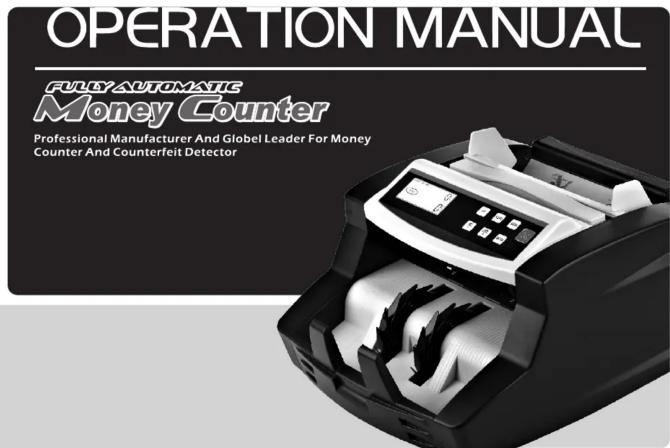
Suitable for both new, old, dirty, tattered polymer bills and paper bills
FULLY AUTOMATIC
Money Counter

CONTENT
1.Illustration 1 2.General instruction. 2 3. Safety instructions 2 4.Power up----2 5 Counting function 2-3 6 Counterfeit detection 4.5 3 Fake money alarm 7. Take money alarm 6.Error code and solution 9.Hopper adjustment 6-7 10. Counting roller replacement 8 11.Maintenance 8 12. Specification 8 13. Special function 8 14. Value counter special function 8 FULLY AUTOMATIC Money Counter
Suitable for both new, old, dirty, tattered polymer bills and paper bills "SE7/25" then press "+" "-" buttons to choose the desired Sensitivity level (range from 0-255). After choosing of the level, press "RESET" button to confirm.CAUTION:
1. It is highly recommended to contact the authorized service center or local dealer before you do the above adjustments. 2. Improper adjustments may cause improper working condition or false detection results.7.Fake money alarm
When fake money pass the machine, the counting will stop and alarm. The function display will show the error code. The last note on the stacker normally is the fake money. The machine counting quantity number is not included in this note, remove the fake money. Press "RESET" button, the machine will start counting again.  \* Fake money or questionable money FULLY AUTOMATIC Money Counter
Suitable for both new, old, dirty, tattered polymer bills and paper bills2.General instruction
On the basis of all our former models of banknote counter, we designed and developed this new model. It concentrates on all the advantages which the former models of banknote counter adopts and meanwhile develops more other advantages of its own kind. This model counts at a rate of 1100pcs/min for both PAPER&POLYMER notes. It includes UV/MG/MT counterfeit detection function; ADD and BATCH function. Detect counterfeit banknotes during the counting procedure will save your time and money during your management accounting operations. It can be used in banks, shops, supermarkets, movie theaters, hotels, restaurants; etc. where the money is used. We recommend the user to verify the gift box contains all of the items listed here: 1. machine body 2. operation manual 3. belt(optional) 4. fuse 5. brush 6. plug 7. external display(optional) --Read and understand all of the instructions and warnings both on the machine and manual. --Follow all warnings and instructions marked on the unit. --This product should be operated only from the type of the power source indicated in the user's guide. If you are not sure of the type of power supply in your location, consult your dealer or local power company. --Only use the cable provided with the unit. The use of other cable may result in electric shock, fire or cause serious damage to the unit. --Never push objects of any kind into the unit through case slots, since they may touch dangerous voltage points or shortcut parts, resulting in a risk of fire or electric shock. --Unplug this product from the wall outlet and refer servicing to qualified service personnel under the following conditions: a. When the power supply cord or plug is damaged or frayed. b. If the liquid has been spilled into the unit.3. Safety instructions
c. If the unit has been exposed to rain or water. d. If the machine has been dropped or the case has been damaged e. If the product shows a noticeable change in performance. To reduce the risk of electric shock, do not disassemble this product. Take it to qualified service personnel when service or repair work is required. Opening or removing covers may expose you to dangerous voltages or other risks. Incorrect reassembly can cause electric shock when the appliance is subsequently used. Do not use the unit if the power cord is damaged or if the plug socket contact is loose. Don't follow these instructions may occur in electric shock, fire or other hazards. When unplugging the power plug, do not pull it by the cord but rather grip the plug and pull it out, don't follow those instruction may occur electric shock, fire or damage to the unit.4.Power up
Connect the power cord to the machine (power outlet), then plug it to power source and turn the switch on; the unit will conduct a self-check by spanning the feeding roller while the MG and/or UV/IR functions will be automatically turned on by default. The counting display will show "0" when the unit is ready5.Counting function
1>Counting Function -Once the bills are correctly placed in the hopper, the machine will start counting automatically (except in the manual counting mode). The number of counted bills will be shown on the counting display. Moreover, once the bills are removed from the stacker, the counting display will be clear and the batch display in turn will show the number of counted bills  natural_image
Two horizontal gray bars of different widths on a white background, no text or symbols present.Instead.
-Bills should be correctly placed as indicated in the following steps: Place the bills between the counting guides as shown in the figure 1, then push the bills backward to make them lay on the top of the hopper plate, in the correct counting position as shown in the figure 2.  Figure 1. Put the bills by this direction  Figure 2. Push the bills backward< NOTE >
The counting mode can be changed between Automatic and Manual. Press the "AUTO" button, if the batch display shows "AUTO" the machine is in automatic counting mode; If without the "AUTO" shown in the display, the machine is in manual counting mode, under this manual mode, press the "RESET" button after placing the bills to start counting.[EMPTY]
2>Addition Function
Addition function can be performed by pressing the "ADD" button (the ADD indicator will appear). In this case, removing the counted bills from the stack will not clear the quantity counted and shown on the counting display. The next bills placed in the hopper will be counted and added to the preceding quantity. The total amount of   added bills will be shown on the counting screen. Press the "ADD" button to close the function and clear the counting display.3>Batch Function
\- The preset batch function can be performed by pressing the "BATCH" button (the BATCH indicator will appear). By default, when pressing the "BATCH" button, the batch function is turn. On the batch number can be set in amounts between 1and 999 by pressing no. "-" & "-" button. To clear this function, press the "BATCH" button until the indicator is off. - Under the batch counting mode, once the hopper is loaded, the machine will start counting and stop when the counted quantity reaches the preset batch one. - To repeat the batch counting operation under the same preset batch quantity, just remove the counted bill from the stacker. The unit will batch the next group of bills under the same settings. - If you wish to keep batching without removing the preset number, press the "RESET" button. - If the counted number does not equal with the preset batch number, the counter display will show the quantity with blinking number. - When counting with MG and/or UV detection on, the machine will stop auette or stop affecting counterfeil currency. This function can be resumed by removing the dubious bill from the stacker and pressing "RESET" button.FULLY AUTOMATIC Money Counter
Suitable for both new, old, dirty, tattered polymer bills and paper bills10. Counting roller replacement
When the counting roller damaged, it will cause counting not fluently or correct. Open the top cover, loosing the screw of roller axis machine. Replaced old roller. Then fix the machine inside.  11. Maintenance
\- Do not operate the unit in areas with high temperature or high humidity since it may damage the machine. - When not using the unit for a long period of time, remove the power plus from the wall outlet. - Never operate the unit under strong light. - Clean the machine frequently after switching off and unplugging of the machine. - Do not use this product in areas where it may be exposed to water or other liquids. - Unplug this product from the wall outlet before cleaning. Do not use liquid cleaners or aerosol cleaner. Use a brush or a damp cloth for cleaning. 12. Specification| Dimension: | 300mmX 260mmX 165mm |
| Banknote Size: | Min50 x 100, Max: 80 x 190mm |
| Net Weight: | 4.5kgs |
| Gross Weight: | 5.0kgs |
| Counting Speed: | ≥slant 1100pcs/min |
| Batch Range: | 1-100 |
| Counting Display: | LCD display or LED display |
| Power Supply: | AC 220V / 50Hz, 120V/60Hz or DC85-250V |
| Power Consumption: | ≤slant 70W |
13.Special function
1. This model is with 190mm adjustable hopper to secure the counting 2. With chargeable battery (Optional)14. Value counter special function (Optional)
1. Value counting function
Value counting function can be performed when turn on the machine. In this case, the total Qty; Qty. of each denomination and total amount of all the denomination will be shown on the display, UV/MG/MT/IR detection function is action under value counting condition. DEN function can be performed by pressing the "DEN" button to switch to sorting function. In this case, when you put 1pc of other denomination inside of 1 batch, it will be sorted under DEN function. For example, when you put 99pcs 100 denomination note and 1pc 50 denomination note inside in the middle, it will be sorted under DEN function, the same condition for other denomination.  FULLY AUTOMATIC Money Counter
Suitable for both new, old, dirty, tattered polymer bills and paper bills8. Error code and solution
The batch display may show some error code when counting, which means there are some problems with the machine. Refer to the following diagram to find way to solve it. Message| d1 | Suspicious bill detected by UV system; Problem in the UV system. | Remove the suspicious bill on the stacker, press “RESET” to continue. Lower the UV sensitivity. |
| d2 | Suspicious bill detected by MG/MT system; Problem in the MG/MT system. | Remove the suspicious bill on the stacker, press “RESET” to continue. Lower the MG/MT sensitivity. |
| d3 | Double-note detected by IR system; Problem in the IR system. | Remove the suspicious bill on the stacker, press “RESET” to continue. Lower the IR sensitivity. |
| d4 | Note of size problem detected by size detection system; Problem in the size detection system. | Remove the suspicious bill on the stacker, press “RESET” to continue. Lower the size checking sensitivity. |
| d5 | Half-note detected by half-note detection system; Problem in the half-note detection system. | Remove the suspicious bill on the stacker, press “RESET” to continue. |
| d6 | Slope-note detected by slope-note detection system; Problem in the slope-note detection system. | Remove the bill from the stacker. Press “RESET” to continue. |
| d7 | Chain-note detected by chain-note detection system; Problem in the chain-note detection system. | Remove the bill from the stacker. Press “RESET” to continue. |
| Message | Error | Solution |
| EQ1 | Problem with the left counting sensor. | Clean the sensor or replace it. |
| EQ2 | Problem with the right counting sensor | Clean the sensor or replace it. |
| EQ3 | Problem with the speed sensor | Clean the sensor or replace it |
| EQ4 | Problem with the auto start sensor | Clean the sensor or replace it |
| EQ5 | Problem with the preset sensor | Clean the sensor or replace it |
| EQ6 | Problem with the UV sensor | Clean the sensor or replace it |
9.Hopper adjustment
--When improper feeding of bills occur, adjust the feeding thickness setting in the hopper by turning the adjustor screw located in the back of the machine to ensure proper feeding.  FULLY AUTOMATIC Money Counter
Suitable for both new, old, dirty, tattered polymer bills and paper bills6. Counterfeit Detection




- CONTENT
- FULLY AUTOMATIC Money Counter
- CAUTION:
- 7.Fake money alarm
- 2.General instruction
- Safety instructions
- 4.Power up
- 5.Counting function
- Instead.
- < NOTE >
- [EMPTY]
- 2>Addition Function
- 3>Batch Function
- Counting roller replacement
- Maintenance
- 13.Special function
- Value counter special function (Optional)
- Value counting function
- Error code and solution
- 9.Hopper adjustment
- Counterfeit Detection
Merk : Pyle
Model : PRMC150
Categorie : Meter