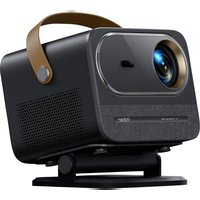
U12 - プロジェクター Yaber - 無料のユーザーマニュアル
デバイスのマニュアルを無料で見つける U12 Yaber PDF形式.


| 製品タイプ | プロジェクター |
| ブランド | Yaber |
| 型番 | U12 |
| ネイティブ解像度 | 1920 x 1080 (フルHD) |
| 明るさ | 8000ルーメン |
| コントラスト比 | 10000:1 |
| 表示技術 | LCD |
| ランプ寿命 | 50000時間 |
| 電源 | 100-240V, 50/60Hz |
| 消費電力 | 120W |
| 寸法 (幅 x 奥行 x 高さ) | 295 x 230 x 105 mm |
| 重量 | 2.5 kg |
| 接続端子 | HDMI、USB、VGA、AV、音声出力 |
| 主な機能 | 台形補正、手動フォーカス、画面ミラーリング、Bluetooth、内蔵アプリ(Netflix、YouTube、Amazon Prime) |
| 設置方法 | 机、三脚、または天井(オプションのブラケット) |
| お手入れと掃除 | レンズは柔らかく乾いた布で拭いてください。通気口のほこりを払ってください。 |
| 安全上の注意 | 掃除の前に電源を切り、プラグを抜いてください。通気口をふさがないでください。 |
| 部品と修理可能性 | リモコン、ACアダプター、HDMIケーブル。ランプ交換可能。 |
よくある質問 - U12 Yaber
ユーザーの質問 U12 Yaber
0 質問 この機器について。知っているものに答えるか、ご自身の質問をしてください。
この機器について新しい質問をする
デバイスの取扱説明書をダウンロード プロジェクター 無料でPDF形式で!マニュアルを見つける U12 - Yaber 電子デバイスをもとに戻しましょう。このページにはデバイスの使用に必要なすべての書類が掲載されています。 U12 ブランド Yaber.
使用説明書 U12 Yaber
Projector Overview · · · · · · · · · · · · · · · · · · · · · · · · · · · · · · · · · · · · · · · · · · · · · · · · · · · · · · · · · · · · · · · · · · · · · · · · · · · · · · 07
Remote Control Overview 08
Adjustable base mount · · · · · · · · · · · · · · · · · · · · · · · · · · · · · · · · · · · · · · 11
Connect Devices 11
Operation 12
-
Starting Up the Projector 12
-
Image Adjustment · · · · · · · · · · · · · · · · · · · · · · · · · · · · · · · · · · · · · · · 13
-
Play Content from Officially Licensed Apps · · · · · · · · · · · · · · · · · · · · · · · · · · · · · · · · · · · · · · · · · · · · · · · · · · · · · · · · · · · · · · · · · · · · · · · · · · · · · · · · · · · · · · · · · · · · · · · · · · · · 16
-
Projection Connection and Input Source · · · · · · · · · · · · · · · · · · · · · · · · · · · · · · · · · · · · · · · · · · · · · · · · · · · · · · · · · · · · · · · · · · · · · · · · · · · · · · · · · · · · · · · · · · · · · · 17
-
Screencast · · · · · · · · · · · · · · · · · · · · · · · · · · · · · · · · · · · · · · · · · · · · · · 19
-
Bluetooth Setting · · · · · · · · · · · · · · · · · · · · · · · · · · · · · · · · · 27
-
Other Setting · · · · · · · · · · · · · · · · · · · · · · · · · · · · · · · · · · · 29
-
Signal Lines Connection 33
-
Power On Mode · · · · · · · · · · · · · · · · · · · · · · · · · · · · · · · · · · · 35
-
Safe Shutdown · · · · · · · · · · · · · · · · · · · · · · · · · · · · · · · · · · · · · 35
Install on the Ceiling · · · · · · · · · · · · · · · · · · · · · · · · · · · · · · · · · · · · · · · 10
-
Schalten Sie den Projektor ein · · · · · · · · · · · · · · · · · · · · · · · · · · · · · · · · · · · · · · · · · 12
-
Bildeinstellung· · · · · · · · · · · · · · · · · · · · · · · · · · · · · · · · · · · · · · · · · · · · 13
-
Spielen Sie Inhalte von offiziell lizenzierten Apps wie Netflix, Youtube und Amazon Prime ab 16
-
Projektionsanschluss und Eingangsquelle · · · · · · · · · · · · · · · · · · · · · · · · · · · · · · · · · · · · · · · · · · · · · · · · · · · · · · · · · · · · · · · · · · · · · · · · · · · · · · · · · · · · · · · · · · · · · · · · · · · · 17
-
Screencast · · · · · · · · · · · · · · · · · · · · · · · · · · · · · · · · · · · · · · 19
-
Bluetooth-Einstellung 27
-
Weitere Einstellungen 29
-
Anschluss von Signalleitungen · · · · · · · · · · · · · · · · · · · · · · · · · 33
-
Einschaltmodus 35
-
Sicheres Herunterfahren · · · · · · · · · · · · · · · · · · · · · · · · · · · · · · · · · 35

- Projector Overview · · · · · · · · · · · · · · · · · · · · · · · · · · · · · · · · · · · · · · · · · · · · · · · · · · · · · · · · · · · · · · · · · · · · · · · · · · · · · · 07
- Remote Control Overview 08
- Adjustable base mount · · · · · · · · · · · · · · · · · · · · · · · · · · · · · · · · · · · · · · 11
- Connect Devices 11
- Operation 12
- Install on the Ceiling · · · · · · · · · · · · · · · · · · · · · · · · · · · · · · · · · · · · · · · 10
ブランド : Yaber
モデル : U12
カテゴリ : プロジェクター