
D-365 - ポータブルCDプレーヤー SONY - 無料のユーザーマニュアル
デバイスのマニュアルを無料で見つける D-365 SONY PDF形式.


| ブランド | Sony |
| モデル | D-365 |
| 製品タイプ | ポータブルCDプレーヤー(ディスクマン) |
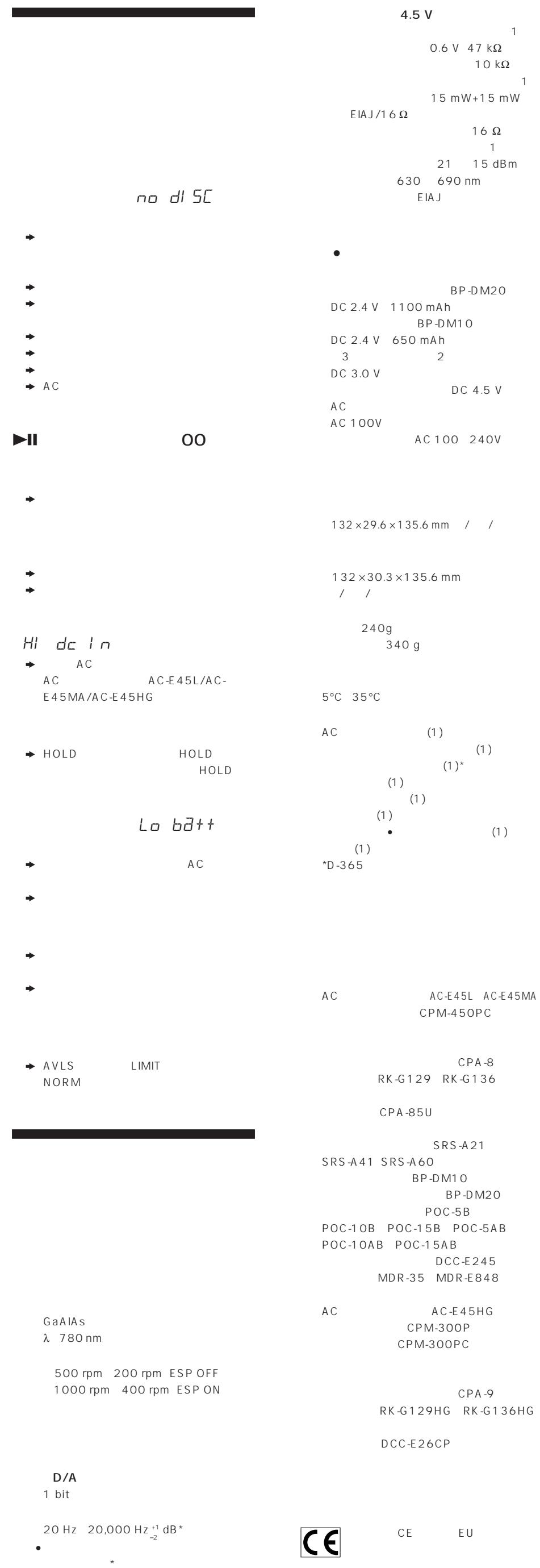
| 電源 | ACアダプター(DC IN 4.5V)、ソニー充電式バッテリーBP-DM10/BP-DM20、LR6(AA)アルカリ乾電池2本、車載バッテリー(アクセサリー経由) |
| 連続再生時間(ESPオフ) | BP-DM20: 9.5時間; アルカリ乾電池2本: 18時間; BP-DM10: 5.5時間; BP-DM20 + バッテリーボックス: 28時間; 2本 + ボックス: 40時間; BP-DM10 + ボックス: 23時間 |
| 連続再生時間(ESPオン) | BP-DM20: 7時間; アルカリ乾電池2本: 13時間; BP-DM10: 4時間; BP-DM20 + バッテリーボックス: 22時間; 2本 + ボックス: 30時間; BP-DM10 + ボックス: 18時間 |
| 充電時間 | BP-DM10: 約2時間; BP-DM20: 約3時間 |
| 再生機能 | 通常再生、リピート(1曲または全曲)、イントロPGM、シャッフル(ランダム)、RMSプログラミング(最大22曲)、AMS(頭出し) |
| 耐震機能 | ESP(エレクトロニック・ショック・プロテクション):10秒のバッファメモリ |
| 低音増強 | デジタルMEGA BASS(2レベル:BASSおよびBASS ) |
| 音量制限 | AVLS(オートマチック・ボリューム・リミッター・システム) |
| ボタンロック | ホールド(物理ロック)+ リモコンは常時有効 |
| レジューム再生 | レジューム:ON/OFF |
| 出力端子 | PHONES/REMOTE端子(ヘッドホン+リモコン)、デジタル光出力/LINE OUT |
| 入力端子 | DC IN 4.5V |
| 付属アクセサリー | ボリューム付き有線リモコン、ACアダプター、電源プラグアダプター(必要な場合)、オプションのバッテリーボックス |
| カー対応 | 取り付けキットCPM-450PC/CPM-300PCまたはバッテリーコードDCC-E245 + 接続パックCPA-8/CPA-9 |
| メンテナンス | CDは柔らかい布で拭く; 表面に直接触れない; 熱や日光にさらさない |
| 安全上の注意 | ソニー推奨の乾電池・バッテリーのみ使用; 新品と使用済みの乾電池を混ぜない; アルカリ乾電池を充電しない |
よくある質問 - D-365 SONY
ユーザーの質問 D-365 SONY
0 質問 この機器について。知っているものに答えるか、ご自身の質問をしてください。
この機器について新しい質問をする
デバイスの取扱説明書をダウンロード ポータブルCDプレーヤー 無料でPDF形式で!マニュアルを見つける D-365 - SONY 電子デバイスをもとに戻しましょう。このページにはデバイスの使用に必要なすべての書類が掲載されています。 D-365 ブランド SONY.
使用説明書 D-365 SONY
取扱説明書
Discman

D-265
D-365
ソニー株式会社 © 1996 マレーシアで印刷
CD
8
| 141 | 6-7-35 | ||
| (03)5448-3311 | (052)232-2611 | (06)539-5111 | |
1
2
①OPEN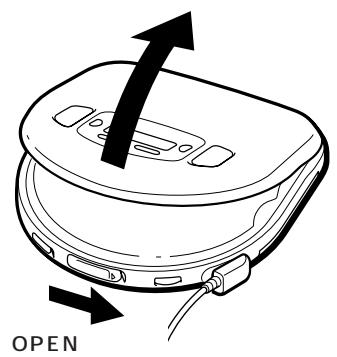
②CD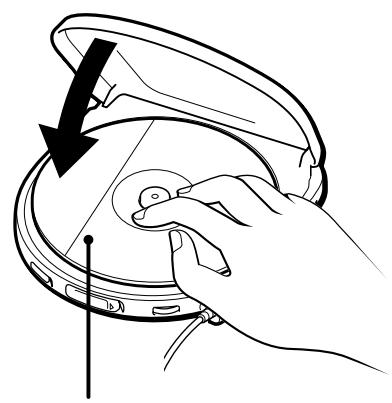
3
AMS オートマチック・ミュージック・センサー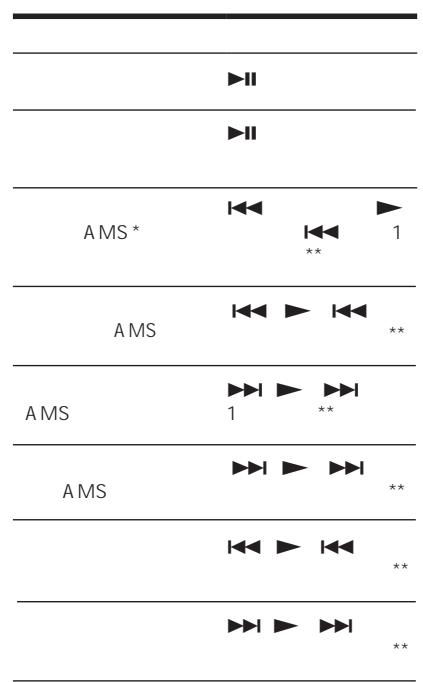
CD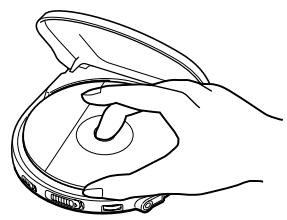
CD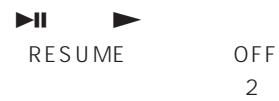
B
リピート/エンター リピート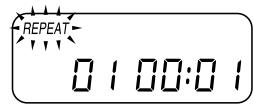
1 リピート/エンター エンター
リピート 2 1 プレイモード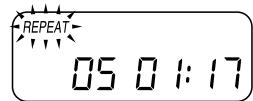
リピート/エンター
C 1 イントロPGM プレイモード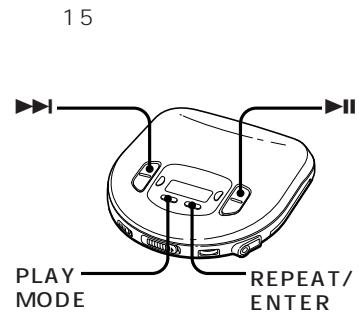
2 15 イントロPGM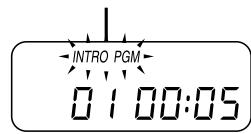
エンター
イントロ
PGM
モード プレイ D
シャッフル プレイモード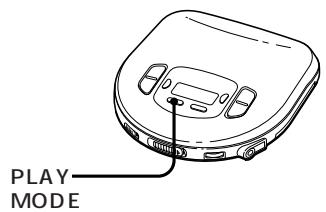
1 プレイモード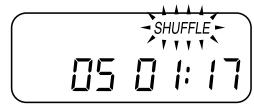

E
22 1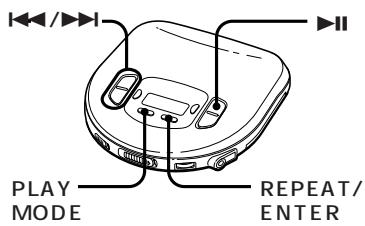
RMS プレイモード 2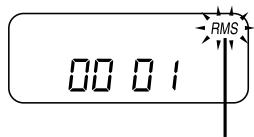

3 リピート/エンター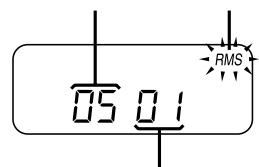
5 RMS 5
リピート/エンター RMS プレイモード リピート/エンター リピート/エンター 22
F
バス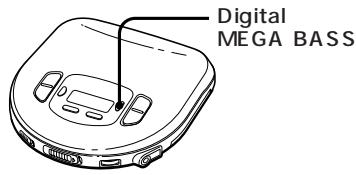
デジタル メガバス

バス


(ESP) G
ESP エレクトロニックショックプロテクション) CD 10 ESP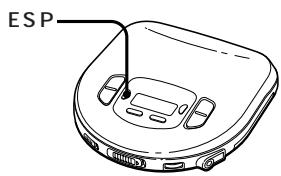
ESP ESP ESP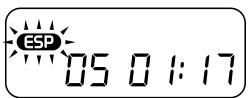
H ホールド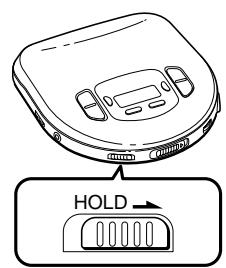
ホールド
AVLS オートマチックボリュームリミッターシステム
(AVLS) I AVLS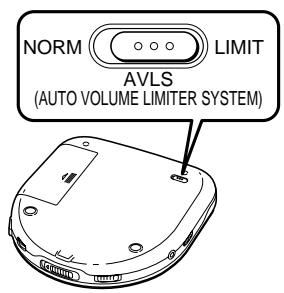
リミット
AVLS
デジタルMEGA BASS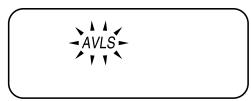
AVLS
レジューム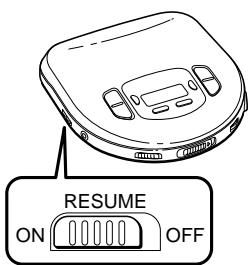
オン
レジューム
オフ
1
オン
±30
CD
AC
CD
*ライン入力 REC IN RK-G136 MIC POC-5AB デジタルMEGA BASS
ACデジタルMEGA BASS ヘッドホン/リモコン
OPTICAL (DIGITAL)/LINE OUT ESP CD OPTICAL (DIGITAL)/ LINE OUT OPTICAL (DIGITAL)/LINE OUT VOLUME ESP
CD
CPM-450PC/CPM-300PC DCC-E245 CPA-8/ CPA-9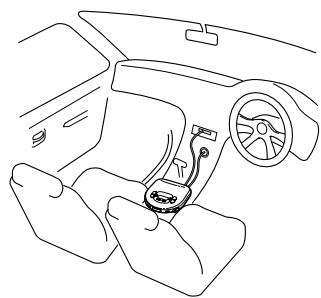
CPM-450PC
オフ
ESP Discman D-365 AC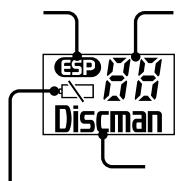
CD
5 プレイモード
ESP 2 IAMS */検索) 3 AVLS** 4 リジューム 5 OPTICAL (DIGITAL)/LINE OUT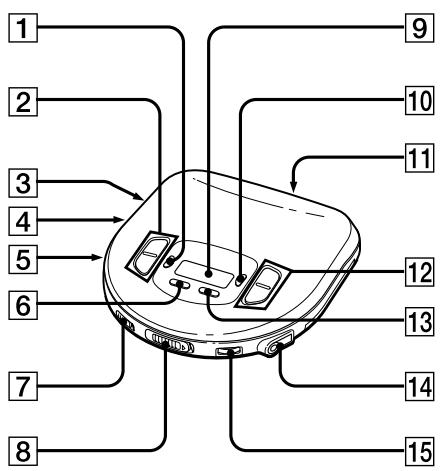
6 プレイモード 7 ホールド 8 オープン 9 デジタルMEGA BASS 11 DC IN 4.5V 12 13 リピート/エンター 14 ヘッドホン/リモコン 15 ボリューム ESP エレクトロニックショックプロテクション **AMS オートマチックミュージックセンサー **AVLS オートマチックボリュームリミッターシステム

*オートマチックミュージックセンサー **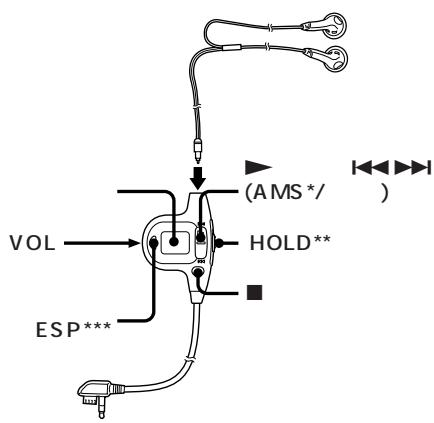
PLD ホールド ホールド ***エレクトロニックショックプロテクション

BP-DM10 BP-DM20 D-365
1 2 SONY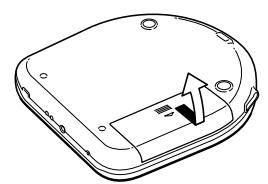
3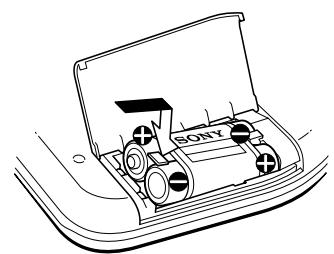
AC 2 (BP-DM10 3 (BP-DM2O
CHG
4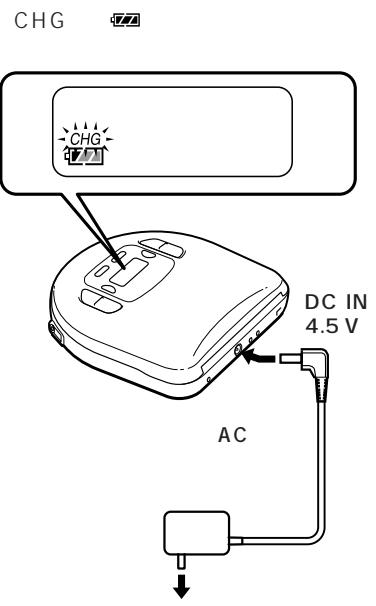
CHG
Lo bdd
BP-DM20
BP-DM1O
3

1 2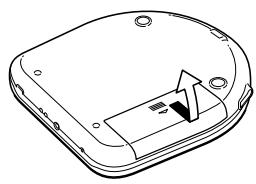
3 2
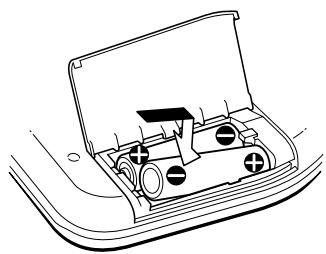
Lo bdd
2

| ESP OFF | ESP ON | ||
| BP-DM203 | * | 9.5 | 7 |
| 2 | 18 | 13 | |
| BP-DM102 | * | 5.5 | 4 |
| BP-DM20 | 28 | 22 | |
| 2 | |||
| 2 | 40 | 30 | |
| 2 | |||
| BP-DM10 | 23 | 18 | |
| 2 |
AG
DC IN 4.5 V(

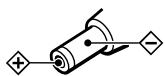

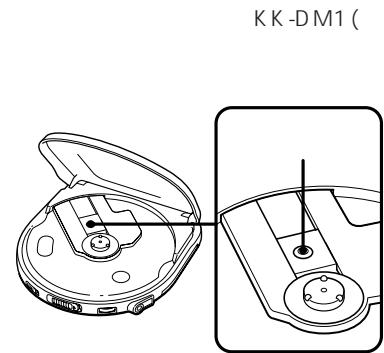
読みながら、対応する日本語の本文中の図(A、Bなどと表示)を参照してください。
▷ ディスクの再生
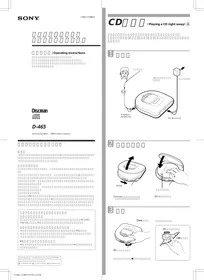
CDをすぐに再生する! A
今すぐCDを再生したい場合は、家庭用電源でDiscmanを使用することをお選びください。その他の選択肢は、次の3つです:充電式バッテリー、乾電池(「電源」を参照)、および車のバッテリー。
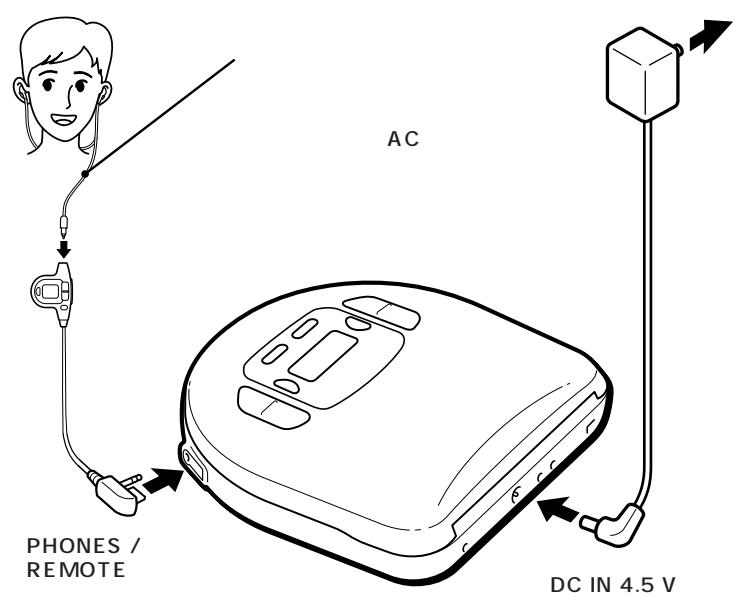
1 接続します。
付属のリモコン付きヘッドホンをPHONES/REMOTEジャックにしっかりと接続します。また、付属のACアダプターをDiscmanのDC IN 4.5Vジャックと壁のコンセントに接続します。ACアダプターが壁のコンセントに合わない場合は、ACプラグアダプターを使用してください。
2 CDをセットします。
① OPENをスライドしてふたを開けます。
② CDをラベル面を上にしてピボットにセットします。
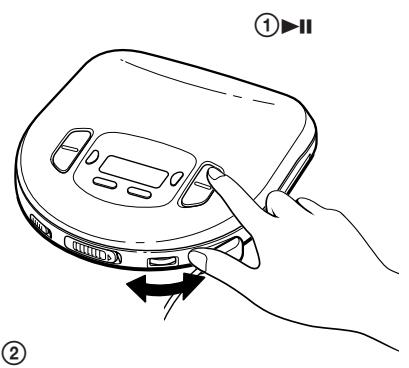
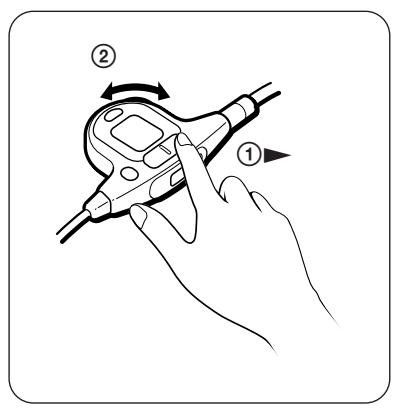
3 CDを再生します。
① リモコンの▷を押します。
② 音量を調節します。
再生を止めるには、を押します。
| To | Press |
| Pause (main unit only) | ▶II |
| Resume play after pause (main unit only) | ▶II |
| Find the beginning of the current track (AMS*) | (▶ side of▶ on the remote control) once** |
| Find the beginning of the previous tracks (AMS) | (▲ side of ) repeatedly** |
| Find the beginning of the next track (AMS) | (▲ side of ) once** |
| Find the beginning of the succeeding tracks (AMS) | (▲ side of ) repeatedly** |
| Go forward quickly | Hold down▶(▶side of *)** |
| Go backwards quickly | Hold down▶(▶side of *)** |
| *AMS = Automatic Music Sensor**These operations are possible during both play and pause. | |
CDを取り出すには
ピボットを押しながらCDを取り出します。
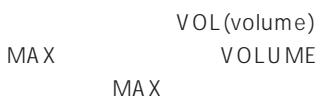
リモコンで音量を調節するときの注意
リモコンのVOL(音量)コントロールをMAXに設定します。次に、Discmanの音量を、リモコンで音量を調節するときの最大音量にしたいレベルに調節します。
表示について
- ▷または▷を押すと(RESUMEがOFFのとき)、CDの全トラック数と総再生時間が2秒間表示されます。
- 再生中は、現在のトラック番号と経過再生時間が表示されます。
- トラック間では、次のトラックの開始までの時間が「-」表示とともに表示されます。
- 一時停止中、現在のポイントの経過再生時間が点滅します。
CDの取り扱い上の注意
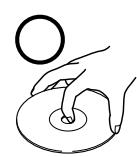
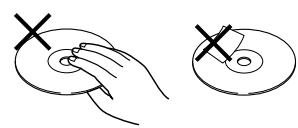
- CDを清潔に保つため、端を持って扱ってください。表面には触れないでください。
- CDに紙やテープを貼らないでください。
- CDを直射日光や、エアコンダクトなどの熱源にさらさないでください。直射日光の当たる場所に駐車した車内にCDを置かないでください。
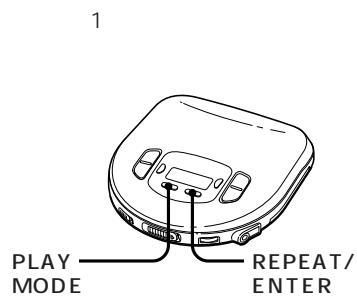
トラックのリピート再生(リピートプレイ)B
ノーマル、イントロPGM、シャッフル、またはRMS(ランダムミュージックセンサー)の各再生モードで、トラックを繰り返し再生できます。全トラックを繰り返すか、1トラックだけを繰り返します。
全トラックを繰り返すには
再生中にREPEAT/ENTERを押します。「REPEAT」と表示されます。
リピート再生を解除するには、もう一度REPEAT/ENTERを押します。
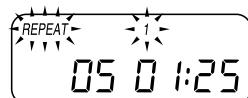
1トラックだけを繰り返すには
1 繰り返したいトラックの再生中にREPEAT/ENTERを押します。「REPEAT」と表示されます。
2 「1」と表示されるまでPLAY MODEを繰り返し押します。
別のトラックを繰り返すには、またはを押します。
リピート再生を解除するには、もう一度REPEAT/ENTERを押します。
再生したい曲だけを再生する(イントロ・プログラム再生)C
CDの各曲の頭出しをしながら、お気に入りの曲を選んで再生できます。
1 再生中にPLAY MODEを押します。
「INTRO PGM」が点滅するまで繰り返し押します。
2 を押してスキャンを開始します。
ディスクマンは各曲の最初の15秒を再生し、「INTRO PGM」が速く点滅します。
3 再生したい曲が流れているときにREPEAT/ENTERを押します。曲をスキップするには、を押すか、次の曲が始まるのを待ちます。
CDを最後までスキャンすると、「INTRO PGM」の点滅が止まり、選択した曲が自動的に再生されます。
CDを最後まで聞く前にプログラムを終了するには、
IIを押します。選択した曲が再生されます。
イントロ・プログラム再生をキャンセルするには、表示に再生モードが表示されなくなるまでPLAY MODEを押します。
ランダムな順序で曲を再生する(シャッフル再生)D
CDの曲をランダムな順序で再生できます。
再生中にPLAY MODEを「SHUFFLE」が表示されるまで繰り返し押します。
曲がランダムな順序で再生されます。
シャッフル再生をキャンセルするには、表示に再生モードが表示されなくなるまでPLAY MODEを繰り返し押します。
お好みの順序でトラックを再生する(RMS再生)
最大22トラックまで、お好みの任意の順序で再生するようにプログラムできます。
1 再生中に、"RMS"が点滅するまでPLAY MODEを繰り返し押します。 2 またはを押してトラックを選択します。トラック番号と再生順序が表示されます。 3 REPEAT/ENTERを押してトラックをプログラムします。 4 手順2と3を繰り返して、残りのトラックをプログラムします。 5 を押します。
"RMS"の点滅が止まり、選択したトラックが指定した順序で再生されます。
RMS再生をキャンセルするには、"RMS"が消えるまでPLAY MODEを押します。
プログラムを確認するには
プログラミング中:
手順5の前にREPEAT/ENTERを押します。
RMS再生中:
"RMS"が点滅するまでPLAY MODEを繰り返し押し、次にREPEAT/ENTERを押します。
ボタンを押すたびに、指定した順序でトラック番号が表示されます。
その他の機能を使用する
より迫力のある低音を楽しむには
迫力のある低音ブーストサウンドを楽しめます。
Press Digital MEGA BASS to select
BASS or BASS . BASS is more effective.
To prevent sound from skipping [G] The ESP (Electronic Shock Protection) function prevents the sound from skipping by using a buffer memory that stores music data for approx. 10 seconds. Use this function when listening during a walk or playing in a car.
Press ESP.
The ESP indication appears.
To lock the buttons H
You can lock your Discman against any accidental operations. (You can still operate the unit with the remote control.)
Slide HOLD in the direction of arrow. When you press any button, you cannot operate the unit.
To unlock, slide HOLD back.
To protect your hearing (AVLS)
The AVLS (Automatic Volume Limiter System) function keeps down the maximum volume to protect your ears.
Set AVLS to LIMIT.
The AVLS indication appears.
To resume playing from the point you stopped the CD (Resume Play) J
Normally, every time you stop and play, playing starts from the beginning of the CD. The resume play function, however, lets you listen to from the point at which you last turned off the Discman.
RESUMEをONに設定します。
レジューム再生をキャンセルするには、RESUMEをOFFに設定します。
ビープ音をオフにするには
Discmanの操作時に鳴るビープ音をオフにすることができます。
電源(ACアダプター、充電式バッテリー、またはアルカリ乾電池)を切断します。本体の を押し続けながら、電源を再接続します。
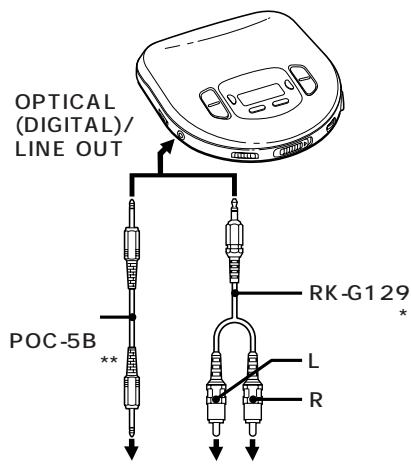
他のステレオ機器への接続 K
他のステレオ機器でCDを聴いたり、CDをカセットテープやミニディスクに録音したりできます。詳細は、他の機器の取扱説明書を参照してください。接続する前に、各機器の電源をオフにしてください。
接続コードを使用する場合
- 接続コードを使用する場合、このユニットからの出力にはDigital MEGA BASSシステムは機能しません。
光デジタル接続コードを使用する場合
- このユニットにデジタル機器を使用する場合は、ACアダプターを使用してください。充電式バッテリーまたはアルカリ乾電池を使用すると、ユニットから光デジタル信号が出力されません。(接続した機器でCDを録音できないなど、予期しない現象が発生する場合があります。)
- Digital MEGA BASSシステムはPHONES/REMOTEジャックからの出力には機能しますが、OPTICAL (DIGITAL)/LINE OUTジャックからの光デジタル出力には機能しません。
- ESP機能は、このユニットからのどの出力でも機能しません。
車でCDを再生する L
車内でDiscmanを使用できます。
Discman をカーカセットデッキに接続するには、以下のアクセサリーが必要です。マウントキット CPM-450PC/CPM-300PC(マウントプレート+カーバッテリーコード+カー接続パック)
または、カーバッテリーコード DCC-E245 とカー接続パック CPA-8/CPA-9。各アクセサリーの取扱説明書を参照してください。
マウントキット(CPM-450PC または同等品)を使用する場合
Discman を取り付ける前に、付属のカーマウントアダプターをマウントプレートに取り付けてください。
イグニッション連動機能
この機能により、車のエンジンを切ると Discman は自動的に停止します。(車種によってはこの機能が使えない場合があります。)
付属のリモコン M を使用する
リモコンを有線リモコンとして使用できます。
リモコンを使用しないときは、HOLD を矢印の方向にスライドさせてください。ロックを解除するには、HOLD を元に戻します。
ディスプレイの照明(D-365 ワールドモデルのみ)
AC 電源アダプターまたはカーバッテリーで使用する場合、ディスプレイは常に照明されます。(CD 停止中に を押すとディスプレイの照明は消えます。)充電式バッテリーまたはアルカリバッテリーで使用する場合、操作ボタンを押すと約 5 秒間ディスプレイが照明されます。
ディスプレイの照明を消すことができます。PLAY MODE を押し続けながら、充電式バッテリーまたはアルカリバッテリーを挿入してください。
電源
充電式バッテリー N を使用する
初めて使用する前に充電式バッテリーを充電してください。このユニットには BP-DM10 または BP-DM20 の充電式バッテリーを使用できます。使用方法は同じですが、充電時間とバッテリー寿命が異なります。使用前に充電式バッテリーの型番を確認してください。
1 電池収納部のふたを開けます。 2 「SONY」の文字がふたの内側に示されている向きと同じになるように充電式電池を入れ、ふたを閉めます。 3 ACアダプターを接続します。 "CHG"表示が点灯します。約2時間(BP-DM10の場合)または約3時間(BP-DM20の場合)充電します。(電池がすでに充電されている場合は、"CHG"が点滅します。) 4 充電が完了すると、"CHG"表示が消えます。ACアダプターを外します。
電池の充電時期
電池が弱くなると、表示部に表示が現れます。電池が切れると、表示部に"L o b d t"が表示されます。充電式電池を充電してください。元の電池容量を長く保つために、電池が切れた(放電した)ときに充電してください。
注意
- 充電時間は、充電式電池の使用状況によって異なります。
- 新しい電池や長期間使用していない電池は、数回充電と放電を繰り返すまで完全に充電されない場合があります。
- 電池の寿命が約半分に短くなった場合は、ソニー製BP-DM10またはBP-DM20充電式電池と交換してください。他の充電式電池(R6型充電式電池など)は使用しないでください。
乾電池の使用
1 電池収納部のふたを開けます。 2 LR6(単3形)アルカリ乾電池を2本、電池収納部内の図に合わせて⊕と⊖を合わせて入れ、ふたを閉めます。
乾電池の交換時期
電池が弱くなると、表示部に表示が現れます。電池が切れると、表示部に"L o b d t t"が表示されます。すべての電池を新しいものと交換してください。
注意
- 乾電池を充電しないでください。
- 新しい電池と古い電池を混ぜて使用しないでください。
- 異なる種類の電池を一緒に使用しないでください。
- このユニットにはマンガン電池を使用しないでください。
バッテリーケースPを使用する場合
バッテリーケースを使用すると、ユニットのバッテリー収納部の充電式バッテリーに加えて、より長い時間ユニットを使用できます。バッテリーケースの電池とバッテリー収納部の充電式バッテリーは一緒に消費されます。
1 バッテリーケースをDiscmanに取り付け、ネジを締めます。
2 バッテリーケースの蓋を開けます。
3 バッテリー収納部内の図に合わせて、LR6(単3形)アルカリ電池を2本、⊕と⊙の向きに注意して挿入し、蓋を閉めます。
電池寿命(おおよその時間)
| When using | ESP function | |
| off | on | |
| BP-DM20(charged for 3 hours maximum*) | 9.5 | 7 |
| Two alkaline batteries | 18 | 13 |
| BP-DM10(charged for 2 hours maximum*) | 5.5 | 4 |
| BP-DM20 + Battery case (two alkaline batteries) | 28 | 22 |
| Two alkaline batteries + Battery case (two alkaline batteries) | 40 | 30 |
| BP-DM10 + Battery case (two alkaline batteries) | 23 | 18 |
(ユニットを平らで安定した場所で使用した場合)※充電時間は、充電式バッテリーの使用方法によって異なります。
- ▷ ディスクの再生
- CDをすぐに再生する! A
- CDを取り出すには
- リモコンで音量を調節するときの注意
- 表示について
- CDの取り扱い上の注意
- トラックのリピート再生(リピートプレイ)B
- 全トラックを繰り返すには
- トラックだけを繰り返すには
- 再生したい曲だけを再生する(イントロ・プログラム再生)C
- ランダムな順序で曲を再生する(シャッフル再生)D
- お好みの順序でトラックを再生する(RMS再生)
- プログラムを確認するには
- その他の機能を使用する
- より迫力のある低音を楽しむには
- TO LOCK THE BUTTONS H
- TO PROTECT YOUR HEARING (AVLS)
- TO RESUME PLAYING FROM THE POINT YOU STOPPED THE CD (RESUME PLAY) J
- ビープ音をオフにするには
- 他のステレオ機器への接続 K
- 接続コードを使用する場合
- 光デジタル接続コードを使用する場合
- 車でCDを再生する L
- マウントキット(CPM-450PC または同等品)を使用する場合
- イグニッション連動機能
- 付属のリモコン M を使用する
- ディスプレイの照明(D-365 ワールドモデルのみ)
- 電源
- 充電式バッテリー N を使用する
- 電池の充電時期
- 注意
- 乾電池の使用
- 乾電池の交換時期
- バッテリーケースPを使用する場合
ブランド : SONY
モデル : D-365
カテゴリ : ポータブルCDプレーヤー