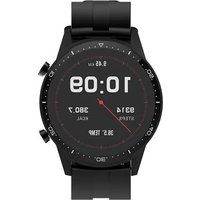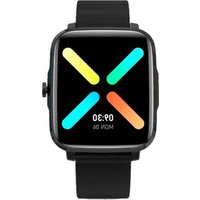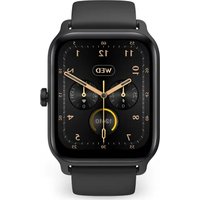
SWB29 - Orologio sportivo Prixton - Manuale utente e istruzioni gratuiti
Trova gratuitamente il manuale del dispositivo SWB29 Prixton in formato PDF.


| Tipo di prodotto | Orologio sportivo connesso |
| Marca | Prixton |
| Modello | SWB29 |
| Dimensioni della cassa | Circa 45 x 38 x 11 mm |
| Peso | Circa 50 g |
| Schermo | Schermo tattile a colori |
| Alimentazione | Batteria agli ioni di litio ricaricabile, 300 mAh |
| Autonomia | Fino a 7 giorni (in base all'uso) |
| Sensori | Frequenza cardiaca, SpO2, accelerometro |
| Connettività | Bluetooth 5.0 |
| Resistenza all'acqua | 5 ATM (impermeabile fino a 50 metri) |
| Funzioni principali | Monitoraggio attività, frequenza cardiaca, SpO2, stress, sonno, Alexa integrato, oltre 20 modalità sport, notifiche, controllo musica, fotocamera remota |
| Modalità sport | Corsa, camminata, ciclismo, nuoto, yoga, HIIT, danza, ecc. (100 tipi disponibili tramite app) |
| Sistema operativo | Proprietario (compatibile con iOS e Android tramite app VeryFit) |
| Compatibilità | Smartphone Android 5.0+ e iOS 9.0+ |
| Contenuto della confezione | Orologio SWB29, cavo di ricarica magnetico, manuale d'uso |
| Manutenzione e pulizia | Pulire con un panno morbido e asciutto; evitare prodotti chimici aggressivi |
| Sicurezza | Non esporre a temperature estreme; evitare urti violenti |
| Parti di ricambio e riparabilità | Cavo di ricarica magnetico disponibile; batteria integrata non sostituibile; riparazione presso centro autorizzato |
| Informazioni generali | Garanzia 2 anni; marca Prixton (La Trastienda Digital SL); dichiarazione di conformità UE disponibile su www.prixton.com |
Domande frequenti - SWB29 Prixton
Domande degli utenti su SWB29 Prixton
0 domanda su questo apparecchio. Rispondi a quelle che conosci o fai la tua.
Fai una nuova domanda su questo apparecchio
Scarica le istruzioni per il tuo Orologio sportivo in formato PDF gratuitamente! Trova il tuo manuale SWB29 - Prixton e riprendi in mano il tuo dispositivo elettronico. In questa pagina sono pubblicati tutti i documenti necessari per l'utilizzo del tuo dispositivo. SWB29 del marchio Prixton.
MANUALE UTENTE SWB29 Prixton
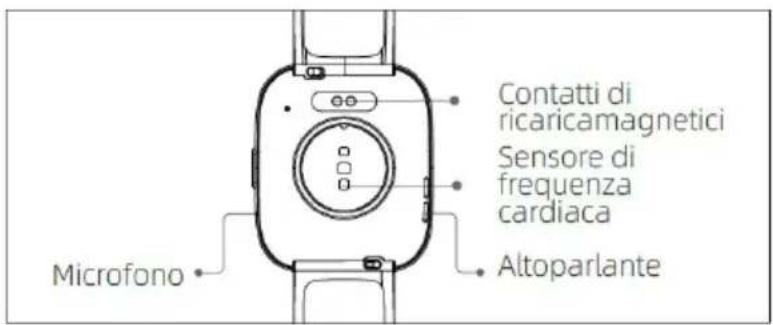
Area di visualizzazione schermo
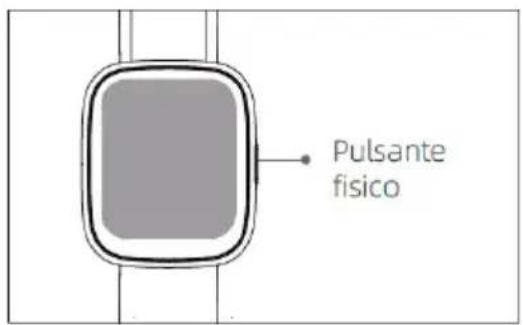
Tasto funzione
Foro di decompressione
Sensore della frequenza cardiaca
Microfono
Altoparlante
Lato anteriore
Lato posteriore
Per Iniziare
(1)Aprire la scatole e controllarne il contenuto.
(2)Contenuto consegnato: (1) Smartwatch SWB29 (con batteria al litio integrata); (2) Manuale utente; (3) cavo di caricamento originale.
(3) Caricare l'orologio per attivarlo ed accenderlo prima del primo uso. Per caricare, collegare semplicemente il cavo di caricamento magnetico ai contatti di caricamento posizionati sul retro dell'orologio.
(4) Cercare "veryfit" nell'App Store o Google Play o scansionare il codice QR per scaricare e installare l'App.
(5)Effettuare il login nell'app ed impostare le informazioni personali, oltre che gli obbiettivi dei passi e di peso.

(6)Sull'interfaccia "Dispositivo", toccare l'icona "+" nell'angolo in alto a destra, il telefono avvierà la ricerca. Dalla lista dei dispositivi trovati, scegliere il nome dello smartwatch con cui appaiarlo. Potreste anche collegare il dispositivo direttamente scansionando il QR code del dispositivo usando la funzione di scansione.
Salute
a)Orologio
- Quando il quadrante interfaccia è visualizzato, premere rapidamente il tasto fisico per accedere alla lista applicazioni. Toccare l'icona Allenamento per accedere alle icone di diversi tipi di esercizio, quindi toccare l'icona di un esercizio (come Corsa in esterna) per avviare l'esercizio.
-L'orologio può visualizzare fino a 20 tipi di esercizi di predefiniti. Nella modalità Multi-esercizio dell'app, si possono aggiungere o cancellare i tipi di esercizi visualizzati sull'orologio o cambiare il loro ordine.
b) App
- Avviare "veryfit", abilitare la funzione Bluetooth, e dare i permessi di posizionamento GPS;
- Attivare lo schermo dello smart watch e avvicinarlo al telefono;
- Cliccare l'icona "+" sull'App, e selezionare il modello di smart watch nei risultati della ricerca per appaiarli;
4.Confermare la richiesta di appaiamento sullo smart watch - Compilare le informazioni e impostare l'obbiettivo di bassi sull'App per completare il collegamento.
Operazioni di base
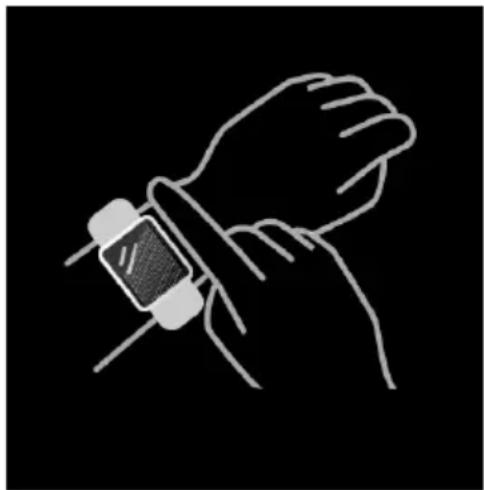
- Indossare l'orologio correttamente: assicurare che l'orologio sia almeno un dito sopra l'osso del polso e che il sensore sul retro tocchi la pelle.
- Operazioni a schermo: SWB29 ha un touch screen full, che supporta operazioni che includono tocco rapido, scorrimento a destra/sinistra e scorrimento su e giù.
- Utilizzo tasto: SWB29 ha un tasto fisico, che supporta le operazioni di “pressione breve” e “pressione lunga”. Pressione breve: per tornare alla home page/mettere in pausa l'esercizio. Pressione lunga: per 2 secondi per accendere l'orologio quando è spento; per attivare Alexa quando l'orologio è acceso; quando l'orologio è acceso e in caricamento, tenere premuto il tasto fisico per 5 secondi, l'orologio ripristinerà il software e si riavvierà.
Descrizione funzione
1. Quadrante orologio
L'orologio arriva con 3 quadrante orologio predefiniti. Si può passare da uno all'altro manualmente sull'orologio o sulle impostazioni del Quadrante orologio sull'app veryfit. È anche possibile personalizzare il quadrante orologio sull'app. Sono disponibili altri quadranti orologio da scaricare su "Watch Face Market".
2. Allenamento
a) Possono essere visualizzati in modo predefinito fino a 20 tipi di esercizio: Corsa outdoor, Corsa indoor, Passeggiata outdoor, Passeggiata indoor, Ciclismo outdoor, Ciclismo indoor, Nuotata in piscina, Nuoto in mare, Escursione, Yoga, Vogatore, Macchina ellittica, Cricket, Esercizio, Allenamento a intervalli ad alta intensità (HIIT), Allenamento alla resistenza funzionale, Allenamento di base, Danza, Pilates, Rilassamento; Sull'app veryfit, è possibile aggiungere o cancellare i tipi di esercizio o cambiarne l'ordine visualizzato sull'orologio. Ci sono un totale di 100 tipi di esercizi tra cui scegliere nell'App.
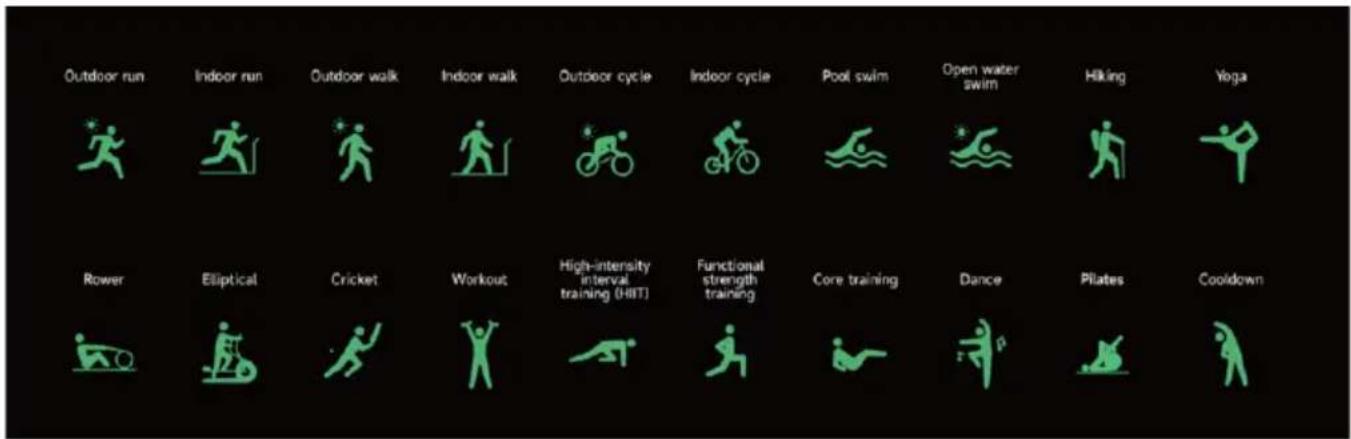
c) Il sommario degli esercizi del SWB29 contiene vari dati di allenamento, che possono essere controllati sull'app veryfit.
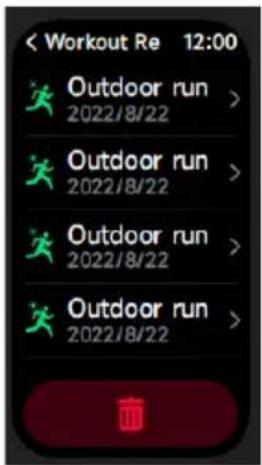
d) È possibile visualizzare i registri di allenamento recenti sull'orologio, inclusi i dettagli; è possibile anche visualizzare i registri di allenamento sull'APP.
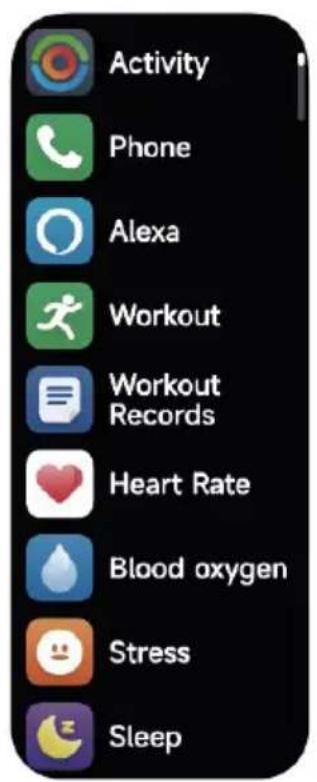
3.Lista applicazioni
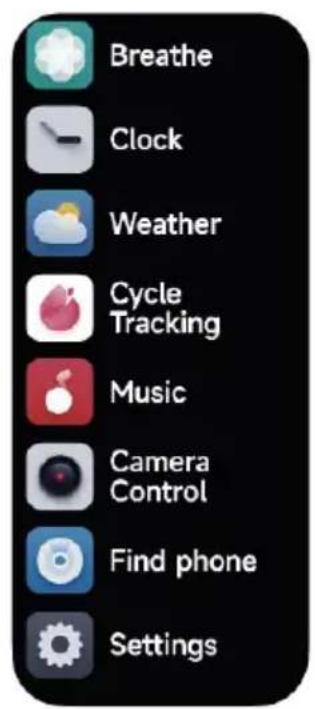
Quando il quadrante interfaccia è visualizzato, premere rapidamente il tasto fisico per accedere alla lista applicazioni, che è visualizzata rispettivamente dall'alto in basso: Attività, Telefono, Alexa, Allenamento, Record Allen., Salute, Freq Cardi, SpO2, Stress, Sonno, Respiro, Orologio, Meteo, Monitoraggio Ciclo, Musica, Controllo Fotocamera, Trova il telefono, Impostazioni
- L'App può cliccare l'area Amazon Alexa per accedere all'interfaccia di tutorial del login.
- Passa all'interfaccia di login dell'account Alexa dedicato ad Amazon per l'autorizzazione a collegare l'account;
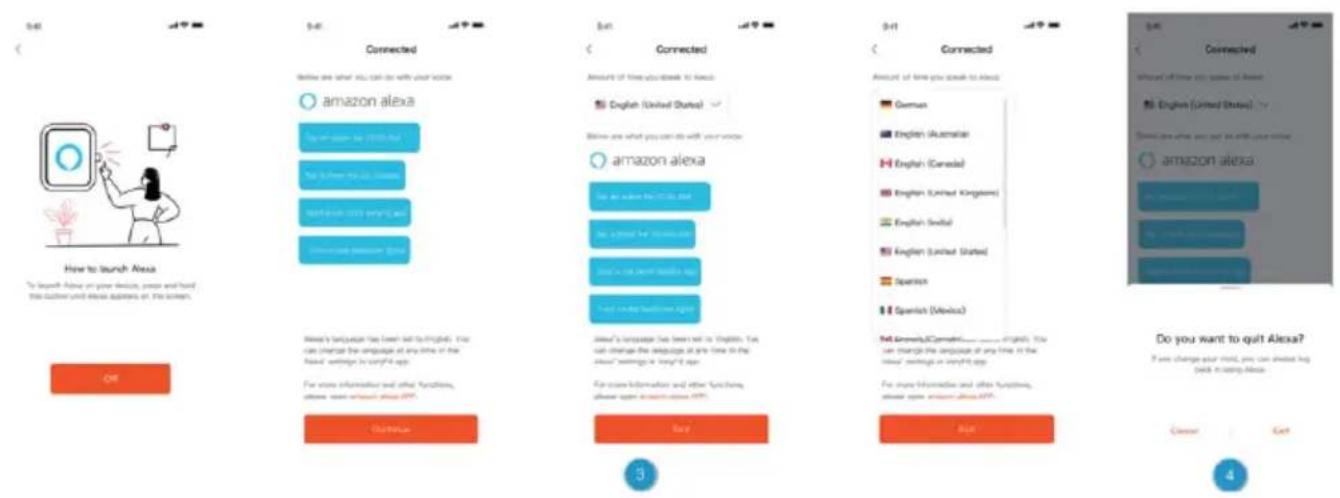
- Dopo aver dato l'autorizzazione di collegamenti, è possibile vedere parte dell'introduzione all'utilizzo ed impostare diverse lingue nazionali;
4.Cliccare il tasto log out per uscire da Alexa, è possibile rifare il log in in ogni momento.
3.1.2 Orologio-Alexa
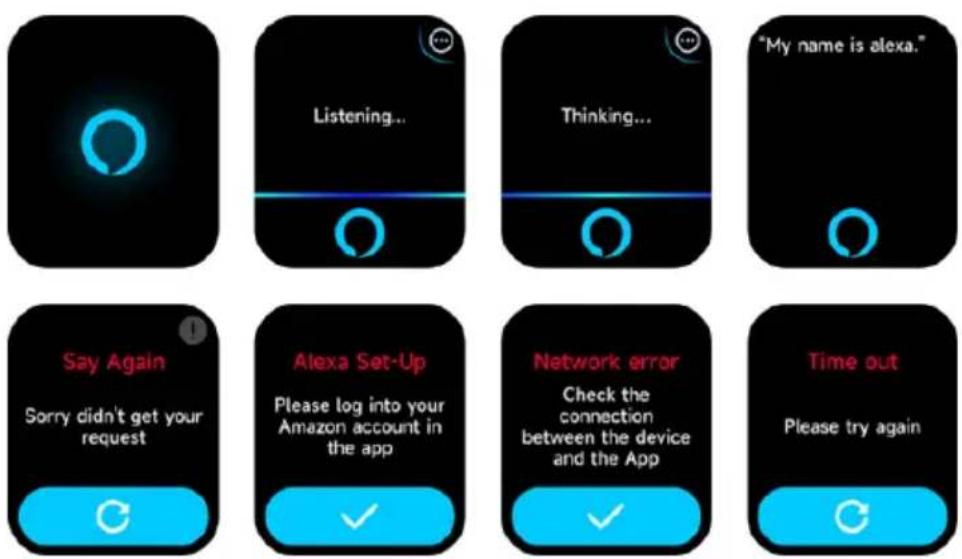
- L'orologio ha Alexa integrata. Nell'interfaccia Listening (Ascolto), se fate una domanda o date un comando vocale, essa passa all'interfaccia Thinking (ci sto pensando) e restituisce una risposta od esegue il comando. Al momento, attraverso Alexa è possibile attivare il cronometro, l'orologio della sveglia, il conto alla rovescia, i servizi di promemoria dell'evento sull'orologio.
- Un messaggio corrispondente è visualizzato in caso la richiesta scada, la voce non sia riconosciuta, l'account non sia collegato, la connessione di rete sia instabile o il Bluetooth non sia collegato.
3.2 Telefono
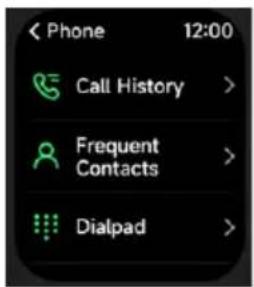
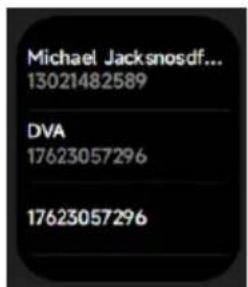
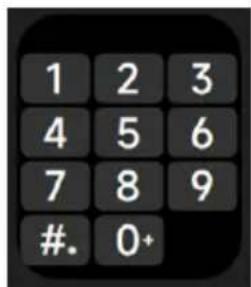
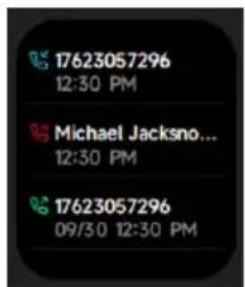
- È possibile aggiungere fino a 10 contatti frequenti al vostro orologio attraverso l'app, e quindi chiamare questi contatti sul vostro orologio.
2.Si può vedere la cronologia delle chiamate recenti sul vostro orologio e chiamare i numeri visualizzati nella cronologia chiamate.
3.Si possono effettuare chiamate attraverso il tastierino dell'orologio.
3.3 Attività
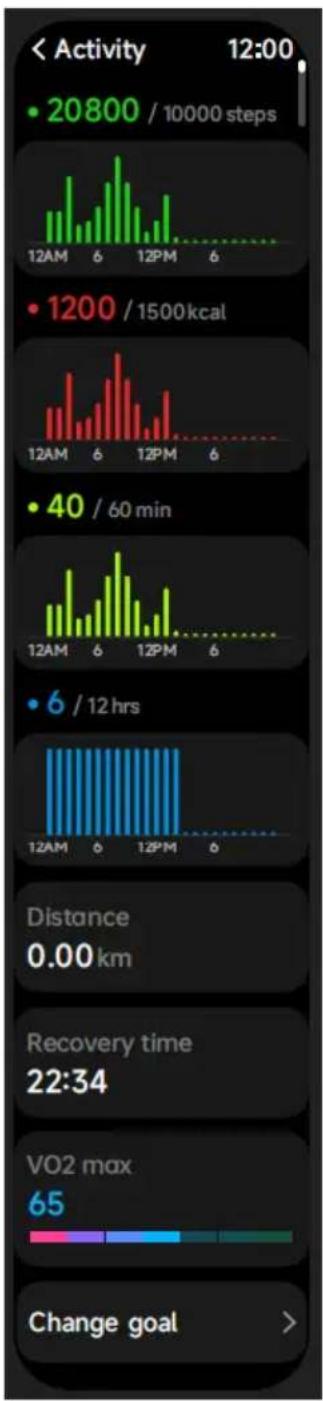
bar
| Activity | Steps | | -------- | ----- | | 20800 / 10000 steps | 20800 / 10000 steps | | 1200 / 1500 kcal | 1500 kcal | | 40 / 60 min | 60 min | | 6 / 12 hrs | 12 hrs |- Si può misurare manualmente la frequenza cardiaca sull'orologio. nelle impostazioni APP, è possibile attivare/disattivare il monitoraggio intelligente 24 su 24 della frequenza cardiaca, o visualizzare i dati cardiaci.
- Ogni volta che la frequenza cardiaca viene misurata, mantenere braccio e polso fermi ed aspettare con pazienza che la misurazione termini.
3.5 SpO2

- Si può misurare lo stress manualmente sull'orologio. In aggiunta, l'orologio supporta il monitoraggio dello stress 24 ore su 24 automatico. Nelle impostazioni APP, è possibile attivare/disattivare questa funzione, o visualizzare lo stress.
2.Ogni volta che lo stress viene misurato, mantenere braccio e polso fermi ed aspettare con pazienza che la misurazione termini.
3.7 Respiro

- Cliccare sull'icona di allenamento alla respirazione per accedere a questa funzione. è possibile scegliere la durata, che aiuta a regolare la respirazione;
2.Cliccare Avvia per accedere direttamente all'animazione dell'allenamento alla respirazione. Seguire la vibrazione e la frequenza dell'animazione per regolare la respirazione. Un ragionevole allenamento alla respirazione può aiutarvi a tranquillizzare le vostre emozioni.
3.8 Telefono
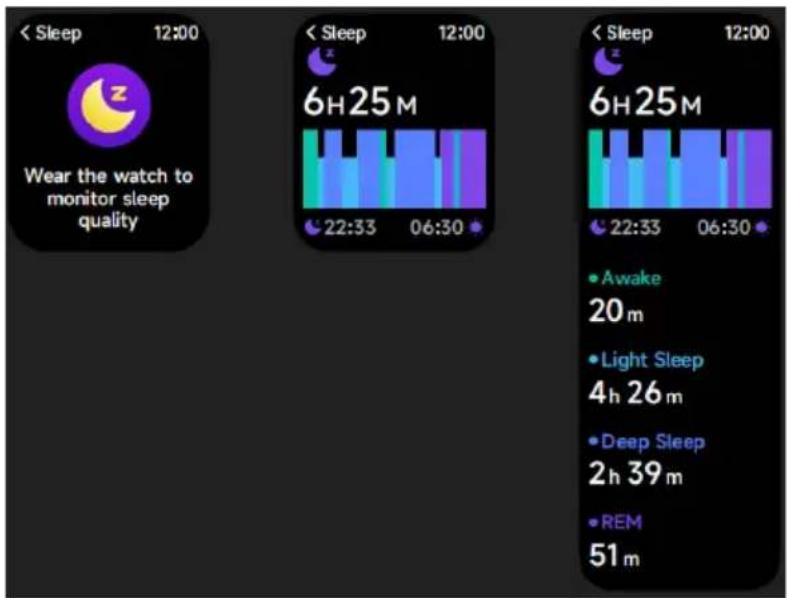
Controllare gli ultimi registri del sonno, i dati di ogni stadio del sonno e il punteggio del sonno.
3.9 Orologio
3.9.1 Cronometro

3.9.3 Timer
 Si può impostare un timer con una durata pre-impostata sull'orologio, e il timer vi ricorderà quando il tempo scade; è possibile personalizzare il timer.3.10 Impostazioni
   Supporta Città corrente la visualizzazione del meteo di 3 giorni. È possibile visualizzare "Meteo attuale, temperature alte e basse" per oggi e "Temperature alte e basse" per i prossimi due giorni.3.11 Musica
   1. Quando l'orologio è connesso all'APP, è possibile controllare il lettore musicale per eseguire le funzioni di "Avanti, Indietro", "Riproduci \ Pausa" e "Volume SU / GIÙ". 2. Esta función puede estar abierta o cerrada en los ajustes de la APP.3.12 Trova il tuo telefono
 1. Quando l'orologio è connesso all'APP, è possibile far squillare il telefono. 2. Fare clic sull'icona per terminare lo squillo. 3. Esta función puede estar activada o desactivada en los ajustes de la APP.3.13 Monitoraggio Ciclo
 Dopo aver aperto la sezione Monitoraggio Ciclo sull'APP, l'orologio visualizzerà le opzioni della funzione di tracciamento dei ciclo, ed imposterà la lunghezza del ciclo, il periodo di promemoria ed altre opzioni, e l'ora a cui mandare periodicamente il promemoria.3.14 Controllo Fotocamera
 Quando l'orologio è collegato all'app, è possibile attivare manualmente la fotocamera di sistema del telefono per controllare lo scatto di foto.3.15 Impostazioni
 1. Nelle impostazioni dell'orologio, è possibile impostare l'ora a schermo, impostazioni suoneria e vista app. 2. Nelle impostazioni dell'orologio, è possibile anche spegnere, riavviare o resettare l'orologio (una volta resettato, tutti i dati memorizzati nell'orologio saranno cancellati, e l'orologio sarà disappaiato dal telefono).4. Modulo promemoria
    L'orologio supporta promemoria multipli, incluso il promemoria di chiamata in ingresso, quello di messaggio in ingresso, quello dell'obbiettivo passi raggiunto, il promemoria di sedentarietà, il promemoria per ber acqua, l'avviso di frequenza cardiaca alta/bassa, l'avviso di bassa saturazione dell'ossigeno e di alto livello di stress, etc.5. Centro controllo
 Il centro di controllo offre un modo semplice per attivare funzioni come Non disturbare, alzare per svegliare, impostare la luminosità dello schermo, trovare il mio telefono, trasfor- mare l'orologio in una torcia, ecc.Politica di garanzia
Questo prodotto è garantito per 2 anni dalla data di acquisto. Quando hai un problema che non puoi risolvere, devi accedere al sito www.prixton.com e fare clic sull\` opzione di contatto per inviarci il tuo modulo di assistenza. Le caratteristiche tecniche ed elettriche qui riportate corrispondono alle unità tipiche e possono essere modificate senza preavviso per migliorare le qualità del dispositivo.Dichiarazione di conformità UE semplificata
Con la presente, La Trastienda Digital SL come proprietaria del marchio commerciale Prixton, situata presso Avenida Cervantes 49, módulo 25, Basauri 48970, Bizkaia, dichiara che il tipo di apparecchiatura radioelettrica che si mostra qui di seguito:| MARCA | MODELLO DESCRIZIONE | CATEGORIA | |
| PRIXTON | SWB29 | SMARTWATCH | WEARABLES |
Einleitung
Bildschirm-Anzeigebereich Funktionstaste Druckentlastungsöffnung Herzfrequenzsensor Mikrofon Lautsprecher Vorderseite Rückseite  Erste Schritte
(1)Öffnen Sie die Lieferung und überprüfen Sie den Inhalt. (2)Lieferumfang: (1) SWB29 Smartwatch (mit Lithium-Akku); (2) Benutzerhandbuch; (3) Original-Ladekabel. (3)Laden Sie die Uhr, um sie vor der ersten Verwendung zu aktivieren und einzuschalten. Zum Laden schließen Sie das magnetische Ladekabel an den Ladekontakten auf der Rückseite der Uhr an. (4)Suchen Sie im App Store oder bei Google Play nach „veryfit“ oder scannen Sie den QR-Code, um die App herunterzuladen und zu installieren. (5)Melden Sie sich bei der App an und stellen Sie Ihre persönlichen Daten sowie Ihre Schritt- und Gewichtsziele ein.  (6) Tippen Sie auf im Menü „Geräte“ oben rechts auf „+“, damit startet Ihr Telefon die Suche. Wählen Sie aus der gefundenen Geräteliste den Namen Ihrer Smartwatch, mit der Sie koppeln möchten. Sie können das Gerät auch direkt koppeln, indem Sie den QR-Code des Geräts scannen.Gesundheit
a)Uhr
1.Die Uhr zeichnet Ihre Daten automatisch auf. 2. Sie können Ihre Herzfrequenz, Blutsauerstoff, Stresslevel, auf der Uhr messen, oder schalten Sie die automatische Messung von Herzfrequenz, Blutsauerstoff, Stress, Schlaf auf der App, um diese Daten den ganzen Tag zu verfolgen. Sie können die Uhr manuell oder automatisch Ihren Gesundheitszustand kontinuierlich überwachen lassen.3.Übung starten:
1-Wenn das Zifferblatt angezeigt wird, drücken Sie kurz die Funktionstaste, um die App-Liste aufzurufen. Tippen Sie auf das Übung-Symbol, um auf die Symbole der verschiedenen Trainingsarten zuzugreifen, dann tippen Sie auf das Symbol einer Übung (z. B. Laufen), um die Übung zu starten. -Die Uhr kann standardmäßig bis zu 20 Übungstypen anzeigen. Im Multi-Übungsmodus der App können Sie die auf der Uhr angezeigten Übungstypen hinzufügen oder löschen oder ihre Reihenfolge ändern.b) App
1. Starten Sie „veryfit“, aktivieren Sie die Bluetooth-Funktion und lassen Sie die GPS-Ortung zu. 2. Beleuchten Sie das Display der Smartwatch und bringen Sie sie in die Nähe Ihres Handys. 3. Tippen Sie auf „+“ in der App und wählen Sie Smartwatch in den Suchergebnissen, um sie zu koppeln. 4. Bestätigen Sie die Kopplungssanfrage auf der Smartwatch. 5. Geben Sie Ihre persönlichen Daten ein und legen Sie Ihr Schrittziel in der App fest, um die Kopplung abzuschließen.Allgemeine Bedienungshinweise
natural_image
Line drawing of a hand wearing a smartwatch (no text or symbols)Funktionen
1.Zifferblatt
Die Uhr wird standardmäßig mit 4 Zifferblättern geliefert. Sie können zwischen ihnen manuell auf der Uhr oder in den Zifferblatt-Einstellungen der veryfit-App umschalten. Sie können das Zifferblatt ebenfalls in der App einstellen. Weitere Zifferblätter stehen im „Zifferblatt-Markt“ zum Herunterladen bereit.2.Übungen
a) Standardmäßig können bis zu 20 Übungstypen angezeigt werden: Lauf im Freien, Laufen in der Halle, Spaziergang im Freien, Gehen in der Halle, Radfahren im Freien, Radfahren in der Halle, Schwimmen im Pool, Freiwasser Schwimmen, Wandern, Yoga, Rudergerät, Ellipsentrainer, Cricket, Übung, Hochintensives Intervalltraining (HIIT), Funktionelles Krafttraining, Core-Training, Tanzen, Pilates, Abkühlung. In der veryfit-App können Sie die Übungstypen hinzufügen oder löschen oder ihre auf der Uhr angezeigte Reihenfolge ändern. Es gibt insgesamt 100 Übungstypen, aus denen Sie in der App wählen können.  b) SWB29 unterstützt die intelligente Bewegungserkennung. Es kann erkennen, ob der Benutzer läuft oder geht. Es unterstützt das automatische Pausieren einer Übung oder die Erinnerung an das Ende einer Übung. Diese Funktion kann in der App ein- und ausgeschaltet werden. c) Die Trainingszusammenfassung der SWB29 enthält verschiedene Trainingsdaten, die in der veryfit-App überprüft werden können. d) Sie können Ihre jüngsten Trainingsaufzeichnungen einschließlich Details auf der Uhr anzeigen. Sie können die Trainingsaufzeichnungen ebenfalls in der App anzeigen.  3.App-Liste
Wenn das Zifferblatt der Uhr angezeigt wird, drücken Sie kurz die Funktionstaste, Aktivität, Telefon, Alexa, Übung, Übungsdaten, Gesundheit, Herzfreq, SpO2, Stress, Schlaf, Atmen, Uhr, Wetter, Zyklusprotokoll, Musik, Kamerasteuerung, Telefon suchen, Einstellung  3.1 Alexa
3.1.1 VeryFit-App Alexa
 1. Tippen Sie in der App auf den Amazon Alexa-Bereich, um das Anmelde-Tutorial aufzurufen. 2. Springen Sie zur Anmeldung des dedizierten Amazon Alexa-Kontos für die Autorisierung der Kontoverknüpfung.  3. Nach der verbindlichen Autorisierung können Sie einen Teil der Einführung in die Bedienung sehen und verschiedene Sprachen einstellen. 4. Tippen Sie auf „Abmelden“, um sich von Alexa abzumelden; Sie können sich jederzeit wieder anmelden. 3.1.2 Uhr Alexa  1. Die Uhr ist mit Alexa ausgestattet. Wenn Sie im Menü Zuhören eine Frage stellen oder einen Befehl geben, geht sie in das Menü Nachdenken und gibt eine Antwort oder führt den Befehl aus. Derzeit können Sie über Alexa die Dienste Stoppuhr, Wecker, Countdown, Ereigniserinnerung auf der Uhr aktivieren. 2. Eine entsprechende Meldung wird angezeigt, wenn die Anfrage eine Zeitüberschreitung aufweist, die Stimme nicht erkannt wird, das Konto nicht angemeldet ist, die Netzwerkverbindung instabil ist oder die Bluetooth-Verbindung nicht besteht. 3.2 Telefon  1. Sie können über die App bis zu 10 häufige Kontakte zu Ihrer Uhr hinzufügen und diese Kontakte dann auf Ihrer Uhr anrufen. 2. Sie können die jüngste Anrufliste auf Ihrer Uhr anzeigen und die in der Anrufliste angezeigten Nummern anrufen. 3. Sie können Anrufe über das Wählfeld der Uhr tätigen. 3.3 Aktivität bar
| Activity | Steps | | -------- | ----- | | 20800 / 10000 steps | 20800 / 10000 steps | | 1200 / 1500 kcal | 1200 / 1500 kcal | | 40 / 60 min | 40 / 60 min | | 6 / 12 hrs | 6 / 12 hrs | | Distance | 0.00 km | | Recovery time | 22:34 | | VO2 max | 65 | | Change goal | > |3.4 Herzfreq
 1. Sie können die Herzfrequenz manuell mit der Uhr messen. In den App-Einstellungen können Sie die intelligente Rund-um-die-Uhr-Überwachung der Herzfrequenz ein- und ausschalten sowie die Herzdaten einsehen. 2. Halten Sie während jeder Messung der Herzfrequenz den Arm und das Handgelenk still und warten Sie geduldig, bis die Messung beendet ist.3.5 SpO2
 1. Sie können den SPO2-Wert manuell mit der Uhr messen. Darüber hinaus unterstützt die Uhr die automatische SPO2-Überwachung rund um die Uhr. In den APP-Einstellungen können Sie diese Funktion ein- und ausschalten oder die SPO2-Daten anzeigen. 2.Halten Sie bei jeder Messung des Blutsauerstoffs den Arm und das Handgelenk still und warten Sie geduldig, bis die Messung beendet ist.3.6 Stress
 1. Sie können den Stress manuell nit der Uhr messen. Darüber hinaus unterstützt die Uhr die automatische Stressüberwachung rund um die Uhr. In den App-Einstellungen können Sie diese Funktion ein- und ausschalten sowie die Stressdaten anzeigen. 2.Halten Sie bei jeder Messung des Stresspegels den Arm und das Handgelenk still und warten Sie geduldig, bis die Messung beendet ist.3.7 Atmen
 1. Tippen Sie auf das Symbol Atemtraining, um auf diese Funktion zuzugreifen. Sie können die Dauer auswählen, die Ihnen hilft, Ihre Atmung anzupassen. 2. Tippen Sie auf Start, um direkt in die Atemtrainingsanimation einzusteigen. Folgen Sie der Vibration und der Animationsfrequenz, um Ihre Atmung anzupassen. Ein vernünftiges Atemtraining kann helfen, Ihre Emotionen abzuschwächen.3.8 Schlaf
 Hier überprüfen Sie Ihre letzte Schlafaufzeichnung, die Daten der einzelnen Schlafstadien und die Schlafbewertung.3.9 Uhr
3.9.1 Stoppuhr
 1. Sie können einen Weckalarm hinzufügen, löschen oder auf der Uhr ein- und ausschalten, sowie einen Weckalarm für die Uhr über die App einstellen. 2. Sie können die Alarmverzögerung in der App einstellen und entscheiden, wie lange Sie verzögern möchten und wie oft die Verzögerung erfolgen soll.3.9.3 Timer
 Sie können einen Timer mit einer voreingestellten Dauer auf der Uhr einstellen, der Sie daran erinnert, wenn die Zeit abgelaufen ist und Sie können die Timerzeit anpassen.3.10 Wetter
   Die Wetteranzeige Aktuelle Stadt für 3 Tage wird unterstützt. Sie können „Aktuelles Wetter, Höchst- und Tiefsttemperaturen“ für heute sowie die „Höchst- und Tiefsttemperaturen“ für die nächsten zwei Tage anzeigen.3.11 Musik
   1. Wenn die Uhr mit der App verbunden ist, können Sie den Musicplayer steuern, um die Funktionen „Nächster Titel“, „Vorheriger Titel“, „Wiedergabe/Pause“ und „Lautstärke erhöhen/verringern“ auszuführen. 2. Diese Funktion kann in den APP-Einstellungen geöffnet oder geschlossen werden.3.12 Telefon suchen
 1. Wenn die Uhr mit der App verbunden ist, können Sie Ihr Telefon klingeln lassen. 2. Tippen Sie auf das Symbol, um das Klingeln zu beenden. 3. Diese Funktion kann in den APP-Einstellungen ein- oder ausgeschaltet werden.3.13 Zyklusprotokoll
 Nachdem Sie Zyklusprotokoll auf der App geöffnet haben, zeigt die Uhr die Optionen für die Zyklusverfolgung an und stellt Zykluslänge, Erinnerungszeit und andere Optionen ein. An die Zeit wird in regelmäßigen Abständen erinnert.3.14 Kamerasteuerung
 Wenn die Uhr mit der App verbunden ist, können Sie die Systemkamera des Telefons manuell einschalten, um die Aufnahme von Fotos zu steuern.3.15 Einstellung
 1. In den Einstellungen können Sie Einschaltzeit, Klingeltoneinstellungen und App-Layout. 2. In den Einstellungen können Sie die Uhr auch ausschalten, neu starten oder zurücksetzen (nach dem Zurücksetzen werden alle in der Uhr gespeicherten Daten gelöscht und die Uhr wird vom Handy entkoppelt).4. Erinnerungsmodul
 Die Uhr unterstützt mehrere Erinnerungen, einschließlich an eingehende Anrufe, an eingehende SMS, an das Erreichen des Schrittziels, an das Umhergehen, an das Trinken von Wasser, an hohe oder niedrige Herzfrequenz, an niedrigen Blutsauerstoff und an hohen Stress.5. Kontrollzentrum
 Mit dem Kontrollzentrum können Sie auf einfache Weise Funktionen wie „ DND-Modus“, „ Zum Wecken hochhalten“, „ Bildschirm-Einschaltzeit“, „ Telefon suchen“, „ Taschenlampe“ usw. aktivieren.Garantiepolitik
Für dieses Produkt gilt eine Garantie von 2 Jahren ab Kaufdatum. Wenn Sie ein Problem haben, das nicht gelöst werden kann, müssen Sie auf das Internet www.prixton.com zugreifen und auf die Kontaktoption klicken, um uns Ihr Unterstützungsformular zu senden. Die elektrischen und technischen Eigenschaften, die hier genannt wurden, entsprechen typischen Geräten und können ohne Vorankündigung geändert werden, um ein besseres Gerät anzubieten.Vereinfachte EU-einverständniserklärung
La Trastienda Digital SL als Inhaber der Handelsmarke Prixton, mit dem Standort Avenida Cervantes 49, módulo 25, Basauri 48970, Bizkaia, erklärt hiermit, dass das im Folgenden detaillierte radioelektrische Gerät:| MARKE | MODEL BESCHREIBUNG | KATEGORIE | |
| PRIXTON | SWB29 | SMARTWATCH | WEARABLES |
Introdução
Área de exibição do ecrã Tecla Função Orifício de alívio de pressão Sensor de ritmo cardíaco Microfone Altifalante Frente Traseira  Começar
(1) Abra a embalagem e verifique o seu conteúdo. (2) Conteúdo entregue: (1) Smartwatch SWB29 (com bateria de iões de lítio integrada); (2) manual do utilizador; (3) cabo de carregamento original. (3) Carregue o relógio para o ativar e ligar antes da primeira utilização. Para carregar, basta ligar o cabo de carregamento magnético aos contactos de carregamento localizados na parte traseira do relógio. (4) Procure "veryfit" na App Store, Google Play ou digitalize o código QR para transferir e instalar a App. (5) Inicie sessão na app e defina a sua informação pessoal, assim como os seus objetivos para passos e peso corporal.  (6)Na interface "Dispositivo", toque no ícone "+" no canto superior direito e o telemóvel começa a procurar. A partir da lista de dispositivos encontrados, escolha o nome do seu Smartwatch para emparelhar. Também pode ligar o dispositivo diretamente ao digitalizar o código QR do dispositivo com a função de digitalização.Saúde
a)Ver
1. O relógio regista automaticamente os seus dados. 2. Pode medir o seu ritmo cardíaco, oxigénio no sangue, nível de stress, no relógio, ou ligar a medição automática do ritmo cardíaco, oxigénio no sangue, stress, sono na aplicação para seguir estes dados durante todo o dia. Pode fazer com que o relógio monitorize o seu estado de saúde de forma manual ou automática e contínua. 3. Para iniciar um exercício: 1) Quando a interface de início do relógio é exibida, prima por instantes a tecla física para aceder à lista de aplicação. Toque no ícone Treino para aceder aos ícones dos diferentes tipos de exercício e toque no ícone de um exercício (como Corrida ao Ar Livre) para iniciar o exercício. 2) O relógio pode exibir até 20 tipos de exercício por padrão. No modo de Exercício múltiplo da app, pode adicionar ou eliminar os tipos de exercício exibidos no relógio ou alterar a sua ordem.b) App
1. Inicie "veryfit", acione a função Bluetooth e conceda permissão ao posicionamento por GPS; 2. Ative o ecrã do Smartwatch e aproxime-o do seu telemóvel; 3. Clique no ícone “+” na App, e selecione o modelo do Smartwatch nos resultados de pesquisa para ligar; 4. Confirme o pedido de ligação no Smartwatch; 5. Preencha a usa informação e defina o seu objetivo de passos na App para concluir a ligação. Funcionamento básico natural_image
Line drawing of a hand wearing a smartwatch (no text or symbols)Descrição da Função
1. Início do relógio
O relógio tem 3 faces de início padrão. Pode alternar entre as faces manualmente no relógio ou nas definições de início do relógio na app veryfit. Pode também personalizar a face do relógio na app. Tem disponíveis mais faces do relógio a partir de “Watch Face Market”.2.Exercício
a) Podem ser exibidos até 20 tipos de exercício de padrão: Corrida externa, Corrida interna, Caminhada externa, Caminhada interna, Bike externa, Bike interna, Natação na piscina, Natação em águas abertas, Caminhada, Yoga, Remo, Elíptico, Críquete, Treino, Treino intervalado de alta intensidade (HIIT), Treino funcional de força, Treino do núcleo, Dança, Pilates, Relaxamento. Na app veryfit, pode adicionar ou eliminar os tipos de exercício ou alterar a ordem de exibição no relógio. Existe o total de 100 tipos de exercícios à escolha na app.  b)O SWB29 apoia o reconhecimento do exercício inteligente. Pode reconhecer se o utilizador está a correr/pararar. Suporta automaticamente a pausa de um exercício ou o lembrete quando um exercício termina. Esta funcionalidade pode ser ligada/desligada na aplicação. c)O resumo de exercícios do SWB29 contém vários dados de exercício, que podem ser verificados na app veryfit. d) Pode ser os seus registos de exercício recentes no relógio, incluindo detalhes; também pode ver os registos de exercício na APP.  3. Lista de aplicação
Quando a interface de início do relógio é exibida, prima por instantes a tecla física para aceder à lista de aplicação, que é exibida respetivamente da parte superior à base: Atividade, Telefone, Alexa, Treino, Registos de Treino, Saúde, Freq Cardí, SpO2, Stress, Sono, Respiração, Relógio, Meteorologia, Seguimento do Ciclo, Música, Controle da Câmera, Encontrar telemóvel, Definições  3.1 Alexa
3.1.1 VeryFit App-Alexa
 1. Na App clique na área Amazon Alexa para aceder à interface de tutorial de início de sessão 2. Passe para a interface de início de sessão da conta Alexa para autorizar a ligação de conta;  3. Depois da autorização de ligação, pode ver a parte da introdução da operação e definir os idiomas; 4.Clique no botão fechar sessão para fechar a sessão da Alexa e pode voltar a iniciar sessão em qualquer momento. 3.1.2 Relógio-Alexa  1. O relógio está integrado na Alexa. Na interface Listening (Ouvir), se ficar uma pergunta ou dizer um comando por voz, aciona a interface Thinking (A pensar) e devolve uma resposta ou executa o comando. Atualmente através de Alexa, pode ligar o cronómetro, o despertador, contagem decrescente e serviços de lembrete de eventos no relógio. 2. É exibida uma indicação correspondente no caso de o pedido ter expirado, a voz não ser reconhecida, a conta não ter sessão iniciada, a ligação de rede ser instável ou Bluetooth não estar ligado. 3.2 Telephone  1. Pode adicionar até 10 contactos frequentes ao seu relógio através da app e ligar a esses contactos no seu relógio. 2. Pode ver o historial de chamadas recentes no seu relógio e ligar aos números exibidos no historial de chamadas. 3. Pode fazer chamadas através do teclado de marcação do relógio. 3.3 Atividade histogram
| Activity | Count | | -------- | ----- | | 12AM | 20800 / 10000 steps | | 12PM | 1200 / 1500kcal | | 12PM | 40 / 60 min | | 12PM | 6 / 12 hrs | | 12PM | Distance 0.00 km | | Recovery time | 22:34 | | VO2 max | 65 | Change goal | > |3.4 Freq Cardí
 1. Pode medir manualmente o ritmo cardíaco no relógio. Nas definições da App, pode ligar/desligar a monitorização inteligente contínua do ritmo cardíaco ou ver os dados. 2. Sempre que o ritmo cardíaco é medido, mantenha o braço e pulso quietos e aguarde pacientemente até a medição terminar.3.5 SpO2
 1. É possível medir manualmente o SPO2 no relógio. Além disso, o relógio suporta a monitorização automática do SPO2 24 horas por dia. Nas definições APP, pode ligar/desligar esta função, ou visualizar os dados do SPO2. 2. Sempre que o oxigénio no sangue é medido, mantenha o braço e pulso quietos e aguarde pacientemente até a medição terminar.3.6 Stress
 1. Pode medir manualmente o Stress no relógio. Além disso, o relógio suporta a monitorização automática contínua do Stress. Nas definições da APP, pode ligar/desligar esta função, ou ver os dados de stress. 2. Sempre que o stress é medido, mantenha o braço e pulso quietos e aguarde pacientemente até a medição terminar.3.7 Respiração
 1. Clique no ícone Treino de respiração para aceder a esta funcionalidade. pode escolher a duração, ajuda a ajustar a sua respiração; 2.Clique Iniciar para aceder diretamente a animação de treino de respiração. Siga a vibração e frequência de animação para ajustar a sua respiração. O treino de respiração razoável pode ajudar a acalmar as suas emoções.3.8 Sono
 Verifique o seu último registo de sono, dados de cada etapa de sono e classificação do sono.3.9 Relógio
3.9.1 Cronómetro
 Utilize o relógio como cronómetro. O cronómetro tem função "Volta".3.9.2 Alarme
 1. Pode adicionar, eliminar um alarme ou ligar/desligar o alarme no relógio e definir também um alarme para o relógio através da app. 2. Pode definir o tempo de atraso do alarme e as horas na APP para decidir quanto pretende atrasar e quantas vezes.3.9.3 Temporizador
 Pode definir um temporizador com uma duração predefinida no relógio e o temporizador irá lembrá-lo quando terminar o tempo; pode personalizar o tempo do temporizador.3.10 Meteorologia
   Suporta Cidade atual visualização de meteorologia para 3 dias. Pode ver “Meteorologia atual, Temperaturas altas e baixas” para hoje e “Temperaturas altas e baixas” para os próximos dois duas dias.3.11 Música
   1. Quando o relógio está ligado à APP, pode controlar o leitor de música para efetuar as funções de "Seguinte/Anterior", "Reproduzir\Pausa" e "SUBIR/DESCER Volume". 2.Esta função pode ser aberta ou fechada nas configurações do APP.3.12 Encontrar telemóvel
 1. Quando o relógio está ligado à APP, pode fazer o telemóvel tocar. 2. Clique no ícone para terminar o toque. 3. Esta função pode estar ligada ou desligada nas configurações do APP.3.13 Seguimento do Ciclo
 Após abrir Seguimento do Ciclo na APP, o relógio vai exibir as opções da função de registo de ciclo e definir a duração do ciclo, hora de lembrete e outras opções e a hora será lembrada periodicamente3.14 Controle da Câmera
 Quando o relógio está ligado à aplicação, pode ligar manualmente a câmara do sistema do telefone para controlar a captação de fotografias.3.15 Definições
 1. Nas definições do relógio, pode definir a hora no ecrã, definições de toque e vista da app. 2. Nas definições do relógio, também pode encerrar, reiniciar ou repor o relógio (uma vez reposto, todos os dados armazenados no relógio serão eliminados e o relógio será desemparelhado do telemóvel).4 Módulo de lembrete
 O relógio suporta múltiplos lembretes, incluindo lembrete de chamada recebida, lembrete de mensagem de texto recebida, lembrete de objetivo de passos alcançado, lembrete para andar, lembrete para beber água, lembrete de ritmo cardíaco alto/baixo, lembrete de oxigénio no sangue baixo e lembrete de stress elevado, etc.5. Centro de controle
 O centro de controlo dá-lhe uma forma fácil de ligar funções como Não Perturbe, elevar para Acordar, definir o brilho do ecrã, encontrar o meu telefone, transformar o seu relógio numa lanterna,etc.Política de garantia
Em cumprimento do estabelecido no Decreto-Lei n.º 84/2021 https://dre.pt/dre/detalhe/decreto-lei/84-2021-172938301, colocamos à disposição dos interessados toda a informação necessária para poder exercer todos os direitos de desistir de acordo com as normas contidas nesta lei, dando por cumpridos os requisitos que a lei exige ao vendedor no contrato de venda. As características técnicas e eléctricas que aqui se indicam podem ser válidas para outras unidades semelhantes às nossas e poderão ser trocadas sem aviso prévio com o objetivo de oferecer um equipamento melhor.Declaração De Conformidade Simplificada
Pela presente, a La Trastienda Digital SL, na qualidade de proprietária da marca comercial Prixton, com sede no Avenida Cervantes 49, módulo 25, Basauri 48970, Bizkaia, declara que o tipo de equipamento radioelétrico que de seguida se expõe:| MARCA | MODELO DESCRIÇÃO | CATEGORIA | |
| PRIXTON | SWB29 | SMARTBAND | WEARABLES |
Inleiding
Schermweergavegebied Functietoets Zuurstof in bloed Hartslagsensor Microfoon Luidspreker  Inleiding
(1)Open de verpakking en controleer de inhoud. (2)Inhoud levering: (1) Smartwatch SWB29 (met geïntegreerde litiumbatterij) (2) Handleiding, (3) Originele oplaadkabel. (3)Laad het horloge op om het te activeren en voor het eerste gebruik te koppelen. Om op te laden, sluit je gewoon de magnetische oplaadkabel aan op de oplaadcontacten aan de achterkant van het horloge, met behulp van een oplader van minimaal 1A. (4) Zoek "veryfit" in de app store, Google Play/Apple Store of scan de bijbehorende QR-code om de app te downloaden en te installeren. (5) Log in op de app, vul je persoonlijke gegevens en je gewichtsdoelen in  (6) Raak in de interface van het "apparaat" het icoon "+" in de rechterbovenhoek aan; je telefoon begint met zoeken. Kies uit de lijst met gevonden apparaten de naam van je smartwatch om mee te koppelen. Je kunt het apparaat ook rechtstreeks koppelen door de QR-code van het apparaat te scannen met behulp van de scanfunctie.Gezondheid
a) Horloge
1. Het horloge registreert automatisch je gegevens. 2. Je kunt je hartslag, zuurstofgehalte in bloed of stressniveau op het horloge meten, of je kunt de automatische meting van hartslag, zuurstofgehalte in bloed, stress of slaap in de app inschakelen om deze gegevens de hele dag bij te houden. Je kunt het horloge handmatig of automatisch je gezondheid laten monitoren. 3.Als je begint met je training: -Wanneer de wijzerplaatinterface wordt weergegeven, druk je kort op de fysieke knop om de lijst met applicaties te openen. Raak het trainingspictogram aan om toegang te krijgen tot pictogrammen voor verschillende soorten trainingen en raak vervolgens een pictogram van een training aanbijv. Outdoor Run) om de training te starten. -Het horloge kan standaard tot 20 soorten oefeningen weergeven. In de modus Meerdere oefeningen van de app kun je de soorten oefeningen die op het horloge worden weerge- geven toevoegen of verwijderen, of de volgorde ervan wijzigen.b) App
1. Start "veryfit", schakel de Bluetooth-functie in en geef toestemming voor positionering aan GPS; 2. Zet het scherm van de smartwatch aan en breng het dicht bij je telefoon; 3. Klik op het pictogram "+" in de app en selecteer het smartwatch-model in de zoekresultaten om te koppelen; 4. Bevestig het verzoek voor koppeling op je smartwatch; 5. Vervolledig je informatie en stel je beoogde stappen in om de koppeling te voltooien.Basishandelingen
natural_image
Line drawing of a hand wearing a smartwatch on a wrist (no text or symbols)Beschrijving van de functie
1.Wijzerplaat
Het horloge heeft 3 standaard wijzerplaten. Je kunt ze handmatig wijzigen op het horloge of in de wijzerplaatinstellingen in de veryfit-app. Bovendien kun je in de app de wijzerplaat aan je wensen aanpassen. De meeste wijzerplaten kun je downloaden op de „Marktplaats voor wijzerplaten”.2. Training
a) Het horloge kan standaard tot 20 soorten oefeningen weergeven: Indoor rennen, outdoor rennen, outdoor wandelen, indoor wandelen, outdoor fietsen, indoor fietsen, zwemmen in het zwembad, outdoor zwemmen, wandelen, yoga, roeimachine, elliptische trainer, cricket, training, HIIT, functionele krachttraining, core workout, dans, pilates, ontspannen. In de veryfit-app kun je de soorten oefeningen die op het horloge worden weergegeven toevoegen of verwijderen, of de volgorde ervan wijzigen. In totaal kun je op de app kiezen uit 100 soorten training.  b) De SWB29 ondersteunt de intelligente herkenning van het soort training. Het horloge kan herkennen of de gebruiker aan het stappen of wandelen is. Ondersteunt automatische pauze van een oefening of herinnering aan de afwerking ervan. Deze functie kan in de app worden in- of uitgeschakeld. c) Het trainingsoverzicht van de SWB29 bevat verschillende trainingsgegevens, die in de veryfit-app kunnen worden gecontroleerd. d)Je kunt je recente trainingsgegevens op het horloge bekijken, inclusief de details; je kunt de trainingsgegevens ook in de app bekijken.  3.Lijst met toepassingen
Wanneer de wijzerplaatinterface wordt weergegeven, druk je kort op de fysieke knop om de lijst met applicaties te openen. De lijst wordt van boven naar beneden weergegeven. Activiteit, telefoon, Alexa, training, trainingslogboeken, gezondheid, hartslag, zuurstof in bloed, stressniveau, slaapcycli, ademhalingscontrole, horloge, weersvooruitzichten, controle van menstruatiecyclus, muziek afspelen, controle camera, telefoon vinden, instellingen  3.1 Alexa
3.1.1 VeryFit-app Alexa
 1.Klik in de app op het Amazon Alexa-gebied om in te loggen op de interface van de tutorial 2.Ga naar de speciale aanmeldingsinterface van het Amazon Alexa-account voor autorisatie van de accountkoppeling;  3. Na linkautorisatie kun je de bedieningsintroductie bekijken en verschillende talen instellen; 4.Klik op de uitlogknop om uit te loggen van Alexa;je kunt je op elk moment weer aanmelden 3.1.2 Horloge-Alexa  1. Het horloge heeft ingebouwde Alexa. Als je in de luisterinterface een vraag stelt of een spraakopdracht gebruikt, gaat het horloge naar de denkinterface en geeft een antwoord of voert de opdracht uit. Momenteel kun je via Alexa de stopwatch, wekker, aftelfunctie, dienst voor gebeurtenisherinneringen op de klok activeren. 2. De bijbehorende melding wordt weergegeven in het geval dat het verzoek is verlopen, de stem niet wordt herkend, het account niet is aangemeld, de netwerkverbinding onstabiel is of de bluetooth niet is verbonden. 3.2 Telefoon  1. Je kunt via de app maximaal 10 veelgebruikte contacten aan je horloge toevoegen, waarna je deze contacten vanaf je horloge kunt bellen. 2.Je kunt de recente oproepgeschiedenis op je horloge bekijken en de nummers bellen die in de oproepgeschiedenis worden weergegeven. 3.Je kunt via het toetsenbord van het horloge telefoongesprekken uitvoeren. 3.3 Activiteit bar
| Metric | Value | | --- | --- | | Activity | 20800 / 10000 steps | | Steps | 12AM | | Calories | 1200 / 1500kcal | | Time Spent | 40 / 60 min | | Duration | 6 / 12 hrs | | Distance | 0.00 km | | Recovery time | 22:34 | | VO2 max | 65 | | Change goal | > |3.4 Hartslag
 1. Je kunt je hartslag op het horloge manueel meten. In de app-instellingen kun je de hele dag door slimme hartslagmeting in- of uitschakelen of hartgegevens bekijken. 2.Houd elke keer dat de hartslag wordt gemeten je arm en pols stil en wacht geduldig tot de meting is voltooid.3.5 SpO2 (zuurstof in bloed)
 1. Je kunt met het horloge handmatig het zuurstofgehalte in je bloed meten. Bovendien kun je die met het horloge de hele dag lang ook automatisch meten. In de app-instellingen kun je deze functie in- of uitschakelen of de gegevens bekijken. 2.Houd elke keer dat het zuurstofgehalte in je bloed wordt gemeten je arm en pols stil en wacht geduldig tot de meting is voltooid.3.6 Stress
 1.Je kunt je stressniveau handmatig meten op het horloge. Bovendien ondersteunt het horloge automatische stressmonitoring de hele dag door. In de app-instellingen kun je deze functie in- of uitschakelen of de stressgegevens bekijken. 2.Houd elke keer dat het stessniveau wordt gemeten je arm en pols stil en wacht geduldig tot de meting is voltooid.3.7 Beheersing van de ademhaling
 1. Klik op het pictogram Ademhalingstraining om deze functie te openen. Je kunt de duur kiezen, de training helpt je je ademhaling aan te passen; 2.Klik op start om direct naar de animatie voor ademtraining te gaan. Volg de frequentie van trillingen en de animatie om je ademhaling aan te passen. Ademhalingstraining op redelijk niveau kan helpen om je emoties te kalmeren.3.8 Slaapcontrole
 Controleer je laatste slaaprapport, gegevens voor elke slaapfase en slaapscore.3.9 Horloge
3.9.1 Stopwatch
 1. Je kunt een alarm toevoegen, verwijderen of het alarm op het horloge in- of uitschakelen, en ook via de app een alarm instellen voor het horloge. 2.Je kunt het wekkertijdstip en snooze-tijd instellen in de app om te bepalen hoe lang en gedurende hoeveel tijd je wilt snoozen.3.9.3 Timer
 Je kunt een timer instellen met een vooraf ingestelde duur op het horloge, en de timer zal je eraan herinneren wanneer de ingestelde tijd afloopt; je kunt de tijd van de timer aanpassen.3.10 Weer
   Ondersteuning van de weergave van het weer in de huidige stad over een periode van 3 dagen. Je kunt „Weer op dit moment, hoge en lage temperaturen” voor de dag en de „hoge en lage temperaturen” voor de komende twee dagen zien.3.11 Muziek
   1. Wanneer het horloge is verbonden met de app, kun je de muziekspeler bedienen om de functies "Volgende, Vorige", "Afspelen/Pauzeren" en "Volume omhoog/omlaag" uit te voeren. 2. In de app-instellingen kan deze functie in- of uitgeschakeld zijn.3.12 Vind je telefoon
 1.Wanneer het horloge is verbonden met de app, kun je de beltoon doen afgaan. 2. Klik op het icoon om de beltoon te stoppen. 3. Deze functie kan de app-instellingen in- of uitgeschakeld zijn.3.13 Controle van de menstruatiecyclus
 Na het openen van Cycluscontrole in de app, toont het horloge de opties van de cyclusvolgfunctie en stelt de cyclusduur, herinneringstijd en andere opties in, en het zal je tijdig herinneren aan het uur3.14 Bediening van de camera
 Wanneer het horloge is verbonden met de app, kun je de systeemcamera van de telefoon handmatig activeren om het maken van foto's te controleren.3.15 Instellingen
 1. In de instellingen van het horloge kun je de tijdweergave, beltoon en app-weergave instellen. 2. In de instellingen van het horloge kun je het horloge ook uitschakelen, opnieuw opstarten of resetten (na het resetten worden alle gegevens die op het horloge zijn opgeslagen gewist en wordt het horloge ontkoppeld van je telefoon).4. Herinneringsmodule
 Het horloge ondersteunt meerdere herinneringen, waaronder: melding inkomende oproep, melding inkomende sms, melding stapdoel bereikt, melding dat je moet omdraaien, herinnering voor water drinken, melding hoge/lage hartslag, melding laag zuurstofgehalte in bloed en melding hoge stress enz.5. Controlecentrum
 Het Controlecentrum biedt je een gemakkelijke manier om functies te activeren zoals niet storen, tijd om op te staan, de helderheid van het scherm aanpassen, mijn telefoon vinden, je horloge als zaklamp gebruiken enz.Garantie beleid
Dit product heeft een garantie van 2 jaar vanaf de datum van aankoop. Als u een probleem hebt dat u niet kunt oplossen, moet u naar www.prixton.com gaan en op de contactoptie klikken om ons uw assistentieformulier toe te sturen. Deze technische en elektrische specificaties kunnen te allen tijde en zonder voorafgaande kennisgeving worden gewijzigd om het apparaat nog te verbeteren.Vereenvoudigde EU-conformiteitsverklaring
Hierbij verklaart La Trastienda Digital SL, als eigenaar van het handelsmerk Prixton, en gevestigd in het Avenida Cervantes 49, módulo 25, Basauri 48970, Bizkaia, dat de radioapparatuur die hierna wordt beschreven:| MERK | MODEL BESCHRIJVING | CATEGORIE | |
| PRIXTON | SWB29 | SMARTWATCH | WEARABLES |