Mono 3600 - Uredska stolica Stem - Besplatni korisnički priručnik
Pronađite besplatno priručnik za uređaj Mono 3600 Stem u PDF formatu.


Pitanja korisnika o Mono 3600 Stem
0 pitanje o ovom uređaju. Odgovorite na one koje znate ili postavite svoje.
Postavi novo pitanje o ovom uređaju
Preuzmite upute za vaš Uredska stolica u PDF formatu besplatno! Pronađite svoj priručnik Mono 3600 - Stem i uzmite svoju elektroničku napravu natrag u ruke. Na ovoj stranici objavljeni su svi dokumenti potrebni za korištenje vaše naprave. Mono 3600 marke Stem.
KORISNIČKI PRIRUČNIK Mono 3600 Stem
MONO OFFICE CHAIR USER'S INSTRUCTIONS
Mono has been specifically designed to compliment the human form. There have been a range of functional options included in this chair to make it the most comfortable, functional chair for your specific work environment.
One of these many features is the versatile synchronised mechanism. This means that the seat and back of your chair move in a set ration of 2:1. You can set your chair in 'free-float', when the chair's seat an back are free to move with you as you move, providing constant postural support making it ideal for when you are regularly swapping between tasks whilst sitting. Alternatively you can use the synchronised mechanism in a 'locked' position, meaning the seat and back stay in the same position. This is the preferred setting as it provides constant support to you while carrying out a task that makes you maintain a similar position.
SITTING PROPERLY: THE THINGS TO LOOKS OUT FOR:
- Your body should always feel that it is in an upright but comfortable and relaxed position.
- Your bottom should always be at the back of the seat
- Your neck should feel upright and your shoulders squared and relaxed
- Your arms should hang straight down by your side with elbows bending at right angles to rest on your work surface
- Your feet should be flat on the floor (or on a foot rest) and your knees at right angle
- Your back should have permanent contact with the chair back and the lower 'lumber' muscles feel supported
- Your pelvis should feel like it is tilted slightly forward with a comfortable one hands width from the front of the seat to the back of your knees
WHY ADJUST MY NEW CHAIR CORRECTLY?
In today's work environment many hours are spent sitting, usually in front of a computer. The physical impact of sitting so much is high and is greatly influenced by what or sitting posture is like. Areas that are particularly susceptible to pain from sitting incorrectly are the neck, shoulders, back and upper thighs. Through using the right equipment correctly adjusted we can greatly increase our comfort and productivity.
HOW TO ADJUST YOUR CHAIR SO THAT YOU CAN SIT WITH THE CORRECT POSTURE:
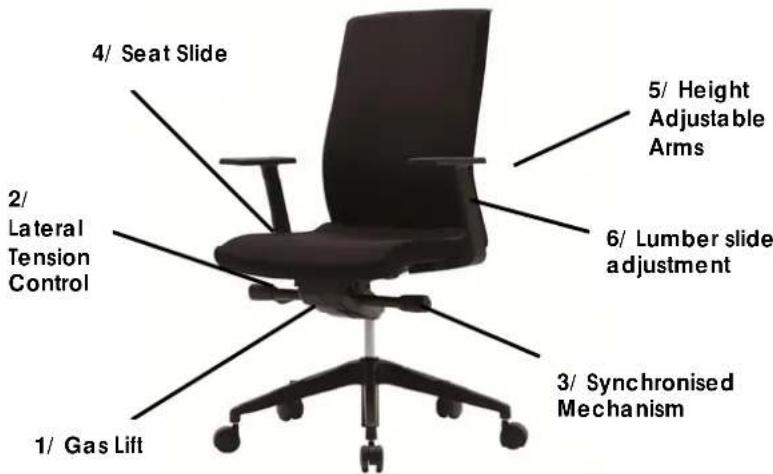
1) Gas Lift- Seat height adjustment: Establish the right seating height with both the hips and knees comfortable at right angles. To increase the seat height lift your weight from the seat and pull the lever under the right side of the seat up. To make the chair decrease in height use your body weight, by sitting in the chair at the same time as pulling the lever up. Always release the lever to lock the chair into a comfortable height
2) Lateral Tension Control: Tension adjustable wheel Turn the tension adjustment wheel either clockwise or anticlockwise to increase or decrease the tension in the synchronised mechanism. This tension level effects the ease of adjustability in the seat and back position in accordance with your body weight.
3) Synchronised Mechanism: Release the lever under the left side of the seat to let the chair operate in free float mode, where the back and seat follow your body in unision. Alternatively, to keep the chair locked in position, release the lever, find the most comfortable position and return the lever to lock the seat and back into position.
4) Seat Slide Control: To adjust the seat depth, locate the seat slide button on the right hand side of the chair. Push this in to the desired position and release the button to lock the seat into place.
5) Height Adjustable arms: To adjust the height of the arms, locate the tabs under the arm and lift up and down.
6) Lumber slide adjustment: Locate the two tabs on either side of the chair back and lift up or down. You should feel more support in the curve of the back.