
LIFE P89064 (MD 86387) - Ulkoinen kiintolevy MEDION - Ilmainen käyttöohje ja opas
Löydä laitteen käyttöohje ilmaiseksi LIFE P89064 (MD 86387) MEDION PDF-muodossa.


Käyttäjien kysymyksiä aiheesta LIFE P89064 (MD 86387) MEDION
0 kysymys tästä laitteesta. Vastaa tuntemiisi tai esitä omasi.
Esitä uusi kysymys tästä laitteesta
Lataa ohjeet laitteellesi Ulkoinen kiintolevy PDF-muodossa ilmaiseksi! Löydä käyttöohjeesi LIFE P89064 (MD 86387) - MEDION ja ota elektroninen laitteesi takaisin hallintaan. Tällä sivulla julkaistaan kaikki laitteidesi käyttöön tarvittavat asiakirjat. LIFE P89064 (MD 86387) merkiltä MEDION.
KÄYTTÖOHJE LIFE P89064 (MD 86387) MEDION
Quick Start Guide
8 GB\* USB Flash Drive with microSD Card Reader P89064 (MD 86387)
Included with your USB Flash Drive
Please check that the contents listed below are supplied with your package. Your package should include the following components:
- USB Flash Drive
- Quick Start Guide
- Warranty Card
System Requirements
- Slot: USB port (USB 1.1/2.0)
- Operating system: Microsoft® Windows® 7 / Vista® SP1 / XP SP3
Safety Instructions
Please read this chapter carefully and observe all listed notes. This ensures a reliable operation and long life expectancy of your USB Flash Drive. Keep these instructions with your device at all times. Please pass these instructions on to the new owner in the event of transferring ownership of this device. Please contact our Service Centre if you are experiencing technical problems with your device.
Data Security
Note
Every time you update your data make back-up copies on an external storage medium. The supplier does not assume liability for data loss or damage to data storage units, and no claims can be accepted for damages resulting from the loss of data or consequential losses.
Operational Safety
- Follow the operating instructions of your computer.
- Keep the device away from humidity and avoid vibration, dust, heat, and direct sunlight, in order to prevent operational interference.
- Never open the case. This would void all warranty claims and it could possibly cause the destruction of the unit.
- Do not allow children to play with electrical devices without supervision. Children do not always recognize possible dangers.
- Before operating the device after a transport, allow it to become acclimatized. High temperature and humidity deviations can lead to moisture build up, which can cause an electric short circuit. Fasten down the plug cover before transportation.
Electromagnetic Compatibility
- While connecting the device, the guidelines for electromagnetic compatibility must be followed. Keep at least 1 meter distance from high frequency and magnetic sources of interference (TV, loudspeakers, mobile phones, etc.), to avoid operation disruption and data loss.
Cleaning Instructions
Normally cleaning of this device is unnecessary.
- Attention! This device does not contain parts that must be serviced or cleaned.
- Make sure the USB Flash Drive does not become contaminated. Do not use solvents, corrosives, or spray cleansers. If necessary, clean the casing with a moist cloth.
Recycling
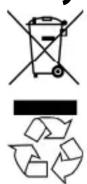
Device
At the end of its life, the appliance must not be disposed of in household trash. Enquire about the options for environmentally-friendly disposal
Packaging
To avoid damage during transport, the device is stored in its packaging. Packaging is mainly produced from materials which can be professionally recycled and disposed of in an environmentally friendly manner. Contact your local authority waste department for further information.
Getting Started
Connecting USB Flash Drive
Remove the protective cover of the USB Flash Drive and insert the device into an available USB port.
The operating system will now recognize the USB Flash Drive and assign two available drive letters, one to the USB Flash Drive and one to the card reader. You can only access one drive, if no microSD card is inserted. Now you can use the device like a mass storage device (copy data, delete, etc.).
Removing USB Flash Drive
With some operating systems it may be necessary to sign off the device. The installed USB Flash Drive is displayed in the taskbar. Right click with the mouse "Unplug or Eject Hardware" (1) and choose the appropriate entry.

The instruction for device removal will follow:
Inserting a microSD Card
Insert the microSD card until it locks. A picture on the USB Flash Drive shows how to insert the microSD card properly without running the risk of damaging the card or the card reader. The card can be accessed as an additional drive on your computer.
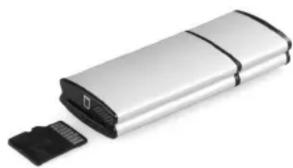
natural_image
Exterior view of a silver rectangular electronic device with a black plastic clip emerging from its side (no text or symbols visible)Removing a microSD Card
In order to remove the microSD card you first have to dismount the USB Flash Drive. Disconnect the USB Flash Drive from the computer and press lightly on the back of the microSD card to remove it from the card reader.
Hint
Never remove a microSD card or the USB Flash Drive while programs are still accessing them. This could cause loss of data.
Customer Service
Errors and Possible Causes
USB Flash Drive is not recognized:
• Is the device connected correctly?
- Check in the Windows® device manager, whether the USB units are correctly linked. If necessary re-install the USB controller.
Data cannot be read / written:
- Did you format the USB Flash Drive with another computer? Different formats (FAT/FAT32/HFS) may be incompatible. Save the data and reformat the USB Flash Drive with a compatible format.
Additional Support
If the suggestions in the above section have not solved your problem, please contact the service hotline and we will attempt to help you solve the problem. Before you contact the Helpline, however, please have the following information available:
• How is your computer configured?
• What additional peripherals do you use?
• What messages, if any, appear on your screen?
• What software were you using when the error occurred?
• What steps have you already undertaken to solve the problem?
- If you have been given a customer number previously, please quote this.
Please note:
If the USB Flash Drive does not operate normally due to an electrostatic discharge, faulty data exchange or other error, please carefully disconnect the USB Flash Drive and reconnect it.
Copyright © 2011, All rights reserved.
Microsoft ® , MS-DOS ® , and Windows are registered trademarks of Microsoft Corporation in the U.S. and other countries.
The names of actual companies and products mentioned herein may be the trademarks of their respective owners.
Information in this document is subject to change without notice.




- Quick Start Guide
- GB\* USB Flash Drive with microSD Card Reader P89064 (MD 86387)
- Included with your USB Flash Drive
- System Requirements
- Safety Instructions
- Data Security
- Note
- Operational Safety
- Electromagnetic Compatibility
- Cleaning Instructions
- Recycling
- Getting Started
- Connecting USB Flash Drive
- Removing USB Flash Drive
- Inserting a microSD Card
- Removing a microSD Card
- Customer Service
- Errors and Possible Causes
- USB Flash Drive is not recognized:
- Data cannot be read / written:
- Additional Support
- Please note:
Merkki : MEDION
Malli : LIFE P89064 (MD 86387)
Kategoria : Ulkoinen kiintolevy