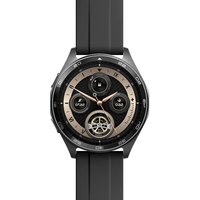
SWB32 - Smartwatch Prixton - Manual de uso y guía de instrucciones gratis
Encuentra gratis el manual del aparato SWB32 Prixton en formato PDF.


| Tipo de producto | Reloj inteligente (smartwatch) |
| Marca | Prixton |
| Modelo | SWB32 |
| Pantalla | Pantalla táctil a color |
| Sensores | Frecuencia cardíaca, SpO2, acelerómetro, sensor de estrés |
| Conectividad | Bluetooth 5.0 (estimación), compatible con la aplicación VeryFit |
| Funciones de salud | Medición de frecuencia cardíaca, oxígeno en sangre, nivel de estrés, sueño, energía corporal |
| Seguimiento deportivo | Más de 100 tipos de ejercicios, reconocimiento automático para algunos |
| Asistente de voz | Alexa integrado |
| Notificaciones | Llamadas, mensajes, recordatorios, alarmas |
| Autonomía | Aproximadamente 7 días (estimación) |
| Carga | Cargador magnético incluido |
| Compatibilidad | iOS y Android (a través de VeryFit) |
| Contenido de la caja | Reloj SWB32, cable de carga magnético, manual de usuario |
| Garantía | Garantía legal - consulte el sitio web de Prixton |
| Reparabilidad | Piezas de repuesto disponibles a través del servicio postventa de Prixton |
| Seguimiento del ciclo menstrual | Sí, con predicciones |
| Control de la cámara | Disparador remoto |
| Música | Control del reproductor y almacenamiento local |
Preguntas frecuentes - SWB32 Prixton
Preguntas de los usuarios sobre SWB32 Prixton
0 pregunta sobre este aparato. Responde a las que conoces o haz la tuya.
Hacer una nueva pregunta sobre este aparato
Descarga las instrucciones para tu Smartwatch en formato PDF gratis! Encuentra tus instrucciones SWB32 - Prixton y toma tu dispositivo electrónico nuevamente en la mano. En esta página están publicados todos los documentos necesarios para el uso de su dispositivo. SWB32 de la marca Prixton.
MANUAL DE USUARIO SWB32 Prixton
Cómo empezar
-
Abra el paquete y compruebe su contenido.
-
Contenido de la entrega:
1) Reloj inteligente SWB32 (con batería de litio incorporada);
2) manual de usuario;
3) cable de carga original.
-
Cargue el reloj para activarlo y enciéndalo antes de utilizarlo por primera vez. Para cargarlo, basta con conectar el cable de carga magnético a los contactos de carga situados en la parte posterior del reloj.
-
Busca "VeryFit" en App Store, Google Play o escanea el código QR para descargar e instalar la aplicación.
-
Inicia sesión en la aplicación y establece tus datos personales, así como tus objetivos de pasos y peso.

- En la interfaz "Dispositivo", toca el icono "+" en la esquina superior derecha, tu teléfono iniciará la búsqueda. En la lista de dispositivos encontrados, elige el nombre de tu reloj inteligente para vincularlo. También puede vincular el dispositivo directamente escaneando el código QR del dispositivo mediante la función de escaneo.
Salud
Reloj
-
El reloj registrará automáticamente tus datos.
-
Puede medir su frecuencia cardiaca, oxígeno en sangre, nivel de estrés y energía corporal en el reloj, o activar la medición automática de la frecuencia cardiaca, oxígeno en sangre, nivel de estrés y sueño en la aplicación para realizar un seguimiento de estos datos durante todo el día. Puede controlar su estado de salud de forma manual o automática.
-
Para empezar un ejercicio:
1) Cuando aparezca la interfaz de la esfera del reloj, pulse brevemente el botón para acceder a la lista de aplicaciones. Pulsa el icono Entrenamiento para acceder a los iconos de los distintos tipos de ejercicio y, a continuación, pulsa el icono de un ejercicio (como Carrera al aire libre) para iniciarlo.
2) El reloj puede mostrar hasta 20 tipos de ejercicio por defecto. Puedes añadir o eliminar los tipos de ejercicio que se muestran en el reloj o cambiar su orden.
Aplicación
- Inicia "VeryFit", activa la función Bluetooth y concede el permiso de posicionamiento GPS;
- Ilumina la pantalla de la pulsera y acércala a tu teléfono;
- Haz clic en el icono "+" de la aplicación y selecciona el modelo de reloj inteligente en los resultados de la búsqueda;
- Confirme la solicitud de vinculación en el reloj inteligente;
- Rellena tus datos y establece tu objetivo de pasos en la App para completar la encuadernación.
Operaciones básicas
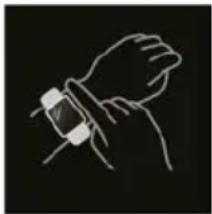
- Póngase el reloj correctamente: asegúrese de que el reloj esté al menos un dedo por encima del hueso de la muñeca y de que el sensor de la parte posterior esté en contacto con la piel.
-
Funcionamiento de la pantalla: SWB32 tiene una pantalla táctil completa, que admite operaciones que incluyen toques cortos, deslizamientos a izquierda/derecha y deslizamientos hacia arriba/abajo..
-
Funcionamiento de los botones: dispone de un botón físico que permite las operaciones de "pulsación corta", "pulsación larga" y "giro". Pulsación corta: para volver a la página de inicio/pausar el ejercicio. Pulsación larga: durante 2 segundos para encender el reloj cuando está apagado; para encender Alexa cuando el reloj está encendido; durante 8 segundos realizará un reinicio duro. Spin: Spin botón puede controlar la interacción de la pantalla, como cambiar el contenido de la pantalla, ajustar el volumen, etc..
Descripción de la función
1. Esfera del reloj
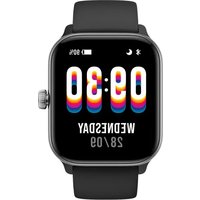
Aquí tienes algunas esferas de reloj predeterminadas. Puedes cambiar entre ellas manualmente en el reloj o en los ajustes de esfera de la aplicación VeryFit. También puedes personalizar la esfera del reloj en la aplicación. Puedes descargar más esferas en el "Watch Face Market".
2. Ejercicio
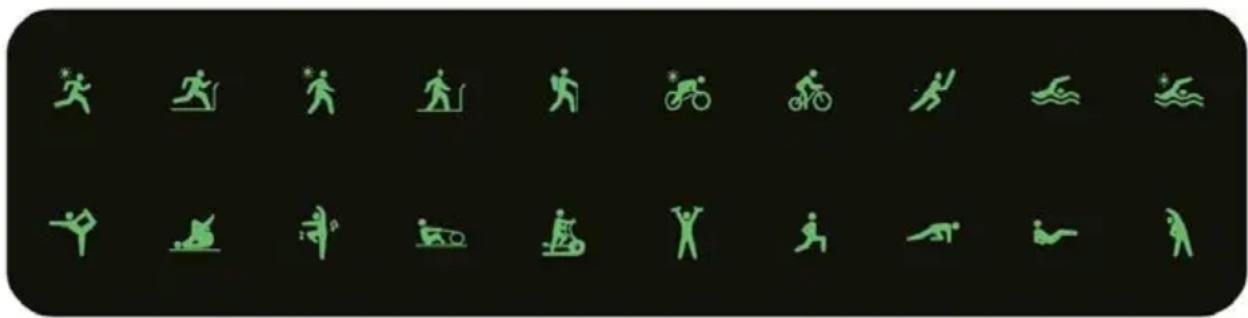
El módulo de deportes admite 100 tipos de deportes. La lista de ejercicios muestra 20 modos de ejercicio por defecto: Correr al aire libre, Correr en interiores, Trail Running, Caminar al aire libre, Caminar en interiores, Senderismo, Ciclismo al aire libre, Ciclismo en interiores, Natación en piscina, Natación en aguas abiertas, Elíptica, Máquina de remo, Stepper, Yoga, Golf, Entrenamiento del tronco, Entrenamiento de fuerza funcional, Entrenamiento por intervalos de alta intensidad, Puesta a punto y relajación, y Entrenamiento libre, que puede utilizar libremente según sus propios hábitos. Puede añadir u ocultar ejercicios libremente según sus propios hábitos de uso. Caminar al aire libre, Caminar en interiores, Correr al aire libre, Correr en interiores, Máquina de remo, Máquina elíptica admiten el autorreconocimiento de ejercicios. Esta función puede activarse/desactivarse en el reloj. Algunos de los deportes al aire libre admiten la conexión al GPS del teléfono móvil, puedes entrar en la APP para comprobar el seguimiento GPS una vez finalizado el deporte.
2.1 Rutas de Carrera
Los Rutas de Carrera muestran 6 tipos de cursos por defecto: carrera fácil de 6 minutos, carrera fácil de 10 minutos, carrera fácil de 15 minutos, carrera saludable para principiantes, carrera saludable avanzada y carrera saludable intensiva. A través de estos cursos de entrenamiento científicos y razonables, junto con los ejercicios de estiramiento, permitirá a los usuarios mejorar su capacidad de correr paso a paso.
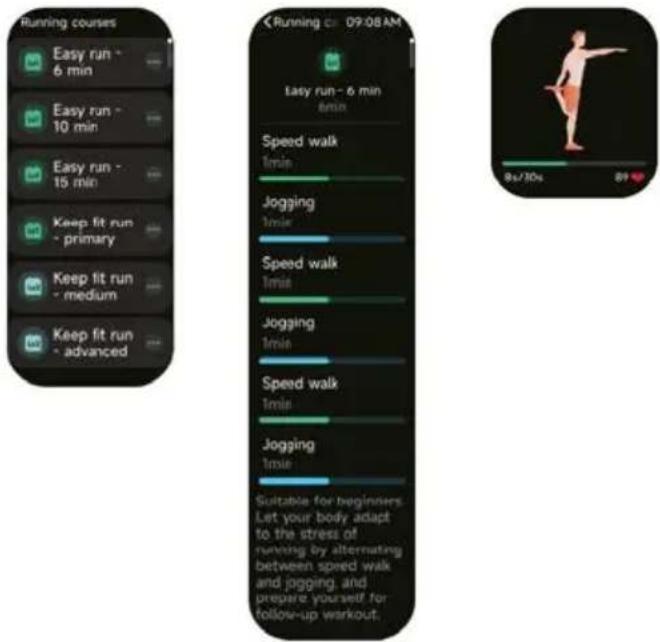
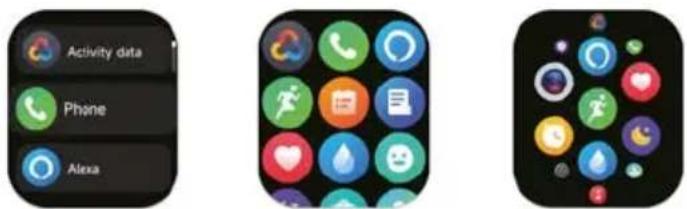
Cuando aparezca la interfaz de la esfera del reloj, pulsa brevemente el botón físico de arriba para ir a la lista de aplicaciones: Datos de actividad, Teléfono, Alexa, Ejercicio, Rutas de Carrera, Registros del entrenamiento, Ritmo cardiaco, SpO2, Estrés, Sueño, Cursos de respiración, Energía corporal, Control del Ciclo, Volumen ambiental, Recordatorio de evento, Alarma, Cronómetro, Temporizador, Reloj mundial , Tiempo, Música, Control de cámara, Encontrar teléfono, Ajustes.
Puede seleccionar la vista de lista de aplicaciones en los ajustes.
- App puede hacer clic en el área de amazon Alexa para entrar en la interfaz tutorial de inicio de sesión.
- Vaya a la interfaz de inicio de sesión de la cuenta de Amazon dedicada a Alexa para la autorización de vinculación de la cuenta.
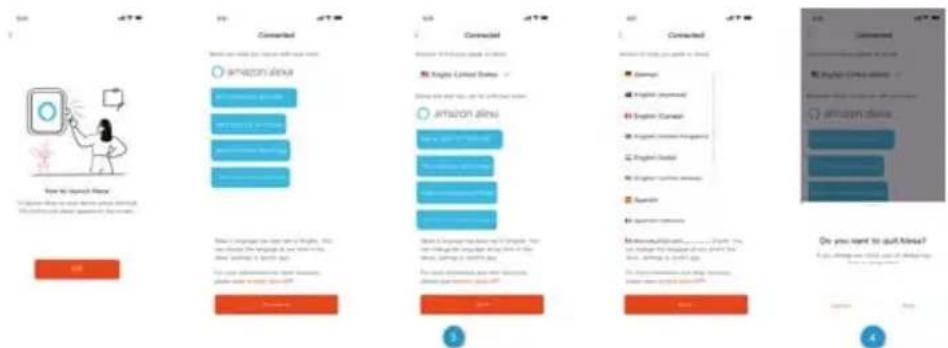
- Después de la autorización de enlace, puede ver parte de la introducción de la operación y establecer different idiomas nacionales;
- Haga clic en el botón de cierre de sesión para salir de Alexa, puede volver a iniciar sesión en cualquier momento.
3.1.2 Ver-Alexa
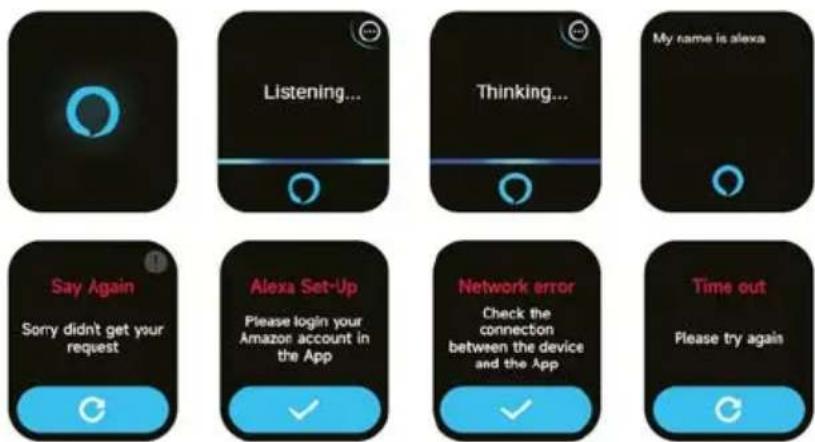
- El reloj incorpora Alexa. En la interfaz de escucha, si haces una pregunta o dices un comando de voz, se vuelve a la interfaz Thinking y devuelve una respuesta o ejecuta el comando. Actualmente a través de Alexa puede activar el cronómetro, despertador, cuenta atrás, servicios de recordatorio de eventos en el reloj.
- Aparecerá el aviso correspondiente en caso de que se agote el tiempo de espera de la solicitud, no se reconozca la voz, no se haya iniciado sesión en la cuenta, la conexión de red sea inestable o el Bluetooth no esté conectado.
3.2 Teléfono
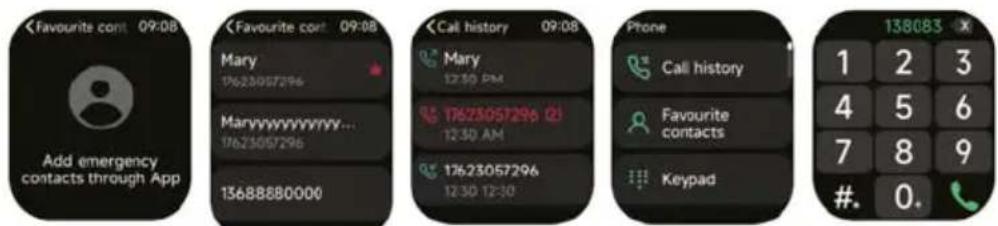
3.4 Ritmo cardiaco
1. Puede medir manualmente la Ritmo cardiaco en el reloj. En los ajustes de la APP, puedes activar/off la monitorización inteligente de la frecuencia cardiaca las 24 horas del día, o ver los datos cardiacos. 2. Cada vez que se mida la Ritmo cardiaco, mantenga el brazo y la muñeca inmóviles y espere pacientemente hasta que finalice la medición.     3.5 SpO2
1. Puede medir manualmente la SPO2 en el reloj. Además, el reloj admite la monitorización automática de la SPO2 las 24 horas del día. En los ajustes de la APP, puede activar/off esta función o ver los datos de SPO2. 2. Cada vez que se mida el oxígeno en sangre, mantenga el brazo y la muñeca inmóviles y espere pacientemente hasta que finalice la medición.  bar
| Metric | Value (%) | | :--- | :--- | | SpO2 | 94 | | Summary | Average | | Max. | 97 | | Min. | 99 | | Prewarning value | 93 | | Too low SpO2 | 90 | | 10 mins ago | 10 |3.6 Estrés
1. Puede medir manualmente el estrés en el reloj. Además, el reloj admite la monitorización automática del estrés las 24 horas del día. En los ajustes de la APP, puedes activar/off esta función o ver los datos de estrés. 2. Cada vez que se mida la tensión, mantenga el brazo y la muñeca inmóviles y espere pacientemente hasta que finalice la medición.     3.7 Cursos de respiración
1. Al acceder a esta función se mostrarán las tres formas de regular la relajación: Respiración Abdominal, Respiración 4-7-8 y Entrenamiento Respiratorio. También puede elegir la frecuencia y el tiempo de entrenamiento. 2. Haga clic en Inicio para ir directamente a la animación de entrenamiento respiratorio. Ajuste su respiración según la frecuencia de vibración y la animación. Un entrenamiento razonable de la respiración puede ayudarle a aliviar sus emociones.      3.8 Sueño
Puedes ver el registro de sueño más reciente y el estado del sueño en cada etapa.   3.9 Energía corporal
Si te pones el reloj y activas la función de energía corporal en la aplicación, el reloj medirá tu energía corporal automáticamente. energía es demasiado baja o baja demasiado rápido, te recordará que debes descansar.  3.10 Volumen ambiental
1. Puede medir manualmente el ruido en el reloj. Además, el reloj admite la monitorización automática del ruido las 24 horas del día. En los ajustes de la APP, puede activar/off esta función o ver los datos correspondientes. 2. Cada vez que se mida el ruido, mantenga el brazo y la muñeca inmóviles y espere pacientemente hasta que finalice la medición. bar
| Time | Value | | ------ | ----- | | 12AM | 98 | | 12PM | 72 |3.11 Cronómetro
Utilice el reloj como cronómetro. El cronómetro dispone de la función "Lap".   3.13 Temporizador
Puedes programar un temporizador con una duración preestablecida en el reloj, y el temporizador te recordará cuando expire; puedes personalizarlo. el tiempo del temporizador.  3.15 Tiempo
Admite la visualización del tiempo de la ciudad actual en seis días, puede ver el "tiempo actual, los valores meteorológicos más altos y más bajos" de hoy y los "valores meteorológicos más altos y más bajos" de los próximos cinco días.  3.16 Música
1. Cuando el reloj está conectado a la APP, puedes controlar el reproductor de música del móvil para realizar las funciones de "siguiente, anterior", "reproducir/pausa" y "subir y bajar volumen". Esta función se puede abrir o cerrar en los ajustes de la APP. 2. También puede establecer listas de canciones y canciones de tránsito a través de APP, después de que el reloj reciba el archivo de música de APP el reloj puede reproducir la música local. 3. Podemos conectar auriculares para escuchar canciones locales.   3.17 Encontrar teléfono
1. Cuando el reloj está conectado a la APP, puedes hacer sonar tu teléfono. 2.Pulse el icono para finalizar el timbre. 3. Esta función se puede abrir/cerrar en los ajustes de la APP.   3.18 Recordatorio de evento
Puede establecer un recordatorio y una hora de recordatorio en la APP. Una vez completado el ajuste, el recordatorio se sincronizará con el reloj y, cuando llegue la hora del recordatorio, aparecerá una notificación en el reloj. Puede ver todos los recordatorios de eventos configurados en el reloj. 3.19 Control del Ciclo
Tras abrir "Seguimiento del ciclo" en la APP y ajustar la duración del ciclo y la hora del recordatorio, el reloj mostrará la función de seguimiento del ciclo.   3.20 Control de cámara
Cuando el reloj está conectado a la App, puedes activar manualmente la cámara del sistema del teléfono para controlar la toma de fotos.   3.21 Ajustes
1.En los ajustes del reloj, puedes configurar el tiempo de encendido de la pantalla, el volumen del tono de llamada y la vibración, etc. 2.En los ajustes del reloj, también puedes apagarlo, reiniciarlo o restablecerlo (una vez restablecido, se borrarán todos los datos almacenados en el reloj y éste se desvinculará de tu teléfono). 4. Módulo recordatorio
El reloj admite varios modos de recordatorio, como recordatorio de mensaje, recordatorio de llamada entrante, recordatorio de caminata, recordatorio de bebida, recordatorio de objetivo de ejercicio, recordatorio de advertencia de ritmo central de ejercicio, etc. 5. Centro de control
El centro de control te ofrece una forma sencilla de activar funciones como No molestar, Levantar para despertar, ajustar el brillo de la pantalla, find my phone, flashlight, etc. Política de garantía
En cumplimiento de lo establecido a tal efecto por el Real Decreto Legislativo 03/2014, de 27 de marzo, se pone a disposición de los interesados, accediendo a www.prixton.com, cuanta información sea necesaria para ejercer los derechos de desistimiento atendiendo a los supuestos que recoge dicha ley, dando por cumplidas las exigencias que esta demanda de la parte vendedora en el contrato de venta. Las características técnicas y eléctricas que aquí se brindan corresponden a unidades típicas y podrían cambiarse sin previo aviso con el fin de proveer un mejor equipo.Declaración UE De Conformidad Simplificada
Por la presente, La Trastienda Digital SL como propietaria de la marca comercial Prixton, ubicada en Avenida Cervantes 49, módulo 25, Basauri 48970, Bizkaia, declara que el tipo de equipo radioeléctrico que a continuación se expone:| MARCA | MODELO DESCRIPCIÓN | CATEGORÍA |
| Prixton SWB32 | Smartwatch | Wearables |
Introducción
 Getting started
1. Open the package and check its content. 2. Delivery content: 1) SWB32 smart watch (with built-in lithium battery); 2) user manual; 3) original charging cable. 3. Charge the watch to activate and turn it on before first use. To charge, simply connect the magnetic charging cable to the charging contacts located on the back of the watch. 4. Search for "VeryFit" on the App Store, Google Play or scan the QR code to download and install the app. 5. Log in to the app and set your personal information, as well as your step and weight goals.  6. On the "Device" interface, tap the "+" icon in the upper right corner, your phone starts searching. From the device list found, choose your smart watch name to pair with. You may also link the device directly by scanning the device's QR code using the scan function.Health
Watch
1. The watch will automatically record your data. 2. You can measure your heart rate, blood oxygen, stress level and body energy on the watch, or turn on automatic measurement of heart rate, blood oxygen, stress level and sleep on the app to track these data the whole day. You can manually or make the watch automatically monitor your health status continuously. 3. To start an exercise: 1) When the watch face interface is displayed, press the button shortly to access the application list. Tap the Workout icon to access the icons of different exercise types, then tap the icon of an exercise (such as Outdoor Running) to start the exercise. 2) The watch can display up to 20 exercise types by default. You can add or delete the exercise types displayed on the watch or change their order.App
1. Start "VeryFit", enable the Bluetooth feature, and grant the GPS positioning permission; 2. Light up the bracelet screen and bring it close to your phone; 3. Click the "+" icon on the App, and select the smart watch model in the search results to bind; 4. Confirm the binding request on the smart watch; 5. Fill in your information and set your step goal on the App to complete the binding.Basic Operations
natural_image
Line drawing of a wristwatch on a wrist (no text or symbols)Function Description
1. Watch face
Here are some default watch faces. You can switch between them manually on the watch or on the VeryFit app's watch face settings. You can also customize the watch face on the app. More watch faces are available for download from the "Watch Face Market".2. Exercise
The sports module supports 100 types of sports. The exercise list displays 20 exercise modes by default: Outdoor Running, Indoor Running, Trail Running, Outdoor Walking, Indoor Walking, Hiking, Outdoor Cycling, Indoor Cycling, Pool Swimming, Open Water Swimming, Elliptical, Rowing Machine, Stepper, Yoga, Golf, Core Training, Functional Strength Training, High Intensity Interval Training, Tidy Up and Relaxation, and Free Workout, which you can freely use according to your own habits. You can freely add or hide exercises according to your own usage habits. Outdoor Walking, Indoor Walking, Outdoor Running, Indoor Running, Rowing Machine, Elliptical Machine support exercise self-recognition. This function can be turned on/off on the watch. Some of the outdoor sports support connecting to cell phone GPS, you can enter the APP side to check the GPS track after the sport is finished. natural_image
Collection of green pictograms of various sports activities on a black background, including running, swimming, cycling, and archery (no text or symbols present)2.1 Running courses
Running courses show 6 kinds of courses by default: 6-minute easy run, 10-minute easy run, 15-minute easy run, Healthy Running Beginner, Healthy Running Advanced, and Healthy Running Intensive. Through the above scientific and reasonable training courses, together with the exercise stretching, it will allow users to improve their running ability in a step-by-step manner. 3. Application list
When the watch face interface is displayed, short press the physical button above to go to the application list: Activity data, Phone, Alexa, Exercise, Running courses, Workout records, Heart rate, SpO2, Stress, Sleep, Breathing courses, Body energy, Cycle tracking, Ambient volume, Event reminder, Alarm, Stopwatch, Timer, World clock, Weather, Music, Camera control, Find phone, Settings. You can select the application list view in the settings.   3.1 Alexa
3.1.1 VeryFit App-Alexa
 1. App can click the amazon Alexa area to enter the login tutorial interface. 2. Jump to the Amazon dedicated Alexa account login interface for account binding authorization;  3. After binding authorization, you can view part of the operation introduction and set different national languages; 4. Click the log out button to log out of Alexa, you can log in again at any time.3.1.2 Watch-Alexa
 1. The watch is Alexa built-in. On Listening interface, if you ask a question or say a voice command, it turns to Thinking interface and returns an answer or executes the command. Currently via Alexa you can turn on the stopwatch, alarm clock, countdown, event reminder services on the watch. 2. A corresponding prompt is displayed in case the request is timed out, the voice is not recognized, the account is not logged in, the network connection is unstable, or the Bluetooth is not connected.3.2 Phone
  1. You can add frequent contacts to your watch through the app, then call these contacts on your watch. 2. You can view recent call history on your watch and call the numbers displayed in the call history. 3. You can set a contact as an emergency contact in the mobile app and short press the encoder crown 3 times in a row to call the emergency contact; 4. You can make calls through the watch's dialer.3.3 Activity data
Activity data includes daily activity, steps, calories, workout duration, walking duration, distance, recovery time, maximal oxygen uptake, change of goal. The watch collects and displays: the day's exercise/activity/walking data and goals, a histogram of hourly exercise/activity/walking data throughout the day, the number of steps and distance for the day, daily goal settings, and more. bar
| Metric | Value | | --- | --- | | Activity data (hours) | 259 | | Activity data (minutes) | 22 | | Activity data (minutes) | 6 | | Activity data (days) | 20800 | | Activity data (days) | 200 | | Activity data (days) | 12 | | Activity data (days) | 6 | | Distance (km) | 2.60 | | Recovery time (min) | 48:32 | | VO2 max | 65 | Change goal >3.5 SpO2
1. You can manually measure SPO2 on the watch. In addition, the watch supports automatic around-the-clock SPO2 monitoring. In the APP settings, you can turn on/off this function, or view the SPO2 data. 2. Each time blood oxygen is measured, keep your arm and wrist still and wait patiently until the measurement finishes.     3.6 Stress
1. You can manually measure stress on the watch. In addition, the watch supports automatic around-the-clock stress monitoring. In the APP settings, you can turn on/off this function, or view the stress data. 2. Each time stress is measured, keep your arm and wrist still and wait patiently until the measurement finishes.     3.7 Breathe courses
1. Accessing this feature will demonstrate the three ways to regulate relaxation: Abdominal Breathing, 4-7-8 Breathing, and Breathing Training. You can also choose the training frequency and training time. 2. Click Start to go directly to the breathing training animation. Adjust your breathing according to the frequency of vibration and animation. Reasonable breathing training can help relieve your emotions.      3.8 Sleep
You can view the most recent sleep record and sleep status at each stage.   3.9 Body energy
If you wear the watch and enable body energy in the App, the watch will measure your body energy automatically. If your body energy is too low or dropping too fast, it will remind you to rest.  3.10 Ambient volume
1. You can manually measure noise on the watch. In addition, the watch supports automatic around-the-clock noise monitor. In the APP settings, you can turn on/off this function, or view the corresponding data. 2. Each time noise is measured, keep your arm and wrist still and wait patiently until the measurement finishes. bar
| Time | Value | |------|-------| | 30 | 78 | | 80 | 120 | | 120 | 120 | | Max | 98 | | Min | 72 |3.11 Stopwatch
Use the watch as a stopwatch. The stopwatch has a "Lap" function.   3.13 Timer
You can set a timer with a preset duration on the watch, and the timer will remind you when the timer expires; you can customize the timer time.  3.15 Weather
Supports Current city Six-day weather viewing, you can view today's "current weather, highest and lowest weather values" and the "highest and lowest weather values" for the next five days.  3.16 Music
1. When the watch is connected to the APP, you can control the mobile music player to perform the functions of "next, previous", "play/pause" and "volume increase and decrease". This function can be open or close in the APP settings. 2. You can also set song lists and transit songs through APP, after watching recieve music file from APP the watch can play the local music. 3. We can connect earphone to listening local songs.   3.17 Find phone
1.When the watch is connected to the APP, you can make your phone ring. 2.Click the icon to end the ringing. 3.This function can be open/close in the APP settings.   3.18 Event reminder
You can set a reminder, reminder time on the APP. Once the setting is completed, the reminder will be synchronized to the watch. When the reminder is due, a notification will pop up on the watch. You can view all event reminders set on the watch. 3.19 Cycle tracking
After opening "Cycle Tracking" on the APP and setting the cycle length and reminder time, the watch will display the cycle tracking function.   3.20 Camera control
When the watch is connected to the App, you can manually turn on the phone's system camera to control taking photos.   3.21 Settings
1. In the watch's settings, you can set the screen-on time, ringtone volume and vibration, etc. 2. In the watch's settings, you can also shut down, restart or reset the watch (once reset, all data stored in the watch will be cleared, and the watch will be unpaired from your phone). 4. Reminder module
The watch supports multiple reminder modes, including message reminder, incoming call reminder, walking reminder, drinking reminder, exercise goal reminder, exercise center rate warning reminder, etc. 5. Control center
Control center gives you an easy way to turn on functions such as Do Not Disturb, raise to Wake, set the screen brightness, find my phone, flashlight,etc. Warranty policy
This product complies with the warranty law in force in the country of purchase. When you have a problem that you can not solve, you must access the web www.prixton.com and click on the contact option to send us your assistance form. These technical and electrical specifications are those of typical units and may be changed without prior notice in order to provide improved equipment.Simplified EU Declaration Of Conformity
We, La Trastienda Digital located in Avenida Cervantes 49, módulo 25, Basauri 48970, Bizkaia hereby declare that the following goods, imported and selling at European market:| BRAND | MODEL NAME DESCRIPTION | CATEGORY |
| Prixton SWB32 | Smartwatch | Wearables |
Introduction
 Pour commencer
1. Ouvrez le paquet et vérifiez son contenu. 2. Contenu de la livraison : 1) Montre intelligente SWB32 (avec pile au lithium intégrée) ; 2) manuel de l'utilisateur ; 3) câble de chargement original. 3. Chargez la montre pour l'activer et la mettre en marche avant la première utilisation. Pour charger la montre, il suffit de brancher le câble de charge magnétique sur les contacts de charge situés au dos de la montre. 4. Recherchez "VeryFit" sur l'App Store, Google Play ou scannez le code QR pour télécharger et installer l'application. 5. Connectez-vous à l'application et définissez vos informations personnelles, ainsi que vos objectifs de pas et de poids.  6. Dans l'interface "Appareil", appuyez sur l'icône "+" dans le coin supérieur droit, votre téléphone commence à chercher. Dans la liste des appareils trouvés, choisissez le nom de votre montre intelligente à associer. Vous pouvez également lier l'appareil directement en scannant le code QR de l'appareil à l'aide de la fonction de numérisation.Santé
Regarder
1. La montre enregistre automatiquement vos données. 2. Vous pouvez mesurer votre fréquence cardiaque, votre taux d'oxygène dans le sang, votre niveau de stress et votre énergie corporelle sur la montre, ou activer la mesure automatique de la fréquence cardiaque, du taux d'oxygène dans le sang, du niveau de stress et du sommeil sur l'application pour suivre ces données tout au long de la journée. Vous pouvez surveiller manuellement ou automatiquement votre état de santé en continu. 3. Pour commencer un exercice : 1) Lorsque l'interface du cadran de la montre est affichée, appuyez brièvement sur le bouton pour accéder à la liste des applications. Appuyez sur l'icône Entraînement pour accéder aux icônes des différents types d'exercices, puis appuyez sur l'icône d'un exercice (tel que Course en plein air) pour démarrer l'exercice. 2) La montre peut afficher jusqu'à 20 types d'exercices par défaut. Vous pouvez ajouter ou supprimer les types d'exercices affichés sur la montre ou modifier leur ordre.App
1. Lancez "VeryFit", activez la fonction Bluetooth et accordez l'autorisation de positionnement GPS ; 2. Illuminez l'écran du bracelet et rapprochez-le de votre téléphone ; 3. Cliquez sur l'icône "+" de l'application et sélectionnez le modèle de montre intelligente dans les résultats de la recherche pour le lier ; 4. Confirmez la demande de liaison sur la montre intelligente ; 5. Remplissez vos informations et définissez votre objectif de pas sur l'application pour compléter la reliure.Opérations de base
natural_image
Line drawing of a wristwatch on a black background (no text or symbols)Description de la fonction
1. Cadran de montre
Voici quelques cadrans de montre par défaut. Vous pouvez passer de l'un à l'autre manuellement sur la montre ou dans les paramètres de l'application VeryFit. Vous pouvez également personnaliser le cadran sur l'application. D'autres cadrans de montre peuvent être téléchargés sur le "Watch Face Market".2. Exercise
Le module sportif prend en charge 100 types de sports. La liste des exercices affiche par défaut 20 modes d'exercice : Course à pied en extérieur, course à pied en intérieur, course sur sentier, marche en extérieur, marche en intérieur, randonnée, cyclisme en extérieur, cyclisme en intérieur, natation en piscine, natation en eau libre, vélo elliptique, rameur, stepper, yoga, golf, entraînement du tronc, entraînement fonctionnel de la force, entraînement par intervalles à haute intensité, rangement et relaxation, et entraînement libre, que vous pouvez utiliser librement en fonction de vos propres habitudes. Vous pouvez librement ajouter ou supprimer des exercices en fonction de vos habitudes d'utilisation. La marche en extérieur, la marche en intérieur, la course en extérieur, la course en intérieur, le rameur, l'appareil elliptique prennent en charge l'auto-reconnaissance des exercices. Cette fonction peut être activée/désactivée sur la montre. Certains sports de plein air permettent de se connecter au GPS du téléphone portable, vous pouvez entrer dans l'APP pour vérifier la trace GPS une fois le sport terminé. natural_image
Collection of green pictograms of various sports activities (e.g., running, cycling, swimming) on black background, no text or symbols present.2.1 Cours de formation
Les cours de course affichent 6 types de cours par défaut : course facile de 6 minutes, course facile de 10 minutes, course facile de 15 minutes, course saine pour débutants, course saine pour avancés et course saine pour intensifs. Grâce aux cours d'entraînement scientifiques et raisonnables susmentionnés, ainsi qu'aux exercices d'étirement, les utilisateurs peuvent améliorer leur capacité à courir étape par étape. 3. Liste des candidatures
Lorsque l'interface du cadran de la montre est affichée, appuyez brièvement sur le bouton physique ci-dessus pour accéder à la liste des applications: Données d'activité, Téléphone, Alexa, Exercice, Coach de jogging, Fiches de séances d'entraînement, Fréquence cardiaque, SpO2, Stress, Sommeil, Cours de respiration, Énergie corporelle, Suivi de Cycle, Volume ambiant, Rappeler les choses, Alarme, Chronomètre, Minuteur, Horloge mondiale, Météor, Musique, Contrôle de la Caméra, Trouver le téléphone, Paramètres. Vous pouvez sélectionner l'affichage de la liste des applications dans les paramètres. 3.1 Alexa
3.1.1 VeryFit App-Alexa
 1. L'application peut cliquer sur la zone amazon Alexa pour accéder à l'interface du didacticiel de connexion. 2. Passez à l'interface de connexion du compte Alexa dédié à Amazon pour l'autorisation de liaison du compte.  3. Après avoir obtenu l'autorisation de liaison, vous pouvez consulter une partie de l'introduction à l'opération et définir différentes langues nationales ; 4. Cliquez sur le bouton de déconnexion pour vous déconnecter d'Alexa. Vous pouvez vous reconnecter à tout moment.3.1.2 Watch-Alexa
 1. La montre est intégrée à Alexa. Sur l'interface d'écoute, si vous posez une question ou dites une commande vocale, la montre se tourne vers l'interface Alexa et renvoie une réponse ou exécute la commande. Actuellement, Alexa permet d'activer les services de chronomètre, de réveil, de compte à rebours et de rappel d'événements sur la montre. 2. Une invite correspondante s'affiche si la demande est interrompue, si la voix n'est pas reconnue, si le compte n'est pas connecté, si la connexion réseau est instable ou si le Bluetooth n'est pas connecté.3.2 Téléphone
 1. Vous pouvez ajouter des contacts fréquents à votre montre via l'application, puis appeler ces contacts sur votre montre. 2. Vous pouvez consulter l'historique des appels récents sur votre montre et appeler les numéros affichés dans l'historique des appels. 3. Vous pouvez définir un contact comme contact d'urgence dans l'application mobile et appuyer brièvement sur la couronne de l'encodeur 3 fois de suite pour appeler le contact d'urgence ; 4. Vous pouvez passer des appels via le composeur de la montre.3.3 Données d'activité
Les données d'activité comprennent l'activité quotidienne, les pas, les calories, la durée de l'entraînement, la durée de la marche, la distance, le temps de récupération, l'absorption maximale d'oxygène, le changement d'objectif. La montre recueille et affiche : les données et les objectifs d'exercice/d'activité/de marche de la journée, un histogramme des données horaires d'exercice/d'activi-té/de marche tout au long de la journée, le nombre de pas et la distance de la journée, les paramètres d'objectifs quotidiens, et plus encore. bar
| Activity | Value | | -------- | ----- | | Activity data | 259 km/h | | Timeframe bar chart | 22 min / 6 hrs | | Daily bar chart | 200 / 500 kcal | | Daily bar chart | 12 / 30 min | | Distance | 2.60 km | | Recovery time | 48:32 | | VO2 max | 65 | Change goal >3.4 Fréquence cardiaque
1. Vous pouvez mesurer manuellement la fréquence cardiaque sur la montre. Dans les paramètres de l'APP, vous pouvez activer/off la surveillance intelligente de la fréquence cardiaque 24 heures sur 24, ou afficher les données cardiaques. 2. Chaque fois que la fréquence cardiaque est mesurée, gardez le bras et le poignet immobiles et attendez patiemment la fin de la mesure. 3.5 SpO2
1. Vous pouvez mesurer manuellement la SPO2 sur la montre. En outre, la montre prend en charge la surveillance automatique de la SPO2 24 heures sur 24. Dans les réglages de l'APP, vous pouvez activer/off cette fonction ou afficher les données SPO2. 2. Chaque fois que l'oxygène du sang est mesuré, gardez le bras et le poignet immobiles et attendez patiemment la fin de la mesure.     3.6 Stress
1. Vous pouvez mesurer manuellement le stress sur la montre. En outre, la montre prend en charge la surveillance automatique du stress 24 heures sur 24. Dans les paramètres de l'APP, vous pouvez activer/off cette fonction ou afficher les données relatives au stress. 2. Chaque fois que le stress est mesuré, gardez le bras et le poignet immobiles et attendez patiemment que la mesure soit terminée.     3.7 Cours de respiration
1. En accédant à cette fonction, vous découvrirez les trois façons de réguler la relaxation :Respiration abdominale, Respiration 4-7-8 et Entraînement respiratoire. Vous pouvez également choisir la fréquence et la durée de l'entraînement. 2. Cliquez sur Démarrer pour accéder directement à l'animation d'entraînement respiratoire. Ajustez votre respiration en fonction de la fréquence des vibrations et de l'animation. Un entraînement respiratoire raisonnable peut contribuer à soulager vos émotions.     3.8 Sommeil
Vous pouvez consulter le dernier enregistrement de sommeil et l'état du sommeil à chaque étape.   3.9 Énergie corporelle
Si vous portez la montre et que vous activez l'énergie corporelle dans l'application, la montre mesurera automatiquement votre énergie corporelle. est trop faible ou diminue trop rapidement, il vous rappellera de vous reposer.  3.10 Volume ambient
1. Vous pouvez mesurer manuellement le bruit sur la montre. En outre, la montre prend en charge la surveillance automatique du bruit 24 heures sur 24. Dans les réglages de l'APP, vous pouvez activer/off cette fonction ou afficher les données correspondan-tes. 2. Chaque fois que le bruit est mesuré, gardez le bras et le poignet immobiles et attendez patiemment la fin de la mesure. bar
| Time | Value | | ------ | ----- | | 12AM | 98 | | 12PM | 72 |3.11 Chronomètre
Utilisez la montre comme un chronomètre. Le chronomètre dispose d'une fonction "Lap".   3.13 Minuterie
Vous pouvez régler une minuterie avec une durée prédéfinie sur la montre, et la minuterie vous rappellera lorsque la minuterie aura expiré ; vous pouvez personnaliser la durée de la minuterie.  3.15 Météo
Prise en charge de la visualisation de la météo à six jours de la ville actuelle, vous pouvez visualiser le "temps actuel, les valeurs météorologiques les plus élevées et les plus basses" d'aujourd'hui et les "valeurs météorologiques les plus élevées et les plus basses" pour les cinq prochains jours.  3.16 Musique
1. Lorsque la montre est connectée à l'APP, vous pouvez contrôler le lecteur de musique mobile pour exécuter les fonctions "suivant, précédent", "lecture/pause" et "augmentation et diminution du volume". 2. Vous pouvez également définir des listes de chansons et transiter des chansons par l'intermédiaire de l'APP, une fois que la montre a reçu le fichier musical de l'APP, elle peut jouer la musique locale. 3. il est possible de connecter des écouteurs pour écouter des chansons locales.   3.17 Trouver le téléphone
1. Lorsque la montre est connectée à l'APP, vous pouvez faire sonner votre téléphone. 2.Cliquez sur l'icône pour mettre fin à la sonnerie. 3. Cette fonction peut être ouverte/fermée dans les réglages APP.   3.18 Rappeler les choses
Vous pouvez définir un rappel, une heure de rappel sur l'APP. Une fois le réglage effectué, le rappel est synchronisé avec la montre. Lorsque le rappel arrive à échéance, une notification s'affiche sur la montre. Vous pouvez afficher tous les rappels d'événements définis sur la montre. 3.19 Suivi du cycle
Après avoir ouvert "Suivi du cycle" sur l'APP et réglé la durée du cycle et l'heure de rappel, la montre affichera la fonction de suivi du cycle.   3.20 Contrôle de la Caméra
Lorsque la montre est connectée à l'application, vous pouvez activer manuellement l'appareil photo du téléphone pour contrôler la prise de photos.   3.21 Paramètres
1. Dans les paramètres de la montre, vous pouvez régler l'heure d'allumage de l'écran, le volume de la sonnerie, les vibrations, etc. 2. Dans les paramètres de la montre, vous pouvez également éteindre, redémarrer ou réinitialiser la montre (une fois réinitialisée, toutes les données stockées dans la montre seront effacées et la montre sera désappariée de votre téléphone). 4. Module de rappel
La montre prend en charge plusieurs modes de rappel, notamment le rappel de message, le rappel d'appel entrant, le rappel de marche, le rappel de boisson, le rappel d'objectif d'exercice, le rappel d'avertissement de la fréquence centrale d'exercice, etc. 5. Centre de contrôle
Le centre de contrôle vous permet d'activer facilement des fonctions telles que Ne pas déranger, lever pour réveiller, régler la luminosité de l'écran, trouver mon téléphone, la lampe de poche, etc. Politique de garantie
Ce produit est conforme à la loi sur la garantie en vigueur dans le pays d'achat. Lorsque vous avez un problème que vous ne pouvez pas résoudre, vous devez accéder au site www.prixton.com et cliquer sur l\`option de contact pour nous envoyer votre formulaire d\`assistance. Les caractéristiques techniques et électriques ici correspondent à des unités spécifiques et pourraient être modifiées sans préavis afin d'améliorer le matériel.Déclaration De Conformité Simplifiée
La Trastienda Digital SL, en tant que propriétaire de la marque Prixton, située dans Avenida Cervantes 49, módulo 25, Basauri 48970, Bizkaia, déclare que le type d'équipement radioélectrique indiqué ci-dessous est le suivant :| MARQUE | MODÈLE DESCRIPTION | CATÉGORIE | |
| Prixton SWB32 | Smartwatch | Wearables | |
Introduction
Per iniziare
1. Aprite la confezione e verificatene il contenuto. 2. Contenuto della consegna: 1) Orologio intelligente SWB32 (con batteria al litio integrata); 2) manuale d'uso; 3) cavo di ricarica originale. 3. Caricare l'orologio per attivarlo e accenderlo prima del primo utilizzo. Per caricare, è sufficiente collegare il cavo di ricarica magnetico ai contatti di ricarica situati sul retro dell'orologio. 4. Cercate "VeryFit" su App Store, Google Play o scansionate il codice QR per scaricare e installare l'applicazione. 5. Accedere all'app e impostare i propri dati personali, nonché gli obiettivi di passo e di peso.  6. Nell'interfaccia "Dispositivo", toccare l'icona "+" nell'angolo in alto a destra: il telefono inizia la ricerca. Dall'elenco dei dispositivi trovati, scegliere il nome dello smart watch da associare. È anche possibile collegare il dispositivo direttamente scansionando il codice QR del dispositivo utilizzando la funzione di scansione.Salute
Guarda
1. L'orologio registrerà automaticamente i dati. 2. È possibile misurare la frequenza cardiaca, l'ossigeno nel sangue, il livello di stress e l'energia corporea sull'orologio, oppure attivare la misurazione automatica della frequenza cardiaca, dell'ossigeno nel sangue, del livello di stress e del sonno sull'app per monitorare questi dati per tutto il giorno. È possibile monitorare manualmente o automaticamente il proprio stato di salute. 3. Per iniziare un esercizio: 1) Quando viene visualizzata l'interfaccia del quadrante dell'orologio, premere brevemente il pulsante per accedere all'elenco delle applicazioni. Toccare l'icona Allenamento per accedere alle icone dei diversi tipi di esercizio, quindi toccare l'icona di un esercizio (ad esempio Corsa all'aperto) per avviare l'esercizio. 2) L'orologio può visualizzare fino a 20 tipi di esercizio per impostazione predefinita. È possibile aggiungere o eliminare i tipi di esercizio visualizzati sull'orologio o modificarne l'ordine.App
1. Avviare "VeryFit", attivare la funzione Bluetooth e concedere l'autorizzazione al posizionamento GPS; 2. Illuminate lo schermo del braccialetto e avvicinatelo al vostro telefono; 3. Fare clic sull'icona "+" dell'app e selezionare il modello di smart watch nei risultati della ricerca per eseguire il binding; 4. Configurare la richiesta di binding sullo smart watch; 5. Compilate i vostri dati e impostate il vostro obiettivo di passo sull'App per completare l'impegno.Basic Operations
natural_image
Line drawing of a wristwatch on a black background (no text or symbols)Descrizione della funzione
1. Volto dell'orologio
Ecco alcune watch face predefinite. È possibile passare da una all'altra manualmente sull'orologio o nelle impostazioni del quadrante dell'orologio dell'app VeryFit. È inoltre possibile personalizzare il quadrante dell'orologio nell'app. Altre watch face sono disponibili per il download dal "Watch Face Market".2. Allenamento
Il modulo sportivo supporta 100 tipi di sport. L'elenco degli esercizi visualizza 20 modalità di esercizio per impostazione predefinita: Corsa all'aperto, Corsa al coperto, Corsa su sentiero, Camminata all'aperto, Camminata al coperto, Escursionismo, Ciclismo all'aperto, Ciclismo al coperto, Nuoto in piscina, Nuoto in acque libere, Ellittica, Vogatore, Stepper, Yoga, Golf, Allenamento del nucleo, Allenamento funzionale della forza, Allenamento a intervalli ad alta intensità, Riordino e rilassamento e Allenamento libero, che è possibile utilizzare liberamente in base alle proprie abitudini. È possibile aggiungere o nascondere liberamente esercizi in base alle proprie abitudini di utilizzo. Camminata all'aperto, camminata al chiuso, corsa all'aperto, corsa al chiuso, vogatore, macchina ellittica supportano l'autoriconosci-mento degli esercizi. Questa funzione può essere attivata/disattiva-ta sull'orologio. Alcuni sport all'aria aperta supportano la connessione al GPS del telefono cellulare; è possibile accedere al lato APP per controllare la traccia GPS al termine dello sport. natural_image
Collection of green pictograms of various sports activities (e.g., running, cycling, swimming) on black background, no text or symbols present.2.1 Allenatore di jogging
I corsi di corsa presentano 6 tipi di corsi per impostazione predefinita: corsa facile di 6 minuti, corsa facile di 10 minuti, corsa facile di 15 minuti, corsa sana per principianti, corsa sana avanzata e corsa sana intensiva. I corsi di allenamento scientifici e ragionevoli, insieme agli esercizi di stretching, consentono agli utenti di migliorare la propria capacità di corsa in modo graduale. 3. Elenco delle applicazioni
Quando viene visualizzata l'interfaccia del quadrante dell'orologio, premere brevemente il pulsante fisico in alto per andare all'elenco delle applicazioni: Dati attività,Corsi di respirazione,Monitoraggio Ciclo,Allenamento,Allenatore di jogging,Registrazioni di allenamento,-Telefono,Alexa,Freq. Cardiaca,SpO2,Stress,Sonno,En-ergia del corpo,Volume ambiente,Meteo,Musica,Sveglia,Cronometro,Timer,Orologio mondiale, Ricordare le cose importanti,Controllo Fotocamera,Trova il telefono,Impostazioni. È possibile selezionare la visualizzazione dell'elenco delle applicazioni nelle impostazioni.   3.1 Alexa
3.1.1 App VeryFit-Alexa
 1. L'applicazione può fare clic sull'area Amazon Alexa per accedere all'interfaccia del tutorial di accesso. 2. Passare all'interfaccia di accesso all'account Alexa dedicato ad Amazon per l'autorizzazione del binding dell'account.  3. Dopo aver ottenuto l'autorizzazione, è possibile visualizzare parte dell'introduzione al funzionamento e impostare diverse lingue nazionali; 4. Fare clic sul pulsante di logout per uscire da Alexa; è possibile accedere nuovamente in qualsiasi momento.3.1.2 Guarda-Alexa
natural_image
Blue circular icon on black background, resembling a stylized 'O' or refresh symbol (no text or symbols)3.2 Telefono
   1. Tramite l'applicazione è possibile aggiungere all'orologio contatti frequenti, per poi chiamarli sull'orologio. 2. È possibile visualizzare la cronologia delle chiamate recenti sull'orologio e chiamare i numeri visualizzati nella cronologia delle chiamate. 3. È possibile impostare un contatto come contatto di emergenza nell'app mobile e premere brevemente la corona dell'encoder per 3 volte di seguito per chiamare il contatto di emergenza; 4. È possibile effettuare chiamate attraverso il dialer dell'orologio.3.3 Dati attività
I dati sull'attività comprendono l'attività giornaliera, i passi, le calorie, la durata dell'allenamento, la durata della camminata, la distanza, il tempo di recupero, la massima assunzione di ossigeno, il cambiamento dell'obiettivo. L'orologio raccoglie e visualizza: i dati e gli obiettivi di esercizio/attività/camminata del giorno, un istogramma dei dati di esercizio/attività/camminata dell'ora durante il giorno, il numero di passi e la distanza del giorno, le impostazioni degli obiettivi giornalieri e altro ancora. 3.4 Freq. cardiaca
1. È possibile misurare manualmente la frequenza cardiaca sull'orologio. Nelle impostazioni dell'APP è possibile attivare/off il monitoraggio intelligente della frequenza cardiaca 24 ore su 24 o visualizzare i dati cardiaci. 2. Ogni volta che viene misurata la frequenza cardiaca, tenere il braccio e il polso fermi e attendere pazientemente che la misurazione termini.    3.5 SpO2
1. È possibile misurare manualmente la SPO2 sull'orologio. Inoltre, l'orologio supporta il monitoraggio automatico della SPO2 24 ore su 24. Nelle impostazioni dell'APP è possibile attivare/off questa funzione o visualizzare i dati SPO2. 2. Ogni volta che viene misurato l'ossigeno nel sangue, tenere il braccio e il polso fermi e attendere pazientemente che la misurazione termini.     3.6 Stress
1. È possibile misurare manualmente lo stress sull'orologio. Inoltre, l'orologio supporta il monitoraggio automatico dello stress 24 ore su 24. Nelle impostazioni dell'APP è possibile attivare/off questa funzione o visualizzare i dati sullo stress. Nelle impostazioni dell'APP è possibile attivare/off questa funzione o visualizzare i dati sullo stress. 2. Ogni volta che viene misurato lo sforzo, tenere il braccio e il polso fermi e attendere pazientemente che la misurazione termini.     3.7 Corsi di respirazione
1. Accedendo a questa funzione, verranno mostrate le tre modalità di regolazione del rilassamento: Respirazione addominale, Respirazione 4-7-8 e Allenamento della respirazione. È inoltre possibile scegliere la frequenza e la durata dell'allenamento. 2. Fare clic su Start per passare direttamente all'animazione di allenamento della respirazione. Regolare la respirazione in base alla frequenza della vibrazione e dell'animazione. Un allenamento respiratorio ragionevole può aiutare ad alleviare le emozioni.     3.8 Sonno
È possibile visualizzare la registrazione del sonno più recente e lo stato del sonno in ogni fase.   3.9 Energia del corpo
Se si indossa l'orologio e si abilita l'energia corporea nell'App, l'orologio misurerà automaticamente l'energia corporea. L'energia è troppo bassa o sta calando troppo velocemente, e vi ricorderà di riposare.  3.10 Volume ambiente
1. È possibile misurare manualmente il rumore sull'orologio. Inoltre, l'orologio supporta il monitoraggio automatico del rumore 24 ore su 24. Nelle impostazioni dell'APP è possibile attivare o visualizzare i dati corrispondenti. Nelle impostazioni dell'APP è possibile attiva-re/off questa funzione o visualizzare i dati corrispondenti. 2. Ogni volta che viene misurato il rumore, tenere il braccio e il polso fermi e attendere pazientemente che la misurazione termini. bar
| Time | Value | |------|-------| | 12AM | 98 | | 6AM | 72 |3.11 Cronometro
Utilizzare l'orologio come cronometro. Il cronometro dispone della funzione "Lap".   3.13 Timer
È possibile impostare un timer con una durata predefinita sull'orologio, e il timer vi ricorderà quando il timer scade; è possibile personalizzare il tempo del timer.  3.15 Meteo
Supporta la visualizzazione del tempo corrente della città a sei giorni: è possibile visualizzare il "tempo corrente, i valori massimi e minimi del tempo" di oggi e i "valori massimi e minimi del tempo" per i cinque giorni successivi.  3.16 Musica
1. Quando l'orologio è collegato all'APP, è possibile controllare il lettore musicale mobile per eseguire le funzioni di "successivo, precedente", "riproduzione/pausa" e "aumento e diminuzione del volume". Questa funzione può essere aperta o chiusa nelle impostazioni dell'APP. 2. È inoltre possibile impostare liste di canzoni e canzoni di transito attraverso l'APP, dopo che l'orologio riceve il file musicale dall'APP, l'orologio può riprodurre la musica locale. 3. Possiamo collegare l'auricolare per ascoltare le canzoni locali.   3.17 Trova il telefono
1. Quando l'orologio è collegato all'APP, è possibile far squillare il telefono. 2.Fare clic sull'icona per terminare la suoneria. 3.Questa funzione può essere aperta/chiusa nelle impostazioni dell'APP.   3.18 Ricordare le cose importanti
È possibile impostare un promemoria e l'ora del promemoria sull'APP. Una volta completata l'impostazione, il promemoria viene sincronizzato con l'orologio. Quando il promemoria è in scadenza, viene visualizzata una notifica sull'orologio. È possibile visualizzare tutti i promemoria impostati sull'orologio. 3.19 Monitoraggio Ciclo
Dopo aver aperto "Cycle Tracking" sull'APP e aver impostato la durata del ciclo e l'ora del promemoria, l'orologio visualizza la funzione di tracciamento del ciclo.     3.21 Impostazioni
1. Nelle impostazioni dell'orologio è possibile impostare l'ora di accensione dello schermo, il volume della suoneria e la vibrazione, ecc. 2. Nelle impostazioni dell'orologio è anche possibile spegnerlo, riavviarlo o resettarlo (una volta resettato, tutti i dati memorizzati nell'orologio verranno cancellati e l'orologio verrà scollegato dal telefono). 4. Modulo promemoria
L'orologio supporta diverse modalità di promemoria, tra cui il promemoria dei messaggi, il promemoria delle chiamate in arrivo, il promemoria della camminata, il promemoria del consumo di bevande, il promemoria dell'obiettivo dell'esercizio, il promemoria dell'avviso della frequenza di esercizio, ecc. 5. Centro di controllo
Il centro di controllo offre un modo semplice per attivare funzioni come Non disturbare, alzare per svegliare, impostare la luminosità dello schermo, trovare il mio telefono, la torcia, ecc. Politica di garanzia
Questo prodotto è conforme alla legge di garanzia vigente nel suo paese di acquisto. Quando hai un problema che non puoi risolvere, devi accedere al sito www.prixton.com e fare clic sull\` opzione di contatto per inviarci il tuo modulo di assistenza. Le caratteristiche tecniche ed elettriche qui riportate corrispondono alle unità tipiche e possono essere modificate senza preavviso per migliorare le qualità del dispositivo.Dichiarazione Di Conformità Ue Semplificata
Con la presente, La Trastienda Digital SL come proprietaria del marchio commerciale Prixton, situata presso Avenida Cervantes 49, módulo 25, Basauri 48970, Bizkaia, dichiara che il tipo di apparecchiatura radioelettrica che si mostra qui di seguito:| MARCA | MODELLO DESCRIZIONE | CATEGORIA | |
| Prixton SWB32 | Smartwatch | Wearables | |
Introduction
 Erste Schritte
1. Öffnen Sie das Paket und prüfen Sie den Inhalt. 2. Inhalt der Lieferung: 1) SWB32 Smartwatch (mit eingebauter Lithium-Batterie); 2) Benutzerhandbuch; 3) Original-Ladekabel. 3. Laden Sie die Uhr auf, um sie vor der ersten Verwendung zu aktivieren und einzuschalten. Schließen Sie zum Laden einfach das magnetische Ladekabel an die Ladekontakte auf der Rückseite der Uhr an. 4. Suchen Sie im App Store oder bei Google Play nach "VeryFit" oder scannen Sie den QR-Code, um die App herunterzuladen und zu installieren. 5. Melden Sie sich bei der App an und legen Sie Ihre persönlichen Daten sowie Ihre Schritt- und Gewichtsziele fest.  6. Tippen Sie auf der "Geräte"-Schnittstelle auf das "+"-Symbol in der oberen rechten Ecke, und Ihr Telefon beginnt mit der Suche. Wählen Sie aus der gefundenen Geräteliste den Namen Ihrer Smartwatch aus, mit der Sie sie koppeln möchten. Sie können das Gerät auch direkt verknüpfen, indem Sie den QR-Code des Geräts mit der Scan-Funktion scannen.Health
Watch
1. Die Uhr zeichnet Ihre Daten automatisch auf. 2. Sie können Ihre Herzfrequenz, Blutsauerstoff, Stresslevel und Körperenergie auf der Uhr messen oder die automatische Messung von Herzfrequenz, Blutsauerstoff, Stresslevel und Schlaf in der App aktivieren, um diese Daten den ganzen Tag über zu verfolgen. Sie können die Uhr manuell oder automatisch Ihren Gesundheitszustand kontinuierlich überwachen lassen. 3. Um eine Übung zu beginnen: 1) Wenn die Oberfläche der Uhr angezeigt wird, drücken Sie kurz auf die Taste, um die Anwendungsliste aufzurufen. Tippen Sie auf das Trainingssymbol, um auf die Symbole der verschiedenen Trainingsarten zuzugreifen, und tippen Sie dann auf das Symbol eines Trainings (z. B. Outdoor Running), um das Training zu starten. 2) Die Uhr kann standardmäßig bis zu 20 Trainingsarten anzeigen. Sie können die auf der Uhr angezeigten Übungstypen hinzufügen oder löschen oder ihre Reihenfolge ändern.App
1. Starten Sie "VeryFit", aktivieren Sie die Bluetooth-Funktion und erteilen Sie die Genehmigung zur GPS-Ortung; 2. Beleuchten Sie den Bildschirm des Armbands und bringen Sie es in die Nähe Ihres Telefons; 3. Klicken Sie auf das "+"-Symbol in der App, und wählen Sie das Smartwatch-Modell in den Suchergebnissen aus, um es zu binden; 4. Bestätigen Sie die Verbindungsanfrage auf der Smartwatch; 5. Geben Sie Ihre Daten ein und legen Sie Ihr Schrittziel in der App fest, um die Bindung abzuschließen.Basic Operations
natural_image
Line drawing of a hand wearing a wristwatch (no text or symbols)Funktion Beschreibung
1. Zifferblatt
Hier sind einige Standard-Uhrengesichter. Sie können zwischen ihnen manuell auf der Uhr oder in den Zifferblatt-Einstellungen der VeryFit-App wechseln. Sie können das Zifferblatt auch in der App anpassen. Weitere Zifferblätter stehen im "Watch Face Market" zum Download bereit.2. Training
Das Sportmodul unterstützt 100 Sportarten. In der Trainingsliste werden standardmäßig 20 Trainingsarten angezeigt: Outdoor-Lauf, Indoor-Lauf, Trail-Lauf, Outdoor-Walking, Indoor-Walking, Wandern, Outdoor-Radfahren, Indoor-Radfahren, Schwimm-bad-schwimmen, Freiwasserschwimmen, Ellipsentrainer, Rudergerät, Stepper, Yoga, Golf, Core-Training, funktionelles Krafttraining, hochintensives Intervalltraining, Aufräumen und Entspannen sowie freies Training, das Sie nach Ihren eigenen Gewohnheiten frei verwenden können. Sie können je nach Ihren eigenen Nutzungs-gewohnheiten Übungen hinzufügen oder ausblenden. Walking im Freien, Walking in der Halle, Laufen im Freien, Laufen in der Halle, Rudergerät, Ellipsentrainer unterstützen die Selbsterken-nung von Übungen. Diese Funktion kann auf der Uhr ein- und ausgeschaltet werden. Einige der Outdoor-Sportarten unterstützen die Verbindung mit dem Handy-GPS, Sie können die APP-Seite aufrufen, um den GPS-Track nach dem Sport zu überprüfen. natural_image
Collection of green pictograms of various sports activities (e.g., running, cycling, swimming) on black background, no text or symbols present.2.1 Laufkurse
Die Laufkurse bieten standardmäßig 6 Arten von Kursen: 6-minütiger leichter Lauf, 10-minütiger leichter Lauf, 15-minütiger leichter Lauf, Gesundes Laufen Anfänger, Gesundes Laufen Fortgeschrittene und Gesundes Laufen Intensiv. Durch die oben genannten wissenschaftlichen und sinnvollen Trainingskurse, zusammen mit den Dehnungsübungen, können die Benutzer ihre Lauffähigkeit Schritt für Schritt verbessern. 3. Liste der Bewerbungen
Wenn die Oberfläche der Uhr angezeigt wird, drücken Sie kurz die physische Taste oben, um zur Anwendungsliste zu gelangen: Aktivitätsdaten, Telefon, Alexa, Übung, Laufkurse, Trainingsaufze-ichnungen, Herzfrequenz, SpO2, Stress, Schlaf, At- mungskurse,Körperenergie,Fahrradverfolgung,Umgebungslautstärk e,Erinnerung an Ereignisse,AlarmStoppuhr,Timer,Weltzeituhr,Wetter,Musik,Kamerasteuerung,Telefon suchen,Einstellungen. Sie können die Ansicht der Anwendungsliste in den Einstellungen auswählen. 3.1 Alexa
3.1.1 VeryFit App-Alexa
 1. Die App kann auf den Amazon Alexa-Bereich klicken, um das Anmelde-Tutorial zu öffnen. 2. Wechseln Sie zur Anmeldeschnittstelle für das Amazon Alexa-Konto, um die Kontobindung zu autorisieren.  3. Nach der verbindlichen Autorisierung können Sie einen Teil der Betriebsanleitung einsehen und verschiedene Landessprachen einstellen; 4. Klicken Sie auf die Schaltfläche Abmelden, um sich von Alexa abzumelden. Sie können sich jederzeit wieder anmelden.3.1.2 Alexa
 1. Die Uhr ist mit Alexa ausgestattet. Wenn Sie auf der Hörerschnitt-stelle eine Frage stellen oder einen Sprachbefehl sagen, wendet sie sich an die Denkerschnittstelle und gibt eine Antwort oder führt den Befehl aus. Derzeit können Sie über Alexa die Stoppuhr, den Wecker, den Countdown und die Erinnerungsdienste auf der Uhr einschalten. 2. Eine entsprechende Eingabeaufforderung wird angezeigt, wenn die Anfrage eine Zeitüberschreitung aufweist, die Stimme nicht erkannt wird, das Konto nicht angemeldet ist, die Netzwerkverbindung instabil ist oder die Bluetooth-Verbindung nicht besteht.3.2 Telefon
   1. Sie können über die App häufige Kontakte zu Ihrer Uhr hinzufügen und diese Kontakte dann über Ihre Uhr anrufen. 2. Sie können die letzten Anrufe auf Ihrer Uhr anzeigen und die in der Anrufliste angezeigten Nummern anrufen. 3. Sie können in der mobilen App einen Kontakt als Notfallkontakt festlegen und die Encoder-Krone dreimal hintereinander kurz drücken, um den Notfallkontakt anzurufen; 4. Sie können über das Wählgerät der Uhr Anrufe tätigen.3.3 Aktivitätsdaten
Zu den Aktivitätsdaten gehören tägliche Aktivität, Schritte, Kalorien, Trainingsdauer, Gehdauer, Distanz, Erholungszeit, maximale Sauerstoffaufnahme, Änderung des Ziels. Die Uhr sammelt und zeigt Folgendes an: die Daten und Ziele des Tages in Bezug auf Bewegung/Aktivität/Gehen, ein Histogramm der stündlichen Bewegungs-/Aktivitäts-/Gehdaten während des Tages, die Anzahl der Schritte und die Entfernung für den Tag, die Tageszieleinstellung-gen und mehr. bar
| Metric | Value | | --- | --- | | Activity data | 259 | | Time | 22 min | | Duration (days) | 100 | | Recovery time | 48:32 | | V02 max | 65 | | Change goal | > |3.5 SpO2
1. Sie können den SPO2-Wert manuell mit der Uhr messen. Darüber hinaus unterstützt die Uhr die automatische SPO2-Überwachung rund um die Uhr. In den APP-Einstellungen können Sie diese Funktion einschalten oder die SPO2-Daten anzeigen. 2. Halten Sie bei jeder Blutsauerstoffmessung Arm und Handgelenk still und warten Sie geduldig, bis die Messung abgeschlossen ist.     3.6 Stress
1. Sie können den Stress manuell mit der Uhr messen. Darüber hinaus unterstützt die Uhr die automatische Stressüberwachung rund um die Uhr. In den APP-Einstellungen können Sie diese Funktion einschalten oder die Stressdaten anzeigen. 2. Halten Sie bei jeder Belastungsmessung den Arm und das Handgelenk still und warten Sie geduldig, bis die Messung abgeschlossen ist.     3.7 Kurse zur Atmung
1. Wenn Sie auf diese Funktion zugreifen, werden Ihnen die drei Möglichkeiten zur Regulierung der Entspannung gezeigt:-Bauchatmung, 4-7-8-Atmung und Atemtraining. Sie können auch die Trainingshäufigkeit und die Trainingszeit wählen. 2. Klicken Sie auf Start, um direkt zur Animation des Atemtrain-ings zu gelangen. Passen Sie Ihre Atmung an die Frequenz der Vibration und der Animation an. Ein vernünftiges Atemtraining kann Ihnen helfen, Ihre Emotionen zu lindern.      3.8 Schlaf
Sie können die letzte Schlafaufzeichnung und den Schlafstatus in jeder Phase anzeigen.   3.9 Körperenergie
Wenn Sie die Uhr tragen und die Körperenergie in der App aktivieren, misst die Uhr automatisch Ihre Körperenergie. Wenn die Energie zu niedrig ist oder zu schnell abfällt, erinnert er Sie daran, eine Pause einzulegen.  3.10 Umgebungslautstärke
1. Sie können den Lärm auf der Uhr manuell messen. Darüber hinaus unterstützt die Uhr die automatische Geräuschüberwa-chung rund um die Uhr. In den APP-Einstellungen können Sie diese Funktion einschalten oder die entsprechenden Daten anzeigen. 2. Halten Sie bei jeder Geräuschmessung den Arm und das Handgelenk still und warten Sie geduldig, bis die Messung abgeschlossen ist. bar
| Time | Value | | ------ | ----- | | Max | 98 | | Min | 72 |3.11 Stoppuhr
Verwenden Sie die Uhr als Stoppuhr. Die Stoppuhr hat eine "Runden"-Funktion.   3.13 Timer
Sie können einen Timer mit einer voreingestellten Dauer auf der Uhr einstellen, und der Timer erinnert Sie, wenn der Timer abläuft; Sie können die Timer-Zeit.  3.15 Wetter
Unterstützt die aktuelle Stadt Sechs-Tage-Wetteranzeige, Sie können das aktuelle Wetter, die höchsten und niedrigsten Wetterwerte" für heute und die höchsten und niedrigsten Wetterwerte" für die nächsten fünf Tage anzeigen.  3.16 Musik
1. Wenn die Uhr mit der APP verbunden ist, können Sie den mobilen Musikplayer steuern, um die Funktionen "Weiter", "Zurück", "Abspielen/Pause" und "Lautstärke erhöhen und verringern" auszuführen, die in den APP-Einstellungen aktiviert oder deaktiviert werden können. 2. Sie können auch Song-Listen und Transit Songs durch APP, nach der Uhr empfangen Musik-Datei von APP die Uhr kann die lokale Musik zu spielen. 3. wir können Kopfhörer anschließen, um lokale Lieder zu hören.   3.17 Telefon suchen
1.Wenn die Uhr mit der APP verbunden ist, können Sie Ihr Telefon klingeln lassen. 2.Klicken Sie auf das Symbol, um das Klingeln zu beenden. 3. Diese Funktion kann in den APP-Einstellungen aktiviert/deak-tiviert werden.   3.18 Erinnerung
Sie können eine Erinnerung und eine Erinnerungszeit in der APP einstellen. Sobald die Einstellung abgeschlossen ist, wird die Erinnerung mit der Uhr synchronisiert, und wenn die Erinnerung fällig ist, erscheint eine Benachrichtigung auf der Uhr. Sie können alle auf der Uhr eingestellten Terminerinnerun-gen anzeigen. 3.19 Zyklusprotokoll
Nach dem Öffnen von "Cycle Tracking" auf der APP und dem Einstellen der Zykluslänge und der Erinnerungszeit zeigt die Uhr die Zyklusverfolgungsfunktion an.     3.21 Einstellungen
1. In den Einstellungen der Uhr können Sie die Einschaltzeit, die Lautstärke des Klingeltons, die Vibration usw. einstellen. 2. In den Einstellungen der Uhr können Sie die Uhr auch ausschalten, neu starten oder zurücksetzen (nach dem Zurücksetzen werden alle in der Uhr gespeicherten Daten gelöscht und die Verbindung zwischen der Uhr und dem Telefon wird aufgehoben). 4. Erinnerungsmodul
Die Uhr unterstützt mehrere Erinnerungsmodi, einschließlich Nachrichtenerinnerung, Erinnerung an eingehende Anrufe, Geherinnerung, Trinkerinnerung, Erinnerung an das Trainingsziel, Erinnerung an die Trainingszentrierung usw. 5. Kontrollzentrum
Mit dem Kontrollzentrum können Sie auf einfache Weise Funktionen wie "Nicht stören", "Wecken", "Bildschirmhelligkeit", "Mein Telefon finden", "Taschenlampe" usw. aktivieren. Garantiepolitik
Dieses Produkt entspricht dem im Land des Kaufs geltenden Gewährleistungsrecht. Wenn Sie ein Problem haben, das nicht gelöst werden kann, müssen Sie auf das Internet www.prixton.com zugreifen und auf die Kontaktoption klicken, um uns Ihr Unterstützungsformular zu senden. Die elektrischen und technischen Eigenschaften, die hier genannt wurden, entsprechen typischen Geräten und können ohne Vorankündigung geändert werden, um ein besseres Gerät anzubieten.Vereinfachte EU-einverständniserklärung
La Trastienda Digital SL als Inhaber der Handelsmarke Prixton, mit dem Standort Avenida Cervantes 49, módulo 25, Basauri 48970, Bizkaia, erklärt hiermit, dass das im Folgenden detaillierte radioelektrische Gerät:| MARKE | MODEL BESCHREIBUNG | KATEGORIE | |
| Prixton SWB32 | Smartwatch | Wearables | |
Introdução
Como começar
1. Abrir a embalagem e verificar o seu conteúdo. 2. Conteúdo da entrega: 1) Relógio inteligente SWB32 (com bateria de lítio incorporada); 2) manual do utilizador; 3) cabo de carregamento original. 3. Carregue o relógio para o ativar e ligar antes da primeira utilização. Para carregar, basta ligar o cabo de carregamento magnético aos contactos de carregamento situados na parte posterior do relógio. 4. Procure por "VeryFit" na App Store, Google Play ou leia o código QR para descarregar e instalar a aplicação. 5. Inicie sessão na aplicação e defina as suas informações pessoais, bem como os seus objectivos de peso e de passos.  6. Na interface "Dispositivo", toque no ícone "+" no canto superior direito e o telemóvel começa a procurar. Na lista de dispositivos encontrada, seleccione o nome do seu relógio inteligente para emparelhar. Também pode associar o dispositivo diretamente, digitalizando o código QR do dispositivo utilizando a função de digitalização.Saúde
Ver
1. O relógio regista automaticamente os seus dados. 2. Pode medir o ritmo cardíaco, o oxigénio no sangue, o nível de stress e a energia corporal no relógio, ou ativar a medição automática do ritmo cardíaco, do oxigénio no sangue, do nível de stress e do sono na aplicação para acompanhar estes dados durante todo o dia. Pode monitorizar manualmente ou automaticamente o seu estado de saúde de forma contínua. 3. Para iniciar um exercício: 1) Quando a interface do mostrador do relógio for apresentada, prima brevemente o botão para aceder à lista de aplicações. Toque no ícone Workout (Exercício) para aceder aos ícones dos diferentes tipos de exercício e, em seguida, toque no ícone de um exercício (como Outdoor Running (Corrida ao ar livre)) para iniciar o exercício. 2) O relógio pode apresentar até 20 tipos de exercício por defeito. Pode adicionar ou eliminar os tipos de exercício apresentados no relógio ou alterar a sua ordem.App
1. Inicie o "VeryFit", active a função Bluetooth e conceda a permissão de posicionamento GPS; 2. Ilumine o ecrã da bracelet e aproxime-a do seu telemóvel; 3. Clique no ícone "+" na aplicação e seleccione o modelo de relógio inteligente nos resultados da pesquisa para ligar; 4. Confirme o pedido de ligação no relógio inteligente; 5. Preencha as suas informações e defina o seu objetivo de passos na aplicação para completar a ligação.Operações básicas
natural_image
Line drawing of a hand wearing a wristwatch (no text or symbols)Descrição da função
1. Rosto do relógio
Aqui estão alguns mostradores de relógio predefinidos. Pode alternar entre eles manualmente no relógio ou nas definições do mostrador do relógio da aplicação VeryFit. Também pode personalizar o mostrador do relógio na aplicação. Estão disponíveis mais mostradores de relógio para descarregar no "Watch Face Market".2. Treino
O módulo de desporto suporta 100 tipos de desportos. A lista de exercícios apresenta 20 modos de exercício por defeito: Corrida ao ar livre, Corrida em recinto fechado, Corrida em trilho, Caminhada ao ar livre, Caminhada em recinto fechado, Caminhada, Ciclismo ao ar livre, Ciclismo em recinto fechado, Natação em piscina, Natação em águas abertas, Elíptica, Máquina de remo, Stepper, Ioga, Golfe, Treino de núcleo, Treino de força funcional, Treino de intervalo de alta intensidade, Arrumar e relaxar e Treino livre, que pode utilizar livremente de acordo com os seus próprios hábitos. Pode adicionar ou ocultar livremente exercícios de acordo com os seus próprios hábitos de utilização. Caminhada ao ar livre, Caminhada em recinto fechado, Corrida ao ar livre, Corrida em recinto fechado, Máquina de remo, Máquina elíptica suportam o auto-reconhecimento do exercício. Esta função pode ser activada/desactivada no relógio Alguns dos desportos ao ar livre permitem a ligação ao GPS do telemóvel. Pode aceder à APP para verificar o percurso do GPS depois de terminado o desporto. natural_image
Collection of green pictograms of various sports activities (e.g., running, cycling, swimming) on black background, no text or symbols present.2.1 Percursos de Corrida
Os cursos de corrida apresentam 6 tipos de cursos por defeito: corrida fácil de 6 minutos, corrida fácil de 10 minutos, corrida fácil de 15 minutos, corrida saudável para principiantes, corrida saudável avançada e corrida saudável intensiva. Através dos cursos de treino científicos e razoáveis acima referidos, juntamente com os exercícios de alongamento, permitirá aos utilizadores melhorar a sua capacidade de corrida passo a passo. 3. Lista de candidaturas
Quando a interface do mostrador do relógio é exibida, pressione rapidamente o botão físico acima para ir para a lista de aplicativos: Dados de atividade, Cursos de respiração, Seguimento do Ciclo, Treino, Percursos de Corrida, Registos de Treino, Telefone, Al-exa, Frequência cardíaca, SpO2, Stress, Sono, Energia corporal, Vol-ume ambiente, Meteorologia, Música, Alarme, Cronómetro, Tempori-zador, Relógio mundial, Lembrete de evento, Controle da câmera, Encontrar telemóvel, Definições. Pode selecionar a vista da lista de aplicações nas definições. 3.1 Alexa
3.1.1 VeryFit App-Alexa
 1. A aplicação pode clicar na área amazon Alexa para aceder à interface do tutorial de início de sessão. 2. Aceda à interface de início de sessão da conta Alexa dedicada da Amazon para autorização de ligação da conta.  3. Após a autorização de ligação, pode visualizar parte da introdução à operação e definir diferentes idiomas nacionais; 4. Clique no botão de saída para sair do Alexa, pode voltar a entrar em qualquer altura.3.1.2 Relógios - Alexa
 1. O relógio tem a Alexa incorporada. Na interface Listening, se fizer uma pergunta ou disser um comando de voz, o relógio volta-se para a interface Thinking e devolve uma resposta ou executa o comando. Atualmente, através da Alexa, é possível ativar os serviços de cronómetro, despertador, contagem decrescente e lembrete de eventos no relógio. 2. É apresentada uma mensagem correspondente no caso de o pedido ter expirado, de a voz não ser reconhecida, de a conta não estar iniciada, de a ligação de rede ser instável ou de o Bluetooth não estar ligado.3.2 Telefone
3.4 Frequência cardíaca
1. Pode medir manualmente o ritmo cardíaco no relógio. Nas definições da APP, pode ativar/ desativar a monitorização inteligente do ritmo cardíaco 24 horas por dia ou ver os dados do coração. 2. Sempre que a frequência cardíaca for medida, mantenha o braço e o pulso imóveis e aguarde pacientemente até que a medição termine.    3.5 SpO2
1. Pode medir manualmente a SPO2 no relógio. Além disso, o relógio suporta a monitorização automática da SPO2 24 horas por dia. Nas definições da APP, pode ativar/desativar esta função ou ver os dados da SPO2. 2. Sempre que o oxigénio no sangue for medido, mantenha o braço e o pulso imóveis e aguarde pacientemente até que a medição termine.     3.6 Stress
1. É possível medir manualmente o stress no relógio. Além disso, o relógio suporta a monitorização automática do stress 24 horas por dia. Nas definições da APP, pode ativar/ desativar esta função ou ver os dados de stress. 2. De cada vez que a tensão é medida, mantenha o braço e o pulso imóveis e aguarde pacientemente até que a medição termine.     3.7 Cursos de respiração
1. O acesso a esta funcionalidade irá demonstrar as três formas de regular o relaxamento: Respiração abdominal, Respiração 4-7-8 e Treino de respiração. Também pode escolher a frequência e o tempo de treino. 2. Clique em Iniciar para ir diretamente para a animação do treino de respiração. Ajuste a sua respiração de acordo com a frequência da vibração e da animação. Um treino de respiração razoável pode ajudar a aliviar as suas emoções.      3.8 Sono
Pode ver o registo de sono mais recente e o estado do sono em cada fase.   3.9 Energia corporal
Se usar o relógio e ativar a energia corporal na aplicação, o relógio medirá automaticamente a sua energia corporal. se a energia estiver demasiado baixa ou a descer demasiado depressa, o sistema lembrar-lhe-á que deve descansar.  3.10 Volume ambiente
1. Pode medir manualmente o ruído no relógio. Além disso, o relógio suporta o monitor automático de ruído 24 horas por dia. Nas definições da APP, pode ativar/ desativar esta função ou ver os dados correspondentes. 2. Sempre que o ruído for medido, mantenha o braço e o pulso imóveis e aguarde pacientemente até que a medição termine. bar
| Metric | Value | |--------|-------| | Ambient volume | 78 dB | | Max. | 98 | | Min. | 72 | Help3.11 Cronómetro
Utilize o relógio como um cronómetro. O cronómetro tem uma função "Lap".   3.15 Meteorologia
Suporta a visualização do tempo da cidade atual de seis dias, pode ver o "tempo atual, os valores meteorológicos mais altos e mais baixos" de hoje e os "valores meteorológicos mais altos e mais baixos" dos cinco dias seguintes.  3.16 Música
1. Quando o relógio está ligado à APP, pode controlar o leitor de música móvel para executar as funções de "seguinte, anterior", "reproduzir/pausa" e "aumentar e diminuir o volume". 2. Também pode definir listas de músicas e músicas de trânsito através da APP, depois de o relógio receber o ficheiro de música da APP, o relógio pode reproduzir a música local. 3. podemos ligar os auscultadores para ouvir as músicas locais.   3.17 Encontrar telemóvel
1. Quando o relógio está ligado à APP, pode fazer o seu telemóvel tocar. 2.Clique no ícone para terminar o toque. 3. Esta função pode ser aberta/fechada nas definições da APP.   3.18 Lembrete de evento
Pode definir um lembrete e a hora do lembrete na APP. Assim que a definição estiver concluída, o lembrete será sincronizado com o relógio. Quando o lembrete estiver a terminar, aparecerá uma notificação no relógio. Pode ver todos os lembretes de eventos definidos no relógio. 3.19 Seguimento do ciclo
Depois de abrir "Cycle Tracking" na APP e definir a duração do ciclo e a hora do lembrete, o relógio apresentará a função de seguimento do ciclo.     3.21 Definições
1. Nas definições do relógio, é possível definir o tempo de ativação do ecrã, o volume do toque e a vibração, etc. 2. Nas definições do relógio, também pode desligar, reiniciar ou repor o relógio (uma vez reposto, todos os dados armazenados no relógio serão apagados e o relógio deixará de estar emparelhado com o telemóvel). 4. Módulo de lembrete
O relógio suporta vários modos de lembrete, incluindo lembrete de mensagem, lembrete de chamada recebida, lembrete de caminhada, lembrete de bebida, lembrete de objetivo de exercício, lembrete de aviso de ritmo central de exercício, etc.        5. Centro de controlo
O centro de controlo oferece-lhe uma forma fácil de ativar funções como Não incomodar, levantar para despertar, definir o brilho do ecrã, encontrar o meu telefone, lanterna, etc. Política de garantia
Em cumprimento do estabelecido no Decreto-Lei n.º 84/2021 https://dre.pt/dre/detalhe/decreto-lei/84-2021-172938301, colocamos à disposição dos interessados toda a informação necessária para poder exercer todos os direitos de desistir de acordo com as normas contidas nesta lei, dando por cumpridos os requisitos que a lei exige ao vendedor no contrato de venda. As características técnicas e eléctricas que aqui se indicam podem ser válidas para outras unidades semelhantes às nossas e poderão ser trocadas sem aviso prévio com o objetivo de oferecer um equipamento melhor.Declaração De Conformidade Simplificada
Pela presente, a La Trastienda Digital SL, na qualidade de proprietária da marca comercial Prixton, com sede no Avenida Cervantes 49, módulo 25, Basauri 48970, Bizkaia, declara que o tipo de equipamento radioelétrico que de seguida se expõe:| MARCA | MODELO DESCRIÇÃO | CATEGORIA | |
| Prixton SWB32 | Smartwatch | Wearables | |
Hoe te beginnen
1. Open de verpakking en controleer de inhoud. 2. Inhoud van de levering: 1) SWB32 smartwatch (met ingebouwde lithiumbatterij); 2) gebruikershandleiding; 3) originele oplaadkabel. 3. Laad de smartwatch op om deze te activeren en in te schakelen voordat u deze voor de eerste keer gebruikt. Om op te laden, sluit u eenvoudig de magnetische oplaadkabel aan op de oplaadcontacten aan de achterkant van de smartwatch. 4. Zoek naar "VeryFit" in de App Store, Google Play of scan de QR-code om de app te downloaden en te installeren. 5. Log in op de app en stel uw persoonlijke informatie in, evenals uw gewichts- en stappen-doelen.  6. Op het "Apparaat" scherm, tik op het "+" icoon in de rechterbovenhoek en uw telefoon begint te zoeken. In de lijst met gevonden apparaten, selecteer de naam van uw smartwatch om te koppelen. U kunt het apparaat ook direct koppelen door de QR-code van het apparaat te scannen met de scanfunctie.Gezondheid
Zien
1. Het horloge registreert automatisch uw gegevens. 2. U kunt uw hartslag, zuurstof in het bloed, stressniveau en lichaamsenergie meten op het horloge, of de automatische meting van hartslag, zuurstof in het bloed, stressniveau en slaap in de app activeren om deze gegevens de hele dag door te volgen. U kunt uw gezondheidsstatus handmatig of automatisch continu monitoren. 3. Om een oefening te starten: 1) Wanneer het wijzerplaatinterface van het horloge wordt weergegeven, drukt u kort op de knop om toegang te krijgen tot de lijst met apps. Tik op het Workout (Oefening) icoon om toegang te krijgen tot de pictogrammen van de verschillende soorten oefeningen en tik vervolgens op het pictogram van een oefening (zoals Outdoor Running (Buiten hardlopen)) om de oefening te starten. 2) Het horloge kan standaard tot 20 soorten oefeningen weergeven. U kunt de weergegeven soorten oefeningen toevoegen of verwijderen op het horloge of de volgorde ervan wijzigen.App
1. Start "VeryFit", schakel Bluetooth in en geef toestemming voor GPS-locatie; 2. Schakel het scherm van de armband in en houd deze dicht bij uw telefoon; 3. Klik op het "+" icoon in de app en selecteer het model van de smartwatch in de zoekresultaten om te koppelen; 4. Bevestig het verbindingsverzoek op de smartwatch; 5. Vul uw informatie in en stel uw stappendoel in de app in om de koppeling te voltooien.Basisoperaties
natural_image
Line drawing of a wristwatch on a black background (no text or symbols)Functiebeschrijving
1. Horlogegezicht
Hier zijn enkele vooraf ingestelde wijzerplaten. U kunt handmatig tussen hen schakelen op het horloge of in de wijzerplaatinstellingen van de VeryFit-app. U kunt ook de wijzerplaat aanpassen in de app. Meer wijzerplaten zijn beschikbaar om te downloaden in de "Watch Face Market".2. Oefening
Het sportmodule ondersteunt 100 soorten sporten. De lijst met oefeningen bevat standaard 20 oefenmodi: Buiten hardlopen, Binnen hardlopen, Spoor hardlopen, Buiten wandelen, Binnen wandelen, Wandelen, Buiten fietsen, Binnen fietsen, Zwemmen in zwembad, Open water zwemmen, Elliptisch, Roeimachine, Stepper, Yoga, Golf, Kerntraining, Functionele krachttraining, Hoge intensiteit intervaltraining, Opruimen en ontspannen en Vrije training, die u vrij kunt gebruiken volgens uw eigen gewoonten. U kunt oefeningen vrij toevoegen of verbergen volgens uw eigen gebruikersgewoonten. Buiten wandelen, Binnen wandelen, Buiten hardlopen, Binnen hardlopen, Roeimachine, Elliptische machine ondersteunen automatische herkenning van oefeningen. Deze functie kan worden in- of uitgeschakeld op het horloge. Sommige buitensporten kunnen worden gekoppeld aan de GPS van de telefoon. U kunt de app openen om de GPS-route te controleren nadat de sport is voltooid. natural_image
Grid of green pictograms showing various activities including running, cycling, swimming, and archery (no text or symbols)2.1 Hardlooproutes
De hardlooproutes bieden standaard 6 soorten routes: een gemakkelijke 6-minutenloop, een gemakkelijke 10-minutenloop, een gemakkelijke 15-minutenloop, een gezonde beginnersloop, een gezonde gevorderdenloop en een intensieve gezonde loop. Met de bovengenoemde wetenschappelijke en redelijke trainingsroutes, samen met stretchoefeningen, kunnen gebruikers stap voor stap hun hardloopvermogen verbeteren. 3. Lijst van aanvragen
Wanneer het wijzerplaatinterface van het horloge wordt weergegeven, drukt u snel op de fysieke knop bovenaan om naar de lijst met apps te gaan: Activiteitsgegevens, Ademhalingsoefeningen, Cyclusvolgen, Training, Hardlooproutes, Trainingsrecords, Telefoon, Alexa, Hartslag, SpO2, Stress, Slaap, Lichaamsenergie, Omgevingsvolume, Weer, Muziek, Alarm, Stopwatch, Timer, Wereldklok, Evenementherinnering, Camera bedienen, Telefoon vinden, Instellingen. U kunt de app-lijstweergave selecteren in de instellingen. 3.1 Alexa
3.1.1 VeryFit App-Alexa
 1. De applicatie kan op het Amazon Alexa-gebied klikken om toegang te krijgen tot de interface van de inlogtutorial. 2. Ga naar de inloginterface van het toegewijde Amazon Alexa-account voor autorisatie van accountkoppeling.  3. Na autorização de ligação, kunt u een deel van de bedieningsintroductie bekijken en verschillende nationale talen instellen; 4. Klik op de uitknop om Alexa te verlaten, u kunt op elk moment opnieuw inloggen.3.1.2 Horloges - Alexa
 1. Het horloge heeft Alexa ingebouwd. Op het luisterinterface, als u een vraag stelt of een spraakopdracht geeft, schakelt het horloge naar het denkinterface en geeft een antwoord of voert de opdracht uit. Momenteel kunt u via Alexa de stopwatch, wekker, aftellen en herinnering aan evenementen op het horloge activeren. 2. Er wordt een bijbehorend bericht weergegeven als de aanvraag is verlopen, de stem niet is herkend, het account niet is ingelogd, de netwerkverbinding instabiel is of Bluetooth is uitgeschakeld.3.2 Telefoon
   1. U kunt vaak gebruikte contacten toevoegen aan uw horloge via de app en vervolgens bellen naar die contacten op uw horloge. 2. U kunt recente oproepgeschiedenis op uw horloge bekijken en bellen naar de nummers die in de oproepgeschiedenis worden weergegeven. 3. U kunt een contactpersoon instellen als een noodcontact in de mobiele app en kort op de kroon van de encoder 3 keer drukken om het noodcontact te bellen; 4. U kunt bellen via de telefoonkiezer van het horloge.3.3 Activiteitsgegevens
De activiteitsgegevens omvatten dagelijkse activiteit, stappen, calorieën, oefenduur, wandelduur, afstand, hersteltijd, maximale zuurstofopname, doelwijziging. Het horloge verzamelt en toont: de dagelijkse oefenings-/activiteits-/wandeldoelen en -gegevens, een histogram van de uurlijkse oefenings-/activiteits-/wandeldaggegevens, het aantal stappen en de afstand van de dag, dagelijkse doelinstellingen en meer. bar
| Metric | Value | | --- | --- | | Activity data | 259 | | Time | 22 min | | Hours | 6 hrs | | Activity duration (days) | 20800 / 10000 | | Activity level (kcal) | 200 / 100 kcal | | Duration (minutes) | 12 / 30 min | | Recovery time | 48:32 | | VOUT limit | 65 | | Change goal | > |3.6 Stress
1. U kunt handmatig stress meten op het horloge. Bovendien ondersteunt het horloge 24-uurs automatische stressmonitoring. In de app-instellingen kunt u deze functie in- of uitschakelen of de stressgegevens bekijken. 2. Houd bij het meten van stress altijd de arm en de pols stil en wacht geduldig tot de meting is voltooid.     3.7 Ademhalingsoefeningen
1. Toegang tot deze functie zal de drie manieren tonen om ontspanning te reguleren: Buikademhaling, 4-7-8 Ademhaling en Ademhalingstraining. U kunt ook de frequentie en de trainingsduur kiezen. 2. Klik op Start om direct naar de ademhalingstraininganimatie te gaan. Pas uw ademhaling aan op basis van de trillingsfrequentie en de animatie. Een redelijke ademhalingstraining kan helpen om uw emoties te verlichten.        3.8 Slaap
U kunt het meest recente slaaplogboek en de slaapstatus in elke fase bekijken.   3.9 Lichaamsenergie
Als u de horloge gebruikt en de lichaamsenergie in de app inschakelt, meet het horloge automatisch uw lichaamsenergie. Als de energie te laag is of te snel daalt, zal het systeem u eraan herinneren dat u moet rusten.  3.10 Omgevingsvolume
1. U kunt handmatig geluid meten op het horloge. Bovendien ondersteunt het horloge 24-uurs automatische geluidsmonitoring. In de app-instellingen kunt u deze functie in- of uitschakelen of de bijbehorende gegevens bekijken. 2. Houd bij het meten van geluid altijd de arm en de pols stil en wacht geduldig tot de meting is voltooid. bar
| Time | Value | | ------ | ----- | | 12AM | 98 | | 12PM | 72 |3.11 Stopwatch
Gebruik het horloge als stopwatch. De stopwatch heeft een "Lap" -functie.  3.15 Weer
Het ondersteunt het bekijken van het weer van de huidige stad voor zes dagen, u kunt het "huidige weer, de hoogste en laagste weerswaarden" van vandaag en de "hoogste en laagste weerswaarden" van de komende vijf dagen zien.  3.16 Muziek
1. Wanneer het horloge is verbonden met de app, kunt u de mobiele muziekspeler bedienen om de functies "volgende, vorige", "afspelen/pauzeren" en "volume verhogen en verlagen" uit te voeren. 2. U kunt ook afspeellijsten en transitmuziek instellen via de app, nadat het horloge het muziekbestand van de app heeft ontvangen, kan het horloge de lokale muziek afspelen. 3. We kunnen de koptelefoon aansluiten om naar lokale muziek te luisteren.   3.17 Mobiele telefoon vinden
1. Als de klok is verbonden met de APP, kunt u uw telefoon laten rinkelen. 2. Klik op het pictogram om het geluid te stoppen. 3. Deze functie kan worden geopend/gesloten in de instellingen van de APP.   3.18 Herinnering aan evenement
U kunt een herinnering en de tijd van de herinnering instellen in de APP. Zodra de instelling is voltooid, wordt de herinnering gesynchroniseerd met de klok. Wanneer de herinnering bijna afloopt, verschijnt er een melding op de klok. U kunt alle ingestelde evenementherinneringen op de klok bekijken. 3.19 Cyclusvolging
Nadat u "Cycle Tracking" in de APP heeft geopend en de duur van de cyclus en de herinneringstijd heeft ingesteld, zal de klok de cyclusvolgfunctie weergeven.   3.20 Camera control
Wanneer de klok is verbonden met de applicatie, kunt u handmatig de camera van het mobiele systeem activeren om foto's te maken.   3.21 Instellingen
1. In de instellingen van het horloge kunt u de schermtijd, het belvolume, de trillingen, enz. instellen. 2. In de instellingen van het horloge kunt u ook het horloge uitschakelen, herstarten of resetten (eenmaal gereset, worden alle gegevens op het horloge gewist en wordt het horloge niet meer gekoppeld aan de telefoon). 4. Herinneringsmodule
Het horloge ondersteunt verschillende herinneringsmodi, waaronder berichtherinnering, inkomende oproepherinnering, wandelherinnering, drinkherinnering, trainingsdoelherinnering, centrale trainingsritmeherinnering, enz. 5. Controlecentrum
Het controlecentrum biedt u een gemakkelijke manier om functies zoals Niet storen, opstaan om te wekken, schermhelderheid instellen, mijn telefoon vinden, zaklamp, enz. te activeren. Garantie beleid
Dit product voldoet aan de in het land van aankoop geldende garantiewetgeving. Als u een probleem hebt dat u niet kunt oplossen, moet u naar www.prixton.com gaan en op de contactoptie klikken om ons uw assistentieformulier toe te sturen. Deze technische en elektrische specificaties kunnen te allen tijde en zonder voorafgaande kennisgeving worden gewijzigd om het apparaat nog te verbeteren.Vereenvoudigde EU-conformiteitsverklaring
Hierbij verklaart La Trastienda Digital SL, als eigenaar van het handelsmerk Prixton, en gevestigd in het Avenida Cervantes 49, módulo 25, Basauri 48970, Bizkaia, dat de radioapparatuur die hierna wordt beschreven:| MERK MODEL BESCHRIJVING | CATEGORIE | ||
| Prixton SWB32 | Smartwatch | Wearables | |