
TMX-R705 - Video screen ALPINE - Free user manual and instructions
Find the device manual for free TMX-R705 ALPINE in PDF.


| Product Type | Ceiling Mount Video Monitor |
| Brand | ALPINE |
| Model | TMX-R705 |
| Screen Size | 7 inches |
| Screen Type | LCD TFT |
| Resolution | 1,440 x 234 pixels |
| Backlight | Cold Cathode Fluorescent Tube |
| Dimensions (W x H x D) | 228 x 55 x 267 mm |
| Weight | 2.0 kg |
| Power Supply | 14.4 V DC (11-15 V allowable) |
| Operating Temperature | 0°C to +45°C |
| Main Functions | Opening/closing motorized, angle adjustment, source selection (AUX1/AUX2), display modes (wide, zoom, cinema, normal), picture adjustments (brightness, color, tint), adjustable backlight, auto close, integrated dome light |
| Fuse | 5 A |
| Dome Light Bulb | 12 V / 5 W (socket T8 x 28) |
| Included Accessories | Remote control, AAA batteries, mini-DIN extension cable, mounting bracket |
| Maintenance | Clean with a soft, dry cloth. Do not use chemicals. Replace dome light bulb with a 12 V / 5 W bulb. |
| Safety Instructions | Do not use while driving. Do not disassemble. Use only with 12 V negative ground battery. Keep batteries out of reach of children. |
Frequently Asked Questions - TMX-R705 ALPINE
User questions about TMX-R705 ALPINE
0 question about this device. Answer the ones you know or ask your own.
Ask a new question about this device
Download the instructions for your Video screen in PDF format for free! Find your manual TMX-R705 - ALPINE and take your electronic device back in hand. On this page are published all the documents necessary for the use of your device. TMX-R705 by ALPINE.
USER MANUAL TMX-R705 ALPINE
7300 Warden Ave., Suite 203, Markham, Ontario L3R 926, Canada
Tel.: 1-800-ALPINE-1 (1-800-257-4631)
ALPINE ELECTRONICS OF AUSTRALIA PTY. LTD.
6-8 Fiveways Boulevard Keysborough,
Victoria 3173, Australia
Tel.: (03) 9769-0000
ALPINE ELECTRONICS GmbH
Kreuzerkamp 7, 40878 Ratingen,
Germany
Tel.: 02102-45 50
13 Tanners Drive, Blakelands,
Milton Keynes MK14 5BU, U.K.
Tel.: 01908-61 15 56
ALPINE ELECTRONICS DE ESPANA, S.A.
Portal de Gamarra 36, Pabellon, 32
01013 Vitoria (Alava) - APDO 133, Spain
Tel.: 945-283588

WARNING
This symbol means important instructions. Failure to heed them can result in serious injury or death.
DO NOT OPERATE ANY FUNCTION THAT TAKES YOUR ATTENTION AWAY FROM SAFELY DRIVING YOUR VEHICLE.
Any function that requires your prolonged attention should only be performed after coming to a complete stop. Always stop the vehicle in a safe location before performing these functions. Failure to do so may result in an accident.
KEEP THE VOLUME AT A LEVEL WHERE YOU CAN STILL HEAR OUTSIDE NOISE WHILE DRIVING.
Failure to do so may result in an accident.
DO NOT DISASSEMBLE OR ALTER.
Doing so may result in an accident, fire or electric shock.
USE THIS PRODUCT FOR MOBILE 12V APPLICATIONS.
Use for other than its designed application may result in fire, electric shock or other injury.
KEEP SMALL OBJECTS SUCH AS BATTERY OUT OF THE REACH OF CHILDREN.
Swallowing them may result in serious injury. If swallowed, consult a physician immediately.
DO NOT PLACE HANDS, FINGERS OR FOREIGN OBJECTS IN INSERTION SLOTS OR GAPS.
Doing so may result in personal injury or damage to the product.
USE THE CORRECT AMPERE RATING WHEN REPLACING FUSES.
Failure to do so may result in fire or electric shock.
DO NOT BLOCK VENTS OR RADIATOR PANELS.
Doing so may cause heat to build up inside and may result in fire.

CAUTION
This symbol means important instructions. Failure to heed them can result in injury or material property damage.
HALT USE IMMEDIATELY IF A PROBLEM APPEARS.
Failure to do so may cause personal injury or damage to the product. Return it to your authorized Alpine dealer or the nearest Alpine Service Center for repairing.
KEEP FINGERS AWAY WHILE THE MOTORIZED FRONT PANEL OR MOVING MONITOR IS IN MOTION.
Failure to do so may result in personal injury or damage to the product.
DO NOT MIX NEW BATTERIES WITH OLD BATTERIES. INSERT WITH THE CORRECT BATTERY POLARITY.
When inserting the batteries, be sure to observe proper polarity (+ and -) as instructed.
Rupture or chemical leakage from the battery may cause fire or personal injury.

PRECAUTIONS
Temperature
Be sure the temperature inside the vehicle is between +45^ (+113^) and 0^ (+32^) before turning your unit on.
Fuse Replacement
When replacing the fuse(s), the replacement must be of the same amperage as shown on the fuse holder. If the fuse(s) blows more than once, carefully check all electrical connections for shorted circuitry. Also have your vehicle's voltage regulator checked.
Maintenance
If you have problems, do not attempt to repair the unit yourself. Return it to your Alpine dealer or the nearest Alpine Service Station for servicing.
Installation Location
Make sure the TMX-R705 will not be exposed to:
- Direct sun and heat
High humidity - Excessive dust
- Excessive vibrations
- After turning the system off, a slight ghost of the image will remain temporarily. This is an effect peculiar to LCD technology and is normal.
- Under cold temperature conditions, the screen may lose contrast temporarily. After a short warm-up period, it will return to normal.
Dome Light Bulb Replacement Precautions
When replacing the dome light bulb, replace with one having the specified 12V, 5W capacity.
Use of a different capacity bulb may cause damage to the unit.
Note that damage under such circumstances will not be covered by the warranty.
To the customers using wireless headphones (sold separately)
If you turn ACC or power source of the monitor off while you are listening with wireless headphones, a big noise occurs through the headphones. So, be sure to take wireless headphones off your ears before you turn ACC or power source of the monitor off.
To the customers using wired headphones (sold separately)
When you use the wired headphones with this unit, it is recommended to use the ones of impedance of 24 - 45 ohms.
Basic Operations
Parts Names of the Overhead Monitor
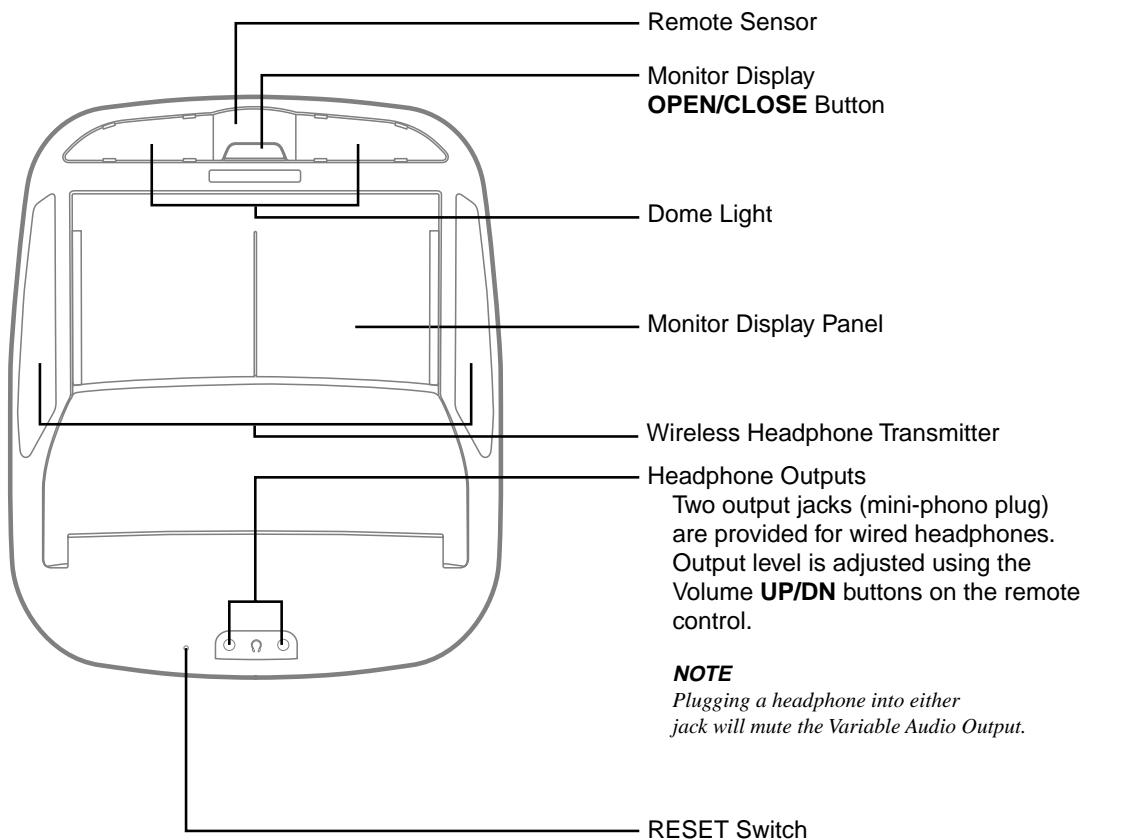
Immediately after installing or applying power to the unit, it should be initialized. Using a pencil or other pointed object, press this RESET switch to complete the initialization procedure.
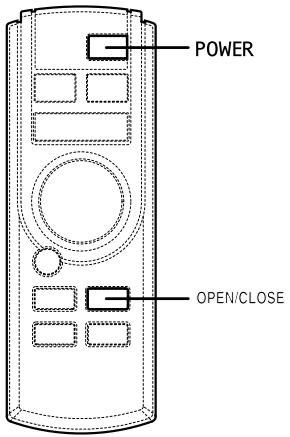
Opening the Monitor Display
NOTE
The TMX-R705 is a precision device. With careful handling, its performance can be maintained at a high level for a long time.
1 Press the OPEN/CLOSE button of the main unit or press the POWER button, press and hold the OPEN/CLOSE button of the supplied remote control for at least 2 seconds.
The unit beeps 3 times and opens the monitor automatically.
Then the power of the monitor turns on.
NOTES
- Since this is an overhead monitor, the display will be lowered when opened and raised when closed. If the monitor touches an obstacle while it is being lowered, the unit will stop immediately. Should this occur, remove the obstacle and press the OPEN/CLOSE button again to close the monitor. If you press the POWER button or the OPEN/CLOSE button while the monitor is being opened or closed, the monitor stops opening or closing and cannot be closed automatically. In this case, press the POWER button or the OPEN/CLOSE button again to close the monitor.
- When the movable monitor is opened, do not place any object on the monitor and be careful not to bump or apply any pressure to the monitor while it is open. This can cause damage to the mechanism.
- Under low ambient temperature conditions, the display may be dark for a short period of time immediately after the power is turned on. Once the LCD has warmed up, the display will return to normal.
- The TMX-R705 draws minimal current even when its power switch is turned off. If the switched power (ignition) lead of the TMX-R705 is connected directly to the positive (+) post of the vehicle's battery, the battery may be discharged. If this lead is unswitched, it must be disconnected from the battery post should the vehicle be left unused for an extended period of time.
An SPST (Single-Pole, Single-Throw) switch (sold separately) can be added to simplify this procedure. Then, you can simply place it in the OFF position when you leave the vehicle. Turn the SPST switch back ON before using the TMX-R705. For connecting the SPST switch, refer to the Installation.
After turning the system off, a slight ghost of the image will remain temporarily. This is an effect peculiar to LCD technology and is normal.
- Under cold temperature conditions, the screen may lose contrast temporarily. After a short warm-up period, it will return to normal.
Closing the Monitor Display
NOTE
The TMX-R705 is a precision device. With careful handling, its performance can be maintained at a high level for a long time.
1 Press the OPEN/CLOSE button of the main unit or press the POWER button, press and hold the OPEN/CLOSE button of the supplied remote control for at least 2 seconds.
The unit beeps 3 times and closes the monitor automatically.
Then the power of the monitor turns off.
NOTE
Since this is an overhead monitor, the display will be lowered when opened and raised when closed. If the monitor touches an obstacle while it is being raised, the unit will stop immediately. Should this occur, remove the obstacle and press the OPEN/CLOSE button again to close the monitor.
Basic Operations
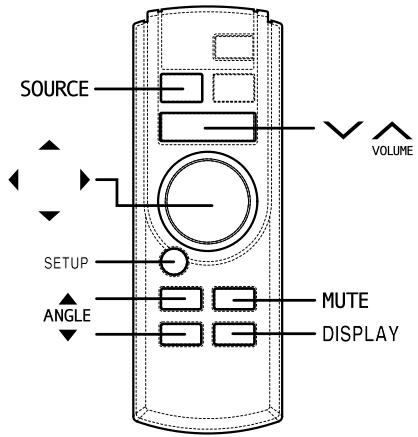
Adjusting the Monitor Viewing Angle
Adjust the monitor's angle for better visibility.
1 While viewing the screen that is shown press the ANGLE or button to adjust the display to the ideal viewing angle.
The display viewing angle can be adjusted between 80 and 105 degrees.
2 Press the or button to adjust the right-left viewing angle. It is possible to adjust the display viewing angle up to 15 degrees to the left or right.
Press and hold the OPEN/CLOSE button of the main unit for at least 2 second. This will return the monitor quickly to its center viewing position.
NOTES
- The angle changes continuously if the ANGLE▼ and ▲ buttons or the ⊥ and ⊥ buttons are held down.
- If there are any obstructions to the monitor when adjusting the angle, first remove the obstruction and then readjust the angle.
- The screen color will vary when viewed at certain angles. Adjust the screen angle for the best viewing position.
- If the voltage of the vehicle's battery power is low, the screen may blink when the screen angle is changed. This is normal and not a malfunction.
- The adjusted angle is stored in the memory.
Adjusting the Volume
1 Press the or button to adjust the volume.
NOTE
The volume changes continuously if the or button is held down. This operation will affect the headphone and External Audio outputs only. The IR signal for the wireless headphones are not affected.
Audio Mute Function
Activating this function will instantly lower the volume level by 20 dB.
1 Press the MUTE button to activate the MUTE mode. The audio level will decrease by about 20 dB.
Pressing the MUTE button again will bring the audio back to its previous level.
Switching the Source
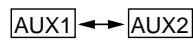
1 Press the SOURCE button. Each press of the button will switch through the modes as follows:
NOTES
- If nothing is connected to AUX 1 or AUX 2, raising the volume while these inputs are selected, may result in excessive noise.
- In addition to the Remote Control Source button, each AUX input has its own wired select trigger. This is called the External AV Select (Pink/Blue) wire.
- The External AV Select trigger is a pulsed signal (Active Low, 500ms or more). If this input remains low, switching to other sources is not possible (Switching sources using the Remote Control is still possible). This is useful if you don't want an AV source to be interrupted. Playing a video is a good example of this scenario. This function is mainly used for connecting with other ALPINE products.
Switching Display Modes
1 Press the DISPLAY button or press and hold the SETUP button for at least 2 seconds. Each press changes the display modes as follows:

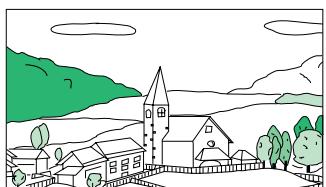
MODE 1 (WIDE)
Stretches the normal image evenly in a horizontal direction so that it is displayed on the entire screen.
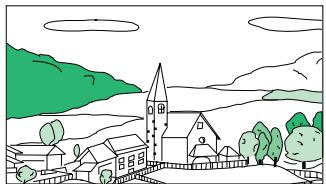
MODE 2 (ZOOM)
Stretches the normal image evenly in a horizontal direction so that it is displayed on the entire screen. The stretching ratio increases the closer to the left or right edge of the screen.
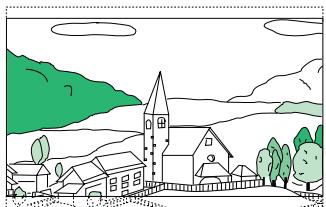
MODE 3 (CINEMA)
Stretches the normal image horizontally and vertically.
The top and bottom of the screen is cut slightly to adapt it to a cinema size image with a proportion of 16:9.
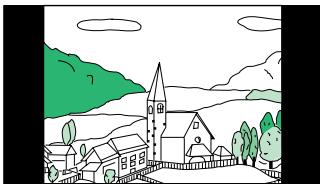
MODE 4 (NORMAL)
A normal television broadcasting (4:3) image is displayed in the center (normal image).
Other Useful Features
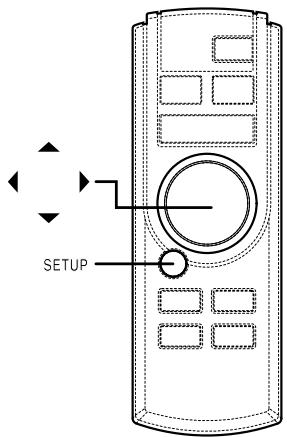
Adjusting Brightness of Picture
1 Press the SETUP button.
2 Press the or button within 10 seconds and select BRIGHT.
3 Press the or button within 10 seconds to adjust the brightness.
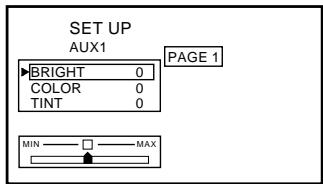
4 Press the SETUP button to finish adjustments.
Adjusting Color Density of Picture
1 Press the SETUP button.
2 Press the or button within 10 seconds and select COLOR.
3 Press the or button within 10 seconds to adjust the color density.
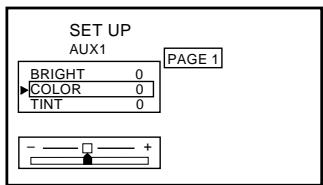
4 Press the SETUP button to finish adjustments.
Adjusting Tint of Picture
1 Press the SETUP button.
2 Press the or button within 10 seconds and select TINT.
3 Press the or button within 10 seconds to adjust the tint.
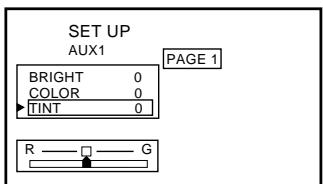
4 Press the SETUP button to finish adjustments.
NOTE
The TINT adjustment is not possible when the PAL is setted.
Setting the Brightness of the Backlight
The brightness of the LCD panel's backlighting is adjustable to more closely match the vehicle's interior lighting. This makes the screen easier to view.
1 Press the SETUP button.
2 Press the or button within 10 seconds and select DIMMER.
3 Press the or button within 10 seconds to set the value.
AUTO:
The screen brightness will dim when the headlight switch is turned on (if proper connections are made).
HIGH:
Maximum screen brightness.
LOW:
The preset screen brightness that was set when adjusting the minimum backlight level.
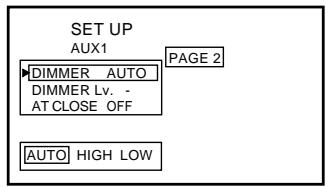
4 Press the SETUP button to finish adjustments.
Adjusting the Lowest Level of the Backlight
The minimum brightness level for the backlighting (LOW) is adjustable. This is used to match the screen brightness to the dashboard (especially at night). This setting is recalled whenever the vehicle's headlight switch is turned on in the AUTO Dimmer mode.
1 Press the SETUP button.
2 Press the or button within 10 seconds and select DIMMER Lv.
3 Press the or button within 10 seconds to set the value.
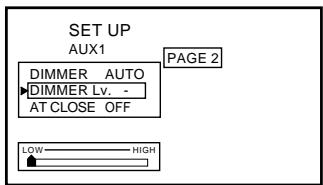
4 Press the SETUP button to finish adjustments.
Setting Automatic Closing of Monitor
Simply turn the ignition key to OFF to automatically close the monitor display.
1 Press the SETUP button.
2 Press the or button within 10 seconds to select AT CLOSE.
3 Press the or button within 10 seconds to set the value.
AUTO:
Automatic closing of the display in depending upon whether the ignition switch is ON or OFF.
If you press the POWER button or the OPEN/ CLOSE button while the monitor is being opened or closed, the monitor stops opening or closing, even if AUTO setting is on, and cannot be closed automatically.
In this case, press the POWER button or the OPEN/CLOSE button again to close the monitor.
OFF:
Manual closing of the display.
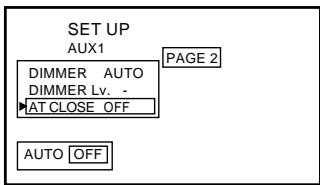
4 Press the SETUP button to finish adjustments.
Other Useful Features
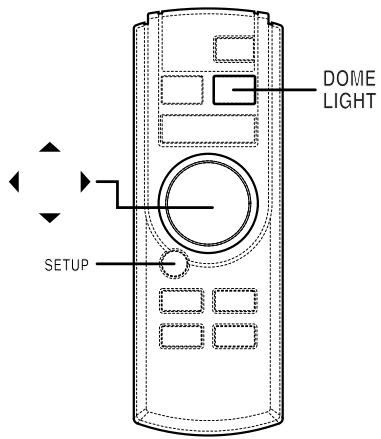
NTSC/PAL Switching Function
You can switch the NTSC/PAL setting in the AUX1 or AUX2 mode.
1 Press the SETUP button.
2 Press the or button within 10 seconds and select AUX 1 SIG. or AUX 2 SIG.
3 Press the or button within 10 seconds to set the selection.
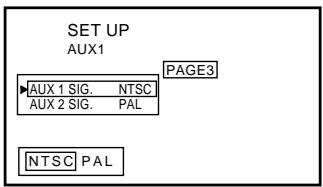
4 Press the SETUP button to finish adjustments.
NOTE
The TINT adjustment is not possible when the PAL is setted.
TIPS
NTSC and PAL can be directly switched when the DISP button is pressed for at least 2 seconds.
Dome Light Settings
1 Press the DOME LIGHT button to turn the Dome Light ON or OFF regardless of whether the vehicle's doors are open or closed.
Door Closed: The dome light will remain lit until the vehicle's door is opened and closed. The dome light will return to Auto mode. To switch OFF the dome light manually, press the DOME LIGHT button again.
Door Open: The dome light will remain OFF until the vehicle's door is closed and re-opened. The dome light will return to Auto mode. To switch ON the dome light manually, press the DOME LIGHT button again.
- With the dome light ON and the vehicle's door OPEN, press and hold the DOME LIGHT button for at least 3 seconds. The dome light will be switched OFF permanently regardless of the opening and closing of the vehicle's doors. To cancel, with the vehicle's door open, press and hold the DOME LIGHT button for at least 3 seconds.
NOTE
If the Override button is connected, it will always work regardless of the Remote Dome Light Status.
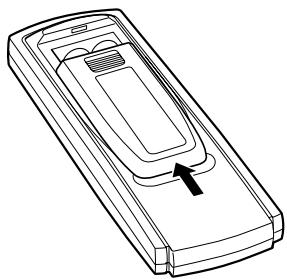
Applicable battery: Use two "AAA" sized dry batteries or equivalent.
- Point the remote control transmitter toward the remote sensor on the TMX-R705 and use the remote control within 2 meters from the TMX-R705.
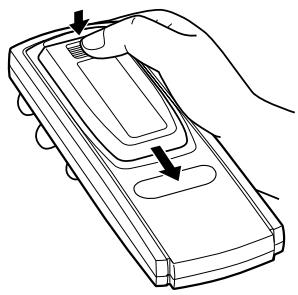
1 Opening the battery cover.
Slide out the battery cover while firmly pressing in the direction of arrow.
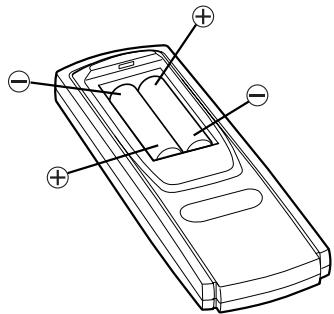
2 Replacing the battery.
Put the batteries in the case observing the polarities as illustrated.
3 Closing the cover.
Push the cover as illustrated until a click is heard.
Replacing the Dome Light Bulb
NOTE
When replacing the dome light bulb, replace with one of the specified 12V, 5W capacity. Use of a different capacity bulb may cause damage to the unit. Please note that no guarantee is carried out if this is the case.
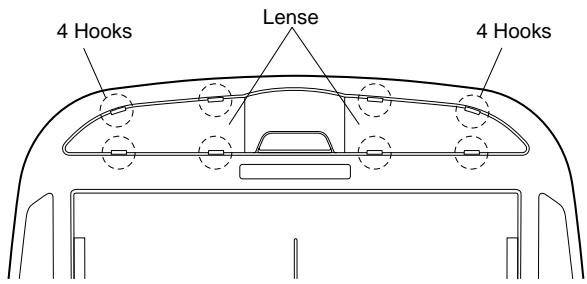
1 Use 12V, 5W rated bulb (End Cap Base: T8 x 28) available at any autoparts store or consult your authorized Alpine Mobile Multimedia dealer for further information.
2 Use a flat-bladed screwdriver to release the hooks and open the lense, being careful not to scratch the product.
3 Pry at two recessed points at rear of lense.
4 Be careful not to crack the lense.
5 Change the bad bulb and press the lense back in place.
Information
In Case of Difficulty
If you encounter a problem, please turn the power off, then on again. If the unit is still not functioning normally, please review the items in the following checklist. This guide will help you isolate the problem if the unit is at fault. Otherwise, make sure the rest of your system is properly connected or consult your authorized Alpine dealer.
No function or display.
- Car's ignition is off.
- Turn the ignition on.
No fuse or blown fuse. - Check the cause and replace the fuse.
Incorrect connections. - Check connection and remedy.
- Vehicle's battery is weak.
- Check the voltage of vehicle's battery.
Unclear picture display.
- Fluorescent tube is exhausted.
- Replace the fluorescent tube.*
No picture display.
- Brightness control is set for minimum brightness control.
- Adjust the brightness.
Incorrect setting of the VCR mode. - Switch to the correct mode.
-
Protective circuit is on because of high temperature.
-
Wait until the temperature inside the vehicle comes down to the operating temperature range (45^)
Picture color is poor.
- Brightness/Color/Tint control are not set to the proper positions.
- Check each control.
Spots or dotted lines/stripes appear.
- Caused by neon signs, high-voltage power lines, CB transmitter, other vehicle's ignition plugs, etc.
- Change the location of your vehicle.
The display angle cannot be adjusted or the adjustment screen does not appear.
- Mechanism error.
- Press the OPEN/CLOSE button to stow away the display, and raise the display again.
Noise is picked up by the Wireless Headphone (available separately) or the sound is inaudible
- Wireless Headphone is being used in a place exposed to direct sunlight.
- Use in an environment that is not exposed to direct sunlight.
- Wireless Headphone batteries are exhausted.
-
Replace the batteries.
-
The fluorescent tube replacement is not free of charge even within the warranty period, for the tube is an article of consumption.
Specifications
MONITOR SECTION
Screen Size 7.0"
LCD Type Transparent type TN LCD
Operation System TFT active matrix
Number of Picture Elements 336,960 pcs. (1,440 x 234)
Effective Number of
Picture Elements
Illumination System
99.99% or more
Cold cathode
fluorescent tube
GENERAL
Power Requirement 14.4V DC (11-15 V allowable)
Operating temperature +32^ to +113^ (0^ to +45^)
Weight 2.0kg (4 lbs. 7 oz)
DIMENSIONS
Width 228 mm (8-15/16")
Height 55 mm (2-3/16")
Depth 267mm (10-1/2")
NOTES
- Due to continuous product improvement, specifications and design are subject to change without notice.
- The LCD panel is manufactured using an extremely high precision manufacturing technology. Its effective pixel ratio is over 99.99% . This means that there is a possibility that 0.01% of the pixels could be either always ON or OFF.
Installation and Connections
Before installing or connecting the unit, please read the following and pages 2 and 3 of this manual thoroughly for proper use.

Warning
MAKE THE CORRECT CONNECTIONS.
Failure to make the proper connections may result in fire or product damage.
USE ONLY IN CARS WITH A 12 VOLT NEGATIVE GROUND.
(Check with your dealer if you are not sure.) Failure to do so may result in fire, etc.
BEFORE WIRING, DISCONNECT THE CABLE FROM THE NEGATIVE BATTERY TERMINAL.
Failure to do so may result in electric shock or injury due to electrical shorts.
DO NOT SPLICE INTO ELECTRICAL CABLES.
Never cut away cable insulation to supply power to other equipment. Doing so will exceed the current carrying capacity of the wire and result in fire or electric shock.
DO NOT USE BOLTS OR NUTS IN THE BRAKE OR STEERING SYSTEMS TO MAKE GROUND CONNECTIONS.
Bolts or nuts used for the brake or steering systems (or any other safety-related system), or tanks should NEVER be used for installations or ground connections. Using such parts could disable control of the vehicle and cause fire etc.
KEEP SMALL OBJECTS SUCH AS BATTERY OUT OF THE REACH OF CHILDREN.
Swallowing them may result in serious injury. If swallowed, consult a physician immediately.
DO NOT INSTALL IN LOCATIONS WHICH MIGHT HINDER VEHICLE OPERATION, SUCH AS THE STEERING WHEEL OR SHIFT LEVER.
Doing so may obstruct forward vision or hamper movement etc. and results in serious accident.
DO NOT INSTALL THE MONITOR NEAR THE PASSENGER SEAT AIR BAG.
If the unit is not installed correctly the air bag may not function correctly and when triggered the air bag may cause the monitor to spring upwards causing an accident and injuries.

Caution
HAVETHEWIRINGANDINSTALLATIONDONEBY EXPERTS.
The wiring and installation of this unit requires special technical skill and experience. To ensure safety, always contact the dealer where you purchased this product to have the work done.
USE SPECIFIED ACCESSORY PARTS AND INSTALL THEM SECURELY.
Be sure to use only the specified accessory parts. Use of other than designated parts may damage this unit internally or may not securely install the unit in place. This may cause parts to become loose resulting in hazards or product failure.
ARRANGE THE WIRING SO IT IS NOT CRIMPED OR PINCHED BY A SHARP METAL EDGE.
Route the cables and wiring away from moving parts (like the seat rails) or sharp or pointed edges. This will prevent crimping and damage to the wiring. If wiring passes through a hole in metal, use a rubber grommet to prevent the wire's insulation from being cut by the metal edge of the hole.
DO NOT INSTALL IN LOCATIONS WITH HIGH MOISTURE OR DUST.
Avoid installing the unit in locations with high incidence of moisture or dust. Moisture or dust that penetrates into this unit may result in product failure.
Installation and Connections
Precautions
- Be sure to disconnect the cable from the (-) battery post before installing your TMX-R705. This will reduce any chance of damage to the unit in case of a short-circuit.
- Be sure to connect the color coded leads according to the diagram. Incorrect connections may cause the unit to malfunction or damage the vehicle's electrical system.
- When making connections to the car's electrical system, be aware of the factory installed components (e.g. on-board computer). Do not tap into these leads to provide power for this unit. When connecting the TMX-R705 to the fuse box, make sure the fuse for the intended circuit of the TMX-R705 has the appropriate amperage. Failure to do so may result in damage to the unit and/or the vehicle. When in doubt, consult your ALPINE dealer.
- The TMX-R705 uses female RCA-type jacks for connection to other units (e.g. amplifier) having RCA connectors. You may need an adaptor to connect other units. If so, please contact your authorized ALPINE dealer for assistance.
IMPORTANT
Please record the serial number of your unit in the space provided below and keep it as a permanent record. The serial number plate is located on the bottom of the unit.
SERIAL NUMBER:
INSTALLATION DATE:
INSTALLATION TECHNICIAN:
PLACE OF PURCHASE:
This Motorized Overhead Monitor requires a 12V DC power supply for the Monitor Display to open and close.
Please DO NOT OPEN and CLOSE BY HAND and handle it with care.
Please follow these steps carefully!
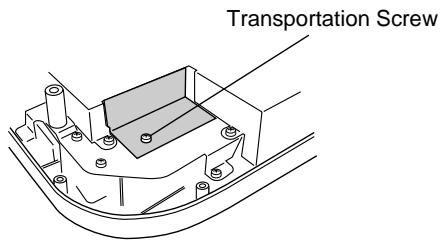
1 Remove the transportation screw from the unit.
2 Connect the main power connector (8-pin connector) as well as one of the AUX input, mini-DIN to RCA Interface connectors (refer to "Installation and Connections" on page 16). Also, refer to the same page showing 5m mini-DIN Extension Cable (to AUX-IN 1 connector) for further details. Make the proper Battery, ACC (ignition) and Ground connections to make the unit operational.
3-1 Turn the unit upside down. With both hands hold the edges of this unit so as not to interfere with the opening and closing the monitor. Open the monitor according to the following procedure. (Two persons may be needed.)
1) Press the OPEN/CLOSE button of this unit, or press the POWER button, press and hold the OPEN/CLOSE button of the supplied remote control for at least 2 seconds. The monitor will automatically open and close with each press.
NOTES
- Do not forcibly open or close the monitor. Doing so will cause damage.
- The monitor cannot be opened or closed unless the unit is turned upside down.
3-2 Use the supplied remote control to adjust the view angle of the monitor as required. (See Page 6 "Adjusting the Monitor Viewing Angle")
NOTE
Do not forcibly change the view angle of the monitor. Doing so may cause damage.
4 After opening the monitor display and adjusting the viewing angle, move the battery line off before installing the unit.
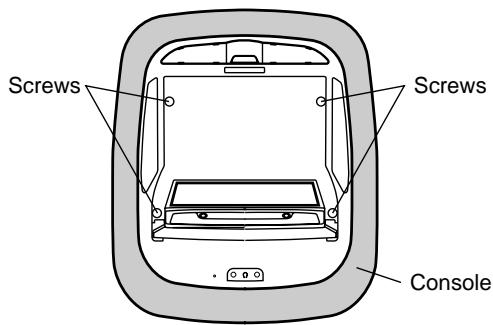
5 Use 4 screws and attach to the mounting plate.
(Screw holes are hidden under the panel. Therefore, the panel has to be opened.) (Two rear side screw holes are located under the mechanism cover plate.)
After installing the unit, reconnect the battery line which you moved off before.
If you have any problem for the installation, please contact to ALPINE Tech Support.
Installation and Connections
Connections
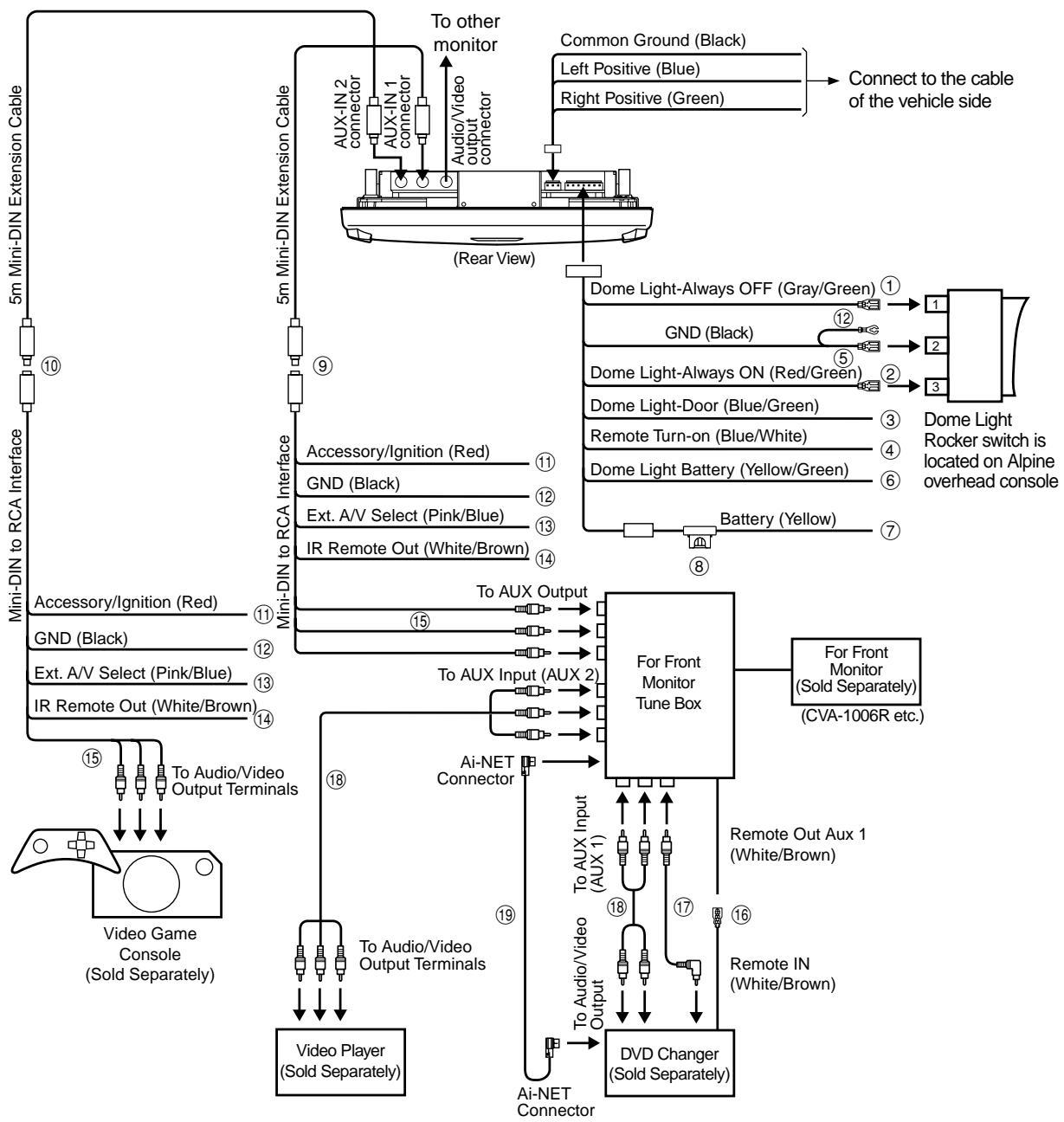
① Dome Override (Always OFF) (Gray/Green)
Connecting to Pin #1 of the external dome light SW. When it is grounded, the Dome light remains off all the time.
② Dome Override (Always ON) (Red/Green)
Connect to Pin #3 of the external dome light SW.
When it is grounded, the Dome light remains on all the time.
③ Dome Light (Door Trigger) (Blue/Green)
Connect to the factory door switch.
NOTES
- Have the switching done being the power cord taken off.
- Have the switching done accurately. If you make mistakes in setting, the dome light remains lit, and it may cause running down of the battery.
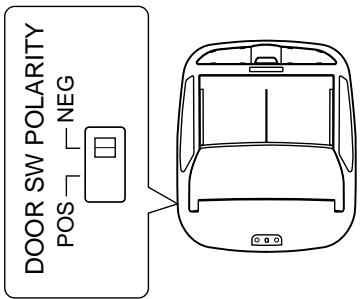
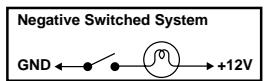
- Vehicle Door polarity depending on the vehicle type can be changed by the "Door SW polarity" where is located on the left side of the main unit. (Default: Negative Switched System)

④ Remote Turn ON (Blue/White)
Connecting to other device such as a small amplifier to turn them ON synchronizing with the TMX-R705 power ON. It gives +12V when the power is ON.
⑤ GND (Black)
This is a common Ground for the main unit and the Dome light. Another GND line connects to Pin #2 of the external dome light SW.
BATT (Dome Light) (Yellow/Green)
This is a constant +12V for the Dome light. Connect to the Dome light +12V line on the vehicle.
⑦ BATT (Main Unit) (Yellow)
This is a constant +12V for the main unit. It is recommended that separate connections from the Dome light battery line are used to avoid noise and over-current.
⑧ Fuse Holder (5A)
KWE-508V (Included)
⑩ KWE-508V (Sold Separately)
⑪ IGN/ACC (Red)
This wire connects to the ignition or accessory line of the vehicle. This triggers main power to turn the unit on. Although both DIN cables have this wire, only one of them should be connected to the IGN/ACC line.
⑫ GND (Black)
This is the shield GND. It should connect to the vehicle's chassis for reducing any noise.
13 External AV Select (Pink/Blue)
External AV Select forces the TMX-R705 to switch to the A/V input sending the AV Select trigger.
④ IR Remote Out (White/Brown)
The Remote Out wire connects to any ALPINE Mobile Video product which has an external remote input function. For example, products such as a DVD, VCR and TV Tuner.
⑤ AV RCA Connector (Video, Audio R, Audio L)
These RCA-type connectors connect to any video source. This connector is used as an A/V input for the TMX-R705, however it may also be used as an output for other units.
Remote Control Lead (White/Brown)
⑦ RCA Extension Cable (Included with DVD changer)
18 RCA Extension Cable (Sold Separately)
⑨ Ai-NET Cable (Included with DVD changer)
Tipps der Polizei:
- WARNING
- CAUTION
- PRECAUTIONS
- Temperature
- Fuse Replacement
- Maintenance
- Installation Location
- Dome Light Bulb Replacement Precautions
- Basic Operations
- Parts Names of the Overhead Monitor
- Opening the Monitor Display
- NOTE
- NOTES
- Closing the Monitor Display
- Adjusting the Monitor Viewing Angle
- Adjusting the Volume
- Audio Mute Function
- Switching the Source
- Switching Display Modes
- Other Useful Features
- Adjusting Brightness of Picture
- Adjusting Color Density of Picture
- Adjusting Tint of Picture
- Setting the Brightness of the Backlight
- AUTO:
- Adjusting the Lowest Level of the Backlight
- Setting Automatic Closing of Monitor
- NTSC/PAL Switching Function
- TIPS
- Dome Light Settings
- Replacing the Dome Light Bulb
- Information
- In Case of Difficulty
- No function or display.
- Unclear picture display.
- No picture display.
- Picture color is poor.
- Spots or dotted lines/stripes appear.
- The display angle cannot be adjusted or the adjustment screen does not appear.
- Noise is picked up by the Wireless Headphone (available separately) or the sound is inaudible
- Specifications
- MONITOR SECTION
- GENERAL
- DIMENSIONS
- Installation and Connections
- MAKE THE CORRECT CONNECTIONS.
- USE ONLY IN CARS WITH A 12 VOLT NEGATIVE GROUND.
- BEFORE WIRING, DISCONNECT THE CABLE FROM THE NEGATIVE BATTERY TERMINAL.
- DO NOT SPLICE INTO ELECTRICAL CABLES.
- DO NOT USE BOLTS OR NUTS IN THE BRAKE OR STEERING SYSTEMS TO MAKE GROUND CONNECTIONS.
- KEEP SMALL OBJECTS SUCH AS BATTERY OUT OF THE REACH OF CHILDREN.
- DO NOT INSTALL IN LOCATIONS WHICH MIGHT HINDER VEHICLE OPERATION, SUCH AS THE STEERING WHEEL OR SHIFT LEVER.
- DO NOT INSTALL THE MONITOR NEAR THE PASSENGER SEAT AIR BAG.
- HAVETHEWIRINGANDINSTALLATIONDONEBY EXPERTS.
- USE SPECIFIED ACCESSORY PARTS AND INSTALL THEM SECURELY.
- ARRANGE THE WIRING SO IT IS NOT CRIMPED OR PINCHED BY A SHARP METAL EDGE.
- DO NOT INSTALL IN LOCATIONS WITH HIGH MOISTURE OR DUST.
- IMPORTANT
- Connections
- Tipps der Polizei:
Brand : ALPINE
Model : TMX-R705
Category : Video screen