
SYBT9-B4 - Battery APC - Free user manual and instructions
Find the device manual for free SYBT9-B4 APC in PDF.


| Product Type | Replacement Battery for UPS |
| Brand | APC |
| Model | SYBT9-B4 |
| Battery Type | Valve Regulated Lead Acid (VRLA) |
| Voltage | 12 V |
| Capacity | 9 Ah |
| Dimensions (L x W x H) | 151 x 65 x 94 mm |
| Weight | 2.7 kg |
| Terminal Type | Faston Tab (F1/F2) |
| Compatible UPS Series | Smart-UPS, Back-UPS Pro, etc. |
| Expected Life | 3-5 years under normal conditions |
| Operating Temperature | 0°C to 40°C |
| Storage Temperature | -15°C to 45°C |
| Charging Method | Constant voltage charge (13.5-13.8V float) |
| Maintenance | Sealed, no water addition required |
| Safety Features | Spark-proof, flame retardant case |
| Disposal | Must be recycled according to local regulations |
| Repairability | Not repairable, replace entire battery |
| Warranty | 2 years (depending on region) |
| Certifications | UL, CE, RoHS |
Frequently Asked Questions - SYBT9-B4 APC
User questions about SYBT9-B4 APC
0 question about this device. Answer the ones you know or ask your own.
Ask a new question about this device
Download the instructions for your Battery in PDF format for free! Find your manual SYBT9-B4 - APC and take your electronic device back in hand. On this page are published all the documents necessary for the use of your device. SYBT9-B4 by APC.
USER MANUAL SYBT9-B4 APC
Battery Module Storage and Replacement (Symmetra® PX and Smart-UPS® VT)

Warning: Only trained persons familiar with the construction and operation of the equipment, as well as the electrical and mechanical hazards involved, may install and remove system components.

Caution: Wait until the system is ready to be powered up before installing Battery Modules in the UPS. Failure to do so can result in a deep discharge of the batteries and cause permanent damage (the time from the battery installation time till the UPS is powered up should not exceed 72 hours or 3 days).
Directions for replacement

Caution: Do not mix battery units. Replace with same model.
Battery Enclosures with four batteries in a row.
APC recommends that a whole battery module (one row of batteries) is replaced at the same time to ensure optimal run-time (see Example 1). However it is only necessary to replace two batteries at the same time according to Example 2 and 3 in the table below.
| Column A Column B Column | C Column D | ||
| Example 1 | New New New New | ||
| Example 2 | New New Old Old | ||
| Example 3 | Old Old New New |
Battery Enclosures with two modules in a row.
Replace both batteries in one row at the same time.
| Column A Column B | |
| New New | |
How to store the battery modules
The battery modules must be stored indoors and with their protective packaging still in place.
 |  |  |
| Ambient temperature: -15° to 40°C/5°F to 104°F | Relative Humidity: 25-85% Non-condensing | Storage place free from vibration, dust, direct sunlight, and moisture. |
Stored batteries should be recharged at regular intervals depending on the storage temperature:
| Storage Temperature Recharge interval | |
| -15° to 20°C/5°F to 68°F 9 months | |
| 20° to 30°C/68°F to 86°F 6 months | |
| 30° to 40°C/86°F to 104°F 3 months |

Caution: Do not store the batteries for more than 12 months.
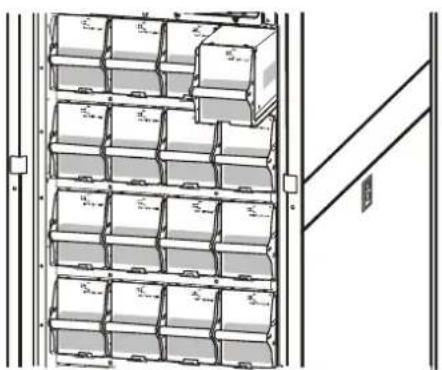
How to replace the battery modules

Use two people to lift components weighing between 18–32 kg/40–70 lb.
natural_image
Diagram of a multi-level storage unit rack with labeled components (no text or symbols present)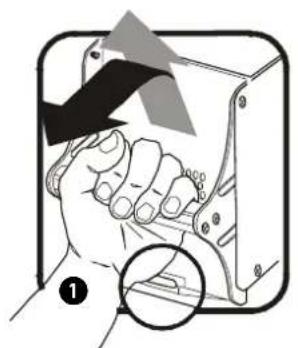
natural_image
Illustration of a hand holding a device with a magnified inset showing a detail (no text or symbols)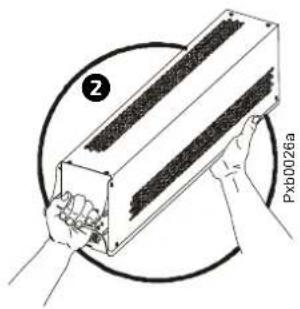
1 Holding the handle, gently lift the battery unit and pull it halfway out. A lock mechanism prevents it from being pulled all the way out.
2 Release the lock by pushing the battery unit upwards and pull the battery unit all the way out while supporting it
③ Take the replacement battery unit and push it into the system.

Note
Allow for a 24-hour recharging period of the batteries after system start-up/battery replacement for battery monitoring data to become fully reliable.
Brand : APC
Model : SYBT9-B4
Category : Battery