
Symmetra LX - Battery APC - Free user manual and instructions
Find the device manual for free Symmetra LX APC in PDF.


| Product Type | Battery Module |
| Brand | APC |
| Model | Symmetra LX |
| Battery Type | Sealed Lead-Acid (VRLA) |
| Battery Voltage | 48 V DC |
| Battery Capacity | 3.5 Ah |
| Dimensions (H x W x D) | 6.7 x 17.9 x 23.7 in (170 x 455 x 602 mm) |
| Weight | 57.3 lbs (26 kg) |
| Hot-Swappable | Yes |
| Shelf Life | 3 to 5 years at 77°F (25°C) |
| Operating Temperature | 32°F to 104°F (0°C to 40°C) |
| Storage Temperature | 5°F to 122°F (-15°C to 50°C) |
| Charging Time | Typically 3 to 6 hours |
| Number of Battery Cells | 4 |
| Connector Type | Anderson Powerpole |
| Safety Approvals | UL, CE, FCC |
| Included Accessories | Owner's manual, mounting screws |
| Maintenance | No user-serviceable parts; replacement required when end of life |
| Recycling | Recycle through APC or local battery recycling program |
Frequently Asked Questions - Symmetra LX APC
User questions about Symmetra LX APC
0 question about this device. Answer the ones you know or ask your own.
Ask a new question about this device
Download the instructions for your Battery in PDF format for free! Find your manual Symmetra LX - APC and take your electronic device back in hand. On this page are published all the documents necessary for the use of your device. Symmetra LX by APC.
USER MANUAL Symmetra LX APC
natural_image
Isometric line drawing of multiple server racks arranged in a grid (no text or symbols)Important Safety Messages
SAVE THESE INSTRUCTIONS - This manual contains important instructions that should be followed during installation and maintenance of the APC ^TM by Schneider Electric equipment and batteries.
Read the instructions carefully. Become familiar with the device before trying to install, operate, service or maintain it. The following special messages may appear throughout this document or on the equipment to warn of potential hazards or to call attention to information that clarifies or simplifies a procedure.
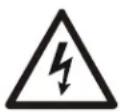
The addition of this symbol to a Danger or Warning product safety label indicates that an electrical hazard exists that will result in personal injury if the instructions are not followed.

This is the safety alert symbol. It is used to alert you to potential personal injury hazards. Obey all safety messages that follow this symbol to avoid possible injury or death.
DANGER
DANGER indicates a hazardous situation which, if not avoided, will result in death or serious injury.
WARNING
WARNING indicates a hazardous situation which, if not avoided, could result in death or serious injury.
CAUTION
CAUTION indicates a hazardous situation which, if not avoided, could result in minor or moderate injury.
NOTICE
NOTICE is used to address practices not related to physical injury.
Product Handling Guidelines
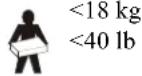
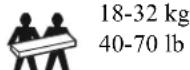
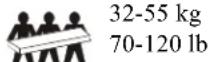



Safety and General Information
Inspect the package contents upon receipt. Notify the carrier and dealer if there is any damage.
- This equipment is for use in a restricted access location.
- Adhere to all national and local electrical codes.
- All wiring must be performed by a qualified electrician.
- Do not work alone under hazardous conditions.
- Changes and modifications to this unit not expressly approved by Schneider Electric IT Corporation could void the warranty.
- This UPS is intended for indoor use only.
- Do not operate this unit in direct sunlight, in contact with fluids, or where there is excessive dust or humidity.
- Be sure the air vents on the UPS are not blocked. Allow adequate space for proper ventilation.
- For a UPS with a factory installed power cord, connect the UPS power cable directly to a wall outlet. Do not use surge protectors or extension cords.
- The equipment is heavy. Always practice safe lifting techniques adequate for the weight of the equipment.
- The batteries are heavy. Remove the batteries before installing the UPS and external battery packs (XLBPs), in a rack.
- Always install XLBPs at the bottom in rack-mount configurations. The UPS must be installed above the XLBPs.
- Always install peripheral equipment above the UPS in rack-mount configurations.
Electrical safety
- Do not handle any metallic connector before power has been disconnected.
- For models with a hardwired input, the connection to the branch circuit (mains) must be performed by a qualified electrician.
- 230 V models only: In order to maintain compliance with the EMC directive for products sold in Europe, output cords attached to the UPS must not exceed 10 meters in length.
- The protective earth conductor for the UPS carries the leakage current from the load devices (computer equipment). An insulated ground conductor is to be installed as part of the branch circuit that supplies the UPS. The conductor must have the same size and insulation material as the grounded and ungrounded branch circuit supply conductors. The conductor will typically be green, with or without a yellow stripe.
- Leakage current for a pluggable, Type A UPS may exceed 3.5mA when a separate ground terminal is used.
- The UPS input ground conductor must be properly bonded to protective earth at the service panel.
- If the UPS input power is supplied by a separately derived system, the ground conductor must be properly bonded at the supply transformer or motor generator set.
Hardwire safety
- Check that all branch circuit (mains) and low voltage (control) circuits are deenergized, and locked out before installing cables or making connections, whether in the junction box or to the UPS.
- All wiring must be performed by a qualified electrician.
- Select wire size and connectors according to national and local codes.
- Wiring must be approved by a local wiring inspector.
- Strain relief is required for all hardwiring (supplied with select products). Snap in type strain reliefs are recommended.
- All openings that allow access to UPS hardwire terminals must be covered. Failure to do so may result in personal injury or equipment damage.
De-energizing safety
- The UPS contains internal batteries and may present a shock hazard even when disconnected from AC and DC power.
- The AC and DC output connectors may be energized by remote or automatic control at any time.
-
Before installing or servicing the equipment perform the following tasks:
-
Set the System enable switch to the OFF position.
- Set the input circuit breaker to the OFF position.
- Disconnect the battery modules.
- Disconnect external battery cabinet if provided.
- Disconnect mains/branch circuit.
Battery safety
- When replacing batteries, replace with the same number and type.
- Batteries typically last for two to five years. Environmental factors impact battery life. Elevated ambient temperatures, poor quality utility power, and frequent short duration discharges will shorten battery life. Batteries should be replaced before end of life.
- Replace batteries immediately when the unit indicates battery replacement is necessary.
- APC™ by Schneider Electric uses Maintenance-Free sealed Lead Acid batteries. Under normal use and handling, there is no contact with the internal components of the battery. Over charging, over heating or other misuse of batteries can result in a discharge of battery electrolyte. Released electrolyte is toxic and may be harmful to the skin and eyes.
- CAUTION: Before installing or replacing the batteries, remove jewelry such as chains, wristwatches and rings. Use tools with insulated handles. High short circuit current through conductive materials could cause severe burns.
- CAUTION: Do not dispose of batteries in a fire. The batteries may explode.
- CAUTION: Do not open or mutilate batteries. Released material is harmful to the skin and eyes and may be toxic.
General information
- The model and serial numbers are located on a small, rear panel label. For some models, an additional label is located on the chassis under the front bezel.
• Always recycle used batteries. - Recycle the package materials or save them for reuse.
Installation

DANGER
RISK OF ELECTRIC SHOCK
- Adhere to all national and local electrical codes.
- Wiring must be performed by a qualified electrician.
- Read and follow all safety and installation instructions in this manual.
Failure to follow these instructions could result in equipment damage, personal injury or death.

CAUTION
RISK OF ELECTRIC SHOCK
- Disconnect the electrical panel circuit breaker before installing or servicing the unit or connected equipment.
- Disconnect equipment from the unit before servicing any equipment.
- The AC and DC output connectors may be energized by remote or automatic control at any time.
- Do not use the UPS as a safety disconnect.
Failure to follow these instructions could result in minor or moderate injury.

CAUTION
RISK OF ELECTRIC SHOCK
- Wire gauge must comply with required amp capacity and national and local electrical codes.
- Use Snap-In strain reliefs provided with the unit.
- The UPS must be wired into a branch circuit equipped with a circuit breaker rated as specified in the tables below.
- Recommended input terminal screw torque: 16 lbf-in (2 Nm).
- Once hardwiring is completed, all openings in the hardwire assembly must be covered.
Failure to follow these instructions could result in minor or moderate injury.
Turn Off Power to UPS
| Turn OFF the AC utility power to the UPS.Turn OFF the UPS input circuit breaker. | 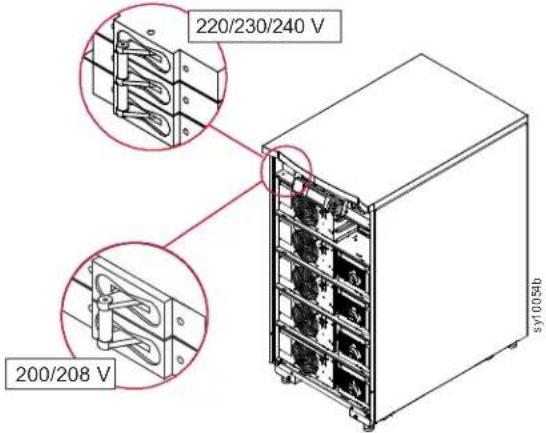 |
| Turn OFF the system enable switch. | 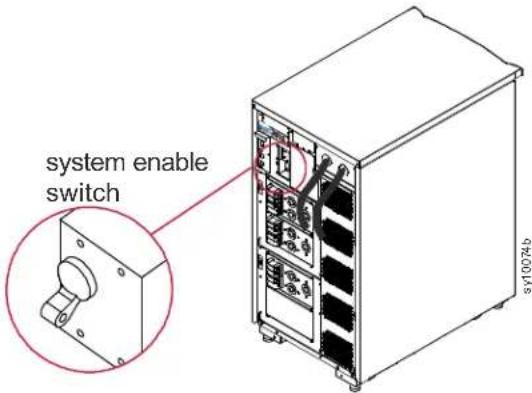 |
Install Symmetra LX
Refer to the Symmetra LX UPS Physical Installation Guide for UPS and peripheral module installation instructions.
Refer to the Symmetra LX Extended Run Cabinet Physical Installation Guide for Extended Run Cabinet installation instructions.
Electrical Connections
DANGER
RISK OF ELECTRIC SHOCK
- Adhere to all national and local electrical codes.
- Wiring must be performed by a qualified electrician.
- Read and follow all safety and installation instructions in this manual.
- Read and follow all safety and installation instructions in manuals referenced in this manual.
Failure to follow these instructions could result in equipment damage, personal injury or death.
Symmetra LX wiring
Refer to the Symmetra LX Electrical Installation Guide for input and output power connections.
System installation checklist
Refer to the Symmetra LX Physical Installation Guide and the Symmetra LX Electrical Installation Guide for detailed instructions.
| Disconnect all equipment connected to the UPS. | |
| Verify that all rack mount components are properly secured in the rack. | |
| Verify that power modules, battery modules, and intelligence modules are properly installed. | |
| Verify that the PowerView is connected to an Intelligence module (IM). | |
| Turn ON UPS AC utility power. | |
Turn ON the input circuit breaker and the system enable switch.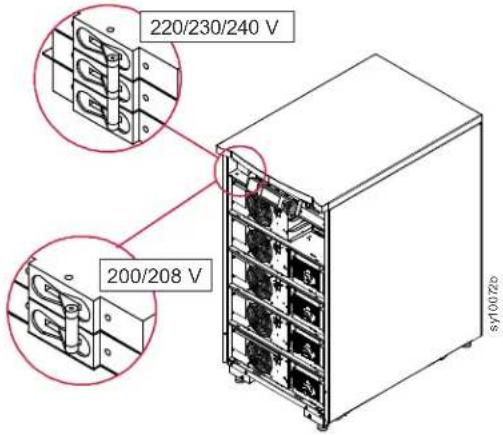 | 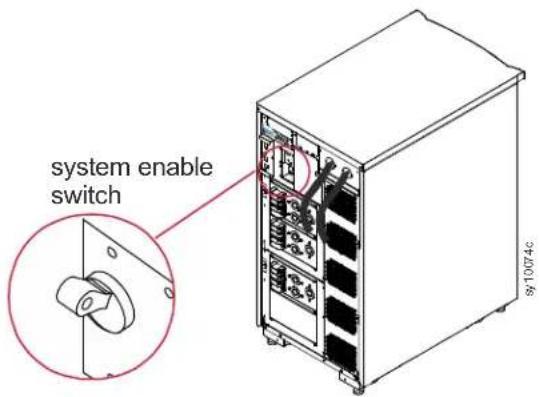 |
| During initial startup clicking sounds may be heard.During initial startup the PowerView may display diagnostic messages. Disregard these messages.Press the Esc' button on the PowerView until the monitoring screen is displayed.Verify that the input voltage (Vin), matches the branch circuit (mains), voltage. | |
System installation checklist continued
| Turn ON the maintenance bypass switch. | 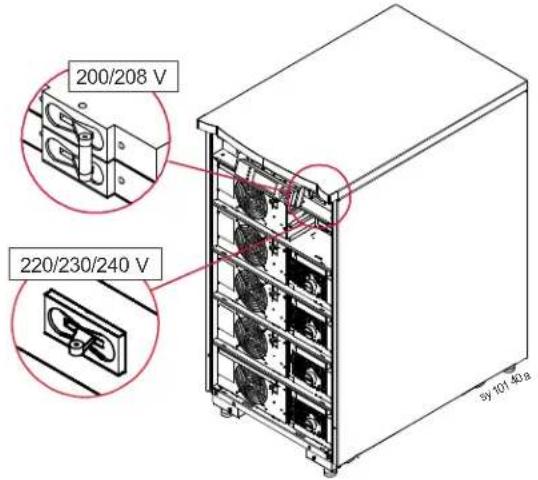 |
| Disregard any LED indicators or diagnostic messages on the PowerView.Press the Esc' button on the PowerView until the monitoring screen is displayed.Verify that the input voltage (Vin), matches the branch circuit (mains), voltage. | |
| Test the REPO switch.The system enable switch should move to the standby position, and the system should shut down. | |
| Turn OFF the input circuit breaker, the system enable switch and the maintenance bypass switch. | |
System Startup
Refer to the Symmetra Operations Guide for detailed instructions.
Turn ON the UPS
| Turn ON the AC utility power. | |
| Turn ON the circuit breakers for all connected equipment. | |
| If connected equipment is hardwired, verify that the output circuit breakers on the distribution panel are switched ON. | 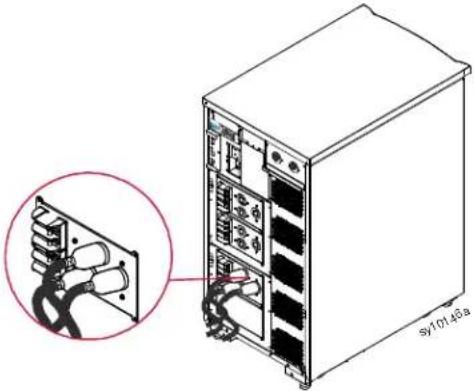 |
| If connected equipment is plugged into the UPS, verify that each UPS PDU output circuit breaker is switched ON | 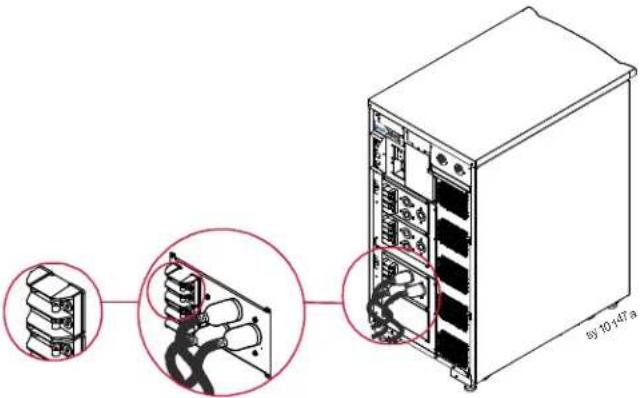 |
| Turn ON the input circuit breaker. | 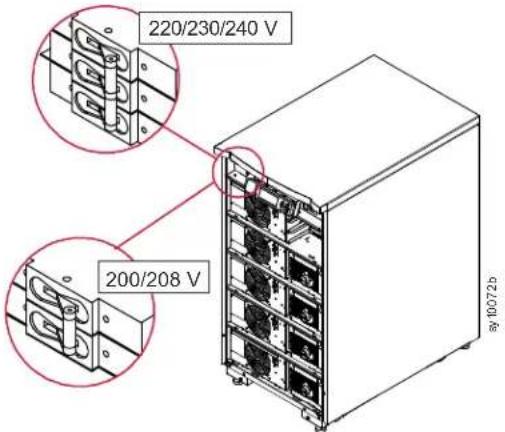 |
Turn ON the UPS continued
| Turn ON the UPS system enable switch | 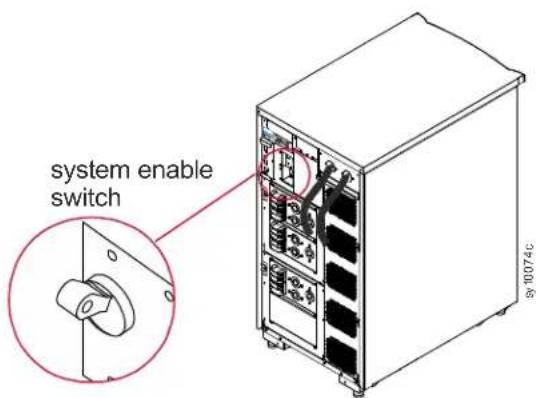 |
| To start the UPS when there is no AC utility power, press and hold either of the cold start buttons for four seconds. | 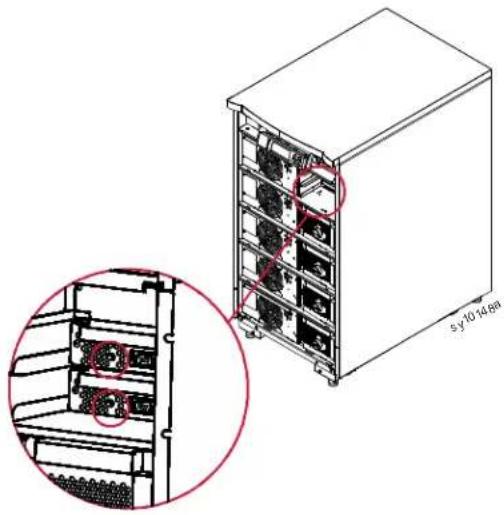 |
Setting PowerView Screens
| Once the PowerView has gone through the initial diagnostics during system startup, monitoring screens that provide operating parameters can be set. | Chg 100%Load 000%220 Vin 000 Vout 60 HzRuntime: 00hr 30min |
| Set output voltagePress the ESC button until the Main menu screen appears.Use the up/down arrow keys to scroll through the options.Select Setup and press ENTER. | Control LoggingStatus Display>Setup DiagsAccessories Help |
| Use the up/down arrow keys to scroll through the options.Select Other and press ENTER. | Settings AlarmsShutdown BypassDefaults CopyOutput Freq >Other |
| To change the output voltage for a specific application use the up/ down arrow keys to scroll through the options.Select Output.The cursor will move to the voltage field. Use the up/down arrows to scroll through voltage options.Select the voltage needed and press ENTER. | Self Test : EnabledUPS ID : UPS_IDENVout Reporting : Auto>Output : 208V |
| Turn ON connected equipmentThe Symmetra LX must be turned ON before executing this procedure.Press the ESC button until the Main menu screen appears.Use the up/down arrow keys to scroll through the options.Select Control and press ENTER. | Control LoggingStatus Display>Setup DiagsAccessories Help |
| Use the up/down arrow keys to scroll through the options.Select Turn UPS Output On, and press ENTER.NOTE: You may need to scroll down to a second page. | Graceful Turn OnStart Runtime Cal>Turn UPS Output On |
| Confirm choice by selecting YES. | Confirm:Turn UPS OnCancel>Yes, Turn UPS On |
| There may be clicking sounds and this message may appear.NOTE: You may see one or more override warnings. Answer these by selecting Start Now. | UPS HAS BEENCOMMANDED TO TURNPOWER ON |
| When this message appears, there will be a 90 second delay before the Load On LED will illuminate. | UPS LOAD IS ONPress any key... |
APC™ by Schneider Electric Worldwide Customer Support
Customer support for this or any other Symmetra® by Schneider Electric product is available at no charge in any of the following ways:
- Visit the APC by Schneider Electric web site, www.apc.com to access documents in the APC Knowledge Base and to submit customer support requests.
- www.apc.com (Corporate Headquarters) Connect to localized APC by Schneider Electric web site for specific countries, each of which provides customer support information.
- www.apc.com/support/ Global support searching APC Knowledge Base and using e-support.
- Contact the APC by Schneider Electric Customer Support Center by telephone or e-mail.
- Local, country specific centers: go to www.apc.com/support/contact for contact information.
- For information on how to obtain local customer support, contact the APC by Schneider Electric representative or other distributor from whom you purchased your APC by Schneider Electric product.
© 2018 APC by Schneider Electric. APC, the APC logo, Smart-UPS and Symmetra are owned by Schneider Electric Industries S.A.S. or their affiliated companies. All other trademarks are property of their respective owners.
- Important Safety Messages
- DANGER
- WARNING
- CAUTION
- NOTICE
- Product Handling Guidelines
- Safety and General Information
- Inspect the package contents upon receipt. Notify the carrier and dealer if there is any damage.
- Electrical safety
- Hardwire safety
- De-energizing safety
- Battery safety
- General information
- Installation
- RISK OF ELECTRIC SHOCK
- Turn Off Power to UPS
- Install Symmetra LX
- Electrical Connections
- Symmetra LX wiring
- System installation checklist
- System installation checklist continued
- System Startup
- Turn ON the UPS continued
- Setting PowerView Screens
- APC™ by Schneider Electric Worldwide Customer Support
Brand : APC
Model : Symmetra LX
Category : Battery