
TEPIPERB - Docking Station SBS - Free user manual and instructions
Find the device manual for free TEPIPERB SBS in PDF.


| Product Type | Portable Bluetooth Speaker |
| Brand | SBS |
| Model | TEPIPERB (Piper Portable Speaker) |
| Connectivity | Bluetooth, AUX input, TF card slot |
| Bluetooth Version | Not specified (compatible with standard Bluetooth devices) |
| Power Output | 3W |
| Power Source | Built-in rechargeable battery via USB (5V) |
| Charging Indicator | Red LED on during charging, off when fully charged |
| Battery Low Indicator | Red LED flashing |
| Controls | Multifunction button, Bluetooth/OFF/MP3 slider, volume up/down via long press |
| Playback Control | Play/Pause, next/previous track, answer/end calls, redial |
| Hands-Free Calling | Yes (via built-in MIC and multifunction button) |
| Media Playback | Bluetooth streaming, TF card (MP3) |
| LED Indicators | Blue flashing (Bluetooth mode), blue/red alternating (pairing), red on (standby/AUX), red flashing (low battery or TF card activity) |
| Dimensions (Estimated) | Approximately 10 x 10 x 5 cm |
| Weight (Estimated) | Approximately 200 g |
| Safety Warnings | Do not disassemble, do not expose to humidity or high temperature, do not cover speaker, keep away from children |
| Cleaning | Wipe with dry cloth, avoid moisture |
| Compliance | Not specified (standard electronic device) |
| Included Accessories | USB charging cable (assumed), user manual |
Frequently Asked Questions - TEPIPERB SBS
User questions about TEPIPERB SBS
0 question about this device. Answer the ones you know or ask your own.
Ask a new question about this device
Download the instructions for your Docking Station in PDF format for free! Find your manual TEPIPERB - SBS and take your electronic device back in hand. On this page are published all the documents necessary for the use of your device. TEPIPERB by SBS.
USER MANUAL TEPIPERB SBS
Piper Portable Speaker
Speaker Bluetooth 3W
USER - TEPIPER

UK
User Manual
Bluetooth pairing:
• Make sure the Bluetooth speaker is in off condition
- Move the ON/OFF slider to Bluetooth mode, wait for 5 seconds then the blue and red LED will flash alternatively.
- On your mobile phone search the Bluetooth devices and connect the speaker. If required the connection PIN (or password) is: 0000
- When connected the blue LED will flashes. If the pairing fails, the blue and red LED continue to flash alternately. In this case try the pairing operation again.
Buttons:
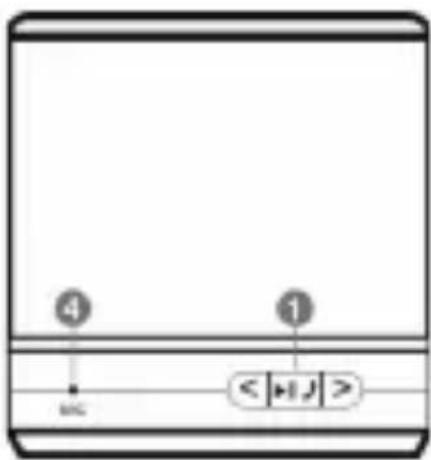
“<”: Short press: Next song. / Long press: Volume up.
">": Short press: Previous song. / Long press: Volume down.
If the AUX input is in use these two buttons are disabled.
“>>||”:
Bluetooth mode:
Short press: Play - Pause - Answer /end call.
During the pairing: Pair
Double click: Last number redial
Long press (2 seconds): reject calls
Use with TF card:
When inserting the TF card, the RED Led flashes.
Short press: Play - Pause
LED status
Blue LED flashing: Bluetooth mode.
Blue and red LED's flashing alternately: Bluetooth pairing
Red LED on: Battery charge. At the end of the charging the red LED goes off
Red LED on: TF card in pause or AUX input enabled.
Red LED flashing: Battery low.
Red LED flashing: TF card in use.
Warnings
•Do not let the children play with this product.
- Do not use in very humid or high temperature ambient.
• Do not throw the product into fire.
• Do not drill or beat the product.
•Do not cover the speaker.
- Do not disassemble: This speaker does not contain any replaceable part.
1 Multifunction button
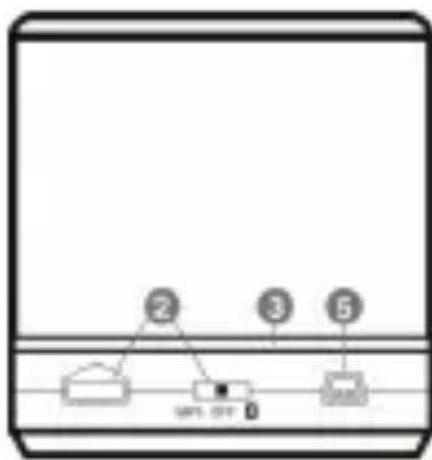
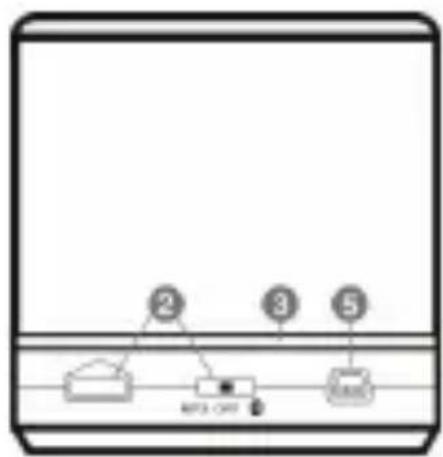
2 Bluetooth/OFF/MP3 (TF card)
3 LED
4 MIC
5 USB charging port
6 AUX input interface
flowchart
graph TD
    A["2"] --> B["3"]
    B --> C["5"]
    style A fill:#f9f,stroke:#333
    style B fill:#ccf,stroke:#333
    style C fill:#cfc,stroke:#333
IT
Manuale utente
F

flowchart
graph TD
    A["②"] --> B["③"]
    B --> C["⑤"]
    style A fill:#f9f,stroke:#333
    style B fill:#ccf,stroke:#333
    style C fill:#cfc,stroke:#333
E
Manual del usuario

flowchart
graph TD
    A["Node 1"] --> B["Node 2"]
    B --> C["Node 3"]
    C --> D["Node 5"]
    style A fill:#f9f,stroke:#333
    style B fill:#ccf,stroke:#333
    style C fill:#cfc,stroke:#333
    style D fill:#fcc,stroke:#333
NL

flowchart
graph TD
    A["②"] --> B["③"]
    B --> C["⑤"]
    style A fill:#f9f,stroke:#333
    style B fill:#ccf,stroke:#333
    style C fill:#cfc,stroke:#333
BG

flowchart
graph TD
    A["②"] --> B["③"]
    B --> C["⑤"]
    D["①"] --> E["②"]
    E --> F["③"]
    style A fill:#f9f,stroke:#333
    style B fill:#ccf,stroke:#333
    style C fill:#cfc,stroke:#333
    style D fill:#fcc,stroke:#333
    style E fill:#cff,stroke:#333
    style F fill:#ffc,stroke:#333

Brand : SBS
Model : TEPIPERB
Category : Docking Station