
Media Suite 8 Centra - Photo/Video Software CYBERLINK - Free user manual and instructions
Find the device manual for free Media Suite 8 Centra CYBERLINK in PDF.


| Product Type | Photo and video editing software suite |
| Brand | Cyberlink |
| Model | Media Suite 8 Centra |
| Version | 8 |
| Main Functions | Video editing, photo editing, slideshow creation, media library management |
| Supported Operating Systems | Windows 7, 8, 10 (32-bit and 64-bit) |
| Minimum CPU | Intel Core 2 Duo or AMD Athlon X2 |
| Minimum RAM | 2 GB |
| Minimum Hard Disk Space | 4 GB for installation |
| Graphics Card | DirectX 9.0c compatible with 256 MB VRAM |
| Media Formats Supported | JPEG, TIFF, PNG, MP4, AVI, MOV, WMV, MPEG-2 |
| Language Support | English, French, German, Spanish, Chinese, Japanese, Korean, Russian, Italian, Dutch, Portuguese, Swedish, Polish, Turkish, Arabic, Thai, Indonesian, Vietnamese |
| Installation Type | CD-ROM or digital download |
| License Type | Retail box or OEM |
| User Manual | PDF included, 100 pages |
| Warranty | Standard 1-year limited warranty |
Frequently Asked Questions - Media Suite 8 Centra CYBERLINK
User questions about Media Suite 8 Centra CYBERLINK
0 question about this device. Answer the ones you know or ask your own.
Ask a new question about this device
Download the instructions for your Photo/Video Software in PDF format for free! Find your manual Media Suite 8 Centra - CYBERLINK and take your electronic device back in hand. On this page are published all the documents necessary for the use of your device. Media Suite 8 Centra by CYBERLINK.
USER MANUAL Media Suite 8 Centra CYBERLINK
CyberLink Media Suite
User's Guide
Copyright and Disclaimer
All rights reserved. No part of this publication may be reproduced, stored in a retrieval system, or transmitted in any form or by any means electronic, mechanical, photocopying, recording, or otherwise without the prior written permission of CyberLink Corporation.
To the extent allowed by law, CyberLink Media Suite IS PROVIDED "AS IS", WITHOUT WARRANTY OF ANY KIND, EITHER EXPRESS OR IMPLIED, INCLUDING WITHOUT LIMITATION ANY WARRANTY FOR INFORMATION, SERVICES, OR PRODUCTS PROVIDED THROUGH OR IN CONNECTION WITH CyberLink Media Suite AND ANY IMPLIED WARRANTIES OF MERCHANTABILITY, FITNESS FOR A PARTICULAR PURPOSE, EXPECTATION OF PRIVACY, OR NON-INFRINGEMENT.
BY USING THIS SOFTWARE, YOU AGREE THAT CYBERLINK WILL NOT BE LIABLE FOR ANY DIRECT, INDIRECT, OR CONSEQUENTIAL LOSS ARISING FROM THE USE OF THIS SOFTWARE OR MATERIALS CONTAINED EITHER IN THIS PACKAGE.
The terms and conditions here under shall be governed and construed in accordance with the laws of Taiwan.
CyberLink Media Suite is a registered trademark along with other company and product names mentioned in this publication, used for identification purposes and remain the exclusive property of their respective owners.
International Headquarters
Mailing Address
CyberLink Corporation
15F, #100, Minchiuan Road, Shindian City
Taipei 231, Taiwan
Web Site
www.cyberlink.com
Telephone
886-2-8667-1298
Fax
886-2-8667-1300
Copyright © 2009 CyberLink Corporation. All rights reserved.
Contents
Introduction...... 1
CyberLink Media Suite Programs .... 1 The PowerStarter Program .... 2
Version Table 7
System Requirements 8
Music 11
Making a Music Disc ....12 Burning a Music Disc ....12
Ripping an Audio CD 13
Converting Audio Formats 13
Editing Your Audio ....14 Adding Audio into the Library ....14 Editing Audio ....17 Audio Effects ....18 Exporting Audio ....21
Movie Player 23
Playing Movie Media ....23 Supported Media Types and Formats ....24 Playing Movie Discs ....24 Playing Movie Folders ....26 Playing Movie Files ....27
Playback Controls 27
Settings 30
Data.... 31
Making a Data Disc ....32
Formatting a Disc ....33
Using InstantBurn ....34
Photo 35
Importing Photos ....36
Managing Photos ....36
Using the Library 37
Tagging Faces 38
Fixing and Enhancing Photos ....40
Making Photo Fixes 41
Fine Tuning Photos ....41
Adding Photo Effects 41
Viewing the Edit Log 42
Playing Slideshows ....42
Creating Slideshows 44
Creating Slideshow DVDs 46
Create Disc Window 46
Printing Photos 48
Uploading Photos ....48
Uploading Photos to Flickr 48
Uploading Photos to Facebook 49
Video 51
Importing Videos 52
Importing Video Files 52
Importing from a DV or HDV Camcorder 52
Capturing Videos 53
Capturing from a DV Camcorder ....54
Capturing from an HDV Camcorder ....55
Capturing from a TV Signal 56
Capturing from a Digital TV Signal 56
Capturing from a Webcam 56
Capturing from a DVD 56
Capturing from an AVCHD Camcorder ....56
Captured Content 57
Managing Videos ....57
Using the Library 57
Fixing and Enhancing Videos 59
Trimming Videos ....59
Making Video Fixes ....59
Fine Tuning Videos 60
Viewing the Edit Log 60
Editing Videos 60
Converting Videos 61
Converting for use on an iPod or iPhone 61
Converting for use on a Sony PSP/PS3 62
Converting to Other Formats 63
Creating Video Discs 65
Burning HDV/DV Videos 66
Uploading Videos 67
Uploading Videos to YouTube 67
Uploading Videos to Facebook 68
Copy & Backup 69
Copying a Data Disc 70
Copying a Movie DVD 71
Backing Up and Restoring Your PC 72
Backing Up Data 72
Restoring Data 74
Utilities 77
Creating a Disc Image 78
Burning a Disc Image ....79
Erasing a Disc 80
Print a Disc Label 81
Step 1 - Select a Label Type ....81
Step 2 - Edit Disc Information 82
Step 3 - Edit Layout ....82
Step 4 - Print 82
Burning DVD Folders 83
Editing Video Discs 83
Advanced Video Disc Utilities 84
Technical Support...... 85
Before Contacting Technical Support 85
Web Support 85
Index 87
Chapter 1:
Introduction
Welcome to CyberLink Media Suite, the all-in-one multimedia suite that opens up the world of digital entertainment on your PC.
CyberLink Media Suite allows you to:
- enjoy all of your movies with the world's #1 playback software on the PC.
- burn music or data discs in a variety of formats.
- edit videos with a powerful editing tool that provides unlimited move-making possibilities.
- access the unlimited content available for download to use in your creations from Flickr*, Freesound* and DirectorZone.
• author Blu-ray Disc*, AVCHD* and DVD discs with motion menus. - organize your photos with features such as face tagging, and then use them to create dazzling slideshows.
- record, trim, cut, and add effects to your audio files that you want to use in your video editing or share with friends
- share your photos on Flickr and Facebook, and upload your videos to YouTube or Facebook.
- back up and restore your data.
- create and print disc labels.
- access useful disc tools (erase discs, create and burn disc images).
Note: * available in CyberLink Media Suite Ultra and Pro versions only.
CyberLink Media Suite Programs
You can access all of CyberLink Media Suite's programs through the CyberLink PowerStarter interface. It provides easy access to all of the CyberLink home entertainment software on your PC, for whatever task you have at hand. From managing your media files and creating movies to organizing your disc content, burning discs and much more.
The PowerStarter Program
When you launch CyberLink Media Suite, the CyberLink PowerStarter interface appears as follows:

Menu icons
CyberLink PowerStarter is the complete CyberLink software portal, allowing you to work with media using a task-based approach, launch your CyberLink software programs all from one convenient location, or easily upgrade/update any of these programs.
Menu Icons
Clicking a menu icon reveals a list of features and functions you can choose from, and provides instant and direct access to all of your powerful CyberLink programs.

Click the menu icon that corresponds to the type of media you want to access or features you want to explore.
Music

Within Music you can access the functions for burning audio files to a disc in a variety of popular formats. You can also rip an audio disc to your hard drive, or edit and enhance your digital audio files with rich effects.
Movie Player

From the Movie Player menu you can watch movies on a disc, with a file on your hard drive, or from a movie folder. Select a movie player function to enjoy your movies with feature-rich navigation controls for an interactive and tailored viewing experience.
Data

Access the Data menu to burn data files to a variety of different disc types. You can also format your existing rewritable discs so that they support convenient drag-and-drop burning.
Photo

The Photo menu contains a variety of functions for importing, managing, fixing, and touching up your photos. Features also include the ability to instantly create dazzling slideshows, author photo discs with menus, and share your photos with the world on the Internet.
Video

In the video menu you can capture and import videos from a variety of sources, and then edit them into creative movie productions. You can then author discs with professional looking motion menus, output the video for use on portable devices, or share your videos with the world by uploading them to the Internet.
Copy & Backup

In Copy & Backup you can copy your data and movie discs. You may also use the available functions to back up all of the important data on your computer and then restore it if ever required.
Utilities

Use the Utilities menu to manage your discs by creating or burning disc images, or erasing existing disc content. You can also edit some video discs, or design and print labels for all of your custom discs.
Favorites

You can add the functions and programs you use most often into the Favorites menu, for quick access. By default, this window is empty.
To add a function or program to the Favorites menu, click the appropriate menu icon to display the function or program. Hover your
mouse over the function and then click

If you would like to remove a function or program from your favorites, hover over it and then click 📄
Function Icons
Click one of the menu icons to reveal all the available functions and tasks you can perform using your CyberLink software. Select any of the functions to open the corresponding software program and complete the specified task, or access the requested feature.

Quick Access Buttons
CyberLink PowerStarter also includes the following buttons that provide access to the Upgrade/Update, CyberLink Products, About, and Preferences windows.
Upgrade/Update

Upgrade/Update
The upgrade/update window lets you view product version information for the CyberLink programs currently installed on your computer. They are listed in a table, along with the current version number, and buttons indicating whether or not there is an upgrade or an update available.
When enabled, click on + in the Free Update column to open a page that lets you download the latest patch update for the corresponding software. You may also click on ↑ in the Upgrade Software column to open a page that allows you to upgrade a specific product, when available.
CyberLink Products
To view a list and detailed information about all of the CyberLink programs
installed on your computer, click and then hover your mouse over a program to view its description. You can then select any of the program names to open the corresponding software.
Note: the specific programs available within CyberLink PowerStarter is dependent on the products installed on your computer and the versions you purchased.
About
Click to display CyberLink PowerStarter version information.
Preferences
To configure the behavior of the CyberLink PowerStarter program, click the button, and then set your desired preferences.

- Return to PowerStarter after you close a program: when enabled, after you close a program that you accessed through CyberLink PowerStarter, you will return to the main window.
- Automatically check for the latest version: when enabled, CyberLink PowerStarter automatically checks for newer versions of the installed software programs every 14 days. When new versions are available, the buttons in the Free Update and Upgrade Software columns are enabled.
- Receive CyberLink product information: allows you to enable/disable banner and running text on the upgrade page.
- Display language: select the user interface language from the drop-down list that you want CyberLink PowerStarter to use.
Version Table
The following table shows the differences between the available versions of CyberLink Media Suite 8.0.
| Product | CMS 8.0 Ultra | CMS 8.0 Pro | CMS 8.0 Centra |
| PowerDVD | 9.0 BD Express 9.0 Standard 9.0 Standard | ||
| PowerDirector | 8.0 HE 8.0 HE 8.0 DE | ||
| PowerProducer | 5.0 Ultra 5.0 Ultra 5.0 DVD | ||
| MediaShow | 5.0 Deluxe 5.0 Deluxe 5.0 DE | ||
| Power2Go | 6.0 Deluxe without authoring | 6.0 Deluxe without authoring | 6.0 Deluxe without authoring |
| WaveEditor | 1.0 Standard | 1.0 Standard | 1.0 LE |
| PowerBackup | 2.6 Standard | 2.6 Standard 2.6 Standard | |
| Instant Burn | 5.0 Standard | 5.0 Standard 5.0 Standard | |
| PowerDVD Copy | 1.0 Standard | 1.0 Standard 1.0 Standard | |
| LabelPrint | 2.5 Standard | 2.5 Standard 2.5 Standard | |
| PhotoNow | 1.0 Standard | 1.0 Standard 1.0 Standard | |
| PowerStarter | 8.0 | 8.0 | 8.0 |
Note: some functions or programs may not be available in the version of CyberLink Media Suite that you have installed on your computer. For information on the features contained in specific programs, see that program's readme or help file.
System Requirements
The system requirements listed below are recommended as minimums for working with the programs. You may find that your system, while meeting these recommended minimums, requires expanded capacity for some tasks.
| Minimum System Requirements | |
| OS | • Microsoft Windows 7/Vista /XP |
| Screen Resolution | • 1024 x 768, 16-bit color or above |
| Memory | • 512 MB required (1 GB or above recommended)• 2 GB DDR2 or above recommended for editing HD videos |
| CPU | • DVD Quality (MPEG-2) Profiles: Pentium 4 2.2 GHz or AMD Athlon XP 2200+• High Quality (MPEG-4 and Streaming WMV, QuickTime, RealVideo) Profiles: Pentium 4 2.4 Ghz or AMD Athlon XP 2400+• AVCHD and MPEG-2 HD (for Blu-ray Disc burning) Profiles: Pentium Core 2 Duo E6400 or Athlon 64 X2 5000+ |
| VGA | • Higher than Intel 945GM• 64MB-VRAM or above• Some animation effects may be turned off or degraded for lower end graphics system |
| HDD Space | • 5 GB required (400 MB for SmartSound Quicktracks Library)• 10 GB (20 GB recommended) required for DVD production• 60 GB (100 GB recommended) required for Blu-ray Disc/AVCHD production |
| DV | • OHCI IEEE 1394 compliant deviceMinimum System Requirements |
| Video Capturing Device | PCI or USB1.0/2.0 capture device compliant with WDM standard (i.e. PC Camera and TV tuner with WDM driver)DV camcorder connected via OHCI-compliant IEEE1394 (check CyberLink web site) for supported model list)DVD camcorder connected via USB2.0 (check CyberLink web site for supported model list)Sony MicroMV/AVCHD/HDV camcorder (check CyberLink web site for supported model list) |
| Burning | A CD or DVD burner (CD-R/RW, DVD+R/RW or DVD-R/RW) is required to burn VCD/DVD/SVCD/AVCHD titlesA Blu-ray Disc recordable drive is required to burn Blu-ray Disc titles |
CyberLink Media Suite
Chapter 2:
Music
The Music function lets you burn audio files to a DVD or CD with CyberLink Power2Go. You can also rip music from an audio CD onto your hard drive.

Use CyberLink WaveEditor to edit and add useful effects to your audio files, or record your own custom audio.
Note: to ensure that your computer has the required codecs for burning and ripping music files, please make sure that Windows Media Player 10 or later is installed on your computer.
Making a Music Disc
CyberLink Power2Go makes it easy to create discs to play back your music. You can create a regular audio CD for playback on traditional CD players or create a DVD or CD that contains MP3 or WMA files.
The steps are the same for creating these discs, but the outputted discs are different.
Note: for a more detailed description of this program and its functions, please consult the product's help file.
Burning a Music Disc
To burn a music disc, do this:
- Select the type of music disc you want to create and the format of the disc in the Music menu of the CyberLink PowerStarter program window. The Music Disc window displays.
![CyberLink Power2Go - [MY_AUDIO_102769_1.p7g] E:\V3\Add Edit Burning Help New Task Configuration Erase Disc Upgrade Power2Go Desktop Media Music Artist Album Genre Year Recently added Name Duration Album Artist Genre 02 Kingdom.mp3 04:33.00 Hourglass Dave Sahan Pop 03 Deeper And Deeper.mp3 04:35.00 Hourglass Dave Sahan Pop 04 21 Days.mp3 04:38.00 Hourglass Dave Sahan Pop 05 Reacles.mp3 04:39.00 Hourglass Dave Sahan Pop 06 Use You.mp3 04:47.00 Hourglass Dave Sahan Pop 07 Insoluble.mp3 04:56.00 Hourglass Dave Sahan Pop 08 Indless.mp3 05:46.00 Hourglass Dave Sahan Pop 09 x Little Lie.mp3 04:55.00 Hourglass Dave Sahan Pop 10 Down.mp3 04:34.00 Hourglass Dave Sahan Pop 01 First Transition.mp3 04:13.00 Ellipse Imogen Heap Electronic 02 Wait It Out.mp3 03:57.00 Ellipse Imogen Heap Electronic 03 Earth.mp3 03:34.00 Ellipse Imogen Heap Electronic 04 little Bid.mp3 04:07.00 Ellipse Imogen Heap Electronic 05 Iwood.mp3 03:53.00 Ellipse Imogen Heap Electronic Track Title Artist Duration File Name Start adding your music ties to the disc by dragging and dropping them here or by selecting the file and clicking the Add File button. Open 10min 20min 30min 40min 50min 60min 70min Track: 9 Disc capacity: 74.00.00 Remaining time: 74.00.00 Play time: 00:00.00 P:\HP DVD Writer 540b L110k](/content/2026/05/999456/images/0c261901f432bb210a1c94a127a020ce75bf2c8e92dc75395022d5081eb0fc92.jpg)
-
Use the search pane to navigate to the files you want to include on your disc. The Media tab allows you to conveniently perform an advanced search for your music files by album, artist, genre, recently added or year using the CyberLink Media Library service.
-
Select the audio files you want to burn and then drag them to the destination disc or click the button.
- When you have added all of the audio that you want to burn, click Burn now.
- If required, adjust the configurations on the Music (Audio CD, MP3 Quality, WMA Quality), Common or Burner tabs.
- Click Burn when you are ready to burn your disc. CyberLink Power2Go will proceed to burn your disc.
- When burning is complete, select an option in the dialog box that opens:
- Click View Log to view the burning log. The log opens in your default TXT editor, where you can view and save it.
- Click Print Label to print a disc label and then open the CyberLink LabelPrint program. See "Print a Disc Label" on page 81.
- Click OK to close the dialog and then exit.
Ripping an Audio CD
The rip audio function copies audio tracks from a CD to your hard drive in the MP3, WAV, or WMA format.
To rip audio files to your hard drive, do this:
- Select the Rip an audio CD function in the Music menu of the CyberLink PowerStarter.
- Insert your disc and then select your drive. If you change discs or select a different drive, click Refresh to ensure that the most updated information is displayed.
- Select the audio track(s) you want to rip to your hard drive.
- Locate the folder you want to rip the audio tracks to.
- Click Go to begin ripping files. CyberLink Power2Go will rip the files to the specified folder.
Converting Audio Formats
You can convert audio files into different audio formats (to and from the MP3, WAV, and WMA formats). You can also extract the audio from video clips.
To convert audio, do this:
-
Select Convert Audio Formats in the Music menu of the CyberLink PowerStarter. The Audio File Converter window opens.
-
Click 📄 and then select the file(s) you want to convert. Click Import to open the files.
- Click Browse, then select a destination folder.
- Specify the format you want to convert the files to, and, if necessary, select a quality from the drop-down box.
- Click Go to begin. CyberLink Power2Go will convert the files to the specified format.
Editing Your Audio
With CyberLink WaveEditor you can record, trim, cut, and enhance the audio files that you want to use in your video editing or share with friends.
To edit your audio files in CyberLink WaveEditor, select Edit Your Audio in the Music menu of the CyberLink PowerStarter.
Note: for a more detailed description of this program and its functions, please consult the product's help file.
Adding Audio into the Library
CyberLink WaveEditor lets you import audio from your hard drive or from a removable device. You can also record your own custom audio or download audio from the Freesound web service and import it directly into the library.
Importing Audio
To import audio from your hard drive or a removable device, click . browse to its location, and then click on Open. You can import multiple audio files into the library at once and then work on them all in CyberLink WaveEditor.
Note: you can also drag and drop audio files into the Library area of CyberLink WaveEditor to import them into the program.
Supported Formats
CyberLink WaveEditor supports the import of audio files in the following formats:
Audio: MP3, WAV, WMA, M4A*, AC3**
Note: * available in the Standard version, and only in the LE version when running the program under Windows 7. ** not available in the LE version of CyberLink WaveEditor.
Downloading Audio From Freesound
You can download audio, such as sound effects or music clips, from the Freesound service into CyberLink WaveEditor.
To download audio clips from Freesound, do this:
-
Click on .
-
Follow the steps within the wizard window to sign in to Freesound and then accept the Term of Use.
-
Within the search window, perform a search for the audio clips you are looking for.
Note: use the check boxes to filter the keyword search criteria before performing your search.
- Select all of the audio that you want to import into your library and then click on the Download button.
Note: you cannot use the audio downloaded into your library for commercial use. Click on the button underneath an audio thumbnail to view its copyright information.
Recording Audio
You can record your own custom audio in the WAV format in CyberLink WaveEditor. The audio you record is then imported directly into the library and saved to the export folder selected in Preferences.
To record audio, click the button to open the recording window.

A - Recording Volume Control, B - Set Time Limit, C - Set Size Limit, D - Audio Device Settings, E - Audio Quality Setup, F - Fade-In/Out Buttons
Set your recordings preferences as follows:
• use the slider control to adjust the recording input volume.
- select Time limit and then input a time if you want the recording to automatically stop after recording for a specified duration.
- select Size limit and then input an amount if you want the recording to automatically stop after reaching the indicated file size.
- select Settings to select your audio device and input.
- select Profile to set the quality of the recorded audio.
- select 🏠 or Begin with fade-in if you want the audio to fade-in, or 🏠 End with fade-out if you want it to fade-out at the end.
To begin recording audio, click . Click to stop recording and save/
import the recorded file into the CyberLink WaveEditor library. Click Close to return to main window.
Editing Audio
Once you have all your audio in the library, you can start editing it. Editing consists of cropping, trimming, and even adding portions (using the paste function) to your audio files.
To edit an audio file, do this:
- Select the audio file in the library that you want to edit.
- Decide whether you want to edit both channels, or just one channel.
- Use range selection to select the portion of an audio file you want to edit.
- Use the editing tools to perform edits on your audio files as follows:
| Editing Tools | |
| Click to cut the selected portion out of the audio file, and place it on your clipboard for pasting. | |
| Click to make a copy of the selected portion on your clipboard for pasting. | |
| Click to paste the audio wave form you cut or copied to the right of the current timeline position. | |
| Click to delete the selected portion of the audio file. | |
| Click to crop to the selected portion of the audio file, removing the parts of the audio file that are not selected. | |
Note: when you perform edits on an audio file, the original audio file is not changed. To save the edits, you must export the audio file. See "Exporting Audio" on page 21 for more information.
Adjusting the Master Volume
CyberLink WaveEditor lets you adjust the volume of an audio file at any point in the timeline. You can make it louder at a certain moment, and then quieter at another, as required.
To adjust the master volume of an audio file, do this:
- Use the playback controls or drag the timeline slider to location the position where you want the audio to reach its loudest/quietest point.
- Click on the line in the master volume area and drag the volume key to desired volume level.

- Use the playback controls or drag the timeline slider to locate the position where you want the change in audio level to begin.
- Click on the line in the master volume area and drag the volume key back to the original volume level.
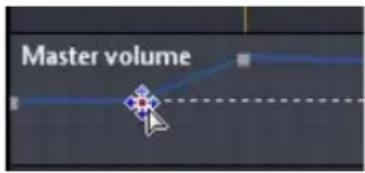
Note: this last step is just a recommendation, and is not necessary if you want the audio to fade up or down from the very beginning to the desired level.
- Continue adjusting the volume keys as required to achieve the desired audio levels throughout the audio file.
Note: to remove a volume key and reset its position back to the original value, select it and drag it outside the master volume area.
Audio Effects
Within CyberLink WaveEditor you can choose from a number of default effects and apply them to your audio files. You can also import custom VST plugin effects that you downloaded and apply them to your audio.
Default Effects
The default effects available in CyberLink WaveEditor include the most widely used for your convenience. Users that are looking for more advanced audio effects, can import custom VST plugin effects.
CyberLink WaveEditor contains the following effects:
Note: to preview an effect, click it in the Effects area, select the Preview check box, and then click the button.
Volume
- Boost: apply this effect to increase the volume of the audio. Use the slider to boost the volume by up to 12 decibels.
- Fade: lets you apply a fade-in or fade-out to audio. To apply it, select 🐘 to fade-in the audio or 🐘 to fade it out, and then use the sliders to set the Initial volume (when the fade-in/out starts) and the Ending volume (when the fade-in/out is complete).
Distortion
- Change Speed: select this effect to change the overall speed of your audio. CyberLink WaveEditor lets you speed the audio up to 2X the original speed, or slow it down to half the original speed.
- Pitch Shift: when applied to audio, this effect can further speed up or slow down the original audio by adjusting its pitch.
Adjustments
- Equalizer: select this effect to apply preset equalizer filters on your audio. You can also fully customize the overall sound of your audio using the available sliders.
Generate
- Reverb: use this effect to apply reverb to audio. Use the available sliders to adjust the overall echo effect on your original audio.
- Generate Silence: use this effect to generate a specified duration of silence in the selected audio.
- Generate Noise: use this effect to generate a specified duration of noise in the selected audio.
Special
- Noise Reduction: use this effect to reduce residual low level noises (such as hisses and hums) in audio, which are usually heard during quieter moments.
- Radio: select this effect to apply a filter that mimics the sound of a radio. Select the Radio type from the drop-down that fits your needs.
- Phone: select this effect to apply a filter that mimics the sound over a phone. Select the Phone type from the drop-down that you prefer.
VST
VST plugin effects are the industry standard for audio processing software. You can purchase, download and then import VST effects into CyberLink WaveEditor for use.
Note: check the associated documentation for each VST plugin effect for detailed information on using these effects.
Importing Effects
With VST plugin effects you can find and add the desired custom effect you want on your audio. VST plugin effects are widely available for download from the Internet, and can easily be imported into CyberLink WaveEditor.
Note: CyberLink does not guarantee the usability of downloaded VST plugin effects, nor the quality of the VST modules.
If you have downloaded a VST plugin effect, do this to import it into CyberLink WaveEditor:
- From the menu select Effects > VST > Import VST Effect.
- Click on the button and then browse to the location where the downloaded VST plugin effect is located.
Note: CyberLink WaveEditor imports VST plugin effects that are in the DLL format. If the downloaded effect is in the ZIP format, you must first unzip it before trying to import it into the program.
-
Select the VST plugin effect and then click Open.
-
Click OK to import the effect into the VST section of CyberLink WaveEditor.
Applying Effects
When applying effects to audio, you can either apply it to a selected range or the entire clip. To apply an effect to an audio file, do this:
- Select the audio file in the library you want to apply the effect to.
- Decide whether you want to apply the effect to both channels, or just one channel.
- Use range selection to select the portion of the audio file that you want to apply the effect to.
Note: if don't select any portion of the audio file, the effect is applied to the entire clip.
- Click on the effect you want to apply. The effect window displays.
- Adjust the effect settings as required.
- Click on the OK button to apply the effect to the audio file.
Exporting Audio
Every time you want to save the changes you make to an audio file, CyberLink WaveEditor saves it as a new file. Essentially you are exporting the original file, and saving it as new version and even in a new file format if you prefer.
To save and export your audio file as a new version, do this:
- Select the audio file in the library you want to save/export and then click .
- Enter in a new file name for the file and then select the format you want to save it as in the Save as type drop down.
- Click on Save. The file is saved to the export folder selected in Preferences.

Supported Formats
CyberLink WaveEditor supports the export of audio files into the following formats:
Audio: MP3**, WAV, WMA, M4A*
Note: * available in the Standard version, and only in the LE version when running the program under Windows 7. ** not available in the LE version of CyberLink WaveEditor.
Chapter 3:
Movie Player
CyberLink Media Suite provides access to CyberLink PowerDVD, a software disc player with all the features and controls of a normal living room disc player. It offers feature-rich navigation controls for an interactive and tailored viewing experience.

CyberLink PowerDVD also plays back movies that are in a movie DVD folder or are video files on your hard drive.
To start watching a movie on your computer, select the Movie Player menu and then select which type of movie media you want to play.
Note: for a more detailed description of this program and its functions, please consult the product's help file.
Playing Movie Media
CyberLink PowerDVD supports the playback of a variety of different media for your convenience. From high definition content and DVDs to video files and even audio
CDs, CyberLink PowerDVD provides you with the complete digital media playback experience.
Supported Media Types and Formats
The optical discs and file formats that CyberLink PowerDVD supports are listed below:
Optical Disc Types File Formats
Blu-ray Discs* BDAV, BDMV
DVD DVD-Video, AVCHD*, AVCREC*, DVD-VR, DVD+VR
CD VCD, SVCD, Audio
Note: * available in CyberLink Media Suite Ultra only.
CyberLink PowerDVD allows you to open and play files in the following formats:
Audio formats: MP3, M3U, MP2, M4A, WAV, WMA, AOB, AC3, CDA, MID, RMI.
Video formats: MPG, MPEG, AVI, DAT, WMV, ASF, VOB, DVR-MS, MOD, TOD, M2TS, MP4, DV, EVO, DIV, DivX, MPV, M1V, TRP, M2V, AVC, MOV, RMX, TIVO, VRO, WTV.
Playing Movie Discs
With CyberLink PowerDVD, you can play movie discs with all the features and controls of a normal living room disc player.
To play a movie disc with CyberLink PowerDVD, do this:
- Select the Play a Movie Disc function in the Movie Player menu of CyberLink PowerStarter.
- If you have a movie disc already in your disc drive, CyberLink PowerDVD plays it automatically. If you want to select a disc that is in a different drive, click select the drive that contains the disc, and then click Play.
Auto-resume
If you stop or close CyberLink PowerDVD during disc playback, even play other files or discs immediately afterwards, the next time you play that specific disc title, you may resume from the last viewed scene.
The auto-resume feature remembers exactly where you left off the last time you watched the disc. The auto-resume feature provides you with the following options:
- select Resume to continue from the point where you previously stopped watching.
- select Restart to watch the disc from the beginning.
- use a remote control, notebook touch pad, your keyboard, or click and drag a thumbnail with your mouse to scroll through the chapter thumbnails in FancyView. Select a specific chapter to begin play back from that chapter.
Note: the resume function is not supported for video files and only for DVD files located on the hard drive if an IFO file is present.
If you do not wish to see this feature every time you insert a disc, you can configure the Auto-resume settings on the Player settings tab.
Chapter Viewer
The Chapter Viewer lets you view the chapter thumbnails for a disc title in one of two modes:
Note: the Chapter Viewer is not available for Blu-ray Disc titles for content protection reasons.
• : displays the chapter thumbnails in FancyView for easy browsing. Use a remote control, your keyboard or notebook touch pad to scroll through the thumbnails. You can also click and drag the chapter thumbnails with your mouse. Select a chapter thumbnail to start playback from that chapter.
• It displays the chapter thumbnails in grid view. Use a remote control or your mouse to browse through the chapter thumbnails. Select a chapter thumbnail to start playback from that chapter.
TrueTheater Effects Window
Click the button to display the TrueTheater Effects window.

Note: TrueTheater effects are disabled during the playback of Blu-ray Disc titles. TrueTheater effects are also disabled when hardware acceleration is enabled.
TrueTheater effects are a group of video enhancement technologies from CyberLink that help to provide the best quality video possible during the playback of DVD titles.
Playing Movie Folders
If you want to play a movie that is in a DVD movie folder, do this:
-
Select the Play a Movie Folder function in the Movie Player menu of CyberLink PowerStarter.
-
In the Browse for Folder window, browse to the folder that contains your movie.
-
Click OK to begin playback.
Playing Movie Files
CyberLink PowerDVD not only lets you play back your disc titles, but also your movie files as well. To play back your movie files, do this
- Select the Play a Movie File function in the Movie Player menu of CyberLink PowerStarter.
- In the Edit Playlist window, browse to the folder on your hard drive (left pane) that contains the movie file you want to play. Movies files are displayed in the upper right hand pane.
- Select the file in the upper right pane and then click Add to add to your playlist.
- Click OK when you have selected all the media files you want in your playlist. CyberLink PowerDVD will play the files in the playlist.
Playback Controls
CyberLink PowerDVD playback controls provide effortless navigation of discs and other media, and easy access to all of the program's main features.
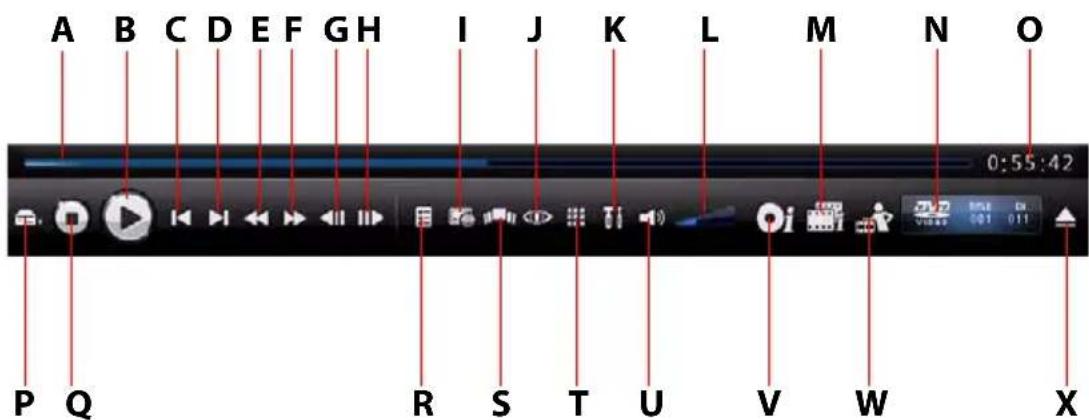
Button/Icon Hotkey Description
A Navigational slider Visually displays elapsed time.
Click along the slider to jump to other locations.
B P I a y / P a u s e Plays End paustes media. / S p a bar
C Previous P Returns to previous chapter.
| Button/Icon | Hotkey | Description |
| D Next N Jumps to next chapter. | ||
| E Rewind B Reverses through disc content at incremental speeds. | ||
| F Fast forward F Fast forwards through the disc content at incremental speeds. | ||
| G Step backward E Goes to previous frame. | ||
| H Step forward T Goes to next frame. | ||
| I Subtitles, audio language and angle | U (subtitles), H (audio language), A (angle) | Let's you select subtitles, set playback language, and switch between any available angles. |
| J True effects | The a t | Provides access to the TrueTheater video effect controls. See "TrueTheater Effects Window" on page 26. |
| K Settings | Ctrl+C | Provides access to CyberLink PowerDVD settings. |
| L Volume adjustment | +,- | Increase or decrease volume. |
| M Movie Collection | F3 | Provides access to your Movie Collection. |
| N Info Display | Displays current playback information about the current media. | |
| O Elapsed/remaining time | Click to toggle between elapsed and remaining playback time. | |
| P Select source | Ctrl+O | Selects media source for playback. |
| Q Stop S Stops playback of media. | ||
| R Menu L Provides access to the available disc menus. | ||
| S Chapter viewer Provides access to the disc chapter viewer. See "Chapter Viewer" on page 25. | ||
| T More Functions Provides access to more functions, including the number pad and extra buttons. | ||
| U M u t e Q M u t e v o l u m e . | ||
| V Movie Info page F2 Provides access to detailed information and reviews about the current movie. | ||
| W Movie Remix room F4 | Provides access to the Movie Remix room. | |
| X Eject Ctrl+E | Ejects the disc in the selected disc drive. | |
Note: the exact playback controls that are available depend on the media you are currently playing, so the buttons and their availability will vary.
Settings
The settings window lets you configure CyberLink PowerDVD to suit your specific playback requirements. You can access the settings window at any time by clicking the button on the playback controls or pressing Ctrl+C on your keyboard.
Note: for a detailed description of the all available settings in this program, please consult the Settings sections of the CyberLink PowerDVD help file.
Chapter 4:
Data
CyberLink Media Suite offers a number of burning functions, including the creation of data discs with CyberLink Power2Go.

You can burn data to a Blu-ray Disc, DVD or CD, and also format a disc for use with CyberLink InstantBurn.
Making a Data Disc
To burn a data disc, do this:
- Select the type of data disc you want to create and the format of the disc in the Data menu of CyberLink PowerStarter program window. The Data Disc window opens.
![CyberLink Power2Go - [MY_DATA_082307_1.p2\r] Project Edit Burning Help New Task Configuration Erase Disc Upgrade Power2Go Desktop Recent Data Desktop My Documents Adobe Backup CyberLink Golf information My Data Files My eBooks My Favorites My Music My Pictures Name Size Type Date Modified ACME Project Presentation.ppt 2,041 KB Microsoft PowerPo... 10/10/2006 07:12 PM ACME project.doc 99 KB Microsoft Word Doc... 08/16/2006 11:20 AM ACME Proposal.doc 325 KB Microsoft Word Doc... 11/08/2006 05:05 PM Contacts.xls 51 KB Microsoft Excel War... 11/22/2006 09:34 PM Convention presentation.ppt 2,602 KB Microsoft PowerPo... 11/16/2006 09:42 AM Convention Report.doc 20 KB Microsoft Word Doc... 12/10/2006 04:02 PM Finanves.xls 55 KB Microsoft Excel War... 09/12/2006 05:32 PM Financial report - January.doc 19 KB Microsoft Word Doc... 06/20/2006 10:33 AM My golf static.xls 17 KB Microsoft Excel War... 10/13/2006 01:07 PM Sample 1.pdf 28 KB Adobe Acrobat 7.0 ... 07/07/2006 09:27 AM Thumbs.db 6 KB Data Base File 07/16/2007 04:40 PM Work Fax Template.doc 31 KB Microsoft Word Doc... 07/12/2006 11:22 PM F:\HP DVD Writer 540b 11OH Disc Compilation Name Size Type Date Modified MY_DATA_082307 Start adding your data files to the disc by dragging and dropping them here or by selecting the file and sticking the Add File button. OMB 400MB 800MB 1200MB 1800MB 2000MB 2400MB 2800MB 3200MB 3600MB 4000MB 4430MB Folders 0 Files 0 Disc capacity: 4.590.208 KB Free space: 4.589.208 KB Used space: 1.000 KB](/content/2026/05/999456/images/6233945892a232df8096132962c2e2077bda7fa75bc63b9c202638b3a8725164.jpg)
-
Use the search pane to navigate to the files you want to include on your disc. The Recent Data tab allows you to conveniently perform an advanced search for your data files by recently added or opened, using the CyberLink Media Library service.
-
Select the files or folders you want to burn and then drag them to the destination disc or click the button.
-
When you have added all of the content that you want to burn, click Burn now.
-
If required, adjust the configurations on the Data, Common or Burner tabs.
-
Click Burn when you are ready to burn your disc. CyberLink Power2Go will proceed to burn your disc.
-
When burning is complete, select an option in the dialog box that opens:
-
Click View Log to view the burning log. The log opens in your default TXT editor, where you can view and save it.
- Click Print Label to print a disc label and open the CyberLink LabelPrint program. See "Print a Disc Label" on page 81.
- Click OK to close the dialog and then exit.
Formatting a Disc
CyberLink InstantBurn allows you to write data by folder or file onto a DVD or CD by simply dragging and dropping the data onto the disc like with a floppy or other removable disks. You can write onto the disc until it is full, or drag and drop unwanted files and folders to the Recycle Bin to remove them from the disc.
Note: during the installation of CyberLink Media Suite, by default, CyberLink InstantBurn is not installed on computers running Windows Vista.
Before you can begin dragging and dropping your data onto a DVD or CD, you must first format the disc. CyberLink InstantBurn is packet-writing software, so it formats discs in UDF (Universal Disc Format) format.
Note: once you have formatted a disc using InstantBurn, you cannot use it for burning using CyberLink Power2Go or other burning software.
To format a disc that can be used with CyberLink InstantBurn, do this:
- Insert a blank unformatted disc into the drive.
- Click on Format a Disc in the Data menu of CyberLink PowerStarter. The InstantBurn window displays.
- Select the drive where the disc to be formatted was inserted, then click Next.
- Click Properties to check the disc properties. If everything is OK, click Next.
- Input the volume label, then click Finish. You can change the volume label after the disc was formatted.
- Click OK on the confirmation prompt that appears to start formatting.
Using InstantBurn
Before you begin, check that the InstantBurn icon is in the system tray in the bottom right of the screen.
Icon Description

Indicates that CyberLink InstantBurn is running, but either no disc is currently in the drive or the current disc needs to be formatted.

Indicates that CyberLink InstantBurn is running and is ready to be used.
Note: for a more detailed description of this program and its functions, please consult the product's help file.
Write to Disc
- Open My Computer to display the disc drive icon you want to copy data to.
- Open a separate window to display the files/folders you want to copy. Make sure it does not hide the window you opened in Step 1.
- Click on the files/folders in the window then drag them onto the disc drive icon. The files/folders are copied onto the disc.
Supported Discs
Instant Burn 5.0 supports rewritable media and certain write-once media. You can only use CD-RW, DVD-RW, DVD+RW, DVD-RAM, BD-RE and BD-R discs.
Chapter 5:
Photo
The photo functions in CyberLink Media Suite let you organize, enhance and share all of your photos using CyberLink MediaShow.

You can turn your photos into dazzling slideshows, print them out in a variety of formats, create slideshow DVDs, and much more.
Note: for a more detailed description of the CyberLink MediaShow program and all of its functions, please consult the product's help file.
Importing Photos
If there are some photos on your hard drive, on a disc, or a removable device, you can easily import them into CyberLink MediaShow.
To import photos, including PowerPoint slides, into CyberLink MediaShow, do this:
- Select the Import Photos function within the Photo menu of CyberLink PowerStater. The CyberLink MediaShow import window displays.
- Select the Import Media button and then select the location of the media that you want to import. Depending on the devices connected to your computer, you can select a removable device (digital camera or other device), optical disc drive, folder on your hard drive, etc., from the list. Select Import and Convert PowerPoint File to browse for and convert the slides in a PowerPoint file into images in the JPG format.
- Once you select your import source, the content of the folder, device, disc, etc. displays in the Import Tray section of the import window. Select a media file to preview it in the Preview section of the window.
- Click Import All to import all of the media in the Import Tray or select the specific media file you want to import and then click Import Selected.
Note: select Exclude duplicates to have CyberLink MediaShow ignore the media that was previously imported into the library.
-
Enter the required information into the Importing Media window, including where on your computer's hard drive you want to store the imported media, and then click on OK.
-
Click on Done when the import is complete.
Note: select Background Import if you want to hide the importing media status dialog and continue using CyberLink MediaShow.
Managing Photos
Once you have all of your photos in CyberLink MediaShow, you can use the program to organize them and prepare them for slideshows, uploading to the Internet, and more. You can also tag all of the faces in the photos using the face tagging feature.
To manage your photos using CyberLink MediaShow, do this:
- Select the Manage Photos function within the Photo menu of CyberLink PowerStater. The CyberLink MediaShow main window displays.
Using the Library
When you import your photos into CyberLink MediaShow, they are automatically categorized into a series of folders for easy browsing within the library. The library also categorizes your media into albums, by search tags, and within the photos module, by the people in your photos.
The library consists of the following sections:
• Albums
- Folders
- Tags
• People
Albums
You can create new albums or place your media into existing ones, helping you organize your media and prepare it for screen savers, slideshows, movies, discs, etc.
Note: when you add media to your favorites, it is placed into the Favorite Media folder within albums automatically.
Favorites
CyberLink MediaShow lets you add the photos and videos you like the most to your favorites. When you add media to your favorites, it is added to the Favorite Media folder in albums, where you can easily view them or add them to a slideshow, disc, or share them with friends and family.
To add media to your favorites, do one of the following:
- select the media files you want to add in the media window and then click on the button.
- while viewing a slideshow or video, click on the ☆ button.
- drag and drop media into the Favorite Media folder in albums.
Folders
When your media is imported into CyberLink MediaShow, it is automatically organized by year and the corresponding folders on your computer's hard drive in the folders section of the library.
Note: media located on removable drives and optical discs are not displayed in the folder list.
Tags
You can add search tags to your photos and videos within CyberLink MediaShow, which can help you find them later when searching through all of the media within the library. Search tags are also useful when uploading media to Flickr, as users search by tags to find media they are interested in.
Note: you can add more than one search tag to a single photo.
People
When you tag faces within your photos, they are added to the people section of the library. For more information see "Tagging Faces" on page 38.
Tagging Faces
CyberLink MediaShow lets you tag all of the faces of your friends and family in your photos. You can manually tag the faces in each photo, or have CyberLink MediaShow auto detect and tag the faces for you.
Once the faces are tagged, the photos are then categorized in the people section of the library.
Auto Tagging Faces
CyberLink MediaShow uses face recognition to auto detect and tag faces in your photos. To have CyberLink MediaShow auto scan a group of photos for faces, do this:
-
On the Home tab, select Tag Faces.
-
Select which photos you want to tag faces in. You can select all of the photos in the library, or a specific group of photos, such as in a folder or those held on the tray.
Note: if your computer's VGA card supports CUDA technology and there are enough resources available, select Enable CUDA support for face analysis to reduce the time it takes to analyze your photos.
- Once you have selected the photos, click Start. CyberLink MediaShow will begin to analyze them for faces.
Organizing Tagged Faces
Once faces are tagged in your photos, CyberLink MediaShow groups similar faces in the Tag Faces window. In this window you can go through each face and associate it with a person in your library, or add a new person. You can also remove any unnecessary tags or skip faces if you want to add them later.
To associate a person to a tagged face:
- click on Select and then select the person from the list,
- click on Select and then on New to create and associate a new person in your library.
- click the button with the name of the suggested person.
- click Skip to tag the person later.
- click Remove to remove the tag from the photo. You can also deselect the check box to remove the tag from the photo.
Editing People
In the Tag Faces window, you can also add new people to your library, edit the person's personal information, and even scan the rest of your media for photos of this person.
To edit people in the Tag Faces window:
- select to edit the person's personal information and associate a default photo for him or her.
- select to remove this person from the library.
- select to scan the rest of the photos in the library for photos of this person.
Manually Tagging Faces
If CyberLink MediaShow missed faces during the auto scanning process, you can manually tag faces in your photos.
To manually tag faces, do this:
- Select an album, folder, search tag, or select and hold all of the photos on the tray.
- Click the Edit button on the Home tab.
- Select the photo in the thumbnail panel that you want to tag a face in and then select Tag Faces.
- Click on Add Tag.
- Drag the square to the position in the photo where the face is located.
- Resize the square if required and then click on Unknown.
- Select an existing person from the list or select New to add a new person to the library.
Repeat the process to tag other faces in the photo. Select Done when you have tagged all the faces in the photo.
Fixing and Enhancing Photos
CyberLink MediaShow offers several editing features, including adding creative effects to your photos or performing various touch ups on photos in preparation for using your media in slideshows, printing, etc.
Note: you can easily undo any edits that you make to a photo by right-clicking on it in the media window and selecting Undo Changes. You can also use the Edit Log to roll back changes to a specific version. See "Viewing the Edit Log" on page 42 for more information.
To fix and enhance your photos, do this:
-
Select the Fix and Enhance Photos function within the Photo menu of CyberLink PowerStarter. The CyberLink MediaShow main window displays.
-
Select the folder that contains the photos you want to use, or select all of the individual photos in the library you want to fix/enhance.
Note: if you want to include multiple photos that are in different folders, select the photos you want and then click the 📄 button to hold them on the tray for easier selection.
- Click the Next button. The Edit window displays.
Making Photo Fixes
CyberLink MediaShow provides you with several common fixes for your photos, including automatic fixes, fixing red-eye and a photo cropping feature. Click on the Edit button and then on the 🎨 tab to perform the following fixes on your photos.
- Crop: allows you to crop the photo and cut out the portions you don't want. Select a Fixed ratio to crop a specified size out of the photo. Select Invert to reverse the size of the fixed area.
- Red-eye: use this option to remove unwanted red-eye from your photos.
- Straighten: if your photo was taken unevenly and appears to be crooked, select this option to make it more level.
- Auto Brightness: select to automatically adjust the photo's brightness.
- Auto Contrast: select to automatically adjust the photo's contrast.
- Auto Balance: select to automatically adjust the photo's color balance.
- Auto Fix Lighting: select to automatically fix the lighting within the photo.
Select Done to save the changes to your photo.
Fine Tuning Photos
Use the fine tune function if you want to manually adjust the Brightness, Contrast, Saturation, White balance or Sharpness of your media. Click on the Edit button and then on the tab to use the sliders to adjust the media file's properties. Select Done to save the changes.
Adding Photo Effects
CyberLink MediaShow lets you add display and color effects to your photos. Click on the Edit button and then on the 📄 tab to add the following effects to your photos.
- Black & White: changes color photos into black and white photos.
- Sepia: applies a dark brown-grey hue that resembles the effect of aging in old photographs.
-
Matte: adds a white matting to your photo. Click and drag the focus to the area you want to apply the matting, and then use the slider to increase or decrease its size.
-
Vignette: using the slider closes/opens a black circle on your photo, like in old silent movies.
- Soft Focus: adds a soft focus effect to your photo. Use the Size slider to adjust the focus area and the Soft slider to adjust the amount of blur.
- Focal B&W: the focal black and white effect lets you have some portions of a photo in color, while others are in black and white. Use the slider to adjust the area that you want to display color.
- Tint: the tint effect lets you add highlighted color throughout your photo. Pick your desired color and then use the slider to adjust the intensity.
- Glow: the glow effect makes all the lighter areas of a photo appear to glow.
- Antique: the antique effect gives your photo an old fashioned look, as if it was taken more than 50 years ago.
Select Done to save the changes to your photo.
Viewing the Edit Log
Click on the Edit button and then on the ☑ tab, or just on the Edit Log* button, to view a history of all the edits made to the selected photo within CyberLink MediaShow.
Select Original File to undo all the changes you made to the media file. You can also select any of items in the edit log list to reset the changes to that point in the media file's edit history.
Note: * available in CyberLink Media Suite Ultra and Pro versions only.
Playing Slideshows
You can quickly play a slideshow with the photos in your CyberLink MediaShow library. To play photos in a slideshow, do this:
- Select the Play Slideshows function within the Photo menu of CyberLink PowerStarter. The CyberLink MediaShow main window displays.
- Select the folder that contains the photos you want to use, or select all of the individual photos in the library you want in your slideshow.
Note: if you want to include multiple photos that are in different folders, select the photos you want and then click the button to hold them on the tray for easier selection.
- Click the Next button. The slideshow begins to play automatically.
- Use the following buttons to control the playback of your slideshow:
Button Function
 | Stops the slideshow and returns to the main window. |
 | When viewing a slideshow, click this button to select the desired slideshow style. |
 | Click this button to configure the media file's playback preferences. You can select the speed CyberLink MediaShow plays the media and whether you want to Display Captions during the slideshow. Select Loop for continuous playback of the media and Shuffle to display media in random order. When viewing a slideshow, click Select Background Music to select a song to use as background music and Match to Background Music Length to set the slideshow duration to match the length of the music selected. If you are viewing a cell slideshow, select Change Slideshow Opening to modify the opening page at the beginning of the slideshow. |
 | Returns to the previously viewed photo, if available. |
 | Starts the playback of the slideshow. |
 | Pauses the playback of the slideshow. |
 | Jumps to the next photo in the slideshow, if available. |
 | Click the Favorites button to add or remove the current photo you are viewing to/from your favorites. |
 | Click this button to rotate the current photo in the counterclockwise direction. |
Button Function

Click this button to rotate the current photo in the clockwise direction.

Click this button to open the Edit window and edit the displayed media file.

When viewing a photo, click this button to modify the slideshow in the slideshow editor. See "Creating Slideshows" on page 44 for detailed information on this feature.

Click this button to adjust the volume of the slideshow music.
Creating Slideshows
CyberLink MediaShow lets you create and customize a slideshow that includes both your photos and videos. You can select from a number of styles, and then add background music, text and color boards.
To create and customize a slideshow, do this:
- Select the Create a Slideshow function within the Photo menu of CyberLink PowerStarter. The CyberLink MediaShow main window displays.
- Select the folder that contains the photos you want to use, or select all of the individual photos in the library you want in your slideshow.
Note: if you want to include multiple photos that are in different folders, select the photos you want and then click the button to hold them on the tray for easier selection.
- Click the Next button. The Slideshow Editor displays.
- Edit the slideshow as follows:
- use the rotate buttons to orientate the photos as required.
- select Add/Arrange to add and arrange the media in your slideshow as follows:
- select the Videos tab to browse to and add video clips into the slideshow.
-
select the Photos tab to browse to and add more photos into the slideshow.
-
select the Color Boards tab to add a new slide with a custom background color. Color boards let you insert a break into your slideshow, or you can use them for titles and credits. Select the color of the color board from the color panel, and then click Add Color Board.
- once you are done adding all of your media, arrange the order of all the slideshow's slides by dragging them to a new position. You can also auto arrange the media by date or name by selecting 📄
- select Design and then the Slideshow Style tab to set the slideshow's style as follows:
- select the Slideshow style and transitions used between the slides in the slideshow from the list.
- select the Aspect ratio of your slideshow. It is recommended that it is set to the same aspect ratio as the majority of the media in the slideshow.
- the Enable slideshow opening page option adds an opening page and text at the beginning of the slideshow.
Note: if the slideshow opening page was previously disabled, to enable it you must select Enable slideshow opening page, back out of the slideshow editor, and then reenter to add the slideshow opening page.
- select Use description as default text for CyberLink MediaShow to use the media file's description when adding text to a slide.
- enter in the Display duration of each slide or photo. This does not alter the length of any video clips included in the slideshow.
Note: you can customize the transition used on each slide, and its duration, by selecting a slide and then clicking the Properties button in the slideshow editor.
- select Design and then the Slideshow Music tab to set background music for the slideshow.
- select Add Text to include a text description on a slide. Use the keyboard to enter or modify the default text on all of the slides in your slideshow.
- To modify the text font properties select .

- To modify the effect the text uses during the slideshow, select .

- Select to preview all of the text on the slide or to remove it.
- select Properties to customize the transition used and the duration of the selected slide, which can differ from those set for the entire slideshow. For videos in the slideshow, use the slider to adjust the level of the background music and the video's audio when the video is displayed. Drag the slider all the way to the Music side if you want to completely mute the video's audio in the slideshow.
- While editing the slideshow, use the playback controls to continually preview your slideshow. Select Save to save it and work on it later.
Creating Slideshow DVDs
You can use CyberLink MediaShow to create professional looking discs that contain your photos.
To create a slideshow DVD, do this:
- Select the Create Slideshow DVD function within the Photo menu of CyberLink PowerStarter. The CyberLink MediaShow main window displays.
- Select the folder that contains the photos you want to use, or select all of the individual photos in the library you want on your slideshow DVD.
Note: if you want to include multiple photos that are in different folders, select the photos you want and then click the button to hold them on the tray for easier selection.
- Click the Next button. The Create Disc window displays.
Create Disc Window
The Create Disc window provides you with an easy to use wizard that guides you through the creation of your disc.
Note: before you begin creating your disc, you may want to configure your Create Disc settings.
Inputting Your Title
The title field allows you to enter a title description for your disc that displays on the main menu page. Simply input a desired title in the field provided.
Selecting a Style
CyberLink MediaShow provides you with the option of selecting from a number of stylish, pre-designed disc menus. These menus are already customized for you and may include such features as motion and menu music. To select a menu template, just click its thumbnail.
Note: You can download and import additional disc menu templates from DirectorZone.
Select the icon when the style section to browse for and download menu templates. Select to import downloaded templates into CyberLink MediaShow.
Adding Photos
You can add additional photos to your disc. Once added to your disc, they are organized into a slideshow. To add additional photos to your disc, do this:
- Click on the Photos tab on the left of the window.
- Browse through your library and select all the photos you want to include on your disc.
-
Either drag and drop them into the Photos section or use the add buttons.
-
Click the Style & Music button to customize your slideshow as follows:
-
Slideshow style: Select one of the following slideshow styles from the drop down menu: Fading, Motion, Cell. Select the Speed the pictures in the slideshow will be displayed from the drop down menu.
- Change Slideshow Opening: if you select the cell slideshow style, click this button to enter a title and your name on the slideshow opening page.
-
Background music: set the background music for the slideshow.
-
Click on OK to return to the Create Disc window.
Burning Your Disc
The final step for your production is to click the Burn button to begin burning your media to disc. Before you proceed, use the Preview function to ensure your disc is exactly the way you want it.
Saving and Opening Existing Disc Projects
When you are creating your disc, you don't need to finish it all at once. At any time you can Save your disc project and then Open it to finalize it later.
Printing Photos
With CyberLink MediaShow you can print out your photos on your printer in a variety of sizes.
To print out your photos, do this:
- Select the Print Photo function within the Photo menu of CyberLink PowerStarter. The CyberLink MediaShow main window displays.
- Select the folder that contains the photos you want to use, or select all of the individual photos in the library you want to print.
Note: if you want to include multiple photos that are in different folders, select the photos you want and then click the button to hold them on the tray for easier selection.
- Click the Next button. The Print window displays.
-
Set your printing options as follows:
-
Layout: select how you want the selected photos printed out. You can select from a variety of sizes, allowing you to print one or more photos out on a single piece of paper.
- Printer: select the printer from the drop down menu that you want to print your photos out on.
- Fit: select whether to shrink the size of the photo to fit the printing area or have CyberLink MediaShow automatically crop the photo to fit it.
- Printer Setup: click this button to set specific printer options, such as page layout and whether you want to print double-sided. The options available depend on the printer that is connected to your computer.
-
No. of copies per photo: enter the number of copies for each photo you would like printed out in the field provided.
-
Click on the Print button to begin printing your photos.
Uploading Photos
You can share all of your photos with your friends and family by uploading them directly from within the CyberLink MediaShow library to Flickr and Facebook.
Uploading Photos to Flickr
You can upload photos from the library directly to the Flickr photo sharing web service.
To upload photos to Flickr, do this:
- Select the Upload to Flickr function within the Photo menu of CyberLink PowerStarter. The CyberLink MediaShow main window displays.
- Select the folder that contains the photos you want to use, or select all of the individual photos in the library you want to upload.
Note: if you want to include multiple photos that are in different folders, select the photos you want and then click the 📊 button to hold them on the tray for easier selection.
- Click the Next button. The Upload to Flickr wizard displays.
- Follow the detailed instructions in the wizard and then click Upload to finish.
Note: if you do not have a Flickr account, you must register first before proceeding with the authorization.
- Click the Done button once your photos are uploaded.
Uploading Photos to Facebook
You can upload photos from the library directly to your Facebook page.
To upload photos to Facebook, do this:
- Select the Upload to Facebook function within the Photo menu of CyberLink PowerStarter. The CyberLink MediaShow main window displays.
- Select the folder that contains the photos you want to use, or select all of the individual photos in the library you want to upload.
Note: if you want to include multiple photos that are in different folders, select the photos you want and then click the 📄 button to hold them on the tray for easier selection.
- Click the Next button. The Upload to Facebook wizard displays.
Note: after clicking the Authorize button, you must log in to your Facebook page within your browser, and then return to the upload wizard to complete the authorization process for uploading photos to Facebook. If you do not have a Facebook account, you must register first before proceeding with the authorization.
- Follow the detailed instructions in the wizard and then click Upload to finish.
- Click the Done button once your photos are uploaded.
Chapter 6:
Video
The Video functions in CyberLink Media Suite let you perform a variety of tasks, including the capture of video content from a variety of sources and the production of video discs with CyberLink PowerProducer.

You can also perform editing tasks on your video with CyberLink PowerDirector or use CyberLink MediaShow to manage, enhance and share all of your videos.
Note: for a more detailed description of these programs and there functions, please consult the product help files.
Importing Videos
If there are some videos on your hard drive, removable device, or camcorder, you can easily import them into CyberLink MediaShow.
Importing Video Files
To import video files into CyberLink MediaShow, do this:
- Select the Import Videos function within the Video menu of CyberLink PowerStater. The CyberLink MediaShow import window displays.
- Select the Import Media button and then select the location of the media that you want to import. Depending on the devices connected to your computer, you can select a removable device, optical disc drive, folder on your hard drive, etc., from the list.
- Once you select your import source, the content of the folder, device, disc, etc. displays in the Import Tray section of the import window. Select a media file to preview it in the Preview section of the window.
- Click Import All to import all of the media in the Import Tray or select the specific media file you want to import and then click Import Selected.
Note: select Exclude duplicates to have CyberLink MediaShow ignore the media that was previously imported into the library.
-
Enter the required information into the Importing Media window, including where on your computer's hard drive you want to store the imported media, and then click on OK.
-
Click on Done when the import is complete.
Note: select Background Import if you want to hide the importing media status dialog and continue using CyberLink MediaShow.
Importing from a DV or HDV Camcorder
To capture and import video from a DV or HDV camcorder, do this:
Note: these steps outline how to capture and import video from camcorders connected with an IEEE (firewire) cable. If your camcorder connects to your computer via USB, you can import the video files directly by selecting Import Media and then selecting your camcorder from the list of attached devices.
- Select the Import Videos function within the Video menu of CyberLink PowerStater. The CyberLink MediaShow import window displays.
-
Select:
-
Import from DV and then your camcorder from the drop down to capture and then import videos from an attached DV camcorder.
-
Import from HDV and then your camcorder from the drop down to capture and then import videos from an attached HDV camcorder.
-
To:
• capture and import all of the video on your camcorder, select Import All.
- capture and import a specific portion of the video, use the playback controls to find the starting point of the content and then select Start Import.
-
Enter the required information into the Importing Media window, including where on your computer's hard drive you want to store the captured video, and then click on OK.
-
If capturing a clip, select Stop Import when you want to stop capturing.
- The captured video displays in the Import Tray and is automatically imported into your media library.
Capturing Videos
With CyberLink PowerDirector you can also capture video from a webcam, TV signal, DVD, and more. You can also perform more advanced captures from DV/HDV camcorders.
To capture video in CyberLink PowerDirector, do this:
- Select the Capture Videos function within the Video menu of CyberLink PowerStater. The CyberLink PowerDirector capture window displays:

A - Capture from a DV Camcorder, B- Capture from an HDV Camcorder, C- Capture from a TV Signal, D - Capture from a Digital TV Signal, E- Capture from a Webcam, F - Capture from a DVD or from an AVCHD Camcorder, G - Captured Content
Capturing from a DV Camcorder

DV camcorders are popular among video hobbyists, as they record in a digital format that does not require conversion before being used on a computer. You can capture a single scene or a number of scenes in a batch from your camcorder.
Note: if your DV camcorder connects to your computer via USB, you must import video files directly as if your camcorder is a regular hard drive. See "Importing Video Files" on page 52 for information on importing video files.
Capturing a Single Scene
You can capture a single segment of video from your camcorder. This function is particularly useful, for example, if you want to acquire a long video segment in its entirety without skipping over sections.
DV Backup
The DV Backup feature lets you back-up the digital video from your DV camcorder directly to DVD using CyberLink PowerDirector. Click the button to begin backing up your video.
Batch Capture from a DV Camcorder
Batch capturing may seem intimidating, but in reality it is an incredibly convenient method of capturing multiple video clips automatically. If you take a few minutes to familiarize yourself with batch capturing, you will save yourself time when you capture video from your camcorder. CyberLink PowerDirector scans your DV for intervals (or allows you to set them manually), then captures them in a batch using the intervals you created.
Automatic Batch Capture
Automatic batch capture is a quick way to capture scenes from a video tape. Click the button to access the automatic batch capture feature.
Manual Batch Capture
Using manual batch capture gives you more control over the capturing process and ensures that the scenes you want to include are captured. Manual batch capture is recommended when you are sure which scenes you want to capture and have a good idea where they are located on the tape. Click the button to access the manual batch capture feature.
Capturing from an HDV Camcorder

HDV camcorders record in a high definition digital format that does not require conversion before being used on a computer. You can capture scenes from your HDV camcorder directly into CyberLink PowerDirector.
Note: if your HDV camcorder connects to your computer via USB, you must import video files directly as if your camcorder is a regular hard drive. See "Importing Video Files" on page 52 for information on importing video files.
Capturing from a TV Signal

You may wish to add segments from your favorite TV programs to your video production, or simply record other segments for different uses.
Capturing from a Digital TV Signal

You may wish to add segments from your favorite Digital TV programs to your video production, or simply record other segments for different uses.
Note: this feature is not available in all regions.
Capturing from a Webcam

Webcams are inexpensive, handy video cameras that you can use for simple video capturing.
Capturing from a DVD

You can capture video scenes (including the audio portion) from a DVD for use in your CyberLink PowerDirector project.
Note: some DVDs are protected by technology that does not allow you to capture the content they contain.
Capturing from an AVCHD Camcorder
Note: * available in CyberLink Media Suite Ultra and Pro versions only.

AVCHD camcorders record in a high definition digital format that does not require conversion before being used on a computer. You can capture scenes from your AVCHD camcorder directly into CyberLink PowerDirector.
Note: if your AVCHD camcorder connects to your computer via USB, you must import video files directly as if your camcorder is a regular hard drive. See "Importing Video Files" on page 52 for information on importing video files.
Captured Content
All of the media you capture in the capture window is displayed in the Captured Content area.
Within in the Captured Content area you can right click on media to perform a number of options, including detecting scenes in video clips and deleting unwanted content so that it won't import into Edit window.
Select the Change Folder button to specify the folder you want all of the captured media to be stored.
Managing Videos
Once you have all of your videos in CyberLink MediaShow, you can use the program to organize them and prepare them for editing, burning, uploading to the Internet, and more.
To manage your videos using CyberLink MediaShow, do this:
- Select the Manage Videos function within the Video menu of CyberLink PowerStater. The CyberLink MediaShow main window displays.
Using the Library
When you import your videos into CyberLink MediaShow, they are automatically categorized into a series of folders for easy browsing within the library. The library also categorizes your media into albums, and by search tags.
The library consists of the following sections:
• Albums
- Folders
- Tags
Albums
You can create new albums or place your media into existing ones, helping you organize your media and prepare it for movies, discs, etc.
Note: when you add media to your favorites, it is placed into the Favorite Media folder within albums automatically.
Favorites
CyberLink MediaShow lets you add the videos you like the most to your favorites. When you add media to your favorites, it is added to the Favorite Media folder in albums, where you can easily view them or add them to a slideshow, disc, or share them with friends and family.
To add media to your favorites, do one of the following:
- select the media files you want to add in the media window and then click on the button.
- while viewing a slideshow or video, click on the ☆ button.
- drag and drop media into the Favorite Media folder in albums.
Folders
When your media is imported into CyberLink MediaShow, it is automatically organized by year and the corresponding folders on your computer's hard drive in the folders section of the library.
Note: media located on removable drives and optical discs are not displayed in the folder list.
Tags
You can add search tags to your photos and videos within CyberLink MediaShow, which can help you find them later when searching through all of the media within the library. Search tags are also useful when uploading media to YouTube, as users search by tags to find media they are interested in.
Note: you can add more than one search tag to a single video.
Fixing and Enhancing Videos
CyberLink MediaShow offers several editing features, including trimming unwanted portions from video clips, or performing various touch ups on videos in preparation for editing, uploading, etc.
Note: you can easily undo any edits that you make to a video by right-clicking on it in the media window and selecting Undo Changes. You can also use the Edit Log to roll back changes to a specific version. See "Viewing the Edit Log" on page 60 for more information.
To fix and enhance your videos, do this:
- Select the Quick Fixes and Enhance Videos function within the Video menu of CyberLink PowerStarter. The CyberLink MediaShow main window displays.
- Select the folder that contains the videos you want to use, or select all of the individual videos in the library you want to fix/enhance.
Note: if you want to include multiple videos that are in different folders, select the videos you want and then click the button to hold them on the tray for easier selection.
- Click the Next button. The Edit window displays.
Trimming Videos
Select Trim within in the video edit window to remove the portions of a video that you don't want in a final movie or slideshow. Use the helpful tips on the user interface for a detailed description on how to use the trim function.
Making Video Fixes
CyberLink MediaShow provides you with several common required quick fixes for your videos, including fixing the lighting, correcting shaky video, and reducing audio and video noise. Click on the Edit button and then on the 📄 tab to perform the following fixes on your videos.
- Fix shaky video: select to automatically fix a video clip that contains moments where the camera is shaking.
-
Auto fix lighting: select to automatically fix the lighting within the video.
-
Reduce video noise: select to reduce any video white noise or remove blocky artifacts from a video clip.
- Reduce audio noise: use this option to filter out background noise from the audio track. Drag the slider to remove more or less noise.
Once you are done selecting all the fixes you want to make to your video, select:
- Preview Selected Fix to view a preview of how the fix affects the video.
- Apply Selected Fix once you are satisfied with the results.
Fine Tuning Videos
Use the fine tune function if you want to manually adjust the Brightness, Contrast, Saturation, or White balance of your media. Click on the Edit button and then on the 📄 to use the sliders to adjust the media file's properties. Select Done to save the changes.
Viewing the Edit Log
Click on the Edit button and then on the ☑ tab, or just on the Edit Log* button, to view a history of all the edits made to the selected video within CyberLink MediaShow.
Note: * available in CyberLink Media Suite Ultra and Pro versions only.
Select Original File to undo all the changes you made to the media file. You can also select any of items in the edit log list to reset the changes to that point in the media file's edit history.
Editing Videos
Use CyberLink PowerDirector to edit all of your video files into professional-looking movie masterpieces.
To edit your videos in CyberLink PowerDirector, do this:
-
Select the Edit Your Videos function within the Video menu of CyberLink PowerStarter. The CyberLink PowerDirector edit window displays.
-
Click to import media into the media room's library, using one of two options:
-
import media files individually.
- import an entire folder that contains media files you want to use in your current project.
Note: videos you imported into CyberLink MediaShow using the Import Videos function are not automatically imported into CyberLink PowerDirector. You must browse to the folder you specified in the Importing Media window and then select the files or folder.
- Proceed to edit your movie. If required, you can download additional media from Flickr and Freesound to include in your video production, and custom effects and titles from DirectorZone.
Note: for a detailed description on how to edit videos in CyberLink PowerDirector, press the F1 key on your keyboard when within the edit window. In the help file, see The PowerDirector Workspace and Creating Your Story sections.
Converting Videos
CyberLink MediaShow Video Converter is a handy little module that lets you quickly convert your video files into other formats, so that you can watch them on an iPod*, iPhone*, PSP*, PS3*, Zune, or Xbox. You can also convert files into many other popular formats.
Note:* available in CyberLink Media Suite Ultra and Pro versions only.
Converting for use on an iPod or iPhone
Note:* available in CyberLink Media Suite Ultra and Pro versions only.
You can convert all of your current videos into files that you can then play on an iPod or iPhone. Once converted, the video converter can import the converted videos into iTunes if it is installed on your computer.
To convert files for use on an iPod or iPhone, do this:
- Select the Convert Video function within the Video menu of CyberLink PowerStarter. The Convert Videos window displays.
- Right-click on the videos that you want to convert and then select Convert to iPod Compatible File.
- Select which Apple device you want to play the converted video files on from the drop-down menu.
- Select the preferred resolution and aspect ratio (4:3 or 16:9) for the file from the drop-down menu.
- If you are only converting one file, enter a name for the converted file.
- If required, click on to select a different output folder for the converted file.
- If iTunes is installed on your computer, select the Import the converted files into your iTunes library option if you want to import the files into iTunes after conversion.
- If your computer supports CUDA/ATI Stream technology, select Enable CUDA/ATI Stream to maximize performance to reduce the time it takes to convert your video file.
- Click OK to start the conversion.
- If you previously selected Import the converted files into your iTunes library, click the Add to iTunes button to import the files into iTunes. Otherwise click on OK to return to the video converter main window.
Note: if iTunes is not currently installed on your computer, the video converter will just place the converted file into the specified output folder.
Converting for use on a Sony PSP/PS3
Note: * available in CyberLink Media Suite Ultra and Pro versions only.
You can convert all of your current videos into files that you can then play on a Sony PSP or PS3.
To convert files for use on a Sony PSP or PS3, do this:
-
Select the Convert Video function within the Video menu of CyberLink PowerStarter. The Convert Videos window displays.
-
Right-click on the videos that you want to convert and then select Convert to a PSP/PS3 Compatible File.
- Select whether you want to play the video file on a PSP (PSP-Video) or PS3 from the drop-down menu.
- Select the preferred resolution and aspect ratio (4:3 or 16:9) for the file from the drop-down menu.
- If you are only converting one file, enter a name for the converted file.
- If required, click on to select a different output folder for the converted file.
- If your computer supports CUDA/ATI Stream technology, select Enable CUDA/ATI Stream to maximize performance to reduce the time it takes to convert your video file.
- Click OK to start the conversion.
- Click OK to return to the main window.
Converting to Other Formats
You can convert videos into other formats, including WMV, MPEG-2, and MPEG-4* (H.264).
Note: * available in CyberLink Media Suite Ultra and Pro versions only.
To output your video as an MPEG-4 (H.264), MPEG-2 or WMV file, do this:
-
Select the Convert Video function within the Video menu of CyberLink PowerStarter. The Convert Videos window displays.
-
Select the videos you want to convert, and then click Next.
-
Select the preferred output format by clicking on the corresponding button.
-
Select the preferred resolution and aspect ratio (4:3 or 16:9) for the file from the drop-down menu.
-
Enter a name for the converted file.
-
If you are converting your file to an MPEG-4 (H.264) or MPEG-2 file, select the format for the video's audio from the Audio format drop-down menu.
-
If required, click on ... to select a different output folder for the produced file.
-
If your computer supports CUDA/ATI Stream technology, select Enable CUDA/ATI Stream to maximize performance to reduce the time it takes to create your video file.
-
Click OK to start the output.
To output your video to format with a custom profile, do this:
- Select the Convert Video function within the Video menu of CyberLink PowerStarter. The Convert Videos window displays.
- Select the videos you want to convert, and then click Next.
- Click on and then click on New to open the Custom window.
- Enter a Profile name for the custom profile in the field provided.
- Select the file format for the converted file from the Format drop-down menu.
- If applicable, select the preferred resolution and aspect ratio (4:3 or 16:9) for the file from the Resolution drop-down menu.
- If applicable, select the video's Bitrate or quality from the drop-down menu.
- If applicable, select the audio compression you want applied to the video's audio from the Format drop-down menu.
- If applicable, select the audio compression rate or quality of the video's audio from the Bitrate drop-down menu.
- Click OK to return to the Convert window.
- Enter a name for the converted file.
- If required, click on to select a different output folder for the converted file.
- If your computer supports CUDA/ATI Stream technology, select Enable CUDA/ATI Stream to maximize performance to reduce the time it takes to create your video file.
- Click OK to start the output.
Creating Video Discs
After you finish creating your video production, you can burn your movie onto a CD, DVD or Blu-ray Disc*, complete with stylish menus, in just a few simple steps in CyberLink PowerDirector. You can also import other videos and CyberLink PowerDirector projects, creating multi-layered and professional looking discs.

A - Disc Content Tab, B - Menu Preferences Tab, C - Disc Preferences Tab, D - Disc Menu Properties, E - Burn to Disc, F - Preview Disc Menu, G - Toggle Display, H - Disc Content
Note:* available in CyberLink Media Suite Ultra and Pro versions only.
To create a video disc in CyberLink PowerDirector, do this:
- Select the Create a Video Disc function and then the format of the disc you want to create within the Video menu of CyberLink PowerStarter. The CyberLink PowerDirector Create Disc window displays.
- On the Contents tab, import all of the videos you want on the disc by:
- clicking on to post any existing videos that you want on your created disc.
- clicking on to post any existing CyberLink PowerDirector projects that you want on your created disc.
- clicking on the Menu Structure button to view a structure tree of your disc menu. This structure tree includes all the titles on your disc and displays any chapters contained within.
-
Once you import all of the videos and CyberLink PowerDirector projects that you want into your disc menu, you can then perform the following functions:
-
click on to play the selected title.
- click on to remove the selected title from the disc menu.
- click on to edit the selected title in the Edit module.
-
click on to view/set/edit the selected title's chapters.
-
Click on the Menu Preferences tab to edit the existing disc menu or to select a different menu template. Select the Download button to download additional disc menu templates from DirectorZone.
-
Proceed to customize your disc menu as required.
Note: for a detailed description on how to customize your disc menu in CyberLink PowerDirector, press the F1 key on your keyboard when within the Create Disc window. In the help file, see the Creating Discs section.
- Click the Burn button to burn your video and customized menu to disc.
Burning HDV/DV Videos
You can burn video content from a DV or HDV camcorder directly onto a DVD or Blu-ray Disc without the intermediary step of first writing to your hard drive.
To burn HDV/DV videos directly to a disc in CyberLink PowerProducer, do this:
-
Select the Quickly Burn HDV/DV Video function within the Video menu of CyberLink PowerStarter. The CyberLink PowerProducer window displays.
-
Insert the disc you want to use and ensure the correct drive is selected.
- Select a recording speed in the Maximum speed drop-down list.
- Select the target disc format from the drop-down and then click Next.
- From the Recording from drop-down list, select the camcorder you want to record from.
Note: make sure that your DV or HDV camcorder is turned on and set to VCR/Camera mode in order for it to be detected by CyberLink PowerProducer.
- If required, click to configure your device.
- If required, set the configuration items.
- If required, click on the Settings tab to display and set the disc and video settings.
- Click the on the Settings tab to make a custom menu for your disc.
- Click Record to begin burning. CyberLink PowerProducer displays the real-time progress of the task. The burning process may take at least a few minutes, depending on the length of your video.
Uploading Videos
You can share all of your videos with your friends and family by uploading them directly from within the CyberLink MediaShow library to YouTube and Facebook.
Uploading Videos to YouTube
You can upload videos from the library directly to the YouTube video sharing web service.
To upload a video to YouTube, do this:
- Select the Upload to YouTube function within the Video menu of CyberLink PowerStarter. The CyberLink MediaShow main window displays.
- Select the video in the library you want to upload.
- Click the Next button. The Upload to YouTube wizard displays.
- Follow the detailed instructions in the wizard and then click Upload to finish.
Note: if you do not have a YouTube account, you must register first before proceeding with the authorization.
- Click the Done button once your video is uploaded.
Uploading Videos to Facebook
You can upload videos from the library directly to your Facebook page.
To upload a video to Facebook, do this:
- Select the Upload to Facebook function within the Video menu of CyberLink PowerStarter. The CyberLink MediaShow main window displays.
- Select the video in the library you want to upload.
- Click the Next button. The Upload to Facebook wizard displays.
Note: after clicking the Authorize button, you must log in to your Facebook page within your browser, and then return to the upload wizard to complete the authorization process for uploading a video to Facebook. If you do not have a Facebook account, you must register first before proceeding with the authorization.
- Follow the detailed instructions in the wizard and then click Upload to finish.
- Click the Done button once your video is uploaded.
Chapter 7:
Copy & Backup
With CyberLink Media Suite, you can easily make an exact copy of a data DVD or CD using CyberLink Power2Go and copy a non-CSS protected DVD Video disc with CyberLink PowerDVD Copy.
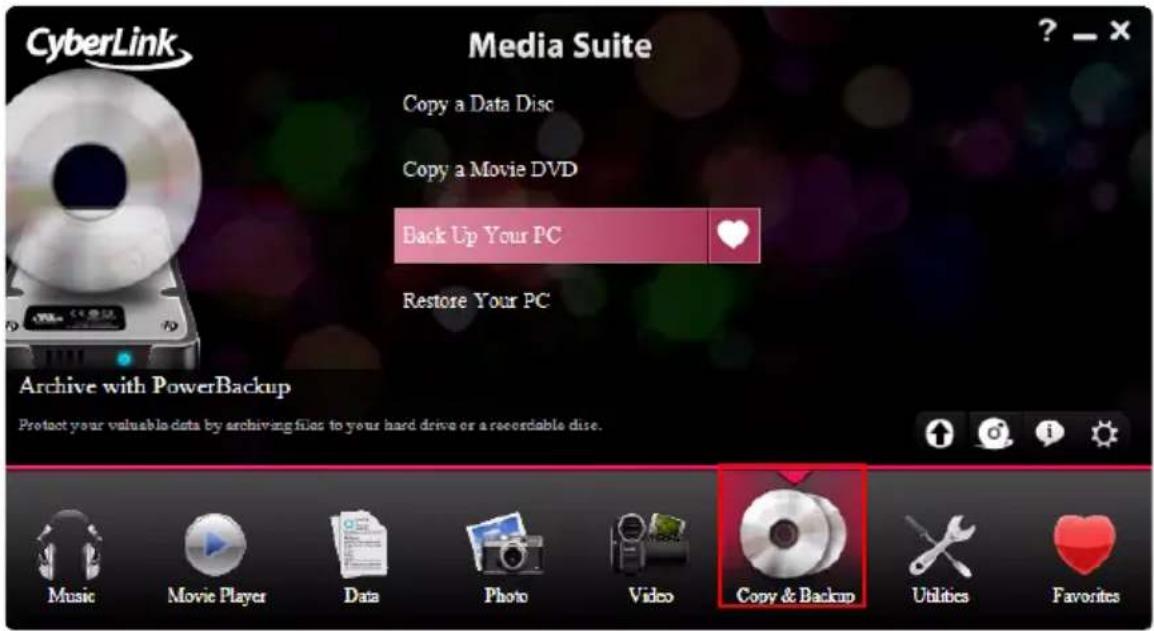
You may also back up all your data and restore it when and if required using CyberLink Power Backup.
Note: for a more detailed description of these programs and there functions, please consult the product help files.
Copying a Data Disc
The Copy Disc option allows you to make an exact copy of a disc of any format. However, you must copy the disc contents onto a blank disc of the same disc type. (You cannot, for example, copy content from a CD onto a DVD.)
To copy a disc, do this:
- Select Copy a Data Disc and the format of the disc in the Copy & Backup menu of the CyberLink PowerStarter program window. The Copy Disc window displays.
![Copy Disc From E:\ASUS DVD-EB16A 1.06 Read speed: 2x [Maximum speed] Ignore reading error Copy to hard disk Copy whole disc To F:\HP DVD Writer 540b 110H White speed: Maximum speed Number of copies: 1 Perform write simulation Verify recorded data Enable detect management Copy Cancel](/content/2026/05/999456/images/af130a9d6d0546ecc4c82c15c36d16c7ea3000d51e6171fefbe0d625ea8ce2a3.jpg)
- Select your source and target drives.
- Click Copy. CyberLink Power2Go burns the copied data onto the disc.
- When burning is complete, select an option in the dialog box that opens:
- Click View Log to view the burning log. The log opens in your default TXT editor, where you can view and save it.
- Click OK to close the dialog and then exit.
Copying a Movie DVD
CyberLink PowerDVD Copy is a specialized tool for copying DVD movies from disc or hard drive onto a back-up DVD. You can likewise create a DVD folder on your hard drive, or burn it to a DVD as a movie. Easy-to-select options and an uncomplicated interface simplify the DVD-copying process.
To copy a movie DVD, do this
-
Select Copy a Movie DVD in the Copy & Backup menu of the CyberLink PowerStarter program window. The CyberLink PowerDVD Copy window displays.
-
Select your video source of the movie DVD you would like to copy.
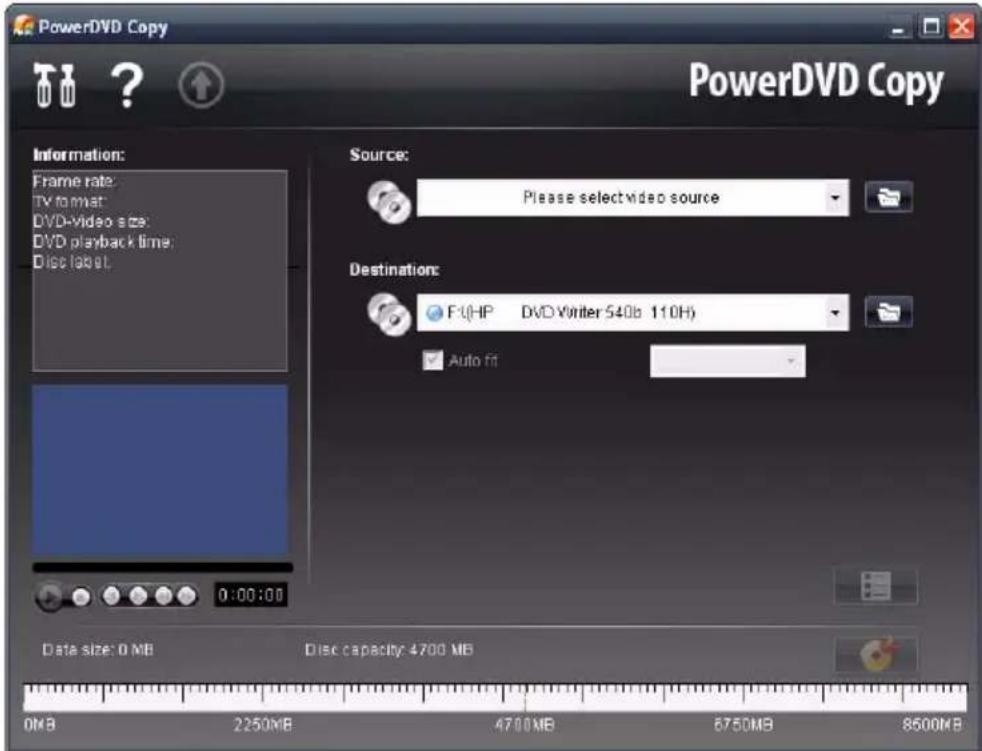
-
Select the destination where to copy the movie DVD.
-
Click the button and select the specific content from the DVD you want to copy, if not all is required.
-
Click . CyberLink PowerDVD Copy burns the movie onto the disc.
Backing Up and Restoring Your PC
Backing up data is an important security procedure that can save large amounts of time and money in case of disaster, disk failure, attack by a hacker or virus, etc. By keeping a backup copy of your important data on another medium, you can quickly and reliably restore your data to its original state.
Backing Up Data
To backup your data, first select Back Up Your PC in the Copy & Backup menu of the CyberLink PowerStarter program window, and then follow these simple steps:
![CyberLink PowerBackup - Backup - [MyBackup.PBJ] Job Edit View Tools Help Backup Features Compare Scheduler New Open Save Createbox Options Help Save Help PowerBackup Backup Procedure Select Source Select Destination Select Outlook Back Up Files Details Files to back up: 0 Totalfile size: 0 GB Step 1. Select the files and folders you want to back up Select the type of files you want to back up File and Folders Application Data Back up from My Documents OKOCO_PrunnerCHIP Adobe BRO-RM CD5/DVD-Case CL User Guides OPAS Cyber ink DVD Ray Help Events Project EventsBackup EventsCopy FAQ FAQ Document Karaoke/2Go MagicSports MakeDVDVideo Merge My eBooks My Music My Pictures My Received Files PageMaker Practice PCM Help File Docs PDRS Readie PowerDirector PowerDirector 6 PP 3.1 Name Size Type Date Mode NVIDIA Private-OIFI File Folder Adobe File Folder BRO-RM File Folder CD5/DVD Case File Folder CL User Guides File Folder OPAS File Folder Cyber ink File Folder DVD Play Help File Folder Events Project File Folder EventsBackup File Folder EventsCopy File Folder FAQ File Folder FAQ Document File Folder Karaoke/2Go File Folder MagicSports File Folder MakeDVD Video File Folder Merge File Folder My eBooks File Folder My Music File Folder My Pictures File Folder My Received Files File Folder PageMaker Practice File Folder PCM Help File Docs File Folder PDRS Readie File Folder PowerDirector File Folder PowerDirector 0 File Folder Ready N.M](/content/2026/05/999456/images/6210cde988e8b02749d58bd05681da753cba670556f649bd767563d6ab5a962b.jpg)
Step 1 - Select Source
In the Backup window select the source by locating and checking the files and folders that you want to back up in the two file directory panes. (These panes resemble Windows Explorer in functionality.) You can choose to backup Files and Folders or Application Data by selecting the desired file type above the directory panes.
Step 2 - Select Destination
Click Select Destination, then set your backup destination.
- Back up to: Select your backup destination from the drop-down box. Backup destinations may include hard disk or a disc burner (depending on your available hardware).
- Back up as: Give each backup file a unique name. To save the backup file to a different directory, click Browse, then locate and select the folder you want to use.
- Include Restore Tool: Select to create an executable (.exe) file that allows you to restore your data on a computer that does not have the PowerBackup program installed.
- Split into volumes: Divide your backup files into volumes (portions) of the size you specify.
Step 3 - Select Method
Click Select Method, then choose the backup method (and advanced options, if desired) that you want to use.
• Backup methods include Full, Differential and Incremental.
• For more options, click Options.
Note: the specific functions of this program depend on the version you have purchased, and therefore some features may not be available.
Step 4 - Back Up Files
Click Back Up Files. Verify that the settings are correct, then click one of the buttons to begin your backup.
- Click Backup Now to begin backing up immediately.
- Click Add to Scheduler to schedule the backup for a later time.
Restoring Data
To restore your data after a backup, first select Restore your PC in the Copy & Backup menu of the CyberLink PowerStarter program window, and then follow these simple steps:

Step 1 - Select Source
In the Restore window select the source by selecting the restoration source from the Restore from drop-down box.
- Backup file: Restore from an existing backup file. To open a backup file, click Browse, then locate and open the file you want to use.
- My Catalog: Restore from existing records of previous backup jobs. (To delete records from My Catalog, use the Edit > Delete Catalog Record or Delete All Catalog Records command.)
•Disc drive: Restore from a disc.
Once you select the source, select the files you want to restore.
Step 2 - Select Destination
Click Select Destination, then set your restoration destination.
- Original location: Restore to the original location from which the files were backed up.
- Alternative location: Restore to a new location. To set a new directory, click Browse, then locate and select the folder you want to use.
- Single directory: Restore all of the backed up files to a single new directory. To set a new directory, click Browse, then locate and select the folder you want to use.
Step 3 - Select Method
Click Select Method, then choose the restoration method you want to use.
- Do not overwrite: Restores only files that are not found on your hard drive, and does not overwrite existing files.
- Overwrite older files: Overwrites existing files on your hard drive if the backed-up copy is newer.
- Always overwrite the files on my computer: Overwrites existing files on your hard drive with the backed-up copy in every case.
- Ask before overwriting: Prompts you to decide which copy you want to keep.
Click Restore Files and then verify that the settings are correct. Click Restore Now to begin restoring files immediately.
CyberLink Media Suite
Chapter 8:
Utilities
CyberLink Media Suite provides you with a number of useful disc utilities, including allowing you to erase rewritable discs and also design and print professional looking labels using CyberLink LabelPrint to complete the disc making process.

You can also create and burn a disc image, burn a DVD folder, edit a video disc, and much more.
Note: for a more detailed description of these programs and there functions, please consult the product help files.
Creating a Disc Image
Creating and saving a disc image onto your hard drive is useful for backing up your discs on your computer for future burning tasks.
To create a disc image, do this:
- Select Create a Disc Image function within in the Utilities menu of CyberLink PowerStarter.
![Save Disc Image From E:\ASUS DVD-E6164 1.06 Read speed: 2x [Maximum speed] ✓ Ignore reading error: ✓ Copy whole disc □ Enable defect management To D:\My Documents\Image.p2i Browse... Save Cancel](/content/2026/05/999456/images/b20ba3d95c9a5137fcc762dd66c1650a6c6270149426de4bd1a227e984f6bade.jpg)
- Insert your disc. If necessary, select your source drive in the From drop-down box.
- Enter the destination folder and disc image file name in the To entry box, or click Browse..., select a folder and enter the disc image file name.
- Click Save to save the disc image.
Burning a Disc Image
Burning a disc image to disc allows you to restore a saved disc image to disc as well as burn disc images created by the CyberLink Image Recorder.
To burn a disc image, do this:
- Select Burn a disc image function within in the Utilities menu of CyberLink PowerStarter.

- Click Browse... and locate the disc image.
- Insert your disc and select your drive in the drop-down list.
- Click Burn to start burning it to disc.
Erasing a Disc
If you are using a rewritable disc, you can erase content that has been previously recorded onto it. This allows you to reuse the same discs over and over without the need to continually buy new discs.
To erase a disc, do this:
-
Select Erase a Disc function within in the Utilities menu of CyberLink PowerStarter window.
-
Insert your disc and select your burner in the Erase Tool window.
![Erase Tool [F:][0,1,0] HP DVD Writer 540b 110H Erase an RW disc. Erase Method Normal Erase (Estimated time: approx. 20-40 min.) Quick Erase (Estimated time: approx. 1 min.) If you need to erase the disc completely, select Normal Erase. CyberLink Eject Start Close](/content/2026/05/999456/images/4bc391c99b60aa43ca238d4530c6558488a559ddc379600f005324a113749bb4.jpg)
- Select an erase method:
• The Normal Erase option erases all of the content the disc contains.
• The Quick Erase option erases the disc index contained on the disc.
- Click Start to start. When the task is completed, a screen message appears, informing you of the status.
Print a Disc Label
Cyberlink LabelPrint offers a wide variety of layout formats and supports a number of printing options, including printing directly on your disc using LightScribe and Labelflash technologies.
Note: for a more detailed description of this application and its functions, please consult the product's help file.
To begin creating a label, select Print a Disc Label function within in the Utilities menu of CyberLink PowerStarter.
![CyberLink LabelPrint - [My Label] New Open Save Save As Config Help LabelPrint LabelPrint 1 Select Label Type 2 Edit Disc Information 3 Edit Layout 4 Print Step 1. Select the type of label you want to print. LightScribe Labelflash™ Disc Label MiniDisc Label Front Cover Black of Front Cover Disc Wrap](/content/2026/05/999456/images/0d91a0a897a7848012c053a4637275d6a255a4146a0833cc02eb8eaf201e8d4a.jpg)
Step 1 - Select a Label Type
The first step in creating a label is to select the type of label you want to print. You can select to create LightScribe label, Labelflash label, a disc label, a mini disc label, a front cover, back cover or a disc inlay.
Step 2 - Edit Disc Information
Add or edit disc information, such as a title, which will allow you to recognize the disc. Add or edit the content list information to keep track of which files you have added to the disc. You can add or edit this information on the Edit Disc Information page.
Step 3 - Edit Layout
By selecting a layout, modifying the fonts, and using a custom background image, you can create a more personalized disc label. You can:
- select a label layout.
- add a background image.
- add or modify text.
Step 4 - Print
You are now ready to print your label with CyberLink LabelPrint. You can print on one of the following media:
- Plain paper: Allows you to print on any sheet of paper your printer supports.
- Label paper: Provides labels for easy printing.
- Directly onto your disc: Does away with paper labels, but requires a special LightScribe or Labelflash burning drive and disc.
Burning DVD Folders
If you have created a DVD folder you can burn this folder to a disc for storage.
To burn a disc from a DVD folder, do this:
- Select Burn a DVD Folder function within in the Utilities menu of CyberLink PowerStarter.

-
Insert your disc and select your drive.
-
Click, then select the folder you want to burn from.
-
Click Start to begin. CyberLink PowerProducer displays the real-time progress of the task.
Editing Video Discs
If you burned your production onto a rewritable disc in the +VR, -VR or BDAV format, you can go back and edit the content at a later time, adding additional video, modify the menu, etc. in CyberLink PowerProducer.
To edit a disc after burning, do this:
- Select Edit a Video Disc function within in the Utilities menu of CyberLink PowerStarter.
2. Click Edit Disc.

- Insert your target disc, select a recording speed, the Aspect Ratio for your disc and then click Next.
- Make any of the required modifications in the CyberLink PowerProducer program.
- When you are done your edits click Next and then click Burn to burn your disc.
Advanced Video Disc Utilities
CyberLink PowerProducer contains a number of utilities you can use to manage disc content, disc image files, disc folders and more.
To access these useful utilities, select Advanced Video Disc Utilities function within in the Utilities menu of CyberLink PowerStarter. The CyberLink PowerProducer Disc Utilities window displays.
Note: for a detailed description about all of the available disc utilities and how to use each of them, press the F1 key on your keyboard when within the Disc Utilities window. In the help file, see the Disc Utilities section.
Chapter 9:
Technical Support
This chapter contains technical support information. It includes all the information to find the answers you need to assist you. You may also find answers quickly by contacting your local distributor/dealer.
Before Contacting Technical Support
Please take advantage of one of CyberLink's free technical support options:
- consult the user's guide or the online help installed with your program.
• refer to the Knowledge Base in the Support section of the CyberLink web site.
http://www.cyberlink.com/prog/support/cs/index.do
The FAQs may have information and helpful hints that are more current than the User Guide and online help.
When contacting technical support by email or phone, please have the following information ready:
- registered activation key (Your activation key can be found on the CD cover, the Box cover, or in the email received after you purchased CyberLink products on the Cyberlink store).
- the product name, version and build number, which generally can be found by clicking on the product name image on the user interface.
- the version of Windows installed on your system.
- hardware devices on your system (capture card, sound card, VGA card) and their specifications.
- the wording of any warning messages that were displayed (You may want to write this down or take a screen capture).
- a detailed description of the problem and under what circumstances it occurred.
Web Support
Solutions to your problems are available 24 hours a day at no cost on the CyberLink web sites:
Note: You must first register as a member before using CyberLink web support.
CyberLink provides a wide range of web support options, including FAQs and a user community forum, in the following languages:
| Language | Web Support URL |
| English | http://www.cyberlink.com/prog/support/cs/index.do |
| Traditional Chinese | http://tw.cyberlink.com/prog/support/cs/index.do |
| Japanese | http://jp.cyberlink.com/prog/support/cs/index.do |
| Italian | http://it.cyberlink.com/prog/support/cs/index.do |
| German | http://de.cyberlink.com/prog/support/cs/index.do |
| French | http://fr.cyberlink.com/prog/support/cs/index.do |
| Spanish | http://es.cyberlink.com/prog/support/cs/index.do |
Index
A
About 5
Access 3
Add
face tag 40
text 45
Add to favorites 4
Albums 37, 58
favorites 37, 58
Alternative location option 75
Always overwrite the files on my computer option 75
Antique 42
Arrange slides 44
Ask before overwriting option 75
ATI stream 62, 63
Audio
burn 3
edit 3, 17
export 21
noise reduction 60
record 15
save 21
Audio Converter 13
Audio tracks, ripping to hard disk 13
Auto-resume
options 25
AVCHD
import 57
B
Background music 47
Backing Up Data 72
Backup 4
Balance 41
Bitrate 64
Black & white 41
Blu-ray Disc
player 23
Boost 19
Brightness 41, 60
Burn 47
audio files 3
data files 3
disc image 4
Burning
data discs 32
disc images 79
burning
DV content to DVD 66
editing a disc after 83
C
Camcorders
AVCHD 57
Captions
slideshow 43
Capture
from Digital TV 56
from DV camcorder 54
from DVD 56
from HDV camcorder 55
from TV 56
from webcam 56
single scene 55
Capture video 52
Captured content 57
CD
ripping music from 13
Cell 47
Change speed 19
Chapter viewer 29
FancyView 25
grid view 25
Chapters
viewer 25
Color boards 44
Contrast 41, 60
Controls 27, 43
Copy 4
Copy discs 70
Copying a Movie DVD 71
Create
disc labels 4, 81
Crop 41
CUDA 39, 62, 63
Custom profiles 64
D
Data 3
backup 4
Delete all catalog records 74
Delete catalog record 74
Digital TV
capture from 56
DirectorZone 47, 61, 66
Disc
supported formats 24
Disc image
burning 79
saving 78
Disc menus
structure 66
Disc utilities
burn disc Image 79
Erase disc 80
Rip audio 13
Save disc image 78
Discs
add photos 47
burn 47
create 4
edit 4
style 47
title 46
Display captions 43
Do not overwrite option 75
Download 47
audio 15
DV Backup 55
DV camcorder 52
capture from 54
DV, burning to DVD 66
DVD
capture from 56
player 23
E
Edit 40, 41, 59, 60
audio 17
audio files 3
fix photos 41
fix videos 59
trim videos 59
undo 42, 60
video 4
Edit log 42, 60
editing
disc after burning 83
Effects 41
apply 21
custom 20
default 18
importing 20
VST 20
Equalizer 19
Erase
discs 4
Erase disc
procedure 80
Export
audio 21
file formats 21
F
Facebook 49, 68
Faces
tag 38, 40
Fade 16, 19
Fading 47
FancyView 25
chapters 25
Favorites 4, 37, 43, 58
albums 37, 58
File directory panes 72
File formats
export 21
import 14
supported 24
Fine tune 41, 60
Fix
photos 41
videos 59
Flickr 49, 61
Focal B&W 42
Folders 38, 58
Format 64
Freesound 15, 61
Functions 5
G
Generate
noise 19
silence 19
Glow 42
GPU acceleration 39
Grid view
chapters 25
H
H.264 63
HDV camcorder 52
capture from 55
|
Image
create disc 4
Import
audio 15
download menu 47
effects 20
file formats 14
PowerPoint files 36
video 52
VST effect 20
Importing media window 36
InstantBurn
erasing a disc 80
supported discs 34
using InstantBurn 34
iPhone 61
iPod 61
iTunes 62
L
LabelPrint 81
Labels 4
Library 37, 57
Lighting
auto fix 41, 59
LightScribe 82
M
Manage
photos 37
videos 57
Master volume 17
Matte 41
Media available for printing on 82
Media library service 12, 32
Media tab 12
Menus 47
download 47
MoovieLive 28
Motion 47
Movie collection 28
Movie player 3
Movie remix 29
MPEG-2 63
MPEG-4 63
Music 3
ripping to hard drive 13
My Catalog 74
N
Navigation
slider 27
Noise reduction 20
Normal erase 80
O
Original location option 74
Overwrite older files option 75
P
Paper templates 82
People
edit 39
Phone 20
Photo 4
Photos
add to disc 47
edit 41, 60
effects 41
fine tune 41, 60
fix 41
import 36
manage 37
upload 49
Pitch shift 19
Plain paper 82
Play back
slideshow 43
videos 43
Playback
controls 27
general 23
Plugin 20
Power2Go
burn a music disc 12
burn data disc 32
burning a disc image 79
copying discs 70
create a music disc 12
creating a disc image 78
rip an audio CD 13
PowerBackup
backing up data 72
restoring data 74
PowerDVD 23
PowerDVD Copy
copying a movie disc 71
PowerPoint files
import 36
PowerStarter Program 2
Preferences 5
Preview 19
available media 82
disc label 81
Produce 4
Profiles 64
Programs 5
Properties 46
PS3 61, 63
PSP 61, 63
Q
Quick erase 80
R
Radio 20
Recent Data tab 32
Recently created documents 32
Recently opened documents 32
Record 15
Red-eye 41
Remove favorite 4
Resolution 64
Restore tool 73
Restoring Data 74
Resume options 25
Reverb 19
Rip audio procedure 13
S
Saturation 41, 60
Save audio 21
Scheduling a backup for later 73
Search album 12 artist 12 genre 12 recently a year 12
Search tags 38, 58
Selecting source 24
Sepia 41
Shaky video 59
Share 4 Facebook 49, 68 Flickr 49 YouTube 67
Sharpness 41
Single directory option 75
Slideshow
add media 44
background music 47
cell 47
design 45
display captions 43
fading 47
motion 47
opening 43, 47
playback controls 43
properties 46
select style 47
speed 47
style description 47
text 45
Slideshows 4
Soft focus 42
Source select 24
Speed 19
Split into volumes 73
Straighten 41
Supported disc and file formats 24
System Requirements 8
T
Tag faces 38, 40
Tags 38, 58
Text 45
Tint 42
Trim 59
TrueTheater 28
video effects 26
TV
capture from 56
U
Undo 42, 60
Upgrade 5
Upload photos 49
Upload videos 67, 68
Utilities 4
V
Version Table 7
Video 4
Video converter 61
Video noise, reduce 60
Videos
convert 61
custom profile 64
display captions 43
edit 41, 60
fine tune 41, 60
fix 59
import 36, 52
manage 57
playback controls 43
trim 59
upload 67, 68
View Log 13, 32
Vignette 42
Volume 17
VST 20
import 20
W
Watch
movies 3
Webcam
capturing from 56
White balance 41, 60
Window
importing media 36
WMV 63
X
Xbox 61
Y
YouTube 67
Z
Zune 61
CyberLink Media Suite


- CyberLink Media Suite
- Copyright and Disclaimer
- International Headquarters
- Contents
- Introduction...... 1
- Music 11
- Movie Player 23
- Data.... 31
- Photo 35
- Video 51
- Copy & Backup 69
- Utilities 77
- Technical Support...... 85
- Index 87
- Chapter 1:
- Introduction
- CyberLink Media Suite Programs
- The PowerStarter Program
- Menu icons
- Music
- Movie Player
- Data
- Photo
- Video
- Copy & Backup
- Utilities
- Favorites
- Function Icons
- Quick Access Buttons
- Upgrade/Update
- CyberLink Products
- About
- Preferences
- Version Table
- System Requirements
- Chapter 2:
- Making a Music Disc
- Burning a Music Disc
- Ripping an Audio CD
- Converting Audio Formats
- Editing Your Audio
- Adding Audio into the Library
- Importing Audio
- Supported Formats
- Downloading Audio From Freesound
- Recording Audio
- Editing Audio
- Adjusting the Master Volume
- Audio Effects
- Default Effects
- Volume
- Distortion
- Adjustments
- Generate
- Special
- VST
- Importing Effects
- Applying Effects
- Exporting Audio
- Chapter 3:
- Playing Movie Media
- Supported Media Types and Formats
- Optical Disc Types File Formats
- Playing Movie Discs
- Auto-resume
- Chapter Viewer
- TrueTheater Effects Window
- Playing Movie Folders
- Playing Movie Files
- Playback Controls
- Button/Icon Hotkey Description
- Settings
- Chapter 4:
- Making a Data Disc
- Formatting a Disc
- Using InstantBurn
- Icon Description
- Write to Disc
- Supported Discs
- Chapter 5:
- Importing Photos
- Managing Photos
- Using the Library
- Albums
- Folders
- Tags
- People
- Tagging Faces
- Auto Tagging Faces
- Organizing Tagged Faces
- Editing People
- Manually Tagging Faces
- Fixing and Enhancing Photos
- Making Photo Fixes
- Fine Tuning Photos
- Adding Photo Effects
- Viewing the Edit Log
- Playing Slideshows
- Button Function
- Creating Slideshows
- Creating Slideshow DVDs
- Create Disc Window
- Inputting Your Title
- Selecting a Style
- Adding Photos
- Burning Your Disc
- Saving and Opening Existing Disc Projects
- Printing Photos
- Uploading Photos
- Uploading Photos to Flickr
- Uploading Photos to Facebook
- Chapter 6:
- Importing Videos
- Importing Video Files
- Importing from a DV or HDV Camcorder
- Capturing Videos
- Capturing from a DV Camcorder
- Capturing a Single Scene
- DV Backup
- Batch Capture from a DV Camcorder
- Automatic Batch Capture
- Manual Batch Capture
- Capturing from an HDV Camcorder
- Capturing from a TV Signal
- Capturing from a Digital TV Signal
- Capturing from a Webcam
- Capturing from a DVD
- Capturing from an AVCHD Camcorder
- Captured Content
- Managing Videos
- Fixing and Enhancing Videos
- Trimming Videos
- Making Video Fixes
- Fine Tuning Videos
- Editing Videos
- Converting Videos
- Converting for use on an iPod or iPhone
- Converting for use on a Sony PSP/PS3
- Converting to Other Formats
- Creating Video Discs
- Burning HDV/DV Videos
- Uploading Videos
- Uploading Videos to YouTube
- Uploading Videos to Facebook
- Chapter 7:
- Copying a Data Disc
- Copying a Movie DVD
- Backing Up and Restoring Your PC
- Backing Up Data
- Step 1 - Select Source
- Step 2 - Select Destination
- Step 3 - Select Method
- Step 4 - Back Up Files
- Restoring Data
- Chapter 8:
- Creating a Disc Image
- Burning a Disc Image
- Erasing a Disc
- Print a Disc Label
- Step 1 - Select a Label Type
- Step 2 - Edit Disc Information
- Step 3 - Edit Layout
- Step 4 - Print
- Burning DVD Folders
- Editing Video Discs
- Click Edit Disc.
- Advanced Video Disc Utilities
- Chapter 9:
- Technical Support
- Before Contacting Technical Support
- Web Support
- Index
- A
- B
- C
- D
- E
- F
- G
- H
- |
- L
- M
- N
- O
- P
- Q
- R
- S
- T
- U
- V
- W
- X
- Y
- Z
Brand : CYBERLINK
Model : Media Suite 8 Centra
Category : Photo/Video Software