
APRC5WIT - CD Player AKAI - Free user manual and instructions
Find the device manual for free APRC5WIT AKAI in PDF.


| Product Type | CD Player |
| Brand | AKAI |
| Model | APRC5WIT |
| Dimensions (W x D x H) | Approx. 430 x 250 x 90 mm |
| Weight | Approx. 2.5 kg |
| Power Supply | AC 230V, 50Hz |
| Power Consumption | 15 W (standby: <1 W) |
| Playback Formats | CD, CD-R, CD-RW, MP3 CD |
| Disc Loading | Top-loading (manual) |
| Audio Output | Stereo RCA, 3.5mm headphone jack |
| Supported Functions | Play, Pause, Stop, Skip, Repeat, Shuffle, Program |
| Display | Backlit LCD display |
| Remote Control | Included (IR) |
| Maintenance | Clean with soft dry cloth; avoid liquids |
| Safety | Do not expose to moisture; unplug during storms |
| Spare Parts/Repairability | Contact AKAI support for service |
| Environmental | Operating temperature: 5°C - 35°C |
| Accessories | Power cord, remote control, user manual |
Frequently Asked Questions - APRC5WIT AKAI
User questions about APRC5WIT AKAI
0 question about this device. Answer the ones you know or ask your own.
Ask a new question about this device
Download the instructions for your CD Player in PDF format for free! Find your manual APRC5WIT - AKAI and take your electronic device back in hand. On this page are published all the documents necessary for the use of your device. APRC5WIT by AKAI.
USER MANUAL APRC5WIT AKAI

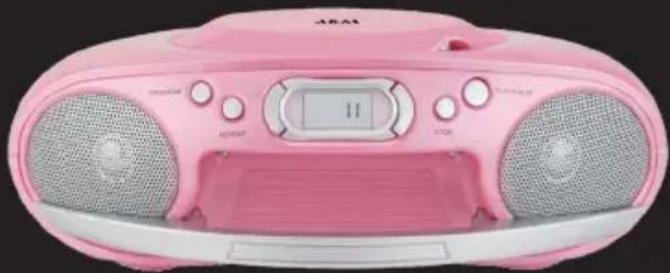
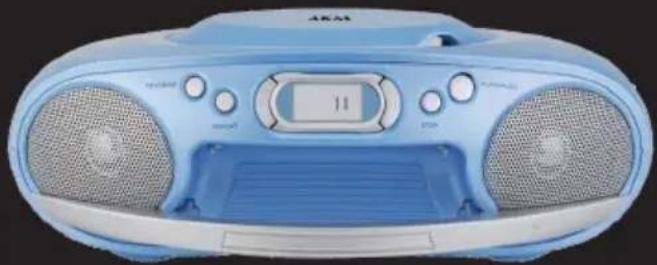
User manual
Gebruiksaanwijzing
1.1 Intended use ....3
1.2 Labels in this manual ....3
1.3 General safety instructions ....3
2. Preparations for use .... 4
2.1 Unpacking 4
2.2 Package contents ....4
3. Installation 5
3.1 Connecting to the mains ....5
3.2 Battery power 6
4. Functions ...... 7
5. Operation 7
5.1 General functions ......7
5.2 Radio functions .....7
5.3 CD functions 8
6. Cleaning and maintenance 9
6.1 Handle and care of a disc 9
7. Troubleshooting 9
8. Technical data ...... 10
9. Disposal of used electrical and electronic equipment 11
Copyright notice
Design and specifications are subject to change without notice.
Safety1.
Intended use1.1
The radio/CD player plays music from CD and radio. Read the manual carefully before the first use.
Labels in this manual1.2

WARNING
A warning means that injury or death is possible if the instructions are not obeyed.

CAUTION
A caution means that damage to the equipment is possible.

A note gives additional information, e.g. for a procedure.
General safety instructions1.3

WARNING
Do not put force on the appliance. The appliance can fall and can cause serious injury.

CAUTION
Do not spill any liquid on the appliance.

WARNING
Do not insert any objects in the ventilation holes.

CAUTION
Do not block the ventilation holes.

This appliance is double insulated; therefore no earth wire is required. Always check that the mains voltage corresponds to the voltage on the rating plate.
This appliance employs a laser system. To prevent direct exposure to the laser beam, do not open the appliance. Visible laser radiation when open and interlock defeated.
Preparations for use2.
Unpacking2.1
- Unpack the appliance carefully.
- Check the package contents as described below. If any item is missing, please contact your reseller.
- Remove the labels from the front panel carefully if present.

We recommend that you retain the original carton and packing materials in case it ever becomes necessary to return your product for service. This is the only way to safely protect the product against damage in transit. If you do dispose of the carton and the packing materials, please remember to recycle with due care to the environment.
Package contents2.2
The following items are included in the received package:
1 Radio/CD player
1 Mains cable
1 Operator manual

If any item is missing, please contact your reseller.
Installation3.
- Put the appliance on a horizontal flat surface.
- Connect the appliance to the mains. Read the paragraph "Connecting to the mains".

CAUTION
- Do not put the appliance near a heat source.
- Do not expose the appliance to direct sunlight.

This appliance is equipped with rubber feet to prevent it from moving. The feet are made from non-migrating material specially formulated to avoid leaving any marks or stains on furniture. However, certain types of furniture polishes, wood preservatives or cleaning sprays cause the rubber to soften and leave marks or a residue on the furniture, and potentially risk the surface to become damaged. To prevent damage to wooden surfaces, we recommend that you apply self-adhesive pads to the bottom of the rubber feet before installation.
Connecting to the mains3.1

- Connect the female connector on the mains cable to the AC MAINS connection.
- Connect the mains plug to a wall socket.
Battery power3.2
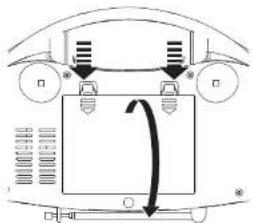
The appliance can also be operated on battery power. For this purpose, the appliance uses six batteries (C).

- Batteries are not included with this appliance.
- Batteries are not necessary for normal operation.
Install batteries
- Remove the battery cover.
- Insert the batteries matching the (+) and (-) polarity markings.
• Re-install the battery cover.

CAUTION
Incorrect installation can cause battery leakage and corrosion which will damage the appliance. Corrosion, oxidation, battery leakage and any other gradually acidic defect of this nature will invalidate the guarantee.

Functions4.

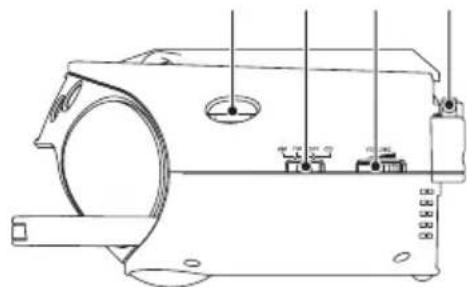
1 Carrying handle
2 PROGRAM button
3 REPEAT button
4 PREV button
5 CD compartment
6 Display
7 NEXT button
8 STOP button
9 PLAY/PAUSE button
10 TUNING dial
11 FUNCTION switch
12 VOLUME dial
13 FM antenna
Operation5.
General functions5.1
- To select the source mode (AM/FM/CD), slide the FUNCTION switch (11) to the desired position. To switch off the appliance, slide the switch to the OFF position.
- To adjust the volume level, turn the VOLUME dial (12) until the desired level is set.
5.2 Radio functions
- To select the radio band, slide the FUNCTION switch (11) to the AM or FM position.
- To select a frequency or radio station, turn the TUNING dial (10) until the desired frequency is set.

To improve the reception of the FM frequency, extend the aerial antenna. To improve the reception of the AM frequency, turn the appliance.
CD functions5.3
- To select the CD function, slide the FUNCTION switch (11) to the CD position.
• To insert a CD: - Press the CD compartment (5) to open the appliance.
- Insert the CD with the label upwards.
- Close the CD compartment (5).
The display shows the total number of tracks on the CD.
- To start playback, press the PLAY/PAUSE button (9) once.
During playback, the following functions are available:
- To select a track, press the PREV button (4) or the NEXT button (7) until the desired track is set.
- To search for a specific point on the disc, hold the PREV button (4) or the NEXT button (7) until the point is reached and release the button.
- To pause playback, press the PLAY/PAUSE button (9) once; to resume playback, press the button again.
- To stop playback, press the STOP button (8).
Using the REPEAT function
This function is available in PLAY and STOP mode.
- Press the REPEAT button (3) once to repeat the current track. The REPEAT indicator is ON.
- Press the button twice to repeat all tracks on the CD. The REPEAT ALL indicator is ON.
- Press the button once again to exit the REPEAT function.
Using the PROGRAM function
To use the PROGRAM function for CD, the playback must be in STOP mode.
- To play a list of tracks (max. 20) in a program, press the PROGRAM button (2).
• To program a CD:
- Press the PREV button (4) or the NEXT button (7) to select a desired track.
- Press the PROGRAM button (2) to confirm the selection. Repeat the
- To play the program again, press the PROGRAM button (2) after the program has finished. Press the PLAY/PAUSE button (9) to start the program again.
- To view the program in stop mode, press the PROGRAM button (2).
- To stop the program during playback, press the STOP button (8).
- To delete the program during the playback, press the STOP button (8) twice.
Cleaning and maintenance6.

WARNING
Before performing any cleaning or maintenance, switch off and unplug the appliance.
- Clean the outside of the appliance with a soft cloth. When the appliance is very dirty, dampen the cloth slightly with water and a neutral solution.
- Clean the lens with a camera lens brush/blower (not included) if the lens is dirty.
Handle and care of a disc6.1
- Hold the disc with fingers. Hold the disc outer edge and/or the centre spindle hole. Do not touch the disc surface.
- Do not bend or press the disc. Do not expose the disc to direct sunlight or heating sources.
- Clean the disc surface with a soft, dry cleaning cloth. Wipe the disc surface gently, radially, from centre towards the outer edge.
- Do not apply thinner, alcohol, chemical solvent, or sprays when cleaning. Such cleaning fluids will permanently damage the disc surface.
Troubleshooting7.
Trouble Action
No display Switch on the appliance.
Connect the appliance properly.
Select the correct function with the FUNCTION switch (11).
No sound Connect the appliance properly.
Adjust the volume.
Adjust tuning control.
Check if the CD is inserted with the label upwards.
Clean the lens.
Technical data8.
Parameter Value
| Voltage 230 V | AC ~ 50 Hz |
| Power consumption 12 W | |
| Max power output 2 X 3 W (2 x 1 W RMS) | |
| Radio bands AM/FM | |
| Dimensions (W x H x D) 269 x 98 x 168 mm | |
| Weight 1.9 kg |
Frequency range
Parameter Value
AM radio 540 - 1600 kHz
FM radio 88 - 108 mHz
Battery power
Parameter Value
Power consumption 6 x 1.5 V
Battery size C
Disposal of used electrical 9. and electronic equipment

The meaning of the symbol on the material, its accessory or packaging indicates that this product shall not be treated as household waste. Please, dispose of this equipment at your applicable collection point for the recycling of electrical and electronic equipments waste. In the European Union and Other European countries which there are separate collection systems for used electrical and electronic product. By ensuring the correct disposal of this product, you will help prevent potentially hazardous to the environment and to human health, which could otherwise be caused by unsuitable waste handling of this product. The recycling of materials will help conserve natural resources. Please do not therefore dispose of your old electrical and electronic equipment with your household waste.
For more detailed information about recycling of this product, please contact your local city office, your household waste disposal service or the shop where you purchased the product.
For more information and warranty conditions, please visit: www.akai.eu
- PREPARATIONS FOR USE .... 4
- INSTALLATION 5
- FUNCTIONS ...... 7
- OPERATION 7
- CLEANING AND MAINTENANCE 9
- TROUBLESHOOTING 9
- TECHNICAL DATA ...... 10
- DISPOSAL OF USED ELECTRICAL AND ELECTRONIC EQUIPMENT 11
- COPYRIGHT NOTICE
- SAFETY1
- INTENDED USE1.1
- LABELS IN THIS MANUAL1.2
- WARNING
- CAUTION
- GENERAL SAFETY INSTRUCTIONS1.3
- PREPARATIONS FOR USE2
- UNPACKING2.1
- PACKAGE CONTENTS2.2
- INSTALLATION3
- CONNECTING TO THE MAINS3.1
- BATTERY POWER3.2
- INSTALL BATTERIES
- FUNCTIONS4
- OPERATION5
- GENERAL FUNCTIONS5.1
- 5.2 RADIO FUNCTIONS
- CD FUNCTIONS5.3
- USING THE REPEAT FUNCTION
- USING THE PROGRAM FUNCTION
- CLEANING AND MAINTENANCE6
- HANDLE AND CARE OF A DISC6.1
- TROUBLESHOOTING7
- TROUBLE ACTION
- TECHNICAL DATA8
- PARAMETER VALUE
- FREQUENCY RANGE
- BATTERY POWER
- DISPOSAL OF USED ELECTRICAL 9. AND ELECTRONIC EQUIPMENT
Brand : AKAI
Model : APRC5WIT
Category : CD Player