
BT-51M - Karaoke system Boytone - Free user manual and instructions
Find the device manual for free BT-51M Boytone in PDF.


| Product Type | Karaoke system |
| Brand | Boytone |
| Model | BT-51M |
| Dimensions (approx.) | 30 x 20 x 30 cm |
| Weight (approx.) | 2 kg |
| Power Supply | AC 100-240V, 50/60Hz or 6 x AA batteries (not included) |
| Bluetooth Version | 5.0 |
| Wireless Range | Up to 10 meters |
| Microphone | 2 wireless UHF microphones included |
| Audio Output | Built-in stereo speakers (2 x 10W RMS) |
| Media Playback | USB drive, SD card, AUX input |
| Display | LED light effects, no screen |
| Controls | Buttons on unit and remote control |
| Material | Plastic casing with metal grille |
| Color | Black |
| Maintenance | Wipe with dry cloth; do not use solvents |
| Safety | Keep away from water; do not disassemble |
| Spare Parts Availability | Contact Boytone support for replacement microphones or adapters |
| General Information | Portable karaoke machine for parties and home use |
Frequently Asked Questions - BT-51M Boytone
User questions about BT-51M Boytone
0 question about this device. Answer the ones you know or ask your own.
Ask a new question about this device
Download the instructions for your Karaoke system in PDF format for free! Find your manual BT-51M - Boytone and take your electronic device back in hand. On this page are published all the documents necessary for the use of your device. BT-51M by Boytone.
USER MANUAL BT-51M Boytone
natural_image
Black and white portable electronic device with a glowing blue-lit speaker (no visible text or symbols)B51M
Operating Instruction
Dear user:
Thank you for choosing our company's professional active audio products, the speaker is specifically design and produce for exercise, fitness, dance, opera, music, shopping guide, which are widely used in schools, shopping malls, indoor and outdoor activities. The sound is clear and in good quality, the entire outward appearance, designs succinctly naturally,. It has many advantages such as long working time, stable performance, and convenient operation and so on, which is a good partner of your work and life.
Inflammable and explosive area:
In flammable and explosive areas, do not use the speaker, and comply with the relevant warning instructions, so as not to cause explosion or fire.
Inflammable and explosive areas include:
Gas station
The fuel area (such as: the deck of the ship under the cabin).
Transportation and storage facilities for flammable or chemical products.
Area with explosion danger signs.
Area with "turning off the two-way wireless device" sign.
Product features
1, Use imported high-power amplifier chip and advanced circuit design technology.
- Use strong magnetic high performance frequency horn, sound loud and clear, covering a wide range of transmission.
3, external audio sound excellent, strong sense of sound level.
Contents
- Product Feature----1
- Using Instructions ----2
- Function Operational Specification ----3,
- Technical Parameters ----5
5Package Contents----6
Instructions:
- Play music u disk, TF card, regulating host the volume knob on the volume is adjusted to a proper sound effect, pay attention to avoid the maximum in volume for a long time, so that people feel upset and acceleration components of aging.
- Don't put the speaker in a damp, high temperature, oil and other harsh environments, avoid direct exposure of sunlight and rain.
- Don't put the speaker close to the bare fire, to avoid dangerous.
- Don't put the volume of liquid in the speaker...
- Equipment suitable for use in non-tropical climate conditions.
- Equipment suitable for the use of 2000 meters above sea level and the following areas.
Functional operation instructions:
1. Panel description
1、function operational specification:
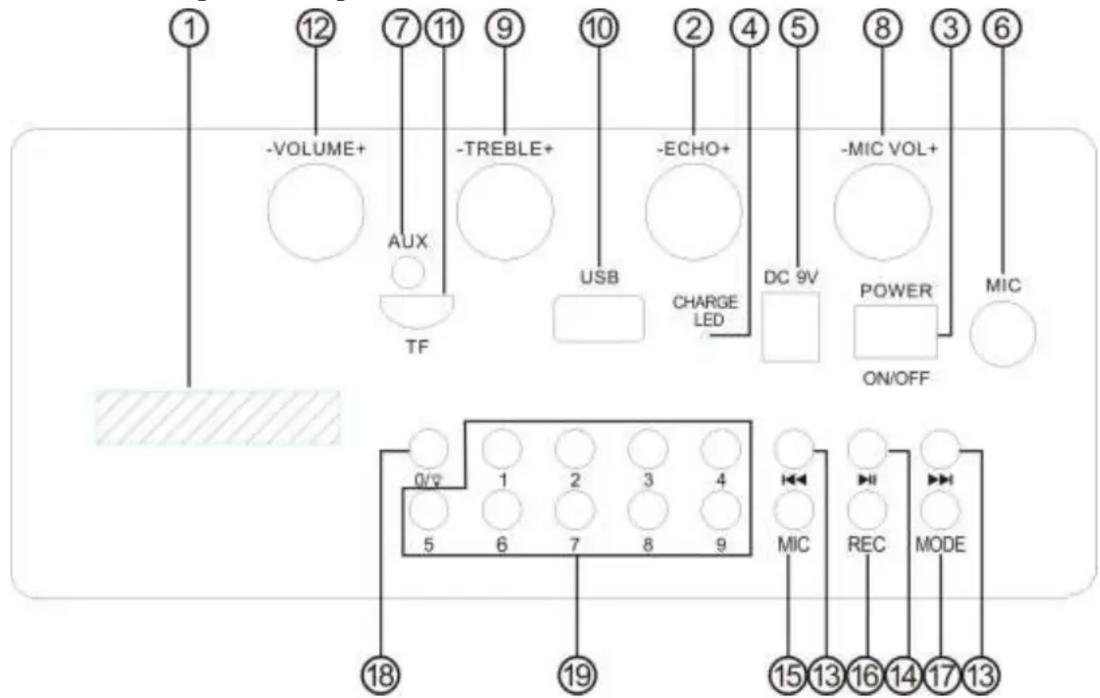
- Digital display window
- Echo volume knob
-
Power switch.
-
Charge LED: when charging, the light is red
- DC input: take connection DC 9V 1A
- Microphone input port
- Line in input port
- Microphone Volume Knob
- Treble Volume
- USB interface: insert USB.
- TF card interface: insert TF card
- Volume knob
- Pre/Next: When you play the USB and TF card, short press to choose Pre/Next music, long press to manual operation forwarder sequence adjustment, when AUX input without function.
- Play/Pause: when play USB and TF card, short press to play/pause the FM, short press is mute, long press is automatically search channel and store, when at AUX state is mute.
- Mic first button.
- Record/Play: Short press to enter record state, resort press play recording, long press this button you will delete the recording.
- Mode: AUX input, BT, USB, TF card, FM, changing-over.
- LED switch: short press it shows 0, long press shows different style of LED
- Number button: choose the music quickly.
3>the Remote Instructions:

- Stand-By
- Stop
- Mute
- Mode shift
-
Recycle
-
EQ: select EQ modes to Normal/Bass/Pop/Jazz Etc.
- Previous Song/Radio Channel
- Next Song /Radio Channel
- Pause/Play
- Volume Decrease
- Volume Decrease
- Number Keys 0-9: press the number combination to quick select the song number or radio channel number to play.
- Karaoke priority: Press this button, the Mic LED will be light, it marked enterimnto Micpriority closed.
- Record/Playback: Press this button to enter the record state, press again to play the recording.
- AUX line Mode.
- FM Mode
- USB/TF shift
- Bluetooth Mode
- FM trimming decrease
- FM trimming increase
Technical parameters:
- Power Maximum……300W
- Frequency Response……100Hz-20KHz
- S/N Radio\≥\95d B
- Output Impedance……4 Ω
5. Input voltage……DC9V/1A Package Contents-
- Host……1PC
- User Manual……1PC
- Adaptor……1PC
- 3.5mm Audio cable……1PC
- Remote Control……1PC
- Wired microphone ……1PC
- Microphone ……1PC
Brand : Boytone
Model : BT-51M
Category : Karaoke system