
TMP 75 - Photo/Video Accessories Glide Gear - Free user manual and instructions
Find the device manual for free TMP 75 Glide Gear in PDF.


| Product Type | Teleprompter |
| Brand | Glide Gear |
| Model | TMP 75 |
| Dimensions | 12 x 8 x 4 inches (30.5 x 20.3 x 10.2 cm) |
| Weight | 2.5 lbs (1.13 kg) |
| Material | Aluminum frame with optical glass beam splitter |
| Compatible Devices | Smartphones up to 3.5 inches wide, DSLR cameras |
| Mounting Thread | 1/4"-20 standard tripod mount |
| Power Source | None (passive optical device) |
| Primary Function | Enables eye contact while reading a script from a screen |
| Included Accessories | Teleprompter hood, glass beam splitter, phone mount, carrying case |
| Adjustability | Tilt and rotation adjustments for optimal positioning |
| Compatibility | Works with any tripod or mounting arm with 1/4"-20 screw |
| Cleaning | Use a soft, lint-free microfiber cloth; avoid harsh chemicals |
| Safety | Handle glass with care; avoid impacts and extreme temperatures |
| Spare Parts | Replacement glass and phone mounts available |
| Repairability | User-replaceable glass and mounts; contact Glide Gear for parts |
| Warranty | One-year limited warranty |
Frequently Asked Questions - TMP 75 Glide Gear
User questions about TMP 75 Glide Gear
0 question about this device. Answer the ones you know or ask your own.
Ask a new question about this device
Download the instructions for your Photo/Video Accessories in PDF format for free! Find your manual TMP 75 - Glide Gear and take your electronic device back in hand. On this page are published all the documents necessary for the use of your device. TMP 75 by Glide Gear.
USER MANUAL TMP 75 Glide Gear
TMP 75 - Webcam Setup
- Using the Velcro strips, attach the cover with a circular hole in the back of the TMP 75.
- Install your smartphone in the front of the TMP 75.
Please note that you will need to download a 3rd party teleprompter app with the ability to mirror text.

natural_image
Diagram of a computer monitor with an open panel and a mounted bracket, showing no text or symbols.
natural_image
Mechanical assembly diagram showing a clamping device with a rotating component (no text or symbols visible)- Using the thumb screws on the side holders, center the hole in the cover with your computer's camera.
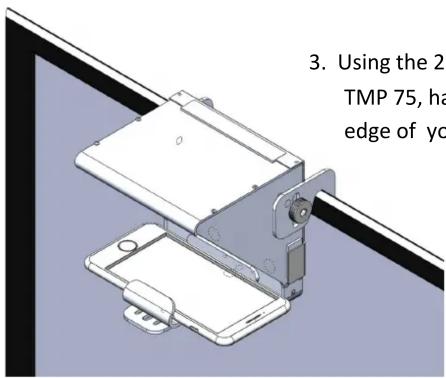
- Using the 2 holders on the back sides of the TMP 75, hang the teleprompter on the top edge of your monitor.


TMP 75 - Video Camera Setup

Please note that you will need to download a 3rd party teleprompter app with the ability to mirror text
2. Attach the camera mounting plate to the rails.
Use the 1/4-20 mounting screw to attach your camera to the plate

Brand : Glide Gear
Model : TMP 75
Category : Photo/Video Accessories