
ES-4853 - Razor PANASONIC - Free user manual and instructions
Find the device manual for free ES-4853 PANASONIC in PDF.


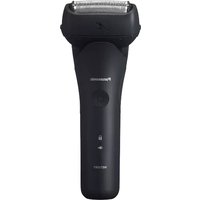
| Product Type | Shaver |
| Brand | Panasonic |
| Model | ES-4853 |
| Dimensions (approx.) | 5.5 x 6.0 x 15.0 cm |
| Weight (approx.) | 210 g |
| Power Source | Rechargeable battery |
| Battery Type | Lithium-Ion |
| Charging Time | 1 hour |
| Usage Time | Approx. 50 minutes |
| Voltage | 100-240 V (auto voltage) |
| Wet/Dry Use | Wet & dry |
| Trimmer | Pop-up trimmer |
| Blade System | Multi-foil and inner blade |
| Cleaning | Rinseable with water |
| Maintenance | Replace foil & cutter annually |
| Safety Features | Waterproof IPX7 |
| Spare Parts | Foil, cutter, trimmer blade |
| Reparability | Replacement parts available |
| Accessories | Charging adapter, cleaning brush |
Frequently Asked Questions - ES-4853 PANASONIC
User questions about ES-4853 PANASONIC
0 question about this device. Answer the ones you know or ask your own.
Ask a new question about this device
Download the instructions for your Razor in PDF format for free! Find your manual ES-4853 - PANASONIC and take your electronic device back in hand. On this page are published all the documents necessary for the use of your device. ES-4853 by PANASONIC.
USER MANUAL ES-4853 PANASONIC
Operating Instructions
使用说明书
AC/Rechargeable Shaver
交流 / 充电式剃须刀
Model No.
型号 ES4853

English 2
中文 6
保修证 9

natural_image
Exterior view of a Panasonic electric shaver (no visible text or symbols)Before operating this unit, please read these instructions completely. 在使用本产品前,请仔细阅读本说明书。
ES4853_CHINA.indb 1

2006/10/16 12:10:14


ES4853_CHINA_02.pdf 2006/10/25 13:05:10


English
Important
▶ Using the shaver
Caution - The outer foil is very thin and can be damaged if not used correctly. Check that the foil is not damaged before using the shaver. Do not use the shaver if the foil etc. is damaged as you will cut your skin.
▶ Charging the shaver
Only use the supplied power cord to charge the shaver. Plug in the adaptor into a household outlet where there is no moisture and handle it with dry hands. The shaver may become warm during use and charging. However, this is not a malfunction. Do not charge the shaver where it will be exposed to direct sunlight or other heat sources. Hold the adaptor when disconnecting it from the household outlet. If you tug on the power cord, you may damage it. Contact an authorized service center if the power cord gets damaged.
Adequate ambient temperature for charging is 0 - 40 °C.
▶Cleaning the shaver
Warning - Disconnect the power cord from the shaver before cleaning it to prevent electric shock.
Keep both the inner blades inserted. If only one of the inner blades is inserted, the shaver may be damaged. If you clean the shaver with water, do not use salt water or hot water. Do not soak the shaver in water for a long period of time. Wipe it with a cloth dampened with soapy water. Do not use thinner, benzine or alcohol.
▶Storing the shaver
Disconnect the power cord when storing the shaver. Do not bend the power cord or wrap it around the shaver. Do not leave this shaver within the reach of small children. Keep these operating instructions in a safe place.
SPECIFICATIONS
Model: ES4853
Rated input: a.c 100 - 240 V, 150 mA
Rated output: d.c 5.7 V, 1.0 A
Charging time: 8 hours
• The unit is applied to the Chinese standard GB4706.1 appendix B, GB4706.9 and Q/(GZ) PEWWBG 6.
Parts identification

① Protective cap
②System outer foil
③ System outer foil release buttons
④Foil frame
⑤Inner blades
⑥ Trimmer
⑦ Foil frame release buttons
⑧0/1 switch
8-①0*CHARGE=off
8-⑥ 1=on
8-© mm = trimmer mode
@Switch lock button
⑩CHARGE lamp
⑪Adaptor
⑫ Power cord
⑬ Appliance plug
⑭ Softcase
⑮Cleaning brush
2
ES48S3_CHINA.indb 2

2006/10/16 12:10:15


ES4853_CHINA_03.pdf 2006/10/25 13:04:52


Charge Charging
Perform the following steps to charge the shaver if it seems to lose the speed.
You can fully charge the shaver in 8 hours.
- A full charge will supply enough power for approx. 7 shaves of 3 minutes each.

1 Insert the appliance plug into the shaver.
2 Plug in the adaptor into a household outlet.
• A special plug adaptor may be required in some areas.
About the lamp
While charging

Glows red.
▶ Cord shaving
If you insert the appliance plug to the shaver and plug in the adaptor into a household outlet, you can use it even if the battery capacity is low.
- If the shaver does not work, continue charging it for approx. 3 minutes.
Shave Using the shaver


1 Depress the switch lock button and slide the 0/1 switch upwards. 2 Hold the shaver as illustrated above and shave.
- Align "1" and the "●" mark on the body with each other.
- Start out shaving by applying gentle pressure to your face. Stretch your skin with your free hand and move the shaver back and forth in the direction of your beard. You may gently increase the amount of pressure as your skin becomes accustomed to this shaver. Applying excessive pressure does not provide a closer shave.
▶ Using the trimmer
Depress the switch lock button and slide the 0/1 switch upwards. Align the "mm" mark and the "●" mark on the body with each other. Place at a right angle to your skin and move downwards to trim your sideburns.

natural_image
Illustration of a hand holding a dollar bill and a magnifying glass, with motion lines indicating movement (no text or symbols)3
ES4850_CHINA.indb 3
2006/10/16 12:10:16


ES4853_CHINA_04.pdf 2006/10/25 13:05:26


English
Clean
Cleaning
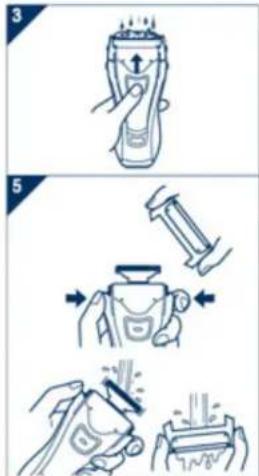
- Disconnect the power cord from the shaver.
- Apply some hand soap to the outer foil.
- Turn the shaver on and then pour some water over the outer foil.
- Turn the shaver off after 10-20 seconds.
- Remove the foil frame and clean it with running water.
- Wipe off any drops of water with a dry cloth.
- Remove the system outer foil and the foil frame to allow them to dry completely.

The mark on the left is for a washable shaver and indicates it can be cleaned with water.

natural_image
Line drawing of a pair of hair blisters with a separate clip, no text or symbols presentReplacing the system outer foil and the inner blades.
| system outer foil | once every year |
| inner blade | once every two years |

- Press the buttons and lift upwards as illustrated.
- Remove the inner blades one at a time as illustrated.
- Do not touch the edges (metal parts) of the inner blades to prevent injury to your hand.
- Insert the inner blades one at a time until they click as illustrated.
- Insert the foil frame by pushing it downwards until it clicks.
Cleaning with the brush

natural_image
Illustration of two hands performing a manual task with directional arrows, no text or symbols present- Clean the inner blades using the short brush by moving it in direction.
Clean the system outer foil, the shaver body and the trimmer using the long brush. - Do not use the short brush to clean the outer foils.
4

2006/10/16 12:10:17


ES4853_CHINA_05.pdf 2006/10/25 13:04:32


Removing the built-in rechargeable battery
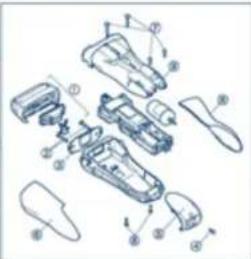
Remove the built-in rechargeable battery before disposing of the shaver. Please make sure that the battery is disposed of at an officially designated location if there is one. Do not dismantle or replace the battery so that you can use the shaver again. This could cause fire or an electric shock. Replace it at an authorized service center.
- Disconnect the power cord from the shaver when removing the battery.
- Perform steps ① to ⑨ and lift the battery, and then remove it.
natural_image
Exploded view diagram of a mechanical assembly with numbered components (no text or labels)For environmental protection and recycling of materials This shaver contains a Nickel-Cadmium battery. Please make sure that the battery is disposed of at an officially assigned location, if there is one in your country.

English

5

ES48S3_CHINA.indb 5
ES4853_CHINA_06.pdf 2006/10/25 13:09:27

注意事项
▶使用剃须刀
①保护盖
②外刀网
③外刀网释放按钮
④外刃架
⑤内刀头
⑥修剪刀
⑦外刃架释放按钮
⑧0/1开关
8-a 0·CHARGE=关
8-b 1=开
8-© mm=修剪刀模式
⑨开关锁定按钮
⑩充电状态指示灯
⑪充电器
⑫充电器电源线
③电源插头(DC)
⑭旅行小包
⑬清洁刷
2006/10/16 12:10:18


ES4853_CHINA_07.pdf 2006/10/25 13:09:15

充电 充电中
natural_image
Simple line drawing of a document, a magnifying glass, and a butterfly (no text or symbols)中文
ES4853_CHINA.indb 7
2006/10/16 12:10:19


环境保护与资源回收
此剃须刀含一块镍镉电池。
(Address) : Wanbao Base, Shiguang Road, Panyu District, Guangzhou
电话(Tel):(020)84770333
传真(Fax):(020)84773033
邮政编码(Post Code):511495
No.1 EN, CH (2006-10-26)
Printed in China
- English
- Important
- ▶ Using the shaver
- ▶ Charging the shaver
- ▶Cleaning the shaver
- ▶Storing the shaver
- SPECIFICATIONS
- Charge Charging
- About the lamp
- ▶ Cord shaving
- Shave Using the shaver
- ▶ Using the trimmer
- Cleaning
- Replacing the system outer foil and the inner blades.
- Cleaning with the brush
- Removing the built-in rechargeable battery
- 注意事项
- ▶使用剃须刀
- 充电 充电中
- 环境保护与资源回收
Brand : PANASONIC
Model : ES-4853
Category : Razor