
FPS-DC - Flat Screen Mount Gabor - Free user manual and instructions
Find the device manual for free FPS-DC Gabor in PDF.


| Product Type | Floor Standing TV Mount |
| Brand | Gabor |
| Model | FPS-DC |
| Compatible Flat-Panel Display Size | 32 to 85 inches (81.3 to 215.9 cm) |
| Max Weight Capacity | 110 lb (49.9 kg) |
| Height | 63.4 inches (161 cm) |
| Weight | 33.7 lb (15.3 kg) |
| Tilt Adjustment | -10° to +5° |
| Material | Wood, steel, plastic |
| Base Dimensions | 34.1 x 20.3 x 2.2 inches (86.5 x 51.5 x 5.7 cm) |
| VESA Mounting Patterns Supported | 100x100, 150x100, 150x150, 200x100, 200x200, 300x200, 300x300, 400x200, 400x300, 400x400, 600x400 mm |
| Cable Management | Integrated wood panel hides cables |
| Warranty | One-year limited warranty |
| Recommended Installation | By at least two people or qualified professional |
| Included Hardware | Screws and washers for various VESA standards |
| Safety Features | Security screws to prevent TV from dislodging |
| Cleaning Instructions | Mild detergent solution, wipe dry with soft cloth |
| Customer Service | Call 212-594-2353 or visit www.madebygabor.com |
| Use | Indoor use only, away from heat sources and vibrations |
Frequently Asked Questions - FPS-DC Gabor
User questions about FPS-DC Gabor
0 question about this device. Answer the ones you know or ask your own.
Ask a new question about this device
Download the instructions for your Flat Screen Mount in PDF format for free! Find your manual FPS-DC - Gabor and take your electronic device back in hand. On this page are published all the documents necessary for the use of your device. FPS-DC by Gabor.
USER MANUAL FPS-DC Gabor
FLOOR STAND TV MOUNT
WITH WOOD ACCENT
for 32-85 in. Displays

User Manual
Thank you for choosing Gabor.
The Gobar FPS-DC floor-standing TV mount offers a stylish design for any home or office. A wood accent and chromed metal finish elevate the stand and your display. The stand accommodates flat and curved panels with screen sizes from 32 to 85 inches and weights up to 110 pounds, with the ability to tilt the screen +5° or -10° for the optimal viewing angle. A large base provides an excellent counterbalance, and the wood panel hides your cables to provide a clean aesthetic in any room.

Safety Warnings
- When installing this product, be sure to refer to the mounting instructions detailed in this manual; failure to follow the mounting instructions may void the product warranty.
- It is strongly recommended that this product be installed by a qualified professional or installation contractor; Gabor takes no responsibility for any product damage or personal injury resulting from mishaneling, incorrect mounting, faulty assembly, or improper use of this product.
- Do not use this product for any flat-panel screen device other than what it is intended for; the exact specifications, size parameters, and weight limits are found both on the product box and in the instruct on manual.
- It is recommended that at least two people perform the installation process to prevent injury from m-shandling or dropping the product or flat-panel display; proper safety gear and tools must be used at all times when installing this product.
-
Do not assemble or use the cart on structures that may be affected by vibrations or noticeable impacts; do not assemble or use near a heater, fireplace, or any other source of direct heat energy.
-
This product may contain small parts which can pose a choking hazard; keep out of reach of children and pets.
- Excessive exposure to liquids may damage the finish of this product; when clearing this product, use only a mild detergent solution and quickly wipe dry with a soft cloth.
- If you have safety concerns about installing this product, contact a qualified professional or installation contractor.
- If this product is missing hardware or there are defective parts, visit www.modebycabor.com or call Customer Service at 212-594-2353.
• All images are for illustrative purposes only.
Product Specifications
Compatible Flat-Panel Display Size:
32 to 85 in. (81.3 to 215.9 cm)
Height:
63.4 in. (161 cm)
Max Weight Capacity
110 lb. [49.9 kg]
Weight:
33.7 b.(15.3 kg)
Tilt:
-10°/+5°
Material:
Wood, steel, plastic
Base Dimensions:
34.1×20.3×2.2 in. (86.5×51.5×5.7 cm)
VESA Mounting Patterns
100×100 mm
150×100 mm
150×150 mm
200×100 mm
200×200 mm
300×200mm
300×300 mm
400×200 mm
400×300 mm
400×400mm
600×400 mm
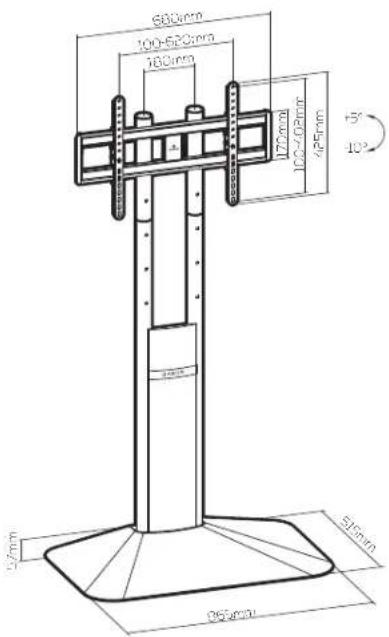
Overview
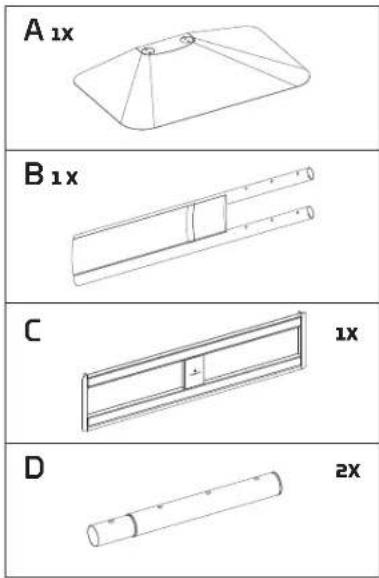


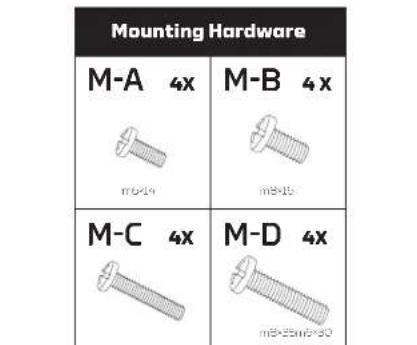
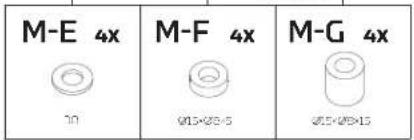
Assembling the Stand


Attaching the Display Mount
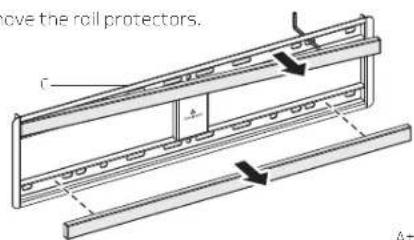
Remove the roll protectors.


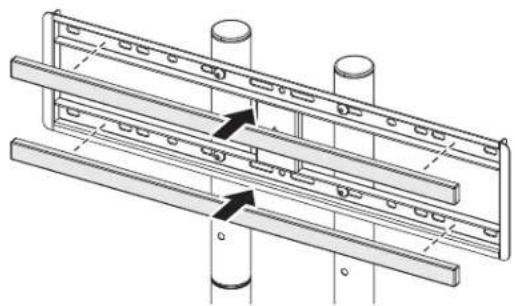
Replace the rail protectors.
Attaching the Display Brackets

Make sure the arrow on the bracket is facing up toward the top or your TV.


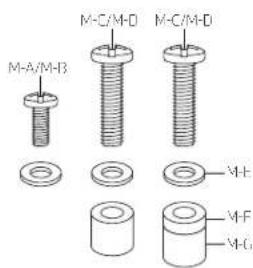
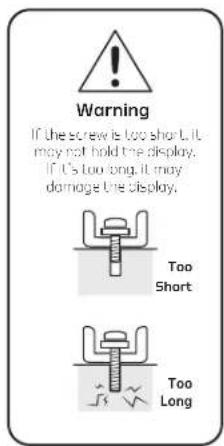
A variety of screws are included for different VFSA standards on the backs of most displays.
Select the appropriate-size screws and washers.
Hand-thread the screws to determine the correct diameter.
Hanging the Display on the Mount
It's highly recommended to perform this step with two people.


Tighten the security screws.

GABOR
Adjusting the Monitor Tilt


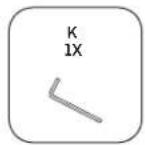
Cable Management Tool Storage

One-Year Limited Warranty
This Gobar product is warranted to the original purchaser to be free from defects in materials and workmanship under normal consumer use for a period of one (1) year from the original purchase date or thirty (30) days after replacement, whichever occurs later. The warranty provider's responsibility with respect to this limited warranty shall be limited solely to repair or replacement, at the provider's discretion, of any product that fails during normal use of this product in its intended manner and in its intended environment. Inoperability of the product or part(s) shall be determined by the warranty provider. If the product has been discontinued, the warranty provider reserves the right to replace it with a model of equivalent quality and function.
This warranty does not cover damage or defect caused by misuse, neglect, accident, alteration, abuse, improper installation or maintenance. EXCEPT AS PROVIDED HEREIN, THE WARRANTY PROVIDER MAKES NEITHER ANY EXPRESS WARRANTIES NOR ANY IMPLIED WARRANTIES, INCLUDING BUT NOT LIMITED TO ANY IMPLIED WARRANTY OF MERCHANTABILITY OR FITNESS FOR A PARTICULAR PURPOSE. This warranty provides you with specific legal rights, and you may also have additional rights that vary from state to state.
To obtain warranty coverage, contact the Gabor Customer Service Department to obtain a return merchandise authorization ("RMA") number, and return the defective product to Gabor along with the RMA number and proof of purchase. Shipment of the defective product is at the purchaser's own risk and expense.
For more information or to arrange service, visit www.madebygabor.com or call Customer Service at 212-594-2353.
Product warranty provided by the Gradus Group.
www.gradusgroup.com
Gabor is a registered trademark of the Gradus Group. © 2024 Gradus Group LLC. All Rights Reserved.

GABOR®
A Gradus Group Brand
Brand : Gabor
Model : FPS-DC
Category : Flat Screen Mount