
B160S - Receiver Bluesound - Free user manual and instructions
Find the device manual for free B160S Bluesound in PDF.


| Type de produit | Récepteur audio multiroom |
| Marque | Bluesound |
| Modèle | B160S |
| Dimensions (L x P x H) | Environ 43.2 x 25.4 x 4.4 cm (1U rack) |
| Poids | Environ 3.5 kg |
| Alimentation | Secteur 100-240 V CA, 50/60 Hz |
| Puissance de sortie | 2 x 60 W (8 ohms) |
| Connectivité réseau | Ethernet, Wi-Fi (2.4/5 GHz) |
| Formats audio pris en charge | MP3, AAC, WMA, FLAC, ALAC, WAV, AIFF, OGG |
| Application de contrôle | BluOS Controller (iOS, Android, Windows, Mac) |
| Entrées audio | 1 x ligne RCA, 1 x optique Toslink, 1 x coaxial |
| Sorties audio | Haut-parleurs (bornes à vis), subwoofer (RCA) |
| Accessoire rack optionnel | RM160 (jusqu'à 6 unités) |
| Entretien et nettoyage | Essuyer avec un chiffon doux et sec. Ne pas utiliser de solvants. |
| Sécurité | Lire le manuel avant utilisation. Ne pas exposer à l'humidité. |
| Pièces détachées et réparabilité | Contacter le support Bluesound pour toute réparation. |
| Informations générales | Récepteur réseau pour système audio multiroom Bluesound. Compatible avec le contrôle vocal via assistants. |
Frequently Asked Questions - B160S Bluesound
User questions about B160S Bluesound
0 question about this device. Answer the ones you know or ask your own.
Ask a new question about this device
Download the instructions for your Receiver in PDF format for free! Find your manual B160S - Bluesound and take your electronic device back in hand. On this page are published all the documents necessary for the use of your device. B160S by Bluesound.
USER MANUAL B160S Bluesound
Power connectors? Speaker connector SJBALOJ connector (ing/MIC connector EIN connector
IMPORTANT
• Download the latest B1605 Owner's manual from the Manuals/Downloads tab of www.bluesoundprofessional.com/product/B1605
- Visit support.bluesound.com for more information and assistance about setup guides and getting the most out of your B160S.
• The professional custom rack accessory RM160 can accommodate up to six sets of B160Ss without a single modification.
CONNECT
EXTERNAL DEVICES
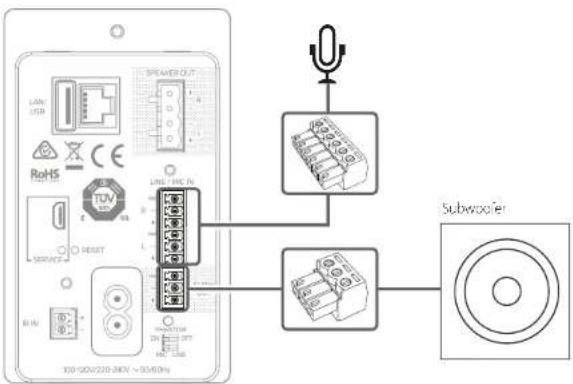
flowchart
graph TD
    A["Device Interface"] --> B["Speaker Out"]
    B --> C["Audio Converter"]
    C --> D["Subwoofer"]
    D --> E["Speaker Receiver"]
    style A fill:#f9f,stroke:#333
    style B fill:#ccf,stroke:#333
    style C fill:#cfc,stroke:#333
    style D fill:#fcc,stroke:#333
    style E fill:#ffc,stroke:#333
SPEAKER TERMINAL BLOCK AND NETWORK
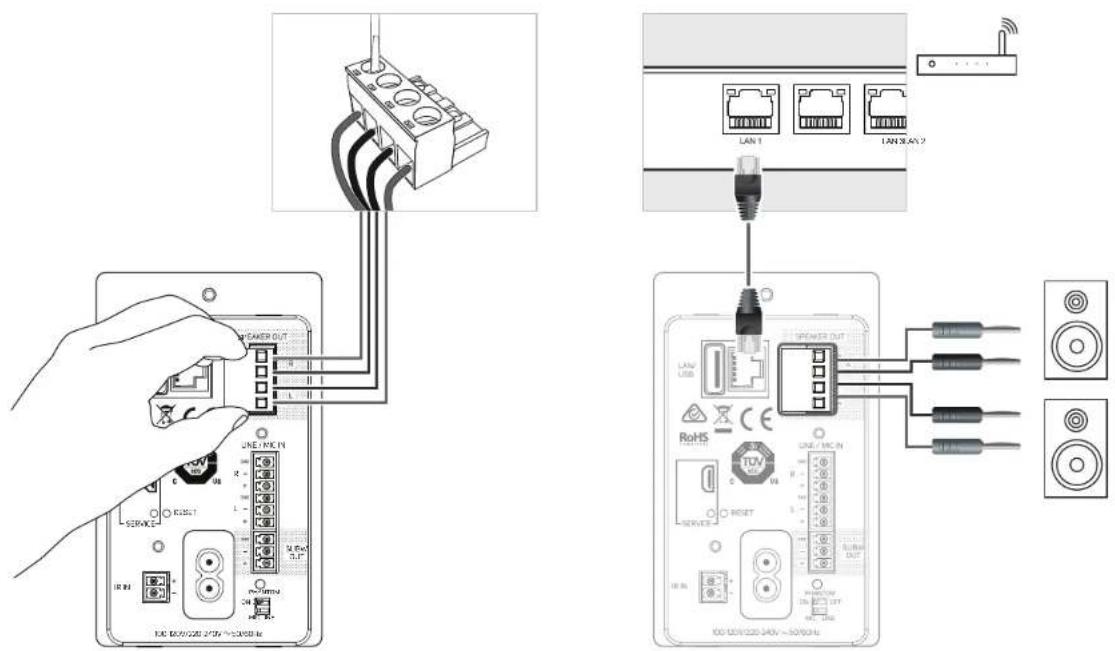
CONNECT
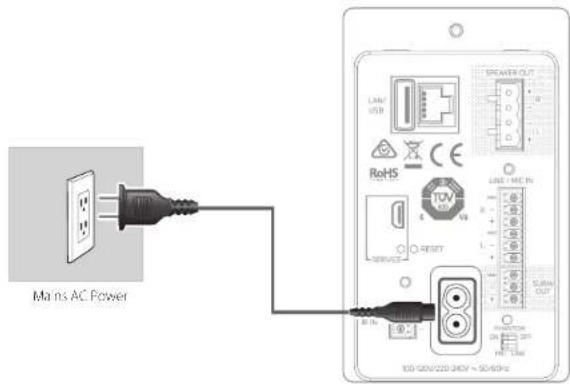
POWER
DOWNLOAD
BluOS CONTROLLER APP
The BluOS Controller App for Apple iOS devices (iPhone, iPad, iPod), Android devices, Kindle Fire and Windows or Mac desktops are available for download from their respective App stores.



CONNECT
MUSIC
Launch the App and explore - everything from your streaming music services, internet radio stations, networked music collections and favorites with quick and easy single-search discovery.
©2019 BLIPSOUND PROFESSIONA, A DIVISION OF THEBROCK INDUSTRIES LIMITED
All rights reserved. Bluescand and Bluescand logo are trademarks of Bluescand Professionals, a division of Lenbrook Industries Limited
No part of this plan or on may be restated, street or tram/hats in any form without the within permission of Queso and Prefecture.
E1635-28 EN-935-0671
Brand : Bluesound
Model : B160S
Category : Receiver