
DKGM-C2D - Car radio CRUX - Free user manual and instructions
Find the device manual for free DKGM-C2D CRUX in PDF.


| Brand | CRUX |
| Model | DKGM-C2D |
| Product Type | Interface Adapter / Radio Replacement Module |
| Compatible Vehicles | Select GM vehicles (Buick, Cadillac, Chevrolet, GMC, Hummer, Isuzu, Oldsmobile, Pontiac, Saab, Saturn) 2000-2013 |
| Factory Features Retained | Chime functions (seat belt, check engine, key in ignition, low fuel, low oil, lights on), RAP (Retained Accessory Power), factory audio system compatibility |
| Audio System Support | Bose, Y-91, and non-amplified factory systems |
| Chime Volume Adjustment | Built-in potentiometer, adjustable via screwdriver |
| Installation Style | Plug-and-play, includes double DIN dash kit |
| Wiring | EIA color-coded wires for easy installation |
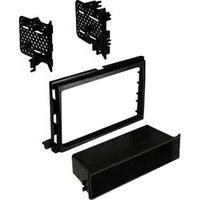
| Included Components | DKGM-C2D module, harness, double DIN dash kit (main trim ring, left and right ISO brackets) |
| Reverse Gear Output | Violet/White wire for reverse signal |
| Dashboard Kit | Double DIN, with ISO mounting brackets |
| Power Supply | 12V DC (vehicle electrical system) |
| Manual Availability | Free PDF download, 4 pages, English |
Frequently Asked Questions - DKGM-C2D CRUX
User questions about DKGM-C2D CRUX
0 question about this device. Answer the ones you know or ask your own.
Ask a new question about this device
Download the instructions for your Car radio in PDF format for free! Find your manual DKGM-C2D - CRUX and take your electronic device back in hand. On this page are published all the documents necessary for the use of your device. DKGM-C2D by CRUX.
USER MANUAL DKGM-C2D CRUX
- Retains factory features in select GM Class II Data Bus vehicles while functioning with an aftermarket radio.
- Supports Bose, Y-91 and non-amplified audio systems.
- Retains chime functions such as: seat belt, check engine, key in ignition, low fuel, low oil and lights on.
- Retains RAP (Retained Accessory Power).
- Double DIN Dash Kit included.
- EIA color coded wiring for easy installation.
PARTS INCLUDED:

natural_image
Black rectangular electronic device with ventilation grille and ports (no visible text or symbols)
natural_image
Coiled electrical connector with various colored wires and connectors (no visible text or symbols)
natural_image
Black plastic electrical connector housing with mounting brackets and mounting holes (no text or symbols visible)DKGM-C2D MODULE DKGM-C2D HARNESS DOUBLE DIN DASH KIT
INSTALLATION DIAGRAM:

flowchart
graph TD
    A["24-Pin Connector"] --> B["Chime volume adjustment"]
    B --> C["16-Pin Black Connector"]
    C --> D["Aftermarket Radio"]
    D --> E["Chime volume adjustment"]
    style A fill:#f9f,stroke:#333
    style B fill:#ccf,stroke:#333
    style C fill:#cfc,stroke:#333
    style D fill:#fcc,stroke:#333
    note1["TO FACTORY HARNESS"]
    note2["Violet/White"]
    note3["Orange"]
    note4["Blue/ White"]
    note5["Yellow"]
    note6["Red"]
    note7["Black"]
    note8["Gray"]
    note9["Gray/Black"]
    note10["White"]
    note11["White/Black"]
    note12["Violet"]
    note13["Violet/Black"]
    note14["Green"]
    note15["Green/Black"]
    note16["Violet/White"]
    note17["Orange"]
    note18["Blue/ White"]
    note19["Yellow"]
    note20["Red"]
    note21["Black"]
    note22["Gray"]
    note23["Right Front (+)"]
    note24["Right Front (-)"]
    note25["Left Front (+)"]
    note26["Right Front (-)"]
    note27["Left Front (-)"]
    note28["Right Rear (+)"]
    note29["Right Rear (-)"]
    note30["Left Rear (+)"]
    note31["Left Rear (-)"]
    note32["Green/Black"]

    subgraph Legend
        direction TB
        direction LR
        CRUX["CRUX"]
        NonBose["Non Bose"]
        Bose[" Bose "]
        ChimeVolume["Chime volume adjustment"]
        ChimeVolumeAdjustment
        SeeBelow["See below for Audio connection options"]
        End
SELECTING THE AUDIO SYSTEM:
If the vehicle is equipped with an amplified audio system, the DKGM-C2D has a built-in audio level adaptor that outputs the proper audio level from the aftermarket radio to the factory amplifier. To use this feature, plug in the male 8-pin connector on the DKGM-C2D harness to the GRAY female 8-pin connector on the DKGM-C2D module. The module is also labeled “Bose” and “Non Bose” to avoid confusion. (see picture below)
If the vehicle is NOT equipped with a factory amplified system, plug in the male 8-pin connector to the BLACK female 8-pin on the DKGM-C2D module.

CHIME VOLUME ADJUSTMENT:
The DKGM-C2D has a potentiometer to adjust the chime volume. It is set at half way by default. To adjust the volume, simply use a suitable screw driver and turn the potentiometer clockwise to increase the volume and counter-clockwise to decrease the volume.

DASH KIT INSTALLATION:
Please make sure that you have all the parts as shown.
(1) Main trim ring
(1) Left ISO mounting bracket
(1) Right ISO mounting bracket
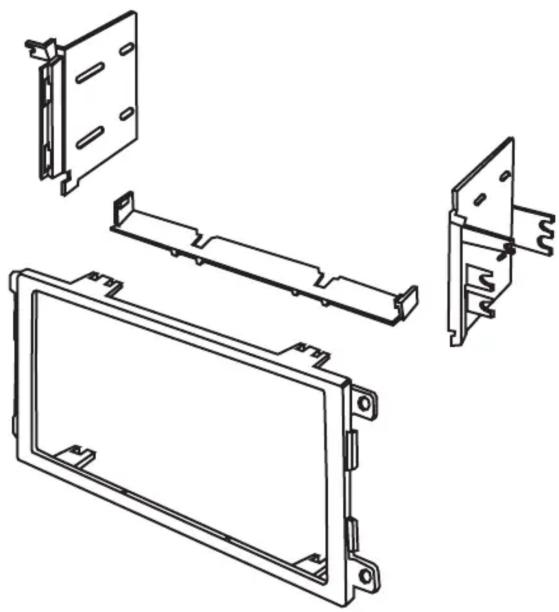
natural_image
Technical line drawing of a mechanical assembly with multiple views and mounting brackets (no text or symbols)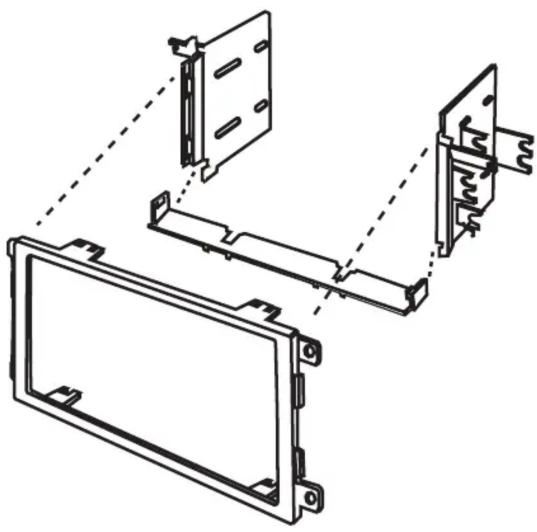
natural_image
Technical line drawing of a mechanical assembly with no visible text or symbolsFor some Cadillac installation, see diagram below:

VEHICLE APPLICATIONS:
| Buick | GMC | ||
| 2004-2005 | Century | 2004-2011 | Canyon |
| 2005-2007 | LaCrosse | 2002-2009 | Envoy |
| 2004-2007 | Rainier | 2003-2007 | Savana |
| 2003-2005 | Rendezvous | 2003-2006 | Sierra |
| 2005-2007 | Terraza | 2007 | Sierra Classic |
| Cadillac | 2003-2006 | Yukon | |
| 2004-2006 | Escalade | Hummer | |
| Chevrolet | 2003-2007 | H2 | |
| 2003-2006 | Avalanche | 2005-2009 | H3 |
| 2000-2005 | Cavalier | Isuzu | |
| 2004-2013 | Colorado | 2003-2008 | Ascender |
| 2006-2013 | Corvette | Oldsmobile | |
| 2004-2007 | Express | 2001-2004 | Alero |
| 2000-2005 | Impala | 2002-2004 | Bravada |
| 2000-2005 | Monte Carlo | 2000-2004 | Silhouette |
| 2003-2004 | S-10 | Pontiac | |
| 2003-2006 | Silverado | 2001-2005 | Aztek |
| 2007 | Silverado Classic | 2001-2005 | Grand Am |
| 2003-2006 | SSR | 2004-2008 | Grand Prix |
| 2003-2006 | Suburban | 2000-2006 | Montana |
| 2003-2006 | Tahoe | 2000-2005 | Sunfire |
| 2002-2009 | Trailblazer | Saab | |
| 2005-2008 | Uplander | 2005-2008 | 9-7X |
| 2003-2005 | Venture | Saturn | |
| 2005-2007 | Relay |
NOTE:
There are instances on the Corvette when the chime will sound when either the “Traction Control” or the “DIC” (Driver Information Center) buttons are pressed.

Traction Control Button
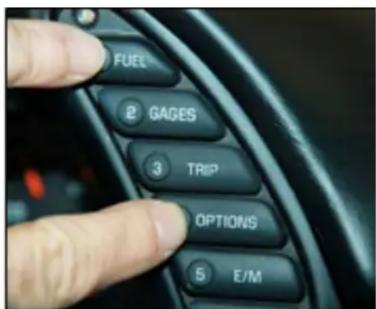
Driver Information Center Buttons
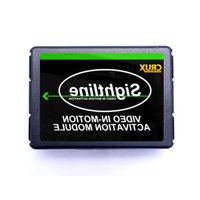
Brand : CRUX
Model : DKGM-C2D
Category : Car radio