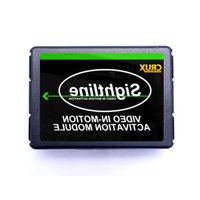
VIMVW-92 - Car radio CRUX - Free user manual and instructions
Find the device manual for free VIMVW-92 CRUX in PDF.


| Product Type | Video In-Motion Activation Interface |
| Brand | CRUX |
| Model | VIMVW-92 |
| Compatible Systems | Volkswagen with MFD3 or RNS-510 Navigation |
| Function | Enables passenger address input while vehicle is in motion |
| Installation Type | T-Harness connection behind factory radio |
| Parts Included | Interface module, wiring harness, instruction manual |
| Dip Switch Settings | Switch 1 ON for permanent activation; others OFF |
| Alternative Activation | Green wire for non-permanent toggle |
| Power Supply | 12V DC from vehicle electrical system |
| Operating Temperature | -20°C to 60°C |
| Dimensions | Approximately 3 x 2 x 1 inches |
| Weight | Approximately 0.5 lb |
| Safety Warning | Driver must keep full attention on road; may void dealer warranty |
| Technical Support | Phone: 1-855-822-1348, M-F 9AM-5PM PDT |
| Required Vehicle Feature | Factory DVD changer |
| Activation Test | Test reverse gear trigger and video in-motion while rolling |
| Material | Plastic casing, printed circuit board |
| Compliance | Designed for aftermarket installation |
| Precaution | Disconnect battery negative terminal before installation |
Frequently Asked Questions - VIMVW-92 CRUX
User questions about VIMVW-92 CRUX
0 question about this device. Answer the ones you know or ask your own.
Ask a new question about this device
Download the instructions for your Car radio in PDF format for free! Find your manual VIMVW-92 - CRUX and take your electronic device back in hand. On this page are published all the documents necessary for the use of your device. VIMVW-92 by CRUX.
USER MANUAL VIMVW-92 CRUX
This interface only supports the
following radio types:
MFD3
RNS-510
Rev. 051713
VIDEO IN-MOTION ACTIVATION FOR VOLKSWAGEN w/MFD3/ RNS-510 NAVIGATION SYSTEMS
We recommend reading this installation guide first before starting any work. Following these instructions from "Start" to "Finish" will ensure a smooth and hassle free installation. We offer telephone support M-F 9:00 AM - 5:00PM PDT at 1 (855) 822-1348. We are here to help.
PARTS INCLUDED:
(1) VW-92 Interface
(1) VW-92 Harness
(1) Instruction
PRECAUTIONS:
- Remove the negative side of the battery to avoid any short circuits during the installation.
- Do not install the interface near any major components or near the
HVAC system. This may cause damage or overheating to the vehicle.
- Do not disconnect the airbag connection behind the radio panel.
PRELIMINARY:
Please read the entire manual before installing this interface.
Vehicle must be equipped with factory DVD changer.
This interface does not activate DVD reader.
SAFETY WARNING:
THIS INTERFACE IS DESIGNED TO ACTIVATE VIDEO IN-MOTION TO ALLOW THE PASSENER ACCESS TO THE ADDRESS INPUT WHILE THE VEHICLE IS IN-MOTION. THIS INTERFACE MAY CAUSE AN ERROR WHEN SERVICED AT THE OEM DEALER. BE AWARE THAT MOST DEALERS WILL ATTEMPT TO VOID THE MANUFACTURERS WARANTY WHEN INSTALLING ANY AFTER-MARKET EQUIPMENT. IMPROPER USE OF THIS INTERFACE BY THE DRIVER MAY RESULT IN CITATION. DRIVER MUST KEEP FULL ATTENTION ON THE ROAD AND RESPOSIBILITY ON THE SAFETY OF HIS PASSENGERS.
INSTALLING THE INTERFACE:
-
Remove the factory radio to gain access to the factory connectors.
-
Make the T-Harness connections behind the factory radio.
(if the connectors do not match please contact tech support)
- Test and make sure the Reverse gear triggers the interface and
also test the video in-motion while the car is rolling.
(Navigation address input should be active while rolling)
- Make all other connections before re-installing the factory radio.
NON-PERMANENT VIDEO IN-MOTION:
If the customer wants the option to deactivate the video in-motion.
The installer can use the GREEN wire instead of the dip switch setting to activate and deactivate the video in-motion.
This way the user can have access to the wire without having to get behind the radio if canting to deactivate.
INSTALLATION OVERVIEW

DIP SWITCH SETTING:
Set dip switch number one to "ON". (Permanent)
All others are OFF.
TO ENABLE VIDEO
IN-MOTION
-
On = Enable
-
Not Used
-
Not Used
-
Not listed
-
Not valid
-
NOT OSED
-
Not Used
TROUBLE SHOOTING
. No video display while driving.
- Make sure the dip swithces are in the proper location.

Brand : CRUX
Model : VIMVW-92
Category : Car radio