
Zeus E2 - Mouse Gamdias - Free user manual and instructions
Find the device manual for free Zeus E2 Gamdias in PDF.


| Product Type | Gaming Mouse |
| Brand | Gamdias |
| Model | Zeus E2 |
| Connectivity | Wired USB |
| Sensor Type | Optical |
| DPI Range | Up to 6400 DPI (adjustable) |
| Number of Buttons | 6 |
| Lighting | RGB LED |
| Dimensions (LxWxH) | 125 x 65 x 40 mm |
| Weight | 100 g |
| Cable Length | 1.8 m |
| Compatibility | Windows, Mac OS |
| Polling Rate | 1000 Hz |
| Switch Lifecycle | 10 million clicks |
| Maintenance | Wipe with dry cloth; avoid liquids |
| Spare Parts Availability | Replacement cables and feet available |
Frequently Asked Questions - Zeus E2 Gamdias
User questions about Zeus E2 Gamdias
0 question about this device. Answer the ones you know or ask your own.
Ask a new question about this device
Download the instructions for your Mouse in PDF format for free! Find your manual Zeus E2 - Gamdias and take your electronic device back in hand. On this page are published all the documents necessary for the use of your device. Zeus E2 by Gamdias.
USER MANUAL Zeus E2 Gamdias
natural_image
Abstract geometric logo with interlocking golden triangles on black background (no text or symbols)
natural_image
Close-up of a black and white computer mouse with glowing red and yellow highlights (no text or symbols visible)ZEUS | E 2 RGB
Optical Gaming Mouse
Thank you for choosing ZEUS E2 optical gaming mouse by GAMDIAS™. The GAMDIAS™ ZEUS E2 optical gaming mouse employs premium micro-processor complemented by 10,800DPI precision-perfect optical sensor. Providing not only impeccable stability, the 8 Macro-Key design enables all combo execution without the need of driver installations. In addition, it offers ergonomics design with textured rubber side grips which provide unparalleled control and perfect tactility.
System Requirements
- Windows ® XP/ Vista /7 /8 /10
- PC with USB port
Package Contents
• GAMDIAS™ ZEUS E2 Optical Gaming Mouse
• GAMDIAS™ NYX E1 Gaming Mouse Mat
Hardware Installation
- Plug the GAMDIAS™ ZEUS E2 into your PCs via USB Port.
- The "found new hardware" notice will appear, please following instruction to complete hardware installation.
ZEUS E2 Default Settings
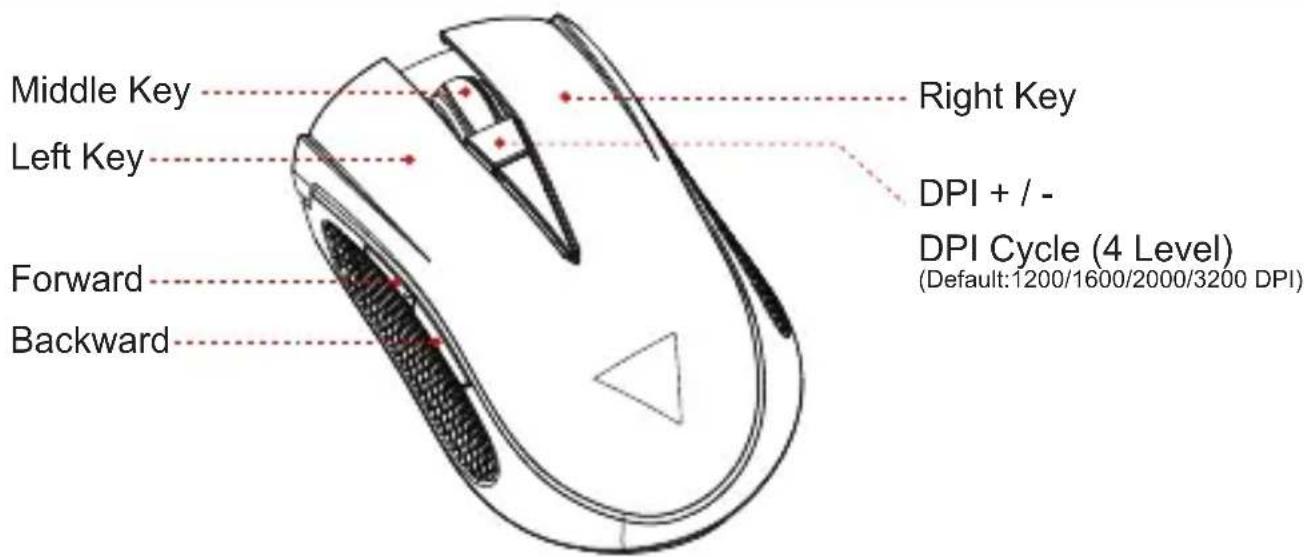
Registering Your GAMDIAS™ ZEUS E2 Optical Gaming Mouse
Please visit www.GAMDIAS.com for online product registration.

natural_image
Abstract geometric logo design with interlocking black and gold shapes forming a triangular frame (no text or symbols)GAMDIAS
GAMING ART IN MOTION


Brand : Gamdias
Model : Zeus E2
Category : Mouse