HD25 - Amplifier Hegel - Free user manual and instructions
Find the device manual for free HD25 Hegel in PDF.


| Product Type | High End Digital to Analog Converter |
| Brand | Hegel |
| Model | HD25 |
| Dimensions (H x W x D) | 6 cm x 21 cm x 26 cm |
| Weight | 3.5 kg |
| Power Supply | Internal toroidal transformer with 30,000 µF capacitors |
| Voltage Selection | 115V or 230V (switchable) |
| Digital Inputs | 2 coaxial (RCA), 1 optical (TOSLINK), 1 USB-B |
| Analog Outputs | Gold-plated XLR balanced and RCA unbalanced |
| Output Signal Level | 2.5V RMS (at 0dBFS) |
| Frequency Response | 0 Hz – 50 kHz |
| Distortion | Typically less than 0.0005% |
| Noise Floor | Typically -145 dB |
| DAC IC | 32-bit |
| Digital Filter Modes | Two selectable (F1 normal, F2 minimum pre-ringing/low latency) |
| Volume Control | Built-in digital, range 0-100 |
| Display | On/off via remote control |
| Remote Control | Included RC9 system remote |
| USB Resolution | Up to 192kHz/24bit (with driver on Windows) |
| Warranty | 2 years |
| Placement | Flat hard surface, allow ventilation, not on amplifier |
| Cleaning | Cloth with warm water or mild detergent |
| Break-in Period | Approximately 100 hours |
| Warm-up Time | 30 minutes for optimal performance |
Frequently Asked Questions - HD25 Hegel
User questions about HD25 Hegel
0 question about this device. Answer the ones you know or ask your own.
Ask a new question about this device
Download the instructions for your Amplifier in PDF format for free! Find your manual HD25 - Hegel and take your electronic device back in hand. On this page are published all the documents necessary for the use of your device. HD25 by Hegel.
USER MANUAL HD25 Hegel
Congratulations on your new HEGEL product!
Every Hegel product is based on a simple philosophy:
The audio reproduction instrument shall reproduce the original musical sound, purely and naturally.
It shall use Scandinavian design reflecting natural music reproduction and styling to fit in with any interior.
The products shall be easy to operate and shall be manufactured according to the best quality principles.
All HEGEL products are created with acoustical instruments in a concert situation as point of reference. The music is reproduced exactly like the original and is limited only by the quality of the recording.
Our aim is to give you the best possible music experience!
SOUND ADVICE
The Hegel HD25 High End Digital to Analog converter is easy to connect and operate, and requires no prior technical knowledge. However, to get the most out of the converter's superior sound and music quality, we have provided a brief description of how to use the device in order to provide a total music experience.
We recommend keeping this user guide for future reference.
GENERAL USE – Front Panel
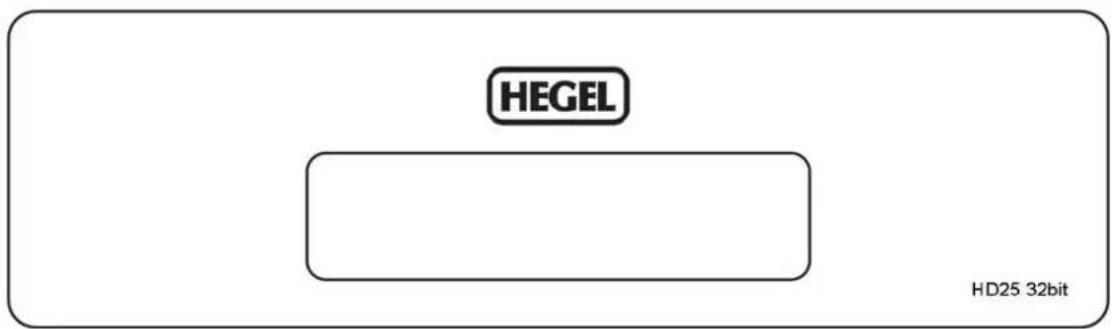
The HD25 DAC is controlled using the supplied RC9 system remote control
On/Off
The power switch is on the rear side of the D/A Converter, next to the mains input. When powered up, the HD25 will use 15 seconds to calibrate. During this time, the outputs will be muted.
NOTE: When powered up the outputs will be muted and the display will flash for approximately 15 seconds. This is normal, and is part of the start-up procedure.
Touch Input Selection
The input selection can be changed by double tapping the front panel.
The touch circuitry has to calibrate to the environment. Because of this, the touch functionality may not work for some seconds after power up or after environmental changes around the HD25.
GENERAL USE – Remote Control
The top four rows of buttons are Hegel system remote control functions that can be used to control most Hegel amplifiers and CD-players. Functionality may differ from model to model. The bottom two rows are designated DAC and computer controls.
Remote control buttons (starting top left)
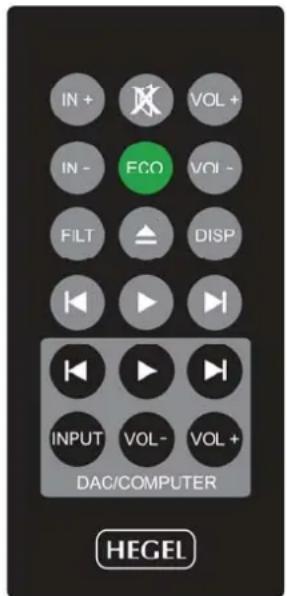
- Switches up to next input on your Hegel amplifier
- Mute for Hegel amplifiers
- Volume up for Hegel amplifiers
- Switches down to previous input on your Hegel amplifier
- ECO - will put certain Hegel equipment in low power mode (sleep)
- Volume down for Hegel amplifiers
- Filter selection button for HD25 and certain other Hegel products
- Stop/Eject for Hegel CD-players
- Display on/off for HD25 and certain other Hegel products
- Skip to previous track on Hegel CD-players
- Play. Starts playback on Hegel CD-players
- Skip to next track on Hegel CD-players
- Skip to previous track on most computers/media players
- Play/Pause on most computers/media players
- Skip to next track on most computers/media players
-
Input source selector button for the HD25
-
Volume Down button. Pressing and holding will decrease the output volume of the HD25.
-
Volume Up button. Pressing and holding will increase the output volume of the HD25.
Using the remote control to operate your HD25
The main buttons you will use to operate your HD25 are the buttons INPUT (16), VOL- (17) and VOL+ (18).
Input:
When you press the INPUT-button (16) or double tap the front panel, the HD25 will switch to the next source input in the following sequence: COAX1 – COAX2 – OPTICAL – USB – COAX1 – COAX2 and so on. On power-up the HD25 will remember the last used input.
Volume control:
The HD25 includes a built-in high quality digital volume control. This means that it can be used as a pre amplifier and may be directly connected to a power amplifier. The volume can be increased or decreased by pressing and holding the VOL- (17) and VOL+ (18) buttons. The minimum output volume setting is 0 (mute) and the maximum is 100.
When used together with a pre amplifier or integrated amplifier with its own volume control, the volume setting on the HD25 should be 100. This is also the default setting.
REMEMBER: Factory volume setting is 100. However, if the volume setting is lower than 100 when power is turned off, the unit will start at a low-level default setting on the next power up. When you power up the unit the display will flash the volume setting for approximately 15 seconds.
WARNING: The default volume setting is at maximum volume (100). If you plan to use the HD25 as a pre amplifier you MUST turn the volume down before starting to play music. Not doing so may cause severe damage to your amplifier and loudspeakers.
Filter:
The HD25 can be switched between two different digital filter modes.
This is done with the FILT (7) button.
By pressing FILT once, the current selected filter will be displayed. By pressing it again, the filter will change.
F.1 (default) is the normal filter.
F.2 is a minimum preringing and low latency filter
Display:
If you are listening in a dark room you may want to turn off the HD25's display. Pressing and holding the DISP-button (9) for approximately one second will turn the display off. A short press of the DISP-button will turn the display on again. If the display is turned off, any use of the HD25 function buttons will turn the display on temporarily to express the current status of the HD25. After a few seconds it will automatically turn off.
PC/MAC remote control functions and a word about USB
When you connect the HD25 to a computer with a USB cable (not included) it will automatically install itself as a USB soundcard on all newer versions of Windows and MAC OS. We recommend that your computer is connected to the internet during the installation process. We also suggest that you close all media players, such as iTunes or Windows Media Player before connecting the HD25. Please do not use a longer USB cable than necessary.
USB Mode Setting:
The USB mode selector switch on the rear panel determines the mode setting of the USB audio interface. Please note that the USB connector must be disconnected before changing this setting. With the switch set to “A” (default) the USB audio interface is set to plug & play mode, and up to 96kHz 24bits resolution can be achieved.
With the switch set to “B” the USB audio interface can achieve up to 192kHz and 24bits resolution. This mode is plug & play when using MAC. If you are using a PC running a Windows operating system, an additional driver has to be installed on the computer. To download and install the driver, please consult the HD25 section of the Hegel website.
Troubleshooting:
MAC – After installation you may need to go to “System Preferences – Sound – Output” and choose your USB Audio DAC as the output device.
24 bit Audio:
The HD25 can receive 24 bit music files through the USB interface. Getting 24 bit audio signals from your computer may require set-up in your media player. This may vary depending on operating system and media player. Please consult the FAQ section for your software. For playing CD-quality files (or lower) no additional set-up is acquired.
Rear Panel
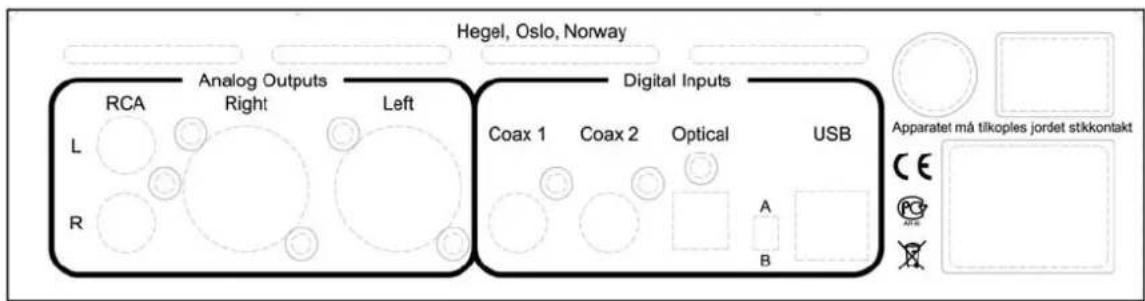
From left to right the connectors are:
Unbalanced outputs Phono / RCA left / right
Balanced outputs XLR right / left
Digital input Phono / RCA - Coax 1
Digital input Phono / RCA - Coax 2
Digital input TOSLINK® / EIAJ Optical
USB mode selector switch
Digital input USB
Mains fuse
AC Power input
Main power switch (on/off)
We recommend connecting the signal cables when the D/A Converter and all other units of the audio system are switched off.
The D/A Converter has two types of analog audio outputs: unbalanced audio signal for RCA plugs (phono plugs) and true balanced audio signal for XLR plugs (pin 2 is positive phase, pin 3 is negative phase and pin 1 is chassis ground).
We recommend using the balanced XLR outputs from the D/A Converter, as this will give the highest level of sound quality.
USE & PLACEMENT
The HEGEL HD25 should be placed on a flat, hard surface for proper isolation from vibrations.
A certain space is required for air circulation above and below the D/A converter. The D/A converter must never be placed on a carpet or similar surface that obstructs air circulation through the unit. Nor must it be covered while in use or placed on a narrow shelf or in any other confined space. The D/A converter should not be placed on the top of an amplifier as the reduced airflow may cause damage to the D/A converter or the amplifier.
The D/A converter performs best after being switched on for about 30 minutes to allow the temperature of the internal circuits to stabilize.
The D/A converter will need “breaking in” for about 100 hours before maximum sound quality can be experienced.
CLEANING
Fingerprints or stains on the front panel or top cover can be removed with a cloth moistened with warm water or a mild detergent suitable for cleaning mirrors and windows.
TRANSPORT AND SHIPPING
If you are shipping the D/A Converter over a longer distance, please follow these instructions to prevent damaging it during transport:
- First put a plastic bag around the D/A Converter
- Fit the two shock absorbers on to the D/A Converter, one on the left side and one on the right side.
- Then put it gently into the original cardboard box and secure it with adhesive tape to ensure that it does not open during shipment.
We wish you good luck in setting up your new D/A Converter and hope that it will give you many years of joyful natural sounding music experiences!
TECHNICAL SPECIFICATIONS
HEGEL HD25 High End D/A Converter
Digital inputs Up to 24bit 192kHz
DAC IC / Digital Filter 32 bit
Output signal level 2.5V RMS (at 0dBFS)
Digital inputs 2 coaxial, 1 optical and 1 USB-B
Analog outputs Gold plated XLR balanced and gold plated RCA unbalanced
Frequency response 0Hz - 50kHz
Phase response Linear phase analog filter
Noise floor Typically -145dB
Distortion Typically less than 0.0005 %
Power supply Internal toroidal transformer and 30.000μF capacitors
Dimensions / weight 6cm x 21cm x 26cm (HxWxD) / 3.5kg
The specifications may be subject to change without notice.
NOTE & WARNING
Hegel products should only be opened and / or serviced by certified Hegel technicians. The device contains electronic components that may cause severe electric shock. Work performed on Hegel products by unqualified personnel can cause serious damage and personal injury.
Opening of the product by non-authorized personnel will void the warranty.
The product must not be exposed to rain or moisture.
VOLTAGE SETTING
Underneath the HD25 there is a red switch to toggle between 115V (use for 100-120V) and 230V mains voltage. Please check and confirm that the setting is correct for your country before use. If you are uncertain of the correct setting, please consult your Hegel dealer.
WARRANTY
All Hegel products come with a 2-year warranty against defective materials and workmanship.
In case you should need any assistance with your Hegel product please find your nearest dealer or distributor by looking at the Hegel website: http://www.hegel.com
If you have any problems locating your dealer or distributor please e-mail to info@hegel.com
www.hegel.com

info@hegel.com
- SOUND ADVICE
- GENERAL USE – Front Panel
- On/Off
- Touch Input Selection
- GENERAL USE – Remote Control
- Remote control buttons (starting top left)
- Using the remote control to operate your HD25
- Input:
- Volume control:
- Filter:
- Display:
- PC/MAC remote control functions and a word about USB
- USB Mode Setting:
- Troubleshooting:
- bit Audio:
- Rear Panel
- USE & PLACEMENT
- CLEANING
- TRANSPORT AND SHIPPING
- TECHNICAL SPECIFICATIONS
- HEGEL HD25 High End D/A Converter
- NOTE & WARNING
- VOLTAGE SETTING
- WARRANTY
Brand : Hegel
Model : HD25
Category : Amplifier