
BT9340 - Loudspeaker Lenoxx - Free user manual and instructions
Find the device manual for free BT9340 Lenoxx in PDF.


| Product Type | Portable Bluetooth Speaker |
| Brand | Lenoxx |
| Model | BT9340 |
| Dimensions (approx.) | 6.7 x 3.1 x 3.1 inches (17 x 8 x 8 cm) |
| Weight (approx.) | 1.1 lbs (0.5 kg) |
| Power Source | Built-in rechargeable lithium-ion battery (3.7V, 1200mAh) |
| Charging | Micro USB cable (DC 5V, 1A) |
| Bluetooth Version | Bluetooth 5.0 |
| Wireless Range | Up to 33 ft (10 m) |
| Speaker Power Output | 5W RMS |
| Frequency Response | 100 Hz - 20 kHz |
| Supported Audio Sources | Bluetooth, AUX (3.5mm), Micro SD card, USB flash drive |
| Playback Time | Up to 6 hours (at 50% volume) |
| Charging Time | Approx. 2-3 hours |
| Control Buttons | Power, Volume +/-, Play/Pause, Mode, Next/Previous track |
| Built-in Microphone | Yes, for hands-free calling |
| Cleaning | Wipe with a soft, dry cloth. Do not use abrasive cleaners. |
| Safety Warning | Do not expose to water or extreme temperatures. Keep away from children. |
| Accessories Included | Micro USB charging cable, AUX cable (3.5mm), user manual |
| Spare Parts Availability | Contact Lenoxx customer support or authorized service centers. |
| Repairability | Limited; battery replacement possible by qualified technician. |
| General Information | Designed for casual indoor/outdoor use. Not waterproof. |
Frequently Asked Questions - BT9340 Lenoxx
User questions about BT9340 Lenoxx
0 question about this device. Answer the ones you know or ask your own.
Ask a new question about this device
Download the instructions for your Loudspeaker in PDF format for free! Find your manual BT9340 - Lenoxx and take your electronic device back in hand. On this page are published all the documents necessary for the use of your device. BT9340 by Lenoxx.
USER MANUAL BT9340 Lenoxx
natural_image
Colorful speaker tower with rainbow gradient lighting (no text or symbols visible)Model no: BT9340
Batch no: PR4507
PLEASE READ AND RETAIN INSTRUCTIONS FOR FUTURE REFERENCE.
The illustrations used in this manual are to illustrate the operation method and structure of the product. Where there is a small difference between the physical item and the illustrations, please take the physical as the standard.
ABOUT THE PRODUCT:
Enjoy vibrant and stylish musical convenience with our LED Flame Light Bluetooth Speaker featuring flame effect colour-changing LEDs in the dual woofers as well as a blue LED top volume control knob. This Bluetooth system will be sure to entertain wherever you go with its rechargeable and portable abilities.
With two 20.3cm woofers and two 2.5cm tweeters and flame effect colour-changing LED lights on the woofers, complete with four different lighting modes, this portable speaker is ready to gear your next chill-out session. The colour-changing LEDs add vibrance and depth to the speaker, however if the LED lights are a bit too much for you, you can simply switch them off. Enjoy your favourite tunes via Bluetooth, aux-in, USB, TF card or FM radio.
The microphone input makes karaoke very simple and fun—it's as easy as plug and go. Microphones can also be plugged in for speeches and announcements at your next ceremony, party or celebration. The full functional remote can control the power, volume, equaliser, previous, next, play, pause, input mode, repeat, microphone recording, TWS pairing and a quick-access mute button.
Whether relaxing at home or entertaining your guests, you can enjoy a wide range of compatibility with your smartphone, tablet and other music devices. Our LED Flame Light Bluetooth Speaker boasts an impressive 60 watts RMS sound and is lightweight at just over 5 kilograms and at a height of 63 centimetres, including a convenient built-in carry handle, perfect for taking on-the-go.
Enjoy a TWS Bluetooth pairing option when using two of these Bluetooth speakers, for a power-packed and unique sound experience. The microphone recording can go on to USB and TF card formats.
With a charge time of 5 hours and a playback time of 2-5 hours, this LED Flame Light Bluetooth Speaker is ready to entertain anywhere at any time.
IMPORTANT SAFETY INSTRUCTIONS:
CAUTION:
To reduce the risk of fire or electric shock, do not expose this equipment, it's charger and remote to rain or moisture; do not use it anywhere near water or where water splashes or drips; do not touch the plug with wet hands.
In the event of water or other liquids entering the device, unplug it immediately and clean and dry it as best as possible. Then have it checked for damage by a qualified technician or contact the after-sales support line.
Electrical safety and cord handling:
- To prevent contact with high voltage components inside, do not attempt to open the equipment.
- Before installing this equipment, make sure your outlet voltage corresponds to the voltage stated on the appliance rating label.
- When connecting the equipment, align the plug properly and insert it fully to prevent electric shock.
- Only use this equipment with the charger supplied, and do not overload the power outlet.
- If the charger becomes damaged, do not use the equipment. The charger must be replaced by the manufacturer or similarly qualified personnel to avoid a hazard. Contact the after-sales support line for advice.
- Do not repair the unit yourself. This product has no user-serviceable parts. Only have it serviced by qualified personnel. Contact the after-sales support line for advice.
- Unplug the unit from the power outlet after use to avoid possible damage during electrical storms, or when the equipment will be unattended or unused for an extended period.
- Do not let the chargers cord hang over the edge of a table or counter or touch any hot surface. Do not allow anything to rest on or roll over the charger's cord and run any cords so that no one steps on or trips over them.
- Do not run the charger's cord near heat-producing appliances such as radiators, stoves or irons. Excessive heat could melt insulation and expose live wires.
- Always grasp the plug, not the cord, when disconnecting the charger from the unit. Pulling the cord can damage the internal wires and may cause a fire.
Installation:
When installing the unit, make sure to place it:
- Away from heat sources, radiators or other products that produce heat.
- Away from areas with hot temperatures, high humidity or direct sunlight.
- Away from excess dirt and dust.
- Away from open windows and any place where water may get into the unit and damage it.
- Make sure there is free circulation of air around the unit. Do not place it on a thick carpet, a bed or any place where ventilation holes are obstructed. Leave at least 10cm clearance around the unit.
- Make sure the mains socket is always readily accessible.
Usage conditions and restrictions:
- Do not place heavy objects on top of the equipment or step on it.
- Do not place objects filled with water (such as vases) or any naked flame sources (such as lit candles, incense sticks or cigarettes) on top of the unit.
- The equipment is not intended for use by persons (including children) with reduced physical, sensory or mental capabilities, or lack of experience and knowledge, unless they have been given supervision or instruction concerning use of the equipment by a person responsible for their safety.
- Young children should be supervised to ensure they do not play with the equipment. Close supervision is always necessary when an appliance is used by or near children.
- We assume no liability for any damage caused by noncompliance with these instructions or any other improper use or mishandling of the equipment.
- Usage of controls, adjustments or performance of procedures other than those specified herein may result in hazardous radiation exposure. Repairs may not be carried out by anyone except qualified service personnel.
Getting Started
Before First Use:
- The unit may become hot during operation. Always leave sufficient space around the unit for ventilation.
- The voltage supplied to the unit should match the voltage that is printed on the chargers panel. If you have any doubts concerning this matter, consult an electrician.
- Avoid placing the unit in direct sunlight or close to any sources of heat. Also avoid locations subject to vibrations and excessive dust, heat, cold or moisture.
- Do not expose the unit to water.
- Do not place the unit on an amplifier or receiver.
- Do not open the cabinet as this might result in damage to the circuits or an electric shock. If a foreign object gets into the unit, contact your dealer or service company.
Power supply/ Recharging the speakers built in battery:
- The unit operates on an internal rechargeable Li-ion battery and mains power.
- The battery can be recharged with the provided charger. Before first plugging the appliance check that voltage indicated on the rating label corresponds
- Insert the charging cable into the DC in socket on the unit.
- Plug the charger to the power source.
- For best results, try to fully charge the battery before each use. If the battery is drained, please allow it to recharge for a few hours.
• Full re-charge time is 5 Hours. - Playback time is 5 Hours when the speaker is at half volume and 1.5 hours when it is at full volume.
- Re-charge the speaker when the sound is weak or distorted.
- Charge indicator is red while charger is connected and unit is charging. Charge indicator is off when battery is full or the speaker is no longer connected to the charge cable.
Accessories:
- 9V 1.5A charger
- Aux in lead
- Remote control, takes 2 x AAA batteries, not included.
Controls:
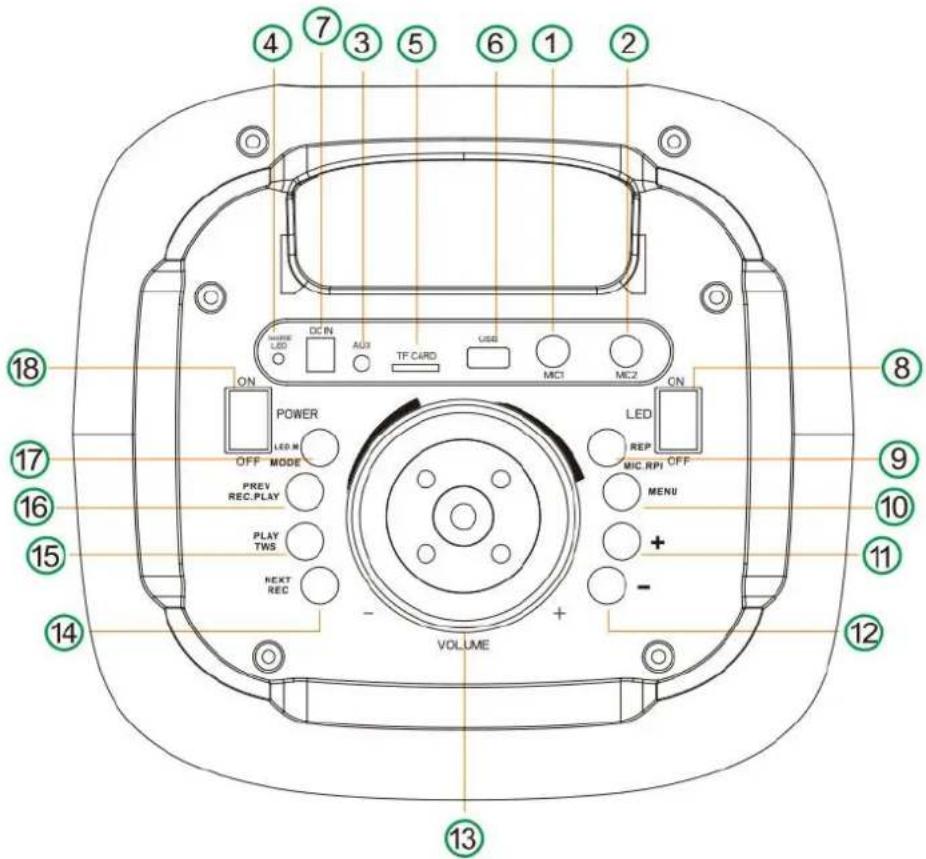
-
Microphone input 1
-
Microphone input 2
-
Aux input
-
Charging light
-
TF card input
-
USB input
-
DC 9V charging input
-
Light on/off switch
-
Microphone priority / repeat (short press to use microphone priority. Long press to repeat one song or repeat all songs
-
Menu (to change mode for adjustment of treble, bass, microphone volume/echo)
-
- (press to increase volume for treble, bass, microphone volume/echo)
-
– (press to decrease volume for treble, bass, microphone volume/echo)
-
Volume dial, turn it clockwise to increase volume, turn it anti-clockwise to decrease volume
-
Next track / record (short press for next track, long press for recording)
-
Play/ Pause (short press to play/ pause, long press for TWS function)
- Previous track / play the recording (short press to go to the previous track, long press to play the recording)
- Mode / LED mode (short press to change mode. Long press to change the LED mode
- Power ON/ OFF switch
Remote control:
- Standby button
- Microphone priority
- ▶II (PLAY/PAUSE) button
- I◀◀ (PREVIOUS) button
- Repeat button, press once to repeat a single track or twice to repeat all tracks
- Record button
- Mode button, press to change between the different playback modes
- LED button, press to change the light modes
- ▶▶▶I (NEXT) button
- Volume + / - button, press to increase or decrease volume
- EQ button, press to change between the different sound modes
- Play recording button, play back files already saved onto your USB stick
- Delete recording, press to delete files already saved onto your USB stick
- Numerical buttons, press to jump to a particular music track when the unit is playing back from USB mode
- Mute button, press to mute sound, press again to un-mute sound
- Echo + / - button, press to adjust the echo
- Bass + / - button, press to adjust the bass
- Treble + / -, press to adjust the treble
- Microphone volume + / -, press to adjust the microphone control

Bluetooth mode:
The Bluetooth name for the speaker is name BT9340.
- The wireless range is approximately within 10 meters in direct line of sight.
- Wireless audio streaming requires pairing of a Bluetooth device (e.g. smartphone).
HOW TO PAIR YOUR DEVICE TO THIS UNIT:
- Make sure the Bluetooth function is switched on in your device (e.g. smartphone, tablet).
- Switch on the unit and press the MODE button repeatedly to select the Bluetooth mode (selected by default). The display will show "bLUE".
- Once the Bluetooth pairing indicator begins flashing, you will find the unit listed in the Bluetooth connections list of your device (as BT9340).
- The initial setup is required only once per device. The unit will automatically pair to the last paired device.
- The LED indicator will flash when searching for a Bluetooth device and stay on when the devices are paired.
- When playing, you can press the ▶II (PLAY/PAUSE) button to play /pause the playback.
- When playing files, you can press the I ◀◀ (PREVIOUS) button and ▶▶I (NEXT) button to go to the previous and next track.
- Rotate the volume knob or press the volume buttons on the remote to adjust volume. Volume can also be controlled from your Bluetooth device.
External device connection (Line / Aux in)
- You can connect the audio output of an external device to this unit, to listen to the sound of that device through the speaker.
- To connect an external audio device, please use the included Aux in cable to connect the headphone out or audio line-out of the external device to the Aux input of this unit.
- Press MODE button to select the Line in mode.
- Turn on the external device. You can press the volume buttons to adjust volume.
USB/ Micro SD operation:
Playback
- Turn on the device.
- Insert a micro SD (TF) card into the slot. Or insert a USB drive into the USB port.
Press the MODE button repeatedly to select the USB or Micro SD mode. - When playing, you can press the ▶II (PLAY/PAUSE) button to play /pause the playback.
- During the playback you can press the I ◀◀ (PREVIOUS) button and ▶▶▶I (NEXT) button to go to the previous and next track. Rotate the volume indicator to adjust volume.
** It may take up to 60 seconds to open and verify a large microSD card / USB drive with many files. - Press the EQ button to switch between various equalizer presets. EQ is only available in the BT and USB/TF modes.
General USB/Micro SD notes
- This unit is equipped with a micro SD slot and USB port that can read and play MP3 files stored on standard micro SD cards and USB drives up to 32 GB.
- FAT and FAT32 file system is supported by this unit.
Never remove micro SD cards and USB drives from the unit during playback, always stop playback, then press the MODE button to switch to another mode before removing the storage to prevent damage to your files and cards/drives themselves.
**If there is a micro SD card or USB installed in the unit, when powered on, playback will automatically start from micro SD/USB.
**Slight noise during playback pauses a construction defect, it is determined by the factory presets of the dynamic noise reduction system.
FM radio:
- Turn on the device.
- Press the MODE button repeatedly to select the FM mode.
- Press PLAY button to automatically scan and save all available radio stations. The procedure will take several minutes and cannot be interrupted.
- Once the search is finished, you can press the I ◀◀ (PREVIOUS) button and ▶▶I (NEXT) button to go to a previous or next radio station.
The radio can only play the scanned and saved stations, there is no manual tuning option.
TWS:
If you own two of these speakers, you can connect them as a pair for stronger stereo and surrounding effect.
- Ensure that Bluetooth is OFF on your Bluetooth device (eg: smart phone).
- Turn on two speakers and put them both into Bluetooth mode.
- Long press "TWS" button on one speaker for two seconds. "BTST will flash on the display. When "BTST" stops flashing on the display, it means that the speakers have connected with each other.
- The speaker which shows "BTST" is the main speaker and the other one is the slave speaker.
- Turn on the Bluetooth on your smart device and locate the Bluetooth and pair it.
- The two speakers can automatically achieve TWS re-connection.
The two speakers can play the same music in TWS mode after being connected successfully.
Microphone:
You can connect a microphone for karaoke or other purposes into this unit by connecting it to either of the 6.35mm microphone input jack (MIC 1 or MIC 2 input on the unit).
Please do not plug the microphone when the unit is charging.
Use the microphone priority button to increase microphone volume louder then the music volume while singing.
Use the M Volume buttons on the remote to adjust the microphone volume.
Recording function:
The record function is only for USB mode and the TF card after inserting a microphone in the mic port and start the recording.
The maximum readable size for the USB/ TF card is 32GB
How to record:
- Press "REC" button on the remote control to start recording.
- After recording, press "REC PLAY" button to play the records.
Note: The recording function only work in USB/TF card mode, the files will save on the USB/TF card.
- If you want to delete the records, press "R-DEL" button to delete.
Lights:
- Ensure the LED switch on the speaker is in the ON position to show the lights, to turn the lights off, push the switch to the OFF position.
- Press the LED button on the remote repeatedly to change between 4 x different light displays.
EQ:
- Press the EQ button to change between the different EQ modes.
Troubleshooting:
| Issue | Cause | Solution |
| No sound | No input sound source | Check connections |
| Volume was in the lowest position or mute | Adjust the volume or press the mute button | |
| USB / TF card not connected | Connect USB/ TF card | |
| Distortion of sound | Volume too loud | Decrease the volume |
| Audio file error | Check the file format, change the audio file | |
| Microphone has no sound | Microphone is not connected correctly | Ensure the microphone is completely plugged into the microphone socket |
| Microphone switch is not on | Power on microphone | |
| Microphone volume is in the lowest position | Adjust the microphone volume | |
| No sound on USB / TF card | Song format error | Song format needs to be MP3 or WMA |
| Incorrect operation | Power the speaker off and then power it on again | |
| USB/ TF card not connected | Ensure the USB / TF card are connected correctly | |
| Sound issues | The wired microphone is too close to the speaker | Do not allow the head of the wired microphone point at the speaker |
| The switch on the microphone is on but the microphone is not being used | Ensure a connected wired microphone is OFF if it remains connected to the speaker but is not being used | |
| Microphone volume is too loud | Adjust the microphone volume | |
| Making mobile phone calls too close to the speaker | Keep mobile phone calls away from the speaker | |
| Too close to equipment which interferes with the speaker | Keep the speaker away from the source of interference | |
| Bluetooth not working | Bluetooth disconnected / Bluetooth connected but has no sound | Ensure the device has been paired to the correct Bluetooth name BT9340 |
| Distance between device and speaker is too long | Move the device closer to the speaker and away from barriers such as walls |
Maintenance and cleaning:
Switch off the unit, unplug from the power supply.
The outside of the speaker can be cleaned with a soft slightly damp cloth.
Never submerge the speaker, remote control or charger into water or other liquids.
Specifications:
Battery: Li-ion, 7.4V. 3000mA
Output power: 60W
Input Voltage: 100 – 240V, 50/60Hz
FM radio: 87.5 – 108 MHz
Charger: 9V 1.5A
Charge time: 5 Hours
Playback time: 2-5 Hours
Remote control battery: 2 x AAA batteries, not included
USB/TF card max capacity: 32GB
Product weight: 5.26 Kg
Product dimensions: 260 x 240 x 630 mm
LENOXX
www.lenoxx.com.au

1300 666 848

LenoxxElectronics

LenoxxElectronics

@LenoxxAustralia


- ABOUT THE PRODUCT:
- IMPORTANT SAFETY INSTRUCTIONS:
- CAUTION:
- Electrical safety and cord handling:
- Installation:
- Usage conditions and restrictions:
- Getting Started
- Before First Use:
- Power supply/ Recharging the speakers built in battery:
- Accessories:
- Controls:
- Remote control:
- Bluetooth mode:
- The Bluetooth name for the speaker is name BT9340.
- HOW TO PAIR YOUR DEVICE TO THIS UNIT:
- External device connection (Line / Aux in)
- USB/ Micro SD operation:
- Playback
- General USB/Micro SD notes
- FM radio:
- TWS:
- Microphone:
- Recording function:
- How to record:
- Lights:
- EQ:
- Maintenance and cleaning:
- Specifications:
- LENOXX
Brand : Lenoxx
Model : BT9340
Category : Loudspeaker