
BTW80 - Loudspeaker Lenoxx - Free user manual and instructions
Find the device manual for free BTW80 Lenoxx in PDF.


| Product Type | Portable Bluetooth Speaker |
| Brand | Lenoxx |
| Model | BTW80 / BTW80BL |
| Dimensions | Approx. 200 x 70 x 70 mm |
| Weight | Approx. 400 g |
| Power Output | 2 x 5 W (RMS) |
| Driver Size | 1.75 inch (44.45 mm) x 2 |
| Frequency Response | 20 – 20,000 Hz |
| Bluetooth Version | 4.2 |
| Wireless Range | Up to 10 meters |
| Waterproof Rating | IPX7 (submersible up to 1 meter for 30 minutes) |
| Battery Type | Li-ion, 3.7 V, 2500 mAh |
| Charging Time | 5 hours |
| Playback Time | Up to 14 hours (varies with volume) |
| Charging Port | Micro USB (5 V DC) |
| Auxiliary Input | 3.5 mm stereo jack |
| Hands-Free Function | Built-in microphone |
| TWS Pairing | Yes (pair two speakers for stereo) |
| Controls | Power, Play/Pause, Volume+/-, Next/Previous Track, TWS, Reset |
| Indicators | Charging LED (red when charging, off when full), Bluetooth status LED (white) |
| Package Contents | Speaker, Micro USB charging cable (60cm), Aux cable (60cm), User Manual, Warranty Card |
| Operating Temperature | 5°C to 35°C |
| Cleaning Instructions | Wipe with soft, slightly damp cloth; no chemicals or abrasives |
| Safety Warnings | Do not disassemble, avoid extreme temperatures, keep away from flames, charge every 2 months if not used |
Frequently Asked Questions - BTW80 Lenoxx
User questions about BTW80 Lenoxx
0 question about this device. Answer the ones you know or ask your own.
Ask a new question about this device
Download the instructions for your Loudspeaker in PDF format for free! Find your manual BTW80 - Lenoxx and take your electronic device back in hand. On this page are published all the documents necessary for the use of your device. BTW80 by Lenoxx.
USER MANUAL BTW80 Lenoxx
natural_image
Black Lenovo 800 smartphone with textured back panel and visible brand logo (no text or symbols on body)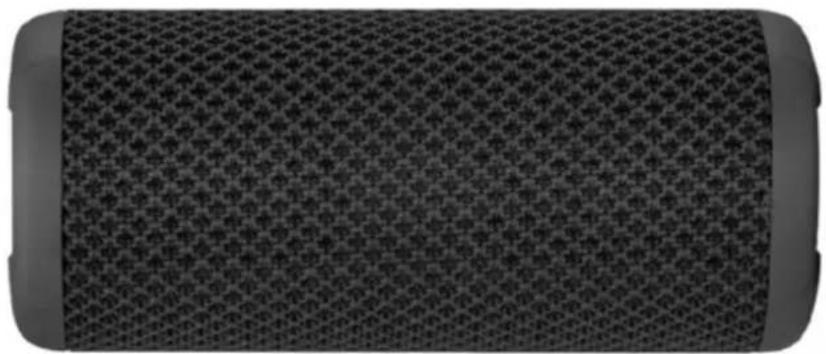
natural_image
Close-up of a textured black mesh surface with no visible text or symbolsModel no: BTW80 / BTW80BL
Batch no: PR3840
PLEASE REATAIN THESE INSTRUCTIONS FOR FUTURE REFERENCE.
Product information:
Bluetooth version: 4.2
Frequency response: 20 – 20,000 Hz
Power output: 2 x 5w
Driver size: 1.75" x 2
Connections: 3.5mm aux in/Bluetooth
Power supply: micro USB, 5 V DC
Battery: Li-ion, 3.7 V, 2500 mAh
Charging time: 5 hours
Playback time: Up to 14 hours*
Working distance: Up to 10 meters
Waterproof level: IPX7. IPX7 is one of the strongest waterproof ratings. The speaker can go 1 meter underwater for up to 30 minutes without any interference in the function of the speaker.
Hands free function: Integrated microphone
* Playback time of the speaker depends on the battery charge level, volume level, audio track and ambient temperature.
Important safety information:

- Do not modify, disassemble or repair your device.
- Do not store your device in hot or cold areas. The recommended ambient temperature for device usage is 5 degrees Celsius to 35 degrees Celsius.
- Keep your device dry. Do not dry the device with external heat sources.
- Do not store your device near or on heaters, in microwaves or other hot equipment.
- Do not drop or cause a physical impact on the device.
- Do not touch the USB lead with wet hands or disconnect the charger by pulling on the lead.
- This device must not be placed near open flames.
- If the speaker needs cleaning, please clean it with a soft slightly damp cloth. Do not clean it with any chemicals or abrasive cleaners.
- Li-ion batteries exhibit a gradual decrease in performance over their service life, so a reduction in the initial battery capacity is not an indication of a faulty battery or device.
- The typical charge time for an empty battery is 5 hours.
- If you do not use the device for a long period of time, please charge it once every 2 months to avoid damage to the battery.
Warranty is void in the case of:
- Inappropriate installation of the product, inappropriate usage and/or operating the product without following the manual, dropping the product from heights or hard impacts.
- Exposure to corrosion, mud and sand.
- Repair works, modifications or cleaning which were performed by a service not authorized by the manufacturer.
- Accidents or events or any other reasons which do not depend on the manufacturer, which includes lightning, fire, magnetic field and inappropriate ventilation.
Package content:
- BTW80 Bluetooth speaker
- 60cm Black Micro USB charging lead
- 60cm Black Aux in lead
- User manual
- Warranty card
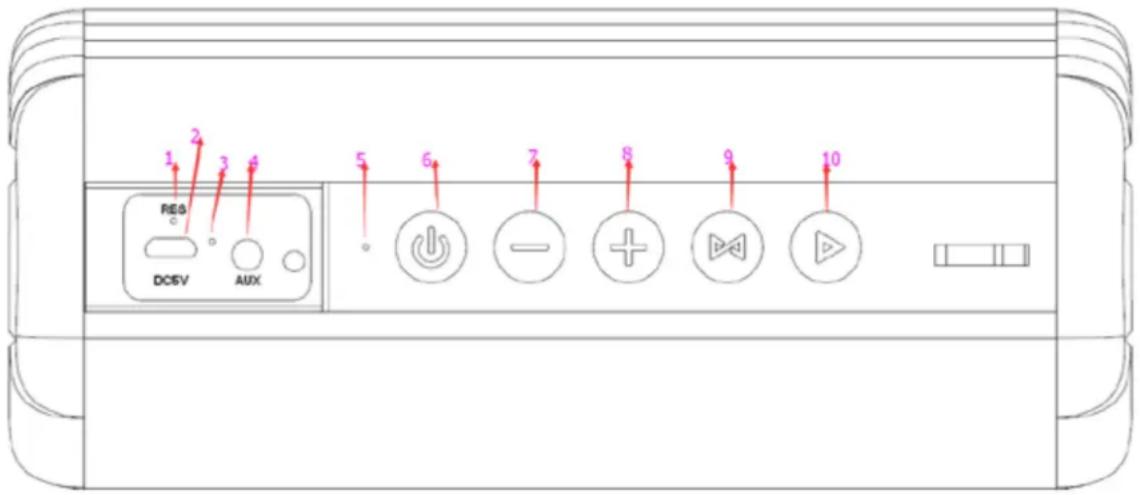
Controls:
- Reset button:
Use a pin to press this button in case your speaker controls are not responding.
- DC 5V charging port:
Use this port to connect the micro-USB charging lead.
-
Charging LED indicator.
-
Aux in port:
Use the 3.5mm standard audio lead to connect an external audio source. E.g. MP3 player with an earphone jack.
- Bluetooth status indicator:
The Led light indicates the operating status of the speaker
- Power on/off button:
Press this button to turn on/off the device.
Press and hold the button for 4 seconds to turn it off.
Press and hold this button for 3 seconds to turn it on
- Last Track/V-:
Press this button repeatedly to decrease the volume.
Press and hold this button for 3 seconds to move to the previous music track.
- V+/Next Track:
Press this button repeatedly to increase the volume.
Press and hold this button for 3 seconds to move to the next music track.
-
TWS (True wireless) pairing button: Use this button for pairing two BTW80 speakers for stereo playback.
-
Play/Pause button. Press once to pause playback, press again to resume playback.
Charging:
Before using the speaker, it needs to be charged. Charge it using the micro USB charging lead included in the package. Plug the small micro USB socket into the charging port on the side of the speaker, and the other end of the lead (the standard USB2.0 plug) into any standard USB charger.
The LED light indicator will be red when charging. When it is fully charged, the LED indicator will be off. The speaker can be charged while playing music.
The full charging time is 5 hours.
Music playback is up to 14 hours*.
BT Pairing
Turn on your speaker. The mode LED indicator on the control panel will flash white. Enable your BT device such as smart phones, tablets, or other BT media and ensure it is in searching mode. Select BTW80 from the list shown on your BT device. The LED light will be White lighting when BT connected successfully. When you play music, the white led light will flash slowly.
Aux in
Use the 3.5mm standard audio lead to connect an external audio source. E.g. MP3 player with an earphone jack. Connect one end of the aux in lead to the earphone socket of your device and connect the other end of the aux in lead to the aux in port of the speaker. Then begin music playback on your device.
TWS Function:
BTW80 supports TWS (True wireless) function, which allows the pairing of two speakers together to play sound in stereo mode.
- Speakers must be disconnected from other Bluetooth devices before TWS Pairing.
- Turn on two BTW80 speakers and keep them in near distance.
- Take one of the speakers as the main, press and hold TWS pairing button for 3 seconds,
after successful pairing you will hear a notification sound and status light on the seconds speaker will start to glow continuously
- Now the speakers will connect together automatically each time after you turn them off and on.
- Turn on the Bluetooth function on your device, select BTW80 from the list and pair the speaker.
- After successful connection one of the speakers will play the left channel while the other speaker will play the right channel of stereo sound.
- Control buttons can be used on any of the TWS paired speakers, when adjusting volume on the single speaker, it will be automatically adjusted on the other one.
- Un-pairing of TWS mode: press and hold TWS pairing button for 3second on one of the speakers and they will be disconnected from each other and will not reconnect to each other automatically.
Hands-Free Function
When you connect you phone with BTW80 via Bluetooth, you can take an incoming call by pressing the ▶ button. Press once again to end the call. You can reject an incoming call by
pressing and holding the ▶ button. Music playback will resume automatically.
LENOXX
www.lenoxx.com.au

1300 666 848

LenoxxElectronics

LenoxxElectronics

@LenoxxAustralia


Brand : Lenoxx
Model : BTW80
Category : Loudspeaker