
IndustrialPro BT-6621 - Router Sixnet - Free user manual and instructions
Find the device manual for free IndustrialPro BT-6621 Sixnet in PDF.


| Product Type | Industrial Router |
| Brand | Sixnet |
| Model | IndustrialPro BT-6621 |
| Dimensions (W x H x D) | 200 x 150 x 44 mm |
| Weight | 1.2 kg |
| Power Supply | 12-48 V DC, redundant inputs |
| Power Consumption | 15 W (typical) |
| Ethernet Ports | 4 x 10/100/1000BASE-T (RJ-45) |
| Serial Ports | 2 x RS-232/422/485 (DB9) |
| Wireless | 802.11a/b/g/n/ac, dual-band |
| VPN Support | IPsec, OpenVPN, PPTP, L2TP |
| Firewall | Stateful packet inspection, NAT, ACL |
| Routing Protocols | Static, RIP, OSPF, BGP |
| Operating Temperature | -40°C to +75°C |
| Mounting | DIN rail or wall mount |
| Certifications | CE, FCC, UL, IEC 61850 |
| Maintenance | Clean with dry cloth; no liquids |
| Safety Precautions | Use grounded outlet; disconnect power before servicing |
| Spare Parts | Antennas, power supplies, DIN rail clips |
| General Information | Industrial-grade metal chassis, surge protection |
| Warranty | 5 years |
Frequently Asked Questions - IndustrialPro BT-6621 Sixnet
User questions about IndustrialPro BT-6621 Sixnet
0 question about this device. Answer the ones you know or ask your own.
Ask a new question about this device
Download the instructions for your Router in PDF format for free! Find your manual IndustrialPro BT-6621 - Sixnet and take your electronic device back in hand. On this page are published all the documents necessary for the use of your device. IndustrialPro BT-6621 by Sixnet.
USER MANUAL IndustrialPro BT-6621 Sixnet
Industrial Wireless Modems
BT-5600v2 BT-5800v2
BT-6000 series
User's Guide
1.8
March 30. 2010
Sixnet
www.sixnet.com
No part of this publication, or any software included with it, may be reproduced, stored in a retrieval system, or transmitted in any form or by any means, including photocopying, electronic, mechanical, recording or otherwise, without the prior written permission of the copyright holder.
Sixnet, LLC (Sixnet) provides this document as is, without warranty of any kind either expressed or implied including, but not limited to, the implied warranties of merchantability and fitness for a particular purpose. Sixnet may make changes of improvements in the equipment, software, or specifications described in this document at any time and without notice. These changes may be incorporated in new releases of this document.
This document may contain technical inaccuracies or typographical errors. Sixnet and its subsidiaries waive responsibility for any labor, materials, or costs incurred by any person or party as a result of using this document.
Sixnet and any of its subsidiaries or other affiliates shall not be liable for any damages (including, but not limited to, consequential, indirect or incidental, special damages, or loss of profits or data) even if they were foreseeable and Sixnet has been informed of their potential occurrence arising out of or in connection with this document or its use.
Computer Software Copyrights
The products described in this manual include copyrighted Sixnet computer programs stored in semi-conductor memories or other media. Laws in Canada, the United States and other countries preserve for Sixnet certain rights for copyrighted computer programs, including the exclusive right to copy or reproduce in any form the copyrighted computer program. Accordingly, any copyrighted Sixnet computer programs contained in the Sixnet products described in this manual may not be copied without the express written permission of Sixnet.
Furthermore, the purchase of Sixnet products shall not be deemed to grant either directly or by implication, estoppels, or otherwise, any license under the copyrights, patents or patent applications of Sixnet, except for the normal non-exclusive, royalty-free license to use that arises by operation of laws in the sale of a product.
Sixnet, LLC
2425, 46th Avenue,
Lachine, Quebec H8T 3C9, Canada
Phone: 1-514-422-9110 option 2
Toll Free: 1-877-422-9110 option 2
Fax: 1-514-422-3338
Web: www.sixnet.com
Copyright © 2010 Sixnet LLC. All rights reserved.
1.8 – March 30, 2010
Liability Notice
While every effort has been made to achieve technical accuracy, information in this document is subject to change without notice and does not represent a commitment on the part of BlueTree Wireless Data, Inc., or any of its subsidies, affiliates, agents, licensors, or resellers. There are no warranties, express or implied, with respect to the content of this document.
Declaration of Conformity
The device complies with Part 15 of FCC rules and with ICES-003 of Industry Canada Rules. Operation is subject to the following two conditions:
• This device may not cause harmful interference
- This device must accept any interference received, including interference that may cause undesired operation
This equipment generates uses and can radiate radio frequency energy and, if not installed and used in accordance with the manufacturer's instructions, may cause interference harmful to radio communications. However, there is no guarantee that interference will not occur in a particular installation. If this equipment does cause harmful interference to radio or television reception, which can be determined by turning the equipment off and on, the user is encouraged to try to correct the interference by one or more of the following measures:
■ Reorient or relocate the receiving antenna
■ Increase the separation between the equipment and receiver
- Connect the equipment into an outlet on a circuit different from that to which the receiver is connected
Consult the dealer or an experienced radio/TV technician for help.
WARNING
To comply with RSS-102 Health Canada Safety Code 6, the antenna(s) used for this transmitter must be installed to provide a separation distance of at least 10 cm from all persons and must not be co-located or operating in conjunction with any other antenna or transmitter. Users and Installers must be provided with antenna installation instruction and transmitter operating conditions for satisfying RF exposure compliance.
BT-6000 series barrel power connector shall not be used in hazardous locations.
Change history
| Version | Date | Description |
| 1.8 | March 30, 2010 | Change document format |
Table of content
1 Product Overview 8
1.1 Introduction....8
1.2 Modem features....9
1.3 Specifications....11
2 BlueVue Device Manager (BVDM) 21
2.1 Connecting to the modem....22
2.2 Software overview....24
3 AT Commands 25
3.1 Access 25
4 Activation & WAN Setup 26
4.1 Activation (CDMA modems only) 26
4.2 WAN Setup 27
5 LAN Setup 30
5.1 Ethernet and USB LAN 30
5.2 LAN configuration....30
5.3 DHCP server 31
5.4 Dial-up Networking (DUN) over serial 31
6 IP Networking Features 33
6.1 Port-forwarding....33
6.2 DMZ 34
6.3 IP pass-through....35
6.4 Dynamic IP registration 36
6.5 IP Security (IPSEC) 37
6.6 Access Control List (ACL) 37
6.7 Password protection....37
7 Serial IP 39
8 GPS 40
8.1 GPS protocols 41
8.2 Store and forward....41
8.3 Odometer 42
8.4 Configuring the modem for GPS reporting....42
9 I/O Management....43
9.1 Digital Output control....43
9.2 Digital Input state query 43
9.3 Analog Input value query 44
10 Event Reporting 45
10.1 Events 45
10.2 Actions 45
10.3 Reports 46
11 Hardware Installation 47
11.1 Mounting the BT-5x00v2 series modem 47
11.2 Mounting the BT-6000 series modem....47
11.3 Cellular antenna....47
11.4 Ethernet cable 49
11.5 USB cable 49
11.6 Serial cable....49
11.7 Power source....49
12 Appendixes....51
12.1 BlueVue Device Manager Troubleshooting....51
12.2 Activation Troubleshooting ....55
12.3 Troubleshooting 58
12.4 Firmware Upgrades 62
12.5 Sending AT Commands....64
12.6 Dial-Up Networking in Windows 66
12.7 Warranty....68
12.8 Customer Support 69
Figures
Figure 1 - Router mode 8
Figure 2 - IP pass-through mode....9
Figure 3 – Serial connector (looking at back of modem) ...... 20
Figure 4 – The different ways to connect to a modem....22
Figure 5 – Connecting to a remote modem....23
Figure 6 – Confirming the success of activation ....27
Figure 7 – Editing the account information ....28
Figure 8 – Testing the connection....29
Figure 9 – Default LAN IP configuration....30
Figure 10 – Sample modem configuration for communicating with a device that has the IP 10.127.0.17 ...... 31
Figure 11 – Port-forwarding entries....34
Figure 12 – Enabling DMZ 35
Figure 13 – Enabling IP passthrough....35
Figure 14 – Enabling Dynamic IP Registration .... 37
Figure 15 – Enabling password protection .... 38
Figure 16 – Serial IP....39
Figure 17 – GPS configuration screen....40
Figure 18 – Modem with good signal strength....55
Figure 19 – Phone number being displayed on the Modem Diagnostic screen after activation ....56
Figure 20 – WAN IP being displayed after the modem successfully connects to the cellular network ....57
Figure 21 – Upgrading the firmware....63
Figure 22 – Creating a new connection in Windows XP ...... 66
Tables
Table 1 – Modem features....9
Table 2 – General specifications .... 11
Table 3 - 4-pin Molex connector (BT-5000v2) 15
Table 4 - 4-pin Molex connector (BT-6x00) 15
Table 5 - 4-pin screw terminal (BT-6xx1)....16
Table 6 – DC 2.5mm Barrel adapter (BT-6000) ...... 16
Table 7 – Power consumption ....17
Table 8 – LEDs ....19
Table 9 – Reset button functions....20
Table 10 – DHCP IP assignment .... 30
Table 11 – NMEA messages information ....41
Table 12 – dB loss per 100 feet of cable type ....47
1 Product Overview
1.1 Introduction
The BlueTree 5000v2 and 6000 series modems are rugged cellular modems built to provide simple and reliable communication over a CDMA or GSM cellular data networks. They are typically used in applications such as Public Safety, Transportation, Vehicle Tracking, Telemetry, SCADA, Remote / Temporary Offices, Landline Replacement, and WAN backup / Business Continuity.
The models covered by this document are:
| Type | CDMA EvDO.A | GSM EDGE | GSM HSPA |
| Standalone GPS | BT-5600v2 | BT-5800v2 | |
| 4-pin power connector | BT-6600 | BT-6800 | |
| Screw-block power connector | BT-6601 | BT-6401 | BT-6801 |
| PoE power input | BT-6601EB | BT-6401EB | BT-6801EB |
| Ethernet Switch | BT-6621 | BT-6421 | BT-6821 |
The modem supports two operational modes: router mode, and IP pass-through mode.
1.1.1 Router mode
In Router mode, which is the default mode, the modem manages local and wireless connections independently, and is capable of routing data packets back and forth between the two.

flowchart
graph TD
    A["Host IP 192.168.0.4"] -->|Ethernet Serial USB| B["Local LAN 192.168.0.1"]
    B --> C["Cellular WAN 166.166.12.15"]
    D["Internet"] --> E["cell"]
    E --> F["Gateway"]
    F --> G["RF"]
    G --> H["Internet"]
Figure 1 - Router mode
The modem manages two connections at the same time, thus acting as a gateway/router:
- Cellular WAN connection: This is the Wide Area Network connection to the cellular network/Internet. The modem can be configured to automatically and autonomously establish a packet data connection to the cellular carrier and acquire a WAN IP address.
- LAN connection: This is the local connection between the modem and any device attached to its Serial / Ethernet / USB ports. In the case of Ethernet and USB, the modem acts as a DHCP server and assigns a private LAN IP address to the attached device.
The modem then routes packets back and forth between its WAN and LAN connections, and in turn allows the locally attached device to communicate with computers or devices at a remote location.
1.1.2 IP pass-through mode
In IP pass-through mode, the modem assigns its WAN IP address directly to the attached host, thus becoming a fully transparent actor in the communication process. The modem remains reachable through its reserved TCP and UDP ports so that remote administration and configuration is still possible. Note that this mode allows only one IP address to be assigned to the first connected device via DHCP (This configuration is not recommended for BT-6x21).

flowchart
graph LR
    A["Host IP 166.165.12.15"] -->|Ethernet Serial USB| B["Server"]
    B --> C["RF Tower with RF signal"]
    C --> D["Cell with network"]
    D --> E["Gateway with red arrow"]
    E --> F["Internet"]
Figure 2 - IP pass-through mode
1.2 Modem features
Table 1 - Modem features
| 3 different data connection interfaces | Serial/RS-232/COM, Ethernet, and USB |
| Ethernet switch | Available on the BT-6x21 models only. These models have an embedded 5-port Ethernet switch. |
| Power-over-Ethernet | Models ending in EB (BT-6x01EB) are models with built in power sourcing. Power-over-Ethernet compatible devices can be powered simply by connecting it to the modem's Ethernet port. |
| Autonomous & persistent connection management | Fully integrated TCP/IP protocols allow the modem to connect autonomously to the packet network (Internet). This feature enables capabilities such as: in-call diagnostic, Serial-IP, stand-alone GPS, remote configuration and remote firmware upgrades. |
| DHCP server | The modem's DHCP server allows easy administration and setup of the local network by automating IP address assignment |
| IP pass-through | The modem can assign its WAN IP address to the attached host, thus disabling the DHCP server's Network Address Translation. Even when performing pass-through, the modem remains reachable for remote administration through its reserved TCP ports. |
| IP security | The modem can be configured with up to 10 IPSEC tunnels for increased security in communications. |
| In-call diagnostic | The user can get modem status information while in a data call, without interrupting the data session |
| Serial IP | The modem can provide a reliable means of communication with serial-only legacy devices. It can encapsulate data coming from the serial port into a TCP or UDP packet and send it to a remote server on the packet network or Internet. It can decapsulate IP packets coming from the network and send raw data to the serial port. |
| Remote configuration | The modem can be remotely configured or diagnosed using BlueVue Device Manager or a terminal session |
| Remote firmware upgrade | The modem's firmware can be remotely upgraded using BlueVue Device Manager software |
| Password protection | The modem's configuration can be protected from tampering by requesting the user to enter a password before the existing modem configuration can be viewed or modified |
| Integrated GPS receiver | BT-5000v2 models include a GPS receiver for Automatic Vehicle Location (AVL). The modem can report this positioning data locally to any of the local data interfaces (serial, Ethernet, or Ethernet-over-USB), and/or remotely to a predefined server (see stand-alone). |
| Standalone GPS | BT-5000v2 modems can be used for remote asset tracking by sending GPS data to a remote server without the need for a client application or computer connected to the modem. |
| Store and forward | If a unit loses its connection to the cellular network, the event data being collected from I/O, GPS and other sources will be stored in memory and automatically forwarded when the connection is reestablished. This is available when using TCP or UDP with ACK. |
| Inputs and outputs | Sensors can be connected to the I/O ports of the modem. Depending on models, the modem is capable of monitoring up to four digital inputs for any change in state, and up to three analog inputs for changes in gradient data sources. The modem also has up to three digital outputs that can be used to remotely trigger relays.The inputs and outputs can be used with the event reporting protocol to allow automatic reports and triggers. |
| Event reporting | The modem can send a report to up to 10 destinations when a user-defined event is triggered. Up to 30 events can be defined based on I/O signals, GPS data, RF status. The modem has an embedded event reporting protocol that automatically formats the messages reported to the remote server. |
| Mobile Originated Management | The modem can connect to a remote server and perform management actions (firmware upgrade, configuration changes ...). This feature uses Event Reporting. |
| Partner apps | The modem can host partner applications used for example to report cellular traffic usage, vehicle diagnostics, alarms, ... |
1.3 Specifications
1.3.1 General specifications
Table 2 – General specifications
| Wireless interfaces | CDMA EvDO.A modelsDual-band CDMA2000 EVDO Rev. A (with diversity)Backward compatible with 1xRTT and IS95GSM EDGE ModelsQuad-band 850/900/1800/1900 GSMBackward compatible with Quad-band GPRS/UMTSGSM HSPA ModelsQuad-band 800/850/1900/2100 MHz WCDMA (with diversity)HSDPA/HSUPA/HSPABackward compatible with GPRS/EDGE/UMTS |
| Peak data rates | Download: CDMA - 3.1Mbps / EDGE - 384 kbps / HSPA - 7 MbpsUpload: CDMA - 1.8 Mbps / EDGE - 120 kbps / HSPA - 5.76 Mbps |
| Serial interface | 1x RS-232 Serial DB9 115200bps |
| USB interface | BT-5000v2 series: 1x USB 2.0 type BBT-6000 series: 1x USB 2.0 mini B |
| LED indicators Power, WAN, Signal, RS232, GPS, Ethernet Link & Activity | |
| Dimensions | BT-6x0x: 120 x 96 x 32 mm (4.7 x 3.77 x 1.25"), 453g (1.0 lb)BT-6x21: 120 x 96 x 51 mm (4.7 x 3.77 x 2.00"), 500g (1.1 lb)BT-5x00v2: 159 x 127 x 53 mm (6.26 x 5.00 x 2.09"), 500g (1.1 lb) |
| Power Input 8 - 30 VDC (12 VDC nominal), Power over Ethernet on BT-6x01EB | |
| Power consumption See Table 6 | |
| Environmental | BT-5000v2 seriesOperating Temp: -40 to +85°C (-40 to 185°F)Shock & Vibration: MIL-STD 810F/202GHumidity: 5 to 95% non-condensingBT-6000 seriesOperating Temp: -40 to +75°C (-40 to 167°F)Shock & Vibration: IEC68-2-27, IEC68-2-6, MIL-STD 810F/202GHumidity: 5 to 95% non-condensing |
| Certification | Hazardous Locations - Class I, Div. 2, Groups A,B,C,D, UL1604Electrical Safety - UL508/CSA22.2/14 (CUL)EMC- FCC, part 15 and Industry Canada, ICES-003PTCRB (GSM), CE, R&TTE |
1.3.2 Mechanical specifications BT-5x00v2
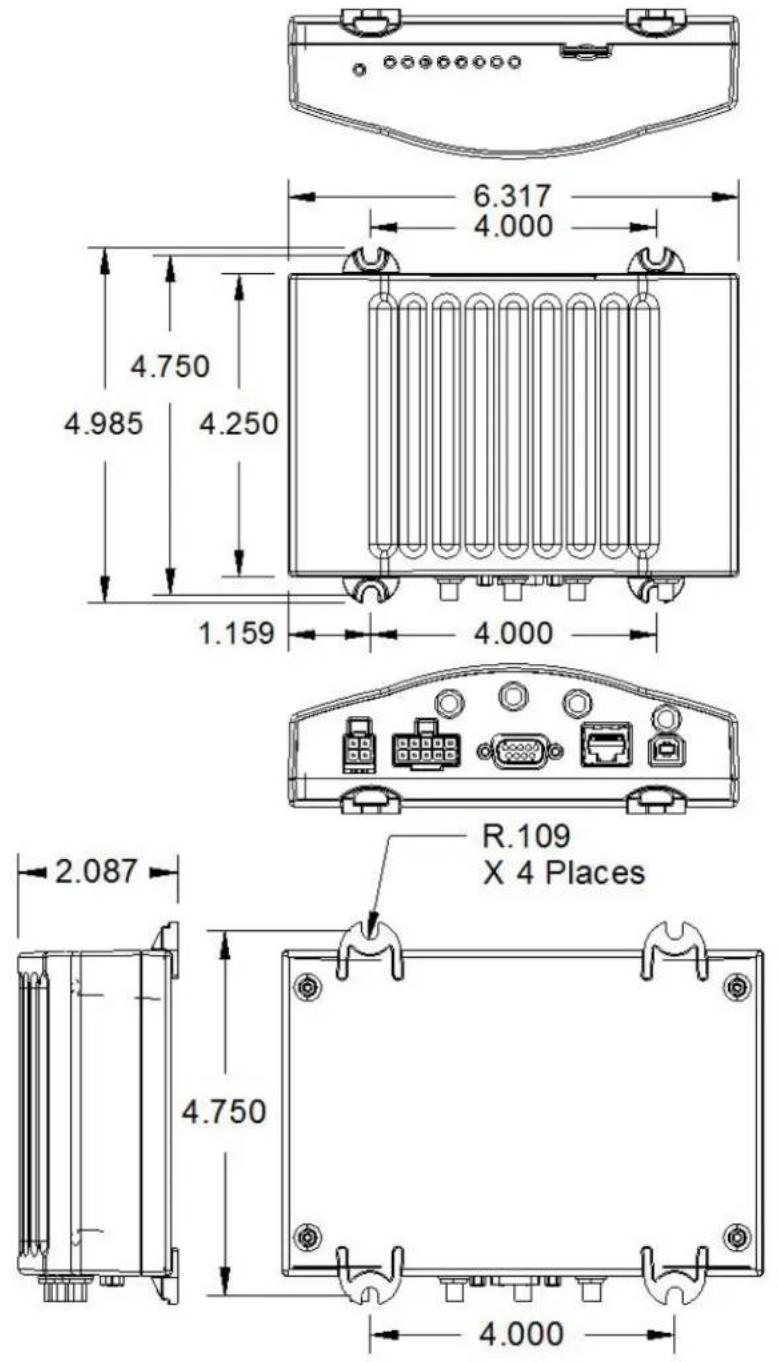
1.3.3 Mechanical specifications BT-6000
![BT-6x21 2.00" [5.08cm] BT-6x00 1.25" [3.17cm] EB/BT-6x01 1.25" [3.17cm] 5.20" [13.21cm] 1.00" [2.54cm] 0.62" [1.59cm] 0.62" [1.59cm]](/content/2026/05/996985/images/6de736eb99995e5c3b7253eb0c55edbcc07fac5954dcd215c9a9df6a6335d0d8.jpg)
![Power Jack #12 screw #10 screw #8 screw #6 screw 3.77" [9.58cm] Panel mounting ears accept up to a #12 screw (see drill guide to right) Screw block on 6x01 & 6x21 only 0.40" [1.02cm] For 35mm DIN rail (EN50022) Removable DIN clip for direct panel mounting (optional on some models) Location of antenna connectors varies between models USB Port Drill guide for direct panel mounting 2.35" [5.97cm] For #6 screw: 5.05" [12.83 cm] For #8 screw: 5.10" [12.95 cm] For #10 screw: 5.15" [13.08 cm] For #12 screw: 5.20" [13.21 cm] 4.70" [11.94cm] 1.89" [4.79cm] 1.88" [4.79cm] 0.39" [0.99cm]](/content/2026/05/996985/images/38a87cea56dca329fac352894423f2f5dd2db6e40e42b6b6935ccb673b7e82bc.jpg)
1.3.4 Power specifications and consumption
Power is supplied to the modem via:
- 4-pin Molex connector for the BT-6x00 and BT-5x00v2 models
- 4-pin screw terminal for the BT-6x01, BT-6x01EB and BT-6x21 models
- DC 2.5mm barrel plug for all BT-6000 models
■ Power over Ethernet for all BT-6x01EB models
1.3.4.1 4-pin Molex Connector (BT-5000v2)
Power is supplied to the modem via the 4-pin Molex connector on the rear panel for BT-5x00 v2 models. The pins are described as follows:

Power connector (facing modem)
Table 3 - 4-pin Molex connector (BT-5000v2)
| Pin | Name | Description |
| 1 | GND | Ground |
| 2 | POS | Power supply input (8 to 30 VDC) |
| 3 | IGN | Ignition sense input (switches modem on or off) |
| 4 | O3 | Digital Output 3 |
1.3.4.2 4-pin Molex Connector (BT-6x00)
Power is supplied to the modem via the 4-pin Molex connector on the front panel for the BT-6x00 models. The pins are described as follows:

Power connector (facing modem)
Table 4 - 4-pin Molex connector (BT-6x00)
| Pin | Name | Description |
| 1 | GND | Ground |
| 2 | POS | Power supply input (8 to 30 VDC) |
| 3 | IN | Digital and analog input |
| 4 | OUT | Digital Output |
1.3.4.3 4-pin Screw Terminal (BT-6xx1)
Power is supplied to the modem via the 4-pin Screw Terminal on the front panel for the BT-6xx1 models. The pins are described as follows:

Power connector (facing front)
Table 5 - 4-pin screw terminal (BT-6xx1)
| Pin | Name | Description |
| 1 | GND | Ground |
| 2 | PWR+ | Power supply input (8 to 30 VDC) |
| 3 | OUT | Digital output |
| 4 | IN | Digital and analog input |
1.3.4.4 DC 2.5mm Barrel Adapter
Power is supplied to the modem via the barrel adapter on the left side of all BT-6000 series modems. The contacts are described as follows:

Power connector (facing left side)
Table 6 – DC 2.5mm Barrel adapter (BT-6000)
| Pin | Name | Description |
| Sleeve | GND | Ground |
| Tip | PWR+ | Power supply input (8 to 30 VDC) |
WARNING:
DC 2.5mm Barrel Adapter shall not be used in hazardous locations.
1.3.4.5 Power specification
Power input to the modem is protected against reverse polarity and over-voltage.
The modem's power consumption is as follows:
Table 7 – Power consumption
| Model | Draw in mA (at 12 VDC) | ||
| Standby | Transmitting | Peaks | |
| BT-5600v2 | 123 | 221 | 452 |
| BT-5800v2 | 123 | 328 | 810 |
| BT-6401 | 115 | 246 | 417 |
| BT-6421 | 229 | 360 | 531 |
| BT-660x | 115 | 213 | 444 |
| BT-6621 | 249 | 347 | 578 |
| BT-6800 | 115 | 320 | 802 |
| BT-680x | 115 | 320 | 802 |
| BT-6821 | 249 | 454 | 936 |
Wiring instructions are provided in the Hardware Installation section.
All modems are equipped with protection for reversed polarity and power surges over 33 volts. The modems are equipped with an internal 3 Amp fuse. When using the 4 pin Molex connector / power accessory cable supplied by BlueTree Wireless, an extra 2 Amp fuse is also included (5600v2, 5800v2).
1.3.5 Modem views
| Standalone GPS | 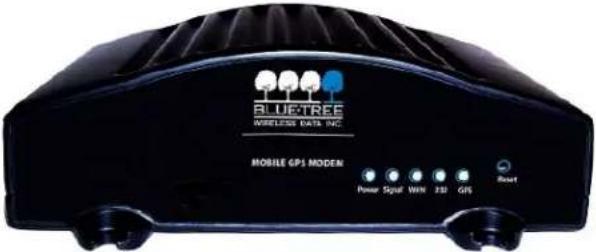 BT-5x00v2 BT-5x00v2 | BT-5600v2BT-5800v2 |
| 4-pin power connector | 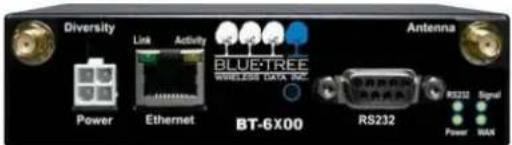 BT-6x00 BT-6x00 | BT-6600BT-6800 |
| Screw-block power connector |  BT-6x01 BT-6x01 | BT-6401*BT-6601BT-6801 |
| Screw-block power connector & PoE power input |  BT-6x01EB BT-6x01EB | BT-6401EB*BT-6601EBBT-6801EB |
| Ethernet Switch |  BT-6x21 BT-6x21 | BT-6421*BT-6621BT-6821 |
* The BT-64xx series modems are not equipped with a diversity antenna connector
1.3.6 Indicators Lights (LED)
Table 8 - LEDs
| LED | Status | Corresponding State |
| Power | OFF Modem | is powered off |
| ON Modem | is powered on | |
| FLASH | Firmware error | |
| Signal | OFF No signal available or signal strength is below -100 dBm | |
| ON Excellent signal strength = greater than -69 dBm | ||
| FLASH | Fast: Every 300ms = -79 to -70 dBm | |
| Medium: Every 600ms = -89 to -80 dBm | ||
| Slow: Every 1200ms = -99 to -90 dBm | ||
| WAN | OFF Cellular connection is not established | |
| ON Cellular connection is established - no network data activity | ||
| FLASH Cellular connection is established - with network data activity | ||
| RS232 | OFF Serial connection is not established | |
| ON Serial connection is established - no data activity with host | ||
| FLASH Seria connection is established - with data activity with host | ||
| GPS(BT-5x00v2) | OFF | No position fix available |
| ON | Position fix available | |
1.3.7 Data Interface Specifications: Serial, Ethernet & USB
1.3.7.1 Ethernet Port
The modem's 10/100Mbps Ethernet port is compliant with the EIA-568 standard. The modem's ports are autosensing so they can be used with either a straight or crossover RJ45 cable to connect to host ports.
The BT-6x21 features a 5-port Ethernet switch allowing connectivity to multiple local devices.
1.3.7.2 USB Device Port
This is a USB 2.0 Device interface on a Type B (BT-5x00v2) or Mini B (BT-6xxx) connector. It offers Ethernet-over-USB functionality using the RNDIS driver for Windows XP and Windows Vista Operating systems only. The BlueTree RNDIS driver must be installed before the USB interface can be used. The driver is automatically installed with BlueTree Device Manager or you can obtain the driver at www.sixnet.com and install it manually.
1.3.7.3 Serial Port (DB9)
The modem's serial port is an RS232 DCE, compliant with EIA-232 standard. The connector used is DB9 female and is shown in the illustration below.
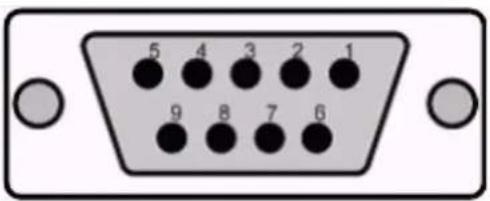
Figure 3 - Serial connector (looking at back of modem)
For further serial wiring information, refer to the Hardware Installation section.
1.3.8 RESET button functions
Table 9 – Reset button functions
| Mode | Pattern | Description |
| Hard reset | Press and hold for less than 3 seconds | Standard reboot |
| Factory restore | Press and hold between 3 and 10 secondsRS232 LED flashes quickly | Overwrites user configuration with the default factory settings |
| FW upgrade | Press and hold between 10 and 15 secondsWAN LED flashes quickly | Puts the modem in advanced firmware upgrade mode by restarting the modem and running the bootloader only. Do not use this mode unless instructed to by BlueTree Technical Support. |
| USB pass-through | Press and hold for longer than 15 secondsSignal LED flashes quickly | Puts the modem in main pass-through mode to the RF module, allowing CCT provisioning and PST support. Do not use this mode unless instructed to by BlueTree Technical Support. |
2 BlueVue Device Manager (BVDM)
The BlueTree BT-5000v2 and BT-6000 series modems can be configured using BlueVue Device Manager version 1.76 or later. This software application is available as a free download at www.sixnet.com. Later sections of this guide will refer to configuration options in this software. For more in-depth information on using BVDM, refer to the BlueVue Device Manager User's Guide. It can be accessed from within BVDM itself by clicking the Help button, or downloaded separately at www.sixnet.com.
BVDM is a Graphical User Interface for modem configuration and administration that allows the user to:
■ Activate the modem (program account information) for use on the cellular network
- Register the modem on the cellular network (WAN Setup)
- Configure operation parameters (such as LAN setup or GPS)
■ Monitor diagnostic and status information
■ Perform firmware upgrades to the modem
2.1 Connecting to the modem
Should you run into any issues connecting to the modem, refer to the BlueVue Device Manager Troubleshooting appendix.
Click on Tools > Settings > Connection tab to select the interface your PC will use to connect to the modem.


Figure 4 - The different ways to connect to a modem
2.1.1 Using a serial cable:
1) Select Serial
2) Select the COM port in the dropdown list, then click OK
2.1.2 Using an Ethernet or USB cable:
3) Select Modem IP
4) Enter the appropriate modem IP then click OK. By default, the DHCP-assigned IPs will be 192.168.0.1 for Ethernet and 192.168.111.1 for USB. If using USB, the BlueTree RNDIS driver must be installed as explained in the Data Interface Specifications section.
2.1.3 Connecting to a remote modem:
5) Select Remote Configuration and click OK. A new panel will open to the left of BlueVue Device Manager.
6) Right-click Available Modems in the panel
7) Click Add...
8) Enter the modem's information, then click OK. The description is optional.
9) The modem will be added to the list of Available Modems, which will be saved for easy access in the future. Double-click the modem name in order to connect to it.

flowchart
graph TD
    A["BlueVue Device Manager"] --> B["Add..."]
    B --> C["Add Modem"]
    C --> D["BlueVue Device Manager"]
    D --> E["Add Modem"]
    E --> F["Add Modem"]
    style A fill:#f9f,stroke:#333
    style C fill:#ccf,stroke:#333
    style D fill:#cfc,stroke:#333
Figure 5 - Connecting to a remote modem
2.2 Software overview

Modem Diagnostic
This screen displays various technical information pertaining to the modem's state.

Modem Configuration
This screen allows the user to configure the modem to suit the application requirements.

Modem Activation
This screen is where the user performs cellular account activation so that the modem may connect to the cellular network.

Modem WAN Settings
This screen allows the user to set the connection profile on the modem, such as the user name and password of the account.

Modem GPS
This screen allows the user to configure the modem for basic GPS reporting (BT-5x00v2 only).

Help
This button opens the BlueVue Device Manager User's Guide, a document that explains every parameter of BlueVue Device Manager in detail.
3 AT Commands
The BlueTree BT-5000v2 and BT-6000 series modems can be configured and managed using AT commands.
AT is a command line interface allowing full control over the modem functionalities and diagnostics.
The AT commands are described in the AT command reference document available from www.sixnet.com.
AT commands allow for the creation of configuration scripts used to configure a fleet of modems with the same settings.
The AT command interface may be protected by a password.
3.1 Access
AT commands interface is accessible via:
- the modem serial port (when not in DUN, Serial IP or Serial pass-through). The default serial settings are:
○ 115200 bauds
- 8 bits data
o no parity
○ one stop bit
- hardware flow control
- a TCP/IP connection to port 6070 over:
○ LAN Ethernet
○ LAN USB
o WAN (remote access)
The modem accepts up to two concurrent TCP/IP connections to port 6070 (in addition to the serial port). When an additional connection is attempted, the idlest connection is dropped.
A terminal emulation application such as Hyperterminal, PuTTY or teraterm is required. Terminal emulation applications can be freely downloaded from the internet. For TCP/IP access, terminal emulation software or a telnet client software can be used.
Please refer to 12.5Sending AT Commands for more details.
4 Activation & WAN Setup
4.1 Activation (CDMA modems only)
A modem must be activated and configured before it can be used on the cellular network. The steps below outline how to activate a modem. To configure the modem to connect to the wireless network after activation has been performed, skip to the next section.
4.1.1 Obtaining a cellular account for the modem
Contact a cellular service provider or cellular dealer and request a CDMA account with the packet data service option for 1xRTT, 1xEV-DO, or 1xEV-DO Rev. A. The provider will require the Electronic Serial Number (ESN) of the modem. The ESN is located on the label under the modem as well as on the modem's packaging box.
The cellular service provider will then provide the information required to activate the modem.
IMPORTANT
Ask your cellular service provider whether the carrier blocks incoming connections. If they do, you will be unable to communicate with the modem remotely unless you ask the service provider to allow incoming connections to your application's TCP and UDP ports. If possible, ask them to open the following ports as well: TCP 20 and TCP 21 (used for firmware upgrades), TCP 5070 (used by BlueVue Device Manager), and TCP 6070 and 6073 (used for AT command configuration and troubleshooting).
4.1.2 Programming the account information into the modem
The steps required to program the account information into the modem are unique to each carrier. The Quick Start Guide booklet included in the modem package contains a step-by-step walkthrough for activating the modem. The latest version of the Quick Start Guide is also available for download at http://www.sixnet.com/.
4.1.3 Confirming the success of activation
Once the activation process above is complete, navigate to WAN (WAN Settings). The modem's phone number should be displayed at the top left as shown in Figure 6.
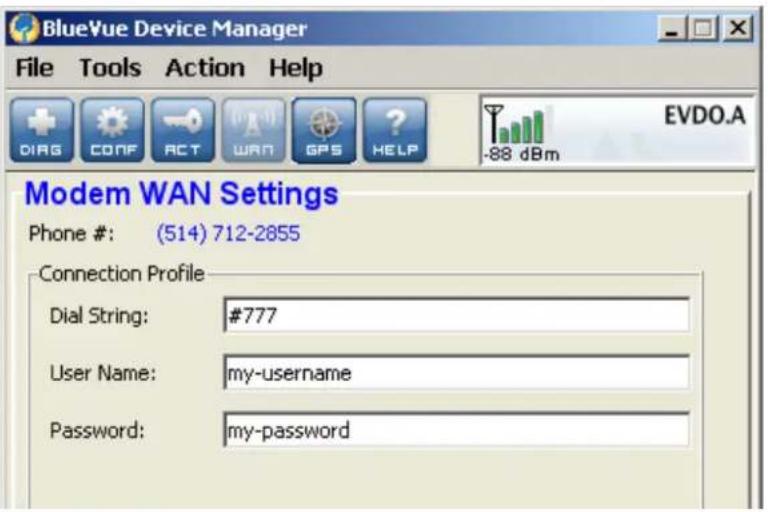
Figure 6 - Confirming the success of activation
4.2 WAN Setup
After the modem has been activated, it must be configured in order to authenticate for use with the cellular network.
4.2.1 Enter the account information
Navigate to WAN (WAN Settings) to configure the WAN connection once the modem has been activated.


Figure 7 - Editing the account information
1) Enter the Dial String:
-
777 for CDMA modems • *99# for HSPA modems (Bell Mobility and Telus)
• *99***1# for other GSM modems (EDGE and HSPA)
2) Enter the User Name and Password if provided by your cellular carrier otherwise, leave them empty.
3) Select Always On or On Demand (explained below) depending on the desired connection initiation behavior.
4) Enter APN information that was provided to you if you are using a GSM modem. The APN field is only shown when BVDM is connected to a GSM (EDGE and HSPA) modem.
When the modem is set to Always On, it will attempt to maintain a permanent connection to the cellular network on its own. Most applications will require the modem to be remotely accessible at any time, and will require the modem to be set to Always On.
When the modem is set to On Demand, the modem does not connect to the cellular network unless told to by the attached terminal. If disconnected from the cellular network, it will not attempt to reconnect. The most common On
Demand scenario is when using the serial port in order to establish a PPP session through a Dial-Up Networking (DUN) connection.
Unless you are sure the modem should be set to On Demand, the modem should be set to Always On.
4.2.2 Testing the connection
Once you've finished entering the settings, and once a connection is established (depending on the connection initiation behavior described above), navigate to DIAG (Modem Diagnostic) and click on Refresh button: the modem's WAN IP should be displayed as outlined in Figure 8. This is the IP address that has been assigned to the modem by the cellular carrier. At this time, the modem's WAN light will stay on as long as the connection is maintained.
Notes:
- HSPA/EDGE: no activation is required since all the connection and network information is contained in the SIM card.
- HSPA/EDGE: Please note that the modem needs to be reset after a SIM card is inserted.
- Please note that some carriers prefer to have the modem phone number hidden. In this case, the modem phone number is not displayed in BVDM.

Figure 8 - Testing the connection
5 LAN Setup
5.1 Ethernet and USB LAN
Computers and devices that use the modem's Ethernet and USB connectivity experience much higher transfer speeds and they employ all the benefits of TCP/IP communication.
5.2 LAN configuration
Whether an Ethernet or USB cable is used, it is essential that both the modem and the attached device be within the same LAN subnet for IP communication to take place. By default, the modem has a DHCP server running, which will initially assign the following IP address to the attached device (providing the device is set to use DHCP):
Table 10 - DHCP IP assignment
Modem IP Host IP
| Ethernet 192.168.0.1 | 192.168.0.4 |
| USB 192.168.111.1 | 192.168.111.20 |

Figure 9 - Default LAN IP configuration
If the attached device must use a specific (static) IP, then the modem's LAN configuration must be changed so that the modem's IP lies in the same subnet as the device. Navigate to CONF (Modem Configuration) > LAN IP and change the parameters under Ethernet or USB.
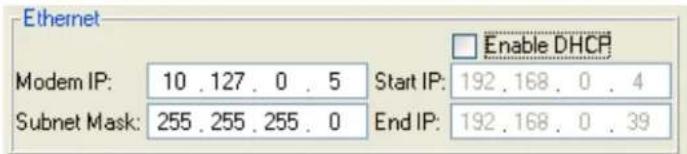
Figure 10 - Sample modem configuration for communicating with a device that has the IP 10.127.0.17
5.3 DHCP server
As mentioned above, the modem has a DHCP server which automatically assigns an IP to the attached device. If an Ethernet hub or switch is connected to the modem's Ethernet port, the modem will assign an IP address to each device connected to the hub or switch, for a maximum of 254 devices, provided the devices are configured as DHCP clients ("Dynamic" or "Automatic" IP configuration). The DHCP server can be configured or turned off in CONF (Modem Configuration) > LAN IP as shown above.
5.4 Dial-up Networking (DUN) over serial
Note:
Regardless of the modem type, using a serial cable will cap the bandwidth at 115200 kbps. The serial port will be a bottleneck in terms of performance, as it will reduce the data throughput considerably to less than 3% of its maximum potential. Whenever possible, use an Ethernet or USB connection to take full advantage of throughput.
Some terminals do not have RJ45 Ethernet or USB connectors and require using a DB9 RS232 standard serial connector to interface with the modem.
- If the attached device is not programmable (smart), then you cannot use DUN, and will have to use the Serial IP feature to communicate with the device. Refer to the Serial IP section for details.
- If the modem will be used with a programmable device that can make PPP connections, then refer to that device's documentation to create the dial-up session. The phone number to dial will be the same as the one programmed in the Dial String of the WAN setup. The username and password, if any, will be those provided by your cellular service provider.
- If the modem is used with a PC making a PPP connection, then a standard modem driver on the COM port to which the modem is physically connected must be installed, and then a dial-up connection running on that driver must be created. This dial-up connection will dial the modem so that a PPP session is established between modem and PC. Meanwhile, the modem will make a PPP session of its own to connect to the network. For a walkthrough on creating a DUN connection in Windows, refer to the Dial-Up Networking in Windows appendix.
6 IP Networking Features
As mentioned previously, the modem acquires an external public or private IP address (WAN IP, or Wide Area Network IP) from the cellular network upon establishing a connection. A remote user can communicate with the modem or a host behind the modem; however the appropriate port-forwarding, DMZ or IP pass-through and LAN IP configuration must be set on the modem. Read on for a description of each configuration option.
Some carriers disable remote access as a security measure. If you are certain that the modem is on the cellular network (i.e., it has acquired a WAN IP) and that the local network is set up properly, but you cannot reach the modem remotely, confirm with the carrier that incoming IP data traffic is allowed on the required TCP or UDP port. Read the BlueVue Device Manager Troubleshooting section for more details.
6.1 Port-forwarding
Since the modem is a network address translation (NAT) enabled router, the remote computer connecting to the modem's cellular WAN IP cannot access devices/servers on the modem's LAN if the modem is not specifically configured to forward the appropriate ports to the LAN devices/servers. Port-forwarding, or tunneling, is the act of relaying an incoming packet to one or more local destinations depending on the port(s) through which the packet came.
The main use of port-forwarding is to allow an external user to reach a port on a private IP address from the outside via a NAT. This allows remote computers to connect to a specific computer within a private LAN, depending on the port used to connect.
To set up the modem's port forwarding rules, navigate to CONF (Modem Configuration) > Port Forwarding/DMZ.

Figure 11 - Port-forwarding entries
The WAN Port is the destination port number used by the remote computer and the LAN Port is where the data is forwarded to. Typically the WAN port and LAN port are the same; however any port can be used on the WAN side, as long as it points towards the correct LAN port. Select the appropriate protocol (TCP or UDP), and submit the new settings.
6.2 DMZ
This feature, when enabled, instructs the modem to port-forward all incoming traffic to a single IP destination on the LAN. An exception will be made for traffic coming on the ports designated by the port-forwarding rules (this would be ports 9000, 23, and 777 in Figure 11). This exception can be overridden by checking the "DMZ overrides all forwarded ports below" checkbox.
Figure 12 - Enabling DMZ
DMZ is ideal in situations where there is already a server on the LAN that handles port-forwarding, as it avoids having to re-program all the port-forwarding rules into the modem. It is also practical when the user does not know which ports his local device listens on, and just wants everything to work with minimal configuration.
DMZ can be enabled at CONF (Modem Configuration) > Port Forwarding/DMZ.
6.3 IP pass-through
Note
When IP pass-through is enabled, both port-forwarding and DMZ are disabled.
When this feature is enabled, the modem will disable NAT and assign its WAN IP address to the attached host. This will solve VPN authentication issues that are caused by NAT. The modem will remain reachable though its reserved TCP and UDP ports.
To enable IP pass-through, navigate to CONF (Modem Configuration) > LAN IP and select the data interface to perform pass-through on, then check the "Enable IP Pass-through" checkbox.
Figure 13 - Enabling IP passthrough
If the host is attached to the modem via an Ethernet cable, then the host must have DHCP enabled (i.e., it should be perform automatic IP negotiation instead of using a pre-defined static IP). If the host is attached to the modem via a serial cable, IP pass-through will only activate when the host creates a PPP session to the modem.
Once IP pass-through is enabled the default IP settings will alter as follows:
| Router Mode | IP Pass-through Mode | |
| Host IP Address | 192.168.0.4 | aaa.bbb.ccc.ddd (WAN Address) |
| Modem IP Address | 192.168.0.1 | aaa.bbb.ccc.1 or .2(if ddd=1) |
Note
Enabling or disabling IP pass-through reset the concerned interfaces and may stop established connections (e.g. BlueVue Device Manager).
To work around this issue, do not enable/disable IP pass-through on the interface used for the device configuration.
Note
This mode allows only one IP address to be assigned to the first connected device via DHCP (This configuration is not recommended for BT-6x21).
6.4 Dynamic IP registration
This feature allows the modem to report a message to a user-configurable IP address every time its WAN IP address changes.
It is useful when the cellular account is associated with a dynamic IP address. Since the WAN IP address will be changing regularly, it will be impossible for the user to know which WAN IP address is assigned to the modem. With Dynamic IP Registration enabled, the modem will notify a remote server of the new WAN IP address as well as the modem's ESN in hexadecimal format. The IP Registration packet can be sent using either TCP or UDP.
To configure Dynamic IP Registration, navigate to CONF (Modem Configuration) > General, and set the destination IP address and port. The registration timer is a value (in minutes) that controls how often the modem should report its IP to the server. If it is set to zero, the modem will report its WAN IP address upon boot-up or upon acquiring a new IP address from the cellular carrier after losing the cellular connection. If it is set to a value between 1 and 65535, then it will report its ESN and WAN IP regularly at the specified interval.

Figure 14 – Enabling Dynamic IP Registration
6.5 IP Security (IPSEC)
The modem supports up to 10 IPSEC VPN tunnels used to secure communications with remote servers. Please refer to the "Getting Started with IPSEC" application notes for further details.
Note
IP Security can only be configured and managed via AT commands.
6.6 Access Control List (ACL)
The modem can be configured with Access Control List to prevent un-authorized incoming IP traffic. Please refer to the "Getting Started with ACL" application notes for further details.
Note
ACL cannot only be configured and managed via AT commands.
6.7 Password protection
This feature allows administrators to restrict unauthorized users from configuring the modem by requiring a password whenever the modem's configuration ports are accessed.
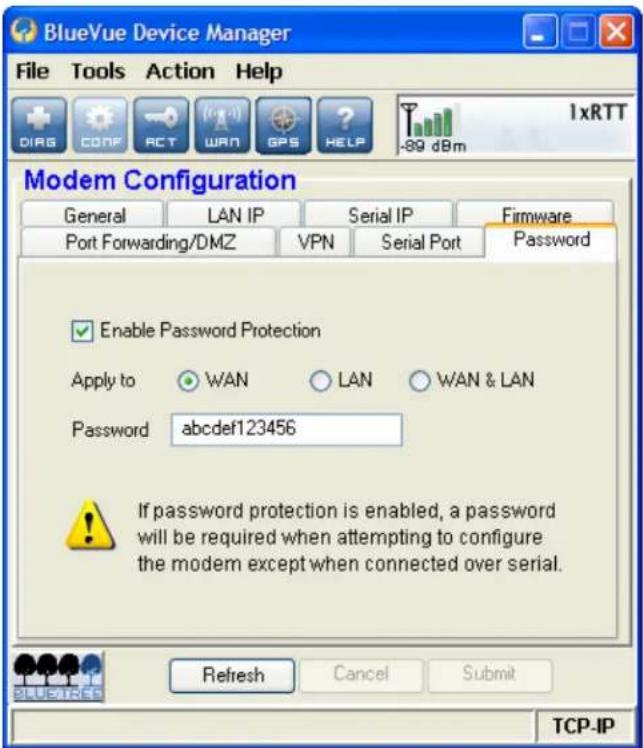
Figure 15 – Enabling password protection
To enable password protection:
1) Navigate to CONF (Modem Configuration) > Password and check the "Enable" box.
2) Select the interfaces to prompt for a password on. The WAN interface (remote connections) is the most commonly password-protected interface, however some users may wish to password-protect both the WAN & LAN interfaces. Note that the modem cannot prevent configuration changes made from its serial port.
3) Finally, set the modem password. The password must be a case-sensitive string that is 6-30 characters long.
4) Click Submit to save the changes.
7 Serial IP
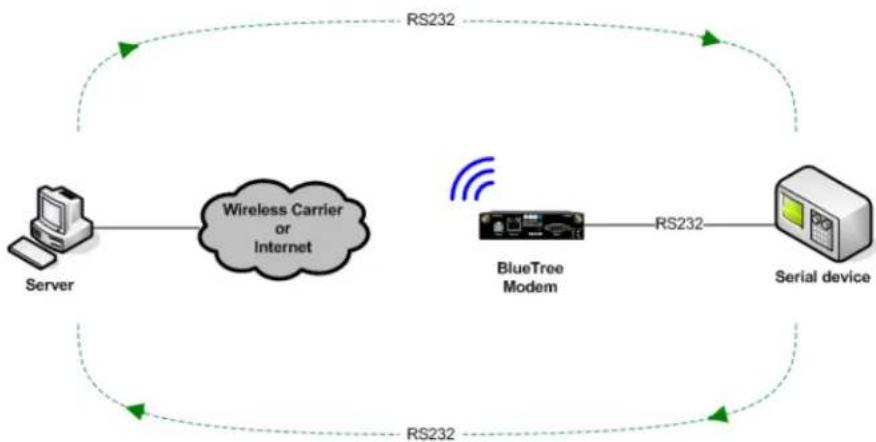
This feature allows communication over the cellular network in two common setups. The first is a server communicating with a remote serial-only device and the other, a serial-only device communicating with another remote serial-only device. Serial IP is used to emulate a direct serial connection to the attached device, or to emulate a landline modem. The modem becomes a transparent middleman routing data back and forth between the poller and the pollee. Serial IP is most commonly used in telemetry applications such as meter reading and SCADA devices.
flowchart
graph LR
    Server -->|RS232| WirelessCarrier["Wireless Carrier or Internet"]
    WirelessCarrier -->|RS232| BlueTreeModem["BlueTree Modem"]
    BlueTreeModem -->|RS232| SerialDevice["Serial device"]
    SerialDevice -->|RS232| Server
Figure 16 - Serial IP
When the modem is in Serial IP mode, IP packets intended for the attached serial device have their IP headers stripped before being passed on to the device. This means that the serial device receives raw serial data that it can understand. Inversely, when the serial device is sending data, the modem encapsulates this data in IP packets to be transmitted over-the-air to the remote destination.
When a Serial IP server is running, the modem waits until a connection is made on the defined Serial IP port, then triggers Serial IP mode. The incoming data will be relayed to the attached serial device. Any output from the serial device will be sent to the IP of the remote computer that made the connection on the port that the remote computer used to make the connection.
When using Serial IP, the modem configuration depends on the application requirements. A support note is available.
8 GPS
The BT-5600v2 and BT-5800v2 modems have an embedded GPS receiver which can be used to track their movement. This feature is commonly used in applications such as asset-tracking and Automatic Vehicle Location (AVL). These modems support two GPS protocols: the National Marine Electronics Association (NMEA) protocol and the Trimble ASCII Interface Protocol (TAIP).
The modem can report the fixes acquired from its GPS receiver to the local serial port, and/or to an IP address, either local (Ethernet/USB) or remote (over the air). A variety of reporting options are available, ranging from basic NMEA/TAIP timer-based reports to intelligent condition-triggered reports which leverage the modem's Event Reporting capabilities.

Figure 17 - GPS configuration screen
8.1 GPS protocols
8.1.1 TAIP
TAIP is configured using a single command string. Read Trimble's TAIP documentation to learn how to create a command that meets your needs.
The modem listens on UDP port 21000 for TAIP commands, allowing its configuration to be modified on the fly by software applications that support TAIP.
For an example of TAIP configuration, refer to the Basic GPS Reporting in BlueVue Device Manager appendix.
8.1.2 NMEA
NMEA uses one or more of the following seven pre-defined, fixed-format messages.
Table 11 – NMEA messages information
| Message | Contents | Size |
| GGA | Time, position, and various status information 75 bytes | |
| GLL | Latitude, longitude, and time 48 bytes | |
| GSA | GPS DOP and active satellites 63 bytes | |
| GSV | Active satellites in view 70 bytes | |
| RMC | Time, date, position, course, and speed 67 bytes | |
| VTG | Track made good and ground speed 37 bytes | |
| ZDA | Time and date 35 bytes |
Refer to Trimble's NMEA 0183 documentation for additional information.
For an example of NMEA configuration, refer to the Basic GPS Reporting in BlueVue Device Manager appendix.
8.2 Store and forward
The BT-5600v2 and BT-5800v2 modems have an integrated 512Kbytes non-volatile memory area dedicated to storing GPS reports or BlueTree Event Protocol reports. It can store approximately 5000 position fixes (exact amount depends on the configuration).
This feature will activate automatically when the modem cannot reach its reporting destination (except when reporting is programmed with UDP/IP and no ACK). The modem will save the reports in its memory buffer until it is able to send them or when they are acknowledged) ensuring that no position has been lost.
When Store And Forward is activated, the modem stores GPS/Event data in memory on a First In First Out (FIFO) basis. This means that if the modem is unable to transmit fixes over an extended period of time, and the memory becomes full as a result, the newest fixes overwrite the oldest stored fixes. When the cellular connection is re-established, the modem will send all the stored fixes to the destination.
Stored fixes and events are not lost if the modem is shutdown through ignition delay timer.
8.3 Odometer
The modem can keep track of the total distance traveled by aggregating the data obtained from the GPS fixes. It calculates the distance traveled based on a straight line between the current and previous fix. By appending these calculations to a total, the modem is able to keep track of the total distance travelled. When using the NMEA protocol, the GPS fix is updated every second, so the odometer can be very accurate. However, when using the TAIP protocol, the GPS fix is acquired as per the configured fix acquisition timer. If the timer is set to a high value such as 5 minutes, then the odometer will most likely be inaccurate.
8.4 Configuring the modem for GPS reporting
Note
If the modem is configured to report GPS fixes to a remote destination, then the reporting frequency determines the cellular network bandwidth consumption. A higher reporting frequency will result in higher bandwidth consumption. Plan carefully to ensure you do not exceed your monthly bandwidth plan.
The modem can be configured to report GPS in two ways:
The first is to use BlueVue Device Manager for basic GPS reporting. This allows easy configuration of timer-based GPS reports. Refer to the Basic GPS Reporting in BlueVue Device Manager appendix for a step-by-step configuration example.
The second is to use AT commands for advanced configuration. This method is more complex and can take advantage of the modem's Event Reporting capabilities (see next section). Event Reporting allows the modem to report automatically when a user-defined condition is met. Read the Event Reporting section for details.
9 I/O Management
BlueTreeoffers:acompletesetofATcommandstoqueryorsetitsgeneralpurposeanddedicatedinputandoutputpins.Thissectionisonlymeanttooffera basicoutlineofhowtheusercaninteractwiththemodem'sI/Os.
The actual modem I/O depends on the model. Please refer to 1 Product Overview for details.
The modem's Event Reporting feature (explained in the Event Report section) covers I/Os as well. This can allow the automation of queries and set the modem to report to all local or remote destination when an input value reaches a certain threshold, or to take action and trigger a digital output.
9.1 Digital Output control
The modem's digital output(s) can be used to toggle peripheral equipment ON or OFF. Peripherals such as lights, sirens, valves, door lock mechanisms, and/or ignitions can be controlled through these I/Os.
Example of turning ON digital output 2: AT+ BDOSET=DO2,1
Example of turning OFF digital output 1: AT + BDOSET = DO1, 0
9.2 Digital Input state query
The modem monitors its general purpose digital input(s) as well as ignition for a change in state, along with the dedicated ignition input. The state of these inputs can be queried by sending the following AT command: AT+BDIGET?
Sampleresponsefrommodem(theactualoutputdependsonthemodemmodel):
+BDIGET: DI1,0
+BDIGET: DI2,1
+BDIGET: DI3,0
+BDIGET: DI4,0
+BDIGET: IGN,1
9.3 Analog Input value query
The modem has a 10-bit Analog to Digital Converter (ADC) which allows it to monitor all of its general purpose analog input(s) for a change in state, along with the dedicated power input. The value of these inputs can be queried by sending the following command:
AT+BAIGET?
Sample response from modem (the actual output depends on the modem model):
+BAIGET: PWR, 13.553
+BAIGET: AI1,3.056
+BAIGET: AI2,1.987
+BAIGET: AI3,0.000
10 Event Reporting
Event Reporting is covered in its own document, the I/O Management & Event Reporting Guide. This section is meant to provide a general overview of what can be accomplished with the modem's BlueTree Event Protocol engine.
Event Reporting is used to program the modem to automatically perform an action (such as sending a report) whenever a user-defined event occurs. An event occurs, or is triggered, when the conditions that define it have been met.
Event Reporting has the same “Store and forward” feature used by the GPS reporting engine, as described in the GPS section. This ensures that no reports are lost if the modem loses its connection to the cellular network: everything is saved to memory and forwarded when the connection is reestablished.
10.1 Events
The event that triggers an action can be any of the following:
- A timer has finished counting down
■ An analog input signal has reached a certain value - A digital input signal has changed state
■ WAN status
The BT-5600v2 and BT-5800v2 modems are equipped with a GPS receiver and can react upon these additional GPS-based event triggers:
- The modem is in motion at a particular speed
- The modem is in motion in a particular direction (heading)
- The modem is unable to acquire a GPS fix
■ The modem has traveled for a set distance
■ The ignition (IGN) signal state
Events can also be combined using logical statements to create more complex events. For example, a combination of the timer and speed event triggers could define an event that would trigger when a vehicle has been speeding, by defining speeding as moving at 60+ mph for more than 10 seconds. This provides a great amount of control and allows defining events that meet most if not all potential requirements.
10.2 Actions
The modem can perform one or more of the following actions when an event is triggered:
■ Change the state of one of its digital outputs
- Turn its radio-frequency module ON or OFF
10.3 Reports
When an event is triggered, the modem can send a report to up to 10 local or remote destinations.
All reports are custom-formatted by the BlueTree Event Protocol as defined in the I/O Management & Event Reporting document, so they require some manipulation on the destination end in order to be parsed properly.
A report can contain one or more of the following information:
■ The modem's name and ESN
■ The modem's RSSI (signal strength)
■ The value of the analog and digital inputs
■ The modem's odometer value (total distance traveled)
- A GPS report containing NMEA or TAIP data
10.3.1 ACK
The modem can be configured to wait for confirmation (“ACK”) from the remote server that it has received the report. If this confirmation does not come, the modem will assume the report has not been received and will continue sending the same report at a configured interval until it receives confirmation of receipt.
10.3.2 Sync flags
To ease the parsing of the packets on the server, the modem can set a sync flag in the beginning and end of each packet it sends.
11 Hardware Installation
11.1 Mounting the BT-5x00v2 series modem
- Horizontally mount the modem using four #6 screws pan or fillister head onto its mounting feet
11.2 Mounting the BT-6000 series modem
There are 3 different ways to mount a BT-6000 series modem:
- Horizontally using two #6 screws pan or fillister head onto its horizontal mounting feet
- Vertically using two #6 screws pan or fillister head onto its vertical mounting feet
- Vertically using a DIN rail clip
11.3 Cellular antenna
The selected cellular antenna(s) must meet the following specifications:
■ Maximum rated gain of 3dBi for Cellular band and 4dBi for PCS band
■ Frequency bands:
▪ CDMA: Dual-band 800 & 1900 MHz
☐ EDGE: 850/1900/900/1800 MHz
▪ HSPA: 850/1900/2100 MHz
■ Nominal 50 ohm impedance
- Voltage Standing Wave Ratio (VSWR) less then 2.5:1
- Male SMA connector
The length of the antenna cable may affect the signal strength. Choose the appropriate cable type and length. The table below provides can help pre-determine the loss to expect.
Table 12 - dB loss per 100 feet of cable type
| Cable type | Loss per 100 feet | |
| 8216 (RG58) | 31 dB | |
| 8267 (RG213) | 7.6 dB | |
| LMR-400 | 3.9 | dB |
| LMR-500 | 3.15 | dB |
| LMR-600 | 2.5 | dB |
| LMR-1200 | 1.26 | dB |
11.3.1 Installation and verification
When installing the antenna, follow the FCC and Industry Canada guidelines and keep the following in mind:
- Mount the antenna(s) at least 30 cm (12 inches) from other antennas
- Do not install the antenna in a closed metallic enclosure (such as a cabinet or the trunk of a car).
Once a modem has a signal, the Signal LED indicator will start flashing according to the signal strength. Additionally, BlueVue Device Manager will display the received signal strength (RSSI) in the top right. The modem should have at the very least one bar of signal strength.
11.3.2 Antenna diversity
The BlueTree 5000v2 and 6000 series modems except for the BT-64xx series have two antenna connectors available, labeled Antenna and Diversity.
- Antenna: This is the main antenna that is used for data transmission. It is mandatory to have the Antenna port connected to an antenna.
- Diversity: This is the diversity antenna, used to improve on the signal strength obtained from the main antenna. This antenna is not mandatory however it will improve throughput in low signal and fringe areas.
Diversity is a transmission technique that consists of using two separate antennas to achieve the most robust cellular signal possible. Diversity will help achieve fast, reliable data throughput in applications that require a high amount of bandwidth.
To get the best performance, the Diversity antenna should be placed at a minimum of 5/8 of a wave length away from the other antenna. Therefore, the minimum spacing for antennas in the 800 MHz frequency is 5/8 × 13.5'' = 8.5'' . The diversity antenna can be spaced further away than this, ideally in increments of 13.5'' : 22'' , 35'' , etc. For a 1900 MHz only network, the optimal distance would be 5/8 × 6.2'' = 4'' .
11.4 Ethernet cable
If you are connecting to the modem via the Ethernet port, you will need a straight or crossover category 5 cable with two 8-pin RJ45 connectors on each end.
To visually confirm that Ethernet cabling was done properly, check the LED indication on the Ethernet port located at the rear panel of the modem. The Link LED should be on when the right cable is used.
11.5 USB cable
This is an Ethernet-over-USB connection which behaves like an Ethernet connection. It can only be connected to a PC with Windows XP or Windows Vista installed. If you are connecting to the modem via the USB port, you will need a Type A plug to Type B plug USB cable for the BT-5x00v2 series modems and a mini Type B plug to Type A plug for the BT-6000 series modems. In order for the USB connection to work, you need to install the BlueTree USB driver which is available at www.sixnet.com. The driver is automatically installed during BlueVue Device Manager setup.
11.6 Serial cable
The modem has all its serial port pins enabled. If all the pins are enabled on the attached serial device, it is important to know whether the device is using DTE or DCE as a communication mode.
The modem is a DCE device, so use a straight-through serial cable between the modem and a DTE device such as a terminal. Use a NULL modem cable adapter between the modem and a DCE device such as another modem.
If using custom wiring or if some pins are disabled, follow the guidelines below. The wiring will vary depending on whether the attached serial device is a DTE or DCE.
| Modem | DTE | Modem | DCE | ||
| CTS | ↔ | CTS | CTS | ↔ | RTS |
| RTS | ↔ | RTS | RTS | ↔ | CTS |
| DTR | ↔ | DTR | DTR | ↔ | DSR |
| DSR | ↔ | DSR | DSR | ↔ | DTR |
| TX | ↔ | TX | TX | ↔ | RX |
| RX | ↔ | RX | RX | ↔ | TX |
| DCD | ↔ | DCD | DCD | ↔ | DCD |
| GND | ↔ | GND | GND | ↔ | GND |
| RI | ↔ | RI | RI | ↔ | RI |
11.7 Power source
IMPORTANT
Any installations involving electrical wiring and connections should be done by someone who is experienced in this field.
As described in the Power specifications and consumption section, the modem can be powered using:
- 4-pin Molex connector for the BT-5x00v2 and BT-6x00 models
- 4-pin screw terminal for the BT-6x01, BT-6x01EB and BT-6x21 models
- DC 2.5mm round plug for all models except the BT-5x00v2 series
- PoE (Power over Ethernet) for BT-6x01EB models
WARNING
DC 2.5mm Barrel Adapter shall not be used in hazardous locations.
11.7.1 Powering up the modem
The modem will power up as soon as an 8 to 30 VDC voltage is applied to one of its power inputs and shuts off when this input voltage is below 4 VDC.
In addition, BT-5x00v2 modems require the IGN signal to be ON for the modem to start. When BT-5x00v2 modems detect the IGN signal transition to OFF, it engages its shutdown after a programmable delay.
11.7.2 Testing the power connection
Check the PWR light on the modem: if it is turned on then the modem is powered. If it's off, then review the installation procedures.
If LED indicators are not accessible to the installer, a computer can be used to verify its functionality by running BlueVue Device Manager and attempting to connect to the modem.
12 Appendixes
12.1 BlueVue Device Manager Troubleshooting
Before troubleshooting, download and install the latest version of BlueVue Device Manager from http://www.sixnet.com/.
12.1.1 (ETHERNET) The BlueVue Device Manager message box displays "Detecting Modem at 192.168.0.1" indefinitely
Connect the modem to a computer using an Ethernet cable, and open BlueVue Device Manager. Set BlueVue Device Manager's connection type to IP. BlueVue Device Manager will attempt to connect to 192.168.0.1 by default.
Possible cause #1
The cable is damaged.
Troubleshooting
Check the Link LED on the modem's Ethernet connector (located on the back of the modem). If the LED is off, verify the cable.
Possible cause #2
The computer's local IP configuration is incorrect.
Troubleshooting
1) In Windows XP, go to Control Panel > Network Connections and select the local area connection that corresponds to the Ethernet port in the “LAN or High-Speed Internet” list (it’s usually “Local Area Connection 1”).
2) Right-click the connection and click Properties. Select Internet Protocol (TCP/IP) in the list and click Properties.
3) Write down the existing values in order to restore them after configuring the modem, then select Obtain an IP address automatically and Obtain DNS server address automatically. The computer will now be ready to use the modem to access the Internet.
Possible cause #3
The modem is in a different network and DHCP is disabled. (This issue does not apply to brand-new modems at factory settings. It only applies to modems that have had their configuration modified.)
Troubleshooting
Follow the instructions below:
1) Connect the computer to the modem using a straight serial cable
2) Set BlueVue Device Manager to connect to the modem over the serial port by changing the connection type to Serial
3) Once the modem has been accessed, navigate to CONF (Modem Configuration) > LAN IP
4) Under Ethernet, set the Modem IP to 192.168.0.1
5) Confirm that DHCP is enabled and that the DHCP Start IP is 192.168.0.4. Set the End IP range to any value higher than 192.168.0.4. The default is 192.168.0.39.
6) Click Submit to save the changes
7) Reset the modem and restart the computer
12.1.2 (USB) The BlueVue Device Manager message box displays "Detecting Modem at 192.168.111.1" indefinitely
Possible cause #1
The USB driver is not installed.
Troubleshooting
The USB driver for Windows must be installed before the modem's USB functionality can be used. Visit http://www.sixnet.com/ to download the USB driver then install it. It may be necessary to reboot the computer.
Possible cause #2
The modem has an old firmware version which does not support USB.
Troubleshooting
The USB functionality was introduced in version 3.0 of the firmware. Upgrade the modem's firmware to the latest version available at http://www.sixnet.com/. A walkthrough can be found in the Firmware Upgrades appendix.
12.1.3 (SERIAL) The BlueVue Device Manager message box displays "COMx is already in use"
Possible cause
Another software application is already using the COM port.
Troubleshooting
Close all applications that could be using the serial port, including other instances of BlueVue Device Manager, then try again.
12.1.4 (SERIAL) The BlueVue Device Manager message box displays "Detecting modem on COMx" indefinitely, or displays a warning about an unsupported modem
Examine the DTR LED. If it is off, then the computer and the modem are not communicating.
Possible cause
The wrong type of cable is being used.
Troubleshooting
Use a straight-through RS232 standard DB9 cable. If using a custom-made cable, confirm that it follows the instructions in Section 11.6. If the correct cable is being used, then the DTR LED on the modem will turn on when BlueVue Device Manager attempts to access it.
Possible cause
BlueVue Device Manager is trying to connect to the wrong COM port.
Troubleshooting
Confirm that the correct COM port is selected in BlueVue Device Manager. It will attempt to use COM1 by default, but computers with built-in dial-up modems might have COM1 assigned to the built-in modem instead. To set the COM port BlueVue Device Manager should use, click on Tools > Settings > Connection and browse through the available COM ports. If the DTR LED turns on, then you will have found the right COM port.
12.1.5 (SERIAL) The BlueVue Device Manager message box displays "Detecting modem on COMx" and then "Modem is not responding"
Possible cause
BlueVue Device Manager and the modem are using different serial port settings.
Troubleshooting
Installing BlueVue Device Manager 1.7.1 or later will allow communication with a modem regardless of its serial settings.
12.1.6 The BlueVue message box displays “[Modem]...is not responding to expected commands. Contact BlueTree Support.”
Possible cause
BlueVue Device Manager has detected a potential hardware issue.
Troubleshooting
Contact BlueTree support at BlueTree.Support@sixnet.com.
12.2 Activation Troubleshooting
When the modem is connected to the cellular network, its WAN LED will stay on and will flash to indicate activity, BlueVue Device Manager's Modem Diagnostic screen will display a WAN IP. If the modem is not connected, the WAN light will be off, and the displayed WAN IP will be "N/A". This appendix covers issues with connecting to the network. If your modem is connected to the network but you cannot browse the internet, refer to 12.3 Troubleshooting.
Each of the following conditions must be met before a modem can connect to the cellular network:
1) The modem must be within coverage, and have an acceptable RF signal strength
2) The modem must be activated for use on the cellular network (CDMA) or have a valid SIM card (EDGE and HSPA)
3) The modem must be configured to connect to the cellular network
4) If the cellular carrier requires a user name and password, the modem's connection parameters (WAN Settings) must be configured
12.2.1 Verifying the signal strength
The modem's SIGNAL LED should always be flashing or solid ON when it has a strong enough signal to detect a cellular network. Additionally, the signal strength is displayed in the information box in the top right of the BlueVue Device Manager window. The minimum required for communication is 1 signal strength bar; however, a signal this weak is not likely to provide a stable connection.
If the SIGNAL LED stays OFF, or if the signal strength is lower than -98 dBm (such as -105 dBm), there may be an issue with the antenna or the modem may be in a low coverage area.

Figure 18 - Modem with good signal strength
12.2.2 Confirming the success of activation (CDMA only)
Once a modem has been activated, BlueVue Device Manager will display its phone number in the WAN (Modem WAN Settings) screen (some GSM carriers chooses to have the modem phone number hidden. In this case, the phone # may appear as blank).
For CDMA modems, if the phone number is blank, or does not correspond to the account's phone number, then activation has not been performed. Follow the instructions written in the Quick Start Guide that shipped with the modem to perform activation. The latest Quick Start Guide is also available for download at www.sixnet.com

Figure 19 – Phone number being displayed on the Modem Diagnostic screen after activation
12.2.3 Configuring the Connection Initiation
The modem must be configured to connect to the network.
To do this, open BlueVue Device Manager and navigate to WAN (WAN Settings), and then ensure that the following settings are applied:
1) The Dial String is #777 for CDMA networks and *99***1# or *99# for GSM networks
2) The Connection Initiation is Always On (default setting for firmware 3.60 and later)
Click Submit to apply any changes. The modem should now connect to the cellular network. Refer to this section's introduction for instructions on how to verify whether your modem is connected to the network or not.
12.2.4 Configuring the User Profile
If the modem's Signal LED turns on for a few seconds then turns off, this indicates that authentication on the cellular network is failing. The modem's User Profile will need to be configured.
Navigate to WAN (WAN Settings). Enter the user name and password as provided by the cellular service provider.
12.2.5 Conclusion
As mentioned previously, when the modem is connected to the cellular network, BlueVue Device Manager's Modem Diagnostic screen will display a valid WAN IP and the WAN LED will remain on and flashing to indicate activity of the cellular interface.
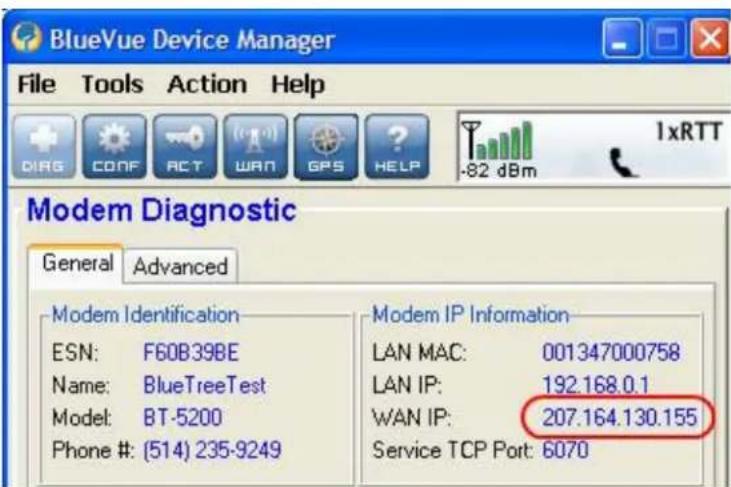
Figure 20 - WAN IP being displayed after the modem successfully connects to the cellular network
If after going through all of the above troubleshooting steps, the modem still does not acquire a WAN IP, then it is very likely that the account is not enabled by the cellular carrier. Contact the cellular service provider and ask them:
- CDMA: to confirm that the phone number assigned matches the modem's ESN (electronic serial number) as shown in DIAG (Modem Diagnostic), and that the account is ready to be used.
- GSM (EDGE/HSPA): to confirm that the SIM card holds a valid account (the SIM card number will be required).
12.3 Troubleshooting
This appendix assumes that the modem is currently online, and therefore the problem cannot be attributed to a lack of connectivity. BlueVue Device Manager's Modem Diagnostic screen should be displaying a valid WAN IP, i.e. an IP other than "N/A". If this is not the case, refer to 12.2Activation Troubleshooting.
12.3.1 You cannot browse the Internet
Possible cause #1 (Ethernet only)
The computer's local IP configuration is incorrect.
Troubleshooting
The computer must be in the same subnet as the modem and must have the modem set as its gateway. The easiest way to achieve this is to enable automatic IP configuration (DHCP) on the computer.
1) In Windows XP, go to Control Panel > Network Connections (for Windows Vista, go to Control Panel > Network and Sharing Center) and select the local area connection that corresponds to the Ethernet port in the “LAN or High-Speed Internet” list (it’s usually “Local Area Connection”).
2) Right-click the connection and click Properties. Select Internet Protocol (TCP/IP) in the list and click Properties.
3) Write down the existing values in order to restore them if needed, then select Obtain an IP address automatically and Obtain DNS server address automatically. Click OK to close both dialog boxes, and reset the computer. It should now be ready to use the modem to access the Internet.
Possible cause #2 (Serial only)
You're connected to the modem using a serial cable and did not start a Dial-Up Networking session.
Troubleshooting
Unlike Ethernet/USB, you must configure Windows to use a serial cable to access the network. Even though the modem is connected to the Internet, your computer is not configured to browse the Internet through the modem.
You will need to install a standard 33600bps modem driver and create a Dial-Up Networking session in order to be able to browse the internet. Refer to the Dial-Up Networking in Windows appendix for a walkthrough for creating a Dial-Up Networking connection in Windows XP.
Possible cause #3
Your web browser is configured to use a proxy which cannot be accessed by the modem.
Troubleshooting
1) Open a command prompt window by clicking Start > Run then entering "cmd" in the Run window.
2) At the command prompt, type ping google.com and press Enter.
If you get a “Reply from xxx.xxx.xxx.xxx: bytes=32 time=xxxms TTL=xxx” response, then your web browser is configured to use a web proxy which is preventing you from browsing the Internet through the modem. Consult your network administrator for help on fixing this issue.
Possible cause #4
The cellular account does not allow web access.
Troubleshooting
Certain cellular accounts, particularly those where security is a high concern, do not allow web access. If you are attempting to test the connection by browsing the Internet, you may not be able to do so because of this account restriction.
12.3.2 (TCP/IP) You cannot communicate with a computer/device behind the modem
This section is meant for TCP/IP connectivity. If the device is a serial-only device, skip to the next issue.
Possible cause #1
Your cellular carrier is operating a firewall which is blocking your attempts to connect.
Troubleshooting
Certain carriers have a firewall turned on by default that blocks all incoming connections.
3) Open a command prompt window by clicking Start > Run then typing "command" in the Run window
4) Type telnet xxx.xxx.xxx.xxx 6070 where x is the modem's WAN IP as assigned by the carrier
If you do not connect and see a “Welcome to BlueTree Wireless” message, then your carrier is likely blocking incoming connections. Contact your cellular service provider and ask them to open the TCP and UDP ports you will be using to access the device.
Possible cause #2
Your computer (from which you are initiating the connection) or network has a firewall blocking outgoing connections.
Troubleshooting
Confirm with your IT technician that no firewall is blocking outgoing connections.
Possible cause #3
You did not perform the appropriate port-forwarding rules on the modem.
Troubleshooting
The modem must be configured to forward incoming traffic to the device, otherwise your connection attempts will never reach the device. Refer to IP Networking Features for further details.
12.3.3 (SERIAL) You cannot communicate with a device behind the modem
First, make sure the modem is configured to enable outside communication with the attached device. Refer to the "Serial IP" section of the main guide for details. The troubleshooting steps below assume the modem is configured properly.
Possible cause #1
The modem and the device are using different serial port settings.
Troubleshooting
Using BlueVue Device Manager, navigate to CONF (Modem Configuration) > Serial Port, and change the serial port settings to the same values as those of the serial device. If the CTS and RTS pins are partially (or both) disabled, set the modem to use no flow control ("none").
Possible cause #2
The cable wiring is incorrect.
Troubleshooting
Refer to Section 11.6 for details on the required cable type.
Possible cause #3
The DTR signal is inconsistent.
Troubleshooting
A flickering DTR signal will interrupt communication with the modem. The modem can be configured to ignore the changes in the DTR state. In BlueVue Device Manager, navigate to CONF (Modem Configuration) > Serial Port, and check the option to Ignore DTR.
12.4 Firmware Upgrades
BlueTree periodically releases updates to the BlueX firmware used on the BT-5x00v2 and BT-6000 series modems. These updates improve the modem's stability and functionality by addressing issues and introducing new features. It is recommended to always upgrade to the latest version of the firmware.
Firmware upgrades can only be performed if BlueVue Device Manager is accessing the modem through an IP connection such as a local Ethernet, USB connection or a remote connection over the Internet. It is not possible to update the firmware using a serial cable.
Up until firmware 3.6.1, the modem's WAN IP address had to be static to perform a successful upgrade. If the WAN IP address was dynamic, (i.e. if its IP changes regularly), and the IP is changed when the modem resets during the firmware update procedure, then BVDM will not be able to reconnect and finalize the update, and the modem will revert back to its previous firmware the next time it is reset or power recycled. Firmware 3.6.1 has changed this and allows both static and dynamic WAN IP addressing schemes to update remotely with success.
12.4.1 Downloading the latest firmware
Download the latest standard firmware package files from www.sixnet.com, and extract the zip file to a folder on your hard drive. It contains a file named abt_version_bt6k.upd as well as the release notes document.
Performing the ABT firmware upgrade

Figure 21 - Upgrading the firmware
1) Navigate to CONF (Modem Configuration) > Firmware.
2) Click the magnifying Browse... button and locate the abt_version_bt6k.upd file from the package that you extracted during the first step.
3) Click Upgrade.
4) Wait for BlueVue Device Manager to confirm that the firmware update was completed. If the upgrade is being performed locally, it should approximately take 2 minutes. If it the upgrade is being performed remotely, then it could take up to 5 minutes depending on download speed.
12.5 Sending AT Commands
AT commands are short text strings that can be sent to the modem to set, remove and query modem's configuration parameters. BlueVue Device Manager is a software application that provides a graphical user interface designed to avoid manual entry of AT commands. However, not all configuration commands are available in BlueVue. Additionally, BVDM is only available in Microsoft Windows operating systems. For these and various other reasons, some users may want to send AT commands to the modem.
The full list of AT commands and their description is in the AT Command Reference manual, available at www.sixnet.com.
IMPORTANT:
After sending AT commands to configure the modem, you must send AT&W to save the changes. Otherwise, they will be lost the next time the modem resets. You do not need to send AT&W after each command: you can send it just once after you're done configuring the modem.
Note:
AT commands must end with a Carriage Return character. If you are not using a Windows operating system, you may have to configure your terminal emulator software or telnet client software to end lines with a Carriage Return (0x0D or \r).
12.5.1 Sending AT commands over an IP connection
If you can reach the modem using a crossover Ethernet cable, or a USB cable, or remotely to the modem's WAN IP, AT commands can be sent by performing a TCP (telnet) connection to the modem on port 6070. Here is an easy way to do this in Windows:
1) Click the Start button, then Run.
2) In the Run window, type command and click OK. A command prompt window will open.
3) Type telnet xxx.xxx.xxx.xxx 6070 (replacing the x's with the modem's IP) and press Enter. By default, the modem's IP will be 192.168.0.1 for Ethernet, and 192.168.111.1 for USB. If connecting to a remote modem, you will need to know its WAN IP.
4) If the modem is password protected, you will have to enter its password.
5) You should get a "Welcome to BlueTree Wireless" message. You can now send AT commands.
12.5.2 Sending AT commands over a serial connection
If connected to the modem using a straight DB9 serial cable, AT commands can be sent using a terminal emulation software. The terminal and the modem must be using identical serial port settings to communicate. By default, the modem uses 115200 bps, 8 data bits, no parity, 1 stop bit, and hardware flow control. Below is an example for connecting to a modem with default serial port settings.
1) Open HyperTerminal. To do so, click the Start button and then click on Run. In the Run window, enter hypertrm and click OK.
2) On the Connection Description screen, enter any name, select any icon, and then click OK.
3) On the Connect To screen, change the Connect using value to the COM port the modem is connected to and click OK.
4) On the COM Properties screen, change the Bits per second value to 115200. Leave all the other options untouched (8, None, 1, Hardware), and click OK.
You should now be able to send AT commands. You will not see what you type until you send the command ATE1 or enable echo in HyperTerminal's settings, but the commands will still be sent to the modem. Send ATI1 and confirm that you see the words "BlueTree Wireless" in the response.
12.6 Dial-Up Networking in Windows
This appendix shows how to create a dial-up networking session to access the Internet/cellular network when connected to the modem using a serial cable. Although these instructions are written for computers running Microsoft Windows XP, this procedure should be similar with other versions of Microsoft Windows.
12.6.1 Installing the modem driver
1) Click Start > Run, type control modem.cpl and then click OK to open the Phone and Modem Options panel
2) Click the Modems tab and then click Add
3) You may be required to enter location information if this is the first modem installed. If this is the case, choose your region and area code in the information window.
4) Check the box labeled Don't detect my modem... and then click Next
5) Select Standard 33600 bps Modem from the list and click Next
6) Select the COM port that the modem is attached to then click Next
7) Click Finish to complete the driver installation
12.6.2 Creating a Dial-Up Networking session

Figure 22 - Creating a new connection in Windows XP
1) Click Start > Run, type control ncpa.cpl and then click OK to open the Network Connections panel.
2) Click on File > New Connection (as per the screenshot above)
3) The New Connection Wizard welcome dialogue will appear. Click Next.
4) The Network Connection Type dialogue will appear. Select Connect to the Internet and click Next.
5) The Getting Ready dialogue will appear. Select Set up my connection manually and click Next. Name the connection in the new window.
6) The Internet Connection dialogue will appear. Select Connect to a dialup modem and click Next.
7) If there is more than one modem installed in Windows, the Select a Device dialogue will appear. If this is the case, select Standard 33600bps Modem and click Next. Otherwise, proceed to the next step.
8) The Connection Name dialogue will appear. Type in any name for the connection and click Next.
9) The Phone Number To Dial dialog will appear. Enter #777 for CDMA or *99***#1 or *99# for GSM (EDGE/HSPA).
10) The Internet Account Information box will appear. Enter the username and password associated with the account (if any) in the corresponding fields and click Next.
The DUN connection is now set up, and your PC is ready to connect to the cellular network. Right-click your new connection in the Network Connections list, and click Connect.
Once the connection has been established, the modem will by default assign the attached device the LAN IP 192.168.0.3, while the modem itself will have the LAN IP 192.168.0.2. These settings are configurable in BlueVue Device Manager under CONF (Modem Configuration) > LAN IP > PPP.
12.7 Warranty
Sixnet warrants its cellular modems against all defects in materials and workmanship for a period of three (3) years from the date of purchase. The sole responsibility of Sixnet under this warranty is limited to either repair or, at the option of Sixnet, replacement of the cellular modem. There are no expressed or implied warranties, including those of fitness for a particular purpose or merchantability, which extend beyond the face hereof. Sixnet is not liable for any incidental or consequential damages arising from the use, misuse, or installation of the Sixnet modem. This warranty does not apply if the serial number has been removed, or if the cellular modem has been subjected to physical abuse, improper installation, or modification. The unit is automatically registered for warranty at the date it is purchased and/or shipped.
12.8 Customer Support
| Phone | (877) 422-9110 option 2 (toll-free)(514) 422-9110 option 2 |
| Hours Mon. - Fri. 9:00 - 17:00 EST (Eastern Standard Time) | |
| Fax (514) 422-3338 | |
| Email BlueTree.Support@sixnet.com | |
| Web http://www.sixnet.com | |
| Address | BlueTree Wireless Data, Inc.Sixnet, LLC2425 46 th AvenueLachine, QC, Canada H8T 3C9 |

Sixnet
www.sixnet.com
11001001110001111001100110110011100001100011101001110100010010
- Industrial Wireless Modems
- Computer Software Copyrights
- Sixnet, LLC
- Liability Notice
- Declaration of Conformity
- WARNING
- Table of content
- Product Overview 8
- BlueVue Device Manager (BVDM) 21
- AT Commands 25
- Activation & WAN Setup 26
- LAN Setup 30
- IP Networking Features 33
- Serial IP 39
- GPS 40
- I/O Management....43
- Event Reporting 45
- Hardware Installation 47
- Figures
- Tables
- Product Overview
- Introduction
- Router mode
- IP pass-through mode
- Modem features
- Specifications
- General specifications
- Power specifications and consumption
- 4-pin Molex Connector (BT-5000v2)
- 4-pin Molex Connector (BT-6x00)
- 4-pin Screw Terminal (BT-6xx1)
- DC 2.5mm Barrel Adapter
- WARNING:
- Power specification
- Indicators Lights (LED)
- Data Interface Specifications: Serial, Ethernet & USB
- Ethernet Port
- USB Device Port
- Serial Port (DB9)
- RESET button functions
- BlueVue Device Manager (BVDM)
- Connecting to the modem
- Using a serial cable:
- Using an Ethernet or USB cable:
- Connecting to a remote modem:
- Software overview
- Modem Diagnostic
- Modem Configuration
- Modem Activation
- Modem WAN Settings
- Modem GPS
- Help
- AT Commands
- Access
- Activation & WAN Setup
- Activation (CDMA modems only)
- Obtaining a cellular account for the modem
- IMPORTANT
- Programming the account information into the modem
- Confirming the success of activation
- WAN Setup
- Enter the account information
- for CDMA modems
- Testing the connection
- Notes:
- LAN Setup
- Ethernet and USB LAN
- LAN configuration
- DHCP server
- Dial-up Networking (DUN) over serial
- Note:
- IP Networking Features
- Port-forwarding
- DMZ
- IP pass-through
- Note
- Dynamic IP registration
- IP Security (IPSEC)
- Access Control List (ACL)
- Password protection
- Serial IP
- GPS
- GPS protocols
- TAIP
- NMEA
- Store and forward
- Odometer
- Configuring the modem for GPS reporting
- I/O Management
- Digital Output control
- Digital Input state query
- Analog Input value query
- Event Reporting
- Events
- Actions
- Reports
- ACK
- Sync flags
- Hardware Installation
- Mounting the BT-5x00v2 series modem
- Mounting the BT-6000 series modem
- Cellular antenna
- Installation and verification
- Antenna diversity
- Ethernet cable
- USB cable
- Serial cable
- Power source
- Powering up the modem
- Testing the power connection
- Appendixes
- BlueVue Device Manager Troubleshooting
- (ETHERNET) The BlueVue Device Manager message box displays "Detecting Modem at 192.168.0.1" indefinitely
- Possible cause #1
- Troubleshooting
- Possible cause #2
- Possible cause #3
- (USB) The BlueVue Device Manager message box displays "Detecting Modem at 192.168.111.1" indefinitely
- (SERIAL) The BlueVue Device Manager message box displays "COMx is already in use"
- Possible cause
- (SERIAL) The BlueVue Device Manager message box displays "Detecting modem on COMx" indefinitely, or displays a warning about an unsupported modem
- (SERIAL) The BlueVue Device Manager message box displays "Detecting modem on COMx" and then "Modem is not responding"
- The BlueVue message box displays “[Modem]...is not responding to expected commands. Contact BlueTree Support.”
- Activation Troubleshooting
- Each of the following conditions must be met before a modem can connect to the cellular network:
- Verifying the signal strength
- Confirming the success of activation (CDMA only)
- Configuring the Connection Initiation
- Configuring the User Profile
- Conclusion
- Troubleshooting
- You cannot browse the Internet
- Possible cause #1 (Ethernet only)
- Possible cause #2 (Serial only)
- Possible cause #4
- (TCP/IP) You cannot communicate with a computer/device behind the modem
- (SERIAL) You cannot communicate with a device behind the modem
- Firmware Upgrades
- Downloading the latest firmware
- Performing the ABT firmware upgrade
- Sending AT Commands
- IMPORTANT:
- Sending AT commands over an IP connection
- Sending AT commands over a serial connection
- Dial-Up Networking in Windows
- Installing the modem driver
- Creating a Dial-Up Networking session
- Warranty
- Sixnet
Brand : Sixnet
Model : IndustrialPro BT-6621
Category : Router