
X230 - Camcorder Kaiser Baas - Free user manual and instructions
Find the device manual for free X230 Kaiser Baas in PDF.


| Product Type | Camcorder |
| Brand | Kaiser Baas |
| Model | X230 |
| Video Resolution | Full HD 1080p (1920x1080) |
| Image Sensor | CMOS, 16.0 Megapixels |
| Lens | Fixed focal length with auto focus |
| Digital Zoom | Up to 8x |
| Display | 2.7 inch LCD |
| Storage | SD/SDHC card slot (up to 32GB) |
| Built-in Microphone | Yes |
| Interfaces | USB 2.0, HDMI mini |
| Power Supply | Lithium-ion rechargeable battery (3.7V, 1200mAh) via USB |
| Dimensions (W x H x D) | Approx. 120 x 60 x 70 mm |
| Weight | Approx. 300 g (without battery) |
| Image Stabilization | Electronic |
| Maintenance | Clean lens with soft, dry cloth. Avoid exposure to dust and moisture. |
| Safety | Keep away from water. Do not disassemble. Use only specified charger. |
| Spare Parts Availability | Battery, USB cable, charger available from manufacturer or retailers. |
Frequently Asked Questions - X230 Kaiser Baas
User questions about X230 Kaiser Baas
0 question about this device. Answer the ones you know or ask your own.
Ask a new question about this device
Download the instructions for your Camcorder in PDF format for free! Find your manual X230 - Kaiser Baas and take your electronic device back in hand. On this page are published all the documents necessary for the use of your device. X230 by Kaiser Baas.
USER MANUAL X230 Kaiser Baas
Before operating your X230 please ensure you have read and understood the safety precautions
Please ensure you remove the plastic protection film from the front lens and back screen before using.
GETTING STARTED
01 - ENG

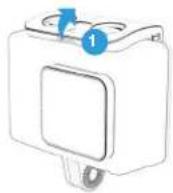
Remove the camera from the Waterproof case. Release latch to unlock casing.

Charge your X230
Connect your camera to a USB charger (not included) or computer using the included Micro USB cable. Whilst charging the red light will appear. Once fully charged it will turn off,

Insert your SD Card
Once your camera is fully charged, insert the Micro SD card (not supplied) into the SD card slot. We recommend using a Class UHS 1 and above Micro SD card up to 64GB for maximum performance.

Note: Please ensure you format your SD card before you start filming with it for the first time.
GETTING STARTED
02 - ENG
CAMERA SETTINGS
03 - ENG

Format your SD Card before using the camera for the first time
Press the Mode button consecutively until Settings mode appears. Select the Settings mode and press the Record/OK button to confirm.
Press the Mode button again to scroll through different settings and select the General Settings.
Scroll down the menu using the arrow keys on the side until you get to Format SD Card. Select Format SD Card and press the Record/OK button. Select on Confirm to format your SD Card.
NOTE: This will clear all data on the card and ensure it is ready for recording.


Using your Camera

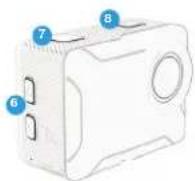
To turn your camera on/off - hold the Power/Mode button on the top of your X230 for few seconds.
To toggle between Video, Photo, Playback and Settings Mode, press the Mode button consecutively until your desired mode appears.

To change the Video/Image resolutions, go to Settings and select the Video or Photo on the top menu bar.

To start recording video, press the Record button on the top of your camera.


REVIEWING YOUR FOOTAGE
04 - ENG
Wi-Fi & KB APP
05 - ENQ
Reviewing your footage

To review footage, go to the the Playback mode using the Mode button.

Scroll through the files using the Up/Down keys and press Record/OK button to review footage.

Press and hold the Record/OK button to delete the selected file.

Press Mode button to exit the Playback mode.

Playback Screen
Connecting to the KB Capture App

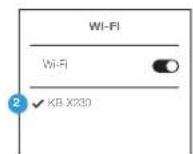
Press the Up arrow key at the side to activate the Wi-Fi.

Go to your Smartphone settings and ensure your Wi-Fi is turned on. Select KB-X230 network. The default password is: 12345678. If your connection fails, please close down the App and relaunch it and restart the camera.
App Name: KB Capture



Sosn these codes to access the KB-X230 Apo.
PRODUCT SPECIFICATIONS
06 - ENG
X230 Action Cam
5 Megapixels
Video Resolution Options
4K 30FPS (Upscaled)
2.7K 30FPS
1080P 60/30FPS - Default
720P 120/60/30FPS
Photo Resolution (Image Size)
16M, 12M, 8M, 5M, 2M
Storage
We recommend using a Class UHS 1 and above Micro SD card up to 64GB for maximum performance.
Visit www.kaiserbaas.com/support or email helpdesk@kaiserbaas.com for support. For the complete user guide, visit www.kaiserbaas.com


-
Power / Mode
-
Record
-
Micro USB
-
Micro HDMI
-
Micro SD Slot
-
Up / Down Scroll
Buttons
- Battery Latch
KAISER BAAS


@kaiserbaas
kaiserbaas.com
KBdiscover #captureadventure

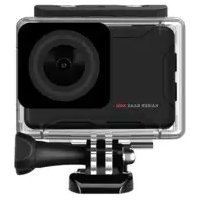
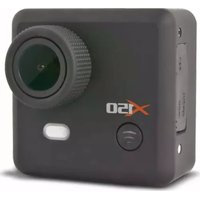

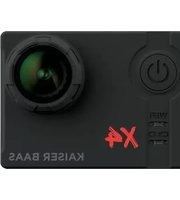
Brand : Kaiser Baas
Model : X230
Category : Camcorder