
EMP426SATT - Power strip Cotech - Free user manual and instructions
Find the device manual for free EMP426SATT Cotech in PDF.


| Product Type | Sliding Compound Miter Saw |
| Model Number | EMP426SATT |
| Brand | Cotech |
| Blade Diameter | 10 inches (254 mm) |
| Arbor Size | 5/8 inch (16 mm) |
| Motor Power | 15 Amps, 120V, 60Hz |
| No-Load Speed | 4800 RPM |
| Bevel Capacity | 0° to 45° left |
| Miter Capacity | 0° to 50° left and right |
| Cutting Capacity at 90° | 2x8 inches (20x200 mm) |
| Cutting Capacity at 45° | 2x6 inches (20x150 mm) |
| Dimensions (L x W x H) | 22 x 18 x 14 inches (56 x 46 x 36 cm) |
| Weight | 30 lbs (13.6 kg) |
| Power Cord Length | 6 feet (1.8 m) |
| Dust Collection Port | 1-1/2 inches (38 mm) diameter |
| Safety Features | Electric brake, spindle lock, blade guard, anti-kickback |
| Included Accessories | 10-inch TCT blade, dust bag, wrench, work clamp |
| Warranty | 1 year limited warranty |
| Intended Use | Crosscutting, mitering, beveling wood and composites |
Frequently Asked Questions - EMP426SATT Cotech
User questions about EMP426SATT Cotech
0 question about this device. Answer the ones you know or ask your own.
Ask a new question about this device
Download the instructions for your Power strip in PDF format for free! Find your manual EMP426SATT - Cotech and take your electronic device back in hand. On this page are published all the documents necessary for the use of your device. EMP426SATT by Cotech.
USER MANUAL EMP426SATT Cotech
Automatic switch with built-in surge protector
Art.no.: 18-2044 Model: EMP426SATT-UK
Art.no.: 36-1065 Model: EMP426SATT
Please read the entire instruction manual before using and save it for future use. We apologise for any text or photo errors and any changes of technical data. If you have any questions concerning technical problems please contact our Customer Service Department.
Description
• Automatic switch with built-in surge protector.
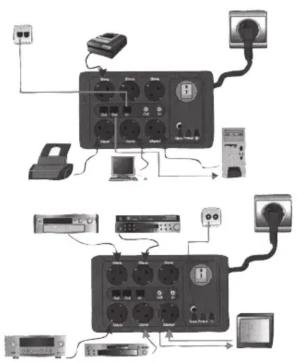
- Good for e.g. computers. Connect your computer to the master outlet and your monitor, printer, scanner etc. to the slave outlet. When you turn on your computer, all devices connected to the slave outlets are turned on simultaneously.
- Saves energy and prevents fire in devices that have accidentally been left on.
- Equipped with 1 x master outlet, 5 x slave outlets, 3 x modular phone jack (1 in/2 out), 2 TV outlets (1 in/1 out).
- All electrical outlets have surge protection. TV and telephone are protected against interferences.
- Load master outlet: 20-500W. Max. power total: 3680W.
- Equipped with 6 x varistors, 2 x discharge tubes, 6 x fuses, and a net filter to protect connected electronics from transient voltage/overvoltage in the power supply.
- The power switch has a built-in control lamp which lights up when the surge protector is turned on.
- 3 x indicator lights:
Blue lights up if the slave outlets are turned on. Green lights up if the device works correctly. Red lights up if the earth connection is good.
- The cable can be wound up and hung on the wall bracket.
- Well spaced outlets, good for AC adaptors etc. which take up plenty of room.
- The master outlet has an adjustable sensitivity to tell the connected slave devices when to turn ON/OFF.
- Note that no surge protector/protector can protect your equipment from a direct lightning strike.
Safety
- Only intended for connection to earthed indoor outlets.
-
Check that all the connected devices have the correct voltage (230V 50Hz.).
-
If you switch the device which is connected to the master outlet to a device which does not have the same voltage, you have to change the setting (steps 1-6) again.
- The device which is connected to the master outlet should have a power consumption of between 20 and 500W (or else the automatic control will not function).
Connection
- Check that all electric devices which are being connected to the surge protector are turned off.
- Connect the surge protector's plug to an earthed wall socket.
- Check that the surge protector's power switch is turned off (O), turn the settings screw anti-clockwise with a small screw driver.
- Connect the computer's plug (or the device to which should control power to the master outlet.
- Turn on the surge protector's power switch (I), the indicator for power on (in the power switch) and both the green and red control light are lit.
- Turn on the computer (or the device connected to the master outlet), turn the settings screw slowly clockwise until the blue control light is lit and indicates that the automatic control is correctly functioning.
- Connect the plugs from the devices which are to be controlled by the master outlet to the slave outlets.
- Connect the TV antenna cables to the outlets (Out and In).
- Insert the telephone cables in the outlets (In, Out1 and Out2).
- Switch on the connected device/s.
flowchart
graph TD
    A["Switch"] --> B["Server"]
    B --> C["Power Line"]
    D["Server"] --> E["Switch"]
    E --> F["Server"]
    G["Power Line"] --> H["Switch"]
    H --> I["Server"]
    J["Power Line"] --> K["Switch"]
    K --> L["Server"]
    M["Power Line"] --> N["Switch"]
    N --> O["Server"]
    P["Power Line"] --> Q["Switch"]
    Q --> R["Server"]
    S["Power Line"] --> T["Switch"]
    T --> U["Server"]
    V["Power Line"] --> W["Switch"]
    W --> X["Server"]
    Y["Power Line"] --> Z["Switch"]
    Z --> AA["Server"]
Troubleshooting
The green Protect – indicator light is not lit:
The surge protector does not work.
- It may have been disabled by lightning or overvoltage but protected the connected devices.
The blue Slave indicator light is not lit after adjusting:
-
Is the connected device to the master outlet is turned on?
-
Has the connected device does not draw less than 20 W? (in these cases the automatic switch does not work).
The red Earth indicator light is not lit:
Check: That the earthing is good.
-
That the outlet is earthed.
-
That the lead/extension lead is undamaged.
Specifications
Max load: 230 VAC, 50 Hz, 16 A (3680 W)
Protection Class: III
Uoc: P-N = 2.5 KV
P/N-E = 5.0 KV
Max overvoltage (230 V): 6,000 V
Max overvoltage (TV): 6,000 V
Max overvoltage (telephone): 6,000 V
Max current spike (230V): Outlet L-N: 4500A at pulse in 8/20 s
Outlet L-E: 4500A at pulse in 8/20 s
Outlet N-E: 4500A at pulse in 8/20μs
Max current spike (TV cable): 4500 A at pulse in 8/20 s
Max current spike (telephone): 4500 A at pulse in 8/20 s
Max energy uptake (230 V): 165 Joule at pulse form in 10/1000 s
Max energy uptake (TV antenna):268 Joule at pulse form in 10/1000μs
Max energy uptake (telephone): 268 Joule at pulse form in 10/1000 s
Reaction time: <1ns.
Cable: HO5VV-F 3G1.5 mm²
Disposal
Follow local ordinances when disposing of this product. If you are unsure about how to dispose of this product contact your municipality.
SVENSKA
Överspännningsskydd
Art.no.: 18-2044 Model: EMP426SATT-UK Art.no.: 36-1065 Model: EMP426SATT
Brand : Cotech
Model : EMP426SATT
Category : Power strip