ST-MW8156 - Microwave Saturn - Free user manual and instructions
Find the device manual for free ST-MW8156 Saturn in PDF.


| Product Type | Solo Microwave |
| Brand | Saturn |
| Model | ST-MW8156 |
| Capacity | 20 liters |
| Power Output | 800 W |
| Control Type | Digital with LED display |
| Dimensions (W x D x H) | 45.5 x 34.5 x 26.0 cm |
| Interior Dimensions | 29.0 x 29.0 x 20.0 cm |
| Weight | 11.5 kg |
| Power Supply | 230 V, 50 Hz, 10 A |
| Consumption | 1200 W (microwave), 1300 W (oven if combo) |
| Functions | Defrost, Timer, Clock, Child Lock, Auto Cook Menus |
| Safety Features | Child lock, overheat protection, door interlock |
| Cleaning | Easy-clean interior with removable glass turntable |
| Maintenance | Regular cleaning, avoid abrasive cleaners |
| Spare Parts | Turntable, waveguide cover, fuse |
| Repair Index | 7.5 / 10 (spare parts availability for 10 years) |
| Warranty | 2 years standard |
Frequently Asked Questions - ST-MW8156 Saturn
User questions about ST-MW8156 Saturn
0 question about this device. Answer the ones you know or ask your own.
Ask a new question about this device
Download the instructions for your Microwave in PDF format for free! Find your manual ST-MW8156 - Saturn and take your electronic device back in hand. On this page are published all the documents necessary for the use of your device. ST-MW8156 by Saturn.
USER MANUAL ST-MW8156 Saturn
natural_image
Black square microwave oven with digital display and control panel (no visible text or symbols)
MICROWAVE OVEN
Dear Buyer!
We congratulate you on having bought the device under trade name "Saturn". We are sure that our devices will become faithful and reliable assistance in your housekeeping.
Installation
Avoid extreme temperature changes. Rapid temperature change (e.g. when the unit is moved from freezing temperature to a warm room) may cause condensation inside the unit and a malfunction when it is switched on. In this case leave the unit at room temperature for at least 1.5 hours before switching it on.
If the unit has been in transit, leave it indoors for at least 1.5 hours before starting operation.
Please read this booklet carefully before fixing and using, and keep it for future reference.
- Take out all the packing. If there is a safe film over the oven, tear it off before Use. Check carefully for damage. If any, immediately notify dealer or send to the manufacturer's service center.
- Microwave ovens must be placed under dry and noncorrosiveness environ-
ments, kept away from heat and humidity, such as gas burner or water tank. 3. To ensure sufficient ventilation, the distance of the back of microwave to the wall should be at least 10 cm, the side to the wall should be at least 5 cm, the free distance above the top surface at least 20 cm.
-
The position of the oven shall be such that it is far from the TV, Radio or antenna as picture disturbance Or noise may occur.
-
The appliance must be positioned so that the plug is accessible, and must ensure a good grounding in case leakage, ground loop can be formed to avoid electric shock.
-
The microwave oven must be operated with the decorative door closed.
-
The microwave oven shall not be placed in a cabinet
-
The back of the oven must be placed against a wall
-
As there is manufacturing residue or oil remained on the oven cavity or heat element, it usually would smell the odor, even a slight smoke. It is normal case and would not occur after several times use, keep the door or window open to ensure good ventilation. So it is strongly recommended to set the oven to grill mode and operate dry several times.

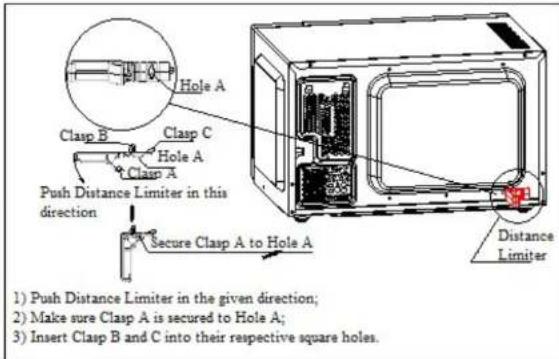
Operating dry should only be conducted in the grill mode, it should not be conducted at combination mode
IMPORTANT SAFEGUARDS
The following basic precautions should always be followed when using electrical appliance:
- Read all instructions before using.
-
Make sure the voltage in your living area corresponding to the one shown on the rating label of the appliance. And the wall socket is properly grounded.
-
TO reduce the risk of fire in the oven cavity:
a. DO not overcook the food.
b. Remove wire twist ties from paper or plastic bags before placing bags in the oven
c. Do not heat oil or fat for deep drying as the temperature of oil cannot be controlled.
d. After use wipe the waveguide cover with a damp cloth, followed by dry cloth to remove any food splashes and
grease. Built up grease may overheat and begin to cause smoke or catch fire. e. If materials inside the oven should smoke or ignite, keep oven door closed, turn oven off and disconnect the power supply.
f. Close supervision is necessary when using disposable containers made from plastic, paper or other combustible material.
- TO reduce the risk of explosion and sudden boiling;
a. Do not place sealed containers in the oven. Baby bottles fitted with a screw cap or teat are considered to be sealed containers.
b. When boiling liquid in the oven, use the wide mouthed container and stand about 20 seconds at the end of cooking to avoid delayed eruptive boiling of liquids.
c. Potatoes, sausage and chestnut should be peeled or pierced before cooking. Eggs in their shell, whole hard boiled eggs should not be heated in microwave ovens since they may explode, even after microwave heating has ended.
d. The cooked liquid should not be removed out immediately. Several moments should be waited before removing. In order to avoid possible hazards caused by delayed eruptive boiling of liquids.
e. The contents of feeding bottles and baby food jars are to be stirred or shaken and the temperature is to be checked before consumption, in order to avoid burns.
- Never operate the oven further if the door or door seals is damaged or the
oven is malfunctioned or supply cord is damaged. Return the appliance to the nearest authorized service center for repair and maintenance. Never try to adjust or repair the oven yourself. 6. If the supply cord is damaged, it must be replaced by the manufacturer or its service agent or a qualified technician in order to avoid a shock hazard.
-
After cooking, the container is very hot. Using gloves to take out the food and avoid steam burns by directing steam away from the face and hands.
-
Slowly lift the furthest edge of dishes cover and microwave plastic wrap and carefully open popcorn and oven cooking bags away from the face.
-
TO prevent the turntable from breaking:
a. Let the turntable cool down before cleaning.
b. Do not place hot foods or utensils on the cold turntable.
c. Do not place frozen foods or utensils on the hot turntable.
-
Make sure the utensils do not touch the interior walls during cooking.
-
Failure to maintain the oven in a clean condition could lead to deterioration of the surface that could adversely affect the life of the appliance and possibly result in a hazardous situation 12. Only use utensils that are suitable for use in microwave ovens.
-
Do not store food or any other things inside the oven.
-
Do not operate the oven without any liquid or food inside the oven. This would do damage the oven.
-
This appliance is not intended for using by young children or infirm persons without supervision.
-
When the appliance is operated in the combination mode, children should only use the oven under adult supervision due to the temperatures generated 17. Any accessories not recommended by the manufacturer may cause injuries to persons.
-
Do not use outdoors.
-
Save these instructions.
-
WARNING: If the door or door seals are damaged, the oven must not be operated until it has been repaired by a competent person;
-
WARNING: It is hazardous for anyone other than a competent person to carry out any service or repair operation that involves the removal of a cover which gives protection against exposure to microwave energy;
-
WARNING: Liquids and other foods must not be heated sealed container
since they are liable to explode; 23. WARNING: Only allow children to use the oven without supervision when adequate instructions have been given
so that the child is able to use the oven in a safe way and understands the hazards of improper use;
-
Only use utensils that are suitable for use in microwave ovens;
-
When heating food in plastic or paper containers, keep an eye on the oven due to the possibility of ignition;
-
If smoke is observed, switch off or unplug the appliance and keep the door closed in order to stifle any flames;
-
Microwave heating of beverages can result in delayed eruptive boiling, therefore care must be taken when handling the container;
-
The contents of feeding bottles and baby food jars shall be stirred or shaken and the temperature checked before consumption, in order to avoid burns;
-
Eggs in their shell and whole hard boiled eggs should not be heated in microwave ovens since they may explode, even after microwave heating has ended:
-
The oven should be cleaned regularly and any food deposits removed;
-
Failure to maintain the oven in a clean condition could lead to deterioration of the surface that could adversely affect the life of the appliance and possibly result in a hazardous situation;
-
During use the appliance becomes hot. Care should be taken to avoid touching heating elements inside the oven.
-
WARNING: Accessible parts may become hot during use. Young children should be kept away.
-
Do not use harsh abrasive cleaners or sharp metal scrapers to clean the oven door glass since they can scratch the surface, which may result in shattering of the glass.
-
This appliance is not intended for use by persons (including children) with reduced physical, sensory or mental capabilities, or lack of experience and knowledge, unless they have been given supervision or instruction concerning use of the appliance by a person responsible for their safety.
-
Children should be supervised to ensure that they do not play with the appliance.
-
The appliances are not intended to be operated by means of an external timer or separate remote control system.
-
The temperature of accessible surfaces may be high when the appliance is operating.
-
Service life - 2 years.
Household use only
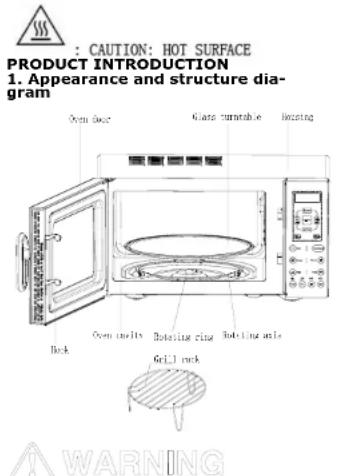
a. Do not remove the Waveguide cover during cleaning
b. Make sure the Waveguide cover installation right and no damage during cooking
- Control panel

Function and Operation method
WARNING
The LED flashes 3 times when plugged in power supply. Then it flashes ": prompting you to input the cooking menu and time.
1. Auto reminder
When your preset cooking procedure have finished, the LED Display will show End and three beeps sound will be heard to prompt you to take out food. If you do not press Pause/Cancel icon once or open the door the beep will sound at an interval of 3 minutes.
- Clock setting
| For example: to set 12:30 | ||
| Depress Display | ||
| 1 | After power-up, the colon flashes | : |
| 2 | Press Clock button. | 00:00 |
| 3 | Press "Adjust +" or "Adjust - " to set hour. | 12:00 |
| 4 | Press Clock button to confirm | 12:00 |
| 5 | Press "Adjust +" or "Adjust - " to set minute | 12:30 |
| 6 | Press Clock button once again or wait for 5 seconds, and the numbers will go steadily. | |
3. Microwave cooking
This function use for cooking and heating food. Press Power icon, LED cycles to show 100P—80P—60P—40P—20P
| High power | 100% microwave power. Applicable for quick and thorough cooking |
| Medium High power | 80% microwave power. Applicable for medium express cooking |
| Medium power | 60% microwave power. Applicable for steaming food |
| Medium Low power | 40% microwave power. Applicable for defrosting food |
| Low power | 20% microwave power. Applicable for keeping warm |
a. The max time which can be set is 60 minutes
b. Never use the grill rack during microwave cooking.
c. Never operate the oven empty.
d. If you turn the food during operation, press the Start icon once and the preset cooking procedure will continue.
e. If you intend to remove the food before the preset time, you must press Pause/Cancel icon once to clear the preset procedure to avoid unintended operation of next time use.
You may change the cooking time during cooking. And it is recommended turning the food halfway, after you turn the food. Press Start icon once to continue.
| Example: To cook at P80 for 10 minutes. | ||
| Depress Display | ||
| 1 | After power-up, the colon flashes | ; |
| 2 | Select the desired microwave power by depressing Power icon consecutively | 80P |
| 3 | Set cooking time by pressing "Adjust +" or "Adjust -" icon. | 10:00 |
| 4 | Press Start Icon to start and LED will count down to show running time. |
You may change the cooking time during cooking. And it is recommended turning the food halfway, after you turn the food. Press Start icon once to continue.
4 Grill& Gill combination Grill-combi
Grill
| G | Grill, the heat element will be energized during operation time. Which is applicable for rolling thin meats or pork, sausage, chicken wing as good brown color can be obtained |
Grill-combi
| G1 | Combination of Grill and microwave cooking. 30% of time microwave output and 70% of time light wave. |
| G2 | Combination of Grill and microwave cooking. 55% of time microwave output and 45% of time light wave. |
In the mode of Grill or Grill-combi, all of the oven parts, as well as the rack and cooking containers, may become very hot. Use caution when removing any item from the oven. Use heavy potholders or oven mitts to PREVENT BURNS.
| Example: To grill food with G2 cook menu for 10 minutes | ||
| Depress Display | ||
| 1. | After power-up, the colon flashes | : |
| 2. | Press Grill-combl Icon to select desired combination menu | G.2 |
| 3. | Set cooking time by pressing "Adjust +" or "Adjust -" icon. | 10:00 |
| 4. | Press Start to start cooking |
5. Defrost
This function use for Defrost food, Press the Defrost icon and the LED display will cycle to show d.1-d.2-d.3.
| d.1 | For defrosting meat, the weight range from 0.1 to 2.0 kg. |
| d.2 | For defrosting poultry, the weight range from 0.2 to 3.0kg. |
| d.3 | For defrosting seafood, the weight range from 0.1 to 0.9kg. |
a. It is necessary to turn over the food during operation to obtain uniform effect.
b. Usually defrosting will need longer time than that of cooking the food.
c. If the food can be cut by knife, the defrosting process can be considered completed.
d. Microwave penetrates around 4cm into most food
e. Defrosted food should be consumed as soon as possible, it is not advised to put back to fridge and freeze again
| Example: To defrost 0.4kg poultry | ||
| Depress Display | ||
| 1 | After power-up, the colon flashes | : |
| 2 | Press Defrost Icon to set the food kind. | d.2 |
| 3 | Press "Adjust +" or "Adjust -" Icon to set the defrost weight | 0.4 |
| 6 | Start cooking by pressing Start | |
| 7 | In half way during defrosting 3 beep sound will be heard two times to prompt you turn over the food. Open the door and turn over the food and shield the warm portion. Then close the door. Press Instant/start icon again to continue defrosting | |
6. Auto cooking
The oven has default cooking menu for simple operation. When the LED flash colon, press the icon to select desired auto cooking menu.
Choose the appropriate menu according to the food type and weight and strictly observe the directions in below table, otherwise the cooking effect will be largely influenced.
| Display Method | ||
| Ac.1 Reheat | Press Re-heat Icon,Press Adjust+" or "Adjust -" Icon to set the cooking weight; he weight range is 0.2-1kg start working by pressing start icon. |
| Ac.2 Popcorn | Suitable for popping a bag of corn, which is available in the market, weighted 85g.Popcorn prior to completing, if the popping speed has been decreased to 1 time per 1-2 seconds you should press Pause/Cancel button to stop the popping process | |
| Ac.3 Pizza | Press Pizza icon, Press "Adjust+" or "Adjust -" icon to set the cooking weight; start working by pressing start icon. | |
| Ac.4 Bread | Same as Pizza, the weight range is 0.1' 0.5kg | |
| Ac.5 Potato | Same as Pizza, the weight range is 0.45' 0.65kg | |
| Ac.6 Beef | Same as Pizza, the weight range is 0.2-0.7kg |
| Ac.7 Fish | Same as Pizza, the weight range is 0.2-0.7kg | |
| Ac.8 Chicken | Same as Pizza, the weight range is 0.2-0.7kg |

a. The temperature of food before cooking would be 20-25°C. Higher or lower temperature of the food before cooking would require increase or decrease of cooking time.
b. The temperature, weight and shape of food will largely influence the cooking effect. If any deviation has been found to the factor noted on above menu, you can adjust the cooking time for best result.
| Example: Steam 0.2kg Chicken | |
| Depress Display | |
| 1. After power-up, the colon flashes | : |
| 2. Press Chicken icon to set the cooking menu | |
| 3. Press "Adjust +" or "Adjust -" icon to set the desired weight | 0.2 |
| 4. Start cooking by pressing Start | 11:00 |
7. Multisequence cooking
To obtain best cooking result, some recipes call for different cook mode and time. You may program your personalized menu as follow:
| Example: You want cook food with 100P microwave for 3 minutes then grill food for 9 minutes. This is 2 sequence setting. | ||
| Depress | Display | |
| 1 | 100P microwave for 3min | |
| 1.1 | Press Power icon to select power level. | 100P |
| 1.2 | Press "Adjust +" or "Adjust -" icon to set cooking time. | 3:00 |
| 2 Grill for 9min | ||
| 2.1 | Press Grill icon to set grill menu | G |
| 2.2 | Press "Adjust +" or "Adjust -" icon to set cooking time. | 9:00 |
| 3 | Start cooking by pressing Start | |

a. When microwave power cooking is finished, microwave oven will begin grilling operation automatically. b. Max 4 sequences can be set per time, repeat the steps
8. Child lock function
Use this feature to lock the control panel when you are cleaning or so that children can not use the oven unsupervised. All the icons are rendered inoperable in this mode.
| Depress | Display | |
| set lock | Depress and hold"STOP/CANCEL" icon about 3 seconds | |
| cancel lock | Depress and hold"STOP/CANCEL" icon about 3 seconds | : : |
9. UTENSILS GUIDELINE
It is strongly recommended to use the containers which are suitable and safe for microwave cooking. Generally speaking, the containers which are made of heat-resistant ceramic, glass or plastic are suitable for microwave cooking. Never use the metal containers for microwave cooking and combination cooking as spark is likely to occur. You can take the reference of below table.
| Material of container | Microwave | grill | Combo | Notes |
| Heat-resistant ceramic | Yes Yes Yes | Never use the ceramics which are decorated with metal rim or glazed | ||
| Heat-resistant plastic | Yes No No | Can not be used for long time microwave cooking | ||
| Heat-resistant glass | Yes Yes Yes | |||
| Plastic film | Yes No No | It should not be used when cooking meat or chops as |
| the over-temperature may do damage to the film | ||||
| Grill rack | No Yes Yes | |||
| Metal container | No No No | It should not be used in ml-crowave oven .Microwave can not penetrate through metal. | ||
| Iacquer | No No No | Poor heat-resis-tant. Can not be used for high temperature cooking | ||
| Bamboo wood and | No No No | Poor heat-resis- | ||
| paper sis- | tant. Can not be used for High temperature cooking |
10. Cooking Tips
The following factors may affect the
cooking result
Food arrangement
Place thicker areas towards outside of dish, the thinner part towards the centre and spread it evenly. Do not overlap if possible
it possible
Cooking time length
Start cooking with a short time setting, evaluate it after it times out and extend it according to the actual need. Over cooking may result in smoke and burns.
Cooking food evenly
Food such as chicken, hamburger or steak should be turned once during cooking. Depending on the type of food, if applicable, stir it from outside to centre of dish once or twice during cooking
Allow standing time
After cooking times out, leave the food in the oven for a adequate length of time, this allows it to complete its cooking cycle and cooling it down in a gradual manner
Whether the food is done
- Color and hardness of food help to determine if it is done, these include: - Steam coming out from all parts of food, not just the edge - Joints of poultry can be moved easily - Pork or poultry shows no signs of blood - Fish is opaque and can be sliced easily with a fork
Browning dish
When using a browning dish or self-heating container, always place a heat-resistant insulator such as a porcelain plate under it to prevent damage to the turntable and rotating ring.
Microwave safe plastic wrap
When cooking food with high fat content, do not allow the plastic wrap come into contact with food as it may melt
Microwave safe plastic cookware Some microwave safe plastic cookware might not be suitable for cooking foods with high fat and sugar content. Also, the preheating time specified in the dish instruction manual must not be exceeded
CLEANING and MAINTENANCE
Microwave oven care

The oven should be cleaned regularly and any food deposits removed.
- It is hazardous for anyone other than a competent person to carry out any service or repair operation that involves the removal of a cover which gives protection against exposure to microwave energy
- Remove the power cord from the wall outlet before cleaning
- Failure to maintain the oven in a clean condition could lead to deterioration of the surface that could adversely affect the life of the appliance and possibly result in a hazardous situation
- The oven should be cleaned regularly and any food deposits removed
- Details for cleaning door seals, cavities and adjacent parts.
- Never use hard detergent, gasoline, abrasive powder or metal brush to clean any part of the appliance
- Do not remove the waveguide cover 8. When the microwave oven has been used for a long time, there may be some strange odors exist in oven, following 3 methods can get rid of them: a. Place several lemon slices in a cup, then heat with high power for 2 - 3min . b. Place a cup of red tea in oven, then heat with high power.
c. Put some orange peel into oven, and then heat them with high power for 1 minute.
TIPS for cleaning
Exterior
Wipe the enclosure with a dampened soft cloth
Door:
Using a dampened soft cloth, wipe clean the door and window Wipe the door seals and adjacent parts to remove any spill or spatter
Wipe the control panel with a slightly dampened soft cloth
Interior walls:
Wipe clean the interior surfaces with a dampened soft cloth Wipe clean the waveguide cover to remove any food splashed
Turntable / Rotation ring / Rotation axis:
Wash with mild soap water Rinse with clean water and allow drying thoroughly
Servicing
Please check the following before calling for services.
a. Place one cup of water (approx. 150ml) in a glass measure in the oven and close the door securely. Oven lamp should go off if the door is closed properly. Let the oven work for 1 min. b. Does the oven lamp light? c. Does the cooling fan work? (Put your hand over the rear ventilation openings.) d. Does the turntable rotate? (The turntable can rotate clockwise or counterclockwise. This is quite normal.) e. Is the water inside the oven hot? If "NO" is the answer to any of the above questions, please check your wall socket and the fuse in your meter box. If both the wall socket and the fuse are functioning properly, CONTACT YOUR NEAREST SERVICE CENTER APPROVED.
SERVICING SAFEGUARDS
MICROWAVE RADIATION!
It is hazardous for anyone, other than a qualified service technician, to carry out any service for repairing operation which involves removal of any cover which gives protection against exposure to microwave energy.
The temperature of accessible surfaces may be high when the appliance is operating
The high voltage capacitor remains charge after disconnection; short the negative terminal of H. V capacitor to the oven chassis (use a screwdriver) to discharge before touching.

During servicing below listed parts are liable to be removed and give access to potentials above220V to earth. 1. Magnetron 2. High voltage transformer 3. High voltage capacitor 4. High voltage diode 5. High voltage fuse
The following conditions may cause undue microwave exposure during servicing. Improper fitting of magnetron; Improper matching of door interlock, door hinge and door; Improper fitting of switch support; Door, door seal or enclosure has been damaged.
- If LED displays Err0 during working, it indicates that sensor has been short circuit and you need replace it at the nearest repaired department.
- If LED displays Err1 during working, it indicates that sensor has been open circuit and you need replace it at the nearest repaired department.
If the door or door seals are damaged, the oven must not be operated until it has been repaired by a competent person; It is hazardous for anyone, other than a qualified service technician, to carry out any service for repairing operation which involves removal of any cover which gives protection against exposure to microwave energy. Liquids or other foods must not be heated in sealed containers since they are liable to explode; Only allow children to use the oven without supervision when adequate instructions have been given so that the child is able to use the oven in a safe way and understands the hazards of improper use
Specification
Power Consumption: 1280 W Microwave Power: 800 W Grill Power: 1000 W Rated Voltage: 220-230 V Rated Frequency: 50 Hz Rated Current: 5,8 A
Set
MICROWAVE OVEN.... 1 INSTRUCTION MANUAL WITH WARRANTY BOOK.... 1 PACKAGE.... 1
ENVIRONMENT FRIENDLY DISPOSAL

You can help protect the environment! Please remember to respect the local regulations; hand in the nonworking electrical equipment to an appropriate waste disposal center. The manufacturer reserves the right to change the specific-
tion and design of goods.
RU
МИКРОВОЛНОВАЯ ПЕЧЬ
The Warranty is provided for the period of 2 years or more if the Law on User Right of the country where the appliance was bought provides for a greater minimum warranty period.
All terms of warranty comply with to the Law on Protection of the Consumer Rights and are governed by the legislation of the country where the product was bought. The warranty and free of charge repair are provided in any country where the product is delivered to by Saturn Home Appliances or authorized representative thereof, and where no restriction of import or other legal provisions interfere with rendering of warranty services and free of charge repair.
Cases uncovered by the warranty and free of charge repair:
-
Guarantee coupon is filled in improperly.
-
The product has become inoperable because of the Buyer's nonobservance of the service regulations indicated in the instruction.
-
The product was used for professional, commercial or industrial purposes (except for the models, specially intended for this purpose that is indicated in the instruction).
-
The product has external mechanical damage or damage caused by penetration of the liquid inside, dust, insects and other foreign objects.
-
The product has damages caused by non-observance of the rules of power supply from batteries, mains or accumulators.
-
The product was exposed to opening, repair or modification of design by the persons, unauthorized to repair; independent cleaning of internal mechanisms etc. was made.
-
The product has natural wear of parts with limited service life, expendables etc.
-
The product has deposits of scale inside or outside of fire-bar elements, irrespective of used water quality.
-
The product has damages caused by effect of high (low) temperatures or fire on nonheat resistant parts of the product.
-
The product has damages of accessories and nozzles which are included into the complete set of product shipment (filters, grids, bags, flasks, cups, covers, knives, scaling rings, graters, disks, plates, tubes, hoses, brushes, and also power cords, headphone cords etc.).
On the warranty service and repair, please contact the authorized service centers of "Saturn Home Appliances".
CZ
MEZINÁRODNÍ ZÁRUKA
When purchasing the product, please require its checking before you; BE SURE that the goods sold to you, are functional and complete and that the warranty coupon is filled in correctly.
This warranty coupon confirms the absence of any defects in the product you purchased and provides for free of charge repair of the product failed through the fault of the manufacturer throughout the period of warranty service and free of charge repair.
Failing the presentation of this coupon, in case of its improper filling in, infringement of factory seals (if any), and also in cases indicated in the warranty obligations, the claims are not accepted, and no warranty service and free of charge repair is made! The warranty coupon is valid only in the original copy with the stamp of trading organization, signature of the seller, date of sale and signature of the buyer.
CZ
ZÁRUČNÍ LIST
SATURN HOME APPLIANCES S.R.O. KONÉVOVA 141/2660
13083 PRAHA 3 – ŽIŽKOV, ČESKÁ REPUBLIKA, TEL: +4202/67 108 392
Model / Артикул
- MICROWAVE OVEN
- Dear Buyer!
- Installation
- Operating dry should only be conducted in the grill mode, it should not be conducted at combination mode
- IMPORTANT SAFEGUARDS
- Function and Operation method
- WARNING
- Auto reminder
- Microwave cooking
- Grill& Gill combination Grill-combi
- Defrost
- Auto cooking
- Multisequence cooking
- Child lock function
- UTENSILS GUIDELINE
- Cooking Tips
- Food arrangement
- Cooking time length
- Cooking food evenly
- Allow standing time
- Whether the food is done
- Browning dish
- Microwave safe plastic wrap
- CLEANING and MAINTENANCE
- TIPS for cleaning
- Door:
- Interior walls:
- Turntable / Rotation ring / Rotation axis:
- Servicing
- SERVICING SAFEGUARDS
- MICROWAVE RADIATION!
- Specification
- Set
- ENVIRONMENT FRIENDLY DISPOSAL
- RU
- МИКРОВОЛНОВАЯ ПЕЧЬ
- Cases uncovered by the warranty and free of charge repair:
- MEZINÁRODNÍ ZÁRUKA
- ZÁRUČNÍ LIST
Brand : Saturn
Model : ST-MW8156
Category : Microwave