SN-3C - Humidifier Emerson - Free user manual and instructions
Find the device manual for free SN-3C Emerson in PDF.


| Product Type | Humidifier |
| Brand | Emerson |
| Model | SN-3C |
| Dimensions (W x D x H) | 12 x 8 x 15 inches |
| Net Weight | 5 lbs |
| Water Tank Capacity | 1 gallon |
| Coverage Area | Up to 300 sq ft |
| Humidification Output | 2.5 gallons per day |
| Power Supply | 120V / 60Hz |
| Power Consumption | 30 watts |
| Noise Level | < 35 dB |
| Features | Auto shut-off, adjustable humidistat, whisper-quiet operation |
| Maintenance | Weekly cleaning with vinegar solution to prevent mineral buildup |
| Filter Type | Wicking filter (replace every 3 months) |
| Safety | Auto shut-off when water tank is empty; cool mist operation safe for children and pets |
| Warranty | 1 year limited |
| Color | White |
| Material | ABS plastic |
Frequently Asked Questions - SN-3C Emerson
User questions about SN-3C Emerson
0 question about this device. Answer the ones you know or ask your own.
Ask a new question about this device
Download the instructions for your Humidifier in PDF format for free! Find your manual SN-3C - Emerson and take your electronic device back in hand. On this page are published all the documents necessary for the use of your device. SN-3C by Emerson.
USER MANUAL SN-3C Emerson
LIEBERT® SN™ INTEGRATED SENSORS
Quick Installation Guide
The Liebert SN integrated sensors monitor temperature and humidity in any area.
These instructions apply to the following Liebert SN integrated-sensor models:
• SN-Z01—integrated cable with 1 temperature probe
• SN-Z02—integrated cable with 3 temperature probes
• SN-Z03—integrated cable with 4 probes: 3 temperature and 1 humidity
SENSOR-STRING COMPATIBLE
You can attach the sensors in a string, and the string can be a combination of integrated and modular sensors. (Modular sensors are single probes with a separate cable.)
A string may include up to 10 probes and be a maximum of 65.6 ft (20 m).
The number of probes that may be used with Liebert monitoring products varies. Refer to the product's user guide for details.
PREPARE FOR INSTALLATION
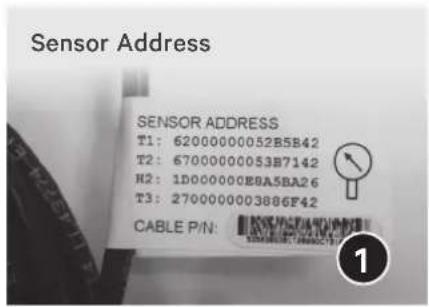
1. Record the address of each sensor
During configuration, the web user interface displays the addresses of all connected sensors.
Before mounting or connecting, locate the sensor-address list on the label near the RJ45-end of the integrated cable (see the picture on the following page). An address is listed for each temperature and humidity sensor
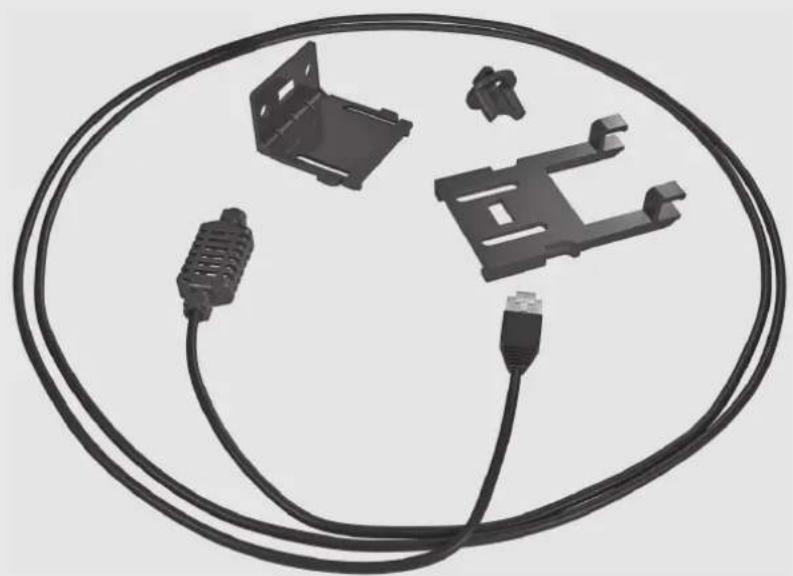
Liebert Sensor, Cable and Mount
natural_image
Illustration of a black cable with various connectors and connectors, no text or symbols present.Included Parts Quantity by Model Number
| Part SN-Z01 SN-Z02 SN-Z03 | |||
| Temperature sensor 13 | 3 | ||
| Humidity sensor — — 1 | |||
| Total number of probes | 13 | 4 | |
| Sensor-bracket base | 13 | 3 | |
| Sensor-bracket support | 13 | 3 | |
| Screws, 8-32 x 7/16 | 2 | 6 | 6 |
| Dual LockTM fastener, 0.5 ft (0.15 m) | 1 | 1 | 1 |
| Cable ties | 2 | 6 | 6 |
| Alcohol pads | 13 | 3 | |
| Quarter-turn High Pro fastener | 13 | 3 | |
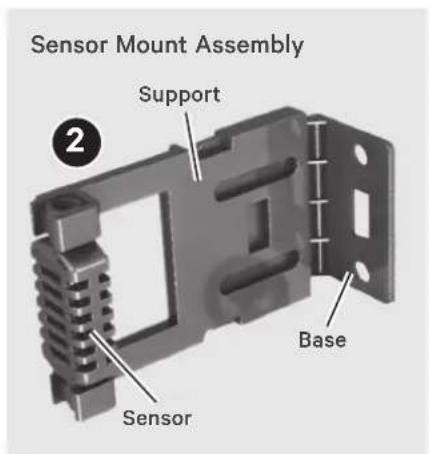
2. Assemble the sensor and bracket
If using the supplied bracket and base:
- Insert the support base into the end of the support.
- Snap the sensor into the other end of the support.
3. Choose a mounting location
Keeping in mind that the temperature and humidity sensors require an unobstructed air flow, and that the sensor does not obstruct vents and impede air flow, select a mounting location. The installation parts needed for various mounting options are included with the sensor. You can install the sensor on rack rails, rack doors, and on a flat surface.
MOUNT THE SENSOR
Use the step appropriate to your chosen mounting method:
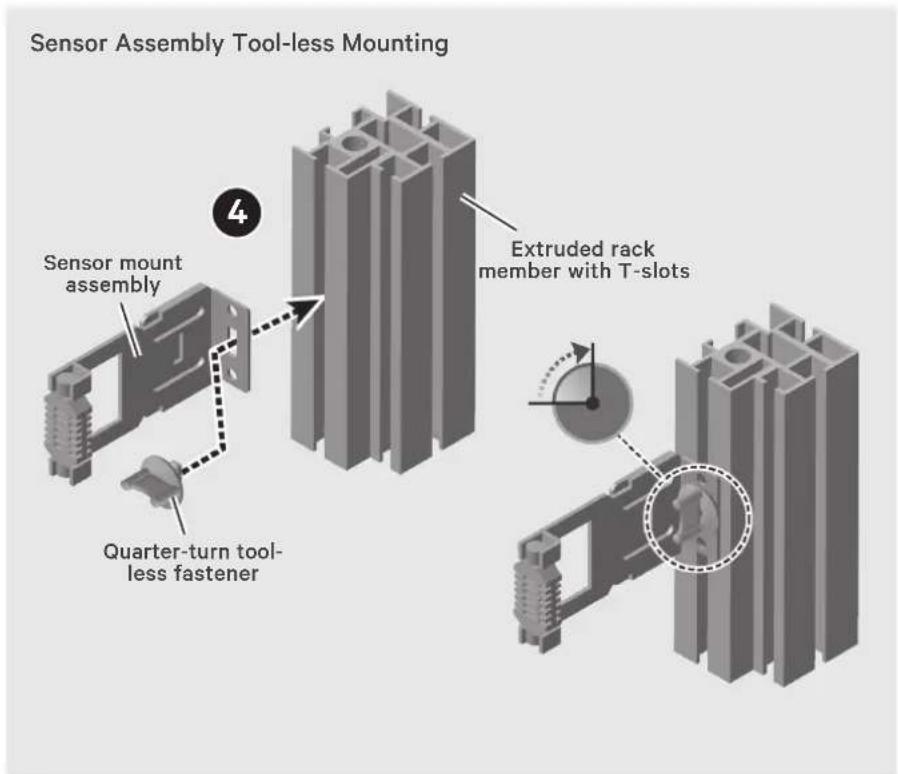
- Mounting on a Knurr® Rack-frame or 19-in. Rail Insert the quarter-turn, tool-less fastener a slot on the support or base, place the bracket on the frame or rail, and turn the fastener clockwise (1/4 turn) to secure the sensor in place.
5. Mounting on rack door
- On a Knurr rack (only), use the supplied screws through the slots on the support or frame base to secure the sensor to the door.
- On all other racks (including Knurr), use cable ties to secure the sensor or support bracket to the door.
6. Mounting on a flat surface
Clean the mounting location with the supplied alcohol pad(s), then affix the sensor support to the surface using the supplied Dual Lock fasteners.
7. Mounting on a rack rail
This method requires a standard, pan-head rack screw, not supplied with the sensor.
Use the pan-head rack screw through a slot on the sensor support or base to secure the sensor in place.
CONNECT THE SENSOR
The integrated cable connects to the SN Sensor port on your Liebert product. The Liebert SN

sensor ports are RJ45 ports designated with the sensor-port icon.
NOTE: Only use the SN sensor port to connect Liebert SN sensors.
CONFIGURE THE SENSOR
Using the sensor address(es) recorded before installation, use the web user interface of your Liebert product to acknowledge the senor connection and configure parameters including labeling the sensor and setting thresholds for alarm/warning triggers.
SPECIFICATIONS
| Dimensions, W x D x H 2 x 3/4 x 1-5/8 in (51 x 19 x 41 mm) |
| Net Weight 0.25 lb (0.11 kg) |
| Shipping Weight 0.44 lb (0.2 kg) |
Temperature Sensor (all models)
| Ambient Operating Environment 41°F to 131°F (5°C to 55°C) |
| Sensor Range 41°F to 131°F (5°C to 55°C) |
| Accuracy ±1.1°F (±0.5°C) |
Humidity Sensor (SN-Z03 models only)
| Operating Altitude Up to 6,000 ft (2,000 m) |
| Senso1r Range 10% to 95% RH (non-condensing) |
| Accuracy ±3.5% RH |

VERTIV™
To contact Vertiv Technical Support: visit www.VertivCo.com
© 2017 Vertiv Co. All rights reserved. Vertiv, the Vertiv logo are trademarks or registered trademarks of Vertiv Co. All other names and logos referred to are trade names, trademarks or registered trademarks of their respective owners. While every precaution has been taken to ensure accuracy and completeness herein, Vertiv Co. assumes no responsibility, and disclaims all liability, for damages resulting from use of this information or for any errors or omissions. Specifications are subject to change without notice.
- LIEBERT® SN™ INTEGRATED SENSORS
- SENSOR-STRING COMPATIBLE
- PREPARE FOR INSTALLATION
- Record the address of each sensor
- Assemble the sensor and bracket
- Choose a mounting location
- MOUNT THE SENSOR
- Mounting on rack door
- Mounting on a flat surface
- Mounting on a rack rail
- CONNECT THE SENSOR
- CONFIGURE THE SENSOR
- To contact Vertiv Technical Support: visit www.VertivCo.com
Brand : Emerson
Model : SN-3C
Category : Humidifier