ATLAS

TF 133-3 - Washing machine ATLAS - Free user manual and instructions

Find the device manual for free TF 133-3 ATLAS in PDF.

📄 13 pages English EN Download 💬 AI Question 10 questions ⚙️ Specs
Notice ATLAS TF 133-3 - page 1
Pick your language and provide your email: we'll send you a specifically translated version.
Product Type Front-loading washing machine
Brand Atlas
Model TF 133-3
Capacity 6 kg
Spin Speed 1000 rpm
Energy Efficiency Class A+
Washing Programs Cotton, Synthetics, Delicates, Quick Wash, Wool, Hand Wash, Rinse & Spin
Display LED digital display
Delay Start Up to 24 hours
Child Lock Yes
Noise Level (Wash/Spin) 62 dB / 78 dB
Water Consumption 49 liters per cycle
Annual Energy Consumption 195 kWh
Dimensions (H x W x D) 85 cm x 60 cm x 55 cm
Weight 62 kg
Power Supply 220-240 V, 50 Hz
Drum Material Stainless steel
Door Opening Hinged left, opening angle 150°
Self-Cleaning Detergent Drawer Yes
Spare Parts Availability 7 years minimum after discontinuing model

Frequently Asked Questions - TF 133-3 ATLAS

How do I install the Atlas TF 133-3 washing machine?
Ensure the machine is on a level, solid floor. Remove all transport bolts and packaging. Connect the water inlet hose to a cold water tap with a 3/4 inch thread. Attach the drain hose to a standpipe or sink drain. Plug into a grounded electrical outlet. Level the machine by adjusting the feet.
What should I do if the machine does not start?
Check that the door is properly closed and latched. Ensure the water supply is turned on. Verify the power cord is plugged in and the circuit breaker is not tripped. If the problem persists, reset the machine by unplugging for 1 minute.
How often should I clean the detergent drawer?
Clean the detergent drawer every 2-3 months. Remove the drawer by pressing the release catch, rinse under warm water, and wipe out the compartment. Use a brush to remove any residue from the softener and detergent slots.
What is the maximum load capacity for a cotton cycle?
The maximum load for the cotton cycle is 6 kg of dry laundry. Overloading can reduce washing performance and cause excessive vibration. For other fabrics, refer to the program chart in the manual.
My washing machine is vibrating excessively during spin. What can I do?
Ensure the machine is level. Adjust the front feet up or down. Check that transport bolts have been removed. Make sure the load is balanced – mix large and small items. Do not wash heavy items like blankets alone.
How do I activate the child lock?
Press and hold the 'Child Lock' button (or a combination of buttons, typically Temp and Spin) for 3 seconds until the lock symbol appears on the display. To deactivate, repeat the process. The child lock prevents accidental button presses during the cycle.
What does the 'End' error code mean?
The 'End' code normally indicates the cycle is completed. If it appears unexpectedly, it may signal a drain issue. Check the drain hose for kinks or blockages, and clean the pump filter as described in the manual.
Can I use a delay start feature? How?
Yes, the delay start allows you to set the machine to finish at a later time. Press the 'Delay' button repeatedly to set desired hours (up to 24). Then press 'Start/Pause'. The machine will begin so that the cycle ends after the set delay.
How do I clean the pump filter?
Turn off the machine and unplug it. Open the lower access panel at the front. Place a container underneath to catch water. Unscrew the filter counterclockwise, remove any lint or debris, and rinse it. Reinstall and close the panel. Do this every 3 months.
Where can I find spare parts for the TF 133-3?
Spare parts are available from authorized Atlas service centers and online retailers. Ensure you have your model number and serial number ready. Common parts like filters, door gaskets, and belts are stocked. Atlas guarantees parts for at least 7 years after model discontinuation.

User questions about TF 133-3 ATLAS

0 question about this device. Answer the ones you know or ask your own.

Ask a new question about this device

The email remains private: it is only used to notify you if someone responds to your question.

No questions yet. Be the first to ask one.

Download the instructions for your Washing machine in PDF format for free! Find your manual TF 133-3 - ATLAS and take your electronic device back in hand. On this page are published all the documents necessary for the use of your device. TF 133-3 by ATLAS.

USER MANUAL TF 133-3 ATLAS

natural_image Line drawing of a front-loading washing machine with control panel and side door (no text or symbols)

BRUGSANVISNING

Vaskemaskine

TF 133-3

∅KO LOGIC

natural_image Hand using a screwdriver to adjust or install a mechanical component (no text or symbols visible)

Fig. 1

natural_image Technical line drawing of a mechanical assembly with no visible text or symbols

Fig. 2

natural_image Technical line drawing of a mechanical assembly with a black arrow indicating a component (no text or symbols present)

Fig. 3

natural_image Technical line drawing of a mechanical assembly with a component and mounting base (no text or symbols)

Fig. 4

natural_image Illustration of a hand using a screwdriver to adjust or install a mechanical component (no text or symbols visible)

Fig. 5

Tag de 3 plasticbolte ud og dæk de tre huller med de tre plasticskiver, som sidder på maskinens bagside.
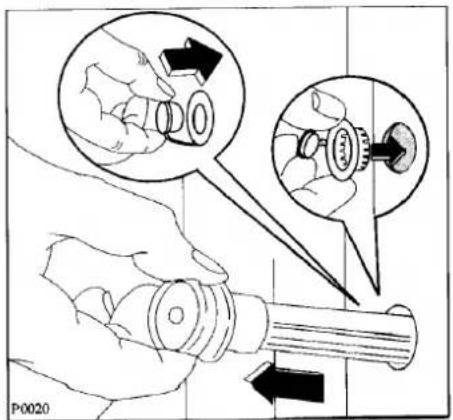
P0020

Fig. 6

natural_image Illustration of hands performing a mechanical gear operation with arrows indicating rotational direction (no text or symbols)

Fig. 7

Vandtæt underlag

natural_image Line drawing of a hand inserting a device into a rack (no text or symbols)

Fig. 9

natural_image Hand holding a square electronic component with an arrow pointing to it, no text or symbols present

Fig. 10

ATLAS TF 133-3 - Vandtæt underlag - 1

natural_image Line drawing of a hand pressing a button on a device, with an arrow indicating rotation (no text or symbols)

Fig. 11

ATLAS TF 133-3 - Vandtæt underlag - 2

natural_image Line drawing of a hand using a tool to clean or wash material inside a container (no text or symbols)

Fig. 12

natural_image Line drawing of a hand using a tool to adjust or install a component, no text or symbols present

Fig. 14

Vandtilgangsfilter

Fig. 15

Fig. 16

ATLAS

Table of contents Click a title to access it
Manual assistant
Powered by Anthropic
Waiting for your message
Product information

Brand : ATLAS

Model : TF 133-3

Category : Washing machine