
QRBT1801 - Loudspeaker Qian - Free user manual and instructions
Find the device manual for free QRBT1801 Qian in PDF.


| Product Type | Portable Bluetooth Speaker |
| Model | QRBT1801 |
| Brand | Qian |
| Dimensions | 7.5 x 7.5 x 15 cm |
| Weight | 400 g |
| Power Output | 5 W |
| Battery Capacity | 2000 mAh |
| Power Supply | USB-C, 5V/1A |
| Bluetooth Version | 5.0 |
| Wireless Range | 10 m |
| Supported Audio Sources | Bluetooth, microSD, FM Radio, AUX |
| Hands-free Calling | Yes |
| Controls | Power, Volume, Play/Pause, Mode, Next/Previous |
| Battery Life | Up to 6 hours (at medium volume) |
| Charging Time | Approx 2-3 hours |
| Care Instructions | Clean with a soft, dry cloth. Do not expose to liquids. |
| Safety Warnings | Keep away from children under 3 years. Do not disassemble. |
| Spare Parts & Repairability | Battery not user-replaceable. USB cable included. Contact support for repairs. |
| Compatibility | Most Bluetooth-enabled devices (smartphones, tablets, laptops) |
Frequently Asked Questions - QRBT1801 Qian
User questions about QRBT1801 Qian
0 question about this device. Answer the ones you know or ask your own.
Ask a new question about this device
Download the instructions for your Loudspeaker in PDF format for free! Find your manual QRBT1801 - Qian and take your electronic device back in hand. On this page are published all the documents necessary for the use of your device. QRBT1801 by Qian.
USER MANUAL QRBT1801 Qian
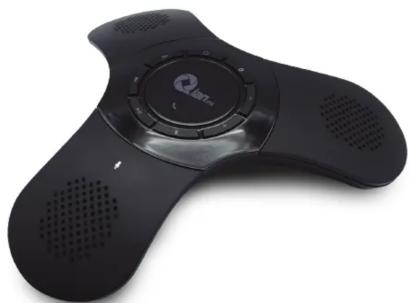
QIAN TAN Communication Station
natural_image
Black handheld electronic device with speaker grille and ventilation slots (no visible text or symbols)QUICK INSTALLATION GUIDE
MOD. QRBT1801
Please read carefully before using your equipment and save it for future reference.
IMPORTANT

• This product is NOT a toy; keep it away from children.

- Don't use or store the device in places where exist water or splashes.

- Do not repair, may cause malfunction and warranty will be avoid.
"The operation of this equipment is subject to the following two conditions: (1) it is possible that this equipment or device may not cause harmful interference and (2) this equipment or device must accept any interference, including interference that may cause its undesired operation".
QUICK DESCRIPTION

HOW TO USE
Charge the Battery
Before to use the station by the first time, connect it by 4 hours to charge the battery at 100% (Estimated time with a 5V AC adapter).


Power adapter is not included.
You can use the station while it is connected to a PC or an AC adapter permanently.
CONNECT YOUR BLUETOOTH DEVICE
-
Press ⏻ for a few seconds to turn on the station and start the search mode.
-
Activate the Bluetooth in your device (smartphone, tablet or IP telephone).
-
Search and select "QIAN TAN"

This is an example of with a smartphone. Refers to the user manual of your device to know how to pair via Bluetooth.
If you want to pair another device, press the Ⓐ button until you hear a tone. The station will be ready to enter search mode.
If the connection is successful, the
successful, the button flashes slowly

MAKE YOUR CONFERENCES AND CALLS

flowchart
graph TD
    A["Place the station in a central area and use the control panel to make calls wirelessly."] --> B["Volume Down"]
    A --> C["Volume Up"]
    B --> D["Activate/disactivate the microphone"]
    C --> D
    D --> E["Answer Press one"]
    D --> F["Hang Up Press once"]
    D --> G["Redial Press twice continuously"]
    D --> H["Rejet Call Press and hold"]
    E --> I["Qianmx"]
    F --> I
    G --> I
    H --> I
MUSIC PLAYBACK

SPECIFICATIONS
Input: 5 V --- 500 mA (by USB port) Battery life in conversation: Up to 5 h Battery capacity: 1 800 mAh (Li-ion) Maximum recommended distance: 8 m Speakers quantity: 2 x 5 W Maximum power output rms: 5 W Microphone frequency response: 50 Hz to 15 kHz Speaker frequency response: 20 to 20 kHz
Specifications may change without notice
The Bluetooth® word mark and logos are registered trademarks owned by the Bluetooth SIG, Inc. and any use of such marks by Qian S.A. de C. V. is under license. Other trademarks and trade names are those of their respective owners.
GUARANTEE POLICY
Qian.mx, guarantees this product in all of its components and workforce during 12 moths, starting the date of acquirement against any manufacturing and operating defects during normal and domestic use of this product.
Cleanmx guarantees the buyer the absence of any manufacturing and operating anomalies including pieces and components of the product or anything referring to the materials.
- This policy protects only the products commercialized by Dian.mx, though its authorized distributors inside the Mexican Republic.
-
To obtain that this company should help investors to prevent those products in the information provided to support this policy (which is 20%
-
to make valid this guarantee, it would be necessary to present this policy (original) with the information required to present this policy (linghaus) with the physical product and with all the accessories that integrates it.
-
In case of loosing the policy it would be necessary to present the original invoice with the serial number of the product
-
Qian.mx could use new pieces, restored, or used in good conditions to repair or replace any product, without any additional cost to the consumer, as long as the warranty period stimulated isn't over
-
In case that the product doesn't have arrangement, it would be changed for a similar product or for one with superior characteristics.
-
The time of repair won't be longer than 30 natural days since the date of reception of the product by Clan.mx or by Authorized Service Centers.
- In case that Clan.mx doesn't count with an Authorized Service Center in the client's city, the client will have to pay the shipping cost to the nearest point and Clan.mx will pay the cost of the returning shipment to the client once the service is fulfilled, within the warranty period.
| PRODUCT | |
| Model: | Distributor Seal |
| Brand: Qian.mx | |
| Serial Number: | |
| Invoice Number: | |
| Date of Delivery: | |
EXCLUSIONS
Qian.ma will not make valid this policy in the next cases:
- When the product had been used under other conditions than the normal.
- When the product hasn't been operated according the instructive that's included
- When the product would have been modified or repaired by unauthorized people by Qian.mx.
To make valid this guarantee, as well as the acquisition of components, consumable parts and accessories request more information in www.gian.mx or go to
To make valid this guarantee, as well as the acquisitions of components, consumable parts and accessories request more information in www.qian.mx or go to any Qian.mx Authorized Service Center.
Main Offices:
Qian S.A. de C.V., Américas Ave. #1501 Floor 20-A, Col. Providencia, Guadalajara, Jalisco, Mr., Tel. +52.33.1078.3404
Brand : Qian
Model : QRBT1801
Category : Loudspeaker