
MOV-040 - Selfie stick Steren - Free user manual and instructions
Find the device manual for free MOV-040 Steren in PDF.


| Type of Product | Electronic Measuring Instrument |
| Brand | Steren |
| Model | MOV-040 |
| Dimensions | Approx. 15 x 8 x 3 cm |
| Weight | Approx. 200 g |
| Power Source | 9V battery (not included) |
| Display Type | LCD digital display |
| Measurement Functions | AC/DC voltage, resistance, continuity test |
| Maximum Voltage | 600V AC/DC |
| Continuity Buzzer | Yes |
| Auto Power Off | Yes, after approx. 15 minutes |
| Safety Rating | CAT II 600V |
| Operating Temperature | 0°C to 40°C |
| Storage Temperature | -10°C to 60°C |
| Accessories Included | Test leads, user manual |
| Maintenance | Clean with dry cloth; replace battery as needed |
| Safety Precautions | Do not use on live circuits above rated voltage; remove test leads before opening battery compartment |
| Spare Parts Availability | Test leads and fuses available from authorized service centers |
| Repairability | Battery replacement user-serviceable; internal repairs by qualified technician only |
| Country of Origin | Mexico |
Frequently Asked Questions - MOV-040 Steren
User questions about MOV-040 Steren
0 question about this device. Answer the ones you know or ask your own.
Ask a new question about this device
Download the instructions for your Selfie stick in PDF format for free! Find your manual MOV-040 - Steren and take your electronic device back in hand. On this page are published all the documents necessary for the use of your device. MOV-040 by Steren.
USER MANUAL MOV-040 Steren
natural_image
Illustration of a selfie stick with a strap and trigger mechanism, set against a grid background (no text or symbols)INSTRUCCIONES
natural_image
Two smartphone devices with orange tags, one mounted on a black stand and the other on a black stand (no text or symbols visible)De 10 cm a 13 cm
natural_image
Close-up of a black and silver selfie stick with a black handle and orange flame (no text or symbols visible)Selfie stick with bluetooth remote

natural_image
Product photo of a black self-balancing device with attached lever and handle, shown against a grid background (no text or symbols visible)Instruction manual
0215v
Before using your new Steren product, read this instruction manual to prevent any damage.
IMPORTANT

The information shown in this manual is for reference only about the product. Because updates can be differences. Please see our website (www.steren.com) to obtain the latest version instructive.
"The operation of this equipment is subject to the following two conditions: (1) it is possible that this equipment or device may not cause harmful interference, and (2) this equipment or device must accept any interference, including interference that may cause undesired in the operation."
CAUTIONS
* Do not use in case of rain or thunderstorm. * Be sure to pay attention to your surroundings while using the device, it could be risky if there are near high voltage cables. * Wipe with a clean cloth moistened with water do not use solvents.
HIGHLIGHTS
With this stick you can take all the selfies you want, load to the cloud and share them with everyone. Don't let any of your friends out of the picture or take a photo of that amazing landscape without asking for help.
The stick has 6 elements and it can reach a length of 1 meter, perfect size for your pictures. It is very easy to install, just pair the remote control to your Smartphone via Bluetooth, open the camera, aim the selfie stick, and take the picture!
Fully compatible with Android and iOS, and the remote control can be used independently from the stick.
CONTENT
- Rubber clamping
- Expandable adapter
- Clamping Knobs
- Telescopic tube
- Protective Case
- Remote Control
- On/off
- Capture button
- Indicator LED

INSTRUCTIONS
-
Power the bluetooth remote control on, the LED blinks in blue.
-
Activate Bluetooth on your mobile device, make sure it is discoverable, the remote control appears as "Stern MOV-040" in the device list then select it, the LED will turn off.

-
Open the camera application on your device.
-
Take a photograph to verify that the operation is correct by pressing the corresponding key on the device connected (IOS or ANDROID).

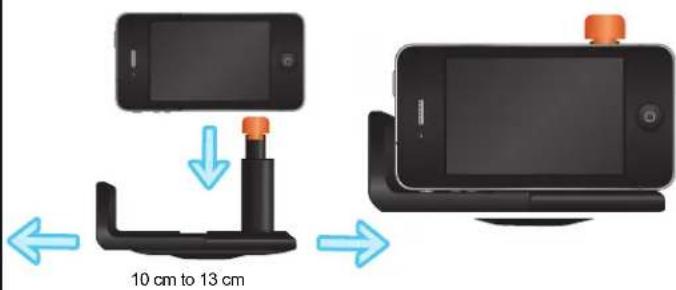
- Open the expandable arms adapter and place your mobile device as shown in the picture. Verify that the device was firmly secured.
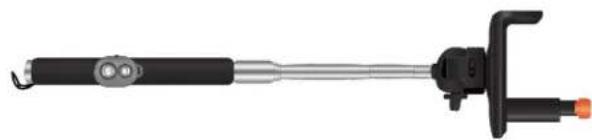
- Carefully adjust the length of the telescopic tube according to your needs.
natural_image
Black and silver selfie stick with attached lever (no text or symbols visible)- In iOS you can record video, pressing the iOS button on the remote control.
SPECIFICATIONS
iOS and Android compatible
Light weight (128g)
Anti-slippery handle
Up to meter length
Remote control:
Input: 3 V--- (1 x CR2032 battery)
Operating frequency: 2.4 GHz

Product design and specifications are subject to change without notice.


STEREN
Product: Selfie stick with bluetooth remote
Part number: MOV-046 Brand: Steren
WARRANTY
This Steron product is warranted under normal usage against defects in workmanship and materials to the original purchaser for one year from the date of purchase and three months on its battery.
CONDITIONS
-
This warranty card with all the required information, invoice or purchase ticket, product box or package, and product, must be presented when warranty service is required.
-
If the product is in the warranty time, the company will repair it free of charge.
-
The repairing this will not exceed 30 natural days, from the day the claim was received.
-
Stolen sell parts, components, consumables and accessories to customer, as well as warranty service, at any of the addresses mentioned later.
THIS WARRANTY IS VOID IN THE NEXT CASES:
If the product has been damaged by an accident, acts of God, mishandling, leaky batteries, failure to follow enclosed instructions, improper repair by unauthorized personal, improper sale keeping, among others.
a) The consumer can also claim the warranty service in the purchase establishment.
b) If you lose the warranty card, we can release it, if you show the invoice or purchase ticket.
RETAILER INFORMATION
Name of the retailer
Address
Product
Brand
Serial number
Date of delivery
In case your product fails or have questions, please contact your nearest dealer. If you are in Mexico, please call to our Cell Center
01 800 500 9000
Brand : Steren
Model : MOV-040
Category : Selfie stick