
PLK-45SFIMWT - Electric kettle TOSHIBA - Free user manual and instructions
Find the device manual for free PLK-45SFIMWT TOSHIBA in PDF.


| Product Type | Electric Kettle |
| Brand | Toshiba |
| Model | PLK-45SFIMWT |
| Capacity | 1.7 L |
| Power | 1500 W |
| Voltage | 220-240 V |
| Frequency | 50-60 Hz |
| Material | Stainless Steel and Plastic |
| Dimensions (W x D x H) | 22 x 18 x 25 cm |
| Weight | 1.1 kg |
| Cordless | 360° Rotational Base |
| Auto Shut-Off | Yes |
| Boil-Dry Protection | Yes |
| Filter | Removable Mesh Filter |
| Water Level Window | Yes, with Markings |
| Illuminated Power Indicator | Yes (Blue Light) |
| Anti-Slip Base | Yes |
| Overheat Protection | Yes |
| Cord Length | 0.75 m |
| Color | White with Silver Accents |
| Warranty | 2 Years |
Frequently Asked Questions - PLK-45SFIMWT TOSHIBA
User questions about PLK-45SFIMWT TOSHIBA
0 question about this device. Answer the ones you know or ask your own.
Ask a new question about this device
Download the instructions for your Electric kettle in PDF format for free! Find your manual PLK-45SFIMWT - TOSHIBA and take your electronic device back in hand. On this page are published all the documents necessary for the use of your device. PLK-45SFIMWT by TOSHIBA.
USER MANUAL PLK-45SFIMWT TOSHIBA
Toshiba Electric Hot Pot (For household use) Instruction Manual
Model
PLK-45SDPLK-45SDI
PLK-45SDRPLK-45SDRI
PLK-45SEPLK-45SEI
PLK-45SFPLK-45SFI
●Thank you for buying Toshiba electric hot pot today.
●The electric hot pot is used for boiling water only.
To apply this product safely and properly, please read the manual thoroughly and well understand before use.
●After reading, please keep the manual handy.
SAFETY PRECAUTION
Follow the instruction strictly.
- This page is mainly referred to the safety precaution to prevent the property damage and the danger to the users and others. After understanding these details clearly (the indication and the symbols), please read and follow the specified items.
SIGNAL EXPLANATION

WARNING
Indicating “when the product is used wrongly, it may cause severe injuries 1 and death.”

CAUTION
Indicating "when the product is used wrongly, the user may get injured" or the product may cause the property damage."
*1: Severe injuries mean to get blind, wound, burnt (high and low temperature), an electric shock, broken bones, and poison, etc. Consequently, there may be some symptoms and you may go to the hospital and it takes a long time to cure.
*2: Getting injured means you get wound, burnt, an electric shock. However, you do not have to go to the hospital for long cure.
*3: Property damages mean the damage to the accommodations, properties, farmland, and pets, etc.
SYMBOL EXPLANATION
PROHIBITED
indicates prohibition (must not do). The details of the prohibition will be instructed by sentences or illustration nearby or in the symbol.
● MANDATORY
● indicates mandatory (must do). The details of the mandatory will be instructed by sentences and illustration near or in the symbol.
CAUTION
△ indicates caution. The details of the caution will be instructed by sentences or illustration nearby or in the symbol.

WARNING

Do not disassemble.
Do not disassemble or repair.
It may cause fire, an electric shock, and injury.
For repair, please contact the shop you purchased or Toshiba repair information center.

natural_image
Line drawing of hands using a tool to press or install a container with a screw (no text or symbols)
Do not touch.
Do not directly touch the steam vent with your hand.
It may cause burn. Please be more carefully not to allow small children to touch the vent.

natural_image
Line drawing of a hand using a steaming machine to press or smoke (no text or symbols)
Wet hand is prohibited.
Do not connect or disconnect the power cord when your hand is wet.
It may cause an electric shock or injury.

Close it firmly.
Close the lid firmly.
If the pot falls down, the water will flow out and you may get burnt.

PROHIBITED
Do not boil anything except water.
When tea, milk, or alcohol, etc. gets hot, it may splash over and you may get burnt.

PROHIBITED
Do not put any ice in the pot to keep the water cool.
There will be some moisture on the outside of the pot. This can cause an electric shock and some accidents.

PROHIBITED
Do not cover the steam vent with clothes or anything.
The hot water may splash over and you may get burnt.

PROHIBITED
Close the lid loosely.
The hot water may splash over and you may get burnt.
2
(WARNING continued)
 PROHIBITED PROHIBITED | Do not fill the water more than the maximum of the water level gauge.The hot water may splash over and you may get burnt. |  PROHIBITED PROHIBITED | Do not allow the children to apply this appliance and keep it out of reach from the children.It may cause burns, an electric shock, and injury. |
 Do not do anything improperly with the pot. Do not do anything improperly with the pot. | Do not scratch, bend, pull, twist, or connect the power cord when you put the object on it. Do not place it near the heating source. Do not put the heavy objects, pinch, or modify the cord.The cord may be damaged, and then cause the fire and an electric shock. |  Do not soak the pot. Do not soak the pot. | Do not wet or immerse the pot into the water.Do not wash the pot thoroughly. Do not immerse the bottom of the pot into the water and do not turn over the pot while its bottom is wet.Do not wet the power cord.It may cause a short circuit, an electric shock, and injury. |
 PROHIBITED PROHIBITED | Do not tilt the pot.Although the button is locked, the water can flow out from the water dispenser or the steam vent when the pot is tipped, and it will cause burns. |  PROHIBITED PROHIBITED | Do not move the lid.The water will flow out from the dispenser or the steam vent. Then the pot may slip and fall down, and cause some burns and injury. |
 PROHIBITED PROHIBITED | Do not terribly shake (especially vertically shake) or strike the pot.With the dispensing lock, if the pot is terribly shook or stroked, the water can flow out from the dispenser or the steam vent, and may cause burns. |  PROHIBITED PROHIBITED | Do not throw away the water with the lid closed.If the lid is accidentally detached, the water will spill over, then cause some burns. |
 PROHIBITED PROHIBITED | Do not let the pot fall down.With the dispensing lock, if the pot falls down, the water can flow out from the dispenser or the steam vent, and may cause burns.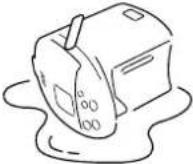 |  Remove the dust. Remove the dust. | If the power plug or its polar is dusty, wipe it away with the dry cloth.It may cause fire. |
| [IMAGE]Fit the plug into the socket fully. | Fully fit the plug into the socket.It may cause an electric shock, a short circuit, and fire. | ||
 PROHIBITED PROHIBITED | Do not use if the cord or the power plug is broken, or if the power plug is loose.It may cause an electric shock, a short circuit, and ignition. |

CAUTION

Unplug.
Pull the plug from the AC outlet when not in use.
It may cause injury, burns, an electric shock or electric leakage due to the deterioration of the insulation.

Hold the
plug and pull.
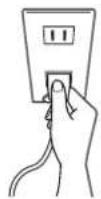
When disconnecting, hold the plug and pull it out without touching the cord.
It may cause an electric shock or a short circuit, and then lead to fire.

PROHIBITED
Do not place the unit on the hot, delicate, or unstable surface.
It may cause fire.

PROHIBITED
Do not pour the water or open the lid while boiling.
The steam or the hot water may splash over and cause some burns.

Do not touch.
Do not directly touch the steam when opening the lid.
It may cause burn.

Do it after cool down the pot.
Maintain after leaving it cool.
In case of touching the hottest part, it may cause some burns.

PROHIBITED
Do not use the pot near the wall or the furniture.
The steam or the heat will deteriorate, decolor, or distort the wall and the furniture.

PROHIBITED
When moving the pot, do not hold the lid release lever.
The lid will automatically open and cause injury or burns.

Do not touch.
While using or right after using the pot, do not touch its hot part.
It may cause burn.

PROHIBITED
Do not use any other power cord except the attached cord, nor use the power cord with other appliances.
It may cause an accident and fire.

While pouring, do not rotate the pot.
The water may splash over and cause some burns.

PROHIBITED
This appliances is not intended for use by person (including children) with reduced physical, sensory or mental capabilities, or lack of experience and knowledge, unless they have been given supervision or instruction concerning use of the appliance by person responsible for their safety.
children should be supervised to ensure that they do not play with the appliance.

PROHIBITED
This appliance is intended to be used in household and similar application such as
- Staff kitchen areas in shope, offices and other working environments.
- Farm houses.
- By clients in hotels, motels and other residential type environments.
- Bed and breakfast type environments.
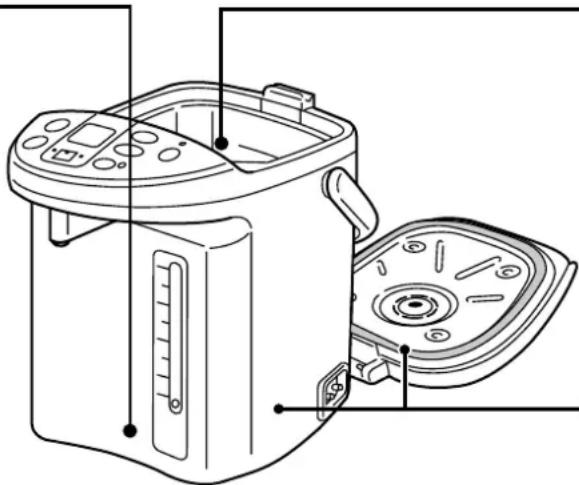
PART NAMES AND FUNCTIONS

(It can rotate up to 360° and the cord will rotate together with it.)
Inner pot
(With fluorocarbon-resin coat, if there is some dirt, it is easily removed.)
NOTE
- Do not use the appliance near the radio, etc. Please keep it away from the place affected by a radio, television, etc. It may cause a loud noise.
- Do not use it near the fire. The pot may be damaged and deformed.
- Do not directly supply the water from the tap into the pot.
- Do not pour out all the hot water remaining using the button on the control panel.
- Please pour out the hot water remaining after usage every time.
If the water is left inside the pot, it may discolor the water or the water may be smelly.
- When pouring out the hot water, do not touch the dispenser.
How to open and detach the lid
1 Press the lid lock button, then lift the lid release lever and lift it up.
2 Hold the lid release lever up. While pressing the lid detach lever, lift the lid slantwise upwards.
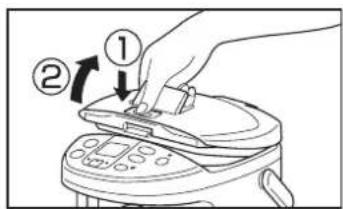
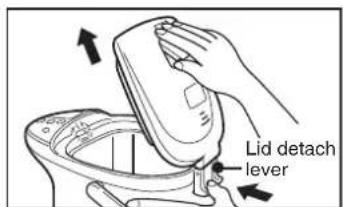
● Install the lid in the reverse order of removal. When closing the lid, please press it until the clicking sound is heard.
Control Panel
Functions of the indicators on the instruction manual
OFF
ON
FLASH


About buzzer
When pressing the buttons,
"beep beep" or "beep" will be
heard. These sounds signal the
correct operation.
| REBOIL TIMER button | Buzzer sound | beep beep → beep → beep |
| Operation | Reboil Reduce chlorine Timer | |
| TEMP CLEAN button | Buzzer sound | beep beep → beep → beep → beep |
| Operation | “98” warm temp. “85” warm temp. “60” warm temp. Clean | |
| UNLOCK button | Buzzer sound | bee → beep |
| Operation | Unlock Lock | |
| SAVING MODE button | Buzzer sound | bee → beep |
| Operation | SavIng mode Cancel |
FOR THE FIRST TIME USE (In case of not using the pot for a long time)
Once boil the water at the temperature of "98". After that, press the PUMP button to pour some water. Then, pour out all the water remaining from the pot. And the pot can be used generally.
1 Put the water into the inner pot and close the lid.
● For example, pour the water from the kettle.

2 Connect the power plug. Then boil the water at the temperature of "98".

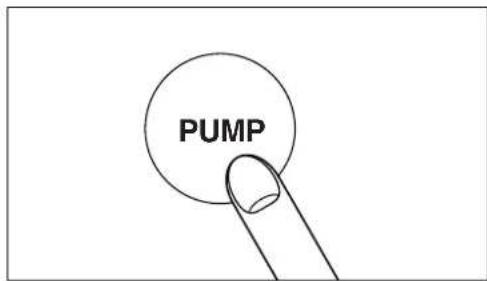
3 Press the PUMP button and pour out about half of the water.
Pour out all the water remaining.
● After unplugging, detach the lid and pour out the water as shown in the picture. Please do not pour out the water using the button on the control panel.

natural_image
Line drawing of a hand holding a device with a handle, no text or symbols presentBOILING/POURING
BOILING
Put the water in the pot and close the lid. Connect the plug. Then press the button to select the temperature. TEMP. CLEAN
The BOIL indicator will light up. And after the selected TEMP. indicator (▼) flashes about 2 seconds, the display will light up instead.
- The display will show the raising water temperature by 5°C at a time. If the temperature is lower than 15°C, “Lo” will appear. The displayed temperature is as a measure. It may change depending on the amount of water or the room temperature.

■ When selecting the temperature of "98"
When the water boils, the BOIL indicator will light off, the WARM indicator will light up and "bee bee bee" will be heard noticeably.


■ When selecting the temperature of "85" and "60"
▶ When the water boils, the BOIL indicator will light off and the selected TEMP. indicator will flash
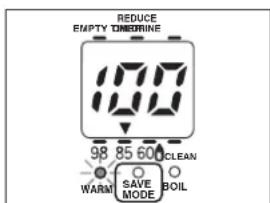
▶ When reaching the selected temperature, the WARM indicator will light up and "bee bee bee" will be heard noticeably.

8
 | |
| At the temperature of "98" Coffee, Chinese tea, instant cup noodle, etc. | |
| At the temperature of "85" Japanese tea, etc. | |
| At the temperature of "60" Mixing milk, etc. (After melting the milk powder, let it cool down to the proper temperature.) | |
| Cleaning |
● The time range of water boiling
• 3.5L: About 26 minutes
• 4.5L: About 32 minutes
(The amount of water: maximum water/the room and water temperature: 20irc C)
●The range of time after boiling to the temperature of “85”
• 3.5L: About 1 hours and 10 minutes
• 4.5L: About 1 hours and 30 minutes
● The range of time after boiling to the temperature of “60”
• 3.5L: About 4 hours
• 4.5L: About 4 hours and 30 minutes
(The amount of water: maximum water/the room and water temperature: 20irc C)
NOTICE
- Although the power cord is unplugged, the previous set temperature will not change until the temperature is adjusted next time.
- The boiling point will change upon the land level and the pressure. Then the selected warm temperature will also change. (In case the selected temperature is "98".)
- If the room temperature is higher after the water boils, it will take more time to reach the selected temperature.
- The warming temperature can be altered although the water is being warmed. The boiling point will depend on the water temperature at that time.
NOTE
- Do not fill the water while the water temperature is decreasing. The water may not boil when reaching the selected warm temperature.
POURING

WARNING
Do not turn over or tilt the pot. Do not terribly shake (especially shake up and down) or strike the pot. Do not hold the lid while moving the pot.
The water will flow out from the water dispenser or the steam vent. Then the pot may slip and fall down, and cause some burns and injury.

PROHIBITED
1 Press the UNLOCK button, then the button will be unlocked.

flowchart
graph TD
    A["SOFT"] --> B["PUMP"]
    B --> C["NORMAL"]
    D["UNLOCK"] --> E["Ring"]
    style D fill:#f9f,stroke:#333
    style E fill:#ccf,stroke:#333
▶ The UNLOCK indicator will light up.
- About 2 seconds after the pot is unlocked, the water can be poured out. And 2 minutes later, the pot will be automatically locked.
2 Place the cup under the water dispenser and press the PUMP button. Then, the water will pour out.

flowchart
graph TD
    A["SOFT"] --> B["PUMP"]
    B --> C["NORMAL"]
    D["UNLOCK"] --> E["Circle"]
There is 2 selectable levels of water pouring.
Please select with the proper use.
SOFT : For slowly pouring into the small container such as a cup, etc.
NORMAL : For pouring a great amount of water such as for cooking, etc.
● The UNLOCK indicator will light up.
When wanting to lock right after pouring water Press the UNLOCK button and the UNLOCK indicator will light off
Reducing Chlorine
Press the REBOIL button once while boiling and press it twice while warming. Then, the REDUCE
CHLORINE indicator (▲) will light up.
▶ The BOIL indicator will flash and the REDUCE CHLORINE indicator (▲) will light up.
- While the water has been boiling for 3 minutes, the amount of chlorine will be reduced.
● When the water is reboiled
- Please press the button twice.
Example: In case of warming at the temperature of "98"

When the pot is nearly empty
Fill the water before the water reaches the water level gauge
When not in use
Unplug the power cord and detach the lid. After that, pour out all the water.
■ Regarding the prevention to warm the empty pot
To prevent the accident from overheating, if it is found that the empty pot is warmed (for example, there is the distribution of power supply when the pot is empty.), the electric current distributed to the heater will be cut off and it is noticeable from the "bee bee bee, bee bee bee, bee bee bee" signal sound and the indicator flashing.

flowchart
graph TD
    A["98 WARM"] --> B["85 600 CLEAN"]
    B --> C["BEOL"]
    D["SAVE MODE"] --> E["BEOL"]
    F["BEOL"] --> G["BEOL"]
    H["BEOL"] --> I["BEOL"]
    J["BEOL"] --> K["BEOL"]
    L["BEOL"] --> M["BEOL"]
    N["BEOL"] --> O["BEOL"]
    P["BEOL"] --> Q["BEOL"]
    R["BEOL"] --> S["BEOL"]
    T["BEOL"] --> U["BEOL"]
    V["BEOL"] --> W["BEOL"]
    X["BEOL"] --> Y["BEOL"]
    Z["BEOL"] --> AA["BEOL"]
→ Please fill the water and press the () button.
- If the empty pot is warmed many times, the coated fluorocarbon-resin may discolor or peel away.
REBOILING/WARMING (TIMER AND SAVING MODE)
Reboiling water while warming
Press the 🅐 button once.
▶ The BOIL indicator will light up.
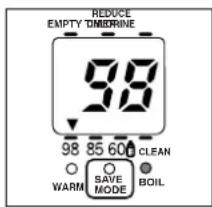
● The time range of water reboiling
- At the temperature of "98": About 3 - 6 min
- At the temperature of "85": About 9 - 10 min
- At the temperature of "60": About 15 - 18 min
- In the saving mode: Within about 18 min (The amount of water : maximum water/the room temperature : 20°C)
TIMER MODE
This mode cannot be used at the warming temperature of "60".
When keeping the temperature of "98"
or "85", press the

button and the
TIMER indicator ( ▲)
will light up.
▶ “6” will be displayed as the hour timer and the WARM indicator will flash. The hours remaining until setting timer is ended will be displayed by 1 hour. (In case setting timer while the water is being boiled, the WARM indicator will flash after the water boils.
▶ The TIMER indicator ( ▲ ) will light off and the temperature indicator will display. After that, the water will be reboiled. When at the selected warm temperature, the WARM indicator will light up noticeably.


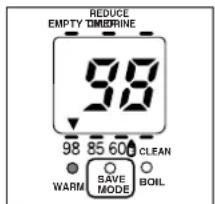
■ To cancel the timer
Press the REDCEL button once. It will switch to BOIL.
NOTE
- While in setting timer, selecting the temperature of "60" will cancel the operation.
10
SAVING MODE
This mode cannot be used at the warming temperature of "60".
Press the SAVING MODE button while in the warming temperature of "98" or "85".
▶ The SAVE MODE indicator will light up
When getting dark...

The mode switches automatically to the saving mode by 5 seconds and the WARM indicator will flash slowly. (The control panel shows the warming status.)

When getting light... (The light stays for 4 minutes.)

The WARM indicator flashes rapidly. And at the selected warming temperature, the WARM indicator will lights the signal will sound.
■ To cancel the saving mode
Please press the SAVING MODE button again.
The SAVE MODE indicator will light off.
* In spite of unplugging, the saving mode still operates until it is cancelled.
■ To reboil the water in saving mode
Press the REBOIL TIMER button once to light up the BOIL indicator.
NOTE
- In saving mode, selecting the warm temperature at "60" or setting the timer will cancel the operation.
- The save mode cannot be used during timer setting mode.
To return to the saving mode operation
When the pot is moved to another location and the saving mode does not operate, please follow the setting procedure below:
- Cancel the saving mode.
- Adjust the lightness where the save mode operates.
- Keep pressing the SAVING MODE button for 5 seconds. When the "bee bee bee" is heard, release the button. (The setting is complete.)
MAINTENANCE

WARNING
Do not wet the lid or the pot.
Do not wash the pot thoroughly. Do not immerse the bottom of the pot into the water and do not turn
over the pot while its bottom is wet.
Do not wet the cord.
It may cause a short circuit, an electric shock, and an accident.

Do not soak.
Daily Maintenance
Filter
It is at the bottom of the pot.
Pull it out and clean it with the brush.
Remove the water slime from the inserted part.
When re-installing, push it down firmly.


Inserted part
natural_image
Line drawing of a kitchen oven with control panel and side panel (no text or symbols)Inner Pot
Wipe it softly with sponge and wash it with water.
Clean it with citric acid once a month or three months.
Main Body and Lid
Wipe it with damp cloth.
Regarding the water slime (which is colored) or white stains
● White particles (crystallized mineral)
● The changes of water color to milky, black or red, etc.
● Rust-like spots (slightly rusty)
● Roughness
According to the example on the left, these are caused by the minerals in the water. So these are not the changes of color or the bad smell caused by the pot, and the peeling of fluorocarbon.
* Though here does not concern the health problem, please be aware of the maintenance with the citric acid according to the specified period.
CAUTION
- Do not use benzene, cleanser, or the scrubbing brush.
These will erode the surface or the coated fluorocarbonasin.
- Do not clean the pot with the dish washer or the dish dryer.
Such appliances may distort the pot.
- Do not wash it with the detergent.
The pot may be smelly.
- Be aware of the pot cleaning. If the dirt is left in the pot, there will be some noise when boiling or it will cause the problem of pouring water.
- In case of not in use for a long time, please leave it naturally dry after the maintenance.
How to clean the pot with the citric acid
1 Put the water into the pot at the level of maximum water. Then fill about 50 grams of citric acid into the water and close the lid.
2 Connect the power cord and press the TEMP. CLEAN button to select "CLEAN".
▶ The CLEAN indicator (▼) flashes and then lights up to start cleaning.
- It takes about 90 minutes for cleaning.
During the clean
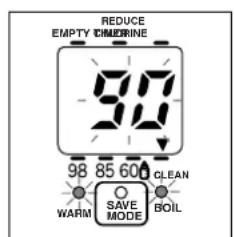
This means the pot cleaning is finished.
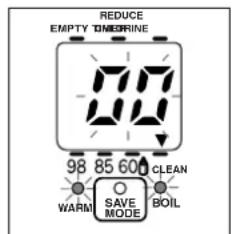
▶The WARM and BOIL indicators will flash. The remained time of the cleaning will flash in the display of minutes.
The "bee bee bee bee bee" will be heard and WARM indicator, BOIL indicator, and display will flash quickly.
3 Unplug and pour out all the water. Wipe away the dirt from the pot and wash it with water.
4 To remove the smell of the citric acid, fill the water at the level of maximum water and select the temperature of "98". After that, boil the water and then pour out all the boiled water.
SPECIFICATIONS
| Model | PLK-45SD, 45SDR, 45SE and 45SF | PLK-45SDI, 45SDRI, 45SEI and 45SFI |
| Power supply | 220 - 240 V a.c. 50 - 60Hz | |
| Power consumption | Boiling 700 W | |
| Capacity | 4.5 L | |
| Type of water pouring | Pouring water with electric power | |
| Outer volume (Width x Depth x Height) | 22.4 cm x 30.6 cm x 28.3 cm | |
| Weight (Including the power cord) | About 2.7 kg | |
| Fuse temperature | 152°C and 157°C | |
- Toshiba Electric Hot Pot (For household use) Instruction Manual
- SAFETY PRECAUTION
- Follow the instruction strictly.
- SIGNAL EXPLANATION
- SYMBOL EXPLANATION
- WARNING
- Do not disassemble or repair.
- Do not directly touch the steam vent with your hand.
- Do not connect or disconnect the power cord when your hand is wet.
- Close the lid firmly.
- Do not boil anything except water.
- Do not put any ice in the pot to keep the water cool.
- Do not cover the steam vent with clothes or anything.
- Close the lid loosely.
- CAUTION
- Pull the plug from the AC outlet when not in use.
- When disconnecting, hold the plug and pull it out without touching the cord.
- Do not place the unit on the hot, delicate, or unstable surface.
- Do not pour the water or open the lid while boiling.
- Do not directly touch the steam when opening the lid.
- Maintain after leaving it cool.
- Do not use the pot near the wall or the furniture.
- When moving the pot, do not hold the lid release lever.
- While using or right after using the pot, do not touch its hot part.
- Do not use any other power cord except the attached cord, nor use the power cord with other appliances.
- While pouring, do not rotate the pot.
- This appliances is not intended for use by person (including children) with reduced physical, sensory or mental capabilities, or lack of experience and knowledge, unless they have been given supervision or instruction concerning use of the appliance by person responsible for their safety.
- This appliance is intended to be used in household and similar application such as
- PART NAMES AND FUNCTIONS
- NOTE
- How to open and detach the lid
- Control Panel
- About buzzer
- FOR THE FIRST TIME USE (In case of not using the pot for a long time)
- Put the water into the inner pot and close the lid.
- Connect the power plug. Then boil the water at the temperature of "98".
- Press the PUMP button and pour out about half of the water.
- Pour out all the water remaining.
- BOILING/POURING
- BOILING
- NOTICE
- POURING
- Press the UNLOCK button, then the button will be unlocked.
- Place the cup under the water dispenser and press the PUMP button. Then, the water will pour out.
- ● The UNLOCK indicator will light up.
- Reducing Chlorine
- CHLORINE indicator (▲) will light up.
- ● When the water is reboiled
- When the pot is nearly empty
- When not in use
- ■ Regarding the prevention to warm the empty pot
- REBOILING/WARMING (TIMER AND SAVING MODE)
- Reboiling water while warming
- ● The time range of water reboiling
- TIMER MODE
- will light up.
- ■ To cancel the timer
- SAVING MODE
- ■ To cancel the saving mode
- ■ To reboil the water in saving mode
- To return to the saving mode operation
- MAINTENANCE
- Daily Maintenance
- Filter
- Inner Pot
- Main Body and Lid
- Regarding the water slime (which is colored) or white stains
- How to clean the pot with the citric acid
Brand : TOSHIBA
Model : PLK-45SFIMWT
Category : Electric kettle